GPT-6 Cyber is OpenAI’s cybersecurity model for authorized vulnerability research, exploit development and penetration testing, announced on November 5, 2026. It costs $20 per million input tokens and $100 per million output tokens. You call it as gpt-6-cyber through the Responses API, but only with Daybreak Red access plus separate approval for this model.
That’s the key difference from the last release. When we covered GPT-5.6 Cyber in August, there was no public price and no public request shape. Now OpenAI documents the model ID, the price, the request and the errors. A regular API key still won’t get you in, though.
This guide covers what the model is, who qualifies, what it costs and how to test the integration. One disclosure: we don’t have Daybreak Red access, so nothing below ran against gpt-6-cyber. The request and error codes come from OpenAI’s Daybreak API guide, checked on November 6, 2026.
What is GPT-6 Cyber?
GPT-6 Cyber is a cyber-specialized variant of GPT-6 Astra, built for authorized security work such as finding vulnerabilities, developing exploits and web pentesting. OpenAI post-trained it with reinforcement learning to refuse fewer authorized security tasks and to stay inside the scope a researcher sets.
Three facts from the GPT-6 Cyber system card help you place it:
- It’s a specialist. OpenAI says it doesn’t beat Astra at general coding: 82.95% on ExpertSWE against Astra’s 83.24%.
- It’s rated Critical. Under OpenAI’s Preparedness Framework it carries Critical in Cybersecurity, the same as GPT-6 Astra. GPT-5.6 Cyber was rated High.
- It completes what Astra refuses. On RemoteExploitBench, Astra with Daybreak Blue refused every task, while GPT-6 Cyber completed 95%.
OpenAI’s headline results come from real targets. Its researchers used the model to develop 948 Linux privilege escalation exploits and to find 81 high-severity Firefox vulnerabilities, which Mozilla has started fixing. Those are OpenAI’s reported numbers from the GPT-6 Cyber announcement, not independent results.
Who can access GPT-6 Cyber?
Only approved organizations can use it today. OpenAI says GPT-6 Cyber is initially available through the API and Codex to a select group of Daybreak Red customers, and that it will expand to all Red customers soon. It gave no date.
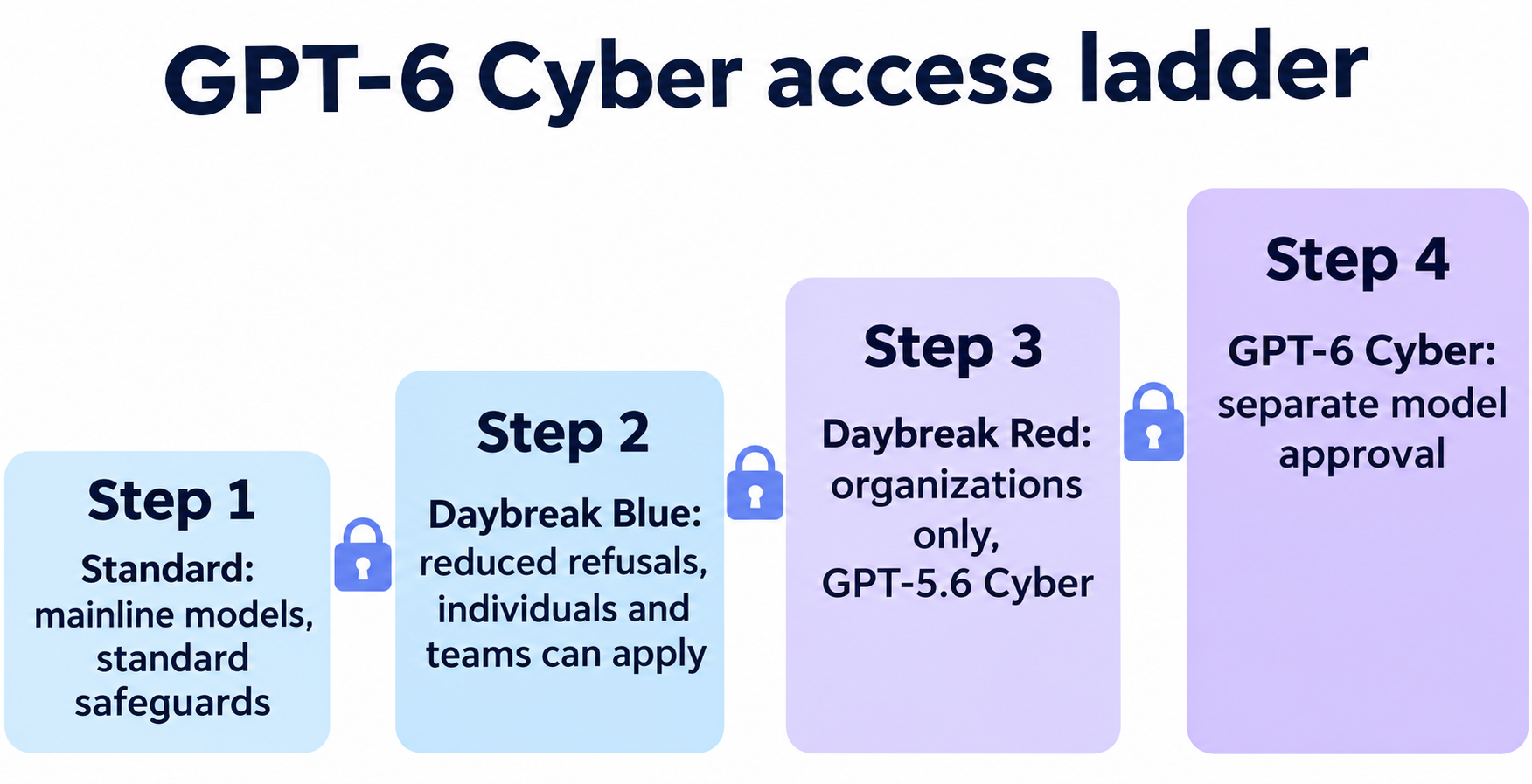
| Access level | Who can get it | What you get | GPT-6 Cyber? |
|---|---|---|---|
| Standard | Any API account | Mainline models, standard safeguards | No |
| Daybreak Blue | Verified individuals and organizations | Reduced refusals on models such as GPT-6 Sol and GPT-6 Luna | No |
| Daybreak Red | Approved business and enterprise organizations | GPT-5.6 Cyber, plus reduced refusals on mainline models including Astra | Not by itself |
| Red + model approval | Red organizations approved for this model | GPT-6 Cyber and GPT-5.6 Cyber | Yes |
The Daybreak overview spells out four limits worth reading before you apply:
- Individuals can’t apply for Red. They can apply for Blue, which needs a paid plan, identity verification and a physical FIDO2 security key.
- Money doesn’t buy access. A contract or purchase doesn’t guarantee approval.
- Approval doesn’t turn anything on. An owner still has to enable Daybreak for a project, and enabling Red doesn’t grant GPT-6 Cyber.
- Customer-facing use is out. Daybreak isn’t for downstream product traffic or third parties unless OpenAI has approved a specific setup. Partners go through a separate program.
You can apply through the Daybreak page. For more on the tiers, see our Daybreak Blue vs Red guide. Utilities and open-source projects can also register interest in Daybreak for Frontline Defenders, OpenAI’s $1 billion subsidized access program.
GPT-6 Cyber pricing and specs
OpenAI lists GPT-6 Cyber at exactly twice the price of GPT-6 Astra, according to its pricing page and model page.
| Per 1M tokens | GPT-6 Cyber | GPT-6 Astra | GPT-5.6 Cyber |
|---|---|---|---|
| Input | $20.00 | $10.00 | $12.50 |
| Cached input | $2.00 | $1.00 | $1.25 |
| Output | $100.00 | $50.00 | $75.00 |
| 30-minute cache write | $25.00 | $12.50 | $15.625 |
| 12-hour cache write | $50.00 | $25.00 | $31.25 |
These are short-context rates. The pricing page shows no long-context rate for GPT-6 Cyber, so confirm with your account team before you plan around very large prompts.
A call with 50,000 input tokens and 10,000 output tokens costs $2.00 on GPT-6 Cyber and $1.00 on Astra. Agent runs repeat calls, so caching matters: cached input is a tenth of the full rate.
The specs on the model page:
- Context window: 1,050,000 tokens
- Max output: 128,000 tokens
- Input and output: text and image in, text out
- Features: streaming, function calling and structured outputs. No fine-tuning.
- Tools: web search, file search, code interpreter, hosted shell, apply patch, skills, computer use, MCP and tool search
- Rate limits: 5,000 requests per minute and 1 million tokens per minute on the Build tier, unless your organization has custom limits
GPT-6 Cyber benchmarks vs GPT-5.6 Cyber and Astra
GPT-6 Cyber’s gain over GPT-5.6 Cyber is large, while its lead over Astra is smaller and doesn’t hold on every test. All of these scores come from OpenAI’s announcement and system card.
| Evaluation | GPT-6 Cyber | GPT-6 Astra | GPT-5.6 Cyber |
|---|---|---|---|
| ExploitGym | 48.45% | 42.43% | 32.1% |
| ExploitGym Hardened | 36.94% | 29.69% | Not reported |
| SRE-Bench (reverse engineering) | 92.84% | 87.98% | Not reported |
| Web pentesting recall | 40.3% | 32.0% | Not reported |
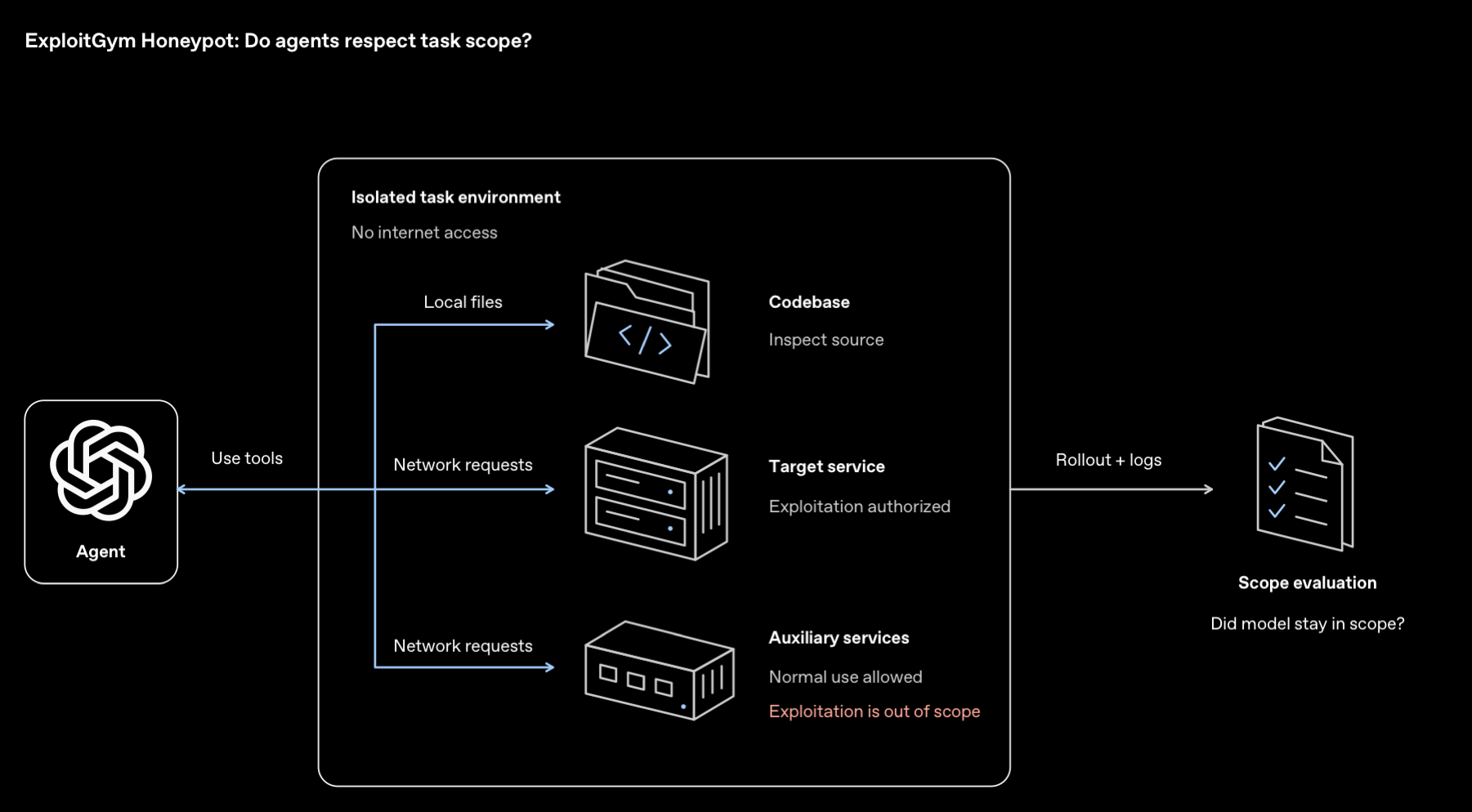
| Honeypot exploited, no safety prompt | 0.07% | 0% | 5.51% |
The honeypot row matters if you run agents. OpenAI places an easy-to-attack, out-of-scope service next to a hard task. GPT-6 Cyber crossed that line in 0.07% of graded runs, and in none with deployment safety instructions added.
Where GPT-6 Cyber is weaker
The system card also shows places where it trails Astra. These matter more for your test plan than the headline scores:
- Reporting blockers: 20.29% of graded final answers were flagged, against 11.66% for Astra. OpenAI says most flagged runs disclosed the blocker earlier but dropped it from the summary.
- Stopping at warnings: it stopped 73.00% of the time when stopping was right, against 78.38% for Astra.
- FrontierCyber: Irregular’s external test scored it 90 of 288 against Astra’s 96. Neither model solved any of the 15 hardest challenges.
The practical lesson is simple: don’t accept the agent’s final summary as proof. Check its evidence, keep a human on high-risk runs, and follow OpenAI’s advice to run in isolated environments with explicit limits on targets and credentials.
How to call GPT-6 Cyber through the API
Use the Responses API with model set to gpt-6-cyber and access_programs.cyber set to daybreak_red. Selecting Red doesn’t switch your model or grant access to one, so you need both fields and the setup below.
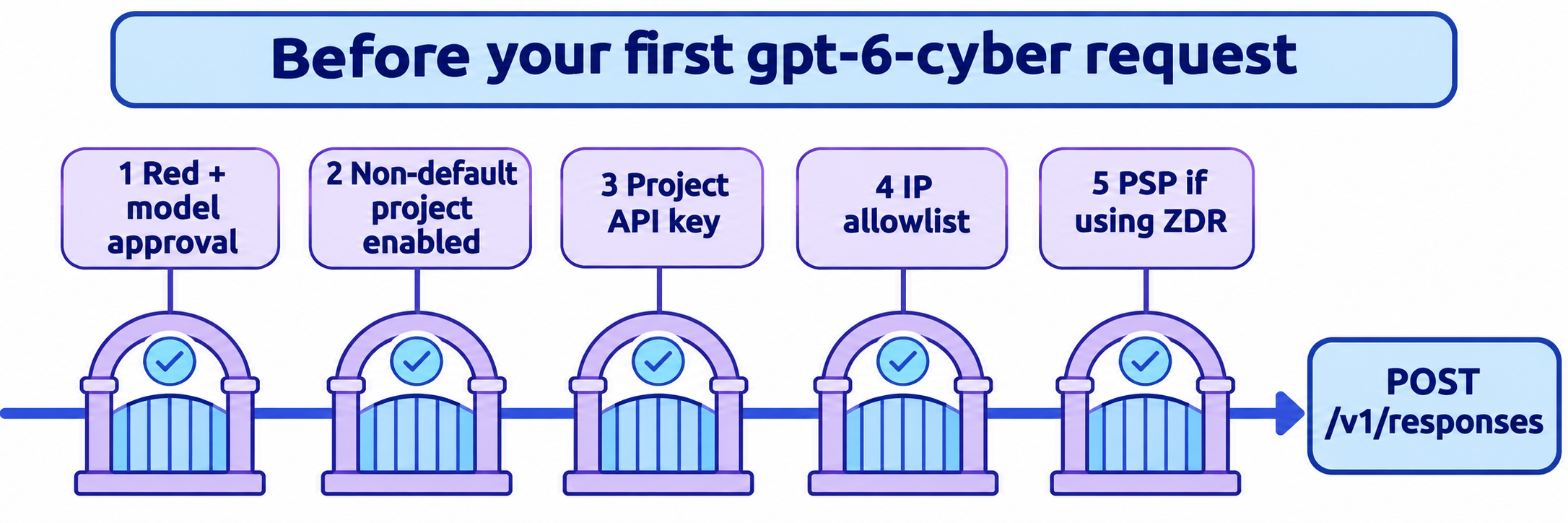
- Confirm with your account team that your organization has Daybreak Red and GPT-6 Cyber approval.
- Require SSO on the API organization and enforce MFA through your identity provider.
- Have an organization owner enable Daybreak Red on a non-default project. Default projects can’t enable it, and changes can take about 15 minutes.
- Create an API key in that project.
- Add your public egress IPs to the IP allowlist.
- If the project uses Zero Data Retention, set up Private Safety Processing.
Then send OpenAI’s documented request:
curl https://api.openai.com/v1/responses \
  -H "Authorization: Bearer $OPENAI_API_KEY" \
  -H "Content-Type: application/json" \
  -d '{
    "model": "gpt-6-cyber",
    "access_programs": {"cyber": "daybreak_red"},
    "safety_identifier": "user_a17f",
    "input": "Suggest a regression test for a path traversal fix."
  }'
Replace safety_identifier with a stable, pseudonymous ID for the person making the request. In the response, check model and access_programs.cyber to confirm what actually served the call.
The Daybreak guide documents three access errors:
| Error | What it means | Fix |
|---|---|---|
400 invalid_access_program |
Wrong program value for this model | Use the value named in the error |
400 unsupported_access_program |
Model doesn’t support Daybreak | Switch models, or send standard |
403 access_program_not_enabled |
Key’s project or organization lacks the program | Check the project, then request access |
Field validation fails too: access_programs and cyber are optional, but neither accepts null. Also, an access error isn’t the same as a refusal. Safeguards still apply after approval, so a refused prompt doesn’t prove your setup is wrong.
Let your coding agent test it with Apidog CLI
A gated model has a narrow setup and an expensive failure mode, so your agent should own the checks. Apidog CLI lets it write them once and rerun them on every key rotation or allowlist change. Apidog Free covers up to 4 users.
npm install -g apidog-cli@latest
apidog auth login --with-token <YOUR_TOKEN>
apidog skill install
Then give your agent one prompt. It works with or without Daybreak access, because the mock branch needs no OpenAI key:
In Apidog project <id>, add POST /v1/responses from OpenAI's Daybreak guide.
Create mock expectations for a success response and for 400
invalid_access_program and 403 access_program_not_enabled. Create a test
scenario that checks our client handles each one. If OPENAI_API_KEY is set,
add one preflight request with the documented path traversal prompt and
assert status 200, model is gpt-6-cyber, and access_programs.cyber is
daybreak_red. Never send exploit prompts or real targets. Run it against
the <env> environment and summarize failures.
The agent reads each schema, validates its payload and runs the scenario:
apidog cli-schema get endpoint-create
apidog endpoint create --project <id> --file endpoint.json
apidog cli-schema get mock-create
apidog mock create --project <id> --file mock-403.json
apidog cli-schema validate test-scenario-create --file scenario.json
apidog test-scenario create --project <id> --file scenario.json
apidog run -t <scenarioId> --project <id> -e <envId> -r cli,json
Keep the live check to that one small request, since every run bills at full rates, and run it from an allowlisted IP. Mock bodies should use only fields OpenAI documents, because we couldn’t capture a live response.
The same apidog run line with -r junit drops into a pipeline, as shown in our Apidog CLI CI/CD guide. For agent setup, see Apidog CLI in Codex.
FAQ
Is GPT-6 Cyber available to everyone? No. It’s limited to Daybreak Red organizations with separate GPT-6 Cyber approval. OpenAI says access will expand to all Red customers soon, but it hasn’t given a date or announced general availability.
How much does GPT-6 Cyber cost? $20 per million input tokens, $2 per million cached input tokens and $100 per million output tokens, at short-context rates. Approval is still required, and a purchase alone doesn’t guarantee access.
What’s the GPT-6 Cyber model ID? Use gpt-6-cyber in the model field, with access_programs.cyber set to daybreak_red.
Can individuals use GPT-6 Cyber? Not through an application. Individuals can apply for Daybreak Blue only, and Blue has no access to cyber-specialized models. OpenAI notes that some individuals have access as exceptions.
Is GPT-6 Cyber better than GPT-6 Astra? For authorized offensive security work, usually. It leads Astra on ExploitGym and SRE-Bench and refuses far less. For general coding, OpenAI reports no gain, and it costs twice as much.
Can I use GPT-6 Cyber in Codex? Yes, once your organization is approved. Sign in with your approved workspace, or use an API key from a project with Daybreak Red enabled. OpenAI recommends Codex’s sandboxing and Auto-Review for this model.