ChatGPT Images 2.6 is OpenAI’s image generation update, released November 4, 2026, for ChatGPT, Codex and the API. It adds animated GIFs, SVG output for developers, image markup and a complexity setting, and OpenAI says it generates images 50% faster. The API ships it as two models: GPT-Image-2.6 Flare and GPT-Image-2.6 Sunburst.
If you read our ChatGPT Images 2.5 explainer, this post covers only what changed. There’s one detail the launch post doesn’t mention: per-token rates stayed the same, but a low quality image now uses about 4.2 times the output tokens it did on 2.5.
ChatGPT Images 2.6 at a glance
| Item | Detail |
|---|---|
| Release date | November 4, 2026 (API changelog) |
| Where it runs | ChatGPT, Codex and the API |
| ChatGPT and Codex access | Global, all subscription tiers, desktop, mobile and web |
| API model IDs | gpt-image-2.6-flare, gpt-image-2.6-sunburst |
| Speed claim | 50% faster than before; Flare in as little as six seconds at low quality |
| New outputs | Animated GIF (ChatGPT and API), SVG (API) |
| New controls | Image markup, complexity (low, medium, high) |
| Image token rates | $8 input, $2 cached input, $30 output per 1M tokens |
| Usage | 4 billion images a week across ChatGPT, Codex and the API |
What’s new compared with Images 2.5
Images 2.5 brought Flare and Sunburst, the xhigh and max quality levels, and ChatGPT features like Sketch and Templates. Version 2.6 keeps the two-model split and the five quality levels, then adds this:
| Area | Images 2.5 | Images 2.6 |
|---|---|---|
| Animated output | None | GIF, 2 to 64 frames in the API |
| Vector output | None | SVG, API only per the system card |
| Planning control | None | complexity: low, medium, high |
| Markup-guided edits | ChatGPT first, API support added November 4 | ChatGPT and API |
Tokens at low, 1024x1024 |
196 | 823 |
| Batch pricing listed | Yes | Not listed on November 5 |
| Weekly images | “More than 3 billion” | 4 billion |
OpenAI’s system card also says both models improve editing consistency, detail preservation and responses to sketches and annotations. The launch post measures none of that with a public benchmark, and it doesn’t say which baseline “50% faster” refers to, so treat the speed figure as OpenAI’s claim until you’ve timed your own prompts.
Who can use ChatGPT Images 2.6?
OpenAI says Images 2.6 is available globally in ChatGPT and Codex “across all subscription tiers” on desktop, mobile and web. API access goes through the two models above, and you may need to finish API Organization Verification before you can call them.
Two questions stay open for ChatGPT users:
- GIF limits on the Free plan. Neither the launch post nor the ChatGPT pricing page gives a GIF quota. The pricing page lists image generation as “Limited” on Free.
- Thinking. The same page, read November 5, lists “Image generation with Thinking” on Plus and Pro, not on Free or Go.
In Codex, you call image generation with the $imagegen skill. That page doesn’t mention GIF or SVG output yet.
Flare vs Sunburst: which model does what?
Flare is the fast model for interactive work. OpenAI says it also improves layout quality for posters and product imagery. Sunburst is for detailed compositions, with higher quality and better consistency across edits at medium or high quality.
Both models cost the same per token, and they share one calculator entry. Our Flare vs Sunburst comparison for 2.5 explains that split in more depth, and most of it still applies.
How GIF generation works
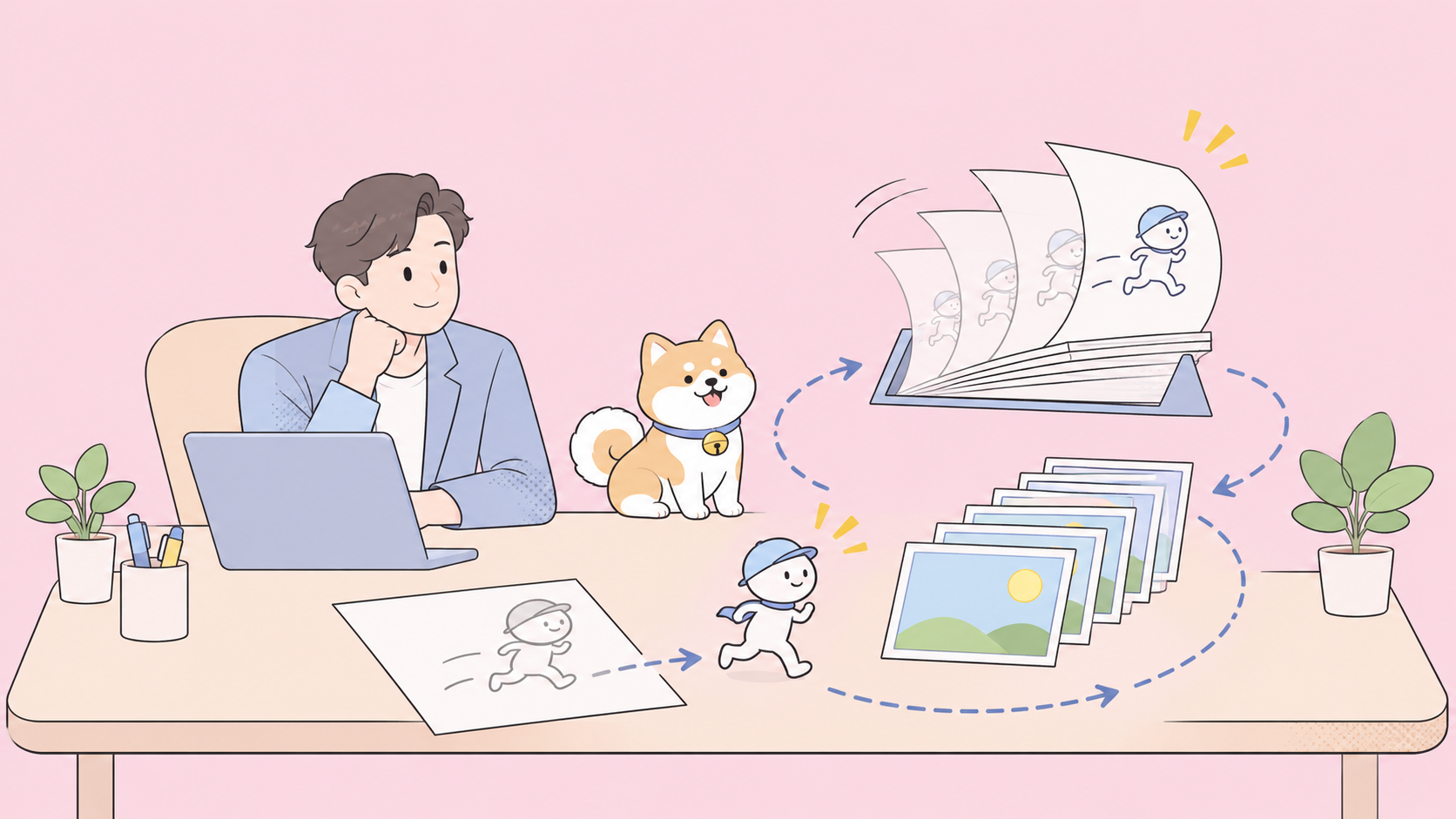
The API returns a finished animation, not a sprite sheet you assemble yourself. The launch post’s example prompts ask for a six-frame sprite sheet in a 3x2 grid, but the image generation guide documents a direct route:
- Call
POST /v1/images/generationswithoutput_format: "gif". - Describe the subject, the motion and the loop in your prompt.
- Set
frame_count(2 to 64, default 9). - Set
frame_duration_ms(20 to 2,000, rounded to 10 ms, default 200). - Decode
b64_jsonfrom base64 and save it with a.gifextension.
curl --fail --silent --show-error https://api.openai.com/v1/images/generations \
  -H "Authorization: Bearer $OPENAI_API_KEY" \
  -H "Content-Type: application/json" \
  -d '{
    "model": "gpt-image-2.6-flare",
    "prompt": "A small orange robot waves, blinks, and returns to its starting pose. Loop it.",
    "output_format": "gif",
    "frame_count": 9,
    "frame_duration_ms": 200,
    "size": "auto"
  }' | jq -er '.data[0].b64_json' | base64 --decode > robot.gif
We built this request from the guide’s field list and haven’t run it against a live key, so test it before you ship it.
Plan around these limits:
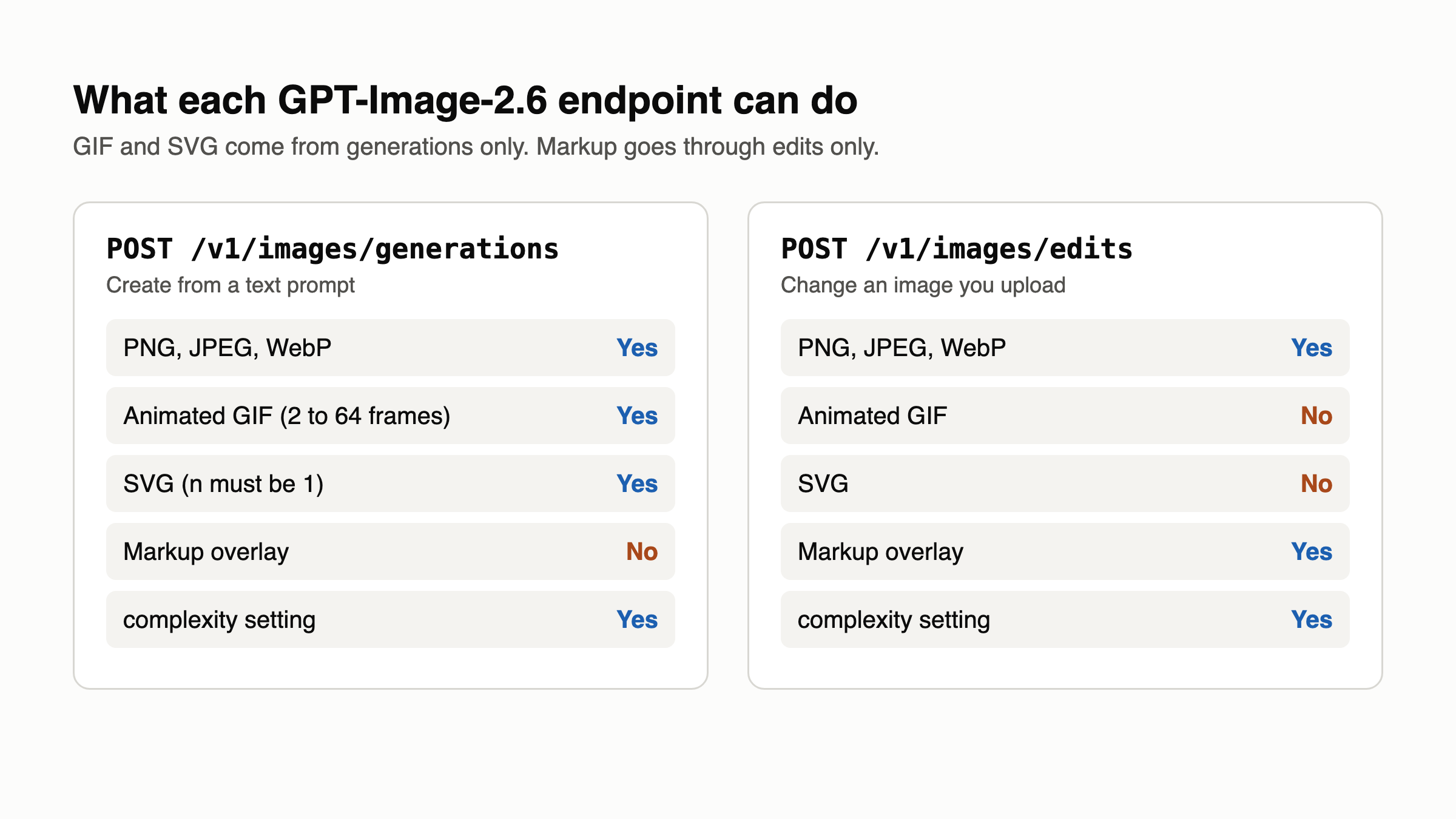
/v1/images/editscan’t return GIFs, so you can’t animate an uploaded image through that endpoint.- GIF output doesn’t support streaming, partial images, custom
output_compressionorprompt_rewriter. - Frame count, frame size and
nmust fit a total pixel budget. If a request fails, reduce one of them.
SVG export: what you get
Set output_format: "svg" on POST /v1/images/generations for icons, logos and illustrations that need editable paths, shapes and colors. The API first creates a reference image, then produces the SVG from it, and quality controls that reference image.
The output is static vector content with no scripts, external resources or embedded rasters. The constraints are tight: n must be 1, there’s no streaming, and neither output_compression nor prompt_rewriter works. The edits endpoint can’t output SVG, and an SVG can’t be a raster input for edits.
Billing differs too. You pay the image model’s rate for the reference image, plus an authoring model’s rate for the tokens that write the SVG. OpenAI doesn’t publish a fixed price per SVG, so measure it on your own prompts.
The complexity parameter and image markup
complexity sets how much the model plans before rendering. quality sets rendering detail. They’re separate controls, and adjusting complexity carries no separate fee.
Watch the default. If you omit complexity, both models use high, yet OpenAI recommends low for most edits, paired with whatever quality you need. The guide warns that higher complexity can add latency and introduce unwanted changes. For background swaps and sign fixes, set low explicitly. Save medium or high for dense text, complex layouts and scenes with many constrained elements.
Image markup comes to POST /v1/images/edits as a markup field. You send a transparent overlay that circles the target, then describe the change in prompt. OpenAI’s example circles a vase, recolors it and asks the model to remove the circle from the final photo. Markup also works on supported 2.5 models, costs the same as other edits, and isn’t available through the Responses API, where the guide points you to masks instead.
GPT-Image-2.6 pricing: same rates, more tokens at low quality
Per-token prices match 2.5 on the pricing page: $8 per 1M image input tokens, $2 cached, $30 output, $5 text input, $1.25 cached text. What changed is token use. OpenAI’s calculator applies a multiplier of 4.2 at low and 3.3 at medium for 2.6, and none above that.
| Quality (1024x1024) | 2.5 tokens | 2.5 output cost | 2.6 tokens | 2.6 output cost |
|---|---|---|---|---|
low |
196 | $0.00588 | 823 | $0.02469 |
medium |
439 | $0.01317 | 1,449 | $0.04347 |
high |
1,756 | $0.05268 | 1,756 | $0.05268 |
xhigh |
3,122 | $0.09366 | 3,122 | $0.09366 |
max |
7,024 | $0.21072 | 7,024 | $0.21072 |
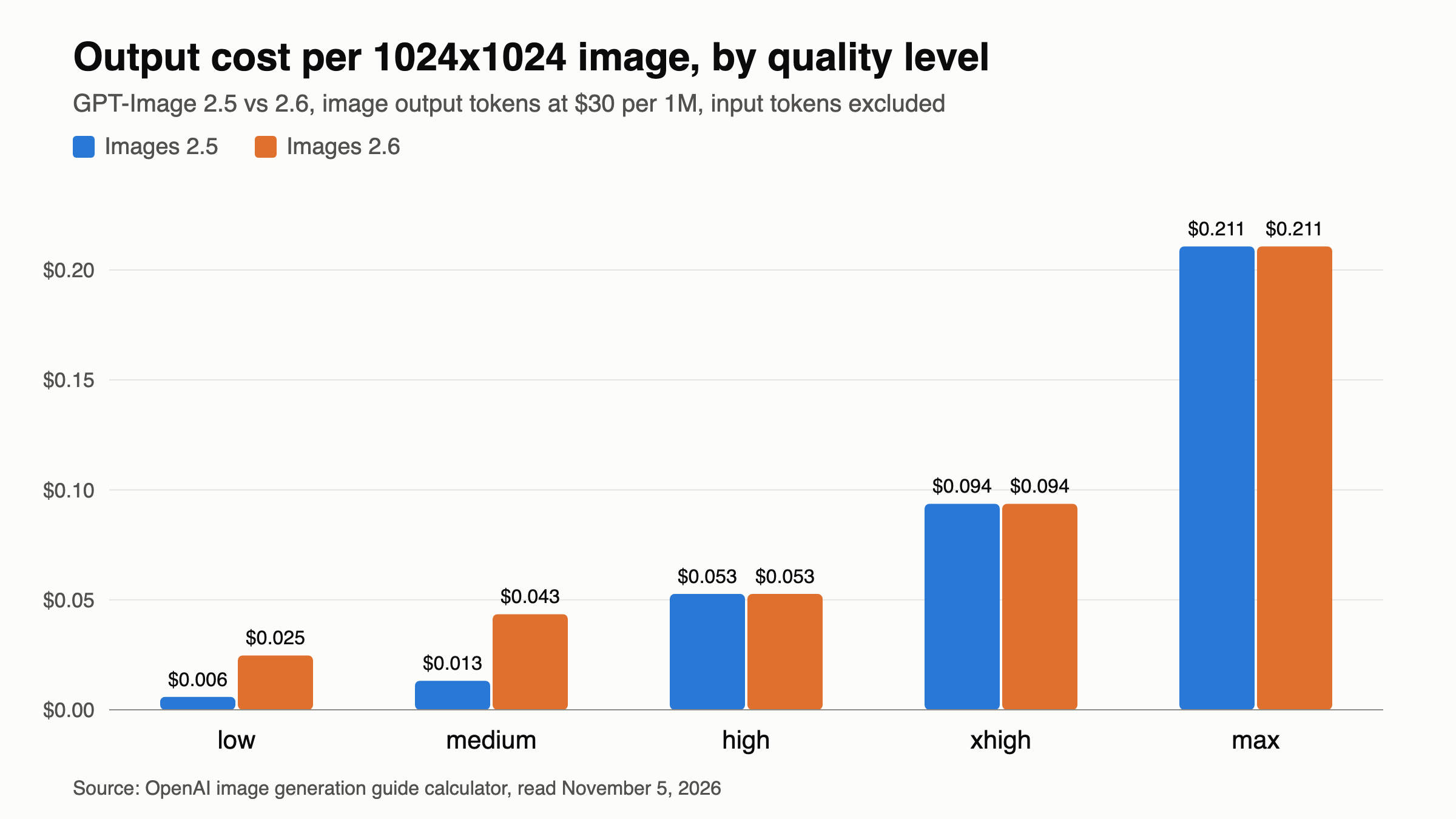
These figures come from the calculator and exclude input tokens. Landscape is cheaper: low at 1536x1024 uses 664 tokens, about $0.02.
So if you run high-volume low jobs on 2.5, moving to 2.6 multiplies your output bill by about 4.2. medium on 2.6 now costs close to high, which makes high worth testing. The Batch tab on the pricing page lists 2.5 at half price but doesn’t list 2.6, so a batch workload may be cheaper on 2.5 for now. The guide also has no GIF-specific billing formula, so run a small frame_count test and check your usage before you scale. Our gpt-image-2.5 API guide covers the request basics that carry over.
Safety and provenance
OpenAI ran both models on 3,077 adversarial prompts. Those results aren’t production rates. The share of unsafe generations not blocked went from 1.92% to 1.72% for Sunburst, and from 1.49% to 2.14% for Flare, though OpenAI doesn’t mark either change as statistically significant.
GIFs carry a new risk, because harm can appear across frames rather than in one still. OpenAI reports 77.7% moderation recall across an adversarial GIF set, and says motion-related violations remain hard to detect.
For provenance, Images 2.6 uses C2PA metadata plus an invisible SynthID watermark across ChatGPT, Codex and the API.
Let your coding agent test it with Apidog CLI
This release changed token use without changing the rate card. A saved test catches a breaking change in a request you depend on, and your coding agent can write it with Apidog CLI. Set it up once:
npm install -g apidog-cli@latest
apidog auth login --with-token <YOUR_TOKEN>
apidog skill install
Then give Claude Code, Codex or Cursor one prompt:
Add POST https://api.openai.com/v1/images/generations to Apidog project <id>.
Create a test case that sends model gpt-image-2.6-flare, quality low,
complexity low, output_format gif and frame_count 6, with the bearer token
read from the OPENAI_API_KEY environment variable. Assert status 200 and that
data[0].b64_json exists. Run it against environment <envId> and summarize failures.
The agent reads each schema, validates its payload, then writes and runs the test:
apidog cli-schema get endpoint-create
apidog cli-schema validate endpoint-create --file endpoint.json
apidog endpoint create --project <id> --file endpoint.json
apidog cli-schema get test-case-create
apidog cli-schema validate test-case-create --file case.json
apidog test-case create --project <id> --file case.json
apidog run --test-case <caseId> --project <id> -e <envId> \
  --env-var "OPENAI_API_KEY=$OPENAI_API_KEY" -r cli,json
Each run makes a real, billable generation, so keep frames and quality low. Duplicate the case with gpt-image-2.6-sunburst to compare both models. Swap -r cli,json for -r junit to run it in a CI pipeline, and see the Claude Code setup guide for agent details.
FAQ
Is ChatGPT Images 2.6 free? OpenAI says it’s available across all subscription tiers, and the pricing page lists limited image generation on the Free plan. Neither source gives a GIF quota for Free users. API use is billed per token.
Does the API return a GIF or a sprite sheet? A finished GIF. Set output_format: "gif" on the generations endpoint, then decode b64_json. The sprite sheets in the launch post come from example prompts.
Is GPT-Image-2.6 more expensive than 2.5? The per-token rates match, but low and medium images use more tokens. A 1024x1024 low image rises from about $0.006 to about $0.025 in output cost. high, xhigh and max don’t change.
What’s the difference between quality and complexity? quality controls rendering detail and drives token cost. complexity controls how much the model plans and defaults to high. OpenAI suggests low complexity for most edits.
Can I edit an existing image into a GIF or SVG through the API? No. The edits endpoint doesn’t support GIF or SVG output, and SVG files aren’t accepted as raster inputs. Both formats come from the generations endpoint only.