
OpenAI LifeVal is a benchmark of 169 everyday-life tasks, such as enrolling a child in school, managing a household budget or dealing with a government office, that an AI agent completes with browser use, computer use and connectors. A rubric grades each attempt, and the score is the average reward from 0 to 1. GPT-6 Astra scores 80.6% at xhigh effort.
That’s the short version. Below you’ll find how OpenAI built LifeVal, every model score it published (including the per-effort numbers that only live inside the page’s interactive chart), what those numbers say about reasoning effort, and what the benchmark leaves out.
What is OpenAI LifeVal?
LifeVal is an OpenAI Research benchmark, that measures how well a model finishes the chores of ordinary life rather than coding or exam questions. Its 169 tasks are agentic: the model browses, operates a computer and calls connectors, and a scenario-specific rubric scores the result.
OpenAI names seven task areas:
- Caregiving
- Health
- Education
- Household administration
- Personal finances
- Shopping
- Accessing government services
The headline metric is average reward. Each point averages the attempts within one task, then averages the 169 task means with equal weight. A score of 80.6% means a reward of 0.806. The chart notes say “No WTP weighting”, which we’ll come back to.
How OpenAI built the LifeVal task set
OpenAI didn’t invent the task list from scratch. It started from how people actually spend their time, using two public datasets and a survey of its own:
- The American Time Use Survey from the US Bureau of Labor Statistics, which records what Americans do hour by hour.
- The Multinational Time Use Study, which harmonizes time-use diaries across countries.
- Its own survey of 3,995 demographically representative respondents, asked where they’d want AI help.
The time-use data tells OpenAI which activities fill people’s days. The survey tells it which of those activities people would hand to an agent. The overlap became the 169 scenarios.
The page shows five example task cards, each with a score. These are OpenAI’s chosen examples, not a random sample:
| Example task (OpenAI’s pick) | Score |
|---|---|
| Enroll in the right kindergarten after moving | 93.1% |
| Manage volunteers ahead of a flood | 98.0% |
| Find a new home for my family | 100% |
| Watch a game with grandma from far away | 96.3% |
| Meal prep for a parent with a new diabetes diagnosis | 90.4% |
LifeVal scores: every OpenAI model
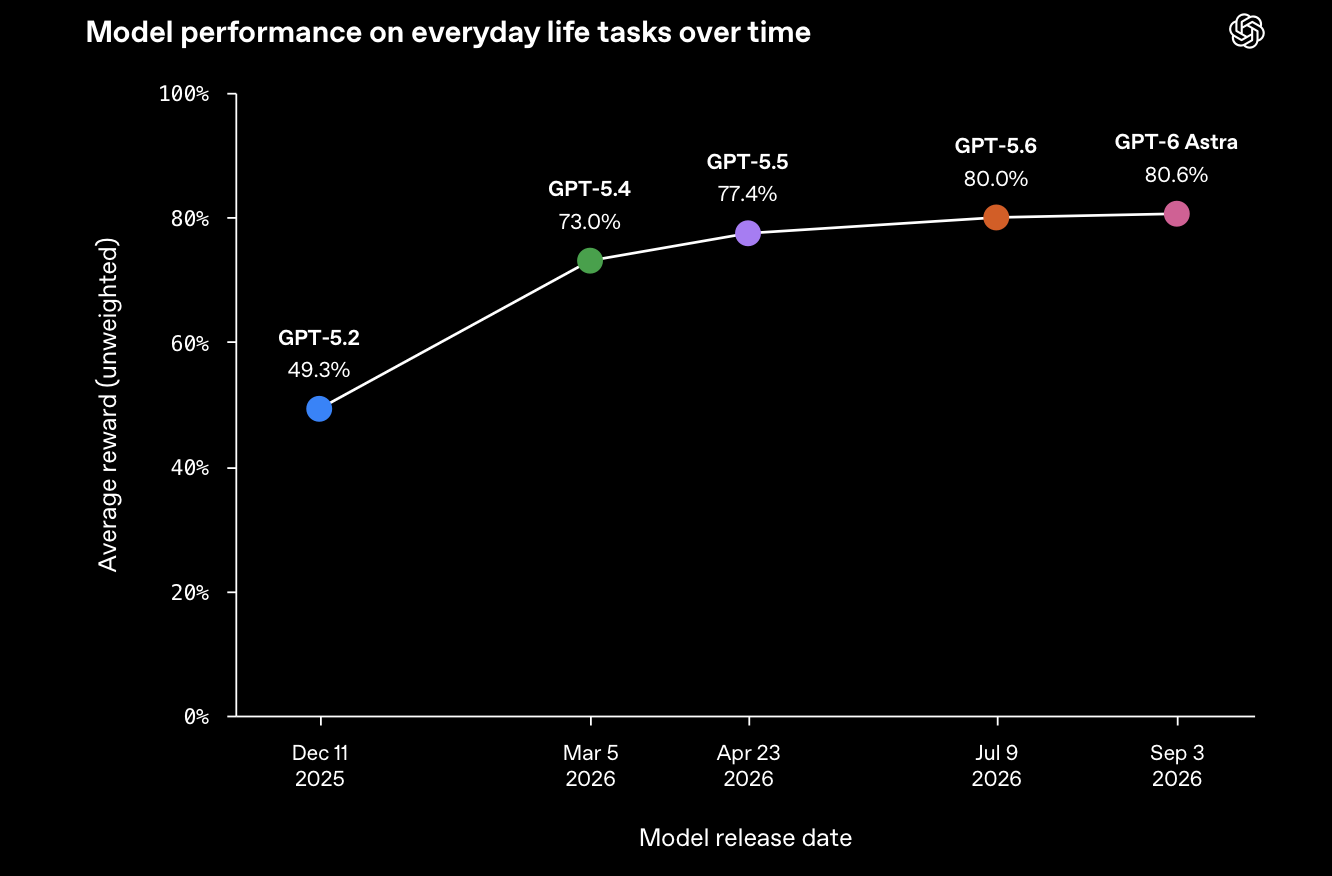
OpenAI’s first chart plots each model at xhigh reasoning effort against its release date. GPT-6 Astra uses “the launch-blog xhigh setting”.
| Model | Release date | LifeVal average reward (xhigh) |
|---|---|---|
| GPT-5.2 | 2025-12-11 | 49.3% |
| GPT-5.4 | 2026-03-05 | 73.0% |
| GPT-5.5 | 2026-04-23 | 77.4% |
| GPT-5.6 | 2026-07-09 | 80.0% |
| GPT-6 Astra | 2026-09-03 | 80.6% |
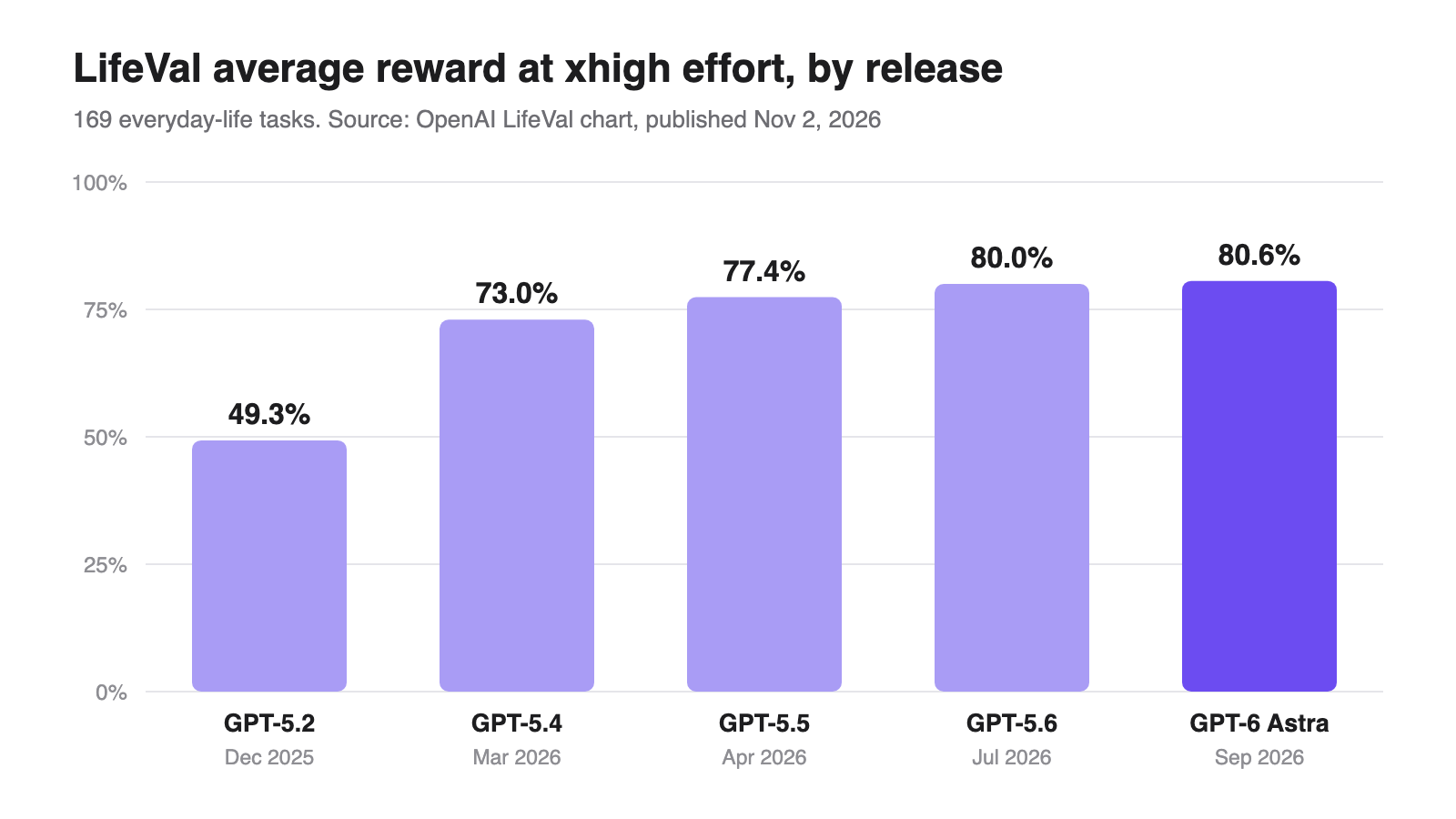
The curve is steep, then flat. GPT-5.2 to GPT-5.4 added 23.7 points in three months. The next three releases added 7.6 points between them, and GPT-6 Astra beat GPT-5.6 by 0.6.
The GPT-5.4 jump wasn’t only about quality. At xhigh, average latency fell from 121.0 seconds to 16.7 seconds and generated tokens from 202.0K to 30.6K per task. The newer model reached a far better answer with roughly a seventh of the output.
GPT-6.1 Sol and GPT-6.1 Terra don’t appear in either chart, even though both have shipped. The timeline stops at September 3, 2026. If you’re choosing between GPT-6.1 Sol and Astra for an agent product, LifeVal can’t help you yet.
LifeVal by reasoning effort
The second chart is the more useful one, and you only see it by hovering. It breaks every model down by reasoning effort, with four numbers per point: reward, latency, generated tokens and API cost. Here’s the reward for each setting:
| Model | low | medium | high | xhigh | max |
|---|---|---|---|---|---|
| GPT-5.2 | 27.7% | 37.2% | 45.2% | 49.3% | n/a |
| GPT-5.4 | 62.8% | 70.1% | 72.0% | 73.0% | n/a |
| GPT-5.5 | 57.1% | 71.3% | 75.6% | 77.4% | n/a |
| GPT-5.6 | 63.9% | 75.0% | 78.8% | 80.0% | 82.6% |
| GPT-6 Astra | 66.6% | 77.6% | 80.7% | 80.6% | 82.5% |
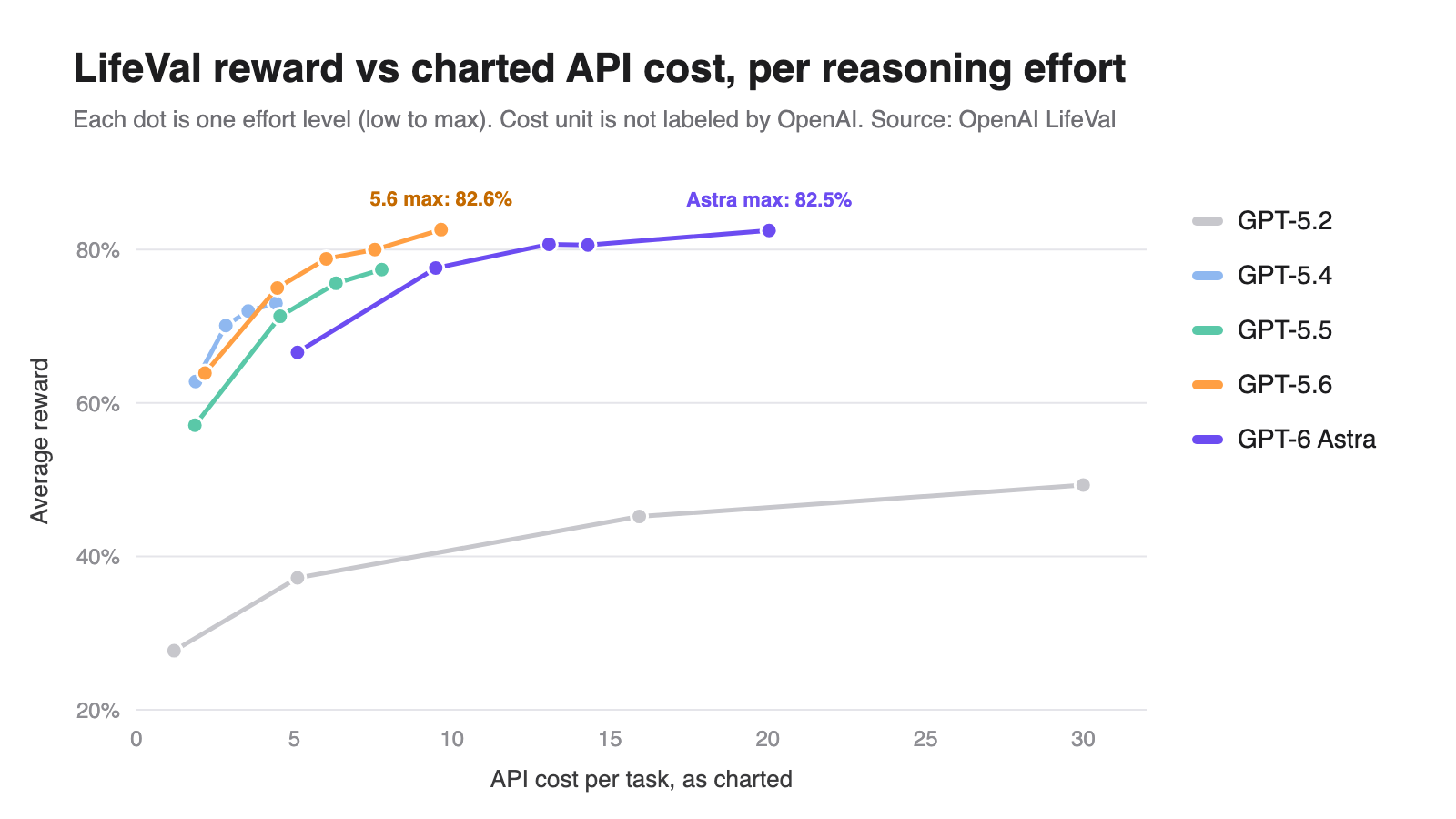
A note on the cost column. OpenAI labels it API cost but doesn’t state the unit, so treat the figures below as “API cost per task as charted”, useful for ratios, not as dollars.
GPT-5.6 at max matches GPT-6 Astra at max
| Setting | Reward | Latency | Tokens | Charted cost |
|---|---|---|---|---|
| GPT-5.6, max | 82.6% | 22.2 s | 29.7K | 9.65 |
| GPT-6 Astra, max | 82.5% | 20.6 s | 26.3K | 20.04 |
| GPT-5.6, xhigh | 80.0% | 17.5 s | 20.7K | 7.55 |
| GPT-6 Astra, high | 80.7% | 13.6 s | 12.4K | 13.07 |
GPT-5.6 at max edges Astra at max by 0.1 points at about half the charted cost. At matching effort, Astra’s lead over GPT-5.6 is under three points at every setting, 0.6 at xhigh, and gone at max. Astra is a little faster and uses fewer tokens, but on these tasks you pay roughly twice as much for it. Our GPT-5.6 pricing breakdown and GPT-6 Astra API guide have the per-token rates if you want to check that ratio against your own traffic.
More reasoning past “high” buys almost nothing
On GPT-6 Astra, high scores 80.7% and xhigh scores 80.6%. The extra effort costs 1.4 more seconds and 2.1K more tokens for a slightly lower score. GPT-5.4 shows the same shape: one point from high to xhigh.
The big gains sit at the bottom of the curve. Moving GPT-5.5 from low to medium adds 14.2 points. Moving it from high to xhigh adds 1.8. If your agent runs everyday tasks like these, medium or high is the setting to test first. OpenAI’s reasoning guide explains how the effort parameter works in the Responses API.
What LifeVal leaves out
LifeVal is a useful signal, but it’s a self-reported one. Before you quote it, know its limits.
- It isn’t public. There’s no downloadable task set and no public leaderboard, and OpenAI hasn’t published the rubrics or how it calibrated its graders. You can’t rerun it.
- It only scores OpenAI models. No Claude, Gemini or open-weight model appears, so it says nothing about how GPT-6.1 Sol compares with Claude Sonnet 5.5 or any other cross-vendor matchup.
- A weighted version exists somewhere. The chart says “No WTP weighting”, WTP meaning willingness to pay. That implies OpenAI computed or considered a variant weighted by what people would pay for each task, and didn’t publish it.
- The example cards are hand-picked. The five cards on the page score 90.4% to 100%. The 169-task average for the best model is 80.6%. The examples show the benchmark’s best days, not its typical one.
None of this makes LifeVal wrong. It makes it a vendor benchmark. Read it the way you’d read any launch chart: as a claim you can test on your own tasks.
Run your own reasoning-effort test with Apidog CLI
LifeVal’s per-effort table is a reward-versus-cost curve. You can draw the same curve for your own prompt. Rather than firing requests by hand, hand the job to your coding agent and let it drive Apidog CLI.
Install the CLI, log in and add the Apidog skill to your agent:
npm install -g apidog-cli@latest
apidog auth login --with-token <YOUR_TOKEN>
npx -y skills add https://apidog.com   # pick your agent when prompted
Then give Claude Code, Codex or Cursor one prompt:
In Apidog project <projectId>, add a POST https://api.openai.com/v1/responses
endpoint that sends {{model}}, reasoning.effort = {{effort}} and my test prompt.
Create a test case that asserts status 200 and saves latency,
usage.output_tokens and usage.output_tokens_details.reasoning_tokens.
Add a test data set with effort = low, medium, high, xhigh, run the case
once per row against environment <envId>, and give me a table of
latency, tokens and estimated cost per effort.
The agent reads each payload schema, validates its JSON and then writes:
apidog cli-schema get endpoint-create
apidog cli-schema validate endpoint-create --file endpoint.json
apidog endpoint create --project <projectId> --file endpoint.json

apidog test-case category --project <projectId>
apidog cli-schema validate test-case-create --file case.json
apidog test-case create --project <projectId> --file case.json

apidog cli-schema validate test-data-create --file efforts.json
apidog test-data create --project <projectId> --file efforts.json

apidog run --test-case <caseId> --project <projectId> -e <envId> \
  -d <testDataId> -r cli,json --out-dir ./effort-runs
The -d flag feeds one iteration per data row, and -r cli,json gives the agent a JSON report to build the table from. Add --upload-report if you want to browse the runs in the Apidog app afterwards. The apidog run command reference lists every flag, and the Claude Code setup guide covers the agent side.
Run it on five or ten of your real prompts, not one. LifeVal averages 169 tasks for a reason: a single prompt will tell you more about variance than about effort.
Should you trust LifeVal when picking a model?
Use it for direction, not decisions. LifeVal tells you three things you can act on: OpenAI’s models got much better at multi-step everyday tasks between December 2025 and March 2026, gains since then are small, and reasoning effort above high rarely pays on this kind of work.
What it can’t tell you is how a non-OpenAI model would score, how your tasks compare with OpenAI’s 169, or what the grader rewards. For that, run your own effort sweep, as above, and compare the numbers you can see. Our GPT-6 Astra hands-on test is a starting point for the kind of checks worth running.
FAQ
What does LifeVal stand for?
OpenAI doesn’t expand the name on the page. It’s an evaluation (“Val”) of everyday-life (“Life”) tasks: 169 agentic scenarios across caregiving, health, education, household administration, personal finances, shopping and government services.
What is GPT-6 Astra’s LifeVal score?
80.6% average reward at xhigh effort, the setting OpenAI used in the Astra launch blog. At max effort Astra scores 82.5%, and at high it scores 80.7%.
Can I run LifeVal myself?
No. OpenAI hasn’t released the task set, rubrics or grader. You can approximate its effort-versus-cost analysis on your own prompts with a test harness like Apidog CLI, but you can’t reproduce LifeVal scores.
Does LifeVal include Claude or Gemini?
No. Both charts only include OpenAI models, from GPT-5.2 to GPT-6 Astra. GPT-6.1 Sol and GPT-6.1 Terra are missing too.
Is the LifeVal cost column in dollars?
OpenAI labels it API cost but doesn’t state the unit. Use it to compare settings against each other, for example GPT-5.6 max at 9.65 versus Astra max at 20.04, rather than as a dollar figure per task.
Which reasoning effort should I use for everyday agent tasks?
On LifeVal, medium or high captures most of the gain. GPT-6 Astra scores 80.7% at high and 80.6% at xhigh, so test medium and high on your own tasks before paying for more.