
If you’ve searched for httpYac, you probably want a way to send HTTP requests from plain-text files you can keep in Git, run inside VS Code, and replay in CI. httpYac is exactly that: a .http/.rest file runner that ships as both a VS Code extension and a Node.js command-line tool. This guide explains how it works, shows a small example, covers when it fits, and points to a GUI plus CI path when you outgrow text files. For a broader grounding in the discipline, see our API testing guide.
What httpYac actually is
httpYac is an open-source HTTP client built around the .http file format. You write requests as plain text, then send them with a keystroke in the editor or with a single command in your terminal. The project lives on GitHub and has full docs at httpyac.github.io.
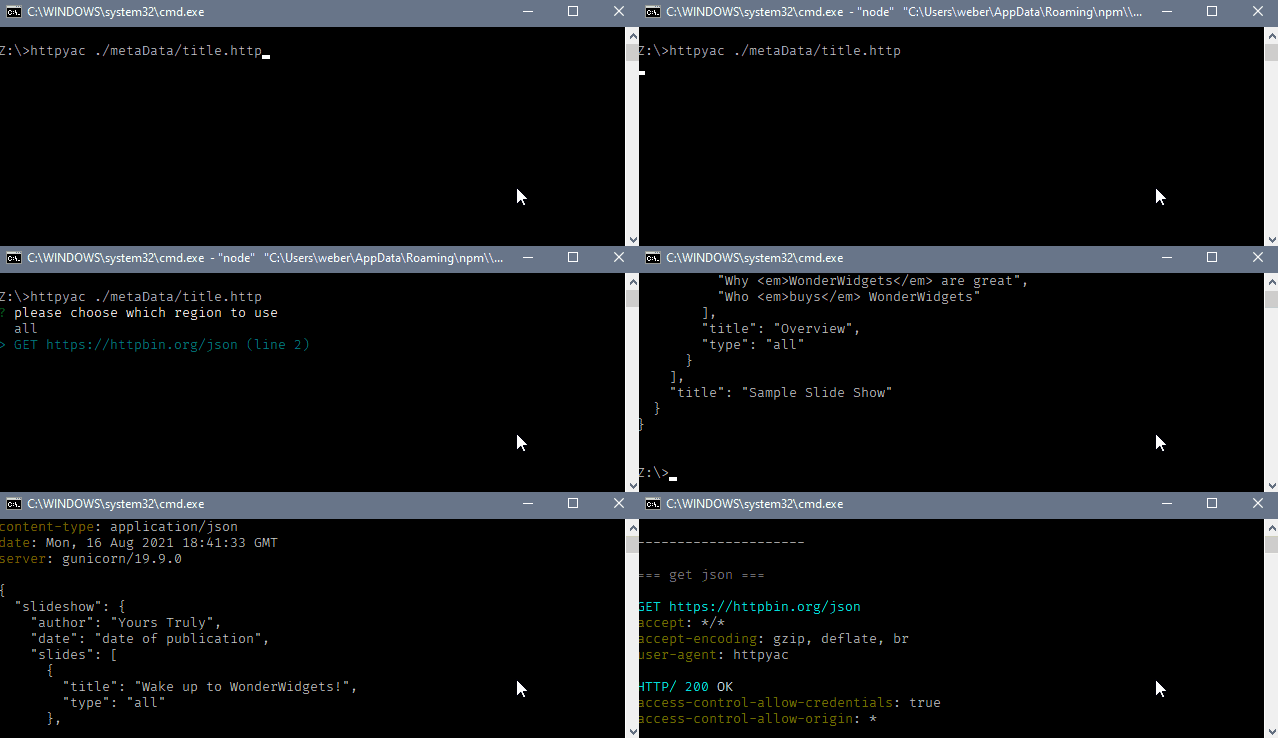
The core idea is simple. A request lives in a text file next to your code. You version it with Git. You review it in a pull request. You run it the same way whether you’re a human in an editor or a CI job on a build server. That git-native, plain-text model is httpYac’s biggest strength, and it’s the reason a lot of backend developers reach for it.
Two pieces make up the tool:
- The VS Code extension (httpYac) gives you a “Send Request” code lens above each request, response previews, and environment switching inside the editor.
- The CLI (
httpyac, installed via npm) runs the same files headless. That’s what makes it CI-friendly: the files you tested locally are the files your pipeline runs.
Because both surfaces read the same .http files, there’s no separate export step. What you commit is what runs.
The .http file format
A .http file is a list of requests separated by ###. Each request reads almost like the raw HTTP it sends. Here’s a small example.
### Get a user
GET https://api.example.com/users/42
Accept: application/json

### Create a user
# @name createUser
POST https://api.example.com/users
Content-Type: application/json

{
  "name": "Ada Lovelace",
  "email": "ada@example.com"
}

### Use a value from the previous response
GET https://api.example.com/users/{{createUser.response.body.$.id}}
Authorization: Bearer {{token}}
A few things are happening here. The ### lines split requests. The # @name comment names a request so you can reference its response later. The {{...}} placeholders pull in variables, including values chained from earlier responses. This format is shared with the popular REST Client extension, so files often move between the two with minor edits.
Variables and environments
httpYac reads variables from .env files, from a http-client.env.json file, and from inline definitions inside the request file itself. You can keep one set of values for local, another for staging, and another for production, then switch between them without editing the request.
@host = https://api.staging.example.com

### Login
# @name login
POST {{host}}/auth/login
Content-Type: application/json

{ "user": "{{USERNAME}}", "pass": "{{PASSWORD}}" }
Secrets stay in .env files you keep out of Git, so the request file itself is safe to commit. In CI, the same variables come from environment variables or pipeline secrets.
Scripting and assertions
This is where httpYac goes past a basic request sender. You can embed JavaScript in a request to set up data before it runs or to check the response after. Pre-request and post-request blocks run in a Node context, so you can compute a signature, store a token, or assert on the body.
### Login and capture token
# @name login
POST {{host}}/auth/login
Content-Type: application/json

{ "user": "{{USERNAME}}", "pass": "{{PASSWORD}}" }

{{
  // post-request script
  test("status is 200", () => {
    client.assert.strictEqual(response.statusCode, 200);
  });
  exports.token = response.parsedBody.token;
}}
That captured token is then available to the next request as {{token}}. The scripting model is flexible, which is part of the appeal for developers who want logic without standing up a full test framework.
Running httpYac in CI
The CLI is the bridge from “works on my machine” to “runs in the pipeline.” Install it and point it at your files.
npm install -g httpyac

# Run a single file
httpyac send api/users.http

# Run every request in a folder, pick an environment, fail on assertion errors
httpyac send --all --env staging "api/**/*.http"
httpYac exits non-zero when an assertion fails, which is what a CI job needs to mark a build red. It can emit JUnit-style output for test reporters, so the results show up in your CI dashboard rather than buried in logs. Drop that command into GitHub Actions, GitLab CI, or Jenkins and the same files you edited in VS Code now gate your merges.
When to use httpYac
httpYac fits a specific shape of team and workflow. Reach for it when most of these are true.
| Situation | Why httpYac fits |
|---|---|
| You live in VS Code | The extension keeps requests next to your code, no context switch |
| You want requests in Git | Plain text diffs cleanly and reviews in PRs |
| Your team is comfortable in code | Scripting and .env files assume some developer fluency |
| You run a handful of focused checks | Lightweight to add, no platform to adopt |
| You already use REST Client files | Shared format makes the move easy |
It’s less of a fit when non-developers need to run or edit requests, when you want a visual view of large request collections, when you need shared environments and team sync without wiring up files, or when you want richer reporting and load testing in one place. Plain-text ergonomics are a feature until the suite grows and the team broadens.
httpYac vs a GUI and CI platform
httpYac is a text-file runner. Apidog is a different model: a GUI-first API platform that also runs in CI. Neither is “better” in the abstract; they solve the problem from opposite ends. Be clear on one point up front: Apidog does not natively run or parse .http files. If your source of truth is a folder of .http files, httpYac runs them directly, and that’s its honest edge.
Here’s how the two compare on the things that usually decide the choice.
| Capability | httpYac | Apidog |
|---|---|---|
| Request source | Plain .http/.rest files in Git |
Visual requests in a workspace, plus OpenAPI import |
| Editing surface | Text in VS Code or any editor | Visual builder with form fields and schema awareness |
| Variables and environments | .env / JSON files, inline vars |
Shared, managed environments with team sync |
| Assertions | JavaScript in request scripts | Visual assertions plus scripting |
| CI execution | httpyac send |
apidog run |
| Mocking and docs | Not built in | Built-in mock server and auto-generated docs |
| Best for | Developers who want git-native text files | Teams who want design, testing, mocking, and docs in one place |
If you want the visual side, Apidog lets you build and organize requests without hand-writing files, then run the same scenarios in CI with apidog run. The apidog run reference walks through the command, environment flags, and reporters. You also get a mock server and documentation in the same workspace, which is something a text-file runner leaves to other tools. If mocking is a real need, our roundup of REST endpoint mocking tools covers the options.
The honest summary: httpYac wins when your whole workflow is “files in Git, run in editor, replay in CI” and your team is all developers. Apidog wins when you want a shared visual workspace, managed environments, mocking, and docs alongside CI runs. Some teams even use both, with httpYac for quick local checks and Apidog as the team source of truth.
Frequently asked questions
Is httpYac free?
Yes. httpYac is open source under the MIT license. Both the VS Code extension and the CLI are free to install and use. There’s no paid tier or account requirement to run requests locally or in CI.
How is httpYac different from the REST Client extension?
Both use the same .http file format, so files are largely portable. httpYac adds a standalone CLI for headless and CI runs, broader environment handling, and a richer scripting and assertion model. REST Client is editor-only. If you only send requests inside VS Code, either works; if you need to run the same files in a pipeline, httpYac’s CLI is the differentiator. For a wider view of editor tooling, see our list of VS Code plugins for API testing.
Can httpYac replace Postman?
For a developer who wants plain-text requests in Git and CI runs, httpYac covers a lot of what people use Postman for, minus the GUI, shared collections, and built-in mocking. If your team needs a visual workspace, managed environments, and mocking together, a platform like Apidog maps more closely. Compare options in our rundown of API testing clients.
Does httpYac support GraphQL and gRPC?
httpYac handles GraphQL requests and several protocols beyond plain REST, including some streaming cases. Check the official docs for the current protocol list, since support evolves between releases. For REST, the .http format covers the common verbs, headers, bodies, and auth flows out of the box.
Conclusion
httpYac is a clean answer to a clear need: send HTTP requests from plain-text files, run them in VS Code, and replay them in CI without a separate export step. Its git-native model, scripting, and free CLI make it a strong pick for developer-heavy teams who want their requests living in the repo. The trade-off is that everything assumes code, files, and developer fluency.
If you’d rather build requests visually, share managed environments, mock endpoints, and generate docs while still running tests in CI, Apidog covers that ground in one workspace. You can download Apidog and run your suite with apidog run, or keep httpYac for quick local checks and let Apidog be the team’s source of truth. Pick the model that matches how your team works.