If you want to build an LLM app or an AI agent without wiring every component together in Python, Flowise gives you a visual canvas instead. It’s an open-source, low-code tool where you drag nodes, connect them, and get a working AI workflow with an API endpoint at the end. This guide explains what Flowise is, how its chatflows and agentflows differ, how you deploy it, and how you test the prediction endpoint and the APIs your flow calls. If you’ve read our explainer on LangGraph, Flowise sits at the opposite end of the spectrum: visual-first instead of code-first. You can read the project README on GitHub for the source.
What Flowise is
Flowise is an open-source generative AI development platform for building AI agents and LLM workflows. It’s released under the Apache 2.0 license, so you can run it locally, self-host it, or fork it.
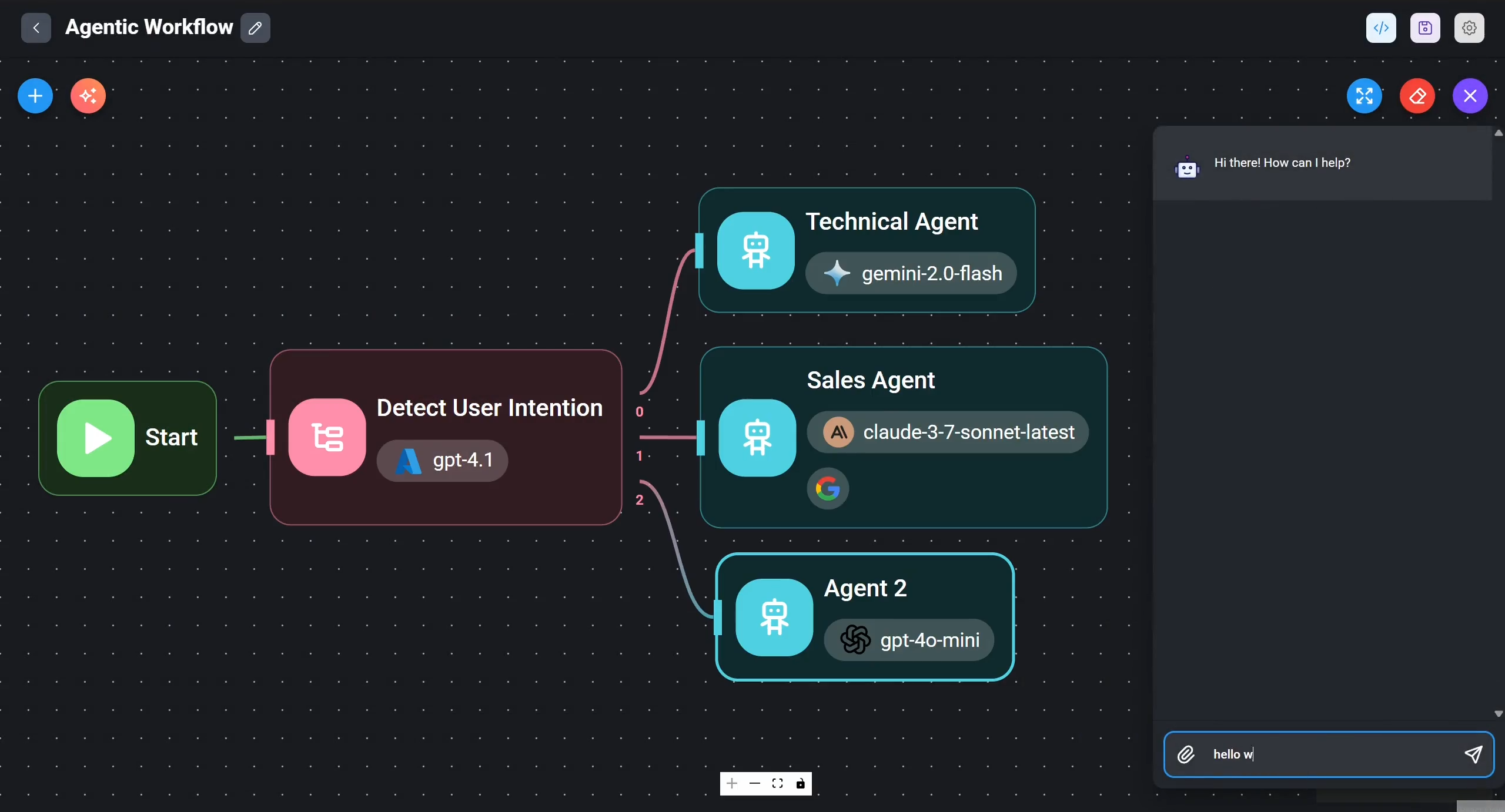
The core idea is a node-based canvas. Each node is a building block: a chat model, a vector store, a document loader, a memory module, a retriever, a tool. You drag these onto the canvas, draw connections between them, and the connections define how data flows. When the flow is done, Flowise exposes it as a REST API you can call from any app.
Under the hood, Flowise connects components from frameworks like LangChain and LlamaIndex. So the abstractions will feel familiar if you’ve used either one: chains, agents, vector stores, query engines. The difference is you assemble them by clicking and connecting instead of importing classes and calling constructors. That’s the trade Flowise makes. You give up some fine-grained control and you gain speed and a shared visual model your whole team can read.
Chatflows, agentflows, and assistants
Flowise gives you three builder types, and picking the right one matters.
| Builder type | Best for | Scope |
|---|---|---|
| Assistant | Beginners; chat assistants that follow instructions, use tools, and do RAG over uploaded files | Narrowest, most guided |
| Chatflow | Single-agent systems, chatbots, simpler LLM flows; supports Graph RAG and rerankers | Single-agent |
| Agentflow | Multi-agent systems and complex orchestration with branching, looping, and routing | Broadest; a superset of Chatflow and Assistant |
A chatflow is the classic Flowise flow. You build one logical pipeline: take a question, retrieve context, call a model, return an answer. It handles single-agent chatbots and RAG well.
An agentflow is the bigger canvas. Flowise positions it as a superset of chatflow and assistant. This is where you build multi-agent systems, route between branches, loop, and run more complex workflow orchestration. If your design has several agents handing work to each other, agentflow is the layer you want.
The assistant is the most guided option. You give it instructions, attach tools, and point it at files for retrieval. It’s the fastest way to get something useful without thinking about graph structure.
How a flow comes together on the canvas
Building in Flowise looks like this. You start a chatflow, then add nodes from the left panel.
- Drop a chat model node and pick a provider (OpenAI, Anthropic, a local model, and so on).
- Add a document loader and a vector store if you need retrieval.
- Add a memory node so the flow remembers the conversation.
- Connect the outputs to inputs so context flows into the model.
- Save, then open the chat panel to test it live.
The visual editor supports expressions, custom code nodes, branching, looping, and routing logic. So you’re not boxed in. When a node doesn’t exist for your case, you write a small custom function node and keep the rest visual.
Deploying Flowise and the REST prediction endpoint
Flowise runs as a Node app on port 3000 by default. The quickest start is npm:
npm install -g flowise
npx flowise start
# open http://localhost:3000
For a repeatable deploy, use Docker:
docker run -d --name flowise -p 3000:3000 flowiseai/flowise
Flowise also supports self-hosted and air-gapped deployments, which matters if your data can’t leave your network.
Once a flow is saved, Flowise turns it into a REST API. The official prediction docs cover the full request format. Every chatflow and agentflow gets its own prediction endpoint:
POST /api/v1/prediction/{id}
The {id} is the flow’s ID. You send a JSON body with at least a question field, and you get the flow’s response back. A minimal call looks like this:
curl -X POST http://localhost:3000/api/v1/prediction/<flow-id> \
  -H "Content-Type: application/json" \
  -d '{"question": "What are your store hours?"}'
The request body supports more than the question. You can pass streaming to stream tokens back, overrideConfig to change flow settings per request, history to seed prior turns, and uploads for images or audio. When streaming is on, Flowise emits events such as start, token, and metadata, then a final end event. Flowise also ships official Python and TypeScript SDKs that wrap this endpoint.
That single endpoint is the contract between Flowise and the rest of your stack. Your frontend, your backend, your other services all talk to the flow through it. Which is exactly why it’s worth testing carefully.
When low-code fits, and when code-first wins
Flowise is a good fit when you want speed, a shared visual model, and quick iteration. Prototypes, internal chatbots, RAG assistants over a document set, and demos all come together fast. Non-engineers on the team can read the canvas and understand what the agent does, which is hard to get from a Python file.
Code-first frameworks pull ahead when you need tight control. If you’re versioning agent logic in Git with full diffs, writing dense unit tests around each step, or building unusual state machines, a library like LangGraph or the Google Agent Development Kit gives you more room. The same applies to the OpenAI Agents SDK when your agents lean on custom tool calls. Many teams use both: prototype in Flowise, then port the proven design to code once requirements stabilize.
The honest read is that this isn’t a binary. Flowise has API, CLI, and SDK access, plus tracing, evaluation, and human-in-the-loop features, so it scales further than a toy. But the more your logic resembles real software, the more a code-first stack rewards you.
Testing the prediction endpoint and the APIs your flow calls
An agent built in Flowise is only as reliable as the APIs behind it. The flow calls an LLM API, and it usually calls external tool or REST APIs too. Those are the parts that fail in production, and they’re exactly what you can test in Apidog.
Start with the prediction endpoint itself. Treat POST /api/v1/prediction/{id} like any other REST endpoint. In Apidog you set the URL, send a question payload, and write API assertions that check the response shape and key fields. Run that as an automated test so a flow change that breaks the contract gets caught before your app does.
Then test the underlying APIs your flow depends on. The LLM provider and every tool endpoint can be hit directly. If you want to develop against the LLM without burning tokens or tripping rate limits, point the flow at a mock API that returns canned, realistic responses. The same trick works for a flaky third-party tool API: mock it, assert your flow handles the shape, and keep your test suite deterministic. There’s a fuller walkthrough in our AI agent test harness guide.
Apidog also handles the boring-but-critical parts. You store provider keys per environment, so your dev flow uses a test key and production uses the real one without code changes. To download Apidog and set this up takes a few minutes.
Frequently asked questions
Is Flowise free and open source?
Yes. Flowise is open source under the Apache 2.0 license, and you can run it for free by self-hosting it with npm or Docker. There’s also a hosted cloud option if you’d rather not manage infrastructure. For private or air-gapped setups, the self-hosted route keeps everything inside your network.
Does Flowise use LangChain?
Flowise connects components from both LangChain and LlamaIndex. The nodes on the canvas map to familiar concepts from those frameworks: chains, agents, vector stores, retrievers, and query engines. You get the same building blocks without writing the glue code by hand.
What’s the difference between a chatflow and an agentflow?
A chatflow is built for single-agent systems, chatbots, and simpler LLM pipelines. An agentflow is the superset: it handles multi-agent systems and complex orchestration with branching, looping, and routing. Start with a chatflow for a straightforward assistant, and move to an agentflow when multiple agents need to coordinate.
How do I test a Flowise flow’s API?
Call the prediction endpoint, POST /api/v1/prediction/{id}, with a JSON body containing a question. You can do this with curl, the official SDKs, or a dedicated tool. In Apidog you send the request, assert the response, mock the LLM and tool APIs the flow calls, and run it all in CI. For the auth and streaming details specific to LLM endpoints, see our guide on testing the ChatGPT API with Apidog.
Wrapping up
Flowise is the low-code path to LLM apps and AI agents. You build on a node canvas, choose between chatflows, agentflows, and assistants, and ship a REST prediction endpoint without writing the orchestration by hand. It’s a strong fit for prototypes and team-readable flows, and code-first frameworks still win when you need deep control. Whichever path you take, the flow lives or dies by the APIs it calls. Test that prediction endpoint and mock the LLM and tool APIs behind it in Apidog, and your agent will behave the same in production as it did on the canvas.