Firecrawl Local is a single Rust binary that scrapes, crawls and maps websites to clean markdown on your own machine. You install it with cargo install firecrawl-local, and it can serve the Firecrawl v2 API on localhost:3002 with no API key, no database, no queue and no container. Search and a few other features still go to Firecrawl Cloud, and you can switch that off.
Below: what runs on your laptop, what goes to the cloud, how to install it, the API routes it serves, its limits, and how to let your coding agent test the local API with Apidog CLI.
What is Firecrawl Local?
Firecrawl Local is the open-source, on-device edition of Firecrawl. It’s one binary that fetches web pages, cleans them with the same HTML-cleaning code the hosted Firecrawl API uses, and returns markdown, HTML or links. It runs as a CLI, as an MCP server for AI agents, or as a local copy of the Firecrawl v2 API.
Firecrawl announced it on November 18, 2026 in a launch post on X, and the code lives in the apps/local folder of the Firecrawl repository. The package is published on crates.io as firecrawl-local, and the repository is licensed AGPL-3.0.
Firecrawl claims it’s 37x faster than self-hosted Firecrawl and uses 230x less memory (11 MB idle). The README publishes no benchmark method, so treat those as vendor claims.
If you know the hosted API or the Firecrawl CLI, the idea is simple: the same calls, answered on your machine.
How Firecrawl Local works: one binary, ten commands
Every feature sits behind a subcommand of firecrawl-local. Here’s the full list from the README:
| Command | What it does | Runs on |
|---|---|---|
scrape <urls...> |
Scrape one or more URLs | Your machine |
crawl <url> |
Follow links from a start URL | Your machine |
map <url> |
List a site’s URLs from sitemaps and the start page | Your machine |
serve |
Run the Firecrawl v2 API on localhost | Your machine |
mcp |
Run the Firecrawl MCP server over stdio | Your machine, some tools on the cloud |
init |
Add the MCP server to AI tools on this machine | Your machine |
search <query> |
Search the web | Firecrawl Cloud |
find-tools <query> |
Find Alexandria data providers | Firecrawl Cloud, sign-in |
data <provider> <capability> |
Run an Alexandria data provider | Firecrawl Cloud, sign-in |
login |
Sign in to Firecrawl in the browser | Firecrawl Cloud |
Three commands cover most daily use:
# Print one page as markdown
firecrawl-local scrape https://example.com --markdown

# Crawl up to 50 pages and save one markdown file per page
firecrawl-local crawl https://docs.firecrawl.dev --limit 50 --out ./pages

# List every URL on a site
firecrawl-local map https://firecrawl.dev
Without --markdown, scrape prints the Firecrawl API’s JSON. --format accepts markdown, html, rawHtml and links. PDFs and Office documents are parsed locally too.
For JavaScript pages, it drives the Chrome or Chromium you already have. Without one, static pages still work and a page that needed a browser returns a warning. --browser auto|never|always decides when Chrome is used.
What runs locally vs in Firecrawl Cloud
Scraping, crawling, mapping and document parsing run on your machine and send nothing to Firecrawl. Three features go to Firecrawl Cloud because a laptop doesn’t have the index, the network or the data:
- Search. There’s no search index on your machine. Keyless search works but is rate limited.
- Pages that refuse your machine. If a site blocks both the plain fetch and the local browser, Firecrawl Cloud fetches it. No account needed.
- Alexandria data providers. These run on Firecrawl Cloud and need a free account. Our Firecrawl Alexandria explainer covers what they are.
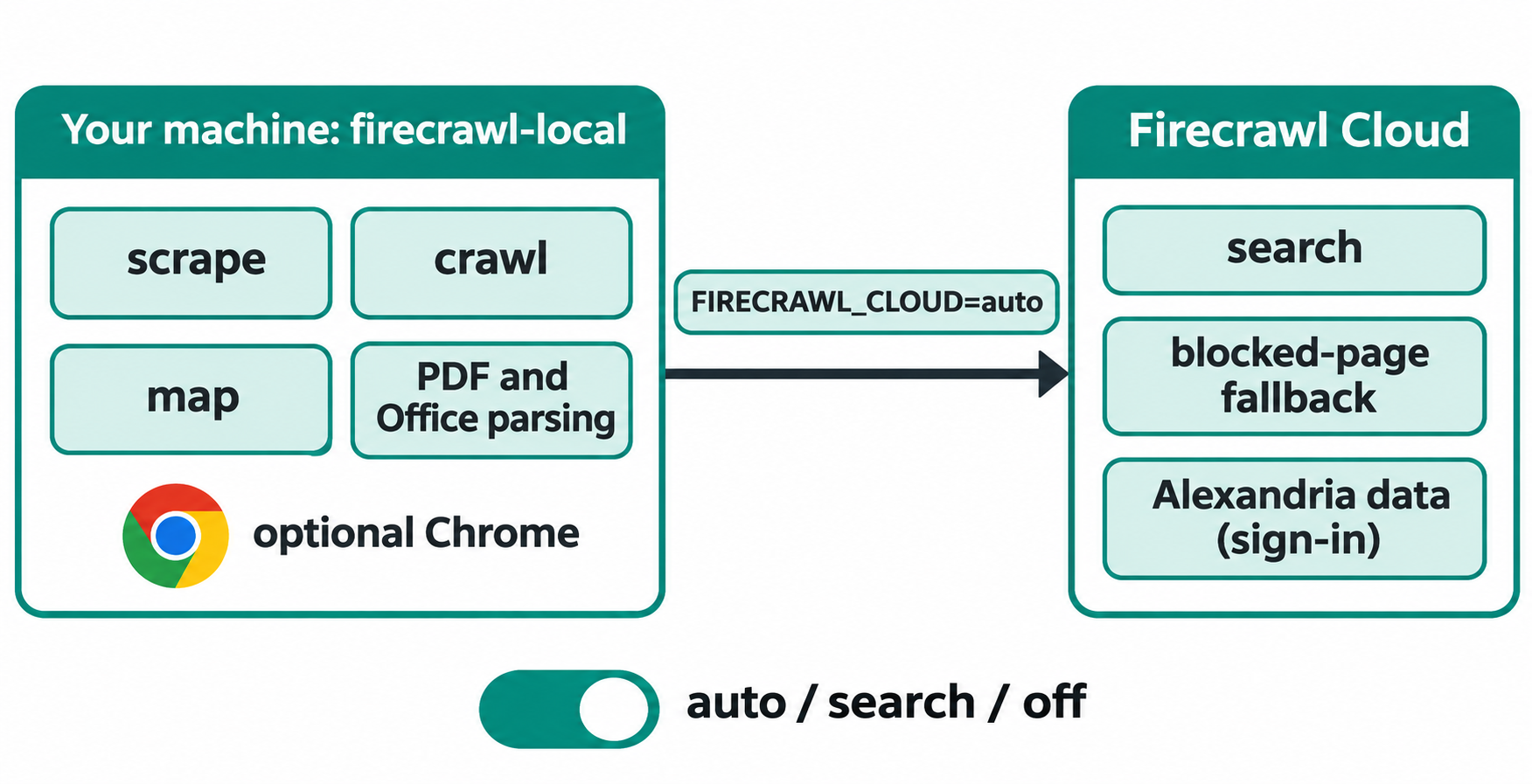
The FIRECRAWL_CLOUD environment variable controls the hand-off:
| Value | Effect |
|---|---|
auto (default) |
Search, the blocked-page fallback and Alexandria all work |
search |
Only search goes to Firecrawl Cloud |
off |
Nothing goes to Firecrawl Cloud |
An unrecognized value counts as off. Cloud-fetched results carry "source": "firecrawl-cloud"; if the cloud fails too, you get "blocked": true.
Cloud calls carry a random install ID and the calling tool’s name, which is how Firecrawl counts installs.
How to install Firecrawl Local
You need Rust and a C compiler. Then:
- Install build tools. On macOS run
xcode-select --install. On Debian or Ubuntu installbuild-essential. - Add Chrome or Chromium (optional) if you need JavaScript-rendered pages or screenshots.
- Add Node.js 22 or newer (optional) if you want the MCP server, which runs the
firecrawl-mcpnpm package throughnpx. - Sign in (optional) with
firecrawl-local loginfor Alexandria providers.
Install the binary from crates.io.
cargo install firecrawl-local
firecrawl-local --version
To build the latest code instead, run cargo build --release in apps/local of a repo clone.
Firecrawl Local API: the v2 routes on localhost:3002
firecrawl-local serve answers the Firecrawl v2 API on port 3002. No API key is needed for the local routes.
firecrawl-local serve

# in another terminal
curl -s http://localhost:3002/v2/scrape \
  -H 'content-type: application/json' \
  -d '{"url":"https://example.com","formats":["markdown"]}'
These routes run on your machine:
| Route | What it does |
|---|---|
POST /v2/scrape |
Scrape one URL |
POST /v2/map |
List a site’s URLs |
POST /v2/crawl, GET and DELETE /v2/crawl/{id} |
Start, check and cancel a crawl |
POST /v2/batch/scrape, GET and DELETE /v2/batch/scrape/{id} |
Start, check and cancel a batch scrape |
GET /health |
Health check |
Every other /v2 route, such as /v2/search, is forwarded to Firecrawl Cloud unless FIRECRAWL_CLOUD says otherwise. The v0 and v1 routes aren’t served.
Existing code moves over by changing one setting: point any Firecrawl SDK’s API URL at http://localhost:3002. Your scraper or RAG pipeline keeps its code, and you stop spending cloud credits while you iterate. For a broader look at scraping pipelines, see our Firecrawl web scraping guide.
Firecrawl Local as an MCP server for AI agents
firecrawl-local init registers Firecrawl Local as a Model Context Protocol server in every AI tool it finds. It knows Claude Code, Claude Desktop, Cursor, Windsurf, Gemini CLI and Codex, backs up each config file first, and takes --dry-run to preview changes or --agent cursor to set up one tool.
Your agent gets the standard Firecrawl MCP tools: scrape, crawl, map and batch scrape run locally, the rest go to Firecrawl Cloud.
If your agent browses sites you don’t trust, register it as firecrawl-local mcp --public-only. A page with hidden instructions could otherwise steer the agent into opening an internal URL on your network.
Firecrawl Local limits
Firecrawl Local isn’t the full Firecrawl server. The README lists what’s missing:
- No
jsonorsummaryformats locally. Local scrapes skip them with a warning, because they need a model. - No browser
actions. Clicks, scrolls and typing steps are ignored. - Screenshots need Chrome.
- Jobs live in memory. Crawl and batch jobs expire an hour after they start and are lost when
servestops. - No v0 or v1 API routes.
For queues, workers and every format, the full server in apps/api still exists, covered in Firecrawl’s self-hosting guide.
Security defaults you should know
The defaults differ by command, because serve takes requests from other programs:
scrape,crawl,mapandmcprun for the person at the keyboard, so they can reachlocalhostand your private network.scrape,crawlandmcpaccept--public-onlyto refuse those addresses.servebinds to127.0.0.1and refuses localhost and private targets unless you pass--allow-private. Binding another address with--hostrequires--token.- Link-local and cloud metadata addresses are always blocked, including after redirects and DNS resolution.
Chrome runs headless and sandboxed with a throwaway profile. When crawling, Firecrawl Local reads robots.txt per the Robots Exclusion Protocol, where site owners can address it as FirecrawlLocal.
Who Firecrawl Local is for
- Developers building scrapers or RAG pipelines who want free, fast iteration before paying for cloud volume.
- Coding agent users who want web reading inside Claude Code, Cursor or Codex without sending every page through a third party.
- Teams with data rules that need fetched content to stay on the machine, using
FIRECRAWL_CLOUD=off.
It’s a weaker fit if you depend on json extraction, browser actions or long-lived crawl jobs. If you only need agent search, see our roundup of open-source web search for Claude.
Let your coding agent test the local API with Apidog CLI
Once serve runs, you have a real HTTP API on localhost:3002. Before you wire a pipeline to it, check the routes answer the way your code expects. Give your coding agent Apidog CLI and one prompt instead of clicking through requests.
Set it up once:
npm install -g apidog-cli@latest
apidog auth login --with-token <YOUR_TOKEN>
apidog skill install
Then ask your agent:
Start firecrawl-local serve in the background. Write an OpenAPI 3 file for its
local routes (POST /v2/scrape, POST /v2/map, GET /health) and import it into
Apidog project <id>. Create an environment pointing at http://localhost:3002,
add test cases that assert /health returns 200 and /v2/scrape returns
success: true with non-empty data.markdown for https://example.com, then run
them and summarize any failures.
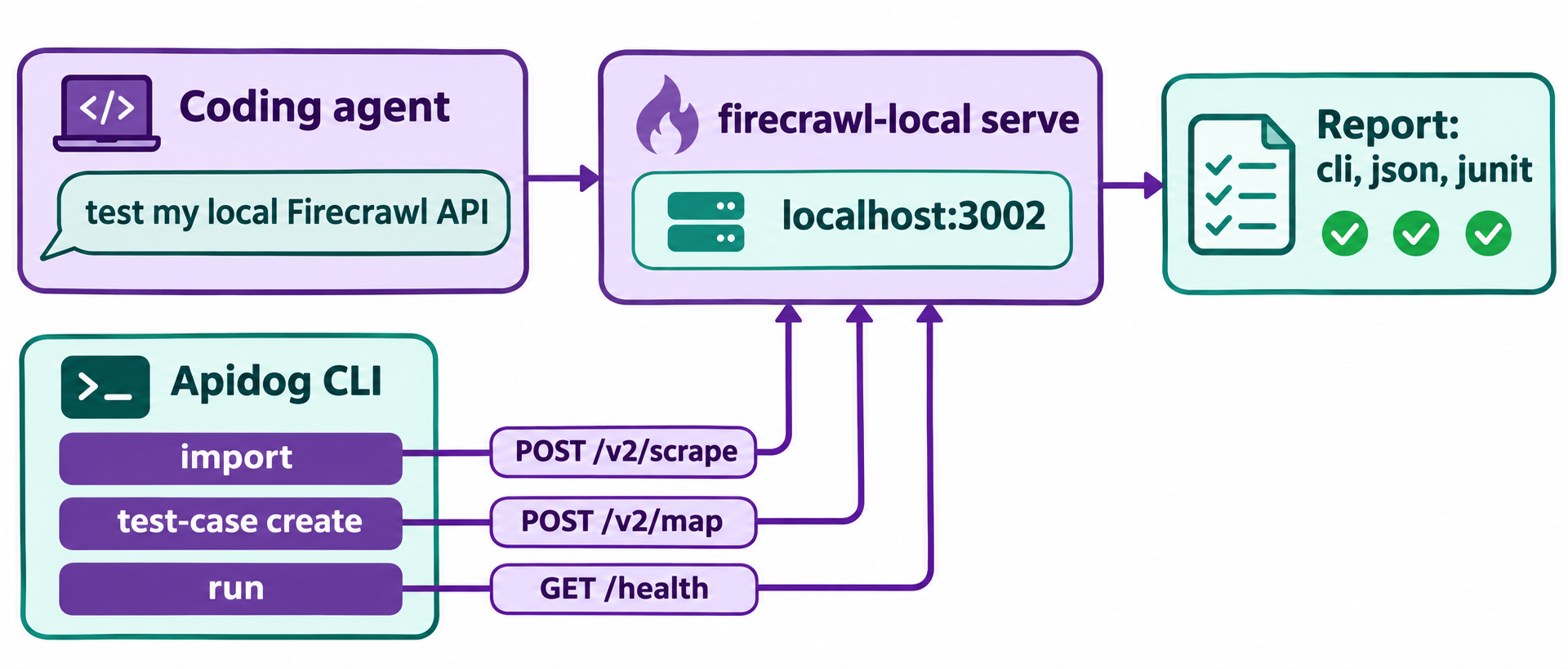
The agent reads the schema, validates its payload, and runs commands like these:
firecrawl-local serve &
apidog import --project <id> --format openapi --file ./firecrawl-local-v2.yaml
apidog environment create firecrawl-local --project <id> --base-url http://localhost:3002
apidog cli-schema get test-case-create
apidog cli-schema validate test-case-create --file case.json
apidog test-case create --project <id> --file ./case.json
apidog run --test-case <caseId> --project <id> -e <envId> -r cli,json
Apidog CLI sends requests from your machine, so localhost:3002 is reachable. Swap -r cli,json for -r junit and the same run drops into CI; our Apidog CLI CI/CD guide shows the setup, and Apidog CLI in Claude Code walks through the agent side. Apidog’s Free plan covers teams of up to 4 users.
FAQ
Is Firecrawl Local free? The binary is open source under AGPL-3.0, and local scraping, crawling and mapping need no API key. Search, the blocked-page fallback and Alexandria go to Firecrawl Cloud, and Alexandria needs a free account.
Can I use my existing Firecrawl SDK code with Firecrawl Local? Yes, for the local routes. Set the SDK’s API URL to http://localhost:3002. Scrape, map, crawl and batch scrape run locally; v0 and v1 routes aren’t served.
How do I stop Firecrawl Local from calling the cloud? Set FIRECRAWL_CLOUD=off. Search and the blocked-page fallback stop working, and nothing leaves your machine except an explicit login.
How is Firecrawl Local different from self-hosted Firecrawl? Self-hosted Firecrawl is the full server in apps/api, with queues, workers and every format. Firecrawl Local is a lighter single binary that drops json and summary formats, browser actions and persistent jobs.