
To test Claude Fable 5.2 API integrations, validate authentication, the Messages request body, typed response blocks, and predictable failures. Then save those checks as repeatable Apidog test cases that your coding agent runs through the CLI. Keep transport assertions separate from task-quality checks so a successful HTTP response can’t hide an unusable answer.
Anthropic’s announcement identifies claude-fable-5-2 as the Claude Platform model ID. This guide builds a regression workflow around that model, rather than stopping after one successful response. Apidog gives your agent a shared place to maintain the endpoint, test cases, and run reports.
What should Claude Fable 5.2 API tests cover?
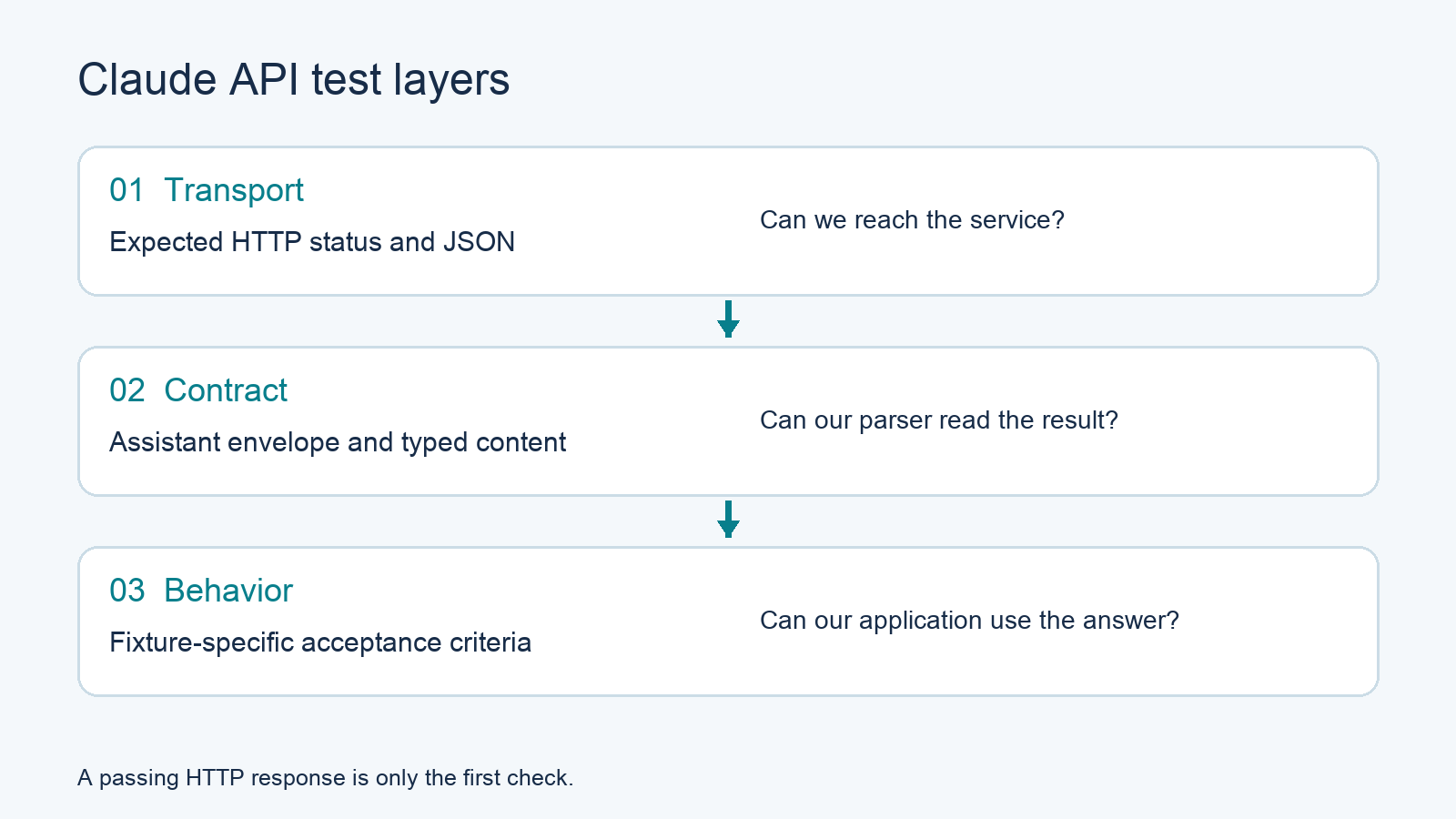
Use three layers: transport checks establish whether the request reached the service; contract checks validate the response structure; behavioral checks establish whether your application can use the result. Run the first two for every fixture. Define behavioral acceptance criteria for each task instead of comparing entire generated answers byte for byte.
| Layer | Example assertion | Failure means |
|---|---|---|
| Transport | Expected status and JSON response | Credentials, network, or service problem |
| Contract | Assistant message with typed content blocks | Parser or API contract mismatch |
| Behavior | Correct arithmetic result in extracted text | Output doesn’t satisfy this fixture |
Start with a tiny, harmless fixture: “What is 2 + 2? Reply with the numeral only.” It makes the acceptance rule visible without introducing files, tools, or conversation history. Add representative application fixtures after the basic contract works.
Don’t treat this fixture as a reasoning benchmark. Its purpose is to catch integration regressions, such as extracting a thinking block as user-facing text or accepting a truncated response.
Fix authentication and request settings before testing
For the direct Claude API, use the Messages endpoint, a workspace-scoped API credential, an explicit API version, and a fixed request body. Keep those inputs constant between runs. The API overview documents Bearer authentication, workspace selection, and version headers. These settings differ from cloud-provider IAM authentication.
Use a Claude Console API key supplied through your local secret environment. An Apidog access token authenticates the CLI to Apidog; it doesn’t authenticate requests to Anthropic. Keep the two credentials separate.
The following request follows the current Messages documentation, checked November 10, 2026. Save the JSON as request.json:
{
  "model": "claude-fable-5-2",
  "max_tokens": 1024,
  "stream": false,
  "thinking": { "type": "adaptive" },
  "messages": [
    {
      "role": "user",
      "content": "What is 2 + 2? Reply with the numeral only."
    }
  ]
}
Then send it from your terminal or have your coding agent execute it:
curl https://api.anthropic.com/v1/messages \
  -H "Authorization: Bearer $ANTHROPIC_API_KEY" \
  -H 'anthropic-version: 2026-10-21' \
  -H 'Content-Type: application/json' \
  --max-time 600 \
  --dump-header response.headers \
  --output response.json \
  --write-out '%{http_code}\n' \
  --data-binary @request.json
If your key isn’t workspace-scoped, include the documented anthropic-workspace-id header for your target workspace. Never put a literal credential into the saved fixture or a generated report.
The Create a Message reference defines model, messages, and max_tokens, plus the returned message fields. Here, 1,024 is a chosen output budget, not a documented minimum or a promise that every task fits. Raise it deliberately when a fixture needs more room.
This is a documentation-verified template. Run it with your own authorized API account before recording a passing baseline; no live Fable response or latency measurement is claimed here.
Add response assertions that survive generated variation
Assert the envelope, inspect block types, extract text, and then apply the fixture’s acceptance rule. A Messages response contains a content array, so don’t assume content[0].text holds the answer. Preserve the full original message separately if your application sends it back in later conversation turns.
For the arithmetic fixture, ask your agent to attach this post-response script to the Apidog test case:
pm.test("HTTP success", function () {
  pm.response.to.have.status(200);
});

const body = pm.response.json();

pm.test("Assistant message contract", function () {
  pm.expect(body.type).to.eql("message");
  pm.expect(body.role).to.eql("assistant");
  pm.expect(body.id).to.be.a("string");
  pm.expect(body.model).to.be.a("string");
  pm.expect(body.content).to.be.an("array");
});

const text = body.content
  .filter(block => block.type === "text")
  .map(block => block.text)
  .join("\n").trim();

pm.test("Arithmetic fixture is complete", function () {
  pm.expect(body.stop_reason).to.eql("end_turn");
  pm.expect(text).to.eql("4");
});
Exact equality makes sense for this deliberately constrained numeral. For a summary, use criteria such as required facts, prohibited unsupported claims, and length bounds. A harmless wording change shouldn’t break a useful summary test.
Record usage and the response’s request-id header for diagnosis. Compare returned model identifiers against the documented behavior for your chosen identifier; don’t silently relabel fallback responses as Fable results.
A max_tokens stop reason means the answer hit its output limit. Fail this arithmetic fixture and inspect the token budget. Other tasks can legitimately return different stop reasons, including tool requests, so give each case its own completion rule.
Test Claude Fable 5.2 API negative cases
Create a separate case for each invalid input and change one field at a time. Check the HTTP status and structured error type rather than matching the complete human-readable error message. Keep the valid baseline unchanged so a negative fixture can’t contaminate the next positive run.
The official error guide documents the following useful cases:
| Case | Change from baseline | Expected result |
|---|---|---|
| Invalid authentication | Replace Bearer credential with a dummy value | 401, authentication_error |
| Disabled thinking | Set thinking.type to disabled |
400, invalid_request_error |
| Legacy extended thinking | Set thinking.type to enabled |
400, invalid_request_error |
| Assistant prefill | End the conversation with an assistant prefill | 400, invalid_request_error |
Fable 5.2 uses always-on thinking. Don’t copy an older Claude tutorial that disables it or configures extended-thinking budgets. The disabled-thinking case is especially useful when upgrading shared request-building code.
For each error case, assert body.type === "error", the expected body.error.type, and a nonempty error message. Preserve a request ID when available. Treat DNS failures and client timeouts as separate outcomes because they may never produce a Claude JSON error.
Test your application’s handling of rate limits and service failures with controlled fixtures or a mock. Don’t flood the live API to manufacture a 429. Distinguish retryable capacity problems from authentication and validation failures, and place a finite retry budget around your application’s retry logic.
Let your coding agent build the Apidog regression cases
Give your agent the endpoint, fixtures, assertions, and target project. It can discover the current CLI schema, validate each payload, create test cases, and run them. You review the generated cases and failure summary. This keeps the repeatable workflow in Apidog CLI.
Install the CLI and authenticate with your Apidog token:
npm install -g apidog-cli@latest
apidog login --with-token <YOUR_APIDOG_TOKEN>
For agent setup, follow the live guides for Claude Code or Codex. Then give your agent one prompt:
In Apidog project <PROJECT_ID>, define POST /v1/messages for the
Claude API. Use model claude-fable-5-2 and version 2026-10-21.
Keep the Anthropic credential in a private runtime variable.
Create the arithmetic success case and four negative cases above.
Read CLI help and input schemas before generating payloads.
Discover valid endpoint and category IDs; validate every payload.
Attach the response assertions, then run each case against
<ENVIRONMENT_ID>. Report failures, request IDs, and token usage.
Do not print credentials or claim unexecuted cases passed.
The following commands were checked against installed CLI 2.2.12. The agent needs a real endpoint ID and category ID; test-case-create describes endpoint-derived cases, so creating an unrelated standalone JSON request isn’t enough.
apidog test-case category --project <PROJECT_ID>
apidog cli-schema get test-case-create
apidog cli-schema validate test-case-create --file case.json
apidog test-case create --project <PROJECT_ID> --file case.json
apidog run --test-case <CASE_ID> --project <PROJECT_ID> \
  -e <ENVIRONMENT_ID> -r cli,json
Have the agent inspect endpoint command help and schemas when the endpoint doesn’t exist. Use returned IDs, not illustrative numbers copied from another project. Validate case.json before writing it, then read the created case back to confirm the intended headers, body, and assertions were saved.
Run Claude API regression tests in CI
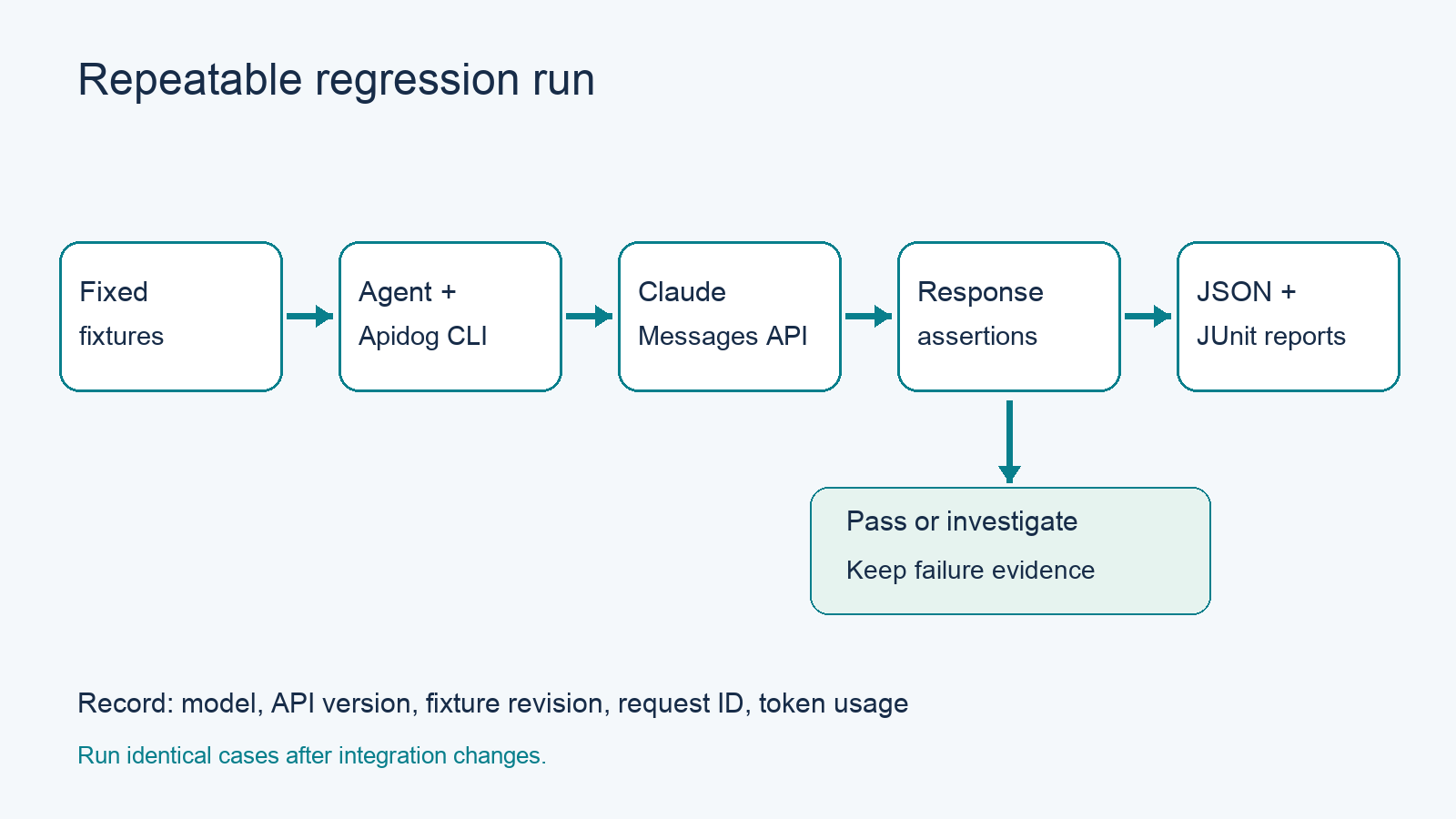
Run the same cases after changes to authentication, message serialization, block parsing, or retry handling. Export machine-readable reports and keep the fixture version alongside your application change. Establish a passing baseline before making comparisons, then investigate failures individually instead of rerunning until the build happens to pass.
For a case already created in Apidog, a CI-oriented invocation is:
apidog run --test-case <CASE_ID> --project <PROJECT_ID> \
  -e <ENVIRONMENT_ID> -r cli,json,junit \
  --out-dir ./apidog-reports
Repeat for the other case IDs or let your agent organize the cases into a test suite using the current suite schema. The Apidog CI/CD guide covers pipeline integration.
Keep model, API version, request body, output budget, fixture revision, and CLI version in the run record. Store credentials through your CI secret mechanism. Review reports for sensitive request data before sharing them.
Use a small live smoke set on routine changes and a broader behavioral set before releases. Set your own spend and duration budgets. An API contract pass establishes integration compatibility; your application-specific acceptance tests establish whether the output is useful.
FAQ
Which model ID should I test?
Use claude-fable-5-2 for this direct Claude Platform workflow. Verify availability in your account before saving a baseline.
Is HTTP 200 enough to pass?
No. Check the message envelope, typed content, completion reason, and fixture acceptance criteria. Streaming needs additional event-level checks because failures can occur after response headers arrive.
Can I disable Fable 5.2 thinking?
No. Anthropic documents always-on thinking for this model. Keep disabled thinking as a negative case that expects a validation error.
Should every answer match exactly?
Use exact matches for constrained fixtures such as the numeral example. For open-ended tasks, define factual and structural criteria that allow valid wording variation.
Can my agent rerun the tests after a fix?
Yes. Give it the saved case IDs and environment, then have it run the same CLI commands and summarize the reports. Start with the Claude Code CLI workflow if you need agent setup.