Stolen AI API keys now pay for other people’s hacking. In October 2026, Bitsight’s threat intelligence team described MONST3R-AI, a tool sold on a criminal forum that runs autonomous penetration-testing scans on stolen OpenAI, Anthropic and Google keys. The buyer brings the key, the agent does the scanning, and the key’s owner gets the bill. This guide covers how keys leak, how to spot abuse, and the controls each provider offers today.
To protect an OpenAI, Anthropic or Gemini key, scope it to one project or workspace, set a hard monthly spend cap, restrict where it can be called from, set an expiry or rotate it, keep it out of client code and repos, and turn on secret scanning with push protection. If a key leaks, create a replacement, deploy it, then disable the old one and audit usage.
What is LLMjacking?
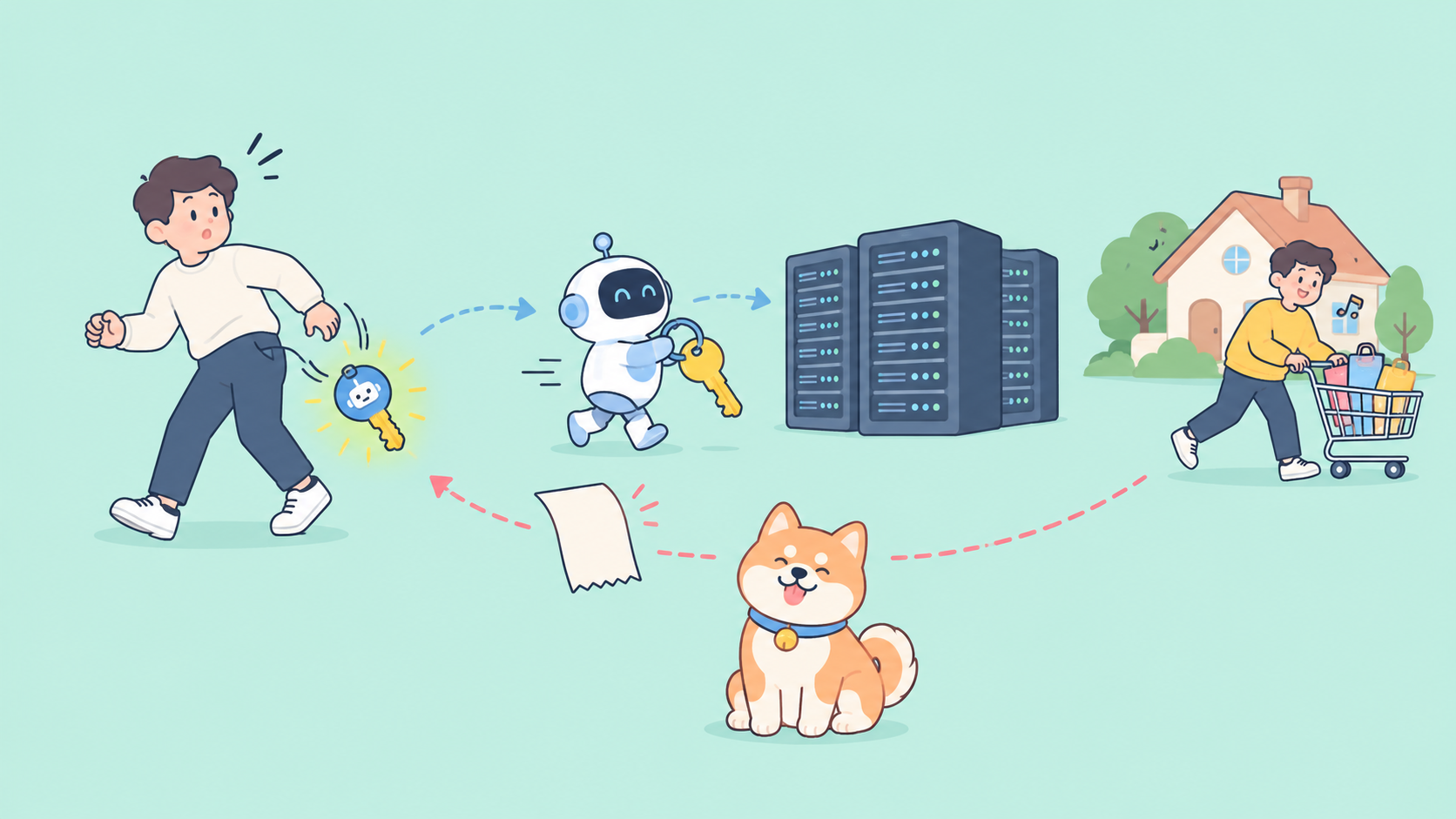
LLMjacking is the abuse of a stolen large language model credential, usually an API key, to run inference that the key’s owner pays for. Attackers resell the access, burn it on their own workloads, or now, according to Bitsight, use it to power autonomous attack agents. The victim sees the activity only as billable usage on their own account.
What Bitsight found about MONST3R-AI
The facts below come from coverage of Bitsight’s research by Help Net Security and AI Weekly, published October 17, 2026. Bitsight’s own write-up of the tool was not public when this article was written.
- What it is: a seller on a restricted criminal forum markets MONST3R-AI as an “autonomous penetration testing platform.”
- Whose keys: it runs on stolen OpenAI, Anthropic and Google API keys.
- Who pays: the buyer pastes a stolen key into the tool’s panel, caps a budget and points the agent at a target list. The seller hosts no model, so the inference bill lands on the key’s rightful owner.
- Claimed results: the seller’s dashboard claims 1,072 findings across 199 scanned hosts. Bitsight says it cannot independently verify that figure, so treat it as marketing, not evidence.
- The wider trend: across 16 underground forums from February through August 2026, mentions of AI agents, indirect prompt injection and the Model Context Protocol rose 67 percent.
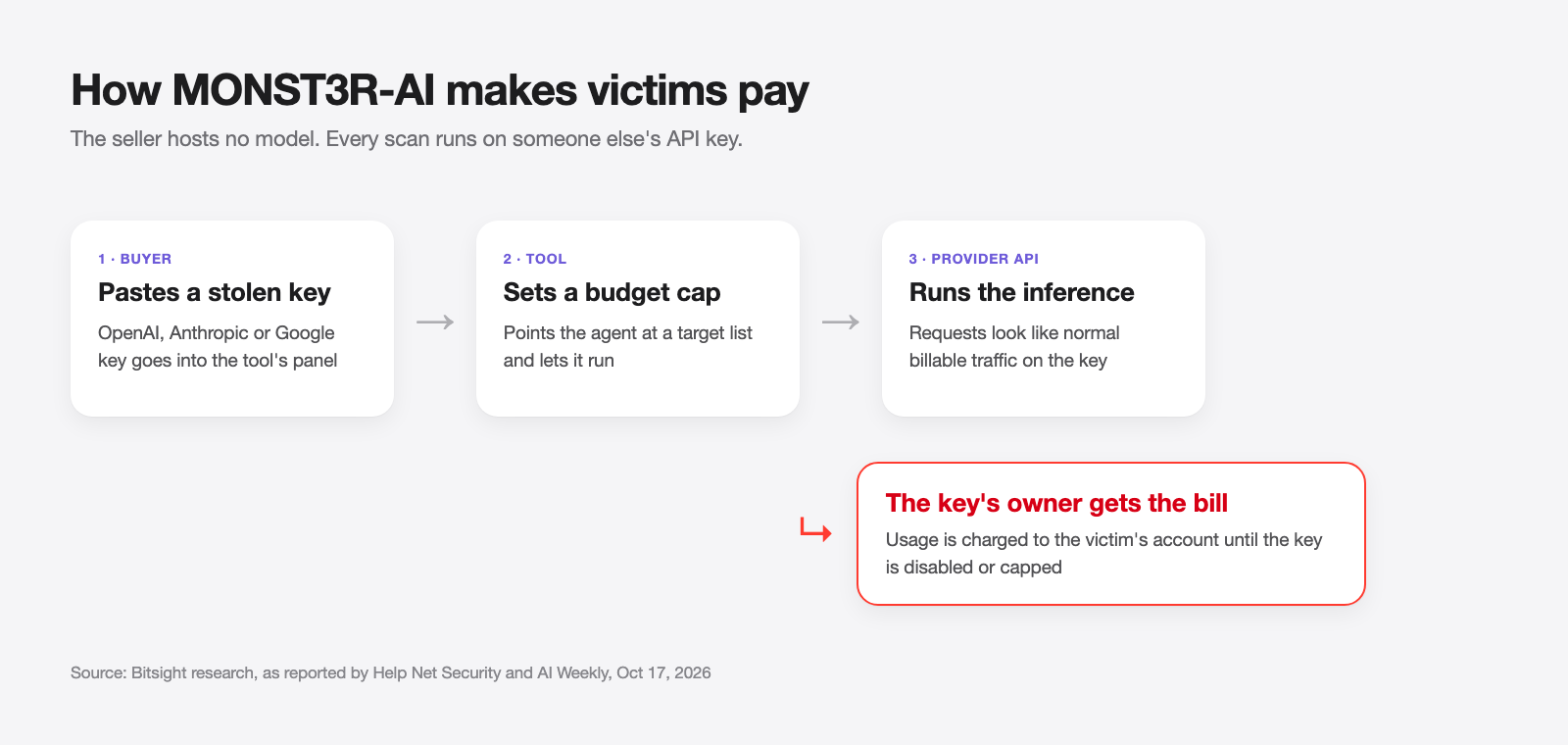
A leaked key is no longer just a surprise invoice. It can fund someone else’s attack campaign, and every request looks like your normal traffic.
How AI API keys leak
Most stolen keys were never “hacked.” They were published by accident. The common paths:
| Leak path | How it happens | Fix |
|---|---|---|
| Public repos | Key committed in code, .env or a notebook |
Secret scanning with push protection |
| Client-side code | Key shipped in a web bundle or mobile app | Call the model from your backend only |
| CI logs | A build step echoes env vars or debug output | Mask secrets, never set -x around them |
| Container images | .env copied into an image layer |
.dockerignore, inject at runtime |
| Agent and MCP configs | Key pasted into an MCP server config or agent settings file, then synced or shared | Reference env vars, not literal keys |
| Chat and tickets | Key pasted into Slack, an issue or a support ticket | Rotate any key that left your secret store |
Google’s Gemini API key guide states the client-side rule plainly: keys compiled into web or mobile apps can be extracted by users, so run a backend proxy that makes the real calls. Our guide to storing API keys covers the storage side in more depth.
Agent configs deserve extra care: MCP and agent settings files end up in dotfile repos, screen shares and bug reports.
How to tell your key is being abused
No alert says “a criminal is using this.” Watch usage and billing data for:
- Spend jumps with no deploy behind them. A flat daily cost that doubles overnight is the clearest sign.
- Models you don’t use. Usage on a model family your product never calls.
- Off-hours traffic. Steady requests at 3 a.m. in your time zone from a key used by a daytime app.
- Rate-limit errors you didn’t cause. Someone else is consuming your per-minute quota.
- Unknown keys or projects on usage pages. Google AI Studio’s Usage page groups requests it can’t match to a named key under “(unknown keys).”
Split keys finely enough that one spike points at one key.
How to protect your OpenAI API key
Checked October 28, 2026 against OpenAI’s developer docs.
- Hard spend limits: per the spend limits guide, you can set a monthly limit for the organization or a single project and turn on “Enforce a hard limit.” Once tracked spend reaches it, requests fail with a 429 and the code
organization_spend_limit_exceededorproject_spend_limit_exceeded. Enforcement isn’t instantaneous, so spend can slightly exceed the cap. - Spend alerts: alerts notify you but don’t stop traffic. Use both, with the alert set well below the hard limit.
- IP allowlist: the IP allowlist rejects requests from other IPs even with a valid key. It takes up to 50 addresses or CIDR ranges, can apply per project or org-wide, and blocked calls get HTTP 401 with
ip_not_authorized. Changes take up to 15 minutes. - One project per app and environment: project-level limits and allowlists only help if keys are split by project.
- Restricted key permissions: OpenAI’s projects guide lists All (the default), Restricted and Read Only permissions for user-owned keys. Give each key only what its app needs.
- Model access per project: under a project’s Limits, Model usage picks which models the project can call. A stolen key then can’t jump to a pricier model you never use.
See our OpenAI API key guide.
How to protect your Anthropic API key
Checked October 28, 2026 against the Claude Platform docs.
- Workspace spend limits: per the Workspaces docs, you can cap monthly spending per workspace and configure alerts at thresholds. You can’t set spend limits on the Default Workspace, so put production keys in their own workspace.
- Workspace rate limits: cap requests, input tokens and output tokens per minute for each workspace.
- Key expiration: the authentication docs let you pick an expiry at creation: 3 hours, 1 day, 7 days, 30 days, a custom duration or Never. It can’t be changed later.
- Identity-backed keys: personal and service account keys stop working when their owner is removed. Anthropic calls workspace keys legacy and recommends Workload Identity Federation for production on cloud platforms and CI.
- Disable versus delete: Disable is reversible and shows the key as
inactive. Delete is permanent. Disable first when you’re unsure.
See our Anthropic API key guide.
How to protect your Google Gemini API key
Checked October 28, 2026 against Google’s Gemini API key docs and billing docs.
- Auth keys: since May 28, 2026, new keys created in Google AI Studio are authorization keys bound to a service account, restricted to the Gemini API by default. Google says they come with fast-acting enforcement against leaked keys its systems detect.
- No unrestricted keys: the Gemini API rejects requests from unrestricted standard keys. Restrict old keys to the Gemini API in AI Studio, or migrate to an auth key.
- Application restrictions: in the Cloud console credentials page, restrict a key to specific IP addresses.
- Project spend caps: set a monthly cap per project on AI Studio’s Spend page. Google labels this experimental and warns of overages during a roughly 10-minute billing delay.
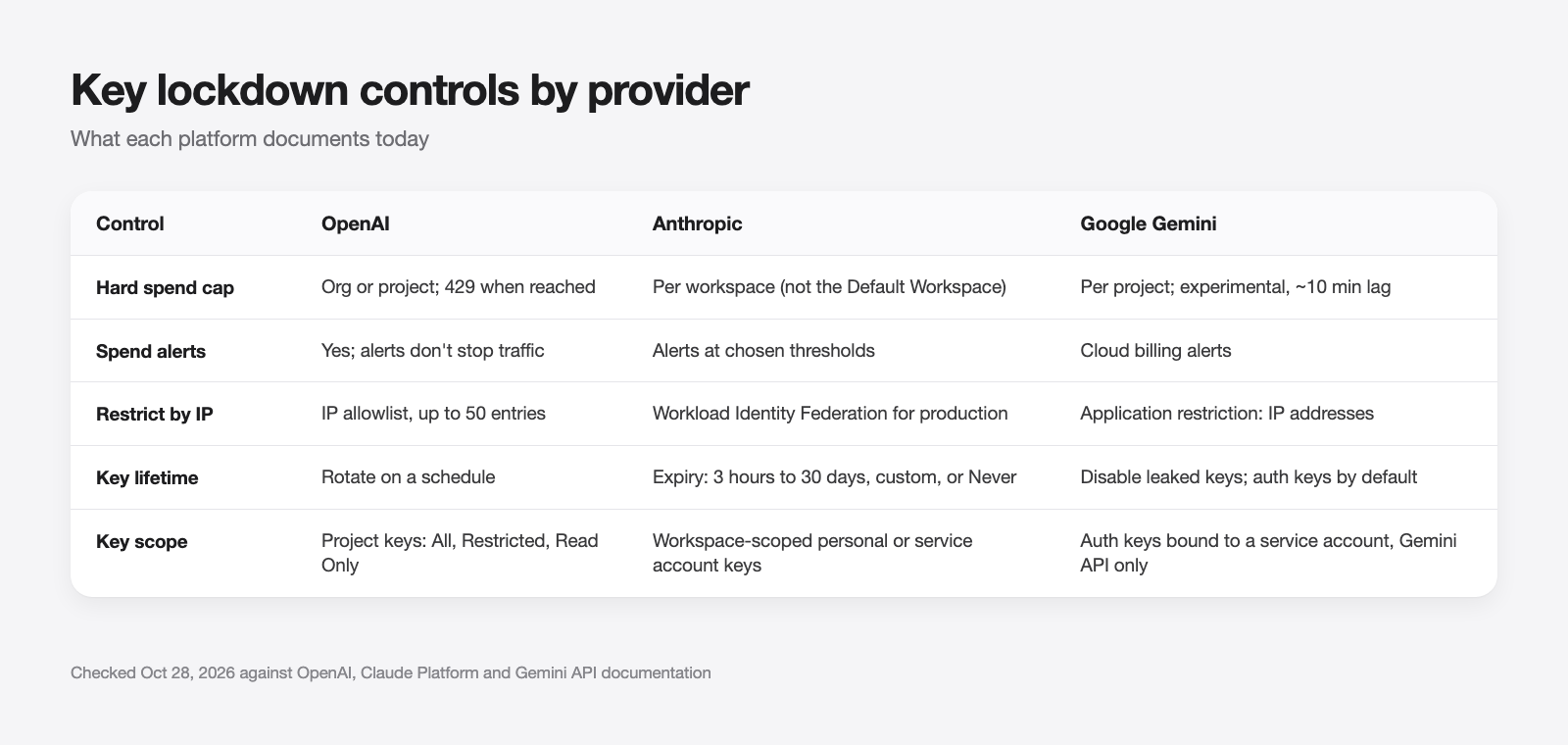
The lockdown checklist for every provider
Run this once per key you own:
- Inventory. List every key, the app that uses it and where it’s stored.
- Split. One project or workspace per app and environment, so a spike names its source.
- Cap. Set a hard monthly limit and an earlier alert.
- Restrict. IP allowlist or application restriction wherever your egress is fixed.
- Expire or rotate. Short expiry where the provider supports it; a rotation schedule where it doesn’t.
- Scan. GitHub’s secret scanning patterns include OpenAI, Anthropic and Google Gemini API keys, and OpenAI keys support push protection. Our post on checking for leaked API keys covers scanners you can run locally.
- Prefer short-lived credentials. Anthropic and OpenAI both document workload identity federation for production.
For the policy side, see API key management best practices.
What to do in the first hour after a leak
Speed beats root cause. In order:
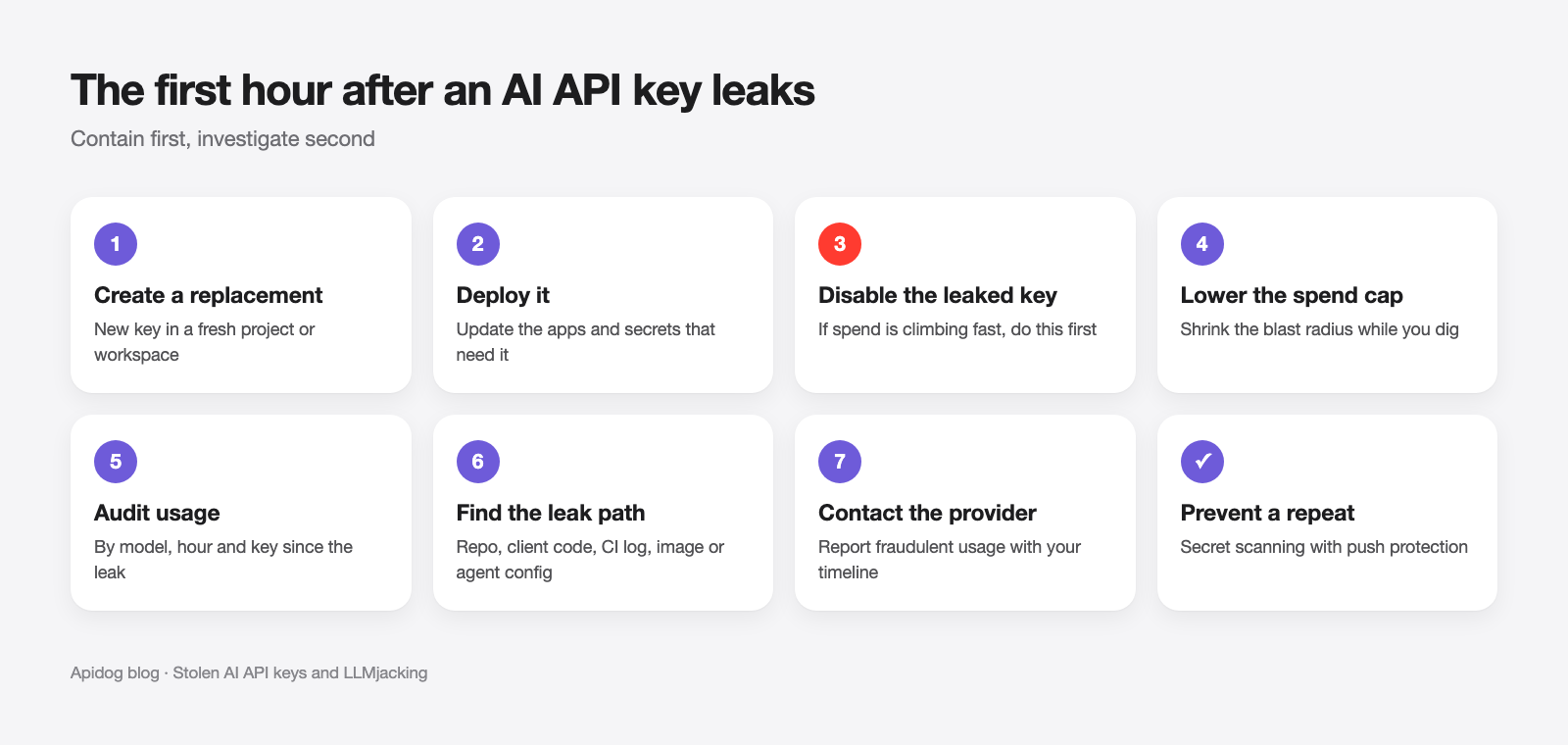
- Create a replacement key in a fresh project or workspace.
- Deploy it to the apps that need it.
- Disable the leaked key. Google’s leak checklist says to disable the old key only after the new one is verified, to avoid downtime. If spend is climbing fast, disable first and accept the outage.
- Lower the spend cap on the affected project while you investigate.
- Audit usage by model, hour and key for the window since the leak.
- Find the leak path using the table above, and purge it from git history.
- Contact the provider about fraudulent usage once you have the timeline.
Let your coding agent test key handling with Apidog CLI
Your backend proxy to OpenAI, Anthropic or Gemini is where key handling breaks: it accepts unauthenticated calls, or echoes the provider key in an error body. Let your coding agent write and run tests for it with Apidog CLI, with secrets kept out of the test definitions.
Set it up once:
npm install -g apidog-cli@latest
apidog login --with-token <YOUR_TOKEN>
npx -y skills add https://apidog.com   # pick your agent when prompted
Then give your agent one prompt:
In Apidog project <id>, create a test case for POST /v1/ai/chat on our proxy.
Assert: no Authorization header returns 401, a bad token returns 401, a valid
token returns 200, and no response body contains "sk-" or "AIza". Read the
token from the {{PROXY_TOKEN}} environment variable, never hardcode it.
Then run it against the staging environment and summarize failures.
The agent reads the payload schema, validates it, creates the case and runs it:
apidog cli-schema get test-case-create
apidog test-case category --project <id>
apidog cli-schema validate test-case-create --file case.json
apidog test-case create --project <id> --file case.json
apidog run --test-case <caseId> --project <id> -e <envId> \
  --env-var "PROXY_TOKEN=$PROXY_TOKEN" -r cli,junit
--env-var passes the token at run time, so it never lives in the spec or the repo. The same apidog run line drops into CI; see Apidog CLI in a CI/CD pipeline and Apidog CLI in Claude Code.
FAQ
What is LLMjacking? It’s the use of a stolen LLM credential, usually an API key, to run inference that the owner pays for. Attackers resell the access or, as with MONST3R-AI, use it to power attack agents.
Can stolen AI API keys really pay for hacking tools? Yes. Bitsight reported that MONST3R-AI’s buyers paste stolen OpenAI, Anthropic or Google keys into its panel, and the seller hosts no model, so victims pay. The seller’s claimed results are unverified.
Does a spend limit stop a stolen key? A hard limit stops spend at the cap, but not instantly. OpenAI and Google both note small overages while limits propagate. Spend alerts alone never stop traffic.
Can I put my OpenAI API key in frontend code? No. Anything shipped to a browser or mobile app can be extracted. Call the model from your backend.
Will GitHub catch a leaked AI key? GitHub secret scanning detects OpenAI, Anthropic and Google Gemini API key patterns. Turn on push protection so a commit with a key is blocked before it’s public.