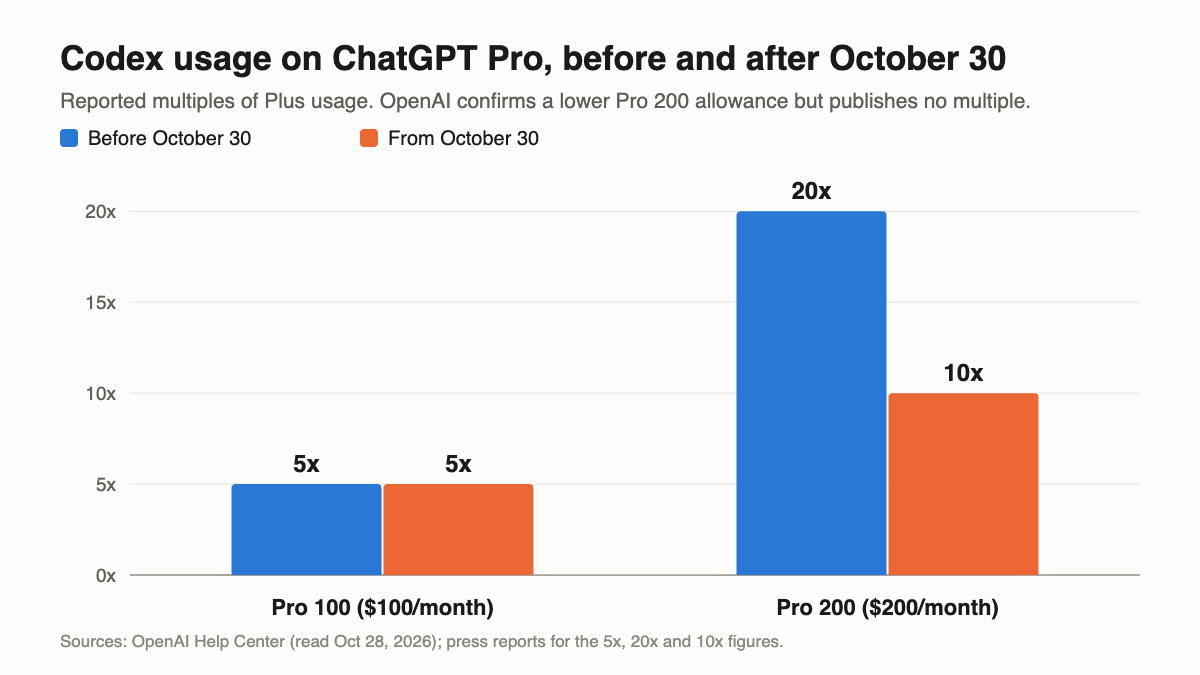
The Codex Pro limit cut lands on October 30, 2026. If you pay $200 a month for ChatGPT Pro, your included Codex usage drops while the price stays the same. Subscribers who qualified for grandfathering keep the old allowance through October 29. From October 30 every Pro 200 account runs on the lower allowance, which press reports put at 10x Plus, down from 20x.
This post covers the dated change only: what OpenAI confirmed, what is still just reported, and what you can do this week. For the full picture of how Codex quotas work, read our guide to Codex usage limits. For general ways to stretch them, see solutions to Codex usage limits.
What changes on October 30: the Codex Pro limit cut in one table
The Codex Pro limit cut moves every Pro 200 subscription to a lower included usage allowance on October 30, 2026, at the same $200 monthly price. OpenAI confirms the cut, the dates and the price. It hasn’t published the new size. Reports put it at 10x Plus, down from 20x.
| Before | From October 30, 2026 | Source | |
|---|---|---|---|
| Pro 200 price | $200/month | $200/month | OpenAI help center |
| Pro 200 included usage | Previous allowance (reported as 20x Plus) | Lower allowance (reported as 10x Plus) | OpenAI confirms “lower”; multiples are reported |
| GPT-6 Pro messages on Pro 200 | Reported 200 per week | Reported 100 per week | Reported only |
| Pro 100 | $100/month (reported 5x Plus) | No change announced | Reported |
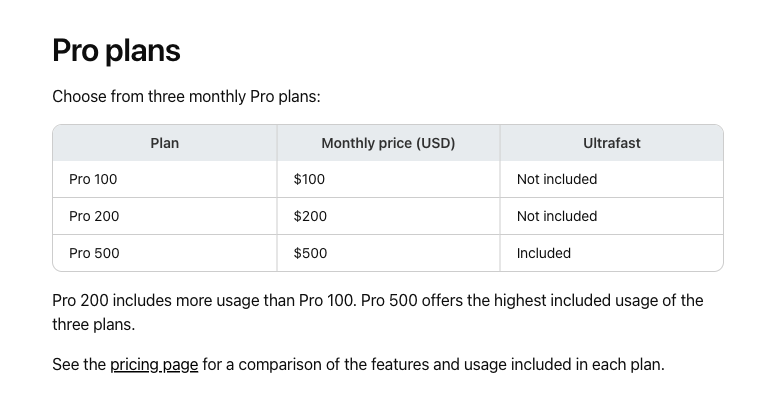
| Ultrafast mode | Pro 500 only | Pro 500 only | OpenAI help center |
| Five-hour limit on Pro | None at present | None at present (weekly limits may apply) | OpenAI pricing docs |
OpenAI’s own About ChatGPT Pro tiers article, read on October 28, says new Pro 200 subscriptions “include a lower usage allowance than previously offered with Pro 200 to reflect our increasingly efficient models.” It doesn’t state a multiple anywhere. The 20x to 10x figure and the drop from 200 to 100 weekly GPT-6 Pro messages come from press coverage such as ThreatFrontier’s Pro $100 vs $200 breakdown and posts that trended on X. Treat them as the best available estimate, not a published number.
Who is grandfathered, and until when
Grandfathering covers you if you had an active Pro 200 subscription at any point from September 22, 2026 through 10 a.m. Pacific Time on September 29, 2026. Eligible accounts keep the previous allowance through October 29, 2026, as long as the subscription stays active.
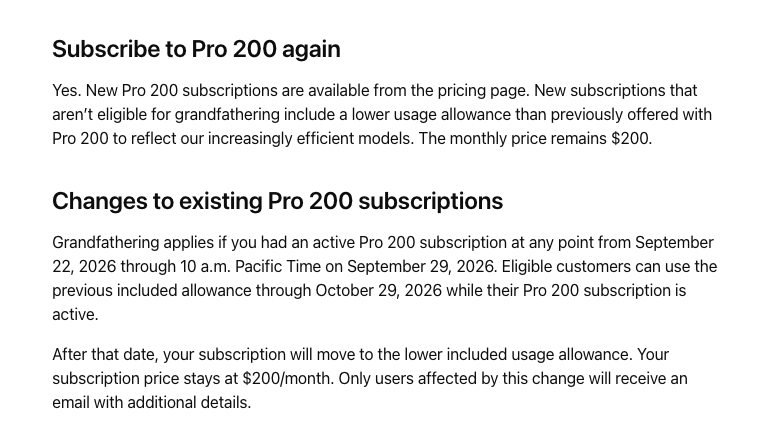
Three details from OpenAI’s help article are easy to miss:
- Resubscribing doesn’t reset the window. If your Pro 200 lapsed and you subscribe again on the same account, you still qualify only if you were active during that September 22 to 29 window.
- Grandfathering isn’t an upgrade. Your plan stays Pro 200. You don’t get Pro 500 features or Ultrafast.
- Only affected users get an email. If you didn’t receive one, you either weren’t eligible or you subscribed after the window, in which case you’re already on the lower allowance.
If you signed up for Pro 200 after 10 a.m. PT on September 29, nothing changes for you on October 30. You’ve been on the lower allowance since day one.
OpenAI doesn’t name a cutover hour for October 30. Plan as if your first session that day runs on the new allowance.
Are there compensation credits?
Not that OpenAI has published. Some subscribers report receiving an email that mentions a one-time Codex credit grant, but OpenAI’s help article and pricing docs say nothing about compensation. If you got that email, check the exact amount and expiry date in Settings, then Usage, in ChatGPT, or Usage & Billing in Codex. Don’t plan around credits you can’t see in your own dashboard.
What OpenAI does confirm is how paid credits work. Included usage is spent first, then your credit balance. Credits cover eligible usage in Codex, ChatGPT Work and ChatGPT for Word, Excel and PowerPoint, and Plus and Pro users can buy more after hitting the included limit without changing plans.
Pro $100 vs Pro $200 after the cut
If the reported multiples hold, the math changes the case for the $200 plan.
| Pro 100 | Pro 200 (from Oct 30) | Pro 500 | |
|---|---|---|---|
| Price | $100 | $200 | $500 |
| Reported Codex usage | 5x Plus | 10x Plus | Highest of the three (multiple not published) |
| Usage per $100 | 5x Plus | 5x Plus | Not published |
| Ultrafast | No | No | Yes |
Before the cut, $200 bought four times the Pro 100 allowance for twice the price. After it, $200 buys twice the allowance for twice the price. The per-dollar rate is the same.
That leaves three honest reasons to stay on Pro 200:
- You regularly hit the Pro 100 weekly ceiling and don’t want to manage credits.
- You use the reported GPT-6 Pro chat messages heavily outside Codex.
- You’d rather pay a fixed $200 than track a credit balance.
If none of those fit, test Pro 100 for a month. You can change plans under Settings, then My Plan, and Pro is billed monthly, so a wrong guess costs you one billing cycle.
Your options if 10x isn’t enough
You have four levers. Most heavy users will combine two of them.
1. Run local sessions on an API key
OpenAI’s pricing docs say all users “may also run extra local chats using an API key, with usage charged at standard API rates.” You give up cloud features (GitHub code review, Slack, cloud tasks), but the CLI, SDK and IDE extension keep working, and you stop drawing down your subscription.
The Codex CLI takes the key from stdin:
printenv OPENAI_API_KEY | codex login --with-api-key
codex login status
A cleaner setup keeps your ChatGPT sign-in for interactive work and uses the key only where it pays off, such as codex exec jobs in CI. API usage is billed per token at the rates on OpenAI’s API pricing page, so set a project budget before you point a long-running agent at it. Our OpenAI API key guide covers creating and scoping a key.
2. Put routine work on a cheaper model
Credit rates on OpenAI’s Codex pricing docs show how much model choice matters:
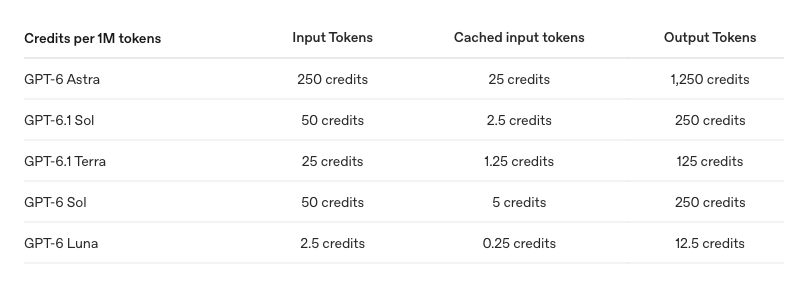
| Model | Input (credits per 1M) | Cached input | Output |
|---|---|---|---|
| GPT-6 Astra | 250 | 25 | 1,250 |
| GPT-6.1 Sol | 50 | 2.5 | 250 |
| GPT-6.1 Terra | 25 | 1.25 | 125 |
| GPT-6 Luna | 2.5 | 0.25 | 12.5 |
GPT-6.1 Terra costs half of GPT-6.1 Sol per token, and GPT-6 Luna costs one twentieth. On Plus, OpenAI’s estimates run 15 to 160 local messages per five hours on GPT-6.1 Sol against 35 to 285 on Terra and 350 to 3,000 on Luna. Use the strong model for planning and hard debugging, then switch with codex -m <model> for renames, test scaffolding and docs. Our GPT-6.1 Terra API guide shows what Terra handles well.
3. Trim what every turn sends
OpenAI’s own tips cost nothing:
- Keep AGENTS.md short and nest it per directory in large repos.
- Disable MCP servers you aren’t using in this session. Each one adds context to every message.
- Narrow the files and date ranges you hand the agent.
- Avoid Fast mode for batch work. It spends included usage at 2.5x the Standard rate.
Run /status inside a Codex CLI session to see what’s left before you start a big task.
4. Mix in a second coding agent
Splitting work across two agents spreads the weekly ceiling. Our Claude Code vs Codex vs Cursor vs MiniMax vs GLM comparison lays out what each plan includes. If you’re weighing Codex’s subscription against its API costs more broadly, our Codex pricing post has the background, and the OpenAI Codex CLI guide covers CLI setup.
Test the API key path with Apidog CLI before you switch
Moving local sessions to an API key only works if the key, the project and the model you picked actually respond the way you expect. Don’t find that out halfway through a refactor. Let your coding agent check it with Apidog CLI and record token usage while it’s at it.
Set it up once:
npm install -g apidog-cli@latest
apidog login --with-token <YOUR_APIDOG_TOKEN>
npx -y skills add https://apidog.com   # pick Codex when prompted
Then give Codex one prompt:
In Apidog project <projectId>, create a test case for POST https://api.openai.com/v1/responses
using the OPENAI_API_KEY environment variable as a Bearer token and model <model-id>.
Assert status 200, that output is non-empty, and that usage.input_tokens and
usage.output_tokens are numbers. Run it against the <envId> environment and report
the token counts and any failures.
The agent reads the payload schema, validates its JSON before writing, creates the case and runs it:
apidog cli-schema get test-case-create
apidog cli-schema validate test-case-create --file case.json
apidog test-case create --project <projectId> --file case.json
apidog run --test-case <caseId> --project <projectId> -e <envId> -r cli,json
The JSON report gives you a usage record per run. Add --upload-report to see the run in the Apidog app, or -n 5 to repeat it and get a feel for token spread on your prompts. The Responses API guide explains the usage object the test reads.
Once it passes, the same apidog run ... -r junit command drops into CI, so a revoked key or a retired model fails a build instead of a late-night session. The Apidog CLI CI/CD guide shows the pipeline wiring, and Apidog CLI in Codex covers the agent setup in more depth. Apidog’s Free plan covers up to 4 users.
What to do before October 30
- Check your inbox for OpenAI’s email. No email means no grandfathering.
- Run
/statusin the Codex CLI and note your remaining weekly usage. - Decide between Pro 100 and Pro 200 using last month’s usage, not habit.
- Set up an API key login for
codex execjobs and test it once. - Move routine tasks to GPT-6.1 Terra or GPT-6 Luna.
FAQ
Does the Codex Pro limit cut change the $200 price? No. OpenAI’s help article says the subscription price stays at $200 a month. Only the included usage allowance drops.
Is Pro 200 really 10x Plus now? That’s the reported figure. OpenAI’s help center confirms a “lower included usage allowance” but doesn’t publish a multiple. Check your usage dashboard for your real ceiling.
I subscribed in October. Does anything change for me on October 30? No. New subscriptions that weren’t eligible for grandfathering have used the lower allowance from the start.
Can OpenAI support reset my Codex limit after the cut? No. OpenAI says support can’t reset ChatGPT or Codex limits. It can investigate usage that was counted incorrectly.
Does an API key login in Codex use my Pro allowance? No. Local sessions on an API key are billed at standard API rates and skip cloud features such as GitHub code review and Slack.
Should I upgrade to Pro 500? Only if you need Ultrafast or more volume than Pro 200 gives you. Ultrafast spends included usage at 8x the Standard rate, so it suits speed-critical work, not bulk tasks.