The OpenAI CLI is OpenAI’s official command-line tool for the OpenAI REST API. You install one openai binary, set OPENAI_API_KEY, and call the API from your terminal or a shell script: openai responses create, openai files upload, openai batches create, openai images generate. It is not Codex CLI. Codex is a coding agent; openai sends one API request per command.
This guide covers install, auth, the first commands worth running, and how it compares with Codex CLI and the old openai command the Python SDK put on your PATH. Every command and output below comes from version 1.44.1, installed and run on October 28, 2026.
What is the OpenAI CLI?
The OpenAI CLI is an open-source Go binary, published by OpenAI at github.com/openai/openai-cli under the Apache 2.0 license. Its commands mirror the API’s resources (responses, files, batches, images, audio, vector-stores, admin), so anything you’d send with curl or an SDK becomes one terminal command with flags.
It isn’t brand new. Version 1.0.0 shipped on May 5, 2026, and the project has cut 99 releases since; 1.44.1 landed on October 27, 2026. So treat it as a mature tool you may have missed, not a launch.
Here’s what you get on a first run:
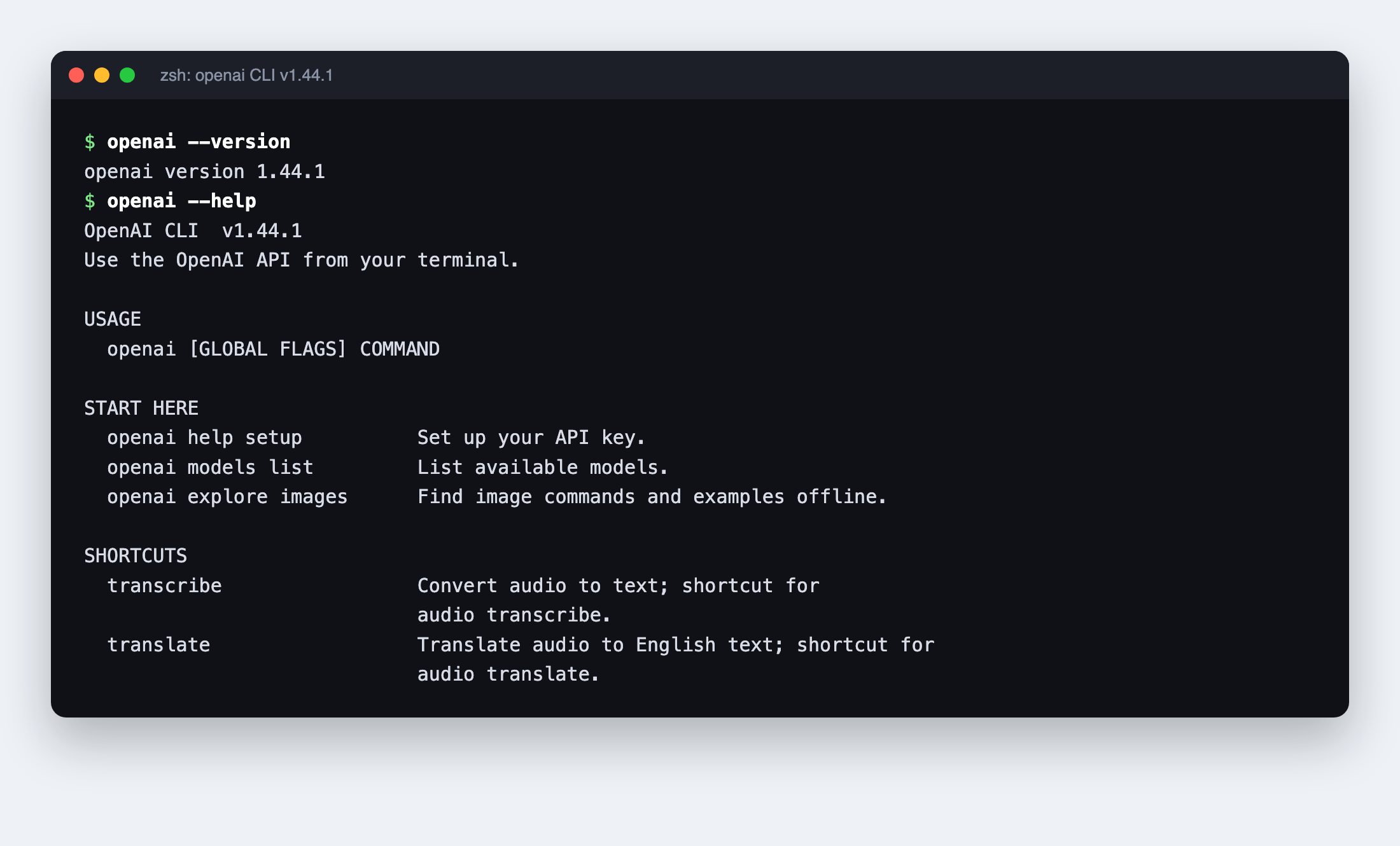
The help groups commands by job: generate content (responses, chat, images, audio, videos), data and retrieval (files, uploads, vector-stores, embeddings), models and jobs, administration, and a set of local tools that never touch the network. Help itself needs no API key and no connection, which makes openai <command> --help the fastest way to learn the flags.
It suits developers testing a prompt without writing a script, ops people who want file uploads and batches in a cron job, and coding agents that need a documented interface instead of hand-rolled curl.
How to install the OpenAI CLI
You have three install routes, all listed in the project README:
- Prebuilt binary. Download the archive for your OS and architecture from GitHub Releases (macOS, Linux and Windows builds are published), extract it and put
openaion your PATH. - Homebrew.
brew install openai/tools/openai
- Go. Requires Go 1.26 or later.
go install 'github.com/openai/openai-cli/cmd/openai@latest'
export PATH="$PATH:$(go env GOPATH)/bin"
Self-managed release installs can update themselves during interactive runs. If you pin versions in CI, set OPENAI_CLI_NO_AUTO_UPDATE=1 to stop automatic installs, or OPENAI_CLI_NO_UPDATE_CHECK=1 to switch off update checks entirely. Homebrew and Go installs keep their update notices but leave upgrades to the package manager.
How OpenAI CLI authentication works
The CLI reads a standard API key from OPENAI_API_KEY (or the --api-key flag, which you should avoid because it lands in shell history). If you don’t have one yet, our guide to getting an OpenAI API key walks through it.
The quickest setup is the built-in guide:
openai help setup
It points you to the API keys page and gives you a read -rs OPENAI_API_KEY line for Bash or zsh, so the key is typed hidden and never echoed.
Forget the key and you get a clear, scriptable failure. This is the real output with no key set:
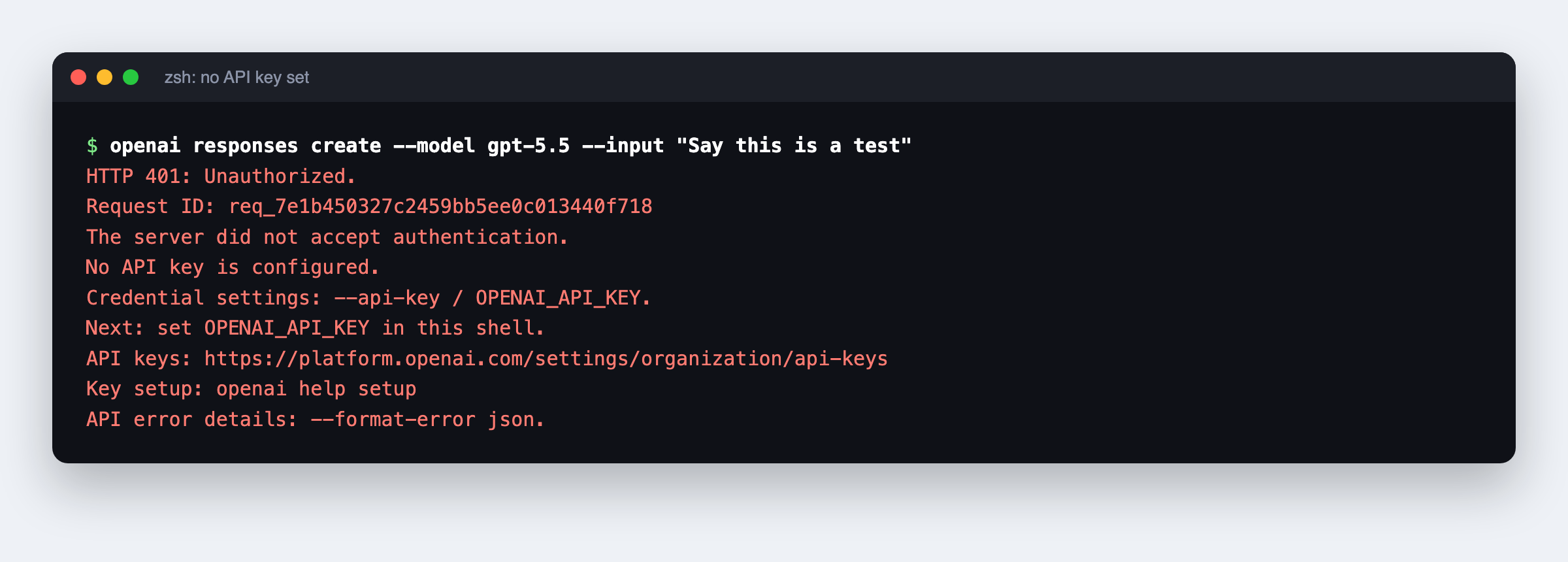
It exits with status 1 and tells you exactly where a key can come from. Add --format-error json when a script needs the raw error body.
The other auth settings:
| Setting | Flag | Environment variable | Use it for |
|---|---|---|---|
| API key | --api-key |
OPENAI_API_KEY |
Every normal API call |
| Admin key | --admin-api-key |
OPENAI_ADMIN_KEY |
openai admin ... (usage, projects); a project key can’t replace it |
| Base URL | --base-url |
OPENAI_BASE_URL |
Pointing the CLI at another host or a gateway |
| mTLS cert and key | --mtls-client-cert-file, --mtls-client-key-file |
OPENAI_MTLS_CLIENT_CERT_FILE, OPENAI_MTLS_CLIENT_KEY_FILE |
Mutual TLS, which needs an explicit HTTPS base URL |
First OpenAI CLI commands to run
The command shape follows the API: openai <resource> [subresource...] <command> [flags...]. These are the commands that earn their place in a toolbox.
Make a Responses API call
openai responses create \
  --model gpt-5.5 \
  --input "Say this is a test"
Long prompts don’t need escaping. JSON input flags read from a file with @path:
openai responses create --model gpt-5.5 --input @prompt.txt
If you pipe JSON or YAML from a source you don’t trust, set OPENAI_UNTRUSTED_STDIN=1 so that input can’t trigger local file reads.
Upload and fetch files
openai files upload report.txt --purpose user_data
openai files get file-example
openai files download file-example --output downloaded-report.txt
Run a batch
Put one request per line in requests.jsonl, each with a unique custom_id, then:
openai files upload requests.jsonl --purpose batch
openai batches create --input-file-id file-example \
  --endpoint /v1/responses --completion-window 24h
openai batches wait batch_example --output-dir ./results
batches wait polls until the batch finishes and saves the result files, which removes the polling loop you’d otherwise write. The project’s batch guide lists the current limits as 50,000 requests and 200 MB per input file, with a 24h completion window. Batch pricing differs from synchronous calls; see our OpenAI API pricing breakdown before you queue a large job.
Count tokens locally, with no key
The tokenizer command runs fully offline: no credentials, no network, no saved input.
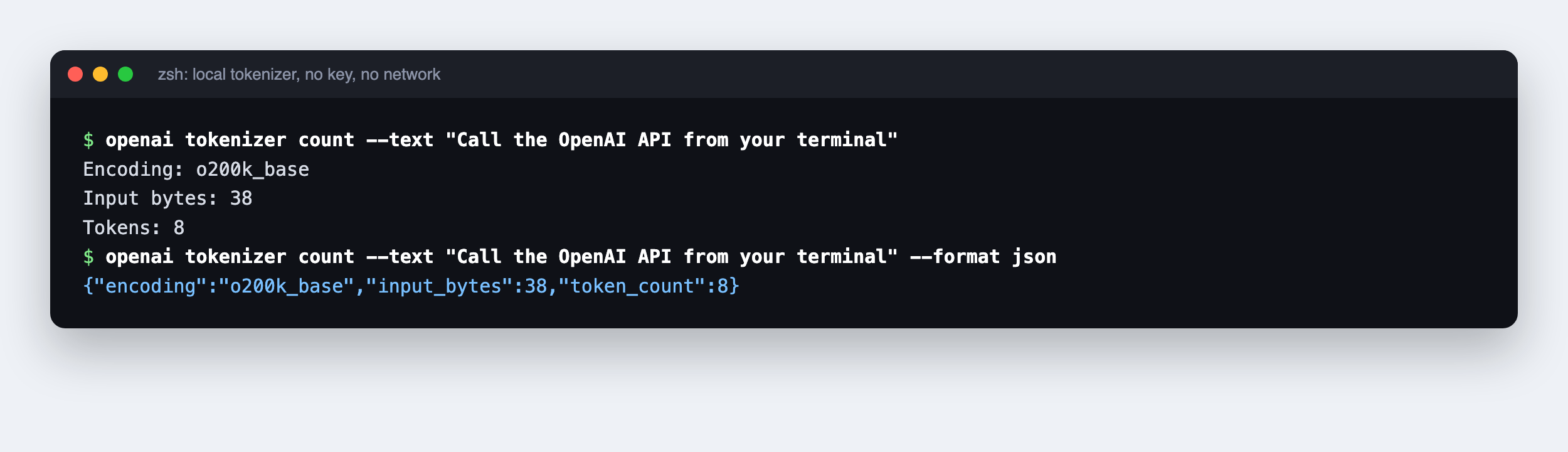
The default encoding is o200k_base, and openai tokenizer encodings lists the others (cl100k_base, plus two legacy ones). The help is honest about limits: a plain-text count excludes request structure and multimodal inputs, so it isn’t a billing figure. For a server-side count, use openai responses input-tokens count.
Get output a script can parse
The default output is readable text, even when piped. Ask for data explicitly:
openai models list --format jsonl | jq '.id'
openai files list --format json > files.json
openai files get file-example --transform filename --raw-output
--format accepts auto, text, json, jsonl, yaml, explore (an interactive JSON viewer) and pretty. --transform pulls fields with GJSON syntax, and jq handles anything fancier. Always check the exit status before trusting a redirected file: a failed request can leave a partial one behind.
When a call misbehaves, --debug adds per-attempt HTTP timing; scrub its logs before sharing them. If you’re hitting 429s, our OpenAI rate limits guide explains the tiers.
OpenAI CLI vs Codex CLI vs the old openai command
Three tools share a vendor and two share a name. This is the short version:
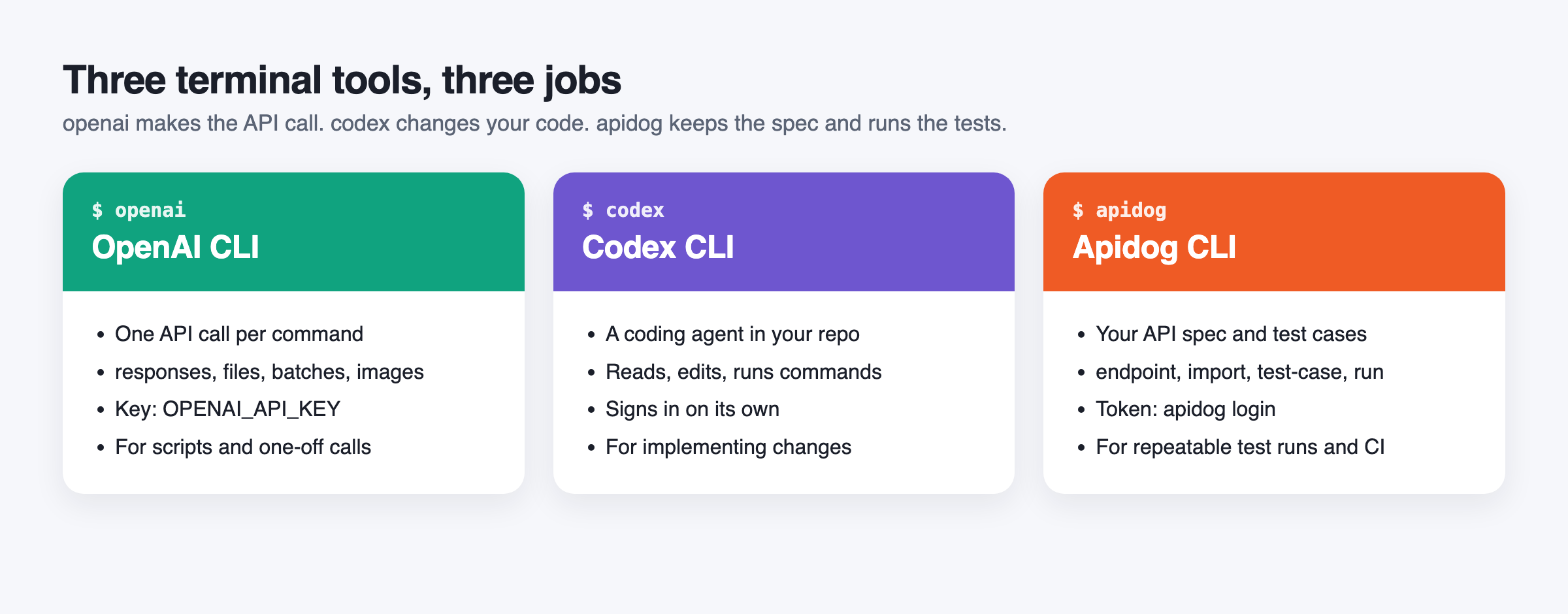
| OpenAI CLI | Codex CLI | Legacy Python openai |
|
|---|---|---|---|
| Command | openai |
codex |
openai |
| What it is | A client for the REST API | A coding agent that reads, edits and runs code in your project | A CLI bundled with the openai Python package |
| Install | Binary, Homebrew or Go | npm install -g @openai/codex or brew install --cask codex |
pip install openai |
| Auth | OPENAI_API_KEY |
Handles its own sign-in | API key |
| Use it when | You want one specific API call, or API steps in a script | You want an agent to implement or debug a change | You maintain older scripts built on it |
Run openai codex and the OpenAI CLI prints Codex install commands itself, noting it’s a separate tool with its own sign-in. Our Codex CLI guide covers the agent side, and the source lives at github.com/openai/codex.
Watch for the PATH clash
The openai Python package also installs a binary named openai. If you’ve ever run pip install openai, you may have two:
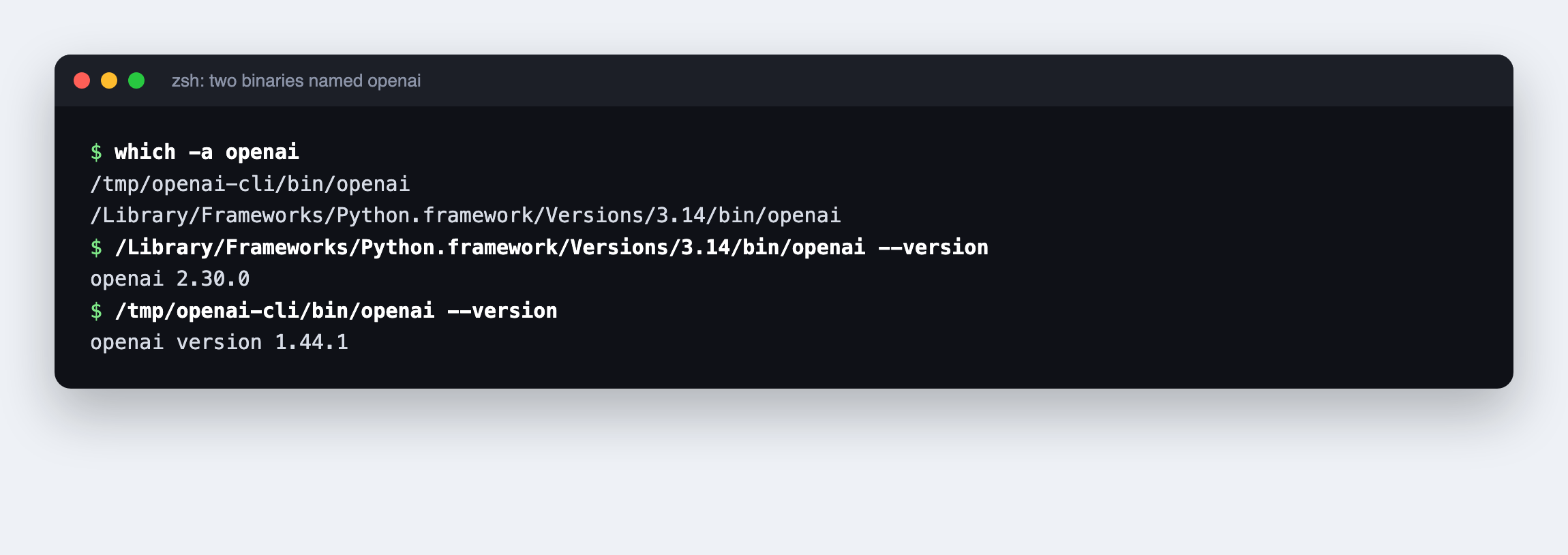
On this Mac the Python one reports openai 2.30.0 and offers api, tools, migrate and grit subcommands; the Go one reports openai version 1.44.1. Whichever directory comes first on your PATH wins. Run which -a openai and openai --version after you install. If the output says openai version 1.44.1 (or newer), you have the right one. If it prints a bare version number like openai 2.30.0, reorder your PATH or call the new binary by its full path.
Where Apidog CLI fits next to the OpenAI CLI
The OpenAI CLI makes calls to OpenAI. It doesn’t know about your own API: the endpoints your app exposes on top of OpenAI, the environments you deploy to, or the assertions that prove a release didn’t break anything. That’s a different job, and it’s where Apidog CLI comes in. You don’t pick one over the other; most teams that ship an AI feature want both.
Better still, let your coding agent run both. Set up Apidog CLI once:
npm install -g apidog-cli@latest
apidog login --with-token <YOUR_TOKEN>
npx -y skills add https://apidog.com   # pick your agent when prompted
Then give your agent one prompt:
Use the openai CLI to confirm my key works with one responses create call on gpt-5.5.
Then import ./openapi.yaml into Apidog project <id>, create a test case for
POST /v1/summarize that asserts a 200 and a non-empty "summary" field, run it
against the staging environment and summarize any failures.
The agent checks the key with openai, then works through Apidog CLI. It reads the schema before writing any payload, validates the file, and only then creates and runs the case:
apidog import --project <id> --format openapi --file ./openapi.yaml
apidog cli-schema get test-case-create
apidog cli-schema validate test-case-create --file case.json
apidog test-case create --project <id> --file case.json
apidog run --test-case <caseId> --project <id> -e <envId> -r cli,json
Two details from apidog test-case create --help save a round trip: the case needs a valid categoryId (list them with apidog test-case category --project <id>), and payloads should come from cli-schema, never from memory. The same apidog run line with -r junit drops into CI, as our Apidog CLI CI/CD guide shows. If Codex is your agent, start with Apidog CLI in Codex.
Apidog’s Free plan covers up to 4 users, so a small team can try this without a purchase decision.
FAQ
Is the OpenAI CLI free? The tool is free and open source under Apache 2.0. The API calls it makes are billed to your OpenAI account at normal API rates. Local commands like openai tokenizer and every --help page cost nothing and need no key.
Is the OpenAI CLI the same as Codex CLI? No. openai sends direct API requests, one per command. codex is a coding agent that reads and edits your project and runs commands. They install separately and authenticate separately.
How do I install the OpenAI CLI on a Mac? Run brew install openai/tools/openai, or download the macos_arm64 (Apple Silicon) or macos_amd64 (Intel) zip from GitHub Releases and put the binary on your PATH. Then run openai --version to confirm you aren’t hitting the older Python openai command.
Does the OpenAI CLI work in shell scripts and CI? Yes, that’s its main design goal. Use --format json or jsonl for parseable output, check the exit status, keep the key in OPENAI_API_KEY from your secret manager, and set OPENAI_CLI_NO_AUTO_UPDATE=1 to keep the version pinned.
When was the OpenAI CLI released? Version 1.0.0 was published on GitHub on May 5, 2026. As of October 28, 2026 the latest release is 1.44.1, from October 27.