TL;DR
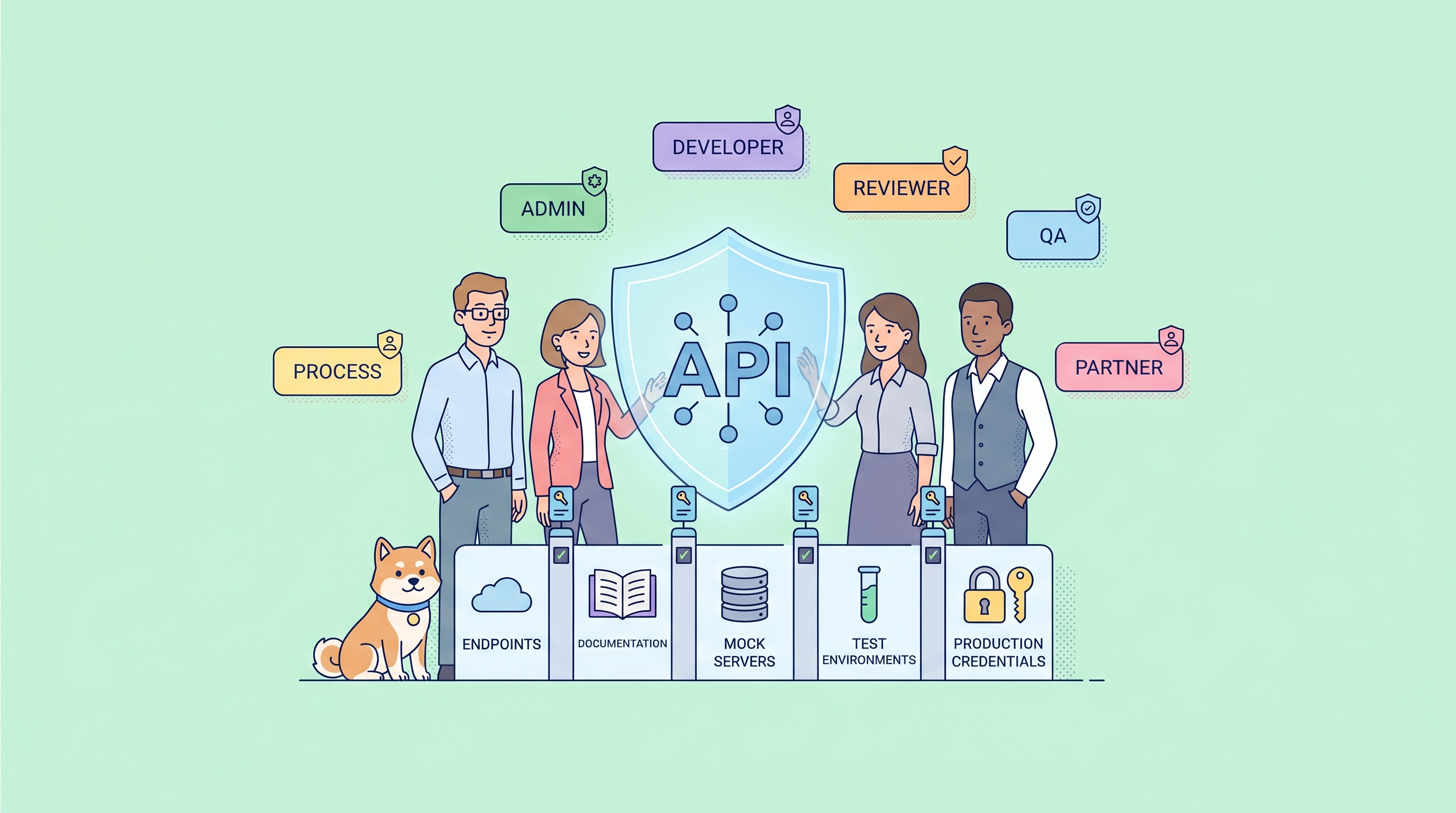
Role-Based Access Control (RBAC) is a security model that assigns permissions to roles rather than individual users, making API team management scalable and auditable. A proper RBAC system for API collaboration should offer three-level permission hierarchy (Organization → Team → Project), custom role creation for granular control, and enterprise integrations like SSO and SCIM. Apidog provides a comprehensive RBAC framework with 12 built-in roles across three levels and custom project roles for enterprise teams—giving you precise control over who can view, edit, test, or manage your API assets.
Why RBAC Matters for API Teams
API development involves multiple stakeholders: developers writing endpoints, QA engineers running tests, product managers reviewing specifications, technical writers creating documentation, and security teams auditing access logs. Without structured access control, chaos follows.
The real-world problem: A junior developer accidentally modifies a production API specification. A contractor gains access to sensitive payment endpoints they shouldn't see. An ex-employee's credentials remain active months after departure. These aren't hypothetical scenarios—they happen daily in organizations managing APIs without proper RBAC.
An API Security Report found that 61% of API security incidents involve unauthorized access or excessive permissions. The root cause? Teams lack granular control over who can do what with their API assets.
RBAC solves this by:
- Assigning permissions to roles, not individuals — When someone joins or leaves, you update their role assignment, not 50 individual permissions
- Enforcing least-privilege access — Each role gets minimum necessary permissions
- Creating audit trails — Every action maps to a role, making compliance reporting straightforward
- Scaling team growth — Add 100 new team members by assigning roles, not configuring each account
Apidog's RBAC system addresses these challenges with a three-tier permission model designed specifically for API development workflows. Let's explore how it works.
The Three-Level Permission Hierarchy
Effective API collaboration RBAC requires permissions at multiple levels—not just "can access this project." Apidog implements a three-level hierarchy that mirrors how real organizations structure their work:
| Level | Scope | What It Controls |
|---|---|---|
| Organization | Company-wide | Billing, SSO, member management, custom role definitions |
| Team | Department/business unit | Team membership, project creation, team resources |
| Project | Individual API | Endpoints, tests, documentation, environments, branches |
Why three levels matter: Consider a fintech company with three teams—Payments, Identity, and Analytics. Each team manages multiple API projects. A developer in the Payments team should access Payment APIs but not Identity or Analytics projects. An organization admin needs to configure SSO for all teams but shouldn't necessarily edit every API endpoint. A QA engineer needs to run tests in specific projects without modifying API specifications.
This hierarchical approach prevents two common failures:
- Over-permissioning: Giving everyone admin access because fine-grained control is too complex
- Permission gaps: Creating team-level permissions but forgetting project-level granularity
Let's examine each level's roles and capabilities.
Organization-Level Roles and Permissions
Organization roles control company-wide settings—billing, identity provider integrations, member management, and resource governance. These roles affect all teams and projects under the organization umbrella.
Built-in Organization Roles
| Role | Description | Key Capabilities |
|---|---|---|
| Org Owner | Organization creator, highest authority | Rename/transfer/dismiss organization, full admin powers |
| Org Admin | Organization management | Manage members, teams, SSO, custom roles, organization resources |
| Org Member | Basic participant | Join teams, participate in projects (based on team/project permissions) |
| Billing Manager | Financial admin only | Manage subscriptions and billing (independent role, stacks with others) |
Permission Matrix: Organization Settings
| Feature | Org Owner | Org Admin | Org Member | Billing Manager |
|---|---|---|---|---|
| Access organization settings | ✅ | ✅ | ❌ | ❌ |
| Rename organization | ✅ | ✅ | ❌ | ❌ |
| Transfer organization ownership | ✅ | ❌ | ❌ | ❌ |
| Dismiss organization | ✅ | ❌ | ❌ | ❌ |
Permission Matrix: Team Management
| Feature | Org Owner | Org Admin | Org Member | Billing Manager |
|---|---|---|---|---|
| Create new team | ✅ | ✅ | ❌ | ❌ |
| Transfer team into organization | ✅ | ✅ | ❌ | ❌ |
| Transfer team out of organization | ✅ | ✅ | ❌ | ❌ |
Permission Matrix: Member Management
| Feature | Org Owner | Org Admin | Org Member | Billing Manager |
|---|---|---|---|---|
| Invite members | ✅ | ✅ | ❌ | ❌ |
| Change member organization role | ✅ | ✅ | ❌ | ❌ |
| Remove members | ✅ | ✅ | ❌ | ❌ |
The Org Member role is intentionally limited—it's a "passive recipient" role. Members can join teams and participate in projects based on team/project-level permissions, but cannot manage organization settings. This design prevents accidental organization-wide changes while enabling collaboration.
Billing Manager is unique: This role is independent and can stack with others. A user can be both Org Member and Billing Manager. Billing Managers cannot access organization settings, manage members, or configure SSO—they only handle subscriptions and billing.
Team-Level Roles and Permissions
Team roles control department-level operations—managing team members, creating projects, and configuring team resources. A team typically represents a business unit, product line, or functional group (e.g., Mobile Team, Backend Team, QA Team).
Built-in Team Roles
| Role | Description | Key Capabilities |
|---|---|---|
| Team Owner | Team creator, full team control | Transfer/dismiss team, manage all team settings |
| Team Admin | Team management | Invite members, assign roles, create/delete projects, manage team resources |
| Team Member | Team participant | View member details, participate in projects (based on project permissions) |
| Guest | External collaborator | No team management access, project access only |
Permission Matrix: Team Management
| Permission | Team Owner | Team Admin | Team Member | Guest |
|---|---|---|---|---|
| View Team Member details | ✅ | ✅ | ✅ | ❌ |
| Invite Team Members | ✅ | ✅ | ❌ | ❌ |
| Assign/Remove Team Member Roles | ✅ | ✅ | ❌ | ❌ |
| View Project Roles | ✅ | ✅ | ❌ | ❌ |
| Add/Edit/Delete Project Roles | ✅ | ✅ | ❌ | ❌ |
Permission Matrix: Team Settings
| Permission | Team Owner | Team Admin | Team Member | Guest |
|---|---|---|---|---|
| Edit Team Name | ✅ | ✅ | ❌ | ❌ |
| Transfer Team | ✅ | ❌ | ❌ | ❌ |
| Dismiss Team | ✅ | ❌ | ❌ | ❌ |
Permission Matrix: Project Operations
| Permission | Team Owner | Team Admin | Team Member | Guest |
|---|---|---|---|---|
| Create New Projects | ✅ | ✅ | ❌ | ❌ |
| Clone a Project | ✅ | ✅ | ❌ | ❌ |
| Delete/Transfer a Project | ✅ | ✅ | ❌ | ❌ |
| Edit Project Name | ✅ | ✅ | ❌ | ❌ |
The Guest role is powerful for external collaboration. Consultants, contractors, or cross-departmental collaborators can join a team as Guests with access only to specific projects—not team management features or other team projects. This prevents external users from seeing unrelated business areas.
Project-Level Roles and Permissions
Project roles control API-level operations—editing endpoints, running tests, managing environments, publishing documentation. This is where daily API work happens.
Built-in Project Roles
| Role | Description | Use Case |
|---|---|---|
| Admin | Full project control | Project lead, API owner |
| Editor | Modify content | Developers, QA engineers |
| Read-only | View and run only | Product managers, stakeholders, reviewers |
| Forbidden | No access | Restricted users, sensitive projects |
Permission Categories
Project permissions cover eight major categories:
- Branch Management — Sprint branches, merge requests, protected branches, API versions
- Endpoint Management — Endpoints, cases, schemas, components, requests, trash operations
- Automated Tests — Test scenarios, performance tests, scheduled tasks, test reports
- Environment Management — Global variables, parameters, environments, Vault Secrets
- Documentation Sharing — Quick share, publish doc sites
- Project Settings — Basic settings, member management, feature settings, notifications
- Request History — Local and shared request history
- Import/Export — Data import, scheduled import, export operations
Key Permission Highlights
| Permission | Admin | Editor | Read-only | Forbidden |
|---|---|---|---|---|
| View, Run Endpoints | ✅ | ✅ | ✅ | ❌ |
| Add, Delete, Modify Endpoints | ✅ | ✅ | ❌ | ❌ |
| Run Functional Tests | ✅ | ✅ | ✅ | ❌ |
| Add, Delete, Modify Test Scenarios | ✅ | ✅ | ❌ | ❌ |
| View, Edit Environment Variables | ✅ | ✅ | ✅ | ❌ |
| Add, Delete, Modify Environments | ✅ | ✅ | ❌ | ❌ |
| Access Vault Secrets | ✅ | ✅ | ❌ | ❌ |
| Publish Doc Sites Settings | ✅ | ❌ | ❌ | ❌ |
| Clone Project | ✅ | ❌ | ❌ | ❌ |
| Manage Project Members | ✅ | ❌ | ❌ | ❌ |
The "Forbidden" role is critical for security. When a team member shouldn't access a specific project (e.g., a sensitive payment API), assign Forbidden rather than removing them from the team. They remain team members but have zero access to that project.
Custom Roles for Granular Control
Built-in roles cover most scenarios, but enterprise teams often need fine-tuned permissions that don't fit standard categories. Apidog's Enterprise plan supports custom project roles with granular permission control.
When You Need Custom Roles
- QA Engineer role: Can run tests and modify test scenarios but cannot edit API specifications
- Technical Writer role: Can edit documentation but cannot modify endpoints or environments
- Security Auditor role: Read-only access plus ability to view Vault Secrets but cannot modify anything
- Intern role: Can view endpoints and run requests but cannot delete anything
Creating Custom Project Roles
Navigate to Team → Members → Roles and Permissions or Organization → Members → Roles and Permissions, then click + Add to create a custom role.
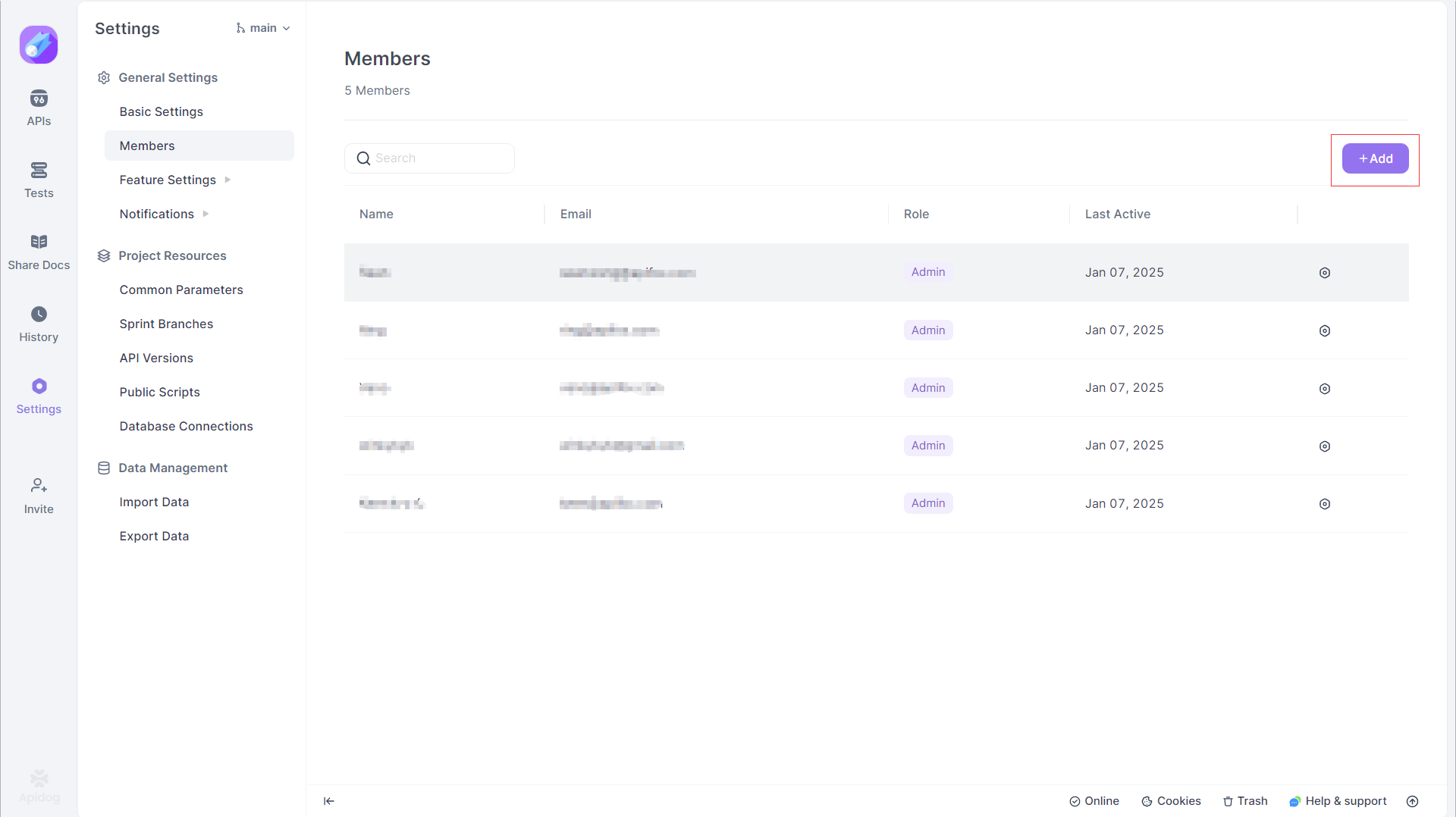
You can configure permissions across all eight categories:
| Category | Granular Controls |
|---|---|
| Branch Management | View branches, merge branches, submit merge requests, modify protected branches |
| Endpoint Management | View/run, add/modify/delete, generate code, manage cases, schemas, components, requests |
| Automated Tests | Run functional tests, run performance tests, modify scenarios, manage scheduled tasks, delete reports |
| Environment Management | View/edit current values, add/modify/delete, manage Vault Secrets |
| Documentation | View quick share, modify quick share, preview doc sites, publish settings |
| Project Settings | View settings, modify settings, manage members, configure notifications, manage import/export |
| Request History | View local history, share history, view shared history, delete shared history |
Custom Role Best Practices
- Start with a copy — Copy an existing role (Editor, Read-only) and modify it rather than starting from scratch
- Use "All Permissions" checkboxes — Checking "All Permissions" for a module automatically grants future permissions added to that module
- Test before deploying — Create a test project, assign the custom role, and verify permissions work as expected
- Document custom roles — Create a role naming convention and document what each custom role can do
- Review quarterly — Custom roles should be reviewed periodically to ensure they still match team needs
Enterprise Security Features
RBAC is foundational, but enterprise API programs need additional security capabilities. Apidog integrates enterprise-grade security features that work alongside RBAC.
Single Sign-On (SSO)
SSO with SAML 2.0 enables centralized authentication through identity providers like:
- Microsoft Entra ID (Azure Active Directory)
- Okta
- Google Workspace
- OneLogin
- Custom SAML 2.0 providers
Why SSO matters for RBAC:
- Eliminates local password risks — No weak passwords, no password sharing, no forgotten credentials
- Centralizes identity management — HR adds/removes users in one place; changes sync to Apidog
- Enforces multi-factor authentication — IdP-level MFA applies to Apidog access
- Simplifies onboarding — New employees sign in with corporate credentials, no separate account creation
SCIM Provisioning
SCIM (System for Cross-domain Identity Management) automates user provisioning:
| Capability | What It Does |
|---|---|
| Add users | When IdP creates a user, they're automatically added to Apidog organization |
| Remove users | When IdP deletes a user, they're removed from Apidog—no lingering access |
| Link accounts | SSO identities automatically link to existing Apidog accounts |
SCIM advantages:
- Immediate de-provisioning — Ex-employees lose access within minutes, not days
- Reduced admin overhead — No manual invitation/removal workflows
- Compliance alignment — Audit trails show exactly when access was granted/removed
- Error elimination — No forgotten accounts or manual mistakes
Group Mapping to Teams
Apidog supports SAML group mapping—IdP groups automatically map to Apidog teams:
- Configure group claims in your IdP (e.g., Azure AD groups)
- Map each IdP group to an Apidog team
- Set team role permissions for each group
Example: Azure AD group "API Developers" maps to Apidog "Backend Team" with Team Member role. Azure AD group "API Admins" maps to "Platform Team" with Team Admin role.
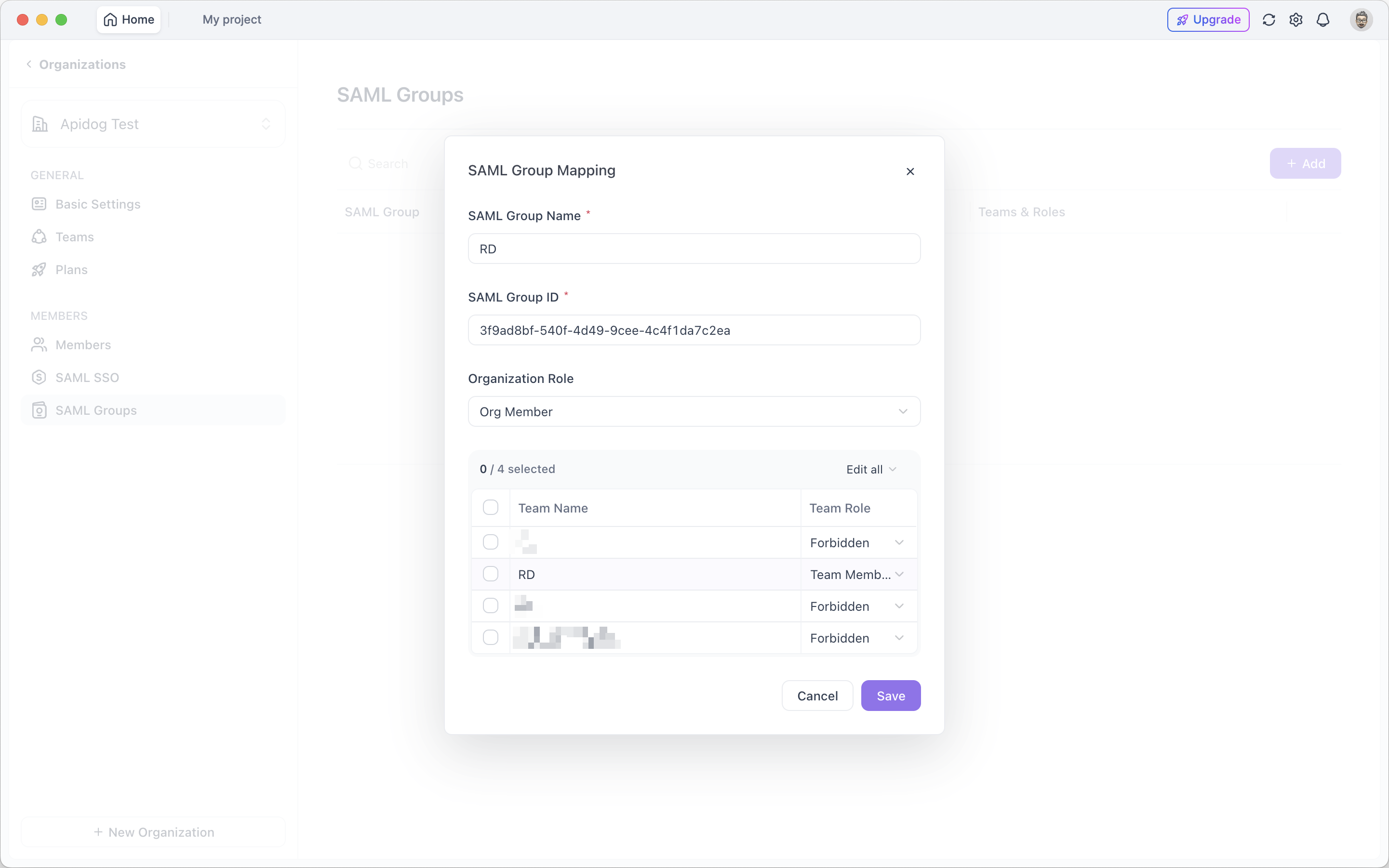
When employees sign in via SSO, they automatically join the correct teams with appropriate permissions—no manual assignment needed.
Vault Secrets
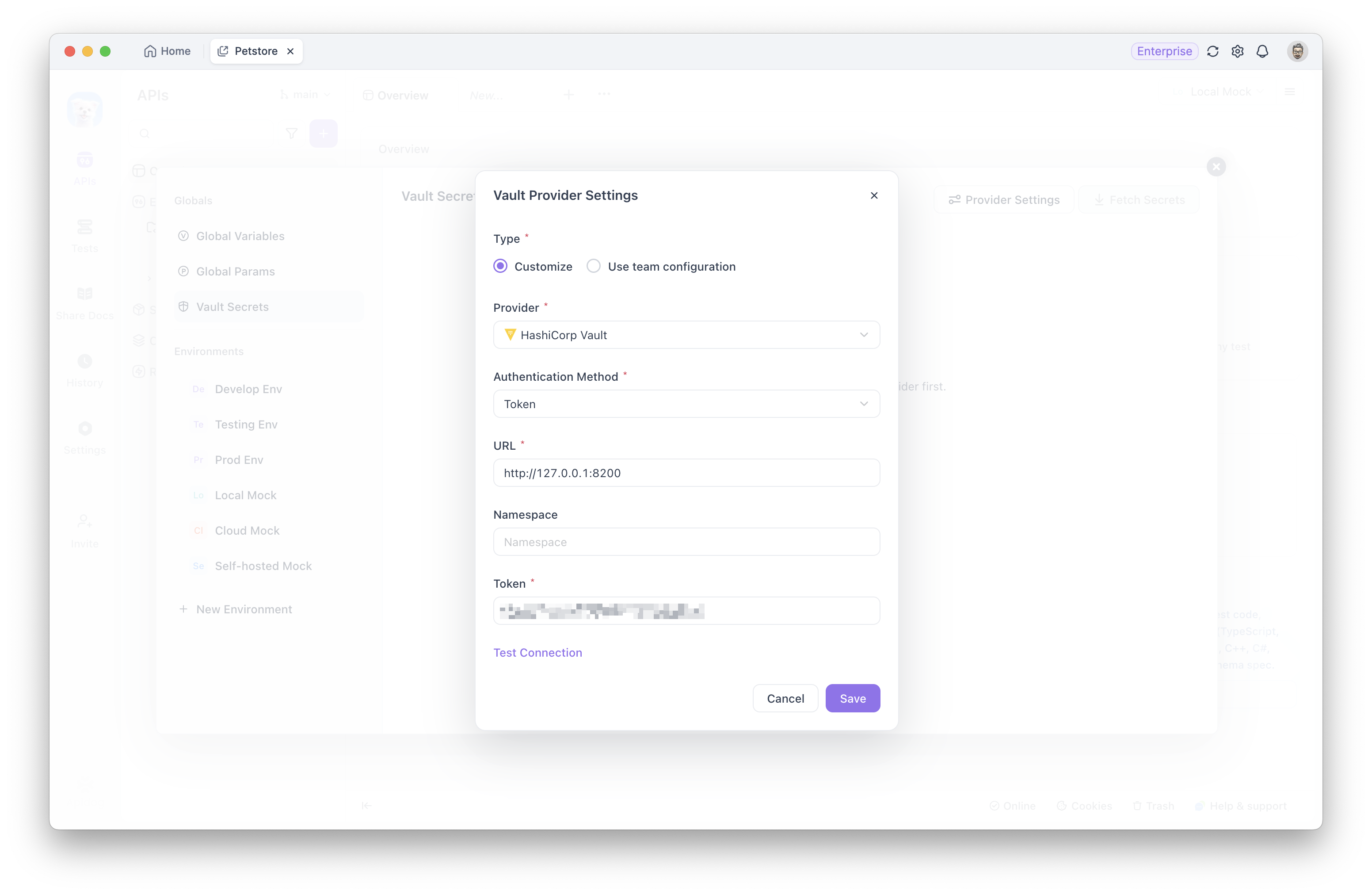
Vault Secrets provides centralized credential management:
| Feature | Security Benefit |
|---|---|
| Encrypted storage | API keys, passwords, tokens stored encrypted, not in environment files |
| Reference-based access | Users reference secrets by name, never see actual values |
| Role-based visibility | Only Admins and Editors can add/modify Vault Secrets |
| Audit trail | Every secret access is logged for compliance |
Vault Secrets vs. local environment files:
| Approach | Security Risk |
|---|---|
| Local environment files | Secrets visible to anyone with project access, potentially shared via Git |
| Vault Secrets | Centralized, encrypted, role-controlled, audited |
How to Set Up RBAC in Apidog
Let's walk through setting up a complete RBAC structure for a typical API team.
Step 1: Define Your Team Structure
Before configuring roles, map your organization:
Organization: Your Company
├── Team: Payments
│   ├── Project: Payment Gateway API
│   ├── Project: Fraud Detection API
│   └── Project: Billing Service API
├── Team: Identity
│   ├── Project: Auth Service API
│   └── Project: User Management API
└── Team: Analytics
    ├── Project: Metrics API
    └── Project: Reporting API
Step 2: Configure Organization Roles
- Org Owner (1 person): CEO, CTO, or Platform Lead
- Org Admins (2-3 people): Engineering managers, Security leads
- Org Members (everyone else): Developers, QA, PMs, writers
Step 3: Configure Team Roles
For each team:
| Team | Team Owner | Team Admin | Team Members |
|---|---|---|---|
| Payments | Payments Lead | Payments Manager | 5 developers, 2 QA |
| Identity | Identity Lead | Identity Manager | 3 developers, 1 QA |
| Analytics | Analytics Lead | Analytics Manager | 2 developers |
Step 4: Configure Project Roles
For each project, assign roles based on responsibilities:
| Person | Payment Gateway API | Fraud Detection API | Auth Service API |
|---|---|---|---|
| Senior Dev A | Admin | Editor | Forbidden |
| Senior Dev B | Editor | Admin | Forbidden |
| Junior Dev C | Editor | Read-only | Forbidden |
| QA Engineer | Editor | Editor | Forbidden |
| Product Manager | Read-only | Read-only | Forbidden |
| Contractor | Editor | Forbidden | Forbidden |
Step 5: Invite Members with Pre-Configured Roles
When inviting users, you can set roles immediately:
- Team invitation — Invite to team with team role + default project role
- Project invitation — Invite to specific project with project role + automatically added to team as Member
For external collaborators: Use project-level invitation with Other Projects = Forbidden to restrict visibility to only the invited project.
Step 6: Configure SSO and SCIM (Enterprise)
- Set up SAML SSO in Organization Settings
- Configure SCIM token from IdP dashboard
- Map IdP groups to Apidog teams
- Test with a pilot group before rolling out
Best Practices for API Collaboration Security
1. Apply Least-Privilege Principle
Start with minimum permissions, add as needed:
- New team members: Read-only → increase based on demonstrated need
- Contractors: Forbidden for most projects → Editor for assigned projects only
- QA engineers: Editor for tests, Read-only for specifications
2. Separate Development and Production Access
Create separate projects or branches for development/staging/production:
| Environment | Developer Access | QA Access | Admin Access |
|---|---|---|---|
| Development | Editor | Editor | Admin |
| Staging | Read-only | Editor | Admin |
| Production | Forbidden | Read-only | Admin |
3. Use Custom Roles for Specialized Functions
Don't force people into generic roles when their work is specialized:
- Security team: Read-only + Vault Secrets access
- Technical writers: Editor for documentation, Read-only for endpoints
- Performance engineers: Editor for tests, Read-only for specifications
4. Review Permissions Quarterly
RBAC isn't set-and-forget. Schedule quarterly reviews:
- Check for accumulated permissions (role creep)
- Verify contractor access hasn't extended beyond project scope
- Update custom roles for new features or changed responsibilities
- Remove access for departed employees immediately via SCIM
5. Document Role Definitions
Create a clear document showing:
- What each role can and cannot do
- Who should have each role
- How to request role changes
- Escalation paths for access disputes
6. Enable Audit Logging
Enterprise plans include audit logs tracking:
- Who accessed what
- When they accessed it
- What actions they performed
- Role assignments and changes
Use audit logs for:
- Compliance reporting
- Security incident investigation
- Permission optimization analysis
RBAC Comparison: Apidog vs Other Tools
How does Apidog's RBAC compare to other API collaboration platforms?
| Feature | Apidog | Postman | SwaggerHub | Bruno |
|---|---|---|---|---|
| Permission Levels | 3 (Org/Team/Project) | 2 (Org/Team) | 2 (Org/Workspace) | 1 (Git-based) |
| Built-in Roles | 12 roles | 5 roles | 4 roles | None (Git permissions) |
| Custom Roles | ✅ (Enterprise) | ✅ (Enterprise) | ✅ (Enterprise) | ❌ |
| SSO/SAML | ✅ | ✅ | ✅ | ❌ |
| SCIM Provisioning | ✅ | ✅ | ❌ | ❌ |
| Group Mapping | ✅ | ✅ | ✅ | ❌ |
| Vault Secrets | ✅ | ✅ (Enterprise) | ❌ | ❌ |
| Project Isolation | ✅ (Forbidden role) | Limited | Limited | Git-based |
| External Collaborator Control | ✅ (Guest + Forbidden) | Limited | Limited | Git access control |
Apidog advantages:
- Three-level hierarchy — More granular than Postman/SwaggerHub's two levels
- Forbidden role — Explicit no-access control within teams
- Guest role — External collaborators with controlled visibility
- SCIM integration — Automated provisioning/de-provisioning
- Unified platform — RBAC covers design, testing, documentation, mocking in one tool
When Apidog RBAC is ideal:
- Large organizations with multiple API teams
- Enterprise compliance requirements (SSO, SCIM, auditability)
- Cross-functional teams (dev, QA, PM, security, writers)
- External collaborators requiring controlled access
- Sensitive APIs requiring strict access boundaries
Access control addresses one part of that compliance picture, butwhy enterprises are moving off Postman Cloudcovers the broader data-residency and audit requirements that role assignments alone cannot resolve.
Conclusion
Role-Based Access Control transforms API collaboration from chaos to governance. Without RBAC, team growth means permission complexity, security risks, and compliance headaches. With proper RBAC, you scale confidently—adding team members, contractors, and stakeholders without losing control.
Key takeaways:
- Three-level hierarchy (Organization → Team → Project) matches how real teams work
- 12 built-in roles cover standard scenarios without custom configuration
- Custom project roles enable fine-tuned permissions for specialized needs
- SSO and SCIM integrate with enterprise identity management
- Vault Secrets centralize credential management with role-based access
- Forbidden role provides explicit no-access control for sensitive projects
- Group mapping automates team assignment based on IdP groups
Apidog's RBAC system gives you the tools to implement all seven principles—whether you're a five-person startup or a thousand-person enterprise.
FAQ: Role-Based Access Control for API Teams
What is Role-Based Access Control (RBAC) in API development?
RBAC in API development is a permission model where access rights are assigned to roles rather than individual users. Users receive roles (like Admin, Editor, Read-only), and those roles determine what API resources they can view, modify, test, or manage. This simplifies team management because changing someone's role updates all their permissions at once.
Why does API collaboration need three levels of permissions?
API teams work at three levels: organization-wide (billing, SSO), team-wide (project creation, member management), and project-specific (endpoint editing, test execution). Three-level RBAC matches this structure, preventing over-permissioning (giving too much access) and permission gaps (missing necessary controls).
What's the difference between Organization Admin and Team Admin?
Organization Admins manage company-wide settings: member invitations, team creation, SSO configuration, custom role definitions. Team Admins manage team-specific operations: inviting team members, creating projects within the team, configuring team resources. Organization Admins have broader scope; Team Admins have focused team control.
How does the Forbidden project role work?
The Forbidden role explicitly denies all access to a specific project. A user can remain a team member but have zero visibility into Forbidden projects. This is useful for sensitive APIs (payment systems, security services) where certain team members shouldn't see any project content.
What's the Guest team role for?
Guest is for external collaborators (contractors, consultants, cross-departmental secondees) who need project access but shouldn't manage teams. Guests cannot see team member details, invite members, or access team settings—they only participate in projects based on project-level permissions.
Can I create custom roles with specific permissions?
Yes, Apidog Enterprise plans support custom project roles. You can define roles with granular permissions across eight categories: branch management, endpoint management, automated tests, environment management, documentation sharing, project settings, request history, and import/export. Create roles like "QA Engineer" (test editing only) or "Technical Writer" (documentation editing only).
How does SSO integration work with RBAC?
SSO centralizes authentication through identity providers (Okta, Microsoft Entra ID). When SSO is enabled, team members sign in with corporate credentials. SSO can also map IdP groups to Apidog teams and roles—automatically assigning correct permissions based on group membership.
What is SCIM provisioning and why use it?
SCIM automates user lifecycle management. When someone joins your company, the IdP automatically provisions their Apidog account. When someone leaves, SCIM immediately removes their access. This eliminates manual invitation/removal workflows and prevents lingering ex-employee credentials.
How do Vault Secrets work with RBAC?
Vault Secrets store encrypted credentials (API keys, passwords, tokens) centrally. Users reference secrets by name without seeing actual values. RBAC controls who can add, modify, or access Vault Secrets—typically Admins and Editors. This prevents credential exposure through environment files or Git repositories.
Should contractors have Org Member or Guest roles?
Contractors should typically be Guests at the team level with Editor or Read-only at the project level. Use project-level invitations with "Other Projects = Forbidden" to restrict their visibility to only assigned projects, preventing access to unrelated business areas.