To run ERNIE 5.5 Flash locally, install vLLM 0.32.0 plus Baidu’s vLLM-ERNIE plugin, then run vllm serve baidu/ERNIE-5.5-Flash-Base with data and expert parallelism on a multi-GPU node. You get an OpenAI-compatible server on port 8000. The catch: today’s open weights are the Base model, a pretraining checkpoint that continues text, not a chat model.
Below: what you can download, the hardware Baidu lists, the exact serve commands and how to test the endpoint. Every command and figure below comes from Baidu’s Hugging Face model card and the vLLM-ERNIE repository, checked on November 12, 2026.
New to the model? Start with what ERNIE 5.5 Flash is. If you want the chat model without a GPU cluster, the ERNIE 5.5 Flash API guide is the faster route.
What can you run locally today?
You can run ERNIE 5.5 Flash Base, released on Hugging Face in FP8 and BF16. It’s a 280B-parameter sparse mixture-of-experts model with 14B parameters active per token, trained on 33.5T tokens. The chat-tuned ERNIE 5.5 Flash Preview is API-only for now; Baidu says its weights are coming “soon” under Apache 2.0.
Here’s how the two releases compare for self-hosting:
| ERNIE 5.5 Flash Base | ERNIE 5.5 Flash Preview | |
|---|---|---|
| What it is | Checkpoint at the end of pretraining | First post-trained (chat, reasoning, agent) model |
| Weights | Hugging Face and ModelScope, FP8 and BF16 | Not released as of Nov 12, 2026 |
| Endpoint you call | /v1/completions (text continuation) |
Chat completions with reasoning and tools |
| License | ERNIE 5.5 Flash Base Model License v1.0 | Apache 2.0 promised at release |
| Where to use it now | Your own GPUs | Qianfan API, OpenRouter |
Today Baidu’s ERNIE-5.5-Flash collection holds only the two Base checkpoints, and the vLLM-ERNIE README marks the chat model “Coming soon”. The Preview release post gives no date.
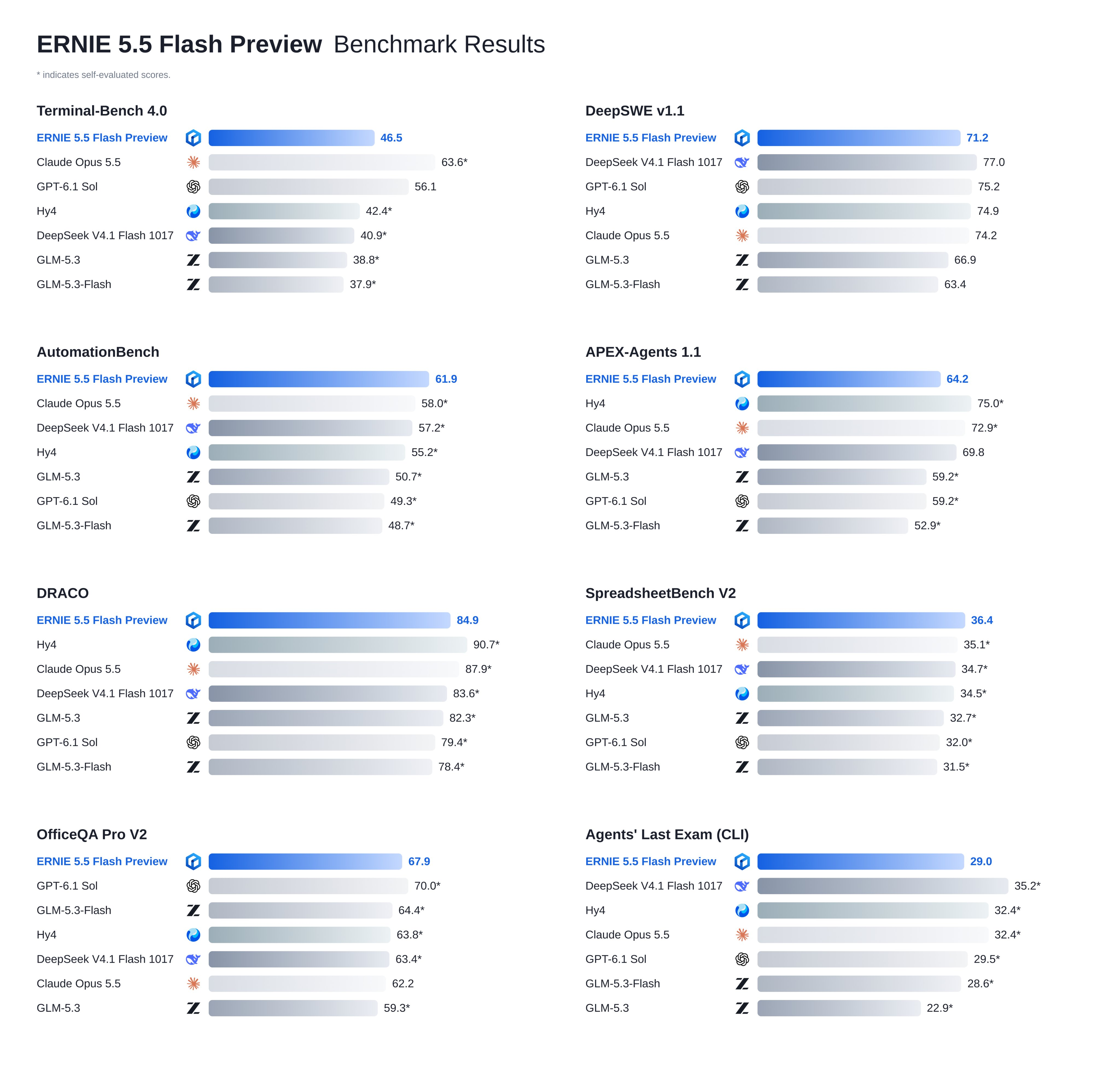
If you want a coding assistant today, a local Base model won’t give you one. If you want a starting point for fine-tuning or few-shot research, Base is what Baidu built it for.
ERNIE 5.5 Flash hardware requirements
The FP8 weights take about 280 GB of GPU memory and the BF16 weights about 560 GB, so this is a multi-GPU server job, not a laptop one. The vLLM-ERNIE README lists the smallest GPU counts that hold the weights, and the plugin runs on NVIDIA GPUs only.
| GPU memory per card | FP8 (~280 GB weights) | BF16 (~560 GB weights) |
|---|---|---|
| 288 GB | 2 GPUs | 4 GPUs |
| 192 GB | 4 GPUs | 8 GPUs (or 2 nodes x 4 GPUs) |
| 80 GB | 8 GPUs | 2 nodes x 8 GPUs |
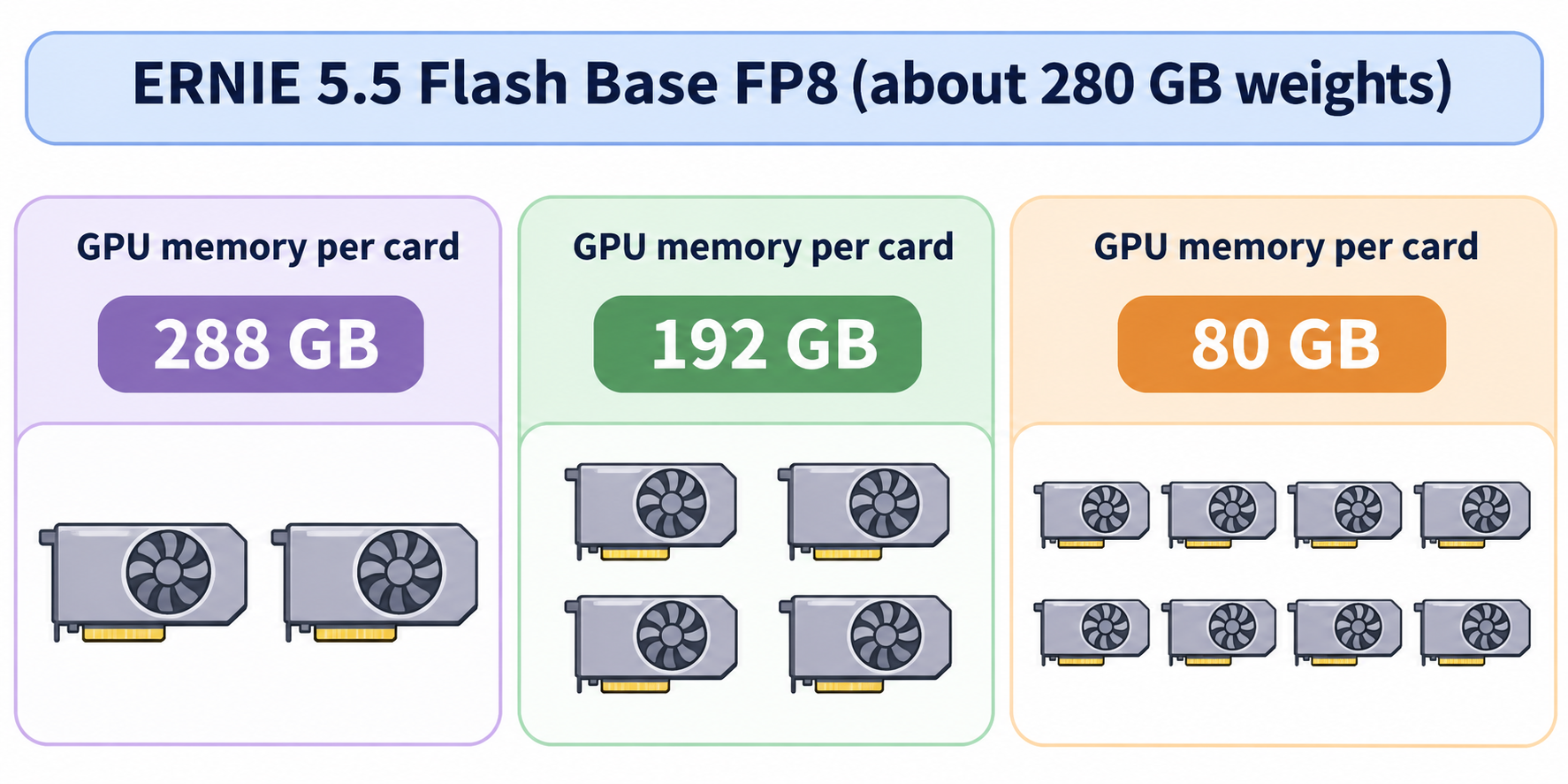
Those are the minimums to load the weights. The KV cache needs room on top, which is why the context length you can serve depends on your cards:
- 80 GB GPUs: serve FP8 on 8 GPUs with
--data-parallel-size 8and--gpu-memory-utilization 0.93. Up to 262,144 tokens fits; 1M does not. - 1M-token context: Baidu’s values are for GPUs with 184 GiB of memory, with utilization lowered to 0.85 because a 1M-token prefill needs tens of GB of temporary memory.
- Architecture matters: the FP8 commands pass
--moe-backend humming, which supports the model’s SiTU activation with FP8 weights on Blackwell GPUs. On Hopper GPUs, drop that flag and keep vLLM’s default MoE kernel.
“Locally” means hardware you control: a rented 8-GPU node, an on-prem server or a lab cluster.
Install vLLM and the ERNIE plugin
vLLM doesn’t support the ERNIE 5.5 architecture (Ernie5_5_MoeForCausalLM) out of the box. Baidu ships it as a plugin that runs on the released vLLM 0.32.0 wheel, unmodified. Create a Python 3.12 environment and install both:
uv venv --python 3.12
source .venv/bin/activate
uv pip install vllm==0.32.0
uv pip install git+https://github.com/baidu/vLLM-ERNIE.git
The plugin loads through vLLM’s vllm.general_plugins entry point in every vLLM process. If vllm serve later says Model architectures ['Ernie5_5_MoeForCausalLM'] are not supported, the plugin isn’t installed in the environment that runs vllm, or VLLM_PLUGINS is set without ernie in it.
To pull weights from ModelScope instead of Hugging Face, set VLLM_USE_MODELSCOPE=True. The repo names are the same on both hubs. If you’re new to vLLM itself, our vLLM overview explains the server and its OpenAI-compatible API.
The vLLM serve command for ERNIE 5.5 Flash
This is the FP8 command from the vLLM-ERNIE README, for one 4-GPU node at the 128K training context with ECHO speculative decoding on:
export VLLM_ENGINE_READY_TIMEOUT_S=3600
vllm serve baidu/ERNIE-5.5-Flash-Base \
    --host 0.0.0.0 \
    --port 8000 \
    --data-parallel-size 4 \
    --enable-expert-parallel \
    --moe-backend humming \
    --kv-cache-dtype fp8 \
    --max-model-len 131072 \
    --speculative-config '{"method":"mtp","num_speculative_tokens":2}'
What each choice does, per Baidu’s notes:
- Data parallel attention plus expert parallel MoE (
--data-parallel-size 4 --enable-expert-parallel) holds the most KV cache and gives the highest throughput. Tensor parallelism (--tensor-parallel-size2, 4 or 8) lowers latency at low concurrency but holds less KV cache. - FP8 KV cache (
--kv-cache-dtype fp8) stores the cache in FP8;autokeeps it in BF16. - ECHO speculative decoding reuses the model’s own final layer as a built-in draft. It drafts 2 steps here; 1 or 3 also work. Drop
--speculative-configto serve without a draft.
The model card shows a shorter variant on port 30000 without the speculative config.
Lock it down. These commands bind 0.0.0.0 with no authentication. Baidu’s README says to add --api-key <key> or bind 127.0.0.1 unless the network is trusted. Do one of the two before you expose the port.
BF16 and 1M context
BF16 runs across two 4-GPU nodes (DP8 plus EP8) with --data-parallel-size 8, --data-parallel-size-local 4, --data-parallel-address ${HEAD_IP} and --data-parallel-hybrid-lb; the second node adds --data-parallel-start-rank 4. Copy the full command from the README; it also sets the network interface between nodes.
For the full 1,048,576-token window, pass --max-model-len 1048576 and --gpu-memory-utilization 0.85, and lower --max-num-seqs so each rank’s KV cache holds whole 1M-token requests.
Call the OpenAI-compatible endpoint
vLLM exposes OpenAI-style routes, but a base model has no chat template, so you call /v1/completions with a raw prompt. For few-shot use, put the examples in the prompt and stop at the end of one answer:
curl http://127.0.0.1:8000/v1/completions \
    -H 'Content-Type: application/json' \
    -d '{
        "model": "baidu/ERNIE-5.5-Flash-Base",
        "prompt": "Question: What is 15% of 240?\nAnswer:",
        "max_tokens": 64,
        "temperature": 0,
        "stop": ["\n"]
    }'
Baidu’s README says the completion text comes back as 36. Three details trip people up:
- Pass
"temperature": 0for greedy decoding. The model’sgeneration_config.jsonsetsdo_sample=false,temperature=1.0andtop_p=0.95. vLLM applies the temperature and top_p but ignoresdo_sample, so you sample unless you override it. - Don’t add
<|ERNIE_MASK|>yourself. The tokenizer prepends it (token id 2) to completion prompts. - Match the model name. Use
baidu/ERNIE-5.5-Flash-Base-BF16when you serve the BF16 weights.
Any OpenAI SDK works if you point base_url at http://<host>:8000/v1 and call completions, not chat completions.
Base vs Preview: which should you use?
Use Base when you plan to train on top of it; use Preview when you need a working assistant now. Base gives you full control and data that never leaves your servers. Preview gives you chat, reasoning and tool calling, through Qianfan or OpenRouter only.
When the Preview weights land, the plugin is already wired for them. The README documents the extra flags, marked “Coming soon”: --reasoning-parser ernie5 --tool-call-parser ernie5 --enable-auto-tool-choice, plus a DSpark draft model for speculative decoding. Thinking will come back in reasoning_content and tool calls in message.tool_calls, so the same server you build today becomes a chat backend with a weight swap and three flags.
The license is the other difference. Base ships under the ERNIE 5.5 Flash Base Model License Agreement v1.0, not Apache 2.0. Read the full license before you build a product on it. On November 12, 2026 it said:
- Non-commercial use is free, with no notice required.
- Commercial use where the related product earns up to US$50 million a year is free of license charges, but you must display “Powered by ERNIE” and send Baidu a one-time notice.
- Above US$50 million a year, you need Baidu’s separate written authorization first.
- The license’s “Territory” excludes the European Union, the United Kingdom and South Korea.
For a smaller open-weights model you can self-host with fewer GPUs, see our guide to self-hosting GLM-5.3.
Let your coding agent test the endpoint with Apidog CLI
A fresh vLLM deployment needs a smoke test you can rerun after every flag change: status, response schema and tokens per second. Hand that to your coding agent and Apidog CLI instead of retyping curl.
Set up the CLI once:
npm install -g apidog-cli@latest
apidog login --with-token <YOUR_TOKEN>
npx -y skills add https://apidog.com   # pick your agent when prompted
Then give Claude Code, Codex or Cursor one prompt:
In Apidog project <projectId>, create an environment "ernie-local" with base URL
http://<gpu-host>:8000. Add a test case for POST /v1/completions with model
baidu/ERNIE-5.5-Flash-Base, prompt "Question: What is 15% of 240?\nAnswer:",
max_tokens 64, temperature 0. Assert status 200, that choices[0].text exists,
and that usage.completion_tokens > 0; log completion_tokens divided by the
response time in seconds as tokens/s. Run it and summarize the result.
The agent reads the payload schema, validates it, writes the case and runs it:
apidog environment create ernie-local --project <projectId> --base-url http://<gpu-host>:8000
apidog cli-schema get test-case-create
apidog cli-schema validate test-case-create --file case.json
apidog test-case create --project <projectId> --file case.json
apidog run --test-case <caseId> --project <projectId> -e <envId> -r cli,json
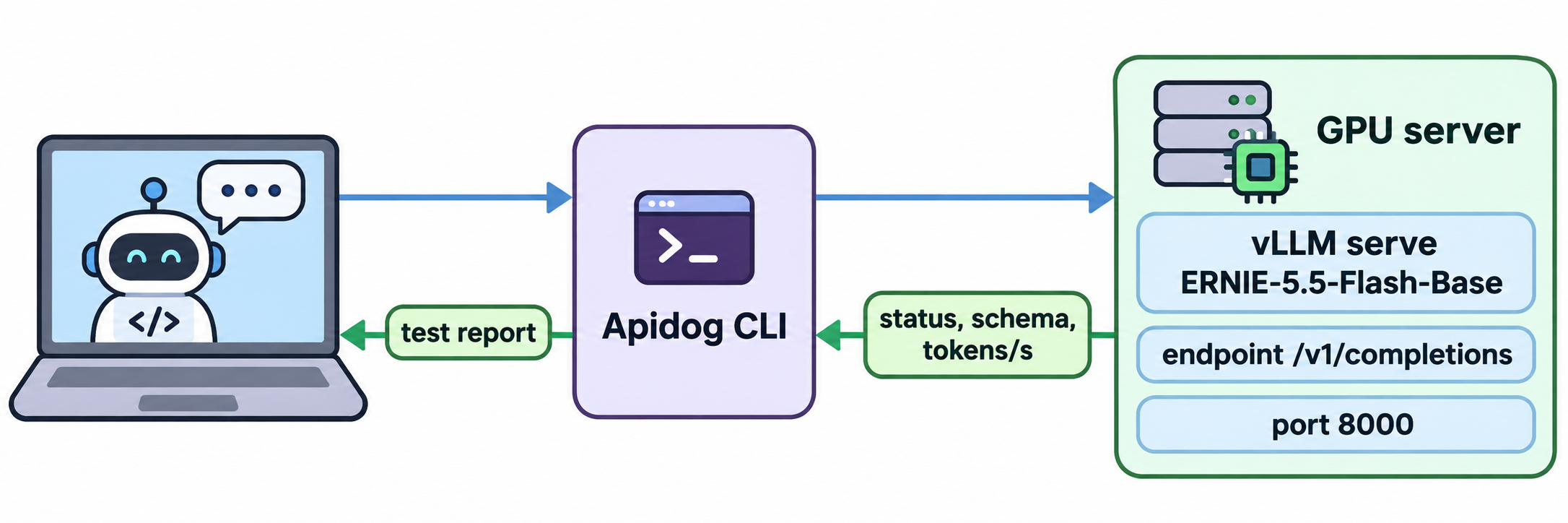
Run the CLI from a machine that can reach port 8000. If you set --api-key on the server, ask the agent to store it as an environment variable and send it as a Bearer token. Rerun the same case after you switch --tensor-parallel-size, drop speculative decoding or raise --max-model-len, and you get a like-for-like comparison. Add -r junit and the same run goes into CI. For the agent setup step by step, see Apidog CLI in Claude Code. The Apidog Free plan covers up to 4 users.
FAQ
Can I run ERNIE 5.5 Flash on a single consumer GPU? No. The FP8 weights are about 280 GB, and Baidu’s smallest listed setup is 2 GPUs with 288 GB each. With 80 GB cards you need 8 of them. Use the Preview through the API if you don’t have that hardware.
Are the ERNIE 5.5 Flash Preview weights available? Not as of November 12, 2026. Baidu says they will be open-sourced under Apache 2.0 soon, and the vLLM-ERNIE plugin lists the chat model as “Coming soon”. Only the Base weights (FP8 and BF16) are on Hugging Face.
Why does /v1/chat/completions fail on the Base model? Base has no chat training or chat template. Baidu serves it through /v1/completions with a raw text prompt. Put few-shot examples in the prompt and use a stop sequence.
Does vLLM support ERNIE 5.5 natively? Not in core vLLM. You need Baidu’s vLLM-ERNIE plugin on top of vLLM 0.32.0. It runs on NVIDIA GPUs only. SGLang also serves the model through a dedicated Docker image named on the model card.
Can I use ERNIE 5.5 Flash Base commercially? Yes, under conditions. Products earning up to US$50 million a year can use it free of license charges with “Powered by ERNIE” attribution and a one-time notice to Baidu. Above that you need written authorization, and the license territory excludes the EU, UK and South Korea.