The ERNIE 5.5 Flash API is live in two places: Baidu Qianfan, where you call ernie-5.5-flash-preview at https://qianfan.baidubce.com/v2/chat/completions, and OpenRouter, where baidu/ernie-5.5-flash-preview:free costs $0 per token. Both speak the OpenAI Chat Completions format, so you can point the official OpenAI SDK at either one by changing the base URL, the key and the model name.
Below: keys, first requests in curl, Python and JavaScript, streaming, reasoning tokens, the 1M window, and errors. Every field and limit comes from the official Qianfan and OpenRouter pages, checked on November 12, 2026.
For background, read what ERNIE 5.5 Flash is, or the ERNIE 5.1 API guide for the previous generation.
What is the ERNIE 5.5 Flash API?
The ERNIE 5.5 Flash API is Baidu’s hosted endpoint for ERNIE 5.5 Flash Preview, a sparse mixture-of-experts model with 280B total parameters, 14B active per token and a 1M-token context. Baidu released it on November 11, 2026, as the first post-trained model built on ERNIE 5.5 Flash Base, and serves it through Qianfan and OpenRouter.
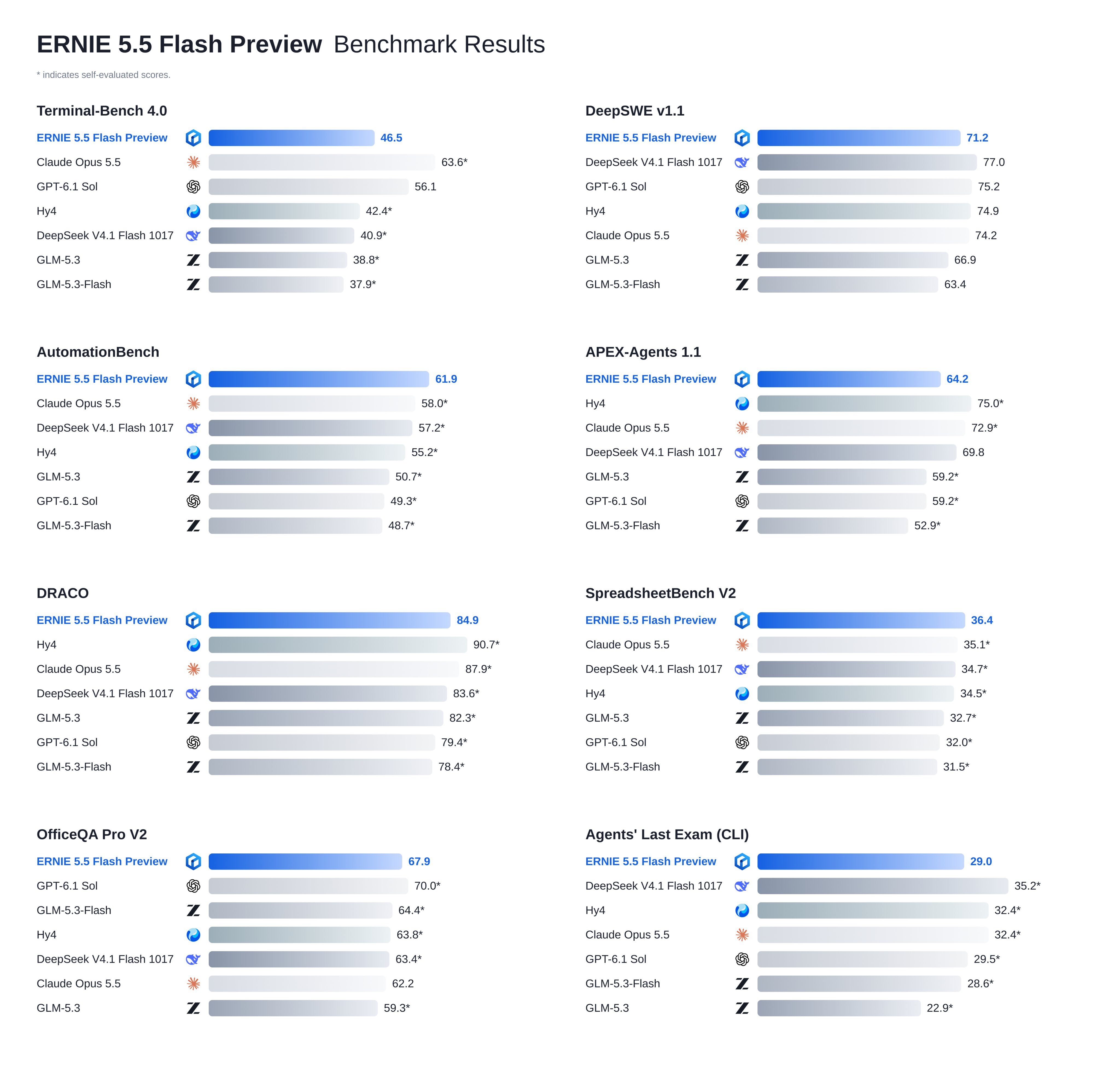
Baidu’s release post pitches it for coding, agentic work, 3D modeling, knowledge work and content creation. It calls the model an intermediate checkpoint, so expect behavior to shift, and says weights will be open-sourced under Apache 2.0 “soon”, with no date.
Qianfan vs OpenRouter: which endpoint should you use?
Here’s how the two routes compare, using what each platform publishes today.
| Baidu Qianfan | OpenRouter | |
|---|---|---|
| Base URL | https://qianfan.baidubce.com/v2 |
https://openrouter.ai/api/v1 |
| Model ID | ernie-5.5-flash-preview |
baidu/ernie-5.5-flash-preview:free |
| Auth header | Authorization: Bearer <Qianfan API key> |
Authorization: Bearer <OpenRouter key> |
| Context | 1M input, 1M output | 1,024,000 tokens |
| Price | Charged to your Baidu AI Cloud balance; the console shows the rate | $0 on the :free variant |
| Default limits | 300 requests/min, 3,000,000 tokens/min | 20 requests/min; 50/day, or 1,000/day after $10 in credits |
| Reasoning | Always on, effort fixed at high |
Controlled with the reasoning object |
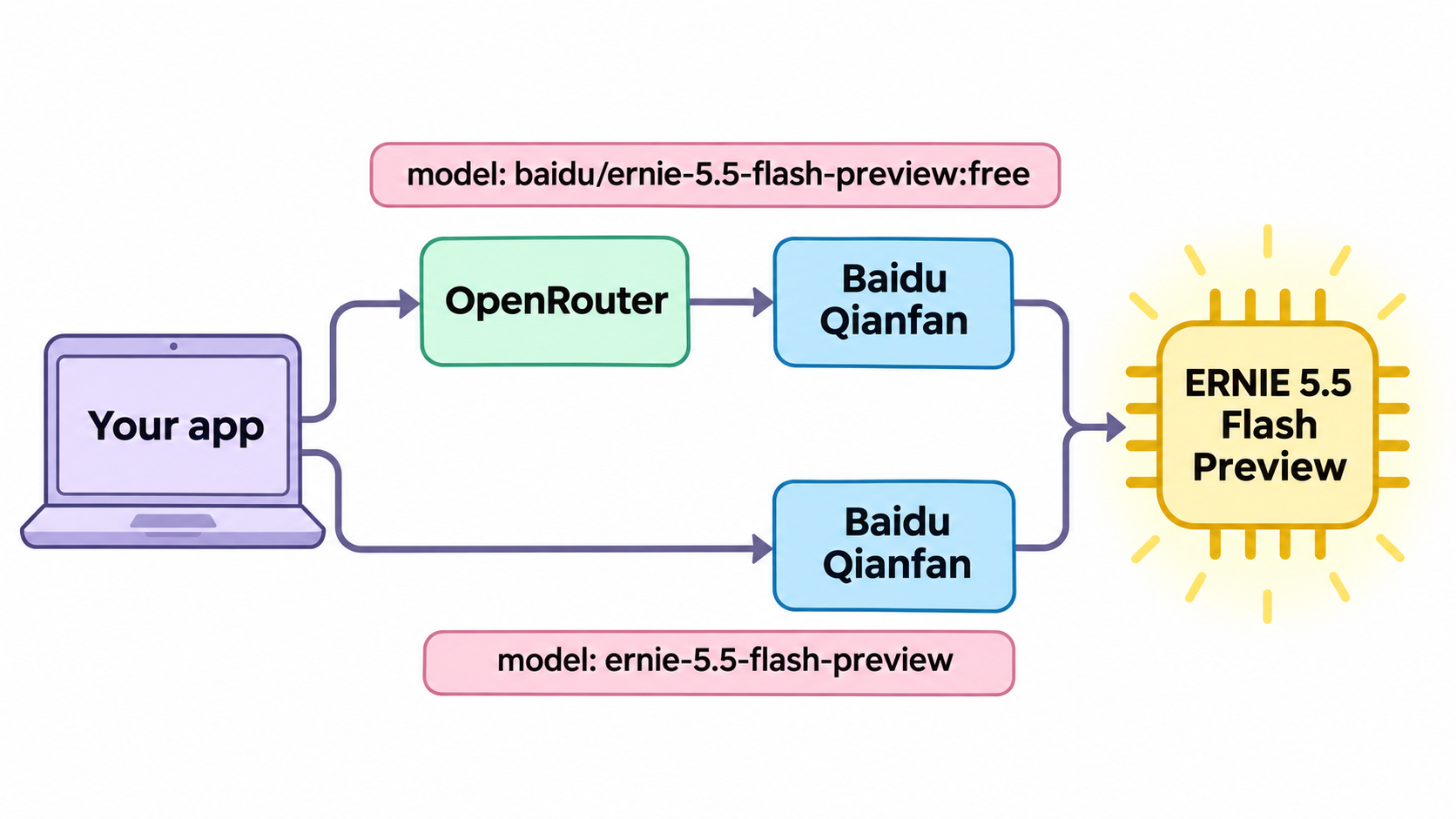
OpenRouter lists one provider, Baidu Qianfan, so both routes hit the same backend. The real difference is limits: OpenRouter’s free tier suits prototyping and evals, Qianfan’s 300 RPM default suits production. The free ERNIE 5.5 Flash guide covers the $0 routes in more depth.
How do you get an ERNIE 5.5 Flash API key?
Qianfan
- Sign in to the Qianfan console with a Baidu AI Cloud account.
- Open API Key under system management and create a key. It looks like
bce-v3/ALTAK-.... - Export it:
export QIANFAN_API_KEY="bce-v3/ALTAK-...".
Qianfan charges calls to your Baidu AI Cloud balance. A negative balance returns 403 account_overdue, so top up before you load test.
OpenRouter
- Create an account and a key at OpenRouter.
- Export it:
export OPENROUTER_API_KEY="sk-or-v1-...". - Use the model ID
baidu/ernie-5.5-flash-preview:free.
Send your first ERNIE 5.5 Flash request
curl
Qianfan:
curl https://qianfan.baidubce.com/v2/chat/completions \
  -H "Content-Type: application/json" \
  -H "Authorization: Bearer $QIANFAN_API_KEY" \
  -d '{
    "model": "ernie-5.5-flash-preview",
    "messages": [
      {"role": "system", "content": "You are a concise senior engineer."},
      {"role": "user", "content": "Write a Python function that validates an ISO 8601 date."}
    ]
  }'
OpenRouter:
curl https://openrouter.ai/api/v1/chat/completions \
  -H "Content-Type: application/json" \
  -H "Authorization: Bearer $OPENROUTER_API_KEY" \
  -d '{
    "model": "baidu/ernie-5.5-flash-preview:free",
    "messages": [
      {"role": "user", "content": "Write a Python function that validates an ISO 8601 date."}
    ]
  }'
Python
Install the SDK with pip install openai, then swap the base URL per provider:
import os
from openai import OpenAI

PROVIDERS = {
    "qianfan": ("https://qianfan.baidubce.com/v2", "QIANFAN_API_KEY", "ernie-5.5-flash-preview"),
    "openrouter": ("https://openrouter.ai/api/v1", "OPENROUTER_API_KEY", "baidu/ernie-5.5-flash-preview:free"),
}

base_url, key_env, model = PROVIDERS["qianfan"]
client = OpenAI(base_url=base_url, api_key=os.environ[key_env])

resp = client.chat.completions.create(
    model=model,
    messages=[{"role": "user", "content": "Explain idempotency keys in two sentences."}],
    max_completion_tokens=4096,
)
print(resp.choices[0].message.content)
print(resp.usage)
JavaScript
import OpenAI from "openai";

const client = new OpenAI({
  baseURL: "https://openrouter.ai/api/v1",
  apiKey: process.env.OPENROUTER_API_KEY,
});

const resp = await client.chat.completions.create({
  model: "baidu/ernie-5.5-flash-preview:free",
  messages: [{ role: "user", content: "List three causes of HTTP 499 errors." }],
});
console.log(resp.choices[0].message.content);
How do you stream ERNIE 5.5 Flash responses?
Add "stream": true and both providers return server-sent events that end with data: [DONE]. On Qianfan, add "stream_options": {"include_usage": true} to get token counts in the last chunk. If you’re new to the format, the SSE streaming guide explains the wire format.
stream = client.chat.completions.create(
    model=model,
    messages=[{"role": "user", "content": "Draft a README for a CLI tool."}],
    stream=True,
    stream_options={"include_usage": True},
)
for chunk in stream:
    if chunk.choices:
        delta = chunk.choices[0].delta
        thinking = getattr(delta, "reasoning_content", None)
        if thinking:
            print(f"[thinking] {thinking}", end="", flush=True)
        if delta.content:
            print(delta.content, end="", flush=True)
    if chunk.usage:
        print("\n", chunk.usage)
Stream by default: the model reasons before it answers, so a blocking call can sit silent for a while.
How do reasoning tokens work on each provider?
ERNIE 5.5 Flash Preview is a reasoning model, and the two platforms expose that differently.
On Qianfan, the deep-thinking docs list ernie-5.5-flash-preview as “enable only, cannot be disabled” for the thinking parameter, and its reasoning_effort default of high “cannot be adjusted”. So you can’t turn reasoning off or dial it down here. The chain of thought comes back in reasoning_content, separate from content. Qianfan counts it inside max_completion_tokens, so a tight cap can cut the final answer short and leave you with finish_reason: "length".
On OpenRouter, you control reasoning with the reasoning object and read the trace from reasoning_details. To hide the trace from the response:
{
  "model": "baidu/ernie-5.5-flash-preview:free",
  "reasoning": { "exclude": true },
  "messages": [{ "role": "user", "content": "Is 2^61 - 1 prime?" }]
}
In multi-turn chats, OpenRouter asks you to pass the full reasoning_details back with the assistant message so the model can continue from where it left off. The reasoning token count appears in usage.completion_tokens_details.reasoning_tokens.
Tips for the 1M-token context window
A million tokens holds a mid-sized codebase. Four habits keep long calls predictable:
- Budget against tokens per minute, not just requests. Qianfan’s default is 3,000,000 TPM, so three full 1M-token prompts in one minute use the whole quota. Watch
X-Ratelimit-Remaining-Input-Tokenson each response. - Put stable content first. Keep the system prompt and reference documents at the start and the changing question at the end, so repeated prefixes can hit the cache. OpenRouter showed a 90.83% cache hit rate for this model on November 12.
- Leave room for reasoning. Set
max_completion_tokenshigh enough to cover thinking plus the answer. - Measure before you trust speed claims. Baidu says the model generates more than 200 tokens per second. On OpenRouter’s free endpoint, the P50 throughput on November 12 was 79 tokens per second, with a P50 latency of 2.53 seconds.
For structured output, test hard before shipping. OpenRouter accepts response_format with a JSON schema, but its page reported a 21.70% structured-output error rate for this model over three days, against a 1.01% tool-call error rate. Validate every JSON response, and retry on parse failures.
ERNIE 5.5 Flash API errors and rate limits
These are the codes you’ll see most, from Qianfan’s error code table and OpenRouter’s limits page:
| Status | Provider | Code or cause | Fix |
|---|---|---|---|
| 400 | Qianfan | tokens_too_long |
Trim the prompt below the 1M input limit |
| 401 | Qianfan | invalid_iam_token |
Key is wrong or expired, or the Bearer prefix is missing |
| 401 | Qianfan | invalid_model |
Check the model ID is exactly ernie-5.5-flash-preview |
| 403 | Qianfan | account_overdue |
Balance below zero; top up |
| 429 | Qianfan | rpm_rate_limit_exceeded, tpm_rate_limit_exceeded |
Back off; the quota refreshes within 60 seconds |
| 402 | OpenRouter | Negative credit balance | Add credits, even for :free |
| 429 | OpenRouter | Free-model cap (20/min, 50 or 1,000/day) | Read X-RateLimit-Reset, or check GET /api/v1/key |
On OpenRouter, GET https://openrouter.ai/api/v1/key returns free_model_daily_requests.remaining. Retry 429s with exponential backoff and jitter; never retry a 400 or 401.
Let your coding agent test both endpoints with Apidog CLI
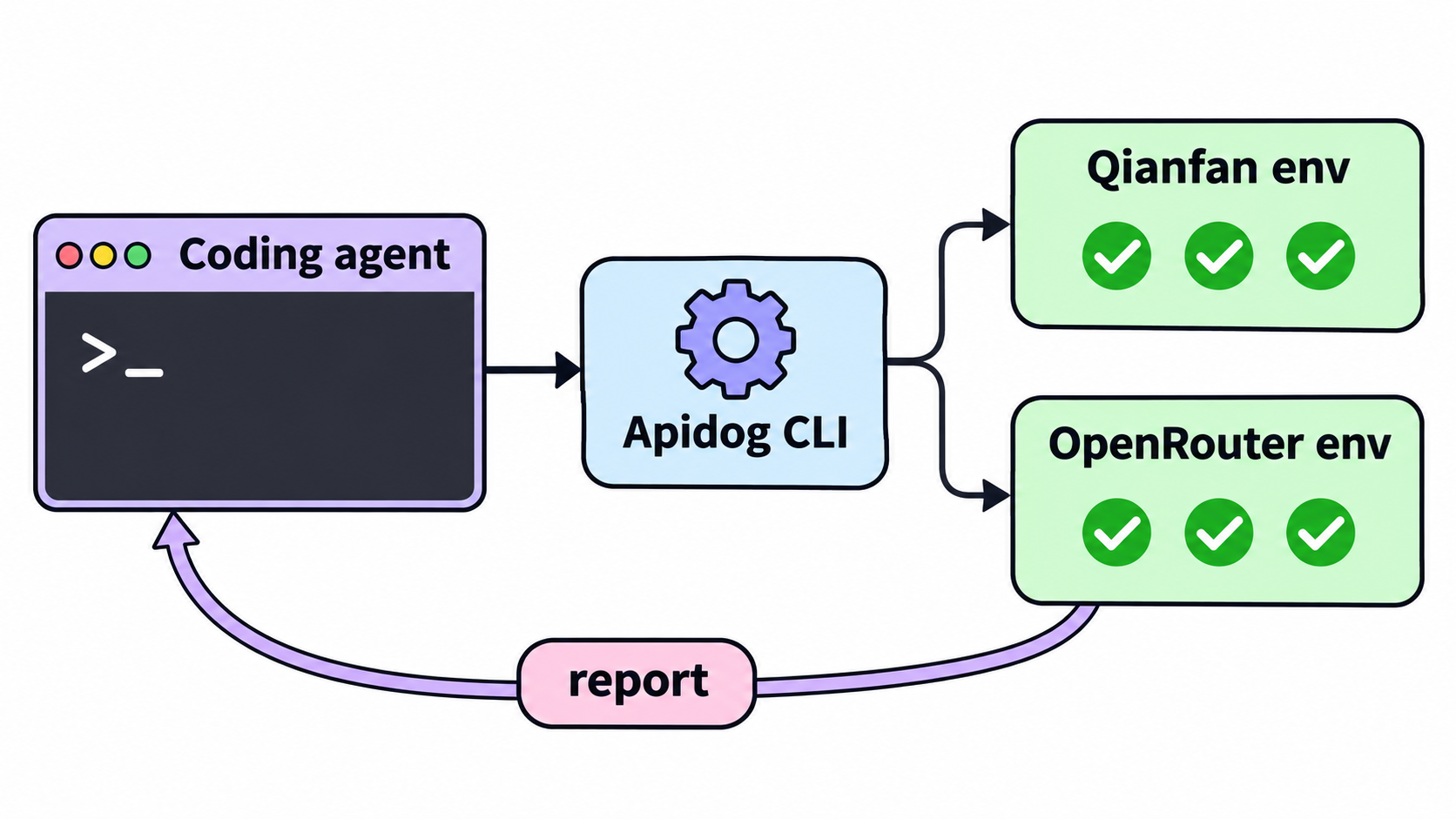
Once both providers answer, you want proof they keep answering correctly: right status, right shape, acceptable latency. Hand that to your coding agent. Apidog CLI gives Claude Code, Codex, Cursor or OpenCode the commands to import the endpoint, save an environment per provider and run a test scenario against each.
Set it up once:
npm install -g apidog-cli@latest
apidog auth login --with-token <YOUR_APIDOG_TOKEN>
apidog skill install
Then give your agent one prompt:
Write an OpenAPI 3 file for POST /chat/completions that matches the ERNIE 5.5 Flash
request and response shape (model, messages, stream; choices[0].message.content, usage).
Import it into Apidog project <projectId>. Create two environments: "qianfan" with base
URL https://qianfan.baidubce.com/v2 and "openrouter" with https://openrouter.ai/api/v1,
each with a "model" variable. Build one test scenario that sends a short prompt and
asserts status 200, the response schema, and a response time under 30 seconds. Run it
against both environments, passing the API keys as environment variables, and summarize
any failures.
The agent checks each schema, validates its payloads and runs commands like these:
apidog import --project <projectId> --format openapi --file ./ernie-5-5-flash.openapi.yaml
apidog environment create qianfan --project <projectId> --base-url https://qianfan.baidubce.com/v2
apidog environment create openrouter --project <projectId> --base-url https://openrouter.ai/api/v1
apidog cli-schema get test-scenario-create
apidog test-scenario create --project <projectId> --name "ERNIE 5.5 Flash smoke" --folder-id <folderId> --priority <priority>
apidog test-scenario import-steps <scenarioId> --project <projectId> --source endpoint --ids <endpointId> --sync manual
apidog run -t <scenarioId> --project <projectId> -e <qianfanEnvId> --env-var "apiKey=$QIANFAN_API_KEY" -r cli,json
apidog run -t <scenarioId> --project <projectId> -e <openrouterEnvId> --env-var "apiKey=$OPENROUTER_API_KEY" -r cli,json
Passing keys with --env-var keeps them out of the saved project, and one scenario gives you a side-by-side read on both routes. The same apidog run with -r junit drops into a pipeline; the Apidog CLI CI/CD guide shows the setup, and Apidog CLI in Claude Code covers the agent side. Apidog’s Free plan covers up to 4 users.
FAQ
Is the ERNIE 5.5 Flash API free? On OpenRouter, yes: baidu/ernie-5.5-flash-preview:free is $0 per token, with limits of 20 requests per minute and 50 per day, or 1,000 per day once you’ve bought $10 in credits. Qianfan charges calls to your Baidu AI Cloud balance.
What’s the model ID for ERNIE 5.5 Flash? Use ernie-5.5-flash-preview on Qianfan and baidu/ernie-5.5-flash-preview:free on OpenRouter.
Can I turn off thinking on Qianfan? No. Qianfan’s docs say thinking can only be enabled for this model and that reasoning_effort stays at high. Budget output tokens for the reasoning trace.
Does the ERNIE 5.5 Flash API support tool calling? Yes. Qianfan lists Function Call and structured output as supported, and OpenRouter accepts tools, tool_choice and response_format. Validate structured output, since OpenRouter reported a high error rate for it.
Can I run ERNIE 5.5 Flash myself? Baidu published ERNIE 5.5 Flash Base on Hugging Face, and Preview weights are promised under Apache 2.0. See running ERNIE 5.5 Flash locally with vLLM.
How does it compare with DeepSeek V4.1 Flash? See ERNIE 5.5 Flash vs DeepSeek V4.1 Flash and the DeepSeek V4.1 Flash API guide.