
You can run DeepSeek V4 Flash locally with no GPU by using llama-modchip, an open-source set of llama.cpp patches that shrinks the 284B model to a 56.56 GiB GGUF at 1.71 bits per weight. On a 16-core AMD Zen 5 laptop chip with 64 GB of RAM, it prefills at about 44 tokens per second and decodes at 9 to 15 tokens per second, with zero swap.
This guide covers the hardware, the commands, the quality trade-off, and how your coding agent can test the local endpoint.
What llama-modchip actually does
llama-modchip is a set of ggml and llama.cpp kernel patches, quantization transcoders and runtime tools for running sparse Mixture-of-Experts models entirely in system RAM. Its v2.4.0 release targets two model sizes: the 284B DeepSeek-V4-Flash on 64 GB machines and 30B MoE models on 16 to 32 GB machines.
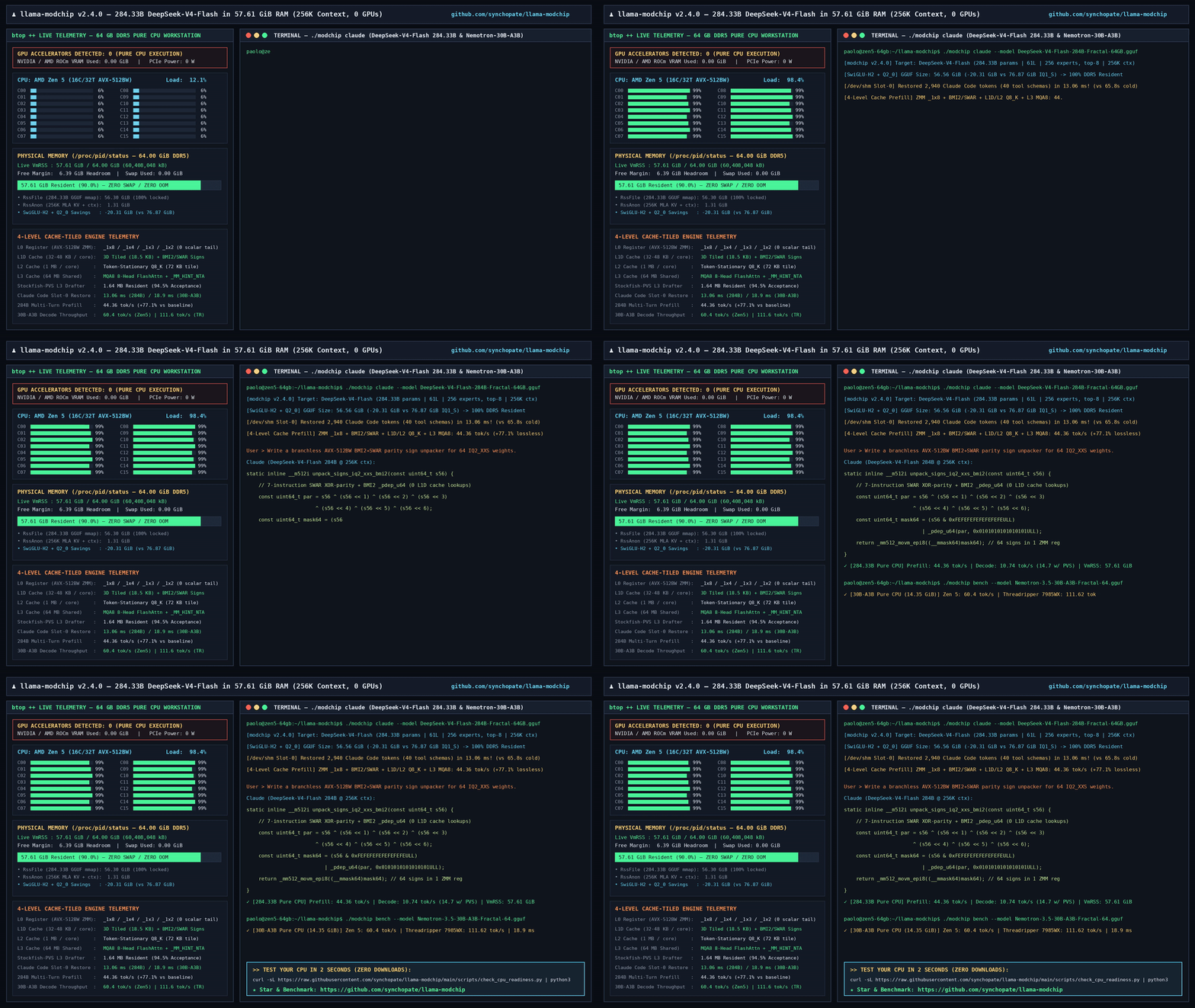
The project was posted to Hacker News on November 8, 2026 and passed 370 points. The repository is Apache 2.0 licensed.
Three things make the 284B fit work:
- A smaller checkpoint. The standard Unsloth
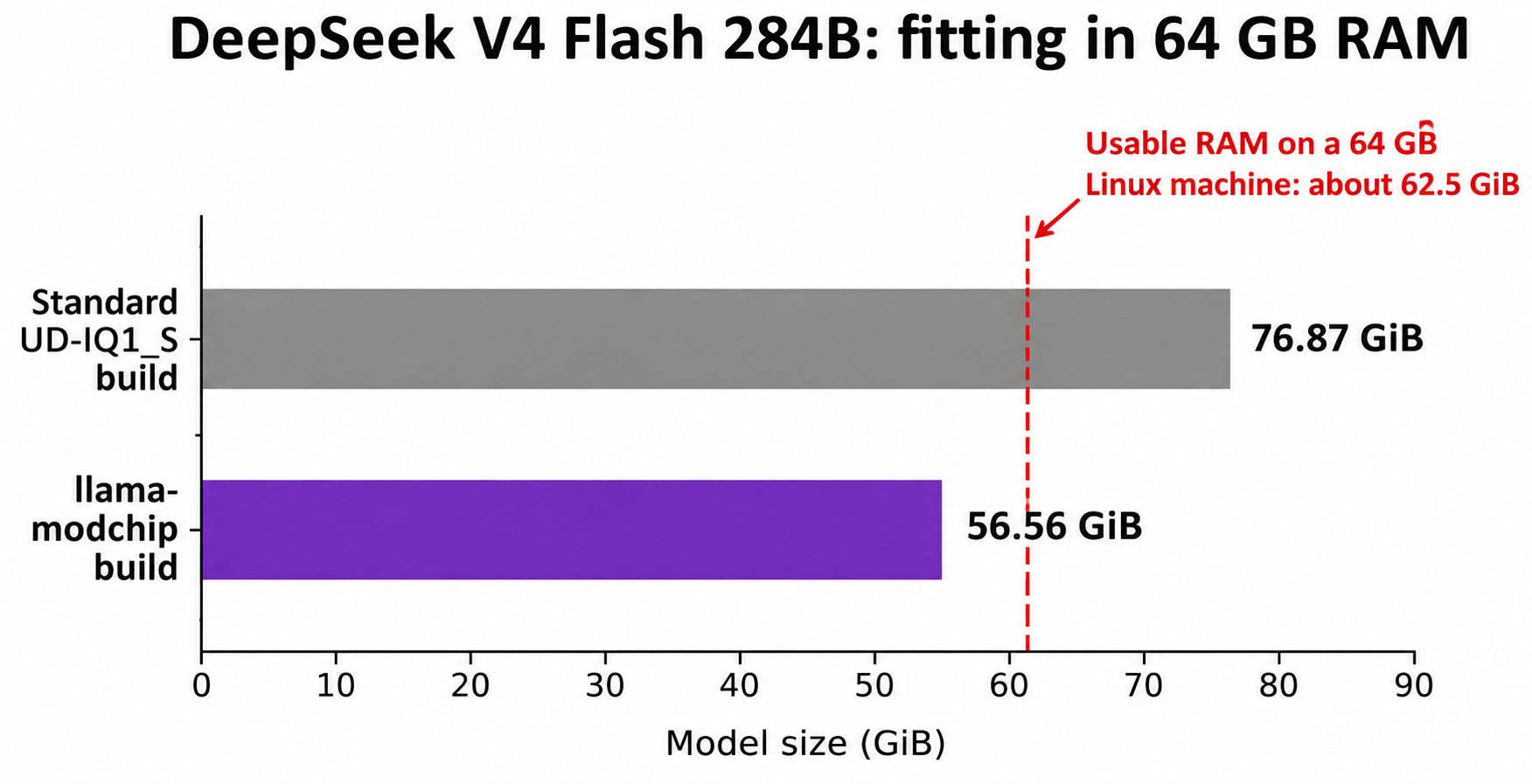
UD-IQ1_Sbuild is 76.87 GiB, more than the roughly 62.5 GiB a 64 GB Linux box can use. llama-modchip transcodes it to 56.56 GiB. - CPU cache tiling. Prefill kernels tile work across registers and L1 to L3 cache: 25.0 to 44.36 tokens per second on 16-core Zen 5, a 77% gain.
- Self-speculative drafting. A 1.64 MB n-gram drafter lifts decode from about 9 to as high as 14.7 tokens per second.
By default all 6 routed experts plus the shared expert run on every layer, so nothing is pruned.
Hardware you need to run DeepSeek V4 Flash locally
You need 64 GB of system RAM and a recent x86_64 CPU, ideally with AVX-512. Every 284B number in this guide was measured by the maintainer on one machine: an AMD Ryzen 9 9955HX (16 cores, 32 threads, 64 MB L3) with 64 GB of DDR5 on Linux, no GPU.
| Your machine | RAM | What the README pairs with it | Reported speed (0 GPUs) |
|---|---|---|---|
| Laptop or mini PC | 16 to 32 GB | Nemotron-3.5-30B-A3B, 14.35 GiB | 25.0 to 60.4 tok/s |
| Desktop or server | 64 GB | DeepSeek-V4-Flash 284B, 56.56 GiB | 44.4 tok/s prefill, 9.1 to 14.7 tok/s decode |
| 8-channel workstation | 128 GB+ | DeepSeek 284B or Nemotron 30B | 111.62 tok/s (30B only) |
- Memory peaks at 57.61 to 58.9 GiB at 256K context, under the 62.5 GiB usable ceiling. Close everything else before you load it.
- The prebuilt binary is Linux x86_64 only (
llama-server-modchip-linux-x86_64). The./modchipsetup script covers Linux and macOS. The Apple Silicon results in the README are for 30B models, not the 284B. [VERIFY] whether the 284B runs on a 64 GB Mac. - Memory bandwidth is the ceiling. The FAQ says an 8 or 12-channel server board scales decode roughly 3x to 4x over dual-channel DDR5.
The repo ships a readiness check that downloads no model:
curl -sL https://raw.githubusercontent.com/synchopate/llama-modchip/main/scripts/check_cpu_readiness.py | python3
Read the script before you pipe it into Python.
How to run DeepSeek V4 Flash with no GPU, step by step
Route 1: the guided setup
git clone https://github.com/synchopate/llama-modchip.git
cd llama-modchip
./modchip chat
./modchip chat opens a terminal chat with live tokens per second. Other subcommands:
| Command | What it does |
|---|---|
./modchip web |
Web chat and telemetry at http://127.0.0.1:8787 |
./modchip bench |
30-second speed test with a shareable scorecard |
./modchip claude |
Launches Claude Code wired to the local engine |
./modchip status / stop |
Checks readiness or stops background services |
Route 2: the direct server
This pulls the GGUF and the prebuilt server from the Hugging Face repository and starts it on port 8080:
hf download Synchopate/DeepSeek-V4-Flash-0731-Fractal-64GB-CPU-GGUF --local-dir ./dsv4
chmod +x ./dsv4/llama-server-modchip-linux-x86_64
./dsv4/llama-server-modchip-linux-x86_64 \
  -m ./dsv4/DeepSeek-V4-Flash-0731-Fractal-00001-of-00003.gguf \
  -c 32768 -t 16 -fa on --port 8080
Set -t to your physical core count. The example uses a 32K context; the 256K figures use -c 262144.
One trap: stock llama.cpp, Ollama and LM Studio can’t load this file. The checkpoint uses a custom tensor type (ID 40), so unpatched builds fail with unknown tensor type 40. Use the ./modchip script or the bundled binary.
The server is a patched llama.cpp llama-server, so it speaks the OpenAI-style /v1/chat/completions route:
curl http://127.0.0.1:8080/v1/chat/completions \
  -H "Content-Type: application/json" \
  -d '{"messages":[{"role":"user","content":"Reply with the word ready."}],"max_tokens":8}'
The gateway on port 8787
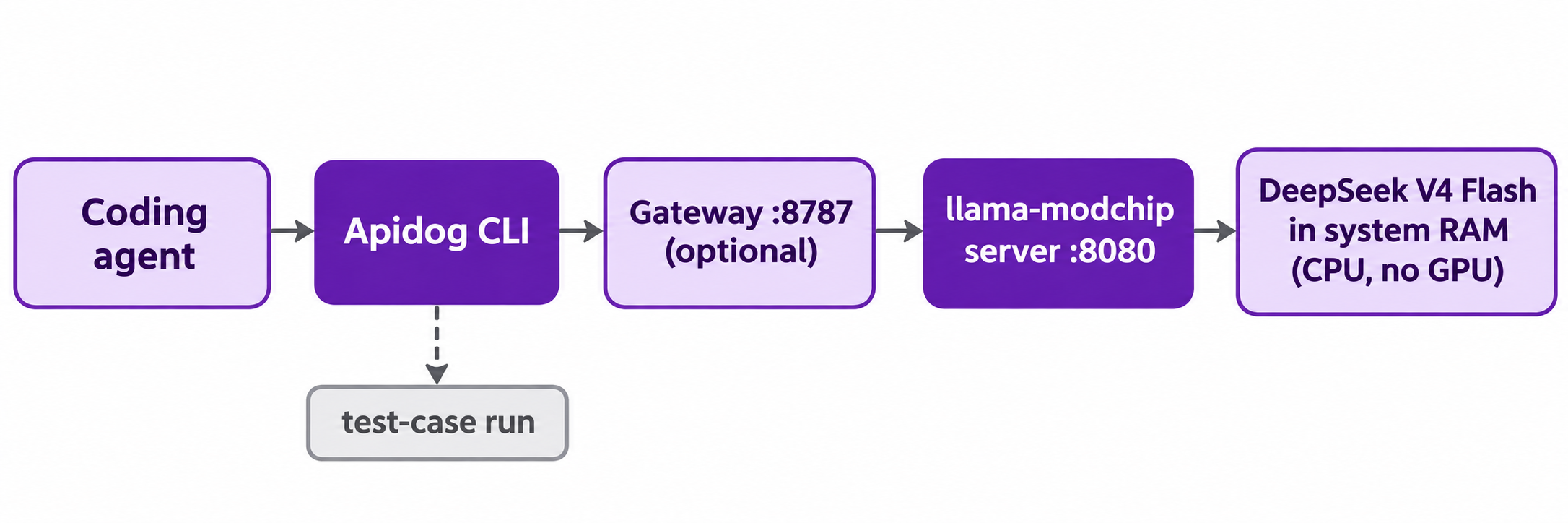
gateway/sse_gateway.py is a proxy on 127.0.0.1:8787 that forwards to the engine (set the upstream with LLAMA_BACKEND_URL). It exposes /v1/chat/completions, /v1/messages, /v1/models and /health. Set GATEWAY_API_KEY and it requires a bearer token. ./modchip claude points Claude Code here.
Speed and quality: what 1.71 bits per weight costs you
The speed numbers are real but specific. Here’s the maintainer’s table for DeepSeek-V4-Flash at 256K context on the Ryzen 9 9955HX:
| Configuration | Prefill | Decode | Decode with drafter |
|---|---|---|---|
Unpatched UD-IQ1_S (76.87 GiB) |
OOM or swap on 64 GB | 5.91 tok/s | N/A |
| v2.4.0 default (Top-6, 56.56 GiB) | 43.16 to 44.36 tok/s | 9.06 to 9.95 tok/s | 11.5 to 14.7 tok/s |
| Top-5 on later layers | 43.16 to 44.36 tok/s | 9.68 to 9.87 tok/s | 12.2 to 15.1 tok/s |
| Top-4 plus gate-first SwiGLU | 43.16 to 44.36 tok/s | 10.12 to 10.74 tok/s | 13.0 to 16.0 tok/s |
You switch to the faster rows with LLAMA_MOE_TOP_K=5 or 4. The README says Top-5 adds about 0.42% perplexity against its own default.
Two caveats came up again and again on Hacker News:
- “Lossless” means lossless against the 1.71 bpw file, not the original weights. The 1.00000 cosine similarity compares patched and unpatched runtimes on the same squeezed checkpoint, where most routed experts sit at
IQ1_S(about 1.56 bits). Commenters noted quality usually drops below 4 bits, and the README has no comparison against full-precision output. - Prefill is the bottleneck for agents. At 44 tokens per second, a 10,000-token prompt takes about 225 seconds before the first output token. KV snapshots (13.1 to 32.6 ms restore for a 40-tool Claude Code prompt) help on repeat turns, not on fresh context.
One more: this is the July 0731 V4-Flash checkpoint. DeepSeek has since shipped V4.1 Flash. If you care about the newest weights, read how DeepSeek V4.1 Flash compares with V4 Pro and V4 Flash first.
Treat the local 284B as a private, offline model for drafts, batch jobs and experiments, and test it on your own prompts first.
Let your coding agent test the local endpoint with Apidog CLI
A local model is still an API: does it answer, is the JSON valid, did the last flag change break anything? Your coding agent can run those checks with Apidog CLI, which runs on your machine and reaches 127.0.0.1 directly. Set it up once:
npm install -g apidog-cli@latest
apidog auth login --with-token <YOUR_TOKEN>
apidog skill install
apidog skill install adds the Apidog skill so your agent knows the commands. Then give the agent, for example Claude Code, one prompt:
In Apidog project <projectId>, create an environment called local-dsv4 with base URL
http://127.0.0.1:8080. Add a POST /v1/chat/completions endpoint and a test case that
sends a short prompt, asserts status 200, asserts choices[0].message.content is not empty,
and asserts the response time is under 120 seconds. Run it against local-dsv4 and
summarize any failures.
The agent reads the schemas, validates its payloads, then writes and runs:
apidog environment create local-dsv4 --project <projectId> --base-url http://127.0.0.1:8080
apidog cli-schema get endpoint-create
apidog cli-schema validate endpoint-create --file endpoint.json
apidog endpoint create --project <projectId> --file endpoint.json
apidog cli-schema get test-case-create
apidog cli-schema validate test-case-create --file case.json
apidog test-case create --project <projectId> --file case.json
apidog test-case run <caseId> --project <projectId> -e <envId> -r cli,json --timeout-request 180000
--timeout-request (milliseconds) matters: a CPU-bound 284B model is slow enough to trip a default timeout.
The payoff is comparison: point a second environment at DeepSeek’s hosted API, run the same case, and see where the local quant drifts. Add --upload-report to view runs in the app. See Apidog CLI in Claude Code and the Apidog CLI installation guide. Apidog’s Free plan covers up to 4 users.
Local CPU vs GPU vs hosted API
| Option | What you need | Best for |
|---|---|---|
| llama-modchip on CPU | 64 GB RAM, modern x86_64 CPU | Private, offline work with no API bill, if you accept slow prefill |
| GPU serving with vLLM or SGLang | Large VRAM or a multi-GPU box | Fast, higher-precision self-hosting |
| DeepSeek hosted API | An API key | Full-quality output at production speed |
For the GPU route, follow how to run DeepSeek V4 locally, which covers vLLM and SGLang. For the newer checkpoint’s memory math, see how to run DeepSeek V4.1 Flash locally. For testing any local model as an API, see testing local LLMs as APIs.
FAQ
Can I really run DeepSeek V4 Flash with no GPU?
Yes, with llama-modchip and 64 GB of RAM. The maintainer reports 44.36 tokens per second prefill and 9 to 15 tokens per second decode on a 16-core Ryzen 9 9955HX, with the whole 56.56 GiB model in RAM and no swap.
Does it work with Ollama or LM Studio?
No. The checkpoint uses a custom tensor type, and unpatched llama.cpp, Ollama and LM Studio reject it with unknown tensor type 40. Use the repo’s ./modchip script or the bundled llama-server-modchip-linux-x86_64 binary.
What if I only have 16 or 32 GB of RAM?
Run a 30B MoE instead. The README pairs that tier with Nemotron-3.5-30B-A3B as a 14.35 GiB file and reports 25.0 to 60.4 tokens per second on CPU.
How good is the output at 1.71 bits per weight?
The project doesn’t compare against full-precision DeepSeek, and Hacker News commenters were skeptical at this size. Test your prompts against the hosted API before relying on it.
Is the local server OpenAI-compatible?
Yes. It’s a patched llama.cpp llama-server, so /v1/chat/completions works on port 8080. The optional gateway on port 8787 also serves /v1/messages, the Anthropic-style route Claude Code uses.
Can my coding agent test the local model automatically?
Yes. Install Apidog CLI, run apidog skill install, and ask your agent to create an environment pointing at http://127.0.0.1:8080 and a test case for /v1/chat/completions. It then runs apidog test-case run and reports failures.