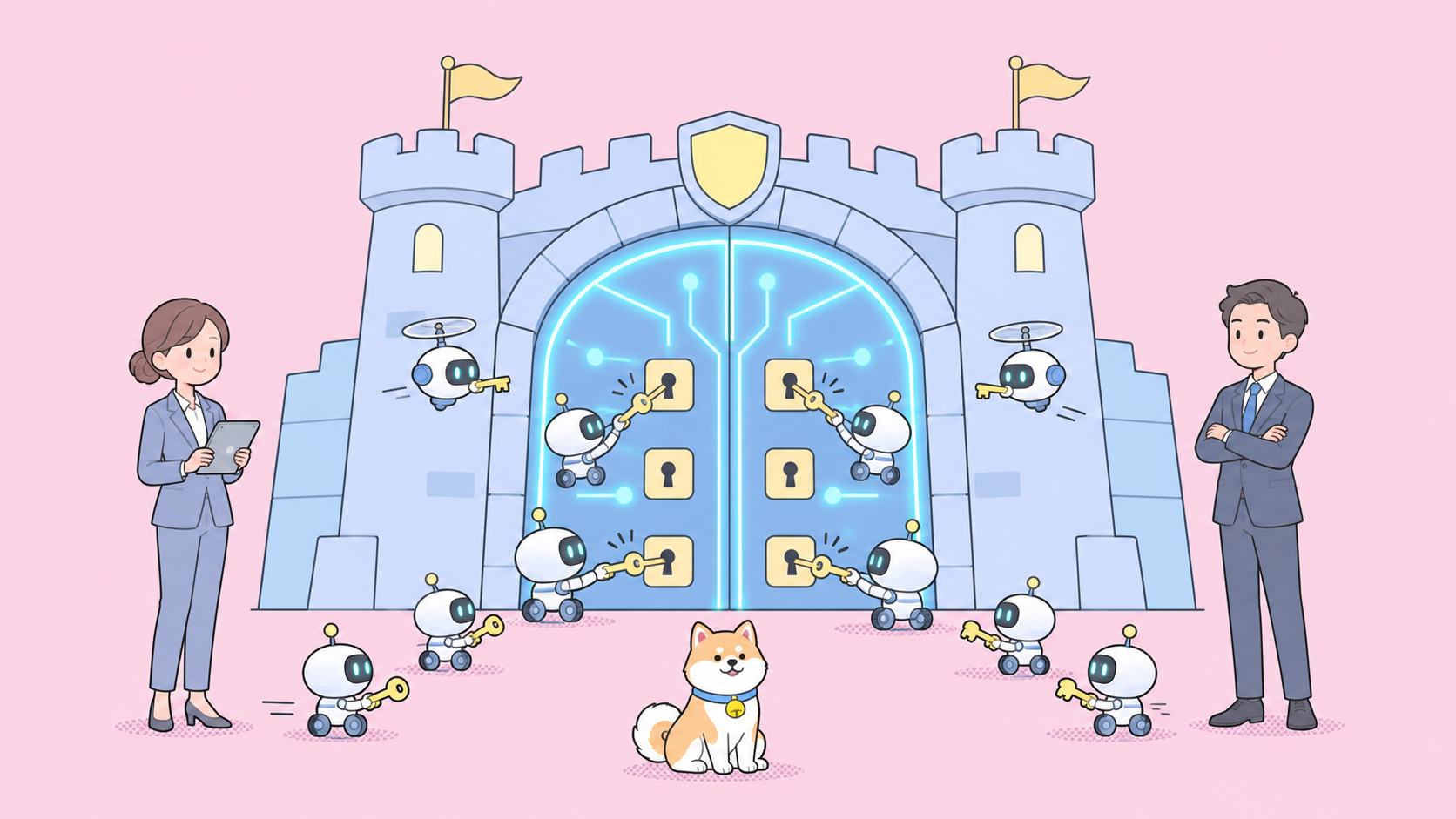
AI agent attacks are now hitting real APIs, and the fix starts at your API layer. On November 21, 2026, the Canadian Centre for Cyber Security warned that attackers use AI-enabled tools such as ARTEX, CyberStrikeAI and PentAGI to find and attack internet-facing systems. To protect your API, do four things this week: hide error detail in production, rate limit every identity, validate and parameterize all input, and keep tokens short-lived and scoped. Then test each control with automated traffic before an attacker does.
Below: what the advisory says, how an agent-driven attack moves through your endpoints, the controls that slow it down, and how to let your coding agent test them with Apidog CLI.
What is an AI agent attack on an API?
An AI agent attack is an intrusion where an autonomous tool, not a person, runs most steps between choosing a target and reaching data. The agent scans exposed endpoints, sends payloads, reads every response, rewrites the payload when it fails and tries again, often within seconds. Your API’s own error messages become its feedback loop.
The Cyber Centre is clear that attacks are not yet fully autonomous. A person still picks the target and sets the goal. What changed is the speed of everything in between. In some activity the agency described, less than three hours passed between selecting a target and gaining privileged access to cloud systems.
Here is what the advisory reports about the tools themselves:
| Finding | Detail from the advisory |
|---|---|
| Share of observed AI-enabled attack tool infrastructure | ARTEX about 46%, CyberStrikeAI 28%, PentAGI 14% |
| ARTEX availability | Made closed source on October 8, 2026, after being copied more than 12,000 times |
| Activity against Canadian organizations | Ongoing for several months from servers running ARTEX, across multiple sectors |
| Time to plan for | Vulnerable systems found, exploited and used to reach data within hours, not days |
Targeting is not compromise, as the agency notes. But if you run a public API, assume the same tools can reach it.
How AI agents attack an API
The advisory describes these tools as working “by trial and error at high volume, rapidly adjusting after failed attempts.” For an API, that loop looks like this:
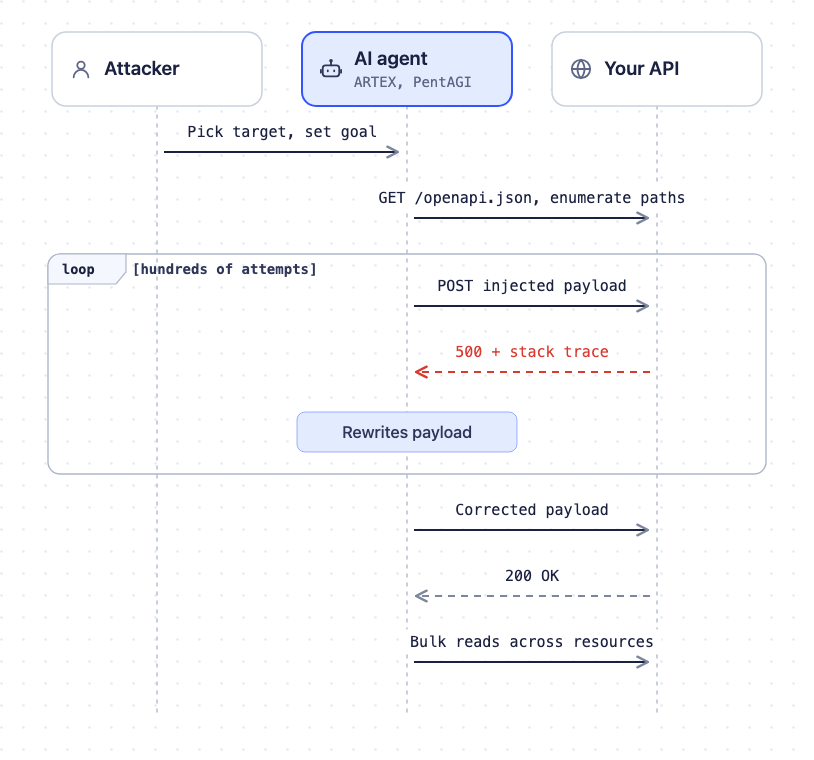
- Discover. The agent enumerates paths, reads any public OpenAPI file and maps which endpoints accept input.
- Probe. It sends malformed or injected input to each parameter.
- Learn. A 500 with a stack trace, a SQL error or a framework name tells it exactly what to change.
- Retry. It adjusts the payload and sends again, hundreds of times, until one request works.
- Expand. With one working request or one valid token, it reads data across as many resource types as it can.
The Cyber Centre singles out step 3: “Detailed error messages and stack traces are what let an automated agent correct a failed payload and try again within seconds.” That makes your error handler one of your most important security controls, which most teams never test.
7 ways to protect your API from AI agent attacks
Each control below maps to a measure in the advisory or its companion bulletin. Together they break the probe, learn, retry loop.
- Suppress verbose errors in production. Return a generic message and a request ID. Log the stack trace on the server, never in the response body. A 500 should look identical whether the cause was SQL, a null pointer or a timeout.
- Rate limit per identity, not just per IP. Agents rotate source addresses, which the advisory lists as a sign of automated activity. Key limits on the API key, user and token as well as the IP, and return
429 Too Many Requests(RFC 6585) with a Retry-After header. OWASP lists unrestricted resource consumption as a top API risk for this reason. Our guide to implementing API rate limiting covers the algorithms. - Validate and parameterize all input. Reject anything that does not match your schema with a plain 400. Use parameterized queries everywhere. Review file upload handling too: the advisory warns that rename, move and extension logic can turn an upload into executable content.
- Keep tokens short-lived and scoped. Make refresh tokens revocable and time-limited, and give each application registration its own credentials, so one leaked secret does not open every door. If agents of your own call your API, the same rules apply; see how to secure AI agent API credentials.
- Alert on credential changes. Fire an alert when a new secret or certificate is added to an existing app, when an app gains new permissions, or when someone consents to an unfamiliar app. The advisory notes these footholds survive a password reset.
- Log the shape of automated traffic. Single indicators miss agents. Watch for the patterns the next section lists, across API logs, WAF events and authentication logs.
- Block unexpected outbound connections. Your API servers should only reach the hosts they need. An outbound call to an unknown host during exploitation is a strong signal, so deny egress by default.
After any incident, the advisory adds a final step: rescan your external surface, rotate every credential the attacker could have reached and hunt for persistence such as new service accounts or access keys. “Treat containment you have not verified as incomplete.”
For a wider baseline, pair this list with the OWASP API Security Top 10 and our API security testing checklist.
Where each control sits
Defense in depth matters here because the Cyber Centre expects AI-driven exploitation to bypass any single preventive control. Each layer below stops a different part of the loop.
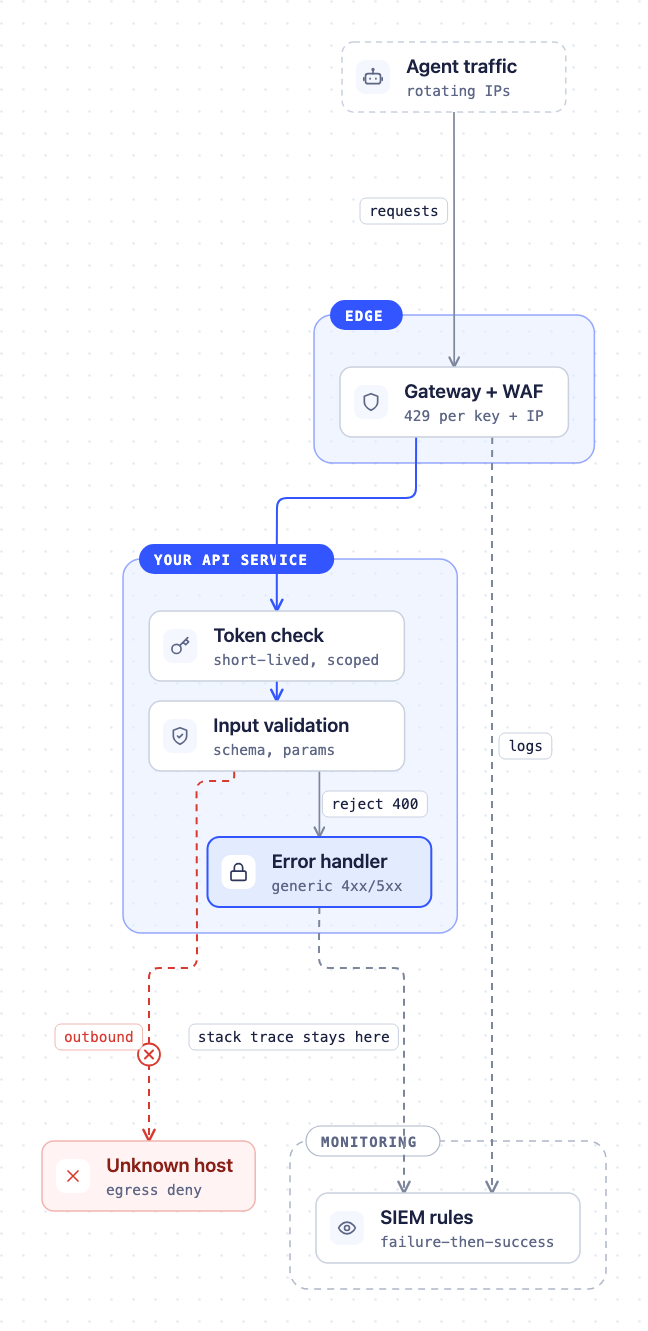
The gateway absorbs volume. Authentication stops unscoped access. The application layer denies the agent its feedback. Logging and egress rules catch what gets through.
How to detect agent traffic in your API logs
The advisory says much of this activity is “widespread and noisy enough to be detected” today, but expects it to become quieter. Look for these patterns now, while they are loud:
- Unusually high request volume against a single application
- Long runs of failed requests followed by a success
- Repeated application errors followed immediately by a working request
- Rapid bursts of read-only or validation-style API calls across many resource types
- High rates of failed sign-ins and lockouts across many accounts, from a changing set of addresses
- A successful sign-in followed immediately by automated reads of files or directory data
You don’t have to write every rule yourself. The ThreatDefence agentic-attack-detections repository, MIT licensed and past 700 stars within a week of launch, publishes detection rules and indicators for 11 agent attack frameworks, including ARTEX, PentAGI and CyberStrikeAI. It ships KQL hunts for Microsoft Sentinel and Defender XDR, plus Sigma, Suricata, Zeek, YARA, Splunk, Elastic and STIX 2.1 formats. Import what matches your stack, then tune thresholds against your own baseline traffic.
Let your coding agent test your defenses with Apidog CLI
An attacker’s agent will hit every endpoint you have. Your tests should too, and a coding agent is the fastest way to write a negative test for each one. Apidog CLI gives Claude Code, Codex or Cursor direct access to your Apidog project, so the agent can list your endpoints, write the test cases and run them.
Set it up once:
npm install -g apidog-cli@latest
apidog login --with-token <YOUR_TOKEN>
npx -y skills add https://apidog.com   # pick your agent when prompted
Then give your agent one prompt:
In Apidog project <projectId>, list every endpoint. For each one, create test cases
that: (1) send no token and assert 401, (2) send each payload in payloads.csv and
assert a 400 whose body contains no stack trace, SQL text or framework name. Run them
against the staging environment, then run the login endpoint 120 times and tell me
when the first 429 appears and whether it carries Retry-After.
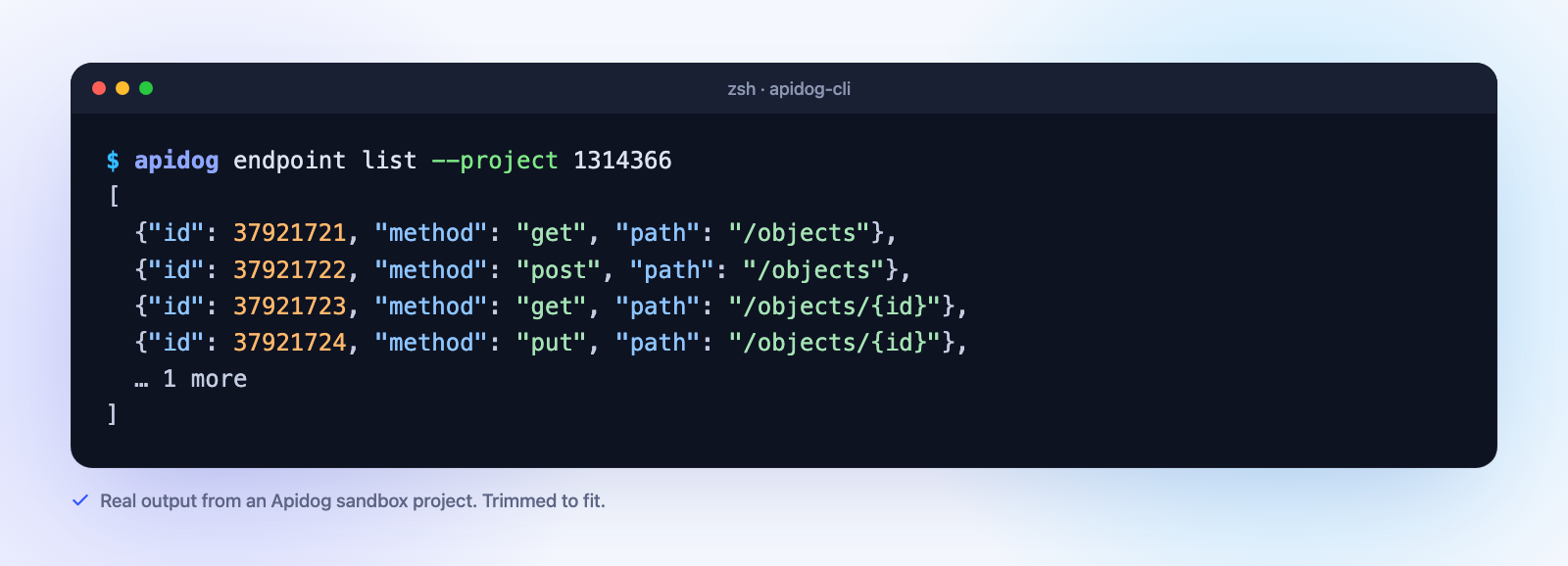
The agent starts by mapping the attack surface, the same first step an attacker takes:
It then finds the staging environment, reads the payload shape instead of guessing it, validates each case and runs them:
apidog environment list --project <projectId>
apidog cli-schema get test-case-create
apidog cli-schema validate test-case-create --file no-token.json
apidog test-case create --project <projectId> --file no-token.json
apidog run --test-case <caseId> --project <projectId> -e <envId> -d payloads.csv -r cli,json
apidog run --test-case <loginCaseId> --project <projectId> -e <envId> -n 120 -r json
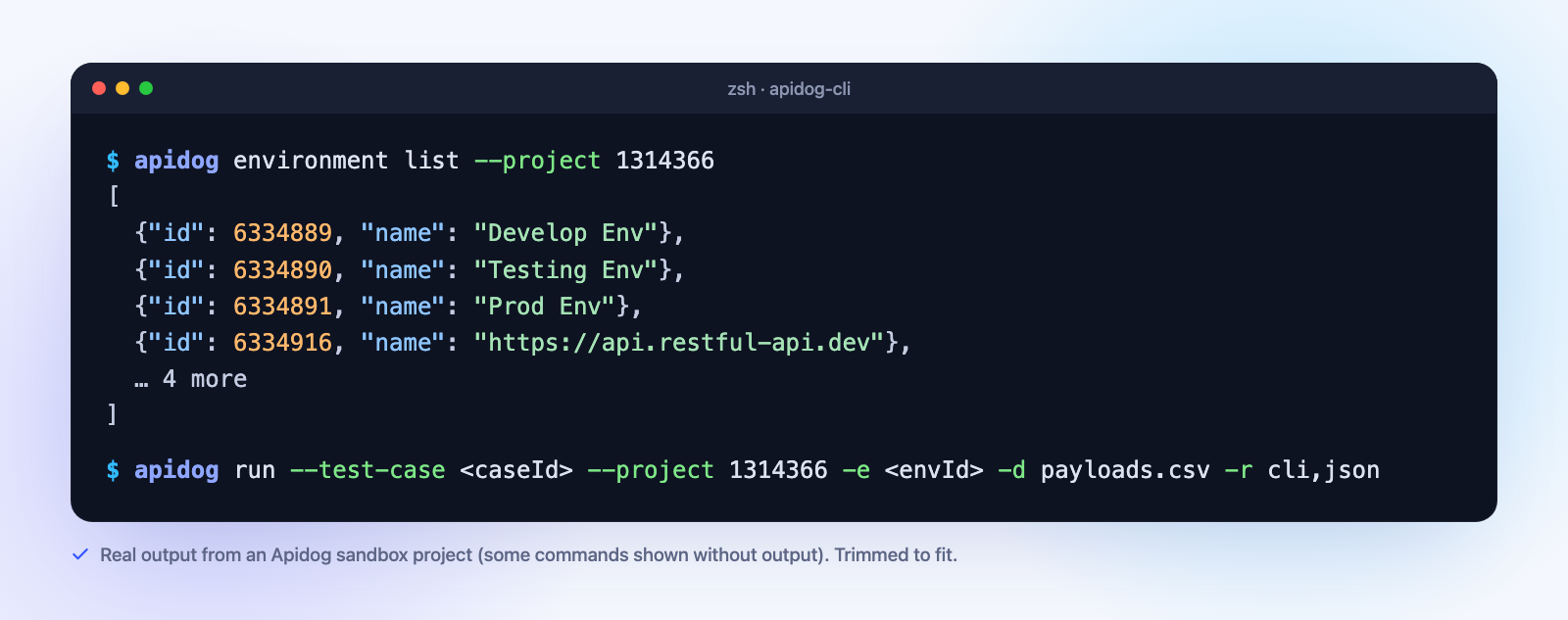
-d feeds the injection payloads as iteration data, and -n 120 repeats the login case so the JSON report shows where rate limiting kicks in. Any endpoint that returns a 500 with detail, or never returns a 429, goes on the fix list. Add --upload-report to view the run in the Apidog app, and put the same apidog run ... -r junit step in CI so a regression fails the build; our Apidog CLI CI/CD pipeline guide has a copy-paste setup. New to the CLI? Start with how to use the Apidog CLI in Claude Code.
If several services need this sweep, Sharkly lets your team hand each one to a coding agent as a task on a shared board, with the agents running on your own machines under your existing Claude Code or Codex plan, and review what they ship before it merges. It’s free to start.
Conclusion
AI agent attacks win on speed and feedback. Remove the feedback with generic errors and strict validation, remove the speed with per-identity rate limits and short-lived tokens, and watch your logs for the trial-and-error shape the Cyber Centre describes. Remember that a password reset doesn’t end an incident: added app secrets and new access keys survive it. Then let your own agent run the negative tests on every endpoint, on every build, so you find the gap first.
FAQ
What is the Canadian AI agent cyberattack advisory? It is a Canadian Centre for Cyber Security advisory, issued November 21, 2026, warning that attackers increasingly use automated and AI-enabled tools such as ARTEX, CyberStrikeAI and PentAGI to find and attack internet-facing systems, including APIs.
Can a WAF alone stop AI agent attacks on an API? No. The advisory expects AI-driven exploitation to bypass individual preventive controls without defense in depth. A WAF helps with volume, but you still need input validation, scoped tokens, quiet errors and log monitoring.
Why do verbose error messages matter so much? Stack traces and SQL errors tell an agent exactly why its payload failed, so it can correct it and retry within seconds. Generic errors with a request ID remove that feedback.
How do I know if AI agents are probing my API? Look for long runs of failed requests followed by a success, bursts of read-only calls across many resource types, and failed sign-ins from rotating addresses. Open detection rules, such as the ThreatDefence repository, can speed this up.
How often should I test my API’s defenses? On every build. Put negative tests for auth, input validation and rate limits into CI with a JUnit report, so a regression fails before it ships.