
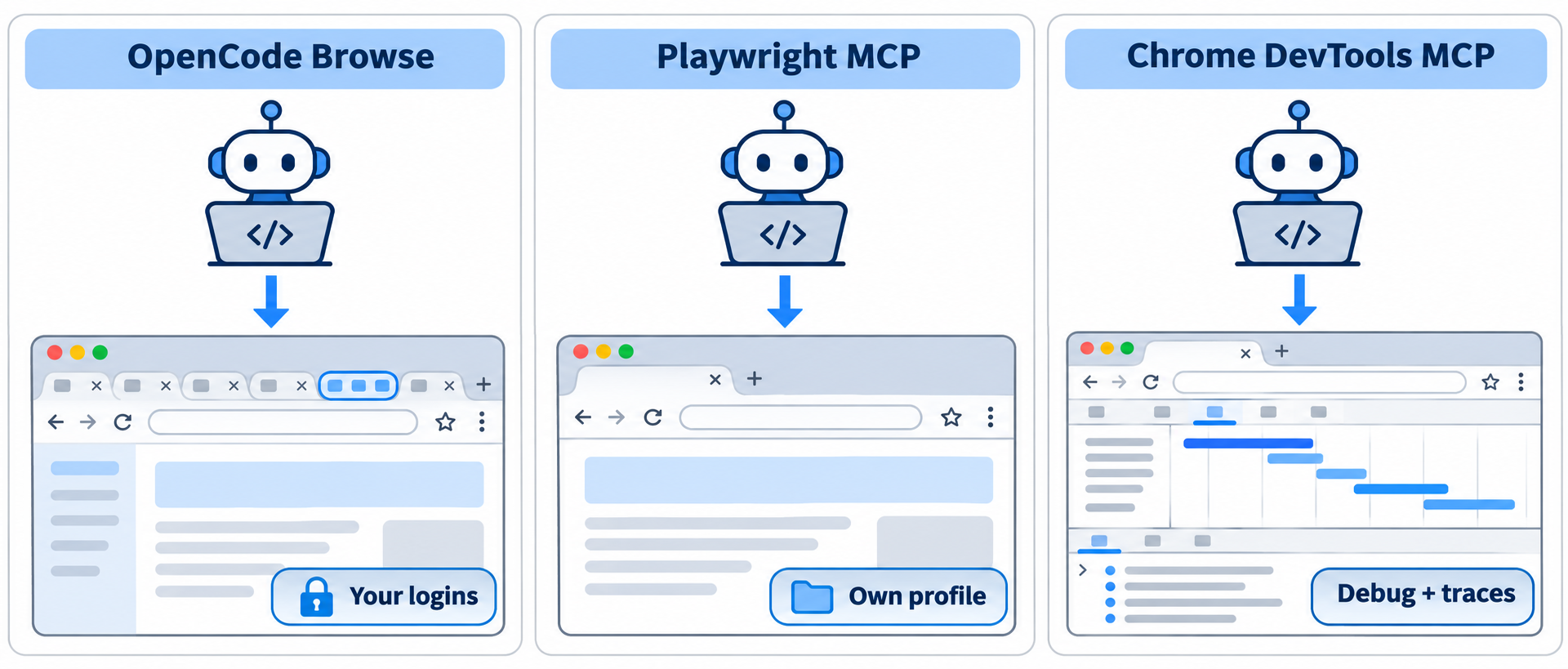
OpenCode Browse vs Playwright MCP comes down to whose browser your agent drives. OpenCode Browse drives your real, signed-in browser and hands you the tab for logins and payments. Playwright MCP launches its own browser with its own profile, built for repeatable automation. Chrome DevTools MCP is the debugger: performance traces, console errors, network and memory.
Short version:
- Pick Browse when the agent needs sites you’re already logged in to.
- Pick Playwright MCP for end-to-end flows and test runs you want to repeat.
- Pick Chrome DevTools MCP when the question is “why is this page slow or broken?”
All three are open-source MCP servers (MIT or Apache-2.0) that work with Claude Code, Codex, Cursor, OpenCode and other MCP clients. They aren’t exclusive: one agent can load two of them in the same session.
OpenCode Browse vs Playwright MCP vs Chrome DevTools MCP at a glance
Here’s the comparison, built from each project’s README and GitHub page on November 17, 2026.
| OpenCode Browse | Playwright MCP | Chrome DevTools MCP | |
|---|---|---|---|
| Maker | Anomaly (OpenCode team) | Microsoft | Chrome DevTools team (Google) |
| Default browser | Your running browser and profile | A browser it launches, with its own saved profile | A Chrome it launches, with its own saved profile |
| Use your logins | Yes, by default | Yes, with --extension |
Yes, with --autoConnect (Chrome 144+) |
| Browsers | Chrome, Edge, Brave, Arc, Helium, Vivaldi, Opera, Chromium | Chrome, Edge, Firefox, WebKit | Chrome and Chrome for Testing officially |
| Human handoff | Built-in handoff tool and Continue card |
No handoff tool | No handoff tool |
| Network | Capture, credentials redacted | Request list, details, mocking with browser_route |
Request list and details, network mocks |
| Debugging depth | Console, screenshots, tab video | Console, traces, video (opt-in tools) | Performance traces, Lighthouse, heap snapshots |
| Licence | MIT | Apache-2.0 | Apache-2.0 |
| Latest release | v0.1.0, November 16, 2026 | v0.0.85, November 9, 2026 | v1.13.0, November 11, 2026 |
| GitHub stars | About 770 | About 39,800 | About 57,900 |
Browse is three weeks old; the other two have a long track record. That matters if you need stable behavior in CI.
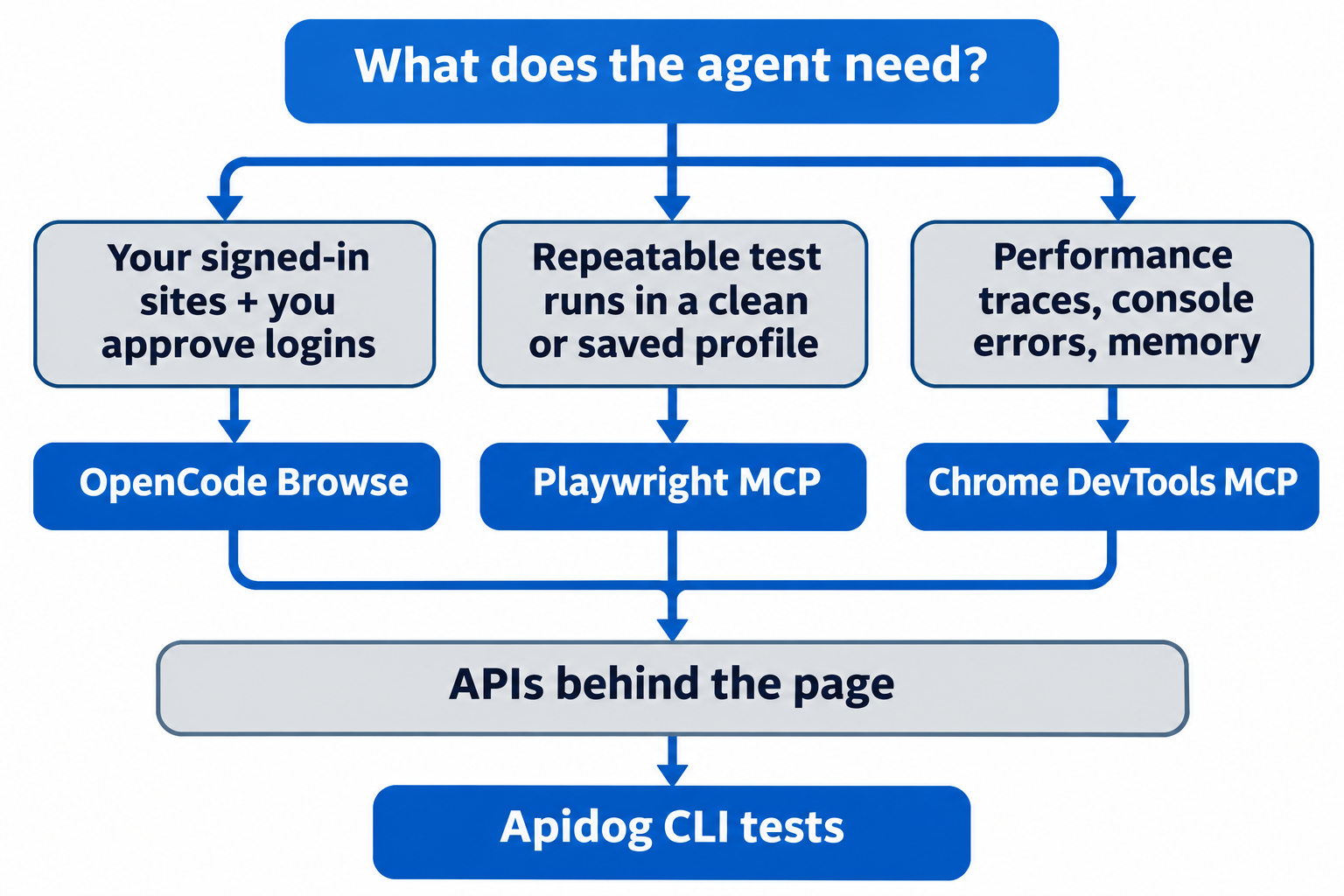
Which browser MCP should you use?
- Your agent needs a dashboard, admin panel or internal tool you’re signed in to. Use OpenCode Browse: no keys to hand over, and it stops for you at a login, 2FA prompt or payment.
- You want the same flow to run the same way every time. Use Playwright MCP: clean profiles, headless mode and Docker.
- You’re chasing a slow page, a console error or a memory leak. Use Chrome DevTools MCP.
- You need a non-Chromium browser. Only Playwright MCP covers Firefox and WebKit.
Setup cost: what each one takes to install
OpenCode Browse has two parts: the browse CLI and MCP server, plus a browser extension from the Chrome Web Store. The product page suggests installing the extension first, since it walks you through the rest. From a terminal:
curl -fsSL https://opencode.ai/browse/install | bash
# or
npm install -g @opencode/browse && browse install
browse install adds the server to the agents you pick (browse install -a claude codex) and pairs the extension. Restart your agent afterwards.
Playwright MCP is one npm package. Add it to Claude Code or Codex like this:
claude mcp add playwright npx @playwright/mcp@latest
codex mcp add playwright npx "@playwright/mcp@latest"
It needs Node.js 18 or newer.
Chrome DevTools MCP is also one npm package:
{
  "mcpServers": {
    "chrome-devtools": {
      "command": "npx",
      "args": ["-y", "chrome-devtools-mcp@latest"]
    }
  }
}
It needs a Node.js LTS release and current stable Chrome. In Claude Code you can also install it as a plugin that adds debugging skills.
How each one handles logins
Browse uses your sessions by design. The agent opens tabs in a background group inside your browser, so every site you’re signed in to is already open to it. When the agent reaches a step only you should do, it calls handoff: a small card shows the site’s origin, the toolbar badge reads WAIT, and the agent continues only after you click Continue. You can also lend the agent one of your open tabs with the toolbar button.
Playwright MCP keeps its own profile by default. Its README lists three modes:
- Persistent profile (default), stored per workspace.
- Isolated (
--isolated), kept in memory and lost when the browser closes. You can preload cookies with--storage-state. - Browser extension (
--extension), which connects to your running Chrome or Edge and its logged-in tabs.
Chrome DevTools MCP also starts its own Chrome with a dedicated profile under ~/.cache/chrome-devtools-mcp/. Its advanced usage guide notes that some accounts block sign-in when the browser is under automation. The fix is --autoConnect: enable remote debugging at chrome://inspect/#remote-debugging, start the server with the flag, and click Allow when Chrome asks. The server then sees every open window in your default profile.
So all three can reach your logins. Browse makes it the default and adds a human checkpoint; the other two make it opt-in.
Safety: what each server lets the agent see
None of the three is a security boundary.
OpenCode Browse has the most guardrails for a shared browser:
allowedOriginskeeps a tab on the sites you name, andreadOnlyrefuses clicks, typing and navigation. The README calls these guardrails, not a data boundary: requests the page makes itself aren’t filtered, andevalstill runs in a read-only tab.- Network captures redact auth headers, API keys and cookie values by name and shape.
- Clearing cookies, closing the browser and changing site permissions are refused.
Playwright MCP offers --allowed-origins and --blocked-origins, --secrets to mask values in tool output, and --redact-url-params for tokens in URLs.
Chrome DevTools MCP warns that it exposes the browser’s content to your MCP client. Two defaults are worth knowing: it collects usage statistics unless you pass --no-usage-statistics, and performance tools may send trace URLs to the CrUX API unless you pass --no-performance-crux.
One rule covers all three: whatever page text your agent reads goes to its model provider. Keep sensitive tabs out of agent sessions.
Tools: what the agent can actually do
All three navigate, click, type, fill forms, take screenshots and read network requests. They split on the extras.
- OpenCode Browse adds
handoff,demonstrate(you show a flow while it records your steps),recordingfor tab video, andscreenshot_diff. Clients other than OpenCode get oneexecutetool that runs sandboxed JavaScript with a Playwright-stylepageobject. - Playwright MCP works from accessibility snapshots, so no vision model is needed. Opt-in groups (
--caps) add network mocking, cookie and storage control, tracing and video, and coordinate clicks. - Chrome DevTools MCP goes deepest on diagnosis:
performance_start_tracewith insights,lighthouse_audit, 14 memory tools for heap snapshots, source-mapped console stack traces and network mocks.
For walkthroughs of the last two, see our Playwright MCP guide, how to connect Claude Code with Chrome DevTools MCP and how to connect Chrome DevTools MCP to AI coding assistants.
Test the APIs behind the page with Apidog CLI
Browser MCPs test what users see, but many bugs they surface live in the API underneath: a 500 on /api/orders, a missing field. Once your agent has watched the page’s traffic with any of the three servers, it can turn those calls into API tests with Apidog CLI, so the next regression fails in seconds without a browser.
Set up the CLI once:
npm install -g apidog-cli@latest
apidog auth login --with-token <YOUR_TOKEN>
apidog skill install
Or tell your agent: “Read https://apidog.com/apidog-cli-installation-guide.md and set up Apidog CLI.” That guide is written for agents.
Then give your agent one prompt:
Use the browser MCP to open https://app.example.com/orders, load the list
and open one order. List the JSON API calls the page made. Write them into
openapi.yaml, import it into Apidog project 123456, create a test case for
GET /api/orders that asserts status 200 and a non-empty items array, run it
against environment 7890 and summarize any failures.
The agent writes the spec from what it captured, then runs commands like these:
apidog import --project 123456 --format openapi --file ./openapi.yaml --overwrite-mode merge
apidog endpoint list --project 123456
apidog cli-schema get test-case-create
apidog cli-schema validate test-case-create --file case.json
apidog test-case create --project 123456 --file case.json
apidog run --test-case <caseId> --project 123456 -e 7890 -r cli,json
cli-schema get gives the agent the exact payload shape, and --overwrite-mode merge keeps endpoints you already have. Once the case passes, the same apidog run with -r junit drops into CI: see the Apidog CLI CI/CD guide and Apidog CLI in Claude Code. Apidog’s Free plan covers up to 4 users.
Limits to know before you choose
- Browse is version 0.1.0. The repo was created on October 27, 2026, and it updates itself by default (
browse update --mode notifyswitches to notices). It’s Chromium only, and the browser shows its “started debugging” bar while an agent is attached. - Playwright MCP’s persistent profile is single-user. Two MCP clients in the same workspace will conflict; start the second with
--isolatedor a different--user-data-dir. - Chrome DevTools MCP supports Chrome and Chrome for Testing officially. Other Chromium browsers may work, but the README doesn’t promise it.
- Context cost. Page snapshots and tool schemas eat tokens; see MCP vs CLI for context windows.
FAQ
Is OpenCode Browse free?
The source is MIT-licensed on GitHub, and the product page lists no price. You install the CLI with a script or package manager and the extension from the Chrome Web Store.
Can Playwright MCP use my logged-in browser like Browse does?
Yes. Start it with --extension and install the Playwright Extension in Chrome or Edge. Browse does this by default and adds a handoff step for logins, 2FA and payments.
Which browser MCP is best for performance debugging?
Chrome DevTools MCP. It records performance traces with insights, runs Lighthouse audits and analyzes heap snapshots.
Can I run OpenCode Browse and Playwright MCP together?
Yes. They’re separate servers, so one agent can use Browse for a signed-in admin panel and Playwright MCP for a clean test run.
Does OpenCode Browse work with Claude Code, Codex and Cursor?
Yes. browse install sets up Claude Code, Codex, Cursor, Zed and many other clients, and browse install --agent none prints a manual config entry for the rest.
Which one should I use for automated testing in CI?
Playwright MCP. It runs headless, supports isolated profiles and Docker, and doesn’t need a person at the browser. For the API layer underneath, run Apidog CLI tests in the same pipeline.