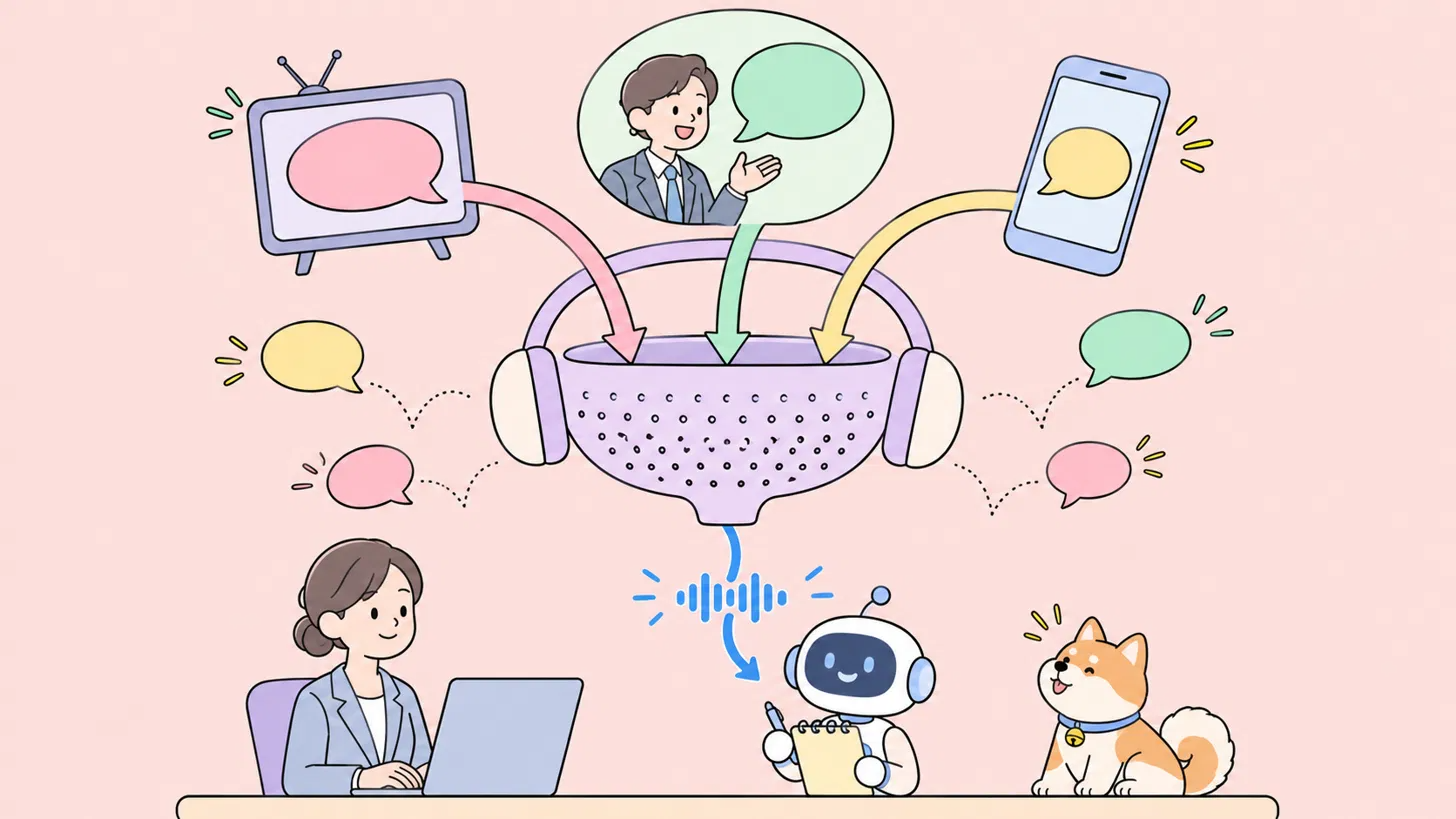
When a voice agent fails on real calls, the LLM or the voice is often not the cause. The problem starts one step earlier, in the audio the agent hears, whether it goes into speech-to-text (STT) or straight into a speech-to-speech model. Modern STT handles traffic and air conditioning fine. What it can't handle is a second person talking: a colleague, a TV, the agent at the next desk in a call center. It listens to them too, and the agent acts on words the caller never said.
Krisp Voice Isolation sits in front of the STT and removes every voice except the main speaker's. For this review I read Krisp's benchmark and docs, signed up for the self-serve API, and ran eight real recordings from Krisp's public dataset through it. Then I transcribed the before and after audio with an open-source STT model to see what actually changed.
The short verdict: if your agent takes calls from offices, homes, call centers or anywhere people talk in the background, Voice Isolation is worth putting in your pipeline. In my test, background speech that had become 331 words of fake transcript dropped to zero. The trade-offs are real but small: a slight cost on clean phone audio, a US-only API region, and fewer models on the API than in the SDK.
The problem: background voices, not background noise
STT models are trained to capture speech, not to decide whose speech matters. Noise can be filtered because it doesn't look like speech. A second voice looks exactly like speech, because it is.
Krisp's own example is a good one. A caller asks to cancel a subscription while a colleague nearby asks about lunch. STT returns one stream of words with nothing to mark which ones came from the caller, so the agent gets both as one request.
That breaks a voice agent in three ways:
- Wrong transcripts. The bystander's words land in the transcript, and the LLM answers things the caller never said.
- False interruptions. The agent hears the bystander, thinks the caller is cutting in, and stops talking mid-sentence.
- Broken turn-taking. Background speech looks like the caller is still talking, so the agent can't tell when the turn has ended.
In each case the agent's logic is working as designed. It is reacting to a voice it should never have heard.
The numbers show how big the gap is. In Krisp's Voice Isolation 2.5 release test, 10 STT systems averaged a 2.10% word error rate (WER) on clean single-speaker audio. With a second person talking over the caller, the same systems averaged 35.92%. Noise suppression doesn't close that gap, because the interference is speech.
What Krisp Voice Isolation is
The Krisp Voice Isolation API & SDK removes background voices and noise from a live audio stream and passes on only the main speaker. It's built for voice AI agents, and it's the same core technology Krisp ships for human calls under the name Background Voice Cancellation (BVC).
It goes first in the agent's pipeline, so every model after it hears one voice:
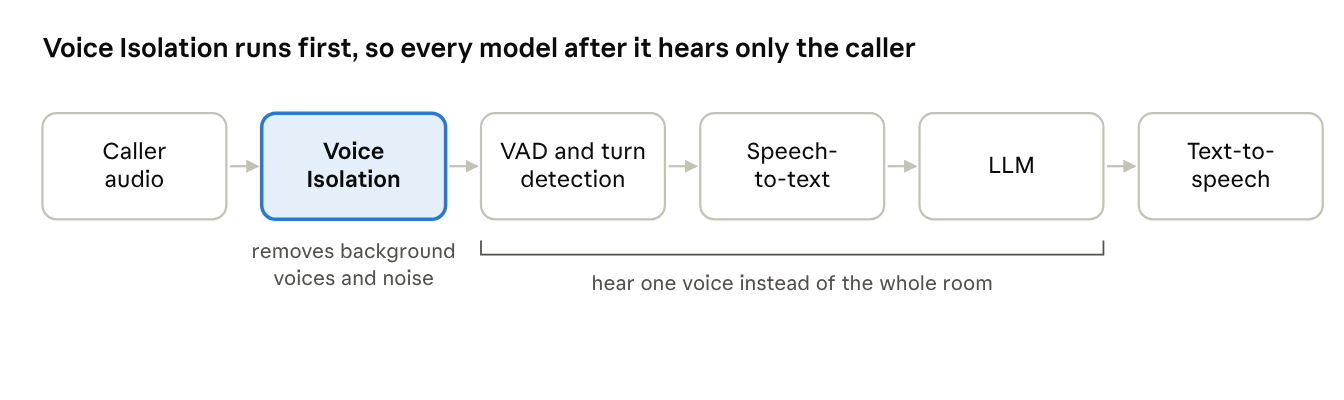
Where Voice Isolation sits in a voice agent pipeline
That placement matters. Without it, VAD and turn detection hear the bystander too, which is where the false interruptions come from.
Krisp has spent about nine years on voice AI and says it processes more than 1 trillion minutes of voice a year. Voice Isolation is one of the products in its voice AI API and SDK lineup. Voice Isolation is part of VIVA, Krisp's set of real-time models for voice agents, alongside Turn-Taking, Interrupt Prediction and VAD. It works with turn-taking rather than replacing it.
The four models give you control over how aggressively background voices and noise are removed. With full aggressiveness (the default configuration), Default removes the most. Balanced processes the main voice more lightly, at the same compute. Lite uses about a third of Default’s compute. HD is for 32 kHz WebRTC streams rather than phone audio. Aggressiveness is a run-time setting you can tune without changing the compute; in the API it’s the suppression_level parameter, from 0 to 100.
One limit worth knowing up front: the voice-removing models assume the speaker is close to the mic. As a rough guide, past about 30 cm the main speaker’s own voice can be suppressed. That isn’t a hard rule; it’s a general recommendation, and the actual distance depends on the acoustic conditions. For far-field devices like smart speakers, Krisp offers a separate model that removes noise only.
Version 2.5 shipped in August 2026, and Krisp published an open benchmark and dataset in September. The model is now available as a self-serve API as well as an SDK.
What Krisp's benchmarks show
On Krisp's open benchmark, Voice Isolation cut average word error rate from 23.24% to 6.24%, a 73% drop.
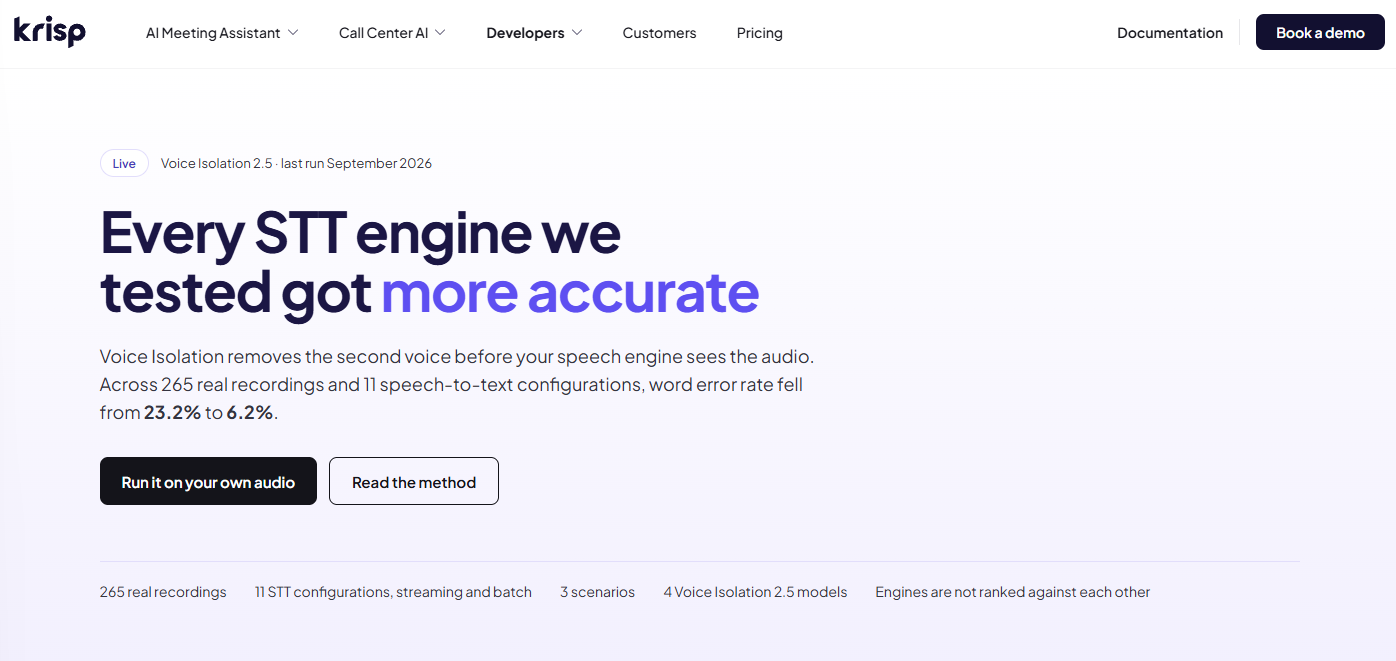
Krisp's benchmark page summarizes the headline result.
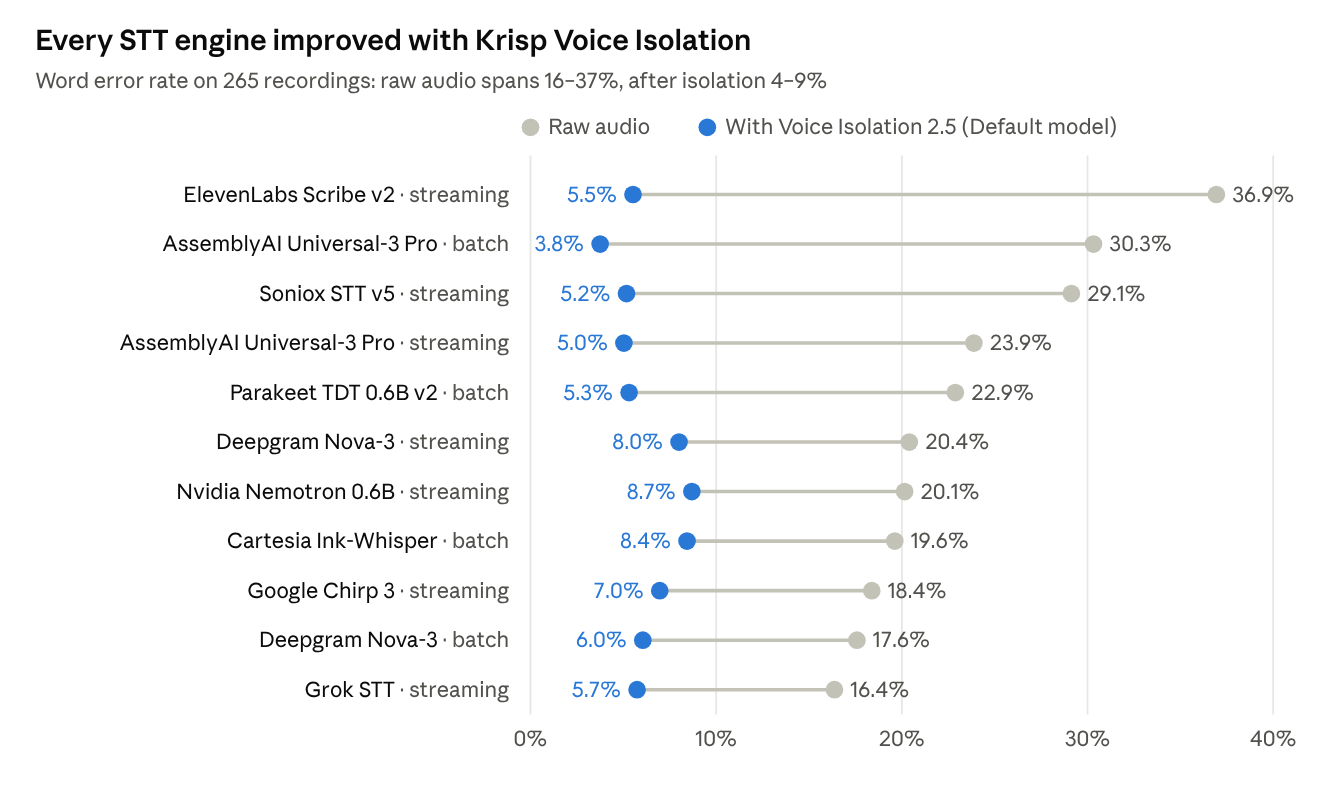
The benchmark uses 265 real recordings from offices, homes, four working call-center floors and cars. Nothing was simulated or mixed in afterwards. Most recordings follow the same script: the main speaker talks, a second person joins, the main speaker goes quiet while the other keeps talking, then the main speaker comes back. That quiet window is the real test, because the correct transcript for it is empty. Each file was run through 11 STT configurations from nine engines, with and without isolation.
Source: Krisp voice isolation benchmark, Oct 2026 · 11 STT configurations, all scenarios pooled
Every engine improved and none got worse. The more useful result is what happens to the gap between engines: on raw audio it's about 20 points wide, and after isolation it shrinks to about 5. If your agent hears background voices, cleaning the input changes your WER more than picking a different STT vendor does.
By scenario, the gain depends on whether a second voice is present:
Where it doesn't help
Krisp publishes its weak spots, and I think that's the most convincing part of the write-up.
- Clean phone audio gets slightly worse. With no second voice to remove, isolation can only touch the main voice. Phone-call WER rose from 3.48% to 3.91%, and one file went from 9.42% to 21.65%. The Balanced model does best here at 3.53%.
- Heavy echo is still a problem. In the separate 2.5 release test, single-speaker recordings with difficult acoustics scored 11.61% with isolation against 8.02% without it. That's much better than version 2.1 (15.42%), but still worse than doing nothing.
- Over-isolation causes silent errors. Krisp explains that earlier models sometimes removed bits of the main voice. A person still understood the audio, but STT dropped whole clauses and the transcript read cleanly with holes in it. Version 2.5 was tuned for STT rather than human ears to fix this.
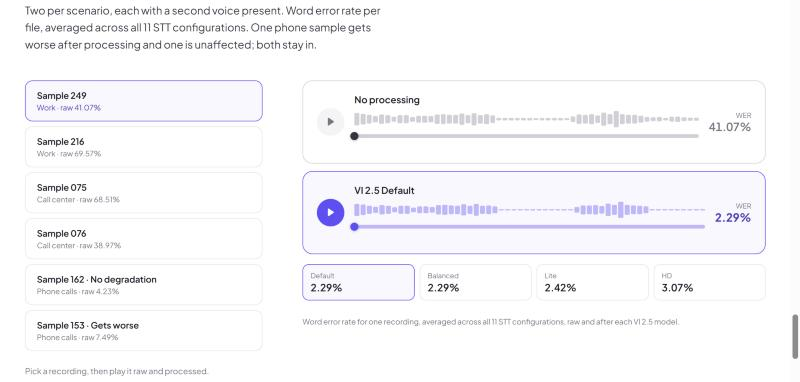
The benchmark page lets you play six recordings raw and processed. Sample 153, a phone call, is labeled "Gets worse".
Two other things to keep in mind. The 73% figure and the 46.4% figure you'll see on Krisp's site come from different tests: 265 recordings in the open benchmark, and 1,685 recordings in the 2.5 release test. And Krisp's results compare audio with and without its own isolation, not against other vendors' isolation products.
The recordings, hand-written transcripts, segment labels and every model's output are public on Hugging Face, so anyone can rerun the test. That's what I did next.
Hands-on: testing the Voice Isolation API
In my test, Voice Isolation removed every word of background speech from the transcripts, and pooled WER fell from 40.1% to 10.2%.
Setup
Signing up on the Developers Portal is quick, with Google, Microsoft or email sign-in. The trial gave me $30 in credits and a limit of two concurrent sessions. From there it's API Keys → Create key, and you get a key you can only copy once.
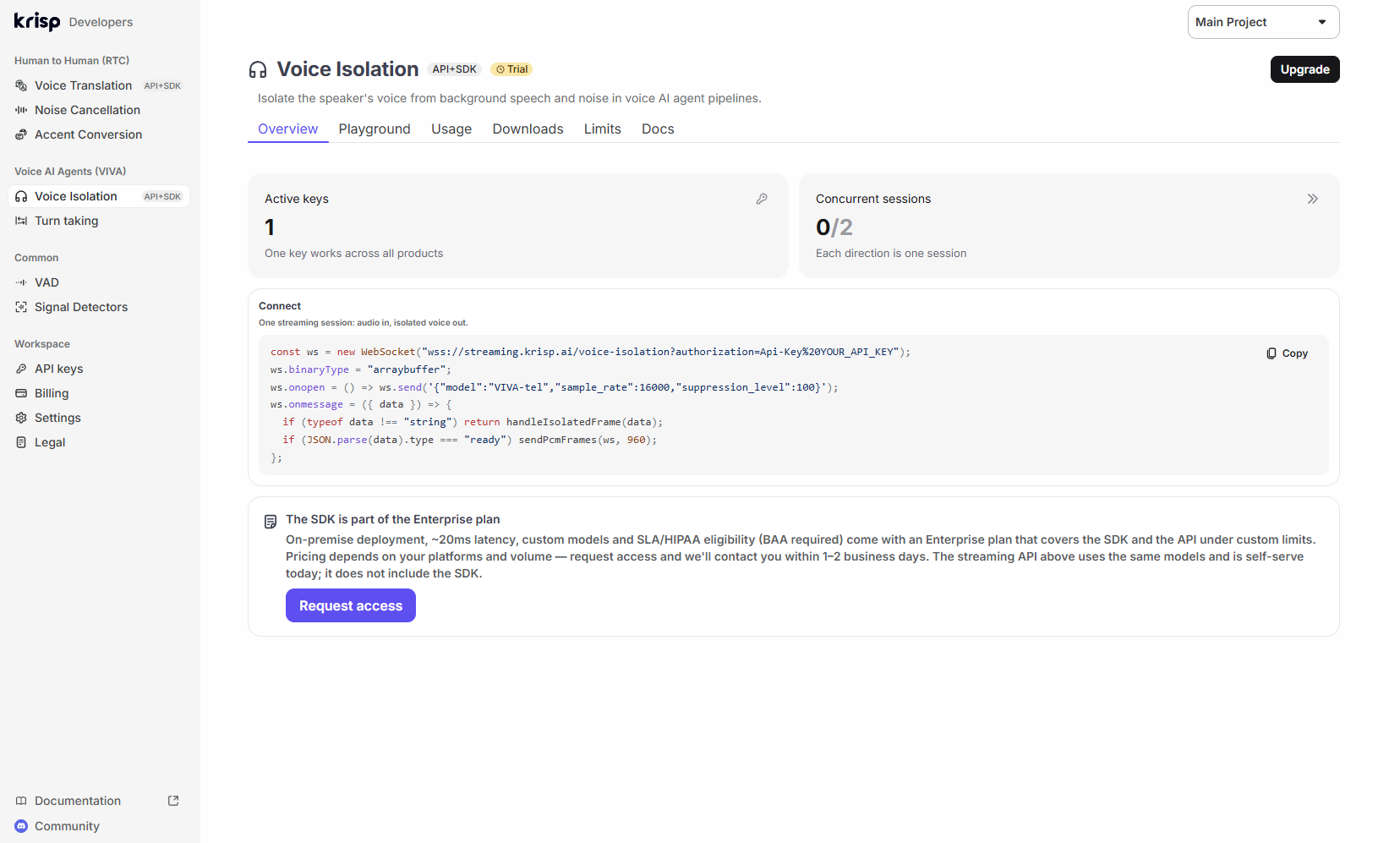
The Voice Isolation page in the Developers Portal on the trial plan.
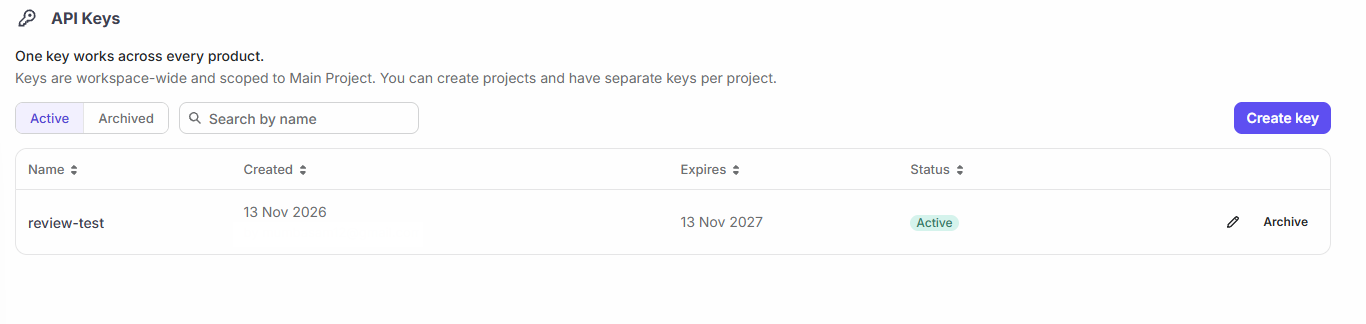
The API key I created for this review. One key works across all Krisp API products, including the Voice Translation API. .
The API is a WebSocket. Your backend swaps the API key for a short-lived session token, the client sends a small JSON hello, waits for ready, then streams 16-bit mono PCM and gets cleaned audio back frame by frame:
URL = "wss://streaming.krisp.ai/voice-isolation"async with websockets.connect(URL, additional_headers={"Authorization": f"api-key {session_token}"}) as ws: await ws.send(json.dumps({"model": "VIVA-tel", "sample_rate": 16000, "suppression_level": 100})) hello = json.loads(await ws.recv()) # {"type": "ready", ...} # then send exactly 30 ms of audio per message (960 bytes at 16 kHz) # and write each binary message you receive to your output
That's close to Krisp's API quickstart, a short Python script that cleans a WAV file. One rule catches people: every audio message must be exactly 30 ms. Anything else ends the session with an invalid_frame_duration error, so pad the last frame with silence.
For the test I picked eight recordings from Krisp's public dataset: three office recordings, three from call-center floors and two phone calls from a car, about 11 minutes in total. I streamed each one through the API at real-time speed, from Asia. Then I transcribed the raw and cleaned audio with NVIDIA's open-source Parakeet TDT 0.6B v2, one of the engines in Krisp's benchmark, and scored each labeled segment against the human transcripts.
Results
Almost all of the improvement came from one place: the windows where the main speaker was silent and someone else kept talking. On raw audio, Parakeet turned that background speech into 331 words of transcript. After Voice Isolation it produced none. The background voice was 13 to 34 dB quieter in those windows, while the main speaker's level barely moved (within 1 dB).
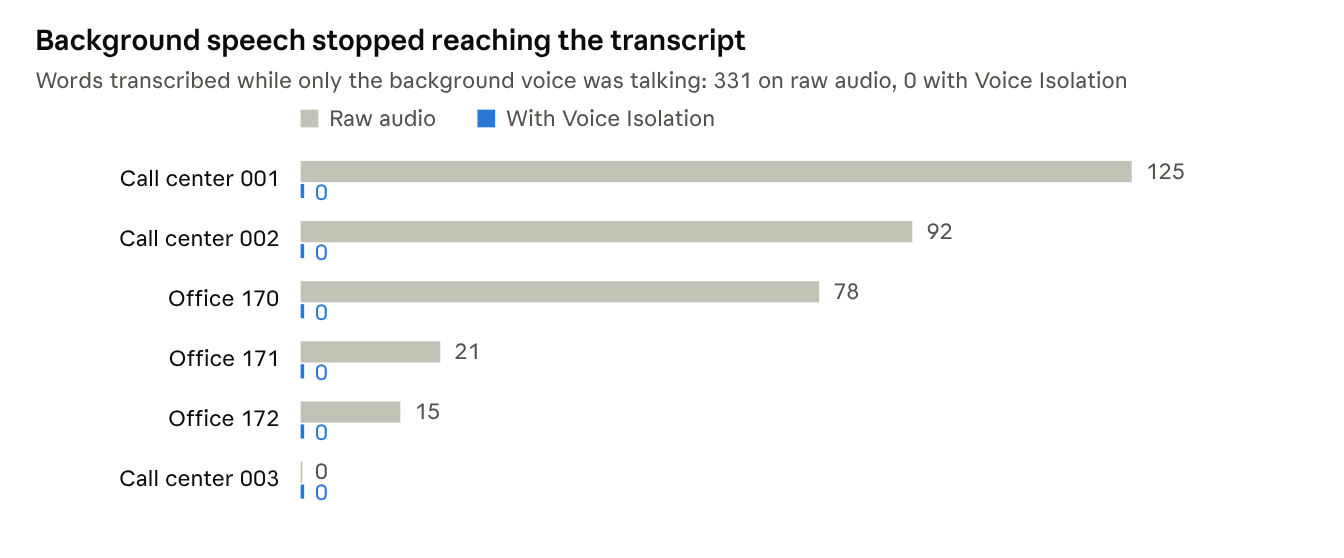
My test · Krisp API (VIVA-tel), transcribed with Parakeet TDT 0.6B v2 · the 6 recordings with a background-only window
The call-center example shows why this matters. While the agent I was testing paused, the agent at the next desk was on a different call. The raw transcript picked up that call word for word:
thank you for calling meridian bank before i begin i will need to confirm your identity for security could you give me your full name your date of birth...
A voice agent would treat that as the caller speaking. With Voice Isolation, the same window came back empty.
When both people talked at once, the change was small: 13.2% raw against 12.5% cleaned. Parakeet already favored the louder, closer voice in those stretches. Most of the remaining errors there are number formatting in my scoring (phone numbers, prices, postcodes), which hit both versions equally.
On the two clean phone calls, one file picked up an extra error and the other lost two. That's in line with Krisp's own finding that the cost on clean audio is small.
Latency and reliability from outside the US
The API currently runs only in the US region, and Krisp's docs warn that clients elsewhere will see extra latency. From Asia, the median round trip for a frame (send to cleaned audio back) was 260–520 ms depending on the session, and setting up a session usually took 1.5–3 seconds. That's network distance, not the model: Krisp states 15 ms of algorithmic latency. But if your agent serves users far from the US, you'll feel it, and the SDK on your own servers avoids it.
One of my nine sessions dropped about 70 seconds in with an abnormal close. Rerunning it worked. I'd put that down to the long route from Asia rather than the service, but it's a reminder to handle reconnects in production.
About this test: eight files is a small sample, not a benchmark. I resampled the 32 kHz recordings to 16 kHz for the telephony model (VIVA-tel), used one STT engine, and kept text normalization simple, so my absolute numbers aren't comparable with Krisp's. What I was checking is the direction and size of the change, and it matched what Krisp reports.
Developer experience: API or SDK
Voice Isolation ships two ways, and which one you can use depends on your plan.
The API is the easy way in: no model files to ship and nothing to run on your CPU. The trade-offs are that your audio goes to Krisp's cloud, you get two models instead of four: VIVA-tel for 8 or 16 kHz phone audio, and VIVA-pro for 32 kHz wideband audio. VIVA-pro isn't in the API reference yet, but it's in the portal's Playground, the API accepted it in my test, and Krisp confirmed it's available.
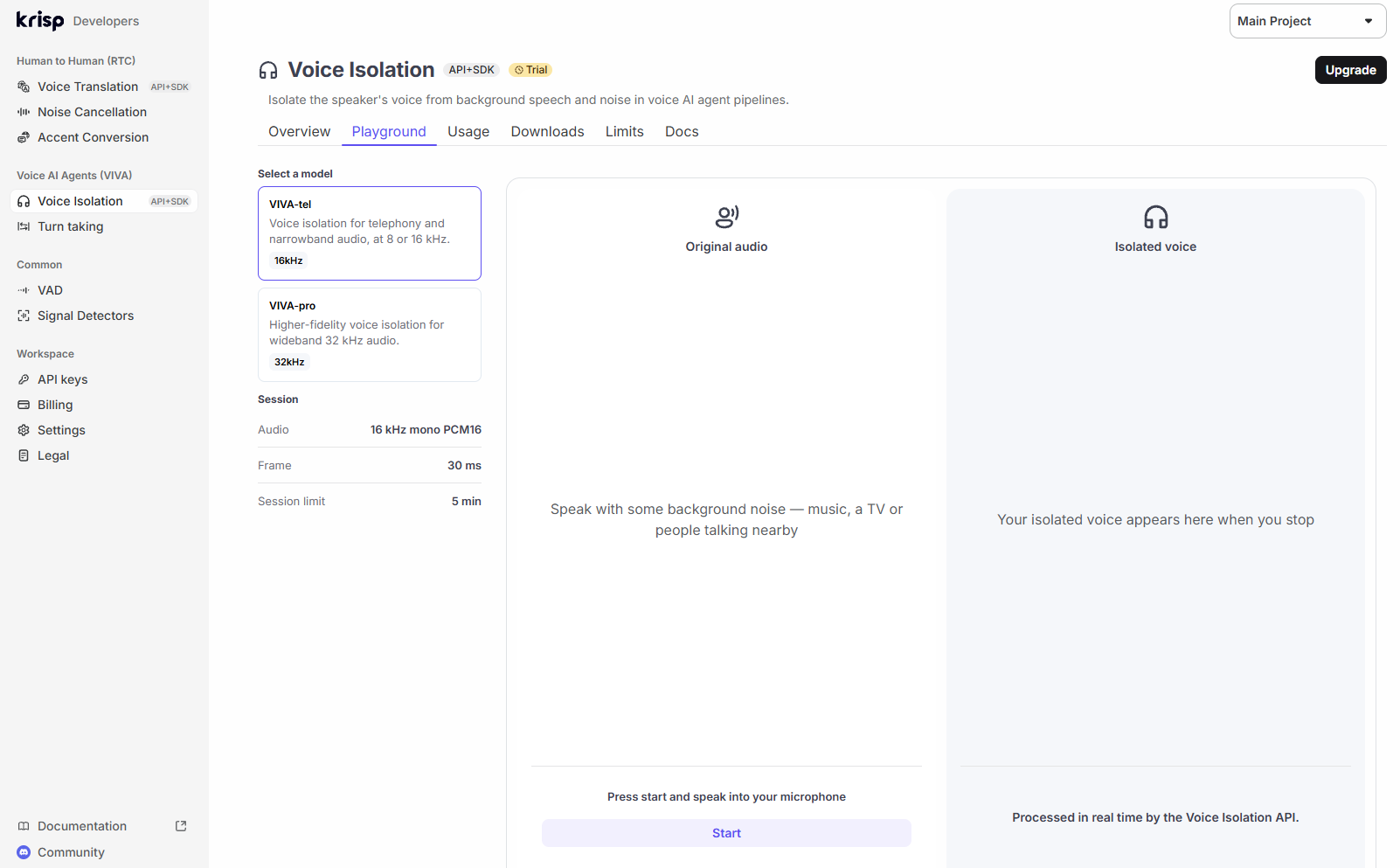
The portal's Playground lets you test either API model with your own microphone before writing any code.
The SDK keeps audio on your own servers and only goes online to check its license. It's also where the cost story gets interesting. Krisp's CPU post shows that one SDK flag, enableLowPrecisionExecution, roughly doubles the calls a server can clean on CPUs with FP16 support. A 16-vCPU AWS Graviton3 instance went from 76 live calls to 137, and the Lite model holds about three times as many streams as the full models. On older Intel Ice Lake chips the flag does nothing.
Integrations
- Pipecat has a ready-made filter. You add KrispVivaFilter() as the audio input filter on your transport, and you can pair it with KrispVivaTurn for turn detection. Note that it uses the SDK, so you need SDK access and the model files, not just an API key.
- LiveKit offers Krisp models in LiveKit Cloud, including background voice cancellation (noise_cancellation.BVC()) for agents. LiveKit charges extra for its voice isolation models.
- WebRTC and telephony pipelines can use the SDK directly, and the API works with anything that can open a WebSocket.
The docs are clear and current. The quickstart worked the first time, and the error messages tell you exactly what went wrong, down to the expected and received frame size. My one gripe is naming: the blog talks about Default, Balanced, Lite and HD, the SDK downloads use file names like krisp-viva-vi-tel-v2.5.1, and the API calls its models VIVA-tel and VIVA-pro, with only the first one in the API reference. A mapping table in the docs would help.
Pricing
The API is billed per hour of audio, and it's cheap enough that cost shouldn't decide whether you use it.
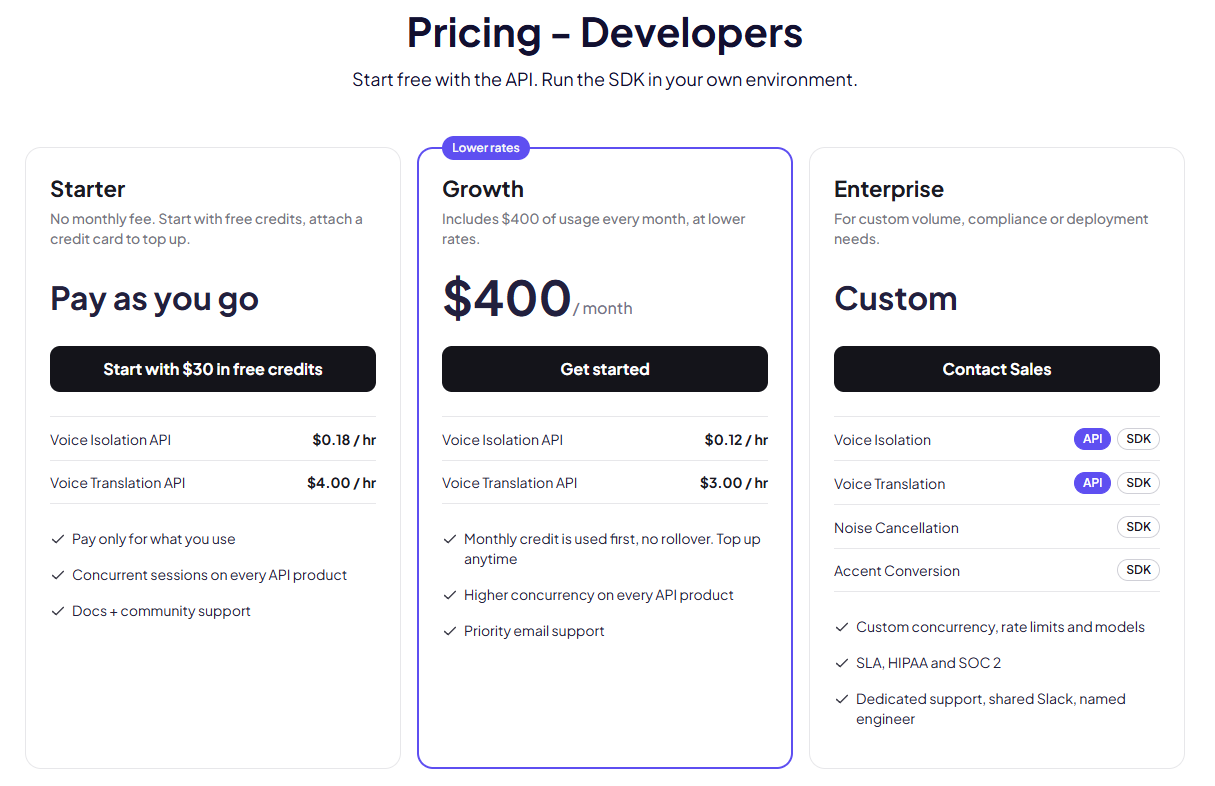
Krisp's developer pricing, November 2026.
On the pay-as-you-go Starter plan the Voice Isolation API costs $0.18 per hour of audio, with no monthly fee. The rate is the same for both API models, VIVA-tel and VIVA-pro. Growth costs $400 a month, includes $400 of usage and drops the rate to $0.12 per hour, with higher concurrency and priority support. Enterprise is custom and is the only plan that includes the SDK, an SLA, and HIPAA and SOC 2.
The $30 starting credit covers about 166 hours of audio at the Starter rate, which is plenty for testing. Credits last 12 months and usage is billed by the minute. For scale, a 5-minute call costs about 1.5 cents to clean on Starter.
The SDK is only on the Enterprise plan, at an agreed price, so you'll need to talk to sales if you want to run the models on your own servers. Rates are from Krisp's pricing page, checked in November 2026.
Alternatives
Krisp isn't the only option for removing background voices, but no independent head-to-head test of these products exists yet. Each vendor publishes its own numbers on its own data, so treat the figures below as claims.
Where Krisp stands out is the evidence. It's the only vendor here with an open, reproducible benchmark across 11 STT setups, and it publishes the cases where it loses. It's also the most flexible to deploy: cloud API, on-server SDK, or built into LiveKit and Pipecat.
Verdict
Krisp Voice Isolation is the fix to reach for when a voice agent misbehaves on real calls and works fine in testing. It removes the voices your agent shouldn't hear, it works with whatever STT you already use, and both Krisp's benchmark and my own test show the same thing: background speech stops reaching the transcript.
Pros
- Removes background voices, not just noise, which is the problem STT can't handle on its own
- Works with any STT engine, with no per-language setup or voice enrollment
- Runs on CPU with 15 ms of algorithmic latency
- Open, reproducible benchmark that includes the cases where it loses
- Self-serve API with $30 of free credit, and cheap at $0.12–$0.18 per hour
- Ready-made Pipecat filter and LiveKit support
Cons
- Slight accuracy cost on clean phone audio, and still worse than raw audio in rooms with heavy echo
- API runs only in the US region, which adds noticeable latency elsewhere
- API offers two models against the SDK's four; on-premise use needs the Enterprise SDK
Who should use it: teams whose agents take calls from call centers, offices, homes, cars or anywhere other people talk nearby. Start with the API to measure the effect on your own recordings, then move to the SDK if you need the other models, lower latency outside the US, or audio that stays on your servers.
Who can skip it: agents whose callers are almost always alone in quiet rooms, or far-field devices like smart speakers, where the voice-removing models aren't designed to work.
You can try the Krisp Voice Isolation API with the free credits and run your own recordings through it in an afternoon.
FAQ
Is voice isolation the same as noise cancellation? No. Noise cancellation removes non-speech sounds like traffic and keyboards. Voice isolation also removes other people's voices, which noise cancellation leaves in.
Does Krisp Voice Isolation work with my STT provider? Yes. It processes the audio itself, so it works in front of any STT engine. Krisp tested it with 11 configurations, including Deepgram, AssemblyAI, ElevenLabs, Soniox, Google, Cartesia and NVIDIA models. It can also sit in front of speech-to-speech models. Krisp hasn’t published results for that setup yet, but nothing stops you from trying it.
Does it replace turn detection? No. It goes before VAD and turn detection and gives them cleaner audio. Krisp provides Turn-Taking as a separate model in the same VIVA SDK.
Do users need to enroll their voice? No. It needs no enrollment and no training on the user's voice.
How much latency does it add? Krisp states 15 ms of algorithmic latency, and its SDK docs put the added latency at about 20 ms. With the cloud API, network time to the US region comes on top of that.
Does it work on phone calls? Yes. It handles narrowband telephony audio, common codecs such as G.711, G.722, G.729 and Opus, and Bluetooth headsets.
What about human-to-human calls? The same technology ships as Background Voice Cancellation (BVC) in Krisp's RTC SDK, which runs on the user's device in browsers, desktop and mobile apps. Contact centers with human agents get it through Krisp’s call center AI product, where it keeps the voices of nearby agents out of customer calls.