
You want API tests that read like plain English, live in Git next to your code, and run in any CI pipeline. Karate is built for exactly that. It uses a domain-specific language (DSL) so you write tests as Given / When / Then steps instead of Java methods. This guide walks through what Karate is, how its feature files work, and a runnable sample.
What Karate Is
Karate is an open-source, Java-based test automation framework for APIs. You describe each test as a scenario in a .feature file using Gherkin, the same Given/When/Then structure that comes from Behavior-Driven Development. The difference from tools like Cucumber is that you don’t write step-definition glue code. Karate ships the HTTP steps, assertions, and JSON handling built in, so a working API test needs no Java at all.

The project bundles more than API testing. The repository includes modules for mocks, performance testing (via Gatling), and UI automation. For this guide, the focus is the API testing core, which is what most teams reach for first.
Because tests are plain text files, they version well. A pull request diff shows exactly which assertion changed. That plays nicely with code review and with a Git-native, code-based workflow.
If you’re new to the Given/When/Then style, our primer on Behavior-Driven Development explains where it comes from and why teams use it.
How It Works: Feature Files and karate-config.js
A Karate test starts with a feature file. Each file has one Feature: and one or more Scenario: blocks. Inside a scenario, you set up the request with Given, fire it with When, and assert with Then.
Here’s the structure Karate’s own quick start shows:
Feature: User API

Scenario: List all users
  Given url 'https://jsonplaceholder.typicode.com'
  And path 'users'
  When method get
  Then status 200
  And match response == '#[10]'
Read it top to bottom. url sets the base address. path appends the resource. method get sends the request. status 200 checks the HTTP code. The last line asserts the response is a JSON array with exactly 10 items. The #[10] is a Karate marker, not JavaScript. More on those markers in the assertions section.
The Gherkin here is standard Given/When/Then. If you want a deeper look at that syntax on its own, see our guide to Gherkin for BDD and API testing.
Most projects need environment-specific values: a dev base URL, a staging token, a prod endpoint. Karate handles this with a single file named karate-config.js. It runs once before your tests and returns a config object that every scenario can read.
function fn() {
  var env = karate.env || 'dev';
  var config = {
    baseUrl: 'https://jsonplaceholder.typicode.com'
  };
  if (env === 'qa') {
    config.baseUrl = 'https://qa.example.com';
  }
  return config;
}
karate.env comes from a system property you pass at run time. Switch environments without touching a single feature file. In a scenario you’d then write Given url baseUrl instead of hard-coding the address.
A Sample Scenario
Let’s write something with a request body. This scenario creates a user, checks the status, and validates the response shape.
Feature: Create user

Background:
  * url baseUrl

Scenario: Create a new user returns 201
  Given path 'users'
  And request { name: 'Ada', job: 'engineer' }
  When method post
  Then status 201
  And match response.name == 'Ada'
  And match response.id == '#string'
A few things to notice. The Background: block runs before each scenario in the file, so you set the base URL once. The * is a wildcard step; Karate treats * the same as Given, When, or Then, which lets you write setup steps without worrying about grammar. The request keyword takes a JSON payload directly. No serializer, no POJO. And #string is a fuzzy matcher that asserts the id field exists and is a string, without pinning it to a specific value.
Assertions and JSON Matching
Assertions are where Karate earns its keep. The core keyword is match. It compares an actual value against an expected one and fails the test on any mismatch.
Exact match checks equality:
And match response == { id: '#number', name: 'Ada', job: 'engineer' }
The #number, #string, #boolean, and #uuid tokens are fuzzy matchers. They assert type and presence without demanding a literal value, which keeps tests stable when the server returns generated IDs or timestamps.
When you only care about a subset of fields, use contains:
And match response contains { name: 'Ada' }
That passes as long as name equals Ada, even if the response has ten other fields. Karate also supports !contains, contains only, contains any, and contains deep for finer control over partial matching.
You can validate arrays too. match response == '#[10]' asserts an array of length 10. You can apply a schema to every element with each:
And match each response == { id: '#number', name: '#string' }
This single line checks that every object in the array has a numeric id and a string name. That kind of shape validation would take a loop and several assertions in a general-purpose test framework. If you want the broader picture on validating responses, our practical guide to API assertions covers the patterns across tools.
Data-Driven Testing and CI
Real test suites run the same logic against many inputs. Karate handles this with Scenario Outline and an Examples table. Placeholders in angle brackets get filled from each row.
Scenario Outline: Create users from a table
  Given url baseUrl
  And path 'users'
  And request { name: '<name>', job: '<job>' }
  When method post
  Then status 201
  And match response.name == '<name>'

  Examples:
    | name  | job       |
    | Ada   | engineer  |
    | Grace | scientist |
    | Alan  | analyst   |
That runs the scenario three times, once per row. You can also read rows from an external file instead of an inline table, which keeps large data sets out of your feature files:
  Examples:
    | read('classpath:test-data/users.json') |
Karate reads JSON and CSV files this way, so your test data can live wherever your team prefers to manage it.
For continuous integration, you have two paths. In a Maven or Gradle project, Karate runs through JUnit 5. You add the karate-junit5 dependency and point a runner at your feature files, so mvn test executes them like any other unit test. That means your existing CI step needs no special tooling.
The second path is the standalone jar, which needs no build tool. Download karate.jar from the project’s releases and run feature files directly. Note the jar requires a recent Java version, so check the release notes for the minimum.
java -jar karate.jar src/test/java/features
You can filter by tag, run in parallel, and choose an output directory:
java -jar karate.jar --tags @smoke --threads 4 --output reports src/test/java/features
Pass an environment with a system property, which flows into karate.env inside karate-config.js:
java -jar karate.jar -Dkarate.env=qa src/test/java/features
Karate writes an HTML report to the output directory after each run, so failures are easy to inspect in a pipeline artifact. For the wider CI picture, see how to automate API tests in CI/CD.
Strengths and Trade-Offs
Karate has clear strengths. Tests read close to plain English, which lowers the barrier for people who aren’t fluent in Java. The built-in JSON matching, including fuzzy matchers and each, removes a lot of assertion boilerplate. Everything lives in text files under Git, so tests review and diff like source code. And it covers more than HTTP, so a team can add mocks or performance tests later without switching tools.
The trade-offs are real too. Karate runs on the JVM, so you need Java installed and a comfort level with the JVM ecosystem for anything beyond the basics. The DSL is its own thing to learn; the syntax reads easily but writing correct matchers and reuse patterns takes practice. Reusable logic, custom helpers, and complex setup often pull you back toward JavaScript functions or Java interop. And because tests are code, non-developers on the team usually can’t author or edit them without help.
None of that is a knock. It’s the profile of a code-first framework. The question is whether that profile matches how your team wants to work.
Karate vs a Code-Free Approach (Apidog)
Karate is code-based and Git-native. You write feature files, commit them, and run them from a build tool or the jar. That suits engineers who want tests in version control next to the application and who are comfortable on the JVM.
Apidog takes a visual, code-free path to the same goal. You build test scenarios in a UI, chain requests, and add assertions by clicking rather than writing DSL. Because the whole API lifecycle (design, debugging, mocking, documentation) lives in one place, the tests can reuse the endpoints and schemas you already defined. That lowers the barrier for QA engineers and product folks who don’t want to manage a Java project.
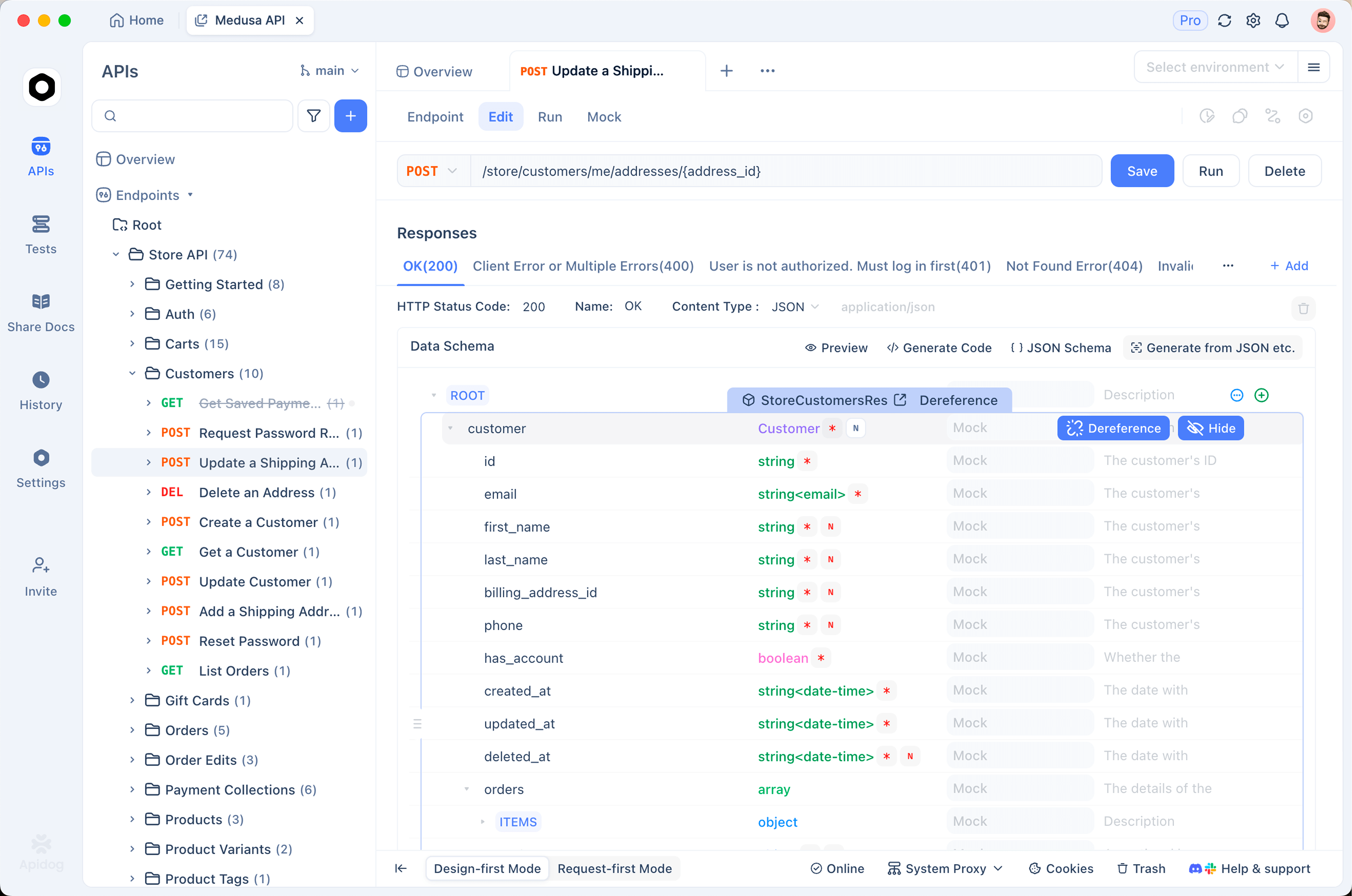
The visual suites are not stuck in the UI. Apidog runs them headless in CI through the Apidog CLI, so a code-free suite still fits an automated pipeline. You install it with Node:
npm install -g apidog-cli
Then trigger a saved scenario or suite by ID, pointing at an environment and choosing report formats:
apidog run --access-token "$APIDOG_ACCESS_TOKEN" -t <scenarioOrSuiteId> -e <environmentId> -r cli,html,junit
The -t flag targets a scenario, folder, or suite; -e selects the environment; -r picks one or more reporters (cli, html, json, junit). For data-driven runs, -d (or --iteration-data) takes a data file path or test-data ID. The CLI is headless and runs on any CI step that can run Node. It runs your saved Apidog scenarios; it isn’t an interactive request sender or a load generator. See a full walkthrough in Apidog CLI for CI/CD, and a side-by-side with another runner in Apidog CLI vs Newman.
Both approaches produce automated API tests that run headless in CI. The split is authoring style: Karate wants you writing DSL in Git; Apidog wants you clicking in a UI that also exports to the pipeline.
How to Choose
Pick Karate when your team is developer-heavy, comfortable on the JVM, and wants tests versioned as code right beside the application. The plain-text feature files and built-in JSON matching pay off when engineers own the test suite end to end.
Pick a code-free tool like Apidog when authors include QA and product people, when you want tests tied to an existing design-and-docs workflow, or when you’d rather not maintain a Java build to run API checks. You still get CI coverage through the CLI.
Some teams run both: Karate for deep, code-owned regression suites and a visual tool for broad, fast coverage that non-developers can extend. If you’re still weighing options, our overview of how to choose an API automation testing framework lays out the decision criteria.
FAQ
Do I need to know Java to use Karate? No, not for writing basic API tests. Feature files use the Gherkin DSL, and Karate ships the HTTP and assertion steps built in. You’ll want Java installed to run the tests, and some Java or JavaScript knowledge helps once you need custom helpers or complex reuse.
How is Karate different from Cucumber? Both use Gherkin’s Given/When/Then syntax. With Cucumber you write step-definition code to back each step. Karate provides the API testing steps for you, so there’s no glue code to maintain for standard HTTP tests.
Can Karate run without Maven or Gradle? Yes. Download the standalone karate.jar from the project’s releases and run feature files with java -jar karate.jar <path>. It supports tags, parallel threads, and a custom output directory without any build tool.
What does the #string or #[10] syntax mean? Those are Karate’s fuzzy matchers. #string asserts a field is a string of any value, #number a number, and #[10] asserts a JSON array of length 10. They let you validate response shape without hard-coding generated values.
Can code-free API tests still run in CI? Yes. A visual tool like Apidog exports saved scenarios to the Apidog CLI, which is headless and runs on any CI step with Node. So you author tests in a UI and still get automated pipeline runs.