
DeepSeek V4 Pro left preview on August 12, 2026. The GA build, stamped 0813, now serves the deepseek-v4-pro API endpoint, and it ships with numbers that read like typos: a 1M-token context window, 384K tokens of maximum output, and input pricing that falls to $0.003625 per million tokens on cache hits. As Unite.AI reported, the model that spent four months in preview is now DeepSeek’s flagship.
Launch coverage tells you what shipped, not how to call it. This guide covers the hands-on part: first request with the OpenAI SDK, thinking modes and the reasoning_content field, streaming, tool calling, and the prompt-caching math that decides whether that 1M context is affordable or ruinous. If you want the architecture backstory first, read What is DeepSeek V4 and come back.
TL;DR
- DeepSeek-V4-Pro-0813 is the GA snapshot behind the
deepseek-v4-proendpoint as of August 12, 2026, the build to target in production. - The API is OpenAI-compatible: point the
openaiSDK athttps://api.deepseek.com, setmodel="deepseek-v4-pro", done. Anthropic Messages format and DeepSeek’s own Responses API also work. - 1M-token context, 384K max output, three thinking modes (
non-think,think high,think max) that return areasoning_contentfield alongside the answer. - Pricing: $0.435/M input (cache miss), $0.003625/M input (cache hit, 120x cheaper), $0.87/M output. Caching is automatic on repeated prompt prefixes.
- DeepSeek warned on August 6 that a “significant” API price increase is coming. No figures or date yet, so budget with headroom.
- Test the endpoint, inspect the SSE stream, and keep pro/flash environments side by side in Apidog before you wire it into anything real.
What GA build 0813 changes for developers
The preview opened in April 2026, the smaller sibling V4 Flash shipped in July, and on August 12 the Pro model graduated to general availability as build 0813, following DeepSeek’s usual datestamp convention (the same way v3-0324 marked a V3 snapshot).
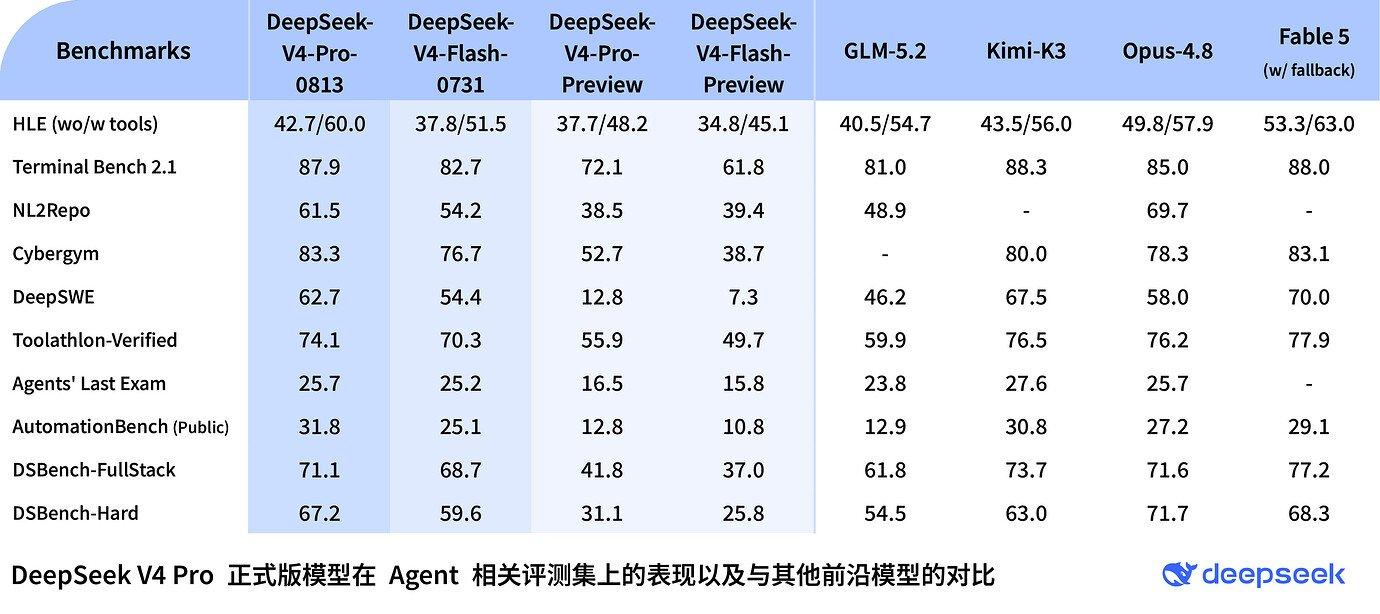
Three things change with GA:
- The snapshot is stable. Preview models can shift under your feet, which quietly invalidates evals and prompt tuning. Build 0813 is a fixed target until DeepSeek announces a new snapshot.
- The endpoint is the production alias. On the official API you call
deepseek-v4-proand get the 0813 build; to pin the snapshot explicitly, OpenRouter lists it asdeepseek/deepseek-v4-pro-0813. - The full feature surface is on. Thinking modes, function calling, structured outputs, prompt caching, and the multi-format API (OpenAI, Anthropic, Responses) are all live on the GA endpoint.
Under the hood, V4 Pro is a mixture-of-experts model with 1.6T total parameters and 49B active per token. The headline engineering story is efficiency: two attention schemes, Compressed Sparse Attention and Heavily Compressed Attention, bring single-token inference compute down to 27% of V3.2’s and the KV cache to 10%. That KV-cache reduction is what makes a 1M-token context servable at these prices rather than a demo feature.
DeepSeek V4 Pro 0813: specs at a glance
| Spec | DeepSeek V4 Pro 0813 |
|---|---|
| Release | GA on August 12, 2026 (snapshot 0813) |
| Architecture | Mixture-of-experts, 1.6T total parameters, 49B active per token |
| Attention | Compressed Sparse Attention + Heavily Compressed Attention |
| Inference cost vs V3.2 | 27% of single-token compute, 10% of KV cache |
| Context window | 1,000,000 tokens |
| Max output | 384K tokens |
| Thinking modes | non-think, think high, think max |
| Input price | $0.435/M tokens (cache miss), $0.003625/M (cache hit) |
| Output price | $0.87/M tokens |
| API formats | OpenAI Chat Completions, Anthropic Messages, DeepSeek Responses |
| Model ID | deepseek-v4-pro |
| Smaller sibling | deepseek-v4-flash (284B total / 13B active), $0.14/M in, $0.28/M out |
On capability, DeepSeek’s own model card lists SWE-bench Verified at 80.6%, Terminal Bench 2.0 at 67.9%, GPQA Diamond at 90.1%, and LiveCodeBench at 93.5% for V4-Pro-Max, the maximum-thinking configuration. Those are self-reported vendor numbers no third party has verified yet, so run your own task-specific evals before migrating anything important.
Get an API key and make your first request
Setup takes about five minutes:
- Create an account on the DeepSeek platform (platform.deepseek.com) and add credit, the API is prepaid.
- Open API Keys, generate a key, and copy it immediately (it’s shown once).
- Export it as an environment variable rather than pasting it into code:
export DEEPSEEK_API_KEY="sk-..."
The API speaks the OpenAI Chat Completions protocol, so the standard openai package is the client. Both https://api.deepseek.com and https://api.deepseek.com/v1 work as base URLs; the /v1 is protocol compatibility, not a model version.
import os
from openai import OpenAI

client = OpenAI(
    api_key=os.environ["DEEPSEEK_API_KEY"],
    base_url="https://api.deepseek.com",
)

response = client.chat.completions.create(
    model="deepseek-v4-pro",
    messages=[
        {"role": "system", "content": "You are a concise technical assistant."},
        {"role": "user", "content": "Explain idempotency in REST APIs in two sentences."},
    ],
)

print(response.choices[0].message.content)
print(response.usage)
Print response.usage from day one. With a model this cheap on cache hits and this expensive on 1M-token cache misses, token accounting is the difference between a rounding error and a real bill.
The same request over raw HTTP, useful for smoke tests and for importing into API tools:
curl https://api.deepseek.com/chat/completions \
  -H "Content-Type: application/json" \
  -H "Authorization: Bearer $DEEPSEEK_API_KEY" \
  -d '{
    "model": "deepseek-v4-pro",
    "messages": [
      {"role": "user", "content": "List three ways to version a REST API."}
    ]
  }'
The full parameter reference lives in the official DeepSeek docs, including the Anthropic-compatible endpoint (usable from the Anthropic SDK and Claude Code without rewriting anything) and DeepSeek’s own Responses API.
Working with the three thinking modes
V4 Pro exposes reasoning as a dial rather than a separate model. One endpoint, three modes:
- non-think: the model answers directly. Fastest and cheapest, right for extraction, classification, formatting, and summaries.
- think high: the model reasons before answering and returns that reasoning in a
reasoning_contentfield. The default for coding, debugging, and multi-step analysis. - think max: maximum reasoning budget, the configuration behind the V4-Pro-Max benchmark numbers. Save it for genuinely hard problems.
The modes map onto the standard reasoning_effort parameter, so no vendor-specific plumbing is needed:
response = client.chat.completions.create(
    model="deepseek-v4-pro",
    reasoning_effort="high", # "none" | "high" | "max"
    messages=[
        {"role": "user", "content": "Our API returns 502s under load but only behind the CDN. Walk through likely causes in order of probability."},
    ],
)

message = response.choices[0].message
print("--- Reasoning ---")
print(message.reasoning_content)
print("--- Answer ---")
print(message.content)
Two practical notes. First, never feed reasoning_content back into the conversation history; send only the content of previous turns. Second, reasoning tokens bill as output tokens at $0.87/M, so think max costs real money and real latency. Match the mode to the task instead of defaulting to maximum.
Streaming responses
At 384K max output and thinking modes that can reason at length, non-streaming requests make for a bad user experience. Set stream=True and handle both delta types, in thinking modes, reasoning_content chunks arrive first, then the answer:
stream = client.chat.completions.create(
    model="deepseek-v4-pro",
    reasoning_effort="high",
    stream=True,
    messages=[
        {"role": "user", "content": "Design a rate limiter for a public API. Compare token bucket and sliding window."},
    ],
)

for chunk in stream:
    if not chunk.choices:
        continue # final chunk may carry usage data only
    delta = chunk.choices[0].delta
    if getattr(delta, "reasoning_content", None):
        print(delta.reasoning_content, end="", flush=True) # thinking phase
    elif delta.content:
        print(delta.content, end="", flush=True) # answer phase
A sensible UI pattern: render the reasoning phase collapsed as a “thinking” indicator, then switch to normal rendering when content deltas start. Under the hood this is standard server-sent events; our guide on streaming API responses with SSE covers the mechanics.
Tool calling and structured outputs
V4 Pro supports OpenAI-style function calling, which means existing agent loops port without modification. Define tools, read tool_calls, execute, append results, repeat:
tools = [{
    "type": "function",
    "function": {
        "name": "get_endpoint_status",
        "description": "Check the health of an internal API endpoint",
        "parameters": {
            "type": "object",
            "properties": {
                "endpoint": {"type": "string", "description": "Path, e.g. /v1/orders"}
            },
            "required": ["endpoint"],
        },
    },
}]

response = client.chat.completions.create(
    model="deepseek-v4-pro",
    messages=[{"role": "user", "content": "Is /v1/orders healthy right now?"}],
    tools=tools,
)

print(response.choices[0].message.tool_calls)
Structured outputs work through the standard response_format parameter when you need guaranteed-parseable JSON. A full walkthrough of multi-step tool loops deserves its own article; the official docs cover the message-shape details.
Prompt caching economics: the number that changes your architecture
Here’s the spec that deserves more attention than the benchmarks. DeepSeek caches prompt prefixes automatically, no cache-control headers, no TTL configuration, and repeated prefixes bill at $0.003625/M instead of $0.435/M. That’s a 120x discount for input the API has already seen.
Run the numbers on a realistic workload. Say you’re building a coding agent that holds a 200K-token repository context and makes 50 calls in a session:
- Without caching: 50 calls × 200K tokens × $0.435/M ≈ $4.35 in input costs.
- With automatic caching: one cache miss ($0.087) + 49 cache hits (≈ $0.0007 each) ≈ $0.12.
Same session, roughly 35x cheaper, and all it takes is prompt structure: stable content first (system prompt, documentation, repository context), volatile content last (the user’s latest message, timestamps, request IDs). Any change early in the prompt invalidates the cached prefix from that point on, so a timestamp in your system prompt silently converts every call into a full-price cache miss.
This also reframes the 1M context window: filling it costs $0.435 on a miss, but as a stable session prefix it reads for about a third of a cent per call. For the general theory, see What is prompt caching.
Testing deepseek-v4-pro in Apidog
Before V4 Pro goes anywhere near production code, put the endpoint under a proper debugger. Because DeepSeek’s API is OpenAI-compatible, Apidog picks it up with zero special handling:
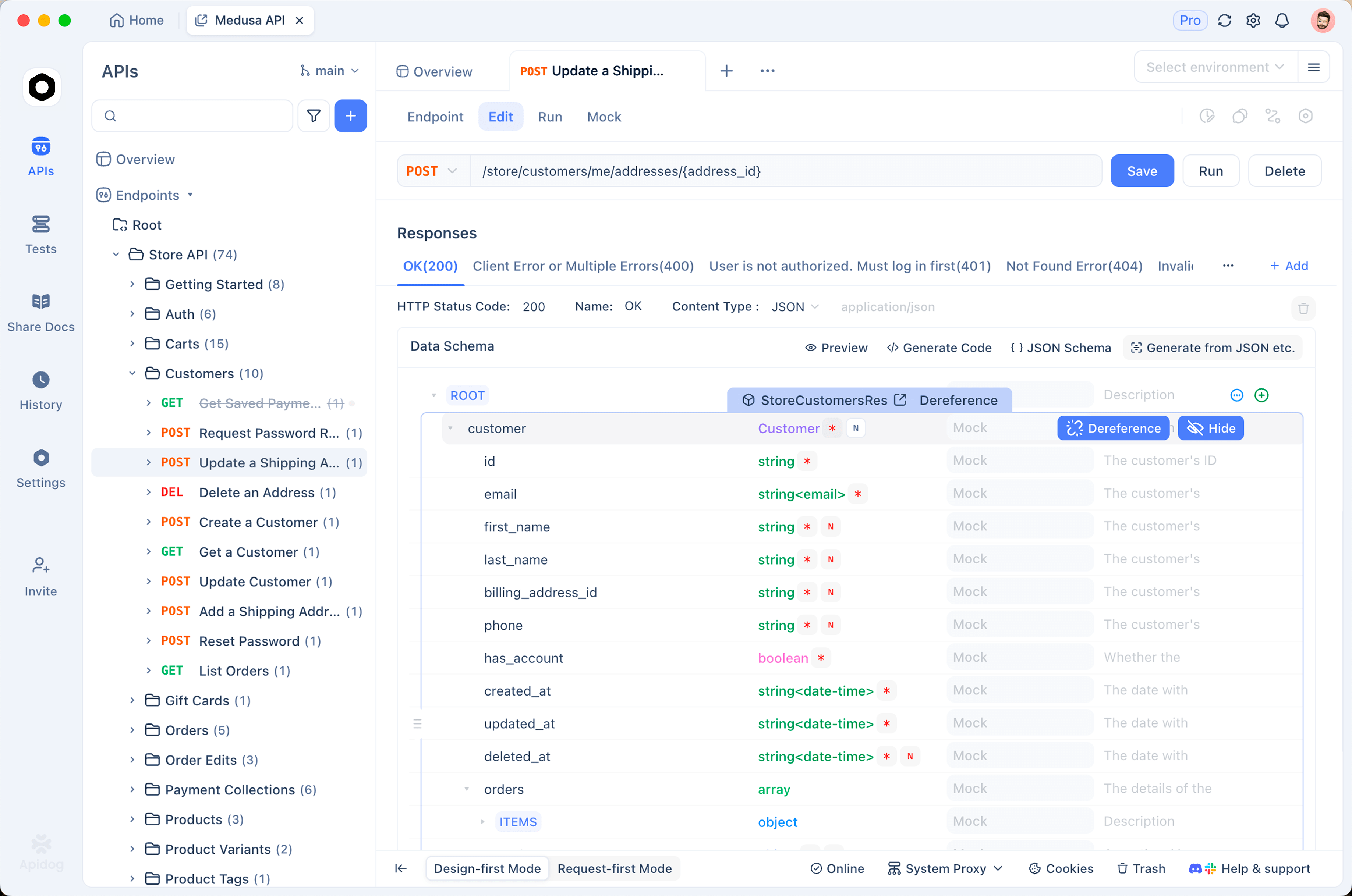
- Import the endpoint. Paste the curl command from earlier into Apidog and it becomes an editable request, headers, auth, and body parsed automatically.
- Set up environments for Pro and Flash. Store
base_urland your API key as environment variables, and make the model name a variable too. Switching betweendeepseek-v4-proanddeepseek-v4-flashbecomes a one-click environment change, which makes “is Pro worth 3x Flash’s price on this prompt?” an empirical question instead of a debate. - Inspect the SSE stream. Send a request with
"stream": trueand Apidog renders the event stream as a live timeline instead of a wall of rawdata:lines, merging deltas so you can watchreasoning_contentarrive ahead of the answer. When a think-max call feels slow, this view shows you exactly where the time went. - Save the session as a collection. When DeepSeek ships the next snapshot, re-run the same requests and diff behavior before you upgrade, the same workflow teams use for OpenAI-compatible endpoints generally.
The response viewer also surfaces the usage block on every request, which is the fastest way to verify your cache-hit ratio while you tune prompt structure.
Pricing today, and the increase that’s coming
Current list prices for the two V4 endpoints:
| Model | Input (miss) | Input (cache hit) | Output |
|---|---|---|---|
deepseek-v4-pro |
$0.435/M | $0.003625/M | $0.87/M |
deepseek-v4-flash |
$0.14/M | $0.28/M |
Even at Pro prices, this undercuts Western frontier models by a wide margin. But plan around one caveat: on August 6, 2026, six days before GA, DeepSeek warned that a “significant” API price increase is coming, no figures, no effective date.
Practical hedges while the number is unknown:
- Measure your real per-task cost now, with
usagedata from actual workloads, so you can model any announced increase in minutes rather than guessing. - Maximize cache hits. If the increase applies proportionally, prefix-heavy architectures keep most of their advantage.
- Keep V4 Flash as a routing fallback. At $0.14/$0.28 with 13B active parameters, it handles high-volume simple tasks so Pro is reserved for requests that need it.
For a deeper breakdown of the V4 pricing structure and how it compares across providers, see our DeepSeek V4 API pricing guide.
FAQ
Will my existing OpenAI SDK code work unchanged?
Almost. Change base_url to https://api.deepseek.com, swap the API key, and set model="deepseek-v4-pro". Chat Completions, streaming, tools, and structured outputs follow the OpenAI shapes. Teams on the Anthropic SDK can use DeepSeek’s Anthropic Messages endpoint instead.
When should I use V4 Flash instead of V4 Pro?
Flash (284B total, 13B active) is the volume model: classification, extraction, simple chat, anything latency-sensitive that doesn’t need deep reasoning. Pro earns its 3x output price on agentic coding, long-context analysis, and think-mode workloads. Route by task, not by loyalty.
Can I use V4 Pro 0813 in Cursor?
Yes, Cursor accepts custom OpenAI-compatible endpoints, so the GA build drops in as a custom model. We walk through the exact setup in How to use DeepSeek V4 Pro with Cursor.
Wrapping up
Day one with a GA model is the right time to build the muscle memory: key, first request, thinking modes, streaming, and a caching-aware prompt layout. V4 Pro rewards that last habit more than any model before it, the 120x cache discount makes prompt structure an architecture decision. Wire up the examples above, watch the usage numbers, and keep a saved Apidog collection so you can re-verify behavior when the next snapshot or the announced price change lands.