To document Kafka APIs, write a contract for every topic. It should name the topic, the event key, the payload schema, the headers, the ordering and delivery guarantees, the consumer groups, the retention period and the owner. Then store that contract next to your HTTP API docs, so producers and consumers read one source of truth instead of reverse-engineering messages from a live cluster.
This guide covers each part of that contract, how to write it in AsyncAPI, how to evolve schemas safely, and how to let your coding agent do the work with Apidog CLI.
If you’re new to event-driven design, start with how to build event-driven APIs and the guide to webhooks and event-driven architecture.
What is a Kafka API?
A Kafka API is the set of topics, message formats and delivery rules that services use to exchange events through an Apache Kafka cluster. Unlike a REST API, nobody calls an endpoint and waits for a response. Producers write records to topics, consumers read them on their own schedule, and the contract lives in the shape and meaning of those records.
The Kafka documentation puts it plainly: “an event has a key, value, timestamp, and optional metadata headers.” Kafka itself doesn’t check what’s inside the value. A producer can write JSON one day and a different JSON shape the next, and the broker will accept both. That’s why Kafka APIs need written contracts more than HTTP APIs do: nothing in the transport stops a breaking change.
Undocumented topics fail in predictable ways: a consumer guesses a field type from one sample and crashes on null, or a new service doesn’t know it gets each message at least once and double-charges on retries.
What to document for each Kafka topic
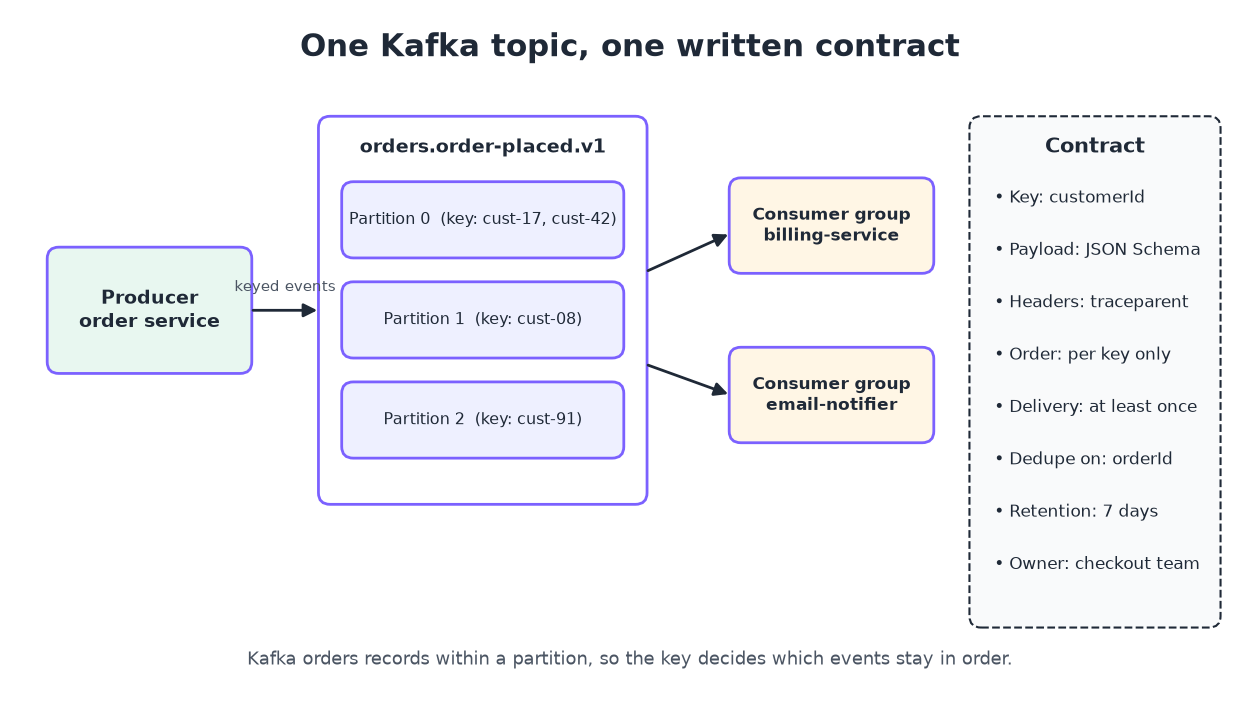
Every topic needs the same core facts. Use this table as your checklist:
| Contract field | What to write down | Example |
|---|---|---|
| Topic name | Full name and naming convention | orders.order-placed.v1 |
| Purpose | One sentence on what the event means | “An order passed payment and is ready to ship” |
| Event key | Which field is the key, and why | customerId, so one customer’s orders stay in order |
| Payload schema | Every field, type, required flag and format | JSON Schema, Avro or Protobuf |
| Headers | Name, type and meaning of each header | traceparent, schema-version |
| Partitions and ordering | Partition count and the ordering promise | 12 partitions, ordered per customerId |
| Delivery semantics | At least once, idempotent producer, transactions | At least once; consumers must deduplicate on orderId |
| Consumer groups | Known groups and what each one does | billing-service, email-notifier |
| Retention | How long records stay readable | 7 days |
| Ownership | Owning team, contact and version policy | Checkout team, #checkout-events |
The ordering and delivery rows matter most: readers can’t infer them from a sample message.
How to document Kafka APIs in 6 steps
- List every topic and its owner. Pull the topic list from your cluster and mark who produces to each one.
- Define the key. Write down which field is the key and what that means for ordering.
- Write the payload schema. Describe every field with JSON Schema, Avro or Protobuf.
- Describe headers and metadata. Include tracing, schema version and content type headers.
- State the guarantees. Document delivery semantics, ordering scope, retention and consumer groups.
- Publish it where people look. Put the contract next to your HTTP API docs and version it like code.
Steps 1 and 2: topics and keys
A naming pattern like <domain>.<event>.<version> tells readers who owns the topic and which version they’re reading. Then document the key, because it decides the partition. Kafka’s docs state that “events with the same event key (e.g., a customer or vehicle ID) are written to the same partition,” and that consumers read a partition’s events “in exactly the same order as they were written.”
So your contract should say “ordered per customerId,” not “ordered.” Kafka only promises order inside a partition, never across a whole topic.
Step 3: the payload schema
The payload is the part consumers code against, so describe it field by field. Here’s a JSON Schema for an order-placed event:
{
  "type": "object",
  "required": ["orderId", "customerId", "totalCents", "currency", "placedAt"],
  "properties": {
    "orderId": { "type": "string", "description": "Unique order ID; use it to deduplicate" },
    "customerId": { "type": "string", "description": "Also the record key" },
    "totalCents": { "type": "integer", "minimum": 0 },
    "currency": { "type": "string", "enum": ["USD", "EUR", "GBP"] },
    "placedAt": { "type": "string", "format": "date-time" },
    "couponCode": { "type": ["string", "null"] }
  }
}
The description “use it to deduplicate” tells a consumer what to do with the field, not just its type. New to the format? Read what is JSON Schema.
Steps 4 and 5: headers and guarantees
List each header (trace context, schema version, content type) and say whether consumers can rely on it. Then write down the delivery guarantee, in Kafka’s own terms. The Kafka design docs state that “Kafka guarantees at-least-once delivery by default,” which means messages “are never lost but may be redelivered.” If your producer uses the idempotent option or transactions, say so. If it doesn’t, tell consumers to deduplicate, and name the field to deduplicate on.
Document consumer groups too. Within each subscribing group, a partition “is consumed by exactly one consumer” at a time. That tells readers how far a group can scale out: one active consumer per partition.
Write the contract in AsyncAPI
Tools need a machine-readable format, and for Kafka that’s usually AsyncAPI, a specification “used to describe message-driven APIs in a machine-readable format.” It plays the role OpenAPI plays for REST.
An AsyncAPI 3.0 document has info, servers, channels, operations and components. A channel maps to a topic through its address, and each operation has an action of send or receive:
asyncapi: 3.0.0
info:
  title: Orders events
  version: 1.0.0
channels:
  orderPlaced:
    address: orders.order-placed.v1
    messages:
      orderPlaced:
        $ref: '#/components/messages/orderPlaced'
operations:
  publishOrderPlaced:
    action: send
    channel:
      $ref: '#/channels/orderPlaced'
components:
  messages:
    orderPlaced:
      payload:
        $ref: './schemas/order-placed.json'
AsyncAPI also has Kafka bindings at the server, channel, operation and message level. They’re where Kafka-specific details go, the ones the generic fields can’t express. Keep the spec in the producer’s repo, so the pull request that changes an event also changes its contract.
Kafka schema evolution: document the compatibility rule
Your schema will change. The contract should say which changes are safe. If you use a schema registry, document its compatibility mode. Confluent’s schema evolution docs list these modes, and note that “the Confluent Schema Registry default compatibility type is BACKWARD”:
| Mode | Who can read what |
|---|---|
| BACKWARD | Consumers on the new schema can read data written with the previous schema |
| BACKWARD_TRANSITIVE | Consumers on the new schema can read data from all earlier schemas |
| FORWARD | Consumers on the previous schema can read data written with the new schema |
| FORWARD_TRANSITIVE | Consumers on any earlier schema can read data written with the new schema |
| FULL | Backward and forward compatible with the previous schema |
| FULL_TRANSITIVE | Backward and forward compatible with all earlier schemas |
| NONE | Compatibility checks are off |
In practice, under BACKWARD you can add optional fields and remove fields that had defaults. Renaming a required field or changing its type breaks consumers. When you need a breaking change, publish a new topic version (orders.order-placed.v2), document both, and set a retirement date for the old one.
Let your coding agent document Kafka APIs with Apidog CLI
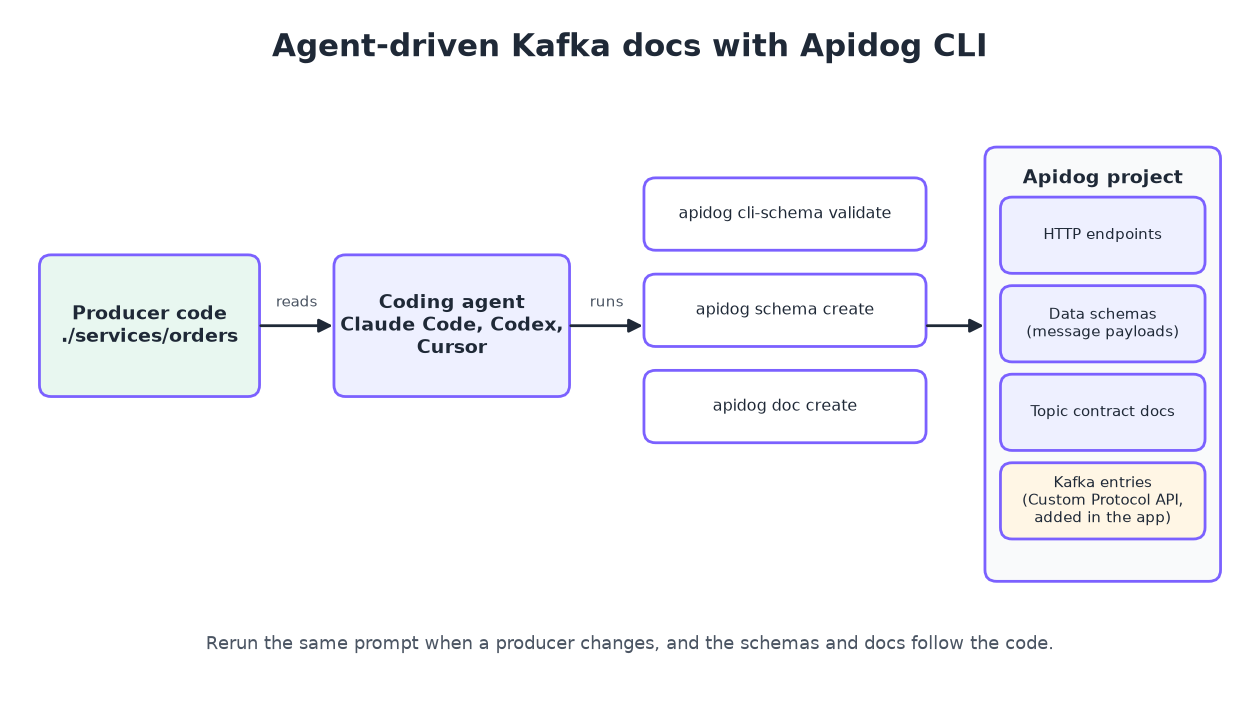
Hand-written contracts drift the moment someone changes a producer. Your coding agent can read the producer code, write the schemas and keep the docs in sync while you review. Apidog CLI gives Claude Code, Codex, Cursor or any terminal agent the commands to do that in an Apidog project.
Install the CLI, log in and add the Apidog skill so your agent knows the commands:
npm install -g apidog-cli@latest
apidog auth login --with-token <YOUR_TOKEN>
apidog skill install
You can also hand the setup to the agent: tell it to read the Apidog CLI installation guide and set itself up.
Then give your agent one prompt:
Read the Kafka producers in ./services/orders. For every topic they write to,
create an Apidog data schema in project <projectId> for the message payload,
then create one Markdown doc per topic with the key, headers, ordering,
delivery guarantee, consumer groups, retention and owner. Validate every
payload before you write it.
The agent checks the payload shape, validates its file, then writes the schema and the contract page:
apidog cli-schema get schema-create
apidog cli-schema validate schema-create --file order-placed.schema.json
apidog schema create --project <projectId> --file order-placed.schema.json
apidog cli-schema get doc-create
apidog doc create --project <projectId> --file order-placed.doc.json
apidog schema list --project <projectId>
apidog schema create stores the payload as a reusable data schema. Your HTTP endpoints can reference the same model, so an Order defined once covers both the REST response and the Kafka event. apidog doc create writes a Markdown document into the project tree, which holds the topic contract from the table above. When a producer changes, rerun the prompt and the agent uses apidog schema update. For a longer walkthrough of agent-driven doc work, see how to document APIs from the CLI and Apidog CLI in Claude Code.
One step stays in the app. Apidog’s Custom Protocol API documents Kafka endpoints alongside HTTP ones: choose New Other Protocol APIs, then Other Custom Protocol API, pick Kafka as the protocol, and fill in the URI (the topic), name, status, maintainers, tags and description. These entries share the folder tree, search and Quick Share with your HTTP docs. The CLI has no command for custom protocol endpoints today, so this is the one part you create by hand.
Apidog Free covers up to 4 users, so a small team can keep its REST and Kafka docs in one project at no cost.
FAQ
Is there an OpenAPI for Kafka?
AsyncAPI fills that role. It describes servers, channels (topics), operations and message payloads in YAML or JSON, with Kafka-specific bindings.
Do I need a schema registry to document Kafka APIs?
No, but it helps. Docs state the rules; a registry enforces them at write time. If you run one, document its compatibility mode.
What’s the difference between documenting a Kafka topic and a REST endpoint?
A REST doc describes a request and a response. A Kafka doc describes one message that many consumers read later, so it also needs the key, ordering scope, delivery guarantee, retention and consumer groups. None of those appear in a typical REST doc.
Can Apidog test Kafka messages?
Apidog documents Kafka endpoints through Custom Protocol API, but it doesn’t send or consume Kafka messages. Use it to hold the contract and the payload schemas, and test the producer and consumer code with your Kafka client library.
How often should I update Kafka documentation?
Every time a producer changes a message. Tie it to code review: the pull request that changes the event updates the contract, or your agent regenerates it with Apidog CLI.