Groq gives every account a Free Plan key to its OpenAI-compatible endpoint, and that key works the moment you sign up. The part that trips people up isn’t getting access, it’s staying inside the limits once your app is actually calling the model. Groq publishes per-model Free Plan figures on its docs, but those numbers move and your own account can differ. The reliable habit is checking your account settings, then reading the response headers on every call, since limits can shift mid-session.
This guide covers getting a key, pointing a standard OpenAI client at Groq’s endpoint, and the part most “free tier” posts skip: watching your limits in real time instead of finding out about them from a 429 in production. Then your coding agent turns that check into an Apidog CLI test, so it’s repeatable, not a one-off curl command you forget about.
TL;DR
Groq runs two tiers: Free Plan and Developer Plan. Rate limits apply at the organization level (not per user), you hit whichever cap comes first among requests, tokens, or daily totals, and cached tokens don’t count against you. Groq publishes per-model Free Plan figures, but the numbers that apply to your account live on the limits page in your console, so the reliable move is to read them from the x-ratelimit-* response headers on every call rather than trust a table that can change without notice.
Getting a key and calling the endpoint
Create an account at console.groq.com and generate a key from the keys page. Groq exposes that key through an OpenAI-compatible API, so if you’ve called OpenAI’s SDK before, you already know the shape. Point the base URL at Groq instead of OpenAI and keep everything else the same:
curl https://api.groq.com/openai/v1/chat/completions \
  -H "Authorization: Bearer $GROQ_API_KEY" \
  -H "Content-Type: application/json" \
  -d '{
    "model": "llama-3.1-8b-instant",
    "messages": [{"role": "user", "content": "Summarize this ticket in one sentence."}]
  }'
Or with the official Python OpenAI client:
import os
from openai import OpenAI

client = OpenAI(
    api_key=os.environ["GROQ_API_KEY"],
    base_url="https://api.groq.com/openai/v1",
)

response = client.chat.completions.create(
    model="llama-3.3-70b-versatile",
    messages=[{"role": "user", "content": "List three causes of API timeout errors."}],
)

print(response.choices[0].message.content)
Groq’s OpenAI compatibility docs note a few gaps worth knowing before you copy over existing code: logprobs, logit_bias, top_logprobs, and messages[].name all return a 400 error, n has to equal 1 if you set it, and a temperature of 0 gets converted to a tiny positive float instead of true greedy decoding.
Free Plan vs Developer Plan
Groq’s own wording is direct: “Upgrade to Developer plan to access higher limits, Batch and Flex processing, and more.” The Free Plan is what every new key starts on, and it’s genuinely usable for testing and small side projects.
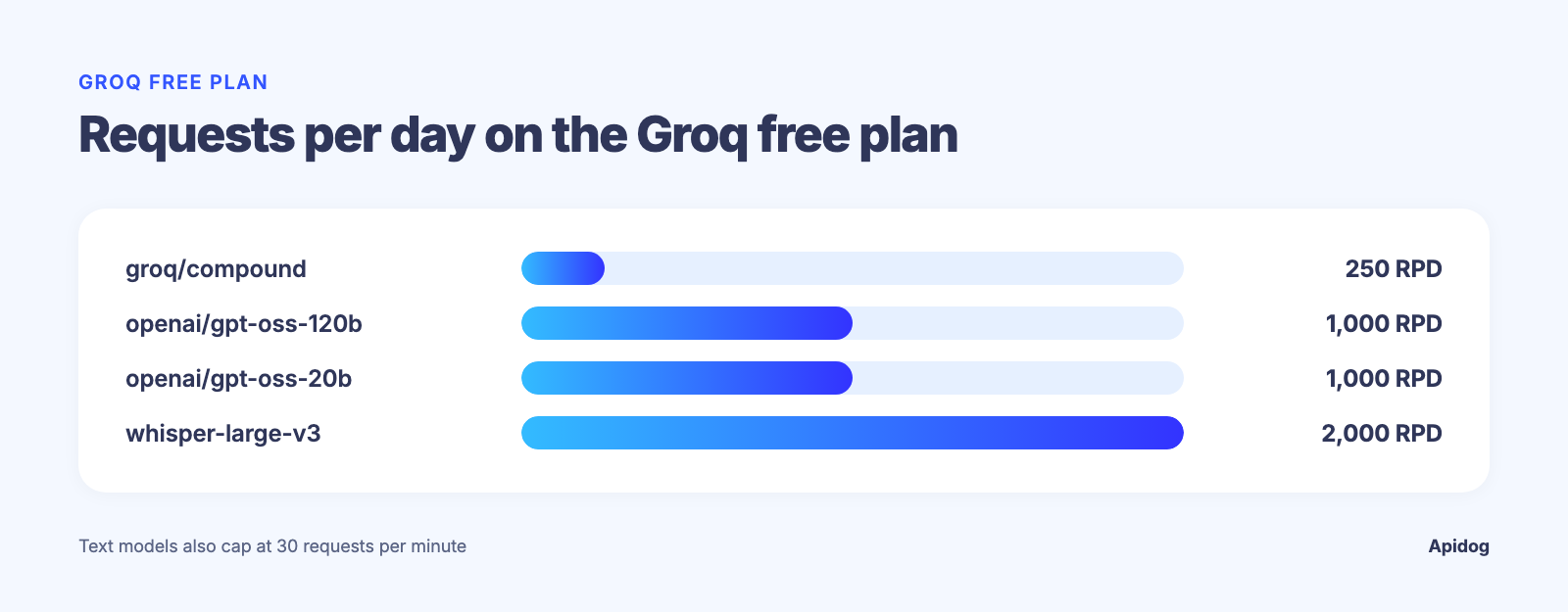
Here’s what the Free Plan allows for a few models, per Groq’s rate limits docs as read on 2026-09-15:
| Model | RPM | RPD | TPM | TPD | Audio |
|---|---|---|---|---|---|
groq/compound |
30 | 250 | 70K | - | - |
openai/gpt-oss-120b |
30 | 1K | 8K | 200K | - |
openai/gpt-oss-20b |
30 | 1K | 8K | 200K | - |
whisper-large-v3 |
20 | 2K | - | - | 7.2K ASH / 28.8K ASD |
That same page has a Developer Plan tab with higher ceilings for every model, plus Batch and Flex processing. Treat the table above as a snapshot, since Groq can change these numbers without notice. Your own figures live at the limits page in your account settings: trust that page over this one if they disagree.
Two policy details matter more than the raw numbers. Rate limits apply “at the organization level, not individual users,” so five people sharing one Groq org share one limit, not five separate ones. And “cached tokens do not count towards your rate limits,” which means a well-cached prompt structure buys you more real throughput than the headline number suggests.
Models worth knowing before you hit a limit
The limit that matters depends on which model you call. Groq’s text models and Compound systems run at a 131,072-token context:
| Model ID | Type |
|---|---|
llama-3.1-8b-instant |
Fast general-purpose text |
llama-3.3-70b-versatile |
Larger general-purpose text |
openai/gpt-oss-120b |
Open-weight reasoning model |
openai/gpt-oss-20b |
Smaller open-weight reasoning model |
groq/compound |
Agentic system |
groq/compound-mini |
Lighter agentic system |
The Whisper models, whisper-large-v3 and whisper-large-v3-turbo, don’t fit this table. They’re audio transcription models, and Groq measures their throughput in audio seconds per hour and per day (ASH/ASD) alongside their own RPM and RPD caps, not in tokens.
Each model has its own RPM, RPD, and token caps, so don’t assume llama-3.1-8b-instant’s limits apply to openai/gpt-oss-120b.
Read the rate-limit headers instead of guessing
Every response from api.groq.com carries a set of headers that tell you exactly where you stand, no console visit needed:
x-ratelimit-limit-requestsandx-ratelimit-limit-tokens, your ceiling for the current windowx-ratelimit-remaining-requestsandx-ratelimit-remaining-tokens, what’s left right nowx-ratelimit-reset-requestsandx-ratelimit-reset-tokens, when the window refreshesretry-after, sent on a 429, telling you how long to wait
Read x-ratelimit-remaining-tokens after every call and you have a live gauge, not a static number you looked up once and forgot to revisit. Here’s a quick check with cURL, printing only the headers:
curl -sD - https://api.groq.com/openai/v1/chat/completions \
  -H "Authorization: Bearer $GROQ_API_KEY" \
  -H "Content-Type: application/json" \
  -d '{"model": "llama-3.1-8b-instant", "messages": [{"role": "user", "content": "hi"}]}' \
  -o /dev/null | grep -i ratelimit
Run that a few times in a loop against a chatty test script and you’ll watch x-ratelimit-remaining-tokens count down. If your app ever needs backoff logic, see our guide on how to implement API rate limiting for patterns that respect a retry-after header instead of guessing at a delay.
Let your coding agent run the check with Apidog CLI
Doing the curl-and-grep dance by hand works for one debugging session. It doesn’t scale to a team, and nobody re-runs a one-off shell command before every deploy. Hand the check to your coding agent instead: with Apidog CLI it writes the test once and runs it whenever you ask. Set it up once:
npm install -g apidog-cli@latest
apidog login --with-token <YOUR_TOKEN>
npx -y skills add https://apidog.com   # pick your agent when prompted
The token comes from Apidog under Account Settings, API Access Token. Then give the agent one prompt:
Use Apidog CLI on project <id>. Create a Groq environment with base URL
https://api.groq.com/openai/v1 and add POST /chat/completions with Bearer auth
from {{GROQ_API_KEY}}. Create one test case per model we run in production
(llama-3.1-8b-instant, openai/gpt-oss-120b) that asserts status 200 and fails
when x-ratelimit-remaining-tokens drops below 10% of x-ratelimit-limit-tokens.
Put both cases in a "Groq limits" test suite, run it, and report the headers.
The commands it runs, checked against Apidog CLI 2.2.7:
apidog environment create Groq --project <id> --base-url https://api.groq.com/openai/v1
apidog endpoint create --project <id> --file groq-chat.json
apidog cli-schema validate test-case-create --file groq-8b-case.json
apidog test-case create --project <id> --file groq-8b-case.json
apidog test-suite create --project <id> --name "Groq limits"
apidog run --test-suite <suiteId> --project <id> -e <envId> \
  --env-var "GROQ_API_KEY=$GROQ_API_KEY" -r cli,junit
A shrinking budget now shows up as a failed test instead of a surprise 429 during a demo. Put that last line in your pre-deploy CI job, as in our Apidog CLI CI/CD pipeline guide, or ask the agent for an apidog scheduled-task create, which runs the suite on a runner on a cron. This matters more given Groq’s organization-level pooling: one teammate running a batch job can eat the shared budget your production endpoint needs an hour later. It’s the same idea behind our post on testing an API for GPT rate limits.
What to do when you actually hit the limit
When a 429 comes back, respect retry-after rather than retrying immediately. A tight retry loop against a request-level limit just spends your remaining budget faster and pushes the reset window out further. If you’re building this into a production service rather than a test script, our complete guide to the rate limit exceeded error walks through backoff strategies that work across providers, not just Groq.
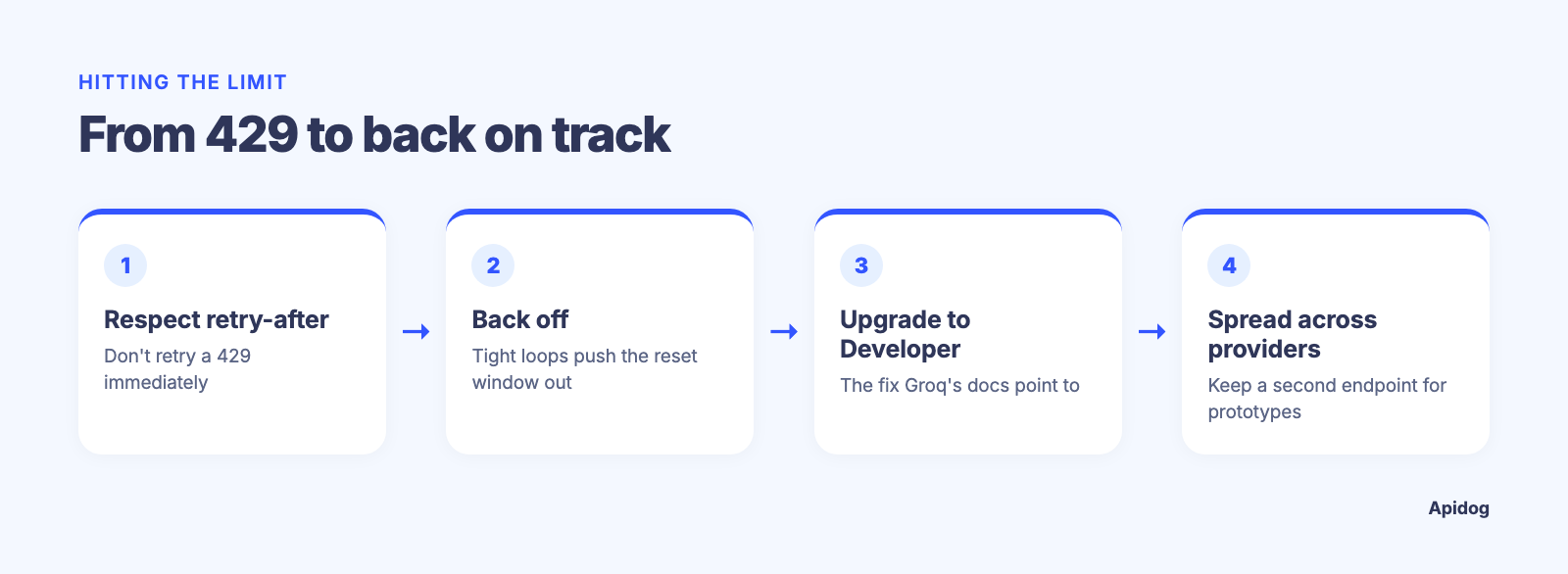
If you’re consistently running into the ceiling on the Free Plan, the fastest fix is the Developer Plan upgrade Groq points to directly in its docs. The second-fastest fix, especially for a prototype, is spreading traffic across more than one provider. Our roundup of OpenRouter alternatives covers other endpoints worth having in your back pocket for exactly this situation.
FAQ
Does Groq have a free tier for its API? Yes. Every new account starts on the Free Plan with access to the OpenAI-compatible endpoint. Groq publishes example Free Plan limits for several models, but the caps that actually apply to your account are on the limits page in your console settings.
How do I check my current Groq rate limit? Two ways: open the limits page in your account settings, or read the x-ratelimit-limit-requests and x-ratelimit-limit-tokens headers on any API response. The headers reflect your account’s real limit at the moment you called, which is more reliable than a number you saw once and remembered.
What happens when I exceed the Groq rate limit? You get a 429 response with a retry-after header telling you how many seconds to wait. See our rate limit exceeded guide for handling this in code instead of guessing at a delay.
Do cached tokens count against my Groq rate limit? No. Groq states directly that cached tokens don’t count toward your rate limits, so a prompt structure that reuses a cached system message gets more real throughput than the raw token limit implies.
Is the Groq rate limit per user or per organization? Per organization. Every key under the same Groq org shares one pool of requests and tokens, so a teammate’s script can eat into the budget your production app needs.
Which Groq models have the highest context window? llama-3.1-8b-instant, llama-3.3-70b-versatile, openai/gpt-oss-120b, openai/gpt-oss-20b, and the Compound systems all run at 131,072 tokens of context. The Whisper models are audio transcription, not text, so Groq measures their limits in audio duration instead. Rate limits differ from model to model even within the same context window, so check each one separately.
Where this leaves you
The free way to use the Groq API isn’t a secret number, it’s a habit. Get a key, point the OpenAI-compatible endpoint at it, and read the response headers on every call instead of trusting a figure you found in a blog post, this one included.
Have your coding agent build that check once with Apidog CLI, with an assertion on remaining tokens for each model, and it runs on every deploy from then on. Setup takes less time than reading the rest of Groq’s docs. For deeper coverage of testing an AI API layer under load, our guide to the best API testing tools for AI agents is a good next stop.