As of November 11, 2026, Google Antigravity swarm mode (the /swarm command) is a preview feature that turns one prompt into a coordinated team of agents led by Google’s Gemini 4 Carbon. Google’s Gemini 4 Carbon became generally available on November 10, 2026, and in /swarm it plans, coordinates and audits while faster, lighter models work in parallel isolated workspaces and adversarial verifier agents test every change.
Below: how the team is organized, what Google built with it, who can run it, what’s still unknown, and how to give swarm agents an API contract to test with Apidog CLI.
What is Google Antigravity /swarm?
/swarm is a preview command in Google Antigravity, Google’s agent-first development platform. You type one prompt, and Antigravity spins up a team of agents you can track in real time. Gemini 4 Carbon handles the roles that need the deepest reasoning, lighter models do the parallel build work, and verifier agents check each change before it lands.
Google introduced it in the post that made Gemini 4 Carbon generally available. It’s labelled a preview, so expect behavior and access rules to change.
If you’re new to Antigravity itself, start with our first look at Google Antigravity and the Antigravity 2.0 platform update. For the model behind the swarm, read What Is Gemini 4 Carbon?.
A note on method: Antigravity with /swarm access isn’t available on the machine this guide was written on, so everything below comes from Google’s announcement. Nothing here describes a hands-on run, and no command syntax beyond /swarm is assumed.
How does the Antigravity agent swarm divide the work?
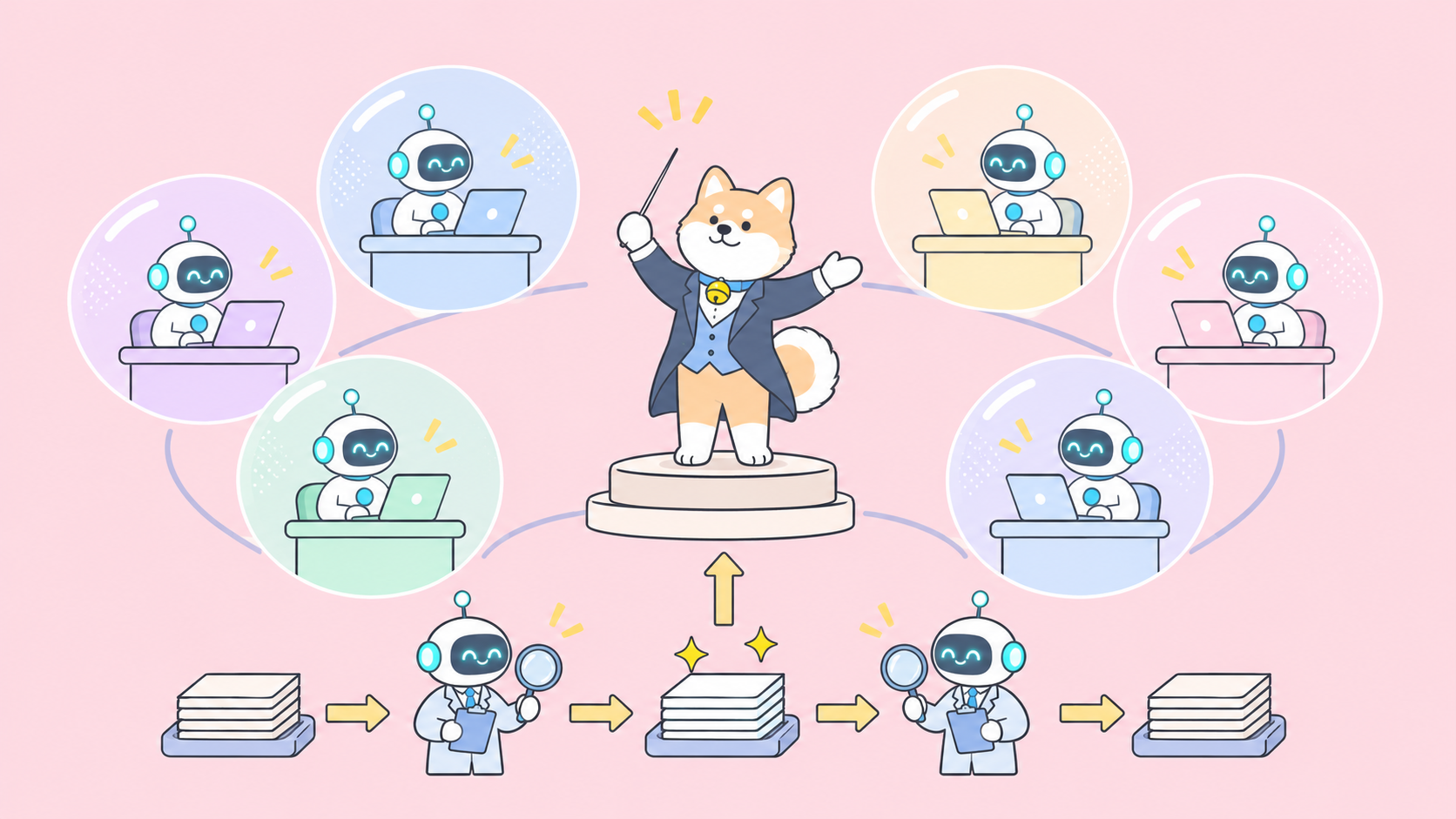
The Antigravity agent swarm splits a job across three kinds of agents:
- The lead (Gemini 4 Carbon). Google says developers can assign Carbon “to roles that demand the deepest reasoning, like architectural design, coordination” and auditing. It breaks the prompt into tasks and judges the results.
- The workers (lighter models). Faster, cheaper models run “across parallel isolated workspaces,” so two workers can’t overwrite each other’s files mid-task.
- The verifiers (adversarial agents). Separate agents “test every change.” Their job is to find what’s broken, not to agree with the worker that wrote it.
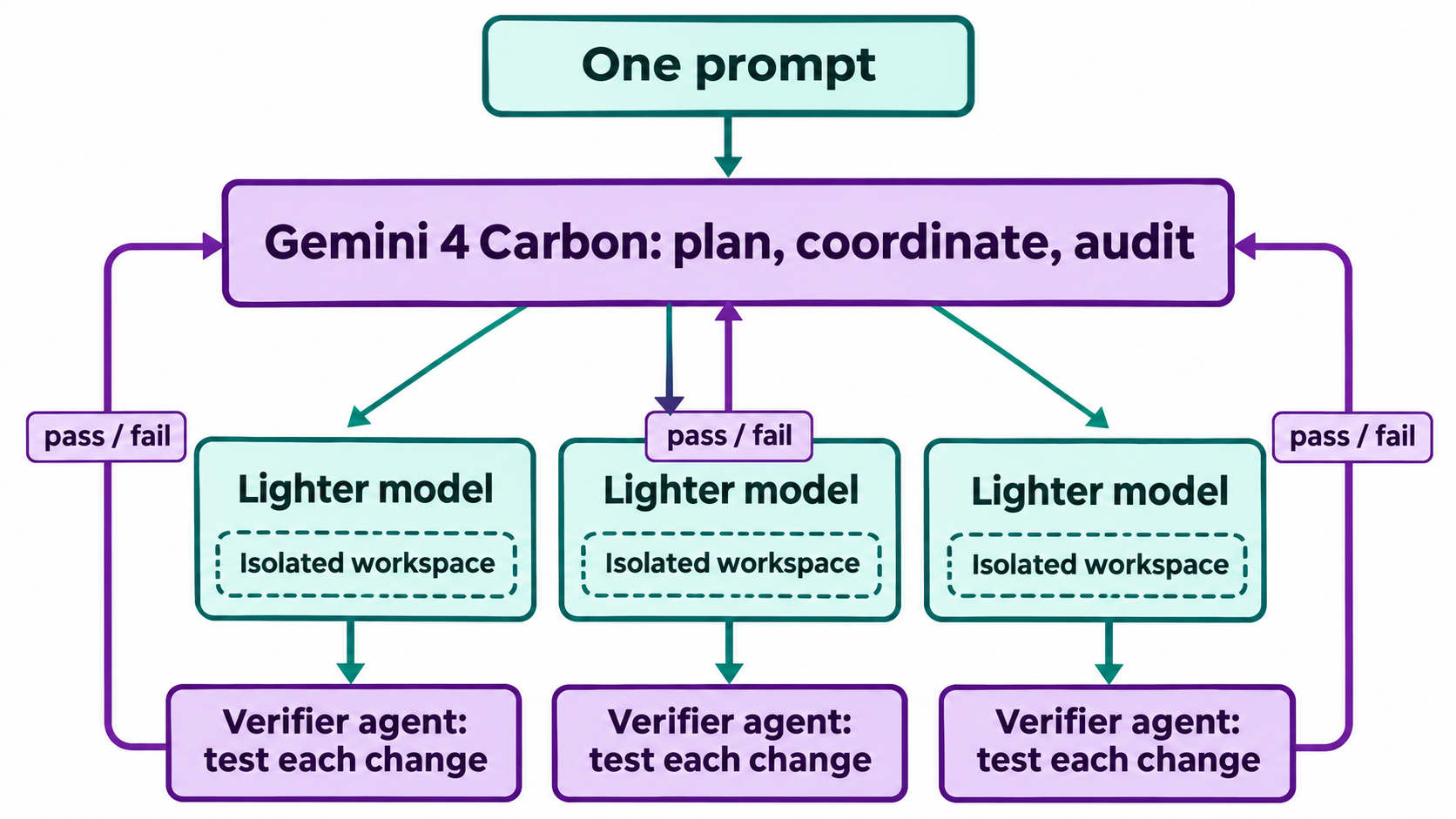
It’s a familiar pattern (expensive planner, cheap parallel executors, independent checker) wired up from a single command.
Isolation matters because parallel agents sharing one working tree collide: one renames a function while another still calls it. Adversarial verifiers matter because the agent that wrote the code tends to test only the paths it already thought about.
What did Google build with /swarm?
Google’s announcement shows three demos. These are Google’s showcases, not independent tests:
| Demo | What Google says Carbon produced | Tooling named by Google |
|---|---|---|
| Mountain View campus game | An open-world 3D game where you explore Google’s Mountain View campus “as a pelican riding a GBike” | Antigravity /swarm |
| Google Merchandise Store | A reimagined store “in two prompts, proposing five art direction concepts” | Carbon (Google post) |
| Koerner Hall fortepiano | A playable c. 1780 Stein-Schule fortepiano placed in a 3D model of Toronto’s Koerner Hall “with seat-specific spatial acoustics” | “a multi-agent loop in Google Antigravity” |
Only the game demo is explicitly credited to /swarm. The fortepiano demo is credited to a multi-agent loop in Antigravity, which is close but not the same claim. Keep that distinction if you cite these.
Who can use Antigravity swarm mode?
Here is what Google states about access, with the source for each line:
| Item | Detail | Source |
|---|---|---|
| Carbon GA date | November 10, 2026 | |
| Model ID | gemini-4-carbon |
|
/swarm status |
Preview in Google Antigravity | |
| Consumer access | Rolling out to all Google AI Ultra subscribers in Antigravity, the Gemini app and AI Mode in Search | |
| Developer access | Gemini API in Google AI Studio and Gemini for business, for paying developers and enterprises | |
| Intro API price | $2 input / $10 output per 1M tokens | |
| Price after Nov 30, 2026 | $4 input / $20 output per 1M tokens | Google (footnote) |
| Default model | “Argon remains the ideal choice for the majority of software engineering and knowledge work” |
What Google hasn’t said yet
The announcement leaves several questions open. Treat any blog or video that answers them confidently with suspicion until Google documents them:
- Agent cap. No maximum number of agents per swarm is stated.
- Plans. Google says Carbon is rolling out to AI Ultra subscribers in Antigravity, but it doesn’t say which plans get the
/swarmpreview specifically. - Model choice for workers. Google says “faster, lighter models” without naming them.
- Usage limits. No swarm-specific quota or rate limit is published.
- General availability. No date for
/swarmto leave preview.
How much does a Gemini 4 Carbon swarm cost?
Google is direct about one thing: Carbon spends more. The announcement says Carbon uses “more tokens than Argon to explore thoroughly, reason deeply, and run extended verification loops.” A swarm multiplies that, because the lead plans, reviews every worker’s output and reads every verifier’s report.
Three practical points:
- Per-token rates match Argon until November 30, 2026. Carbon’s intro price is $2 input and $10 output per 1M tokens, the same as Argon. From December 1, it moves to $4 and $20. Our Gemini 4 Carbon pricing breakdown works through that jump.
- Same rate doesn’t mean same bill. If Carbon uses more tokens per task, a Carbon-led job costs more than an Argon job at identical per-token prices.
- Subscription vs API. How swarm usage counts against a Google AI Ultra plan isn’t published, so watch your usage page during the preview.
Routing the bulk of the edits to lighter workers keeps Carbon’s tokens for planning and auditing, which matches Google’s guidance: Argon for most work, Carbon for the hard parts. Our Gemini 4 Carbon vs Argon comparison covers where that line sits, and Gemini 4 Carbon vs Claude Fable 5.2 compares it with Anthropic’s model.
If you’d rather call Carbon directly than through Antigravity, the Gemini 4 Carbon API guide shows your first request, and the Gemini 4 Argon API guide covers the cheaper default.
Give your swarm a contract: OpenAPI spec plus Apidog CLI tests
Verifier agents are only as good as the definition of “correct” they test against. If the swarm is building or changing an API, the strongest definition you can hand it is an OpenAPI spec plus executable tests. Then “verified” means the endpoints pass real requests, not that another model read the diff and approved it.
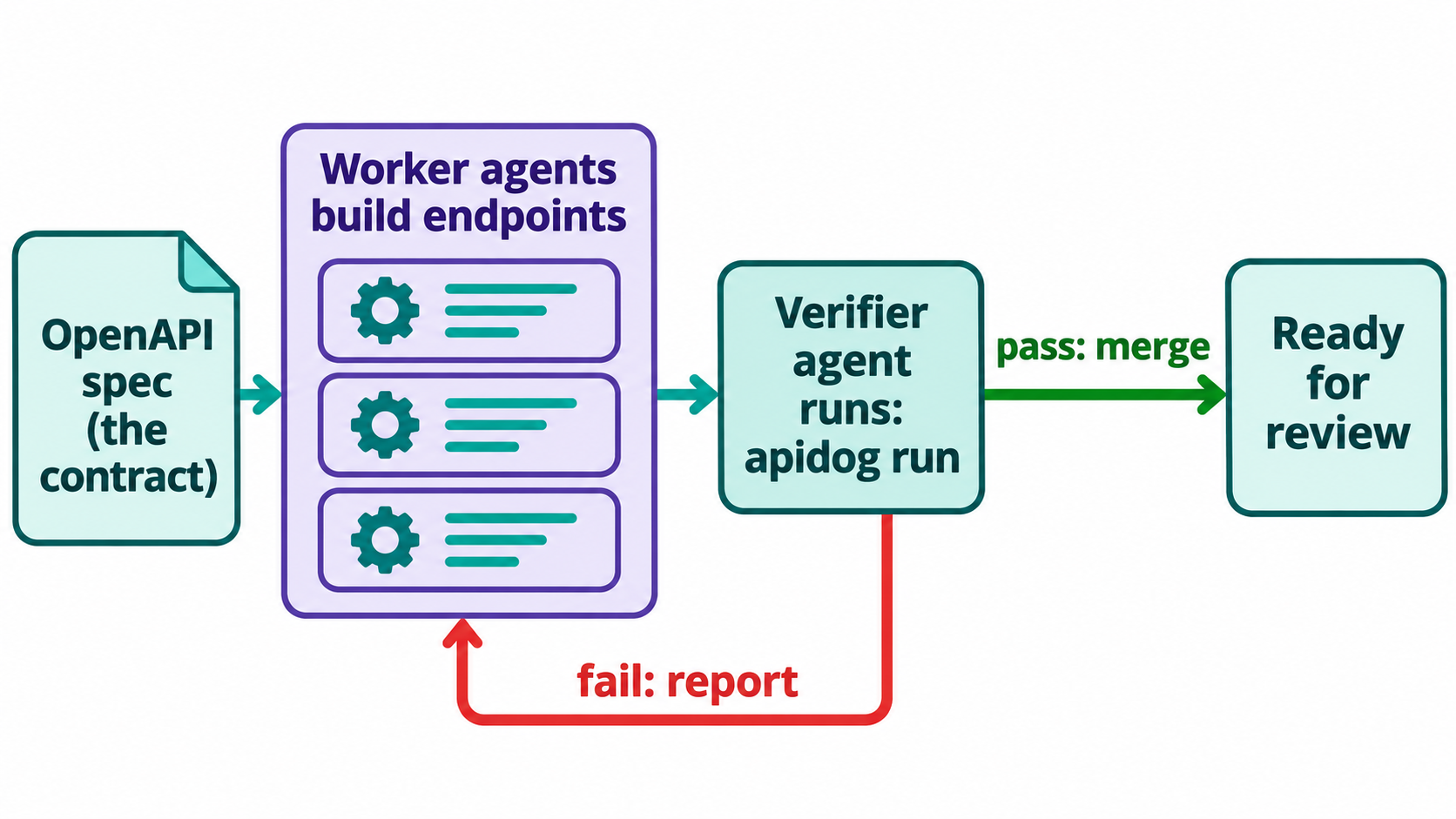
Failures go back to the workers with the exact request and response that broke.
Let your Antigravity agent run the tests with Apidog CLI
Apidog CLI lets an agent import your spec, write test cases and run them from the terminal, with JSON output it can read. You don’t click through anything. You set it up once, then the agent does the work.
Install and log in:
npm install -g apidog-cli@latest
apidog auth login --with-token <YOUR_TOKEN>
npx -y skills add https://apidog.com   # pick your agent when prompted
A shortcut: tell your agent “Read https://apidog.com/apidog-cli-installation-guide.md and set up Apidog CLI.” That guide is written for agents. For Antigravity specifically, see how to use the Apidog CLI in Antigravity.
Then give your agent one prompt:
Import ./openapi.yaml into Apidog project <projectId> on a new AI branch.
For every endpoint in the spec, create a test case that asserts the status code
and the response schema. Run all cases against environment <envId> and report
each failure with the request, the expected schema and the actual response.
The agent reads each payload schema before it writes anything, then runs commands like these:
apidog branch create --project <projectId> --type ai --name "ai/20261111-from-main-swarm-contract" --from main
apidog import --project <projectId> --format openapi --file ./openapi.yaml --branch "ai/20261111-from-main-swarm-contract"
apidog cli-schema get test-case-create
apidog cli-schema validate test-case-create --file case.json
apidog test-case create --project <projectId> --file case.json --branch "ai/20261111-from-main-swarm-contract"
apidog run --test-case <caseId> --project <projectId> --branch "ai/20261111-from-main-swarm-contract" -e <envId> -r cli,json
Every flag above comes from apidog <cmd> --help on Apidog CLI 2.2.12. The AI branch keeps agent-written changes out of your main branch until you review them, which suits a swarm that touches many endpoints at once.
Two habits make this work well with a swarm:
- Point the verifier role at the run, not the code. In your prompt, tell verifier agents to treat a failed
apidog runas a failed change, whatever the diff looks like. - Keep the report machine-readable.
-r jsongives the agent structured failures to route back to the right worker. Add--upload-reportif you want to review the run in the Apidog app afterwards.
The same apidog run ... -r junit command drops into CI, so the contract the swarm tested against is the one your pipeline enforces. See Apidog CLI in a CI/CD pipeline for the setup. Apidog’s Free plan covers up to 4 users, which is enough to try this on a side project.
When should you use /swarm instead of a single agent?
Use the swarm for wide work: a feature touching the API, frontend and migrations at once, or a build where a silent bug is expensive. Stay with one agent, probably on Argon, for small fixes you can review in five minutes.
FAQ
Is Google Antigravity /swarm free?
Google hasn’t announced a free tier for /swarm. Google says Gemini 4 Carbon is rolling out to Google AI Ultra subscribers in Antigravity and is available to paying developers through the Gemini API. Which plans include the /swarm preview isn’t stated.
What model runs the agents in an Antigravity swarm?
Google’s Gemini 4 Carbon takes the lead roles: architecture, coordination and auditing. Google says “faster, lighter models” run the parallel workers but doesn’t name them.
How many agents can a swarm run?
Google hasn’t published a limit. The announcement describes a “coordinated team of agents” without a number.
Does /swarm work with my own API tests?
Google doesn’t describe a built-in API test integration. You can still give the agents a contract: an OpenAPI spec plus tests your agent runs with Apidog CLI, so a verifier’s pass means the endpoints returned what the spec promises.
Is Gemini 4 Carbon the default model in Antigravity?
Google positions Argon, not Carbon, as the right choice for most software engineering and knowledge work. Carbon is for harder tasks and uses more tokens exploring and verifying. Our Claude Fable 5.2 API guide covers another option if you’re comparing frontier models for agent work.