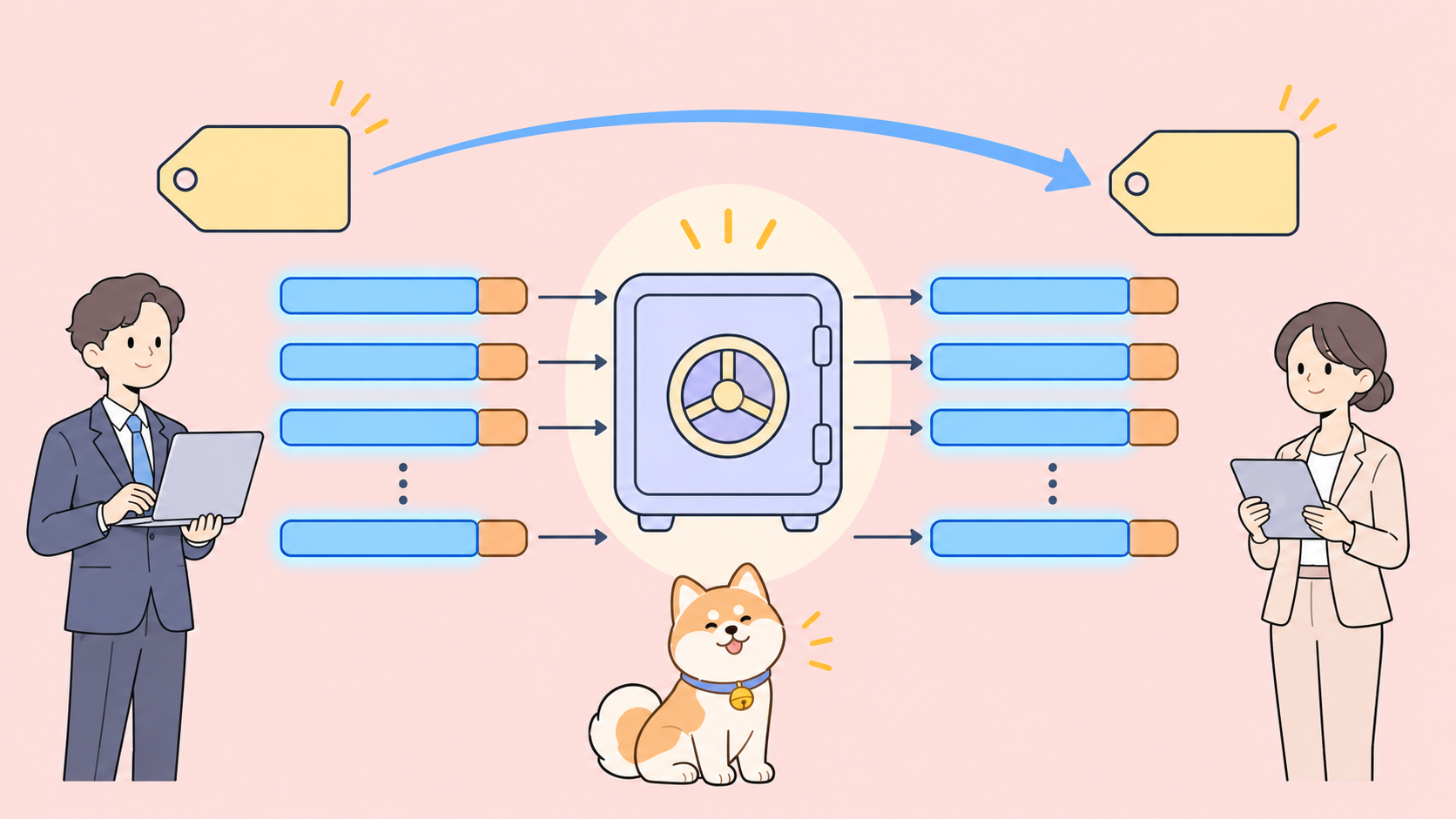
Gemini 4 Neon context caching is implicit only. You don’t create a cache. Google caches repeated prompt prefixes of at least 4,096 tokens on its own and bills those cached input tokens at $0.15 per 1M instead of $3, a 95% discount. You get it by keeping the stable part of every request at the front and byte-for-byte identical, then confirming hits in usage.total_cached_tokens.
Below: prompt layout for cache hits, the agent-loop rule, reading the cached count, and a test your coding agent runs for you.
How does Gemini 4 Neon context caching work?
Gemini 4 Neon context caching is automatic prefix caching. When a new request starts with the same tokens as a recent one, and that shared prefix is at least 4,096 tokens long, Google serves the repeated part from cache and bills it at the cached rate. There’s nothing to switch on, and no cache object, TTL or storage fee to manage.
Google released Neon on November 18, 2026 (model ID gemini-4-neon, see the launch post). Its caching facts fit in one table:
| Item | Gemini 4 Neon |
|---|---|
| Caching mode | Implicit only, on by default |
Explicit caching (cachedContents, caches.create) |
Not supported |
| Minimum prefix for a cache hit | 4,096 tokens |
| Standard input | $3.00 per 1M tokens |
| Cached input (Standard) | $0.15 per 1M tokens |
| Cached input (Batch and Flex) | $0.075 per 1M tokens |
| Cached input (Priority) | $0.27 per 1M tokens |
| Where to see hits | usage.total_cached_tokens |
| Free tier | None, paid tier only |
The discount is 95% on every tier: $0.15 is 5% of $3, $0.075 is 5% of $1.50, and $0.27 is 5% of $5.40. Output tokens, including thinking tokens, stay at $15 per 1M on Standard. Caching only touches input.
Gemini 4 Neon implicit caching vs explicit caching
If you ran explicit caching on Gemini 2.5 or 3, this is the change that breaks code. Google’s Neon migration notes say it plainly: Gemini 4 Neon “does not support explicit caching (cachedContents and caches.create)”, and you should “remove cached_content fields from requests.”
The caching docs add that the Interactions API only supports implicit caching, and explicit caching isn’t available for any Gemini 4 model. Explicit caches still work on supported Gemini 3 and 2.5 models through generateContent.
What that means for a migration:
- Delete the code that calls
caches.createand stores a cache name. - Remove
cached_contentfrom every request body. - Stop paying for cache storage you no longer use.
- Restructure prompts so the content you used to cache explicitly sits at the very start of each request.
You can’t pin a document or pick a TTL, and a hit isn’t guaranteed. You can raise the odds a lot.
How do you structure prompts to hit the Gemini 4 Neon cache?
A cache hit needs a long, identical prefix sent again soon. Google’s docs give two tips: put large and common content at the beginning of your prompt, and send requests with a similar prefix within a short time.
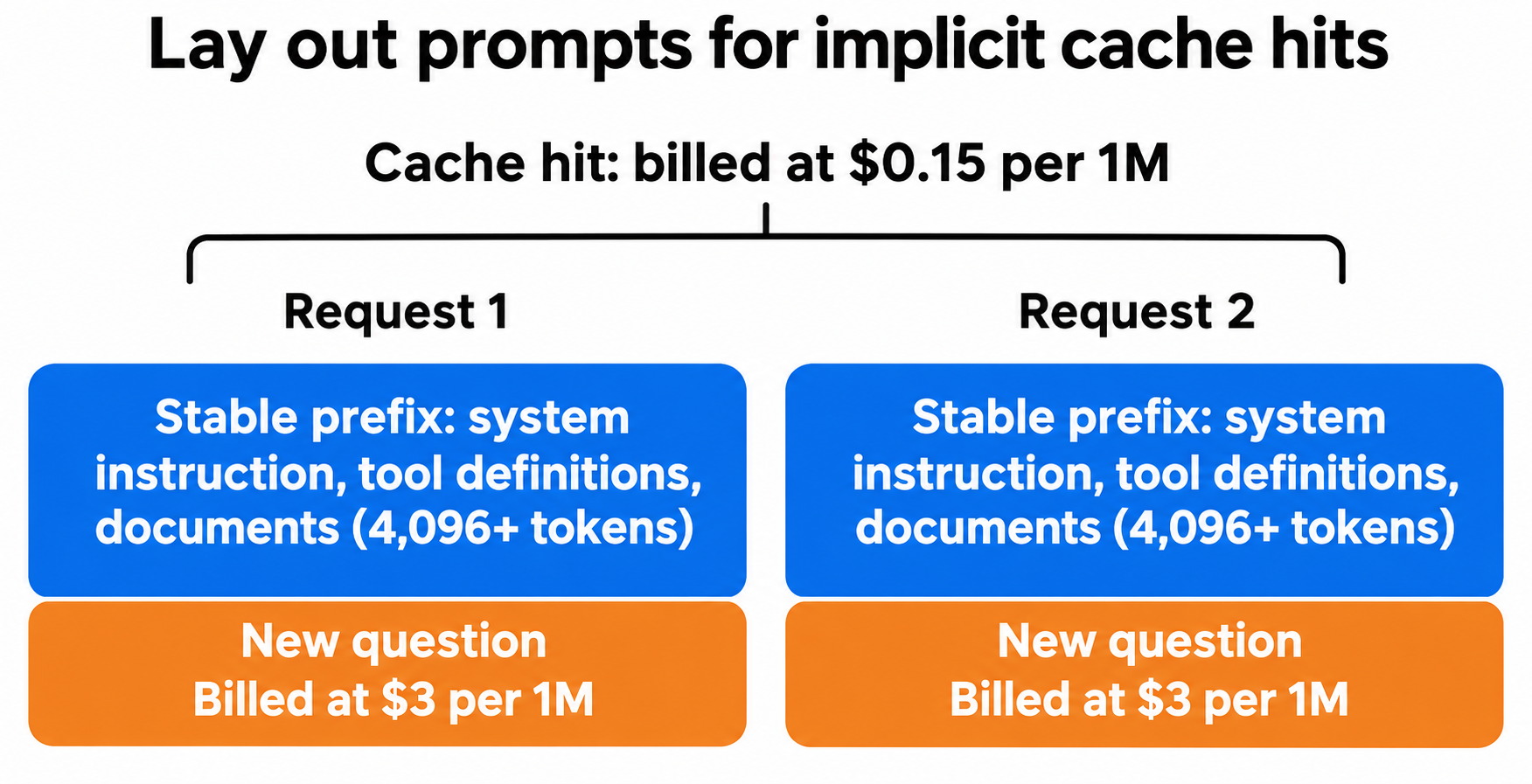
Order every request like this:
- System instruction. Fixed text, no timestamps, no user names, no request IDs.
- Tool and function declarations. Same list, same order, same descriptions every time.
- Shared documents. The codebase, the contract, the API spec, the long policy file.
- The part that changes. The user’s question, the latest tool result, today’s date.
The most common way to miss the cache is a small dynamic value near the top. A line like Current time: 2026-11-19T09:14:02Z in the system instruction changes the prefix on every call, so nothing after it can match. Move it to the end, after the documents.
Other prefix breakers: tool lists built in a random order, documents re-serialized with different whitespace, and retrieved chunks returned in a different order.
Keep the prefix above 4,096 tokens. A 2,000-token system prompt alone won’t qualify. If you send a long shared document with it, the combined prefix will.
With the Interactions API, pass the stable instruction in system_instruction and put the documents first in input:
from google import genai

client = genai.Client()  # reads GEMINI_API_KEY

SYSTEM = open("review_rules.md").read()      # fixed text
CODEBASE = open("repo_snapshot.txt").read()  # ~200K tokens, unchanged

def ask(question: str):
    interaction = client.interactions.create(
        model="gemini-4-neon",
        system_instruction=SYSTEM,
        input=CODEBASE + "\n\nQuestion: " + question,
    )
    print("cached tokens:", interaction.usage.total_cached_tokens)
    return interaction

ask("Where do we validate JWT expiry?")
ask("Which handlers skip input validation?")
The first call fills the cache. If the second prints 0 cached tokens, something in the prefix changed.
Implicit caching works in both conversation modes. Stateless calls like the one above qualify, and so do stateful sessions chained with previous_interaction_id. For the full request shapes, see our Gemini 4 Neon API guide.
How caching works in agent loops: the 2,050-token rule
Agent loops are where caching pays most, because each turn resends the whole history. Gemini 4 models add one rule you need to know. From Google’s caching docs: “Gemini caches the full previous request only if the new request adds at least 2,050 tokens.” Model output, thoughts and function results all count toward that total.
If a turn adds fewer than 2,050 tokens, Gemini re-processes the last 2,050 tokens of the previous request at the standard input rate. The earlier part of the prefix can still hit, but that tail bills at $3 per 1M.
Google notes most agent turns exceed the threshold. It bites in chatty loops with tiny steps, like a status check returning {"ok": true}. The cost is small per turn (2,050 tokens at $3 per 1M is about $0.006), but it adds up over thousands of short turns. If your loop makes many tiny calls, batch small tool results into one turn where your logic allows it.
How much does Gemini 4 Neon context caching save?
Take a code-review assistant that answers 20 questions about a 200,000-token codebase. Each question adds 3,000 tokens and gets a 1,000-token answer, on the Standard tier.
Without cache hits, each call costs:
- Input: 203,000 × $3 / 1M = $0.609
- Output: 1,000 × $15 / 1M = $0.015
- Per call: $0.624, so $12.48 for 20 calls
With cache hits after the first call, calls 2 to 20 cost:
- Cached prefix: 200,000 × $0.15 / 1M = $0.030
- New input: 3,000 × $3 / 1M = $0.009
- Output: $0.015
- Per call: $0.054
Add the first, uncached call at $0.624 and the session costs $1.65, about 87% less.
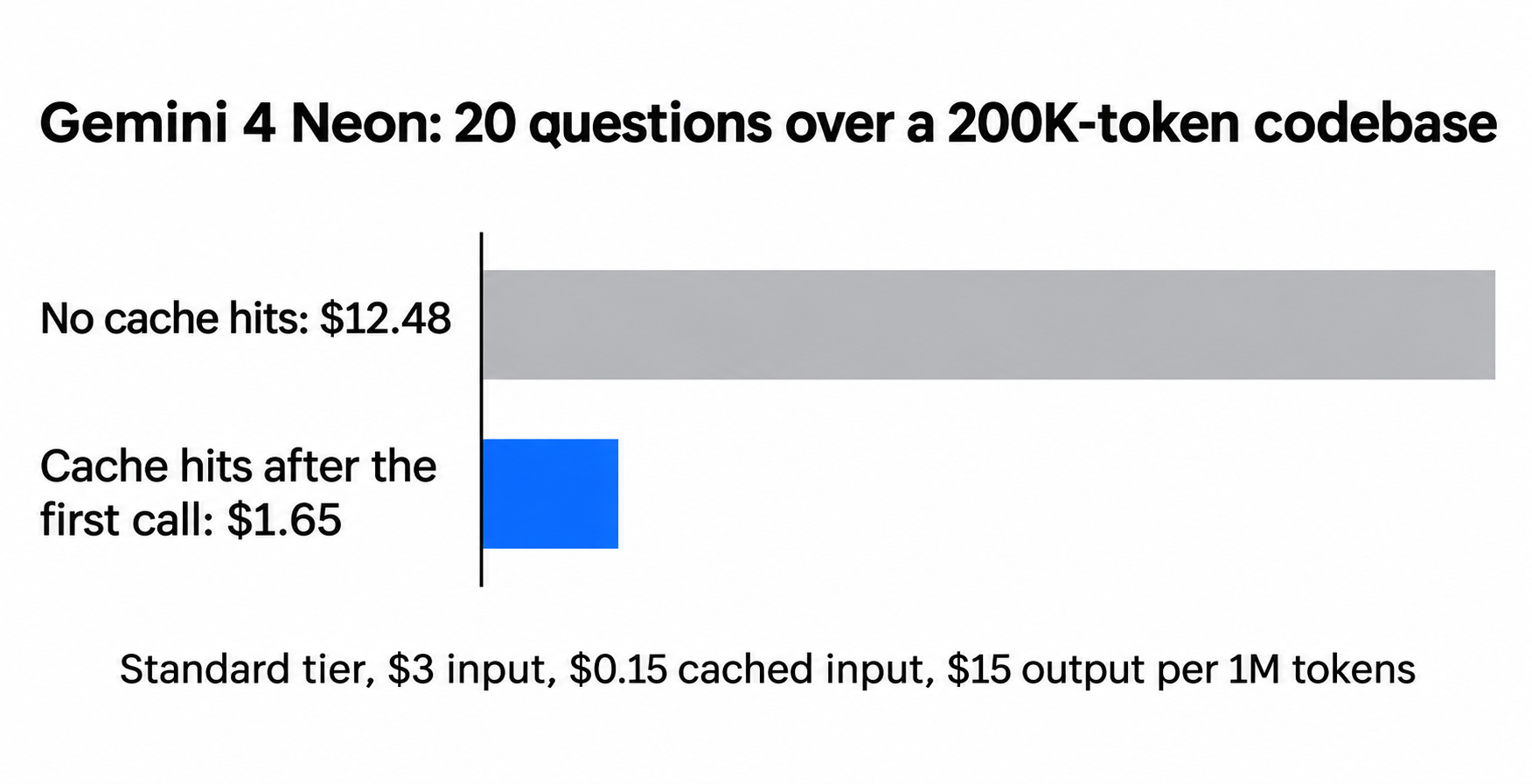
The saving is under 95% because output and new input never get the discount. The bigger the shared prefix relative to the rest, the closer you get to 95% on input. Run the same job through Batch and the cached rate halves again to $0.075. For the full rate card and thinking-level costs, see Gemini 4 Neon pricing.
How do you check Gemini 4 Neon cached tokens in the response?
Read usage.total_cached_tokens on every response. Google documents it as the field that shows how many tokens were cache hits, in both the Python and JavaScript SDKs.
With curl and jq:
curl -s "https://generativelanguage.googleapis.com/v1beta/interactions" \
  -H "x-goog-api-key: $GEMINI_API_KEY" \
  -H "Content-Type: application/json" \
  -d @request.json | jq '.usage'
To price a call, bill the cached tokens at $0.15 per 1M, the rest of your input at $3 and output plus thinking at $15. Log the cached count next to your request ID. A sudden drop to 0 across all traffic usually means a deploy changed the prefix: a new tool, a reworded rule, or a timestamp that crept into the system instruction.
Let your coding agent test cache hits with Apidog CLI
Prefixes break during ordinary refactors, and nobody notices until the bill arrives. Turn the cache check into an API test your coding agent maintains and CI runs.
Apidog CLI lets Claude Code, Codex, Cursor or OpenCode create and run API tests from the terminal. Set it up once:
npm install -g apidog-cli@latest
apidog login --with-token <YOUR_TOKEN>
npx -y skills add https://apidog.com   # pick your agent when prompted
Then give your agent one prompt:
In Apidog project <id>, create an environment for the Gemini API with a
GEMINI_API_KEY variable. Build a test scenario called "Neon cache hit" with two
steps that POST to /v1beta/interactions with model gemini-4-neon, using our
production system_instruction and the docs/context.md file as the start of
input, then two different questions. Assert HTTP 200 on both, and assert that
usage.total_cached_tokens on step 2 is greater than 4096. Run it and tell me
the cached token count.
The agent creates the environment and scenario, checks its payload against the CLI’s schema, and runs it:
apidog environment create gemini-api --project <id> --base-url https://generativelanguage.googleapis.com
apidog test-scenario create --project <id> --name "Neon cache hit"
apidog cli-schema get test-scenario-update
apidog cli-schema validate test-scenario-update --file scenario.json
apidog test-scenario update <scenarioId> --project <id> --file scenario.json
apidog run -t <scenarioId> --project <id> -e <envId> -r cli,json
If someone adds a timestamp to the system prompt next month, step 2’s assertion fails before the change ships. Put apidog run -t <scenarioId> --project <id> -e <envId> -r junit in your pipeline with the Apidog CLI CI/CD guide, or start from Apidog CLI in Claude Code. Each run makes two real Neon calls, so it costs a few cents per run at the rates above. Apidog’s Free plan covers up to 4 users.
For how prefix caching works across providers, see what is prompt caching.
FAQ
Does Gemini 4 Neon support explicit context caching? No. Google’s Neon guide says it doesn’t support cachedContents or caches.create, and you should remove cached_content from requests. Neon uses implicit caching only, which is on by default.
What’s the minimum prompt size for a Gemini 4 Neon cache hit? 4,096 tokens of shared prefix. That’s the same minimum as Gemini 4 Hydrogen, Argon and Carbon. Gemini 2.5 Flash and Pro need 2,048.
How big is the Gemini 4 Neon caching discount? 95% on cached input. Standard drops from $3 to $0.15 per 1M tokens, Batch and Flex from $1.50 to $0.075, and Priority from $5.40 to $0.27. Output and thinking tokens aren’t discounted.
Can I force Gemini 4 Neon to cache a prompt? No. Implicit caching has no setting you can switch on, no TTL you can pick and no guaranteed hit. You raise the odds by keeping a long, identical prefix at the start of each request and sending similar requests close together.
How do I know if my request hit the cache? Check usage.total_cached_tokens in the response. A value above zero means that many input tokens were billed at the cached rate.
Does caching work with previous_interaction_id? Yes. Google’s docs say implicit caching works in both stateful conversations chained with previous_interaction_id and stateless ones where you send the full history yourself.