Gemini 4 Neon vs Carbon is now a real choice for every team on the Gemini API. Google added Neon in November 2026 as a middle model that sits between Hydrogen and Carbon, and the three share one request schema, one 1M-token context window and the same built-in tools. What separates them is how hard they think, how fast they finish and what each token costs.
Quick answer: Default to Gemini 4 Hydrogen ($1.50 input / $7.50 output per 1M tokens, free tier available) for everyday coding and agent workers. Move a task to Gemini 4 Neon ($3 / $15, paid tier only) when it’s complex and runs often, such as multi-file refactors or dense document analysis. Save Gemini 4 Carbon ($2 / $10 until November 30, 2026, then $4 / $20) for your hardest architecture, debugging and security problems.
Gemini 4 Neon vs Carbon vs Hydrogen at a glance
Gemini 4 Neon is Google’s middle Gemini 4 model, built for complex software engineering, knowledge work and science tasks that you run at high frequency. It reasons more deeply than Hydrogen, finishes faster with fewer output tokens than Carbon, and costs $3 per 1M input tokens and $15 per 1M output tokens on the paid tier only.
Here’s the side-by-side, taken from Google’s Choosing a model guide and the Gemini API pricing page, both checked on November 19, 2026:
| Gemini 4 Hydrogen | Gemini 4 Neon | Gemini 4 Carbon | |
|---|---|---|---|
| Model ID | gemini-4-hydrogen |
gemini-4-neon |
gemini-4-carbon |
| Positioning | Fast default | Complex, high-frequency work | Strongest reasoning |
| Speed (Google’s label) | Fast | Moderate | Deliberate |
| Input / output per 1M | $1.50 / $7.50 | $3.00 / $15.00 | $2.00 / $10.00 to Nov 30, then $4.00 / $20.00 |
| Cached input per 1M | $0.075 | $0.15 | $0.10, then $0.20 |
| Thinking levels | low, medium, high (default), xhigh | low, medium, high (default), xhigh | low, medium (default), high |
| Free API tier | Yes | No | No |
| Context window | 1,048,576 tokens, unified | 1,048,576 tokens, unified | 1,048,576 tokens, unified |
All three accept text, image, video, audio and PDF input and support function calling, structured outputs, code execution, computer use and Google Search grounding. Each has a 65,536-token synchronous output cap and can run past it to 1M tokens with long decode.
Which Gemini 4 model should you use?
Google’s own guidance is short and worth following as your starting point:
- Start with Hydrogen for most new projects: everyday coding, interactive apps, tool-using agents and multimodal document pipelines. Google says it cuts fabricated claims by more than 5x compared to Gemini 3.8 Flash.
- Step up to Neon when Hydrogen isn’t enough and you don’t need Carbon’s extra verification: repository-level debugging, multi-file refactors, legal, finance and science analysis that runs many times a day.
- Reserve Carbon for system architecture, multi-file debugging, formal proofs, security audits, or any task where a faster model gets stuck.
- Drop to Gemini 3.5 Flash-Lite ($0.30 / $2.50) for high-volume text work like translation, extraction and summarization.
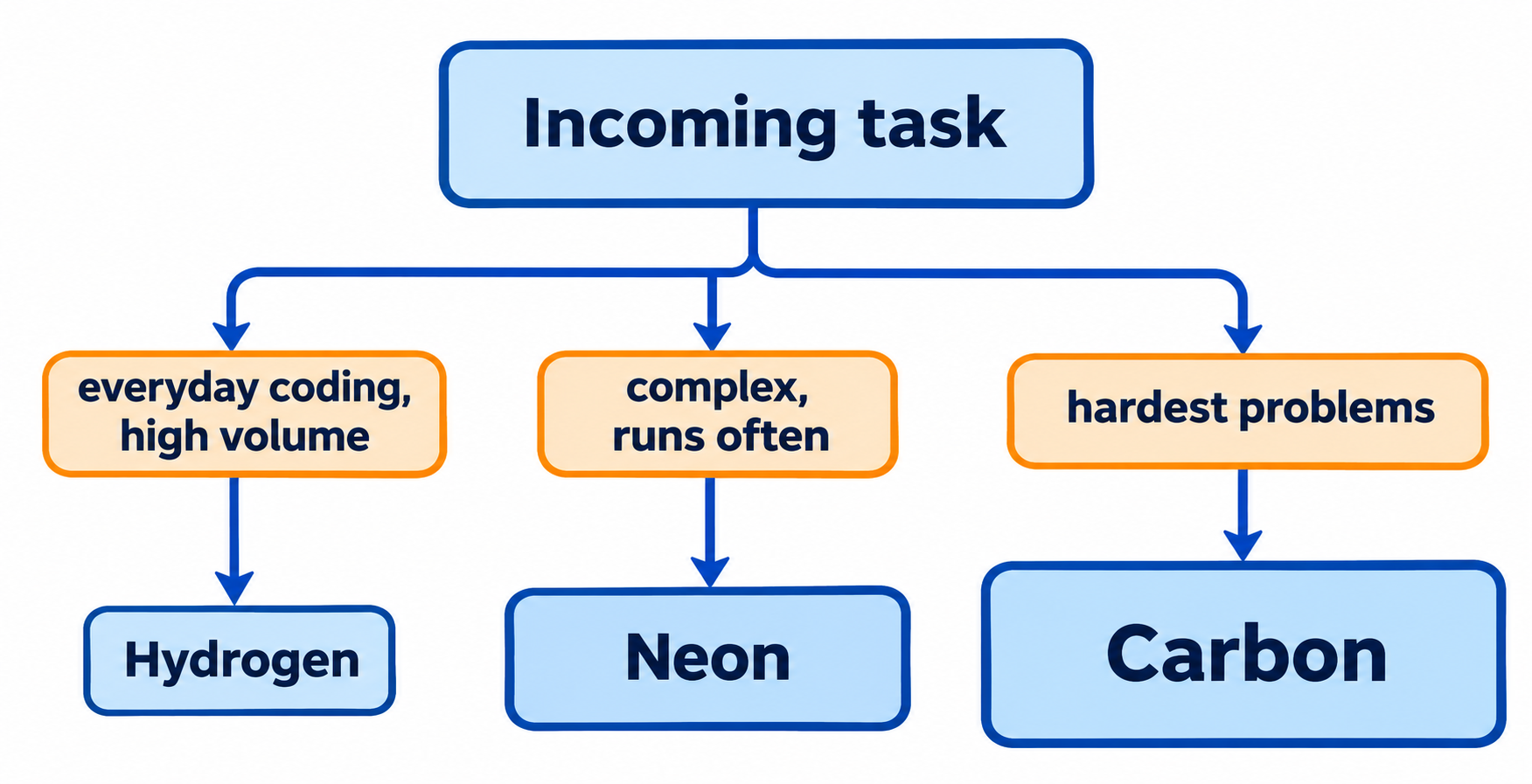
The key word for Neon is “often.” A quarterly security audit can afford Carbon’s slower reasoning. A refactoring agent that touches 200 pull requests a week needs something that finishes quickly and still gets the hard parts right.
Gemini 4 Neon vs Carbon: price and reasoning depth
This is the comparison most teams care about, because Neon and Carbon both target hard work.
Reasoning style. Carbon spends more thinking tokens per turn to test hypotheses, isolate root causes across repositories and check fixes against tests. Neon aims for frontier-level quality with leaner token use. According to Google’s What’s new in Gemini 4 Neon page, it completes repository-level debugging in fewer steps, cuts redundant file reads in long tool-calling sessions and handles context compaction reliably.
Defaults differ. Carbon defaults to medium thinking and caps at high. Neon defaults to high and adds xhigh for the hardest multi-step problems. If you swap Carbon for Neon without setting thinking_level, you also change how hard the model thinks.
Price flips on December 1. Until November 30, 2026, Carbon’s introductory rate ($2 / $10) is actually cheaper per token than Neon ($3 / $15). From December 1, Carbon doubles to $4 / $20, and Neon becomes 25% cheaper per token. Neon has no introductory price, so its rate doesn’t move.
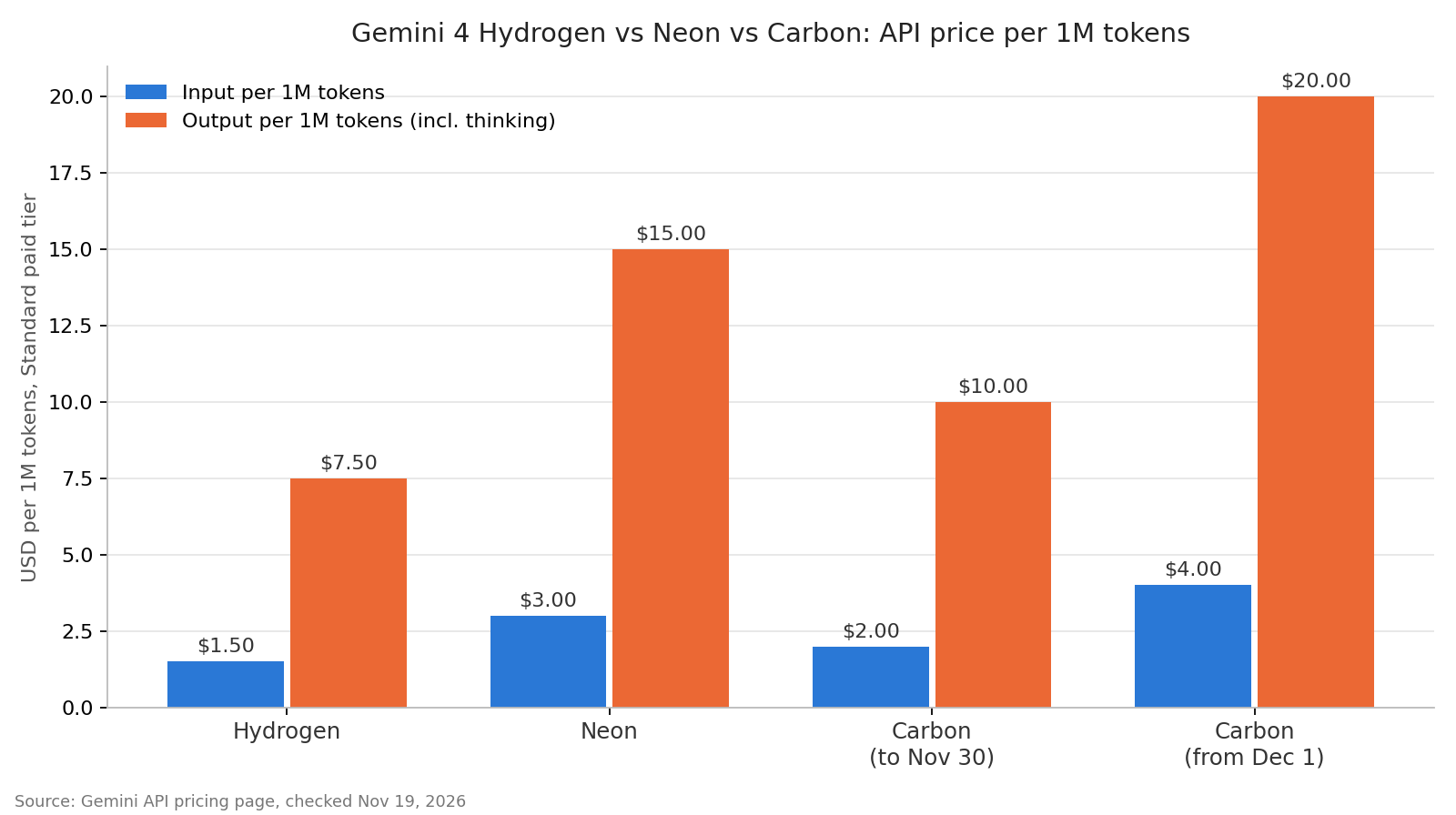
Per-token price is only half the bill, though: output pricing includes thinking tokens, and Carbon is designed to think more.
Gemini 4 Neon vs Hydrogen: when the upgrade pays off
Hydrogen and Neon look alike on paper: same thinking levels, same default, same context window, same tools. Neon costs exactly twice as much per token.
The upgrade pays off when Hydrogen’s answer forces a retry. If Hydrogen needs three attempts to land a multi-file refactor that Neon lands in one, the cheaper model is the expensive one.
Two practical differences:
- Free tier. Hydrogen has a free API tier for prototyping. Neon doesn’t, so you need a paid tier project before your first call. On that free tier, Google may use your data to improve its products.
- Batch pricing. Both halve their price in Batch mode: Hydrogen drops to $0.75 / $3.75 and Neon to $1.50 / $7.50. A nightly Neon batch job costs the same per token as a real-time Hydrogen call.
If you already run Hydrogen as a fast worker under Carbon as a planner, see our breakdown of the Gemini 4 Hydrogen orchestrator pattern. Neon gives that setup a third lane for the middle-difficulty steps.
Cost per task: a worked example
Here’s one agent task with 40,000 input tokens and 8,000 output tokens (thinking included), priced at Standard paid-tier rates:
| Model | Input cost | Output cost | Per task | Per 1,000 tasks |
|---|---|---|---|---|
| Hydrogen | $0.060 | $0.060 | $0.12 | $120 |
| Neon | $0.120 | $0.120 | $0.24 | $240 |
| Carbon (to Nov 30) | $0.080 | $0.080 | $0.16 | $160 |
| Carbon (from Dec 1) | $0.160 | $0.160 | $0.32 | $320 |
This table assumes each model uses the same number of tokens, which they won’t. Google states that Carbon spends more thinking tokens per turn and that Neon finishes with fewer output tokens than Carbon. If Carbon needs 12,000 output tokens for that same task, its December cost rises to $0.40 per task, and the gap with Neon widens from $0.08 to $0.16. These token counts are illustrative; measure your own before you budget.
Three levers cut the bill:
- Implicit caching. It runs by default on prompts of at least 4,096 tokens and discounts cached input by 95%. Put stable system prompts and tool definitions first so they hit the cache.
- Thinking level. Google recommends running your evals at all four levels and picking the lowest one that meets your quality bar.
xhighcosts the most tokens and latency. - Batch mode. Non-urgent work belongs in Batch mode at half the Standard price.
For the full Carbon price timeline, read our Gemini 4 Carbon pricing guide.
Switching between the three: what changes in your code
Switching among Gemini 4 models needs no request schema changes. You change the model string and, usually, the thinking_level:
curl "https://generativelanguage.googleapis.com/v1beta/interactions" \
  -H "x-goog-api-key: $GEMINI_API_KEY" \
  -H 'Content-Type: application/json' \
  -X POST \
  -d '{
    "model": "gemini-4-neon",
    "input": "Find the race condition in this retry queue and propose a fix.",
    "generation_config": { "thinking_level": "high" }
  }'
When you move a workload:
- Pin
thinking_levelexplicitly. Carbon’s default ismedium; Neon’s and Hydrogen’s ishigh. An unpinned swap changes cost and latency. - Use a paid tier project for Neon and Carbon. Free tier keys only reach Hydrogen and Flash-Lite.
- Drop sampling parameters. Neon’s migration guide says
temperature,top_pandtop_kare ignored in range and return a400out of range. - Chain models with
previous_interaction_id. Because all three share a schema, you can plan with Carbon, implement with Hydrogen and send the tricky middle steps to Neon in one conversation.
Let your coding agent compare them with Apidog CLI
The fastest way to settle Neon vs Carbon vs Hydrogen is to send the same prompt to all three and compare status, latency and token usage. Your coding agent can build and run that test with Apidog CLI while you keep working.
Install the CLI and give your agent the Apidog skill:
npm install -g apidog-cli@latest
apidog login --with-token <YOUR_TOKEN>
npx -y skills add https://apidog.com   # pick your agent when prompted
Then give Claude Code, Codex or Cursor one prompt:
In Apidog project <id>, create a test scenario named "Gemini 4 model compare"
that POSTs to https://generativelanguage.googleapis.com/v1beta/interactions
with model {{model}}, thinking_level "high" and the prompt in {{prompt}}.
Assert status 200 and a non-empty output, and save the usage block to a variable.
Run it once each for gemini-4-hydrogen, gemini-4-neon and gemini-4-carbon,
then give me a table of latency and token usage per model.
The agent reads the payload schema, validates its file, creates the scenario and runs it three times, swapping only the model:
apidog cli-schema get test-scenario-create
apidog cli-schema validate test-scenario-create --file scenario.json
apidog test-scenario create --project <id> --file scenario.json
apidog run -t <scenarioId> --project <id> -e <envId> --env-var "model=gemini-4-hydrogen" -r cli,json
apidog run -t <scenarioId> --project <id> -e <envId> --env-var "model=gemini-4-neon" -r cli,json
apidog run -t <scenarioId> --project <id> -e <envId> --env-var "model=gemini-4-carbon" -r cli,json
Keep GEMINI_API_KEY in the Apidog environment. Add --upload-report to view each run in the app, and put the same command in CI with -r junit to catch regressions when Google updates a model. Our guide to Apidog CLI in Claude Code covers the setup end to end. Apidog’s Free plan covers teams of up to 4 users.
FAQ
Is Gemini 4 Neon better than Gemini 4 Carbon? Not across the board. Carbon is Google’s strongest reasoning model. Neon trades some depth for faster completion and fewer output tokens, which suits complex work that runs often.
Is Gemini 4 Neon free? No. Neon is on the paid tier of the Gemini API only, and in Google AI Studio with Google AI Pro and Ultra plans. Hydrogen is the Gemini 4 model with a free API tier.
Is Neon cheaper than Carbon? Per token, only from December 1, 2026. Until November 30, Carbon’s introductory rate of $2 / $10 undercuts Neon’s $3 / $15. After that, Carbon costs $4 / $20 and Neon is 25% cheaper per token, before counting Carbon’s heavier thinking.
Do Gemini 4 Neon, Carbon and Hydrogen have the same context window? Yes. All three share a unified 1,048,576-token window for input, thinking and output, with a 65,536-token synchronous output cap and long decode up to 1M tokens.
Can I use Neon, Carbon and Hydrogen in the same workflow? Yes. They share a request schema, so you can pass previous_interaction_id from one model’s turn to another’s. Plan with Carbon, implement with Hydrogen and give Neon the steps in between.
Which Gemini 4 model is fastest? Hydrogen. Google labels Hydrogen fast, Neon moderate and Carbon deliberate.