Gemini 4 Neon isn’t free on the API. Google lists gemini-4-neon as paid tier only, at $3 per 1M input tokens and $15 per 1M output tokens. You can still use it at $0 three ways: a Google AI Pro free trial, a student offer, or by building on the free Gemini 4 Hydrogen tier and swapping the model string later.
Neon went GA on November 18, 2026. Below: each $0 route, its catches, and how to keep the bill small.
Is Gemini 4 Neon free?
Gemini 4 Neon has no free API tier. Google’s pricing page says it plainly: “Gemini 4 Neon is not available on the Free tier.” Every token is billed, thinking tokens included. Free use runs only through a Google AI Pro or Ultra plan, which you can get at no charge as a trial or student offer.
Here’s what Google published:
| Item | Free tier | Paid tier (standard) | Source |
|---|---|---|---|
| Model ID | Not available | gemini-4-neon (stable) |
Model page |
| Input price | Not available | $3.00 / 1M tokens | Pricing page |
| Output price (incl. thinking) | Not available | $15.00 / 1M tokens | Pricing page |
| Cached input (implicit only) | Not available | $0.15 / 1M tokens | Pricing page |
| Batch and Flex | Not available | $1.50 in / $7.50 out | Pricing page |
| Grounding with Google Search | Not available | 5,000 free requests/month, then $14 per 1,000 | Pricing page |
| Context window | 1,048,576 tokens shared by input, thinking and output | Same | Model page |
| Thinking levels | low, medium, high (default), xhigh |
Same | What’s new page |
Neon has no introductory price, unlike Carbon, and its standard rate is exactly twice Hydrogen’s. Google’s launch post has the full rundown.
Every Gemini 4 Neon free route
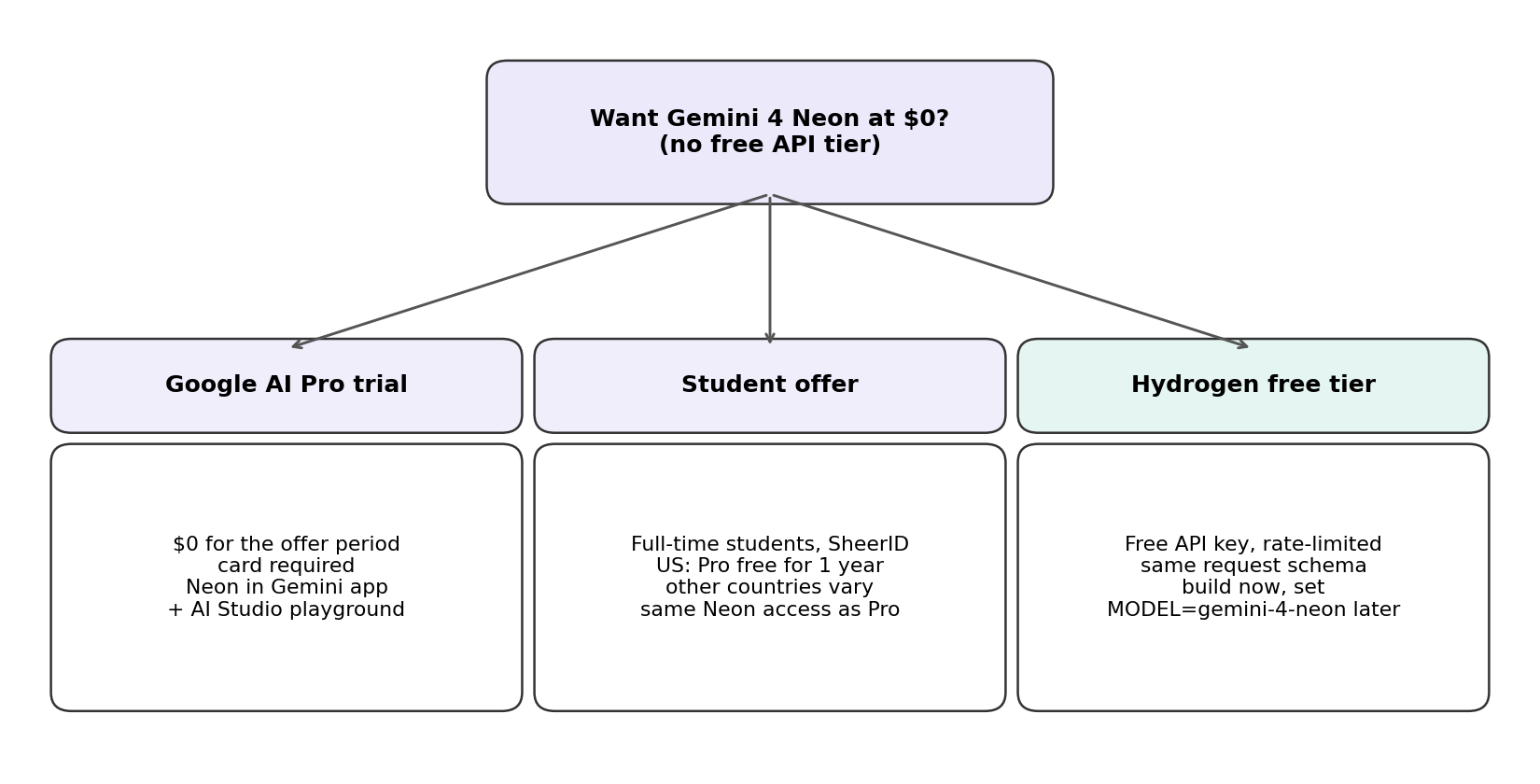
Three routes cost $0 today. Two put Neon in front of you; the third gets your code ready for it.
| Route | Cost | What you get | Card needed? | Neon via API? |
|---|---|---|---|---|
| Google AI Pro free trial | $0 for the offer period | Neon in the Gemini app and Google AI Studio | Yes | No |
| Student offer | $0 or discounted, by country | Same as Pro while it lasts | Yes (payment profile) | No |
| Gemini 4 Hydrogen free tier | $0, rate-limited | Hydrogen, same request schema as Neon | No mention | No, swap later |
Route 1: Google AI Pro free trial
Google AI Pro ($19.99/month in the US) includes Neon. The Google AI plans page lists “Access to Gemini 4 Neon for deeper analysis in the Gemini app” and “AI Studio with expanded limits to prototype, experiment, and build with our Gemini 4 Neon model.” The same page’s FAQ says the AI benefits apply “when you start a trial or are subscribed.”
The Google One offer terms (updated November 17, 2026) set the catches:
- Payment method required. You need “a Google Payments account with a qualifying form of payment at sign-up.”
- It auto-renews. Cancel before the offer period ends or you’re charged the standard price.
- Limits can differ. Trial users “may experience different usage limits than Google One members on a paid plan.”
- New users only. The length isn’t fixed on the page; you see the end date after redeeming.
To use it: start the trial, open the Gemini app and pick Gemini 4 Neon from the model drop-down. For prompt testing, open Neon in AI Studio; Google’s launch post says “all Pro and Ultra subscribers can try it in AI Studio.”
Route 2: Student offers
On the US version of the plans page, Google’s banner reads “Students get Google AI Pro free for 1 year.” The offer is country-specific: the student page we loaded from another region showed Google AI Plus free for 12 months and Pro at 74% off instead, so check what your country gets before you plan around Neon.
The student offer terms require full-time enrollment at an accredited higher-education institution, SheerID verification with yearly re-checks, and a Google Account with a valid payments profile. School-issued Workspace for Education accounts don’t qualify.
Route 3: Build on Gemini 4 Hydrogen for free, switch to Neon later
Hydrogen’s input, output and caching are “Free of charge” on the Gemini API free tier, and Google says Carbon, Neon and Hydrogen “share the same request schema, context window, and tools.” Build on a free Hydrogen key, then change one string when you’re ready to pay. Our Gemini 4 Hydrogen free guide covers that tier’s limits and catches.
What isn’t a free route
- Neon on the Gemini API. The What’s new in Gemini 4 Neon page tells you to “use a paid tier project.” A Pro subscription widens your AI Studio playground limits; it doesn’t turn a free API key into a Neon key.
- Neon in Google Antigravity on a trial. Both the launch post and the Antigravity blog say paid Google AI Pro and Ultra subscribers. That wording excludes trials, and we couldn’t confirm whether a free student plan counts.
- The free Gemini app plan or Google AI Plus. Google names only Pro and Ultra for Neon; Plus gets Hydrogen.
- Google Cloud trial credits. Google’s Cloud docs say Neon “is available to verified enterprise customers in select regions,” so a fresh trial account isn’t a dependable path.
Gemini 4 Neon free trial vs paying for the API
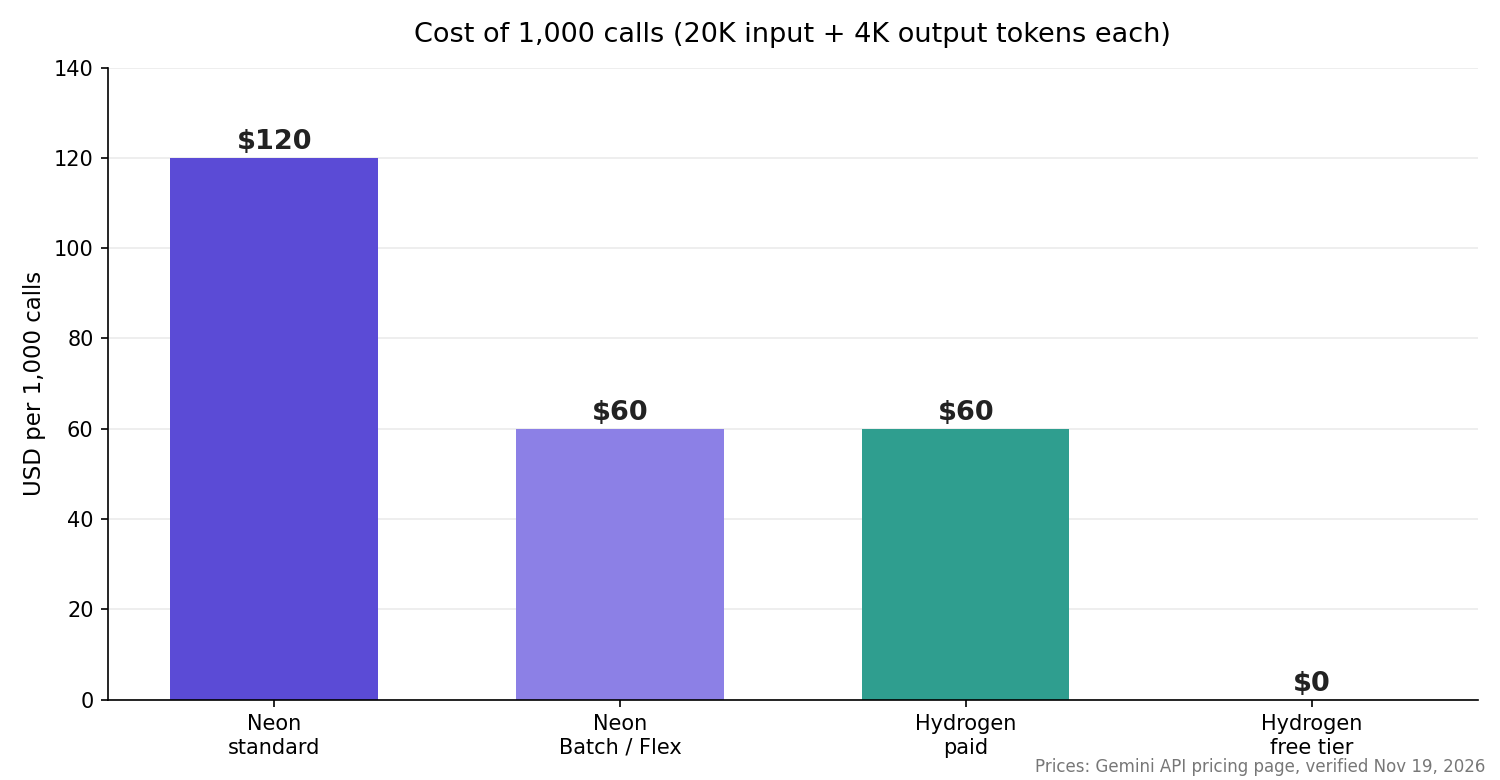
A trial gives you a chat window and a playground. Neon inside your own app is paid per token. Here’s a call of 20,000 input and 4,000 output tokens:
| Option | Cost per call | 1,000 calls |
|---|---|---|
| Neon, standard | $0.06 + $0.06 = $0.12 | $120 |
| Neon, Batch or Flex | $0.03 + $0.03 = $0.06 | $60 |
| Hydrogen, standard paid | $0.03 + $0.03 = $0.06 | $60 |
| Hydrogen, free tier | $0 | $0 (within rate limits) |
Thinking tokens bill as output, so xhigh costs more. See our Gemini 4 Hydrogen pricing breakdown and Gemini 4 Carbon pricing.
Gemini 4 Neon vs Hydrogen: when the free model is enough
Google’s model guide keeps Hydrogen “as the default for everyday coding and agentic workflows” and points Neon at multi-file coding, dense knowledge work and science workflows.
So run every step on Hydrogen first, and move a step to Neon only when Hydrogen fails your quality bar, since that step then costs twice as much. Gemini Managed Agents can pair the two in one workflow, and our Gemini 4 Hydrogen Orchestrator guide shows the planner-executor pattern.
Keep the swap to one string
Read the model name from an environment variable: Hydrogen on the free key today, Neon on a paid project later:
MODEL="${GEMINI_MODEL:-gemini-4-hydrogen}"   # set GEMINI_MODEL=gemini-4-neon on a paid key
for attempt in 1 2 3 4 5; do
  code=$(curl -s -o out.json -w "%{http_code}" \
    "https://generativelanguage.googleapis.com/v1beta/models/${MODEL}:generateContent" \
    -H "x-goog-api-key: $GEMINI_API_KEY" -H "Content-Type: application/json" \
    -d '{"contents":[{"parts":[{"text":"Review this diff for bugs."}]}],
         "generationConfig":{"thinkingConfig":{"thinkingLevel":"medium"}}}')
  [ "$code" != "429" ] && break
  sleep $((2 ** attempt))   # 2, 4, 8, 16, 32 seconds
done
echo "HTTP $code"
Before you flip, note three Neon specifics:
- Default thinking is
high. Setmediumorlowwhen you don’t need depth. - Raise timeouts. Google suggests at least 15 minutes for hard prompts, or background execution.
- Only implicit caching. Repeat long prompt prefixes to get the $0.15 cached rate.
The retry loop handles HTTP 429 on the free tier; HTTP 429 Too Many Requests explains the status code.
Let your coding agent test it with Apidog CLI
The swap is safe only if one test passes on both models. Let your coding agent build it once. Apidog CLI gives Claude Code, Codex or Cursor the commands, and Apidog’s Free plan covers up to 4 users.
npm install -g apidog-cli@latest
apidog login --with-token <YOUR_TOKEN>
npx -y skills add https://apidog.com   # pick your agent when prompted
Then give your agent one prompt:
In Apidog project <id>, create an environment "gemini" with base URL
https://generativelanguage.googleapis.com/v1beta and a MODEL variable.
Add a test case for POST /models/{{MODEL}}:generateContent using the key in
{{GEMINI_API_KEY}} and thinkingLevel "medium". Assert HTTP 200, a non-empty
candidates array and a usageMetadata object. Run it with MODEL=gemini-4-hydrogen,
2 seconds between requests, and summarize any failures, including 429s.
The agent creates the environment, reads the schema, validates its payload, writes the case and runs it:
apidog environment create gemini --project <id> \
  --base-url https://generativelanguage.googleapis.com/v1beta
apidog cli-schema get test-case-create
apidog cli-schema validate test-case-create --file case.json
apidog test-case create --project <id> --file case.json
apidog run --test-case <caseId> --project <id> -e <envId> \
  --env-var "GEMINI_API_KEY=$GEMINI_API_KEY" --env-var "MODEL=gemini-4-hydrogen" \
  --delay-request 2000 -r cli,json
On a paid key, rerun with --env-var "MODEL=gemini-4-neon" and compare reports. --env-var keeps the key out of the project, and --delay-request (milliseconds) keeps you under per-minute limits. The Apidog CLI in Claude Code guide covers agent setup, and Apidog CLI in CI/CD runs the same case on every push.
FAQ
Is Gemini 4 Neon free? Not on the API: Google lists it as paid tier only, at $3/$15 per 1M tokens. You can use it at $0 in the Gemini app and AI Studio through a Google AI Pro trial or an eligible student offer.
Is there a Gemini 4 Neon free tier in Google AI Studio? No free-tier API key covers Neon. Google AI Pro and Ultra subscribers can try it in the AI Studio playground, and Google’s plan FAQ says the AI benefits apply during a trial. API calls bill to a paid-tier project.
Do I need a credit card for the Gemini 4 Neon free trial? Yes. Google’s offer terms require a qualifying form of payment at sign-up, and the plan renews at the standard price unless you cancel before the offer period ends.
Can I use Gemini 4 Neon in Antigravity for free? Google limits Neon in Antigravity to paid Google AI Pro and Ultra subscribers, so a trial doesn’t cover it.
What’s the cheapest way to call the Neon API? Batch or Flex inference at $1.50 input and $7.50 output per 1M tokens, half the standard rate. Route easy steps to Hydrogen, which stays free on the free tier.
Start free, pay only where Neon earns it
Gemini 4 Neon has no free API tier, but you don’t need one to start. Try it on a Pro trial, build on the free Hydrogen key, and keep one test that proves the swap works. When a step truly needs Neon, flip one variable and pay only for that step.