
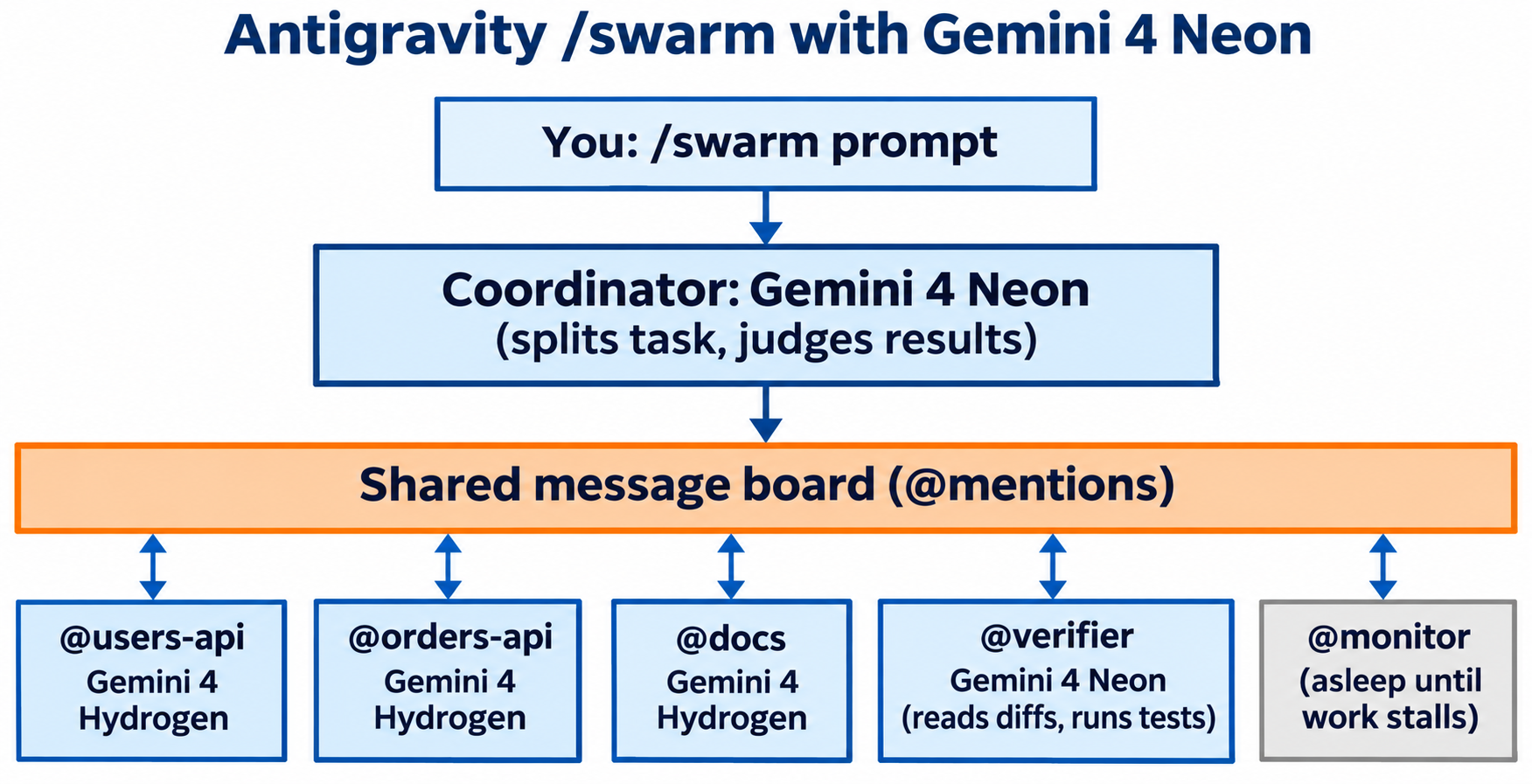
Antigravity swarm mode with Gemini 4 Neon works like this: pick Gemini 4 Neon in the model selector, type /swarm followed by a task and how to verify it, and your conversation becomes the coordinator. Neon splits the work across named workers, adds a @verifier, and reports back when the tests pass. Ask for Gemini 4 Hydrogen workers in the prompt to stretch your quota.
What is Antigravity swarm mode with Gemini 4 Neon?
/swarm is a preview command in Google Antigravity that runs a team of named agents on one task. Your current conversation becomes the coordinator: it splits the work, briefs each worker, adds a verifier that reads diffs and runs tests, and reports the result to you. With Gemini 4 Neon selected, Neon is the coordinator.
Google launched Neon on November 18, 2026 and describes it “acting as a fast, high-judgment Orchestrator directing parallel Hydrogen subagents in Google Antigravity.” Two launch demos, a 3D lab bench built through Blender MCP and a 3D recreation of Alan Turing’s 1936 study, were built with /swarm.
For model basics, read what Gemini 4 Neon is; for the feature as it launched with Carbon, see our Google Antigravity /swarm explainer. The steps below come from Google’s docs, and swarm is in preview, so menus may change.
Who can use /swarm with Gemini 4 Neon?
You need a Google AI Pro or Google AI Ultra plan. Here’s what each plan gets in Antigravity, per the Choose a model docs:
| Feature | Free and Google AI Plus | Google AI Pro | Google AI Ultra |
|---|---|---|---|
/swarm command |
No | Yes | Yes |
| Gemini 4 Neon | No | Yes (paid plan, or trial on eligible premium devices) | Yes |
| Gemini 4 Hydrogen | No | Yes (non-trial subscriptions only) | Yes |
| Orchestrator (Neon) | No | Yes (paid plan, or trial on eligible premium devices) | Yes |
| Quota refresh | Weekly | Every 5 hours, up to a weekly limit | Every 5 hours, highest weekly limit |
Three details trip people up:
- Neon is the default. On plans that include it, Neon sits at the top of the model selector and is the default for new conversations unless you already chose another model.
- Context is smaller inside Antigravity. The API offers a 1M-token window, but the Antigravity docs list Neon at “up to 512K tokens.”
- Swarms burn quota fast. Google’s docs warn that “every worker is its own agent, so a swarm uses quota much faster than a single conversation.” Pro and Ultra users can turn on AI credit overages in settings if they run out.
/swarm runs on your subscription quota, not an API key. For Neon’s API rates, see our Gemini 4 Neon pricing guide.
How to run /swarm with Gemini 4 Neon: step by step
Here are the steps in the Antigravity App:
- Open your project and start a new conversation.
- Select Gemini 4 Neon in the model selector under the prompt box. Pick plain Gemini 4 Neon, not Orchestrator (Neon). More on why below.
- Choose a thinking level. Neon offers Low, Medium, High (the default) and Extra. High is the right start for a coordinator.
- Type
/swarmand press Tab (or Enter) to insert the command. - Describe the task and how to verify it. For example:
/swarm Add input validation to the handlers in src/routes/users.ts and src/routes/orders.ts, add tests next to each, and have a verifier run npm test. - Open the Swarm pane from the “Open the Swarm UI” link at the end of the coordinator’s reply.
- Keep talking to the coordinator while the swarm runs. Ask for status or change scope at any time.
The pane’s Board, Members and Graph tabs show the live posts, each worker’s status and model, and who mentioned whom.
In the Antigravity CLI
The terminal flow is nearly identical. Start the CLI with Neon selected:
agy --model gemini-4-neon
# or, for the deepest reasoning on the coordinator:
agy --model gemini-4-neon-xhigh
Type /swarm, press Tab, and describe the task. Open the live board with /swarm board or Alt+S (on macOS, only if your terminal sends Option as Meta), list workers with /agents, and message one directly with @verifier also run the integration tests.
Neon coordinator, Hydrogen workers: how to mix models
By default, every worker runs on the same model as your conversation. Select Neon and you get an all-Neon swarm: strong, but expensive on quota.
The Neon launch post describes a different shape: Neon judging the work while faster Gemini 4 Hydrogen agents do it. Antigravity lets you ask for that in plain language. The docs say: “To use a different model for one worker or for all of them, say so in your prompt.” The model must be one you can pick in your model selector.
A prompt that sets up the split:
/swarm Build the /users and /orders endpoints described in openapi.yaml.
Give each resource its own worker and run every worker on Gemini 4 Hydrogen.
Keep the verifier on Gemini 4 Neon. The verifier must run the API tests
and send each failure back to the worker that owns the endpoint.
Why not Orchestrator (Neon)?
Orchestrator (Neon) is a model selector option that pairs Neon as planner with Hydrogen as executor inside one agent. The docs put it plainly: “Orchestrator keeps a single agent in your conversation.” It runs with a fixed configuration, so you can’t set a thinking level, and Google’s swarm docs don’t say how a swarm behaves when Orchestrator is the conversation model.
So pick by shape of work:
| You want | Pick |
|---|---|
| One agent, Neon plans and Hydrogen types, less quota | Orchestrator (Neon) |
| Several agents in parallel on separate files, plus a verifier | Gemini 4 Neon + /swarm |
| Neon judgment on every step, adjustable thinking | Gemini 4 Neon, no swarm |
Our Gemini 4 Hydrogen Orchestrator guide explains the single-agent hand-off loop in detail.
Which Neon thinking level should the coordinator use?
Start on High. Google says Neon at High shows a 32% lower cost per task than Carbon while scoring high on the Artificial Analysis Intelligence Index. Its top score (61, ranked #3) comes at Extra High.
Move to Extra (xhigh) when the coordinator keeps making bad splits, such as two workers editing one file. Drop workers to Hydrogen before you drop the coordinator to Medium: its job is judgment, not typing. For the full trade-off, see our Gemini 4 Neon thinking levels guide.
Write /swarm prompts that split cleanly
The Antigravity swarm docs give one rule above the rest: state what you want and how to verify it, and let the coordinator decide the split. Four habits help:
- Name the boundaries. List files or resources so each worker owns something alone.
- Name the check.
npm test,go test -race ./...or an API test run. Without one, the verifier only reads diffs. - Say what must not change. “Without deleting assertions” stops workers weakening tests.
- Ask for working copies when edits overlap. Workers share your workspace by default.
Use /swarm for broad work that splits cleanly. For one hard bug, Google points you to /boost. For projects that run hours or days, it’s /teamwork.
Waiting workers use no tokens until someone mentions them. A member that runs out of quota pauses and won’t restart on its own when quota refreshes: post to the board, switch its model or message it.
Give the swarm’s verifier real API tests with Apidog CLI
When the swarm builds an API, a verifier that only reads diffs is guessing. Hand it an OpenAPI spec and executable tests, and “verified” means real requests passed against the contract.
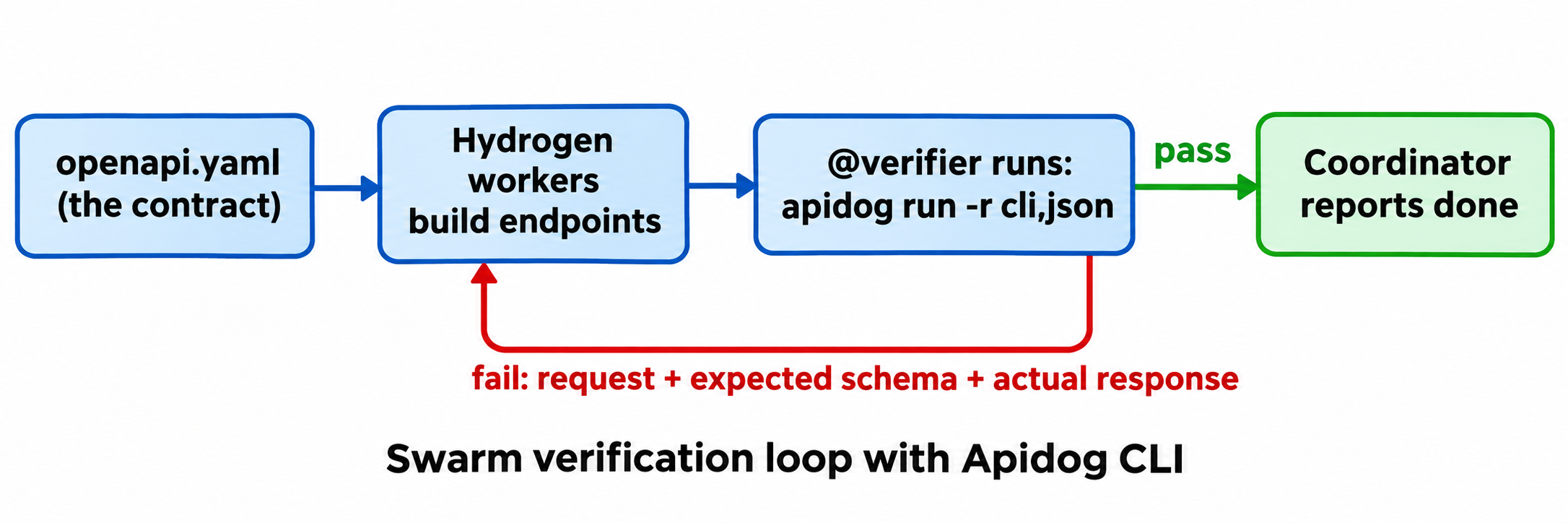
Apidog CLI lets an agent import the spec, write test cases and run them from the terminal with JSON output it can parse. Set it up once in the project:
npm install -g apidog-cli@latest
apidog auth login --with-token <YOUR_TOKEN>
npx -y skills add https://apidog.com   # pick your agent when prompted
Or tell your agent: “Read https://apidog.com/apidog-cli-installation-guide.md and set up Apidog CLI.” That guide is written for agents. For the Antigravity-specific setup, see how to use Apidog CLI in Antigravity.
Then add the test step to your swarm prompt:
/swarm Build the /users and /orders endpoints in openapi.yaml, one Gemini 4
Hydrogen worker per resource. Before building, import openapi.yaml into Apidog
project <projectId> on a new AI branch and create one test case per endpoint
that asserts the status code and response schema. The verifier stays on
Gemini 4 Neon, runs every case against environment <envId>, and treats any
failed run as a failed change, whatever the diff looks like.
The verifier reads each payload schema before writing anything, then runs commands like these:
apidog branch create --project <projectId> --type ai --name "ai/20261119-from-main-neon-swarm" --from main
apidog import --project <projectId> --format openapi --file ./openapi.yaml --branch "ai/20261119-from-main-neon-swarm"
apidog cli-schema get test-case-create
apidog cli-schema validate test-case-create --file case.json
apidog test-case create --project <projectId> --file case.json --branch "ai/20261119-from-main-neon-swarm"
apidog run --test-case <caseId> --project <projectId> --branch "ai/20261119-from-main-neon-swarm" -e <envId> -r cli,json
Every flag above comes from apidog <cmd> --help on Apidog CLI 2.2.12. The AI branch keeps agent-written changes off your main branch until you review them, which matters when several workers touch endpoints at once.
The JSON report names the failing request, so the verifier can post it to @users-api or @orders-api instead of @all. Add --upload-report to review the run in Apidog afterwards.
The same apidog run ... -r junit command drops into CI, so the contract the swarm tested against is the one your pipeline enforces. See Apidog CLI in a CI/CD pipeline. Apidog’s Free plan covers up to 4 users.
FAQ
Is Antigravity /swarm free?
No. Google’s docs list /swarm for Google AI Pro and Google AI Ultra plans only, and Gemini 4 Neon isn’t available on Free or Plus plans in Antigravity.
What model do swarm workers use?
The same model as your conversation, unless your prompt says otherwise. Ask for Gemini 4 Hydrogen workers and a Neon verifier in plain language, using models available in your model selector.
How many agents can a Neon swarm run?
Google doesn’t publish a cap. The coordinator decides how many workers to add and usually adds one @verifier for every two to four workers, plus a @monitor.
Does Neon have a 1M-token context in Antigravity?
Not according to Google’s Antigravity docs, which list Neon at up to 512K tokens there. The 1M window applies to the Gemini API.
Is /swarm the same as Orchestrator (Neon)?
No. Orchestrator (Neon) is one agent that switches between Neon planning and Hydrogen execution. /swarm runs several named agents in parallel on a shared board, with a dedicated verifier.