
In today's fast-paced API and application development landscape, efficiency, collaboration, and intelligent tooling are more critical than ever. Google’s launch of Firebase Studio marks a major step forward—offering a unified cloud-based development environment that merges top features from industry-leading platforms.
But how does Firebase Studio stack up for API-centric teams, backend engineers, and QA professionals? And where do specialized tools like Apidog, a robust Postman alternative, fit into a modern workflow?
What Is Firebase Studio? A New Generation Cloud IDE
Firebase Studio is Google’s latest platform for building, deploying, and managing modern, AI-enhanced applications—all in the cloud. By integrating technologies like Project IDX, Genkit, and Gemini AI, it delivers:
- Zero local setup: Work from any device with just a browser.
- Native integration with Firebase services (Authentication, Firestore, Hosting).
- Real-time collaboration and AI-assisted features throughout the dev lifecycle.
Who benefits most? API developers, full-stack engineers, and teams seeking a seamless way to design, code, test, and deploy applications—especially when rapid iteration and cross-team workflows are key.
Why Firebase Studio Stands Out for API-Driven Teams
Intuitive UI Design—Rapid Prototyping for Modern Apps

Firebase Studio offers a visual, drag-and-drop interface for quickly building user experiences. With pre-built templates for use cases like e-commerce or chat apps, teams can:
- Assemble layouts and user flows without deep UI coding.
- Tap into a component library of modern UI elements (buttons, forms, widgets).
- Preview changes instantly—accelerating feedback in sprints or UAT cycles.
AI-Enhanced Code Editing—Firebase Studio vs. Cursor

Code faster with AI-powered editing. Firebase Studio’s editor brings:
- Syntax highlighting and smart autocompletion.
- “Describe and generate”: Write what you want in plain English, get instant code in JavaScript, TypeScript, Python, and more.
- Built-in debugging, inline version control, and immediate code execution.
How does it compare?
- Cursor: $20/month for Pro, 500 premium AI requests.
- Firebase Studio: Free preview with 3 workspaces; more for Google Developer Program members.
For API developers, this means less time on boilerplate and more on business logic—especially when paired with advanced API testing and documentation tools.
Real-Time Collaboration—Firebase Studio vs. Replit

Working as a team? Firebase Studio enables:
- Live multi-user editing: Changes sync instantly, conflict-free.
- Integrated chat and video: Keep discussions in the same workspace.
- Pair programming and inline code reviews: Mentor, onboard, or solve complex issues efficiently.
Compared to Replit, Firebase Studio’s ecosystem and Google integration can suit larger, API-driven projects with complex deployment needs.
Seamless Deployment & Hosting—Firebase Studio vs. Bolt.new

Deploying to production is streamlined:
- One-click deployment to Firebase Hosting, with built-in SSL and fast, secure servers.
- Continuous deployment: Push to Git, auto-update environments.
- Environment management: Separate staging/production, easy rollbacks, detailed logs.
For mobile apps, Firebase Studio integrates with distribution tools for direct beta testing—a crucial feature for iterative API and backend release management.
Efficient Workflow Management—Firebase Studio vs. Windsurf
Firebase Studio embeds project management into the dev environment:
- Agile boards: Plan sprints, track issues, manage backlogs.
- Task assignment: Delegate items like “Implement user authentication” directly in the workspace.
- CI/CD integration: Maintain code quality with automated testing (ideal for API test automation).
Price check: Windsurf Pro is $15/month with limits; Firebase Studio’s free preview covers most needs for small-to-mid teams.
Cutting-Edge AI Integration—Firebase Studio vs. GitHub Copilot
Firebase Studio leverages Google’s Gemini 2.5 Pro AI:
- Context-aware code generation and debugging.
- AI-powered architecture suggestions and performance optimization.
- Integrated AI across the workflow (not just code completion).
Pricing: GitHub Copilot’s tiers range from free (limited) to $39/month. Firebase Studio’s preview is free for up to three workspaces, offering all-in-one value—especially for teams seeking both AI coding and full-stack cloud capabilities.
Where Apidog Fits: Specialized API Testing & Collaboration
💡 For teams building and testing API-centric applications, specialized tools like Apidog remain essential. Apidog streamlines the API lifecycle—covering design, debugging, automated testing, and documentation. Its collaborative workspaces, environment management, and UAT-friendly workflows:
- Help QA engineers validate API responses against business requirements.
- Enable product-minded engineers and technical leads to ensure API quality before production.
- Integrate with CI/CD pipelines for continuous quality checks alongside platforms like Firebase Studio.
By complementing Firebase Studio’s cloud IDE with rigorous API testing via Apidog, teams can maintain high standards from prototype to production.
Firebase Studio Pricing at a Glance
- Firebase Studio: Free preview (3 workspaces); extra for Google Developer Program.
- Cursor: $20/month Pro, $40/user/month Business.
- GitHub Copilot: Limited free, $10–$39/month.
- Windsurf: $15/month with feature caps.
By combining multiple toolsets—design, code, collaborate, deploy—into a single platform, Firebase Studio can lower costs and complexity for modern dev teams.
Getting Started with Firebase Studio
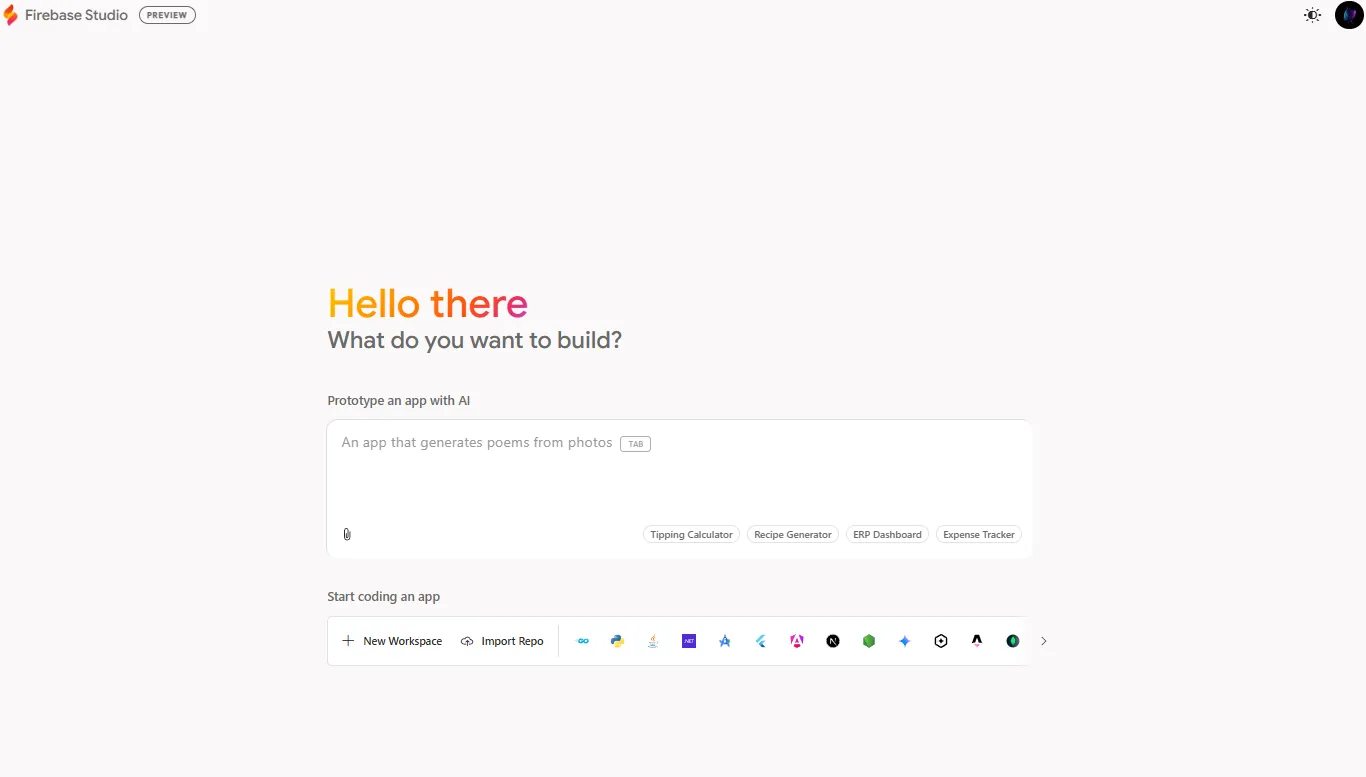
Quick Start:
- Sign up with your Google account.
- Visit the Firebase Studio site and log in.
- Create a new project—choose a template (e.g., “AI Chat App”) or start from scratch.
- Begin coding with the cloud-based editor and AI features.
For comprehensive guidance, consult the official docs or tutorials on the Firebase blog.
Conclusion: The Future of Cloud Development for API Teams
Firebase Studio represents a leap in unified, intelligent development environments—especially for teams building, testing, and deploying API-driven applications. Its blend of intuitive design, powerful AI assistance, and seamless collaboration can accelerate delivery and streamline workflows.
For API specialists, combining Firebase Studio with tools like Apidog ensures robust API quality across the SDLC. As cloud-first development becomes the norm, adopting integrated platforms like Firebase Studio—backed by specialized API tools—positions teams for greater productivity and reliability.