DeepSeek shipped the official DeepSeek-V4-Flash API this morning. The announcement landed on July 31, 2026, and the release notes make three things clear: the model’s agent capabilities got a serious upgrade, it now speaks OpenAI’s Responses API format natively, and it works with Codex from day one.
If you’ve been calling deepseek-v4-flash since April, you were on the preview. This release graduates the model to its official version, DeepSeek-V4-Flash-0731, and you get the upgrade without changing a single line of code. The model name stays the same.
This guide walks through everything: getting a key, making your first call, switching thinking mode on and off, and what the public beta pricing looks like. If you’re new to the DeepSeek lineup, start with What Is DeepSeek V4? for the family overview, then come back here.
What actually shipped on July 31
According to the official change log, the release covers the API only. The DeepSeek app and web models are unchanged, and the V4-Pro API is unchanged. Here’s the summary:
- DeepSeek-V4-Flash-0731 is the official release of the V4-Flash line, now in public beta on the API.
- Same architecture and size as V4-Flash-Preview. DeepSeek says the model was only re-post-trained, so the gains come from training, not a bigger network.
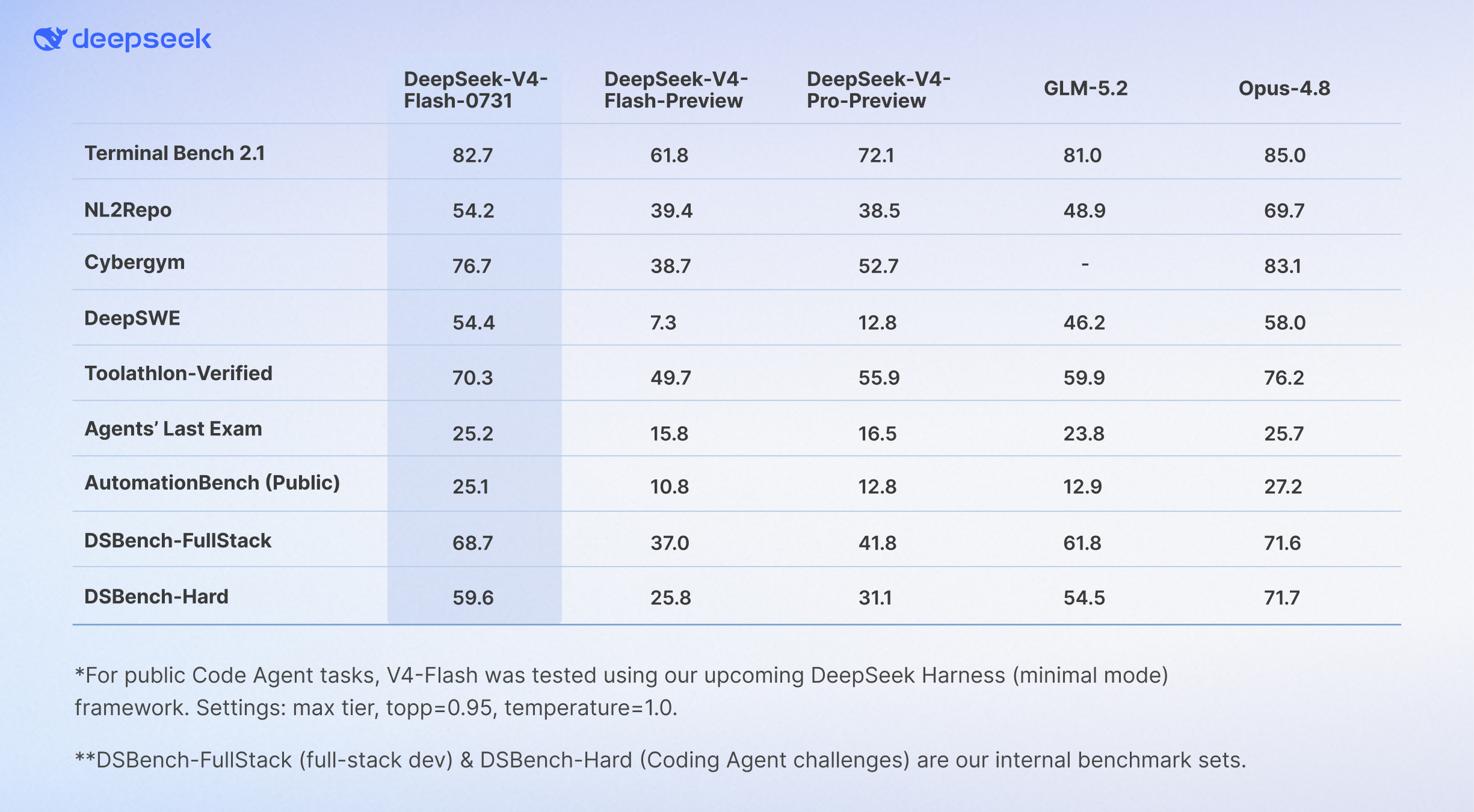
- Agent benchmarks jumped past V4-Pro-Preview. DeepSeek reports Terminal Bench 2.1 at 82.7, Cybergym at 76.7, Toolathlon verified at 70.3, and DeepSWE at 54.4. These are DeepSeek’s own published numbers, tested with their harness at max effort.
- Native Responses API support and official Codex integration. We cover both in depth in DeepSeek-V4-Flash now supports the Responses API and Codex.
- The official release of DeepSeek-V4-Pro “will follow soon,” per the change log. Responses API and Codex support for V4-Pro is expected in early August 2026.
One note of honesty: the headline benchmark claim (“far exceeding V4-Pro-Preview”) comes from DeepSeek’s own evaluation, and two of the listed benchmarks (DSBench-FullStack and DSBench-Hard) are internal test sets. Independent numbers will take a few days to appear.
Step 1: Get your API key
Head to the DeepSeek Platform, sign in, and create a key from the API Keys page. Keys start with sk-. Store it as an environment variable rather than hardcoding it:
export DEEPSEEK_API_KEY="sk-your-key-here"
The DeepSeek API is compatible with both the OpenAI and Anthropic API formats, so you don’t need a DeepSeek-specific SDK. Two base URLs matter:
| Format | Base URL |
|---|---|
| OpenAI-compatible | https://api.deepseek.com |
| Anthropic-compatible | https://api.deepseek.com/anthropic |
Step 2: Make your first call
The fastest sanity check is curl:
curl https://api.deepseek.com/chat/completions \
  -H "Content-Type: application/json" \
  -H "Authorization: Bearer ${DEEPSEEK_API_KEY}" \
  -d '{
    "model": "deepseek-v4-flash",
    "messages": [
      {"role": "system", "content": "You are a helpful assistant."},
      {"role": "user", "content": "Summarize what changed in DeepSeek-V4-Flash-0731."}
    ],
    "stream": false
  }'
The same call through the OpenAI Python SDK:
# pip3 install openai
import os
from openai import OpenAI

client = OpenAI(
    api_key=os.environ.get("DEEPSEEK_API_KEY"),
    base_url="https://api.deepseek.com"
)

response = client.chat.completions.create(
    model="deepseek-v4-flash",
    messages=[
        {"role": "system", "content": "You are a helpful assistant."},
        {"role": "user", "content": "Write a Python function that validates an email address."}
    ],
    stream=False
)

print(response.choices[0].message.content)
And Node.js:
// npm install openai
import OpenAI from "openai";

const openai = new OpenAI({
  baseURL: "https://api.deepseek.com",
  apiKey: process.env.DEEPSEEK_API_KEY,
});

const completion = await openai.chat.completions.create({
  model: "deepseek-v4-flash",
  messages: [{ role: "user", content: "Hello!" }],
});

console.log(completion.choices[0].message.content);
Because the model name deepseek-v4-flash now points at the 0731 release, any existing integration you built against the preview picks up the new model automatically. Nothing to migrate.
Step 3: Control thinking mode and reasoning effort
V4-Flash supports both a non-thinking mode and a thinking mode, and thinking is the default. You control it with the thinking parameter, and you can tune depth with reasoning_effort:
response = client.chat.completions.create(
    model="deepseek-v4-flash",
    messages=[{"role": "user", "content": "Plan a database migration from MySQL to Postgres."}],
    reasoning_effort="high",
    extra_body={"thinking": {"type": "enabled"}}
)
Two behaviors worth knowing before you tune parameters:
temperatureandtop_phave no effect while thinking mode is on.- FIM completion (fill-in-the-middle, still beta) only works in non-thinking mode.
For latency-sensitive endpoints like autocomplete, disable thinking. For agent loops and hard debugging tasks, keep it on and raise the effort level.
Step 4: Stream the response
Set stream: true and the API returns server-sent events. If you haven’t debugged SSE payloads before, our guide on streaming LLM responses with server-sent events covers the format in detail.
stream = client.chat.completions.create(
    model="deepseek-v4-flash",
    messages=[{"role": "user", "content": "Explain connection pooling."}],
    stream=True
)

for chunk in stream:
    if chunk.choices[0].delta.content:
        print(chunk.choices[0].delta.content, end="")
Pricing during the public beta
Per the official Models & Pricing page, V4-Flash stays aggressively cheap:
| Item | deepseek-v4-flash | deepseek-v4-pro |
|---|---|---|
| Input, cache hit (per 1M tokens) | $0.0028 | $0.003625 |
| Input, cache miss (per 1M tokens) | $0.14 | $0.435 |
| Output (per 1M tokens) | $0.28 | $0.87 |
| Context length | 1M tokens | 1M tokens |
| Max output | 384K | 384K |
| Concurrency limit | 2,500 | 500 |
Three pricing notes:
- Context caching is automatic, and a cache hit costs 50x less than a miss. Long-running agent sessions that reuse a system prompt benefit enormously.
- DeepSeek has announced a peak/off-peak policy: peak-hour usage (9:00-12:00 and 14:00-18:00 Beijing time) will be billed at 2x regular prices. As of July 31 the docs say the effective date is “subject to the official announcement,” so it isn’t active yet. Watch the pricing page.
- The concurrency limit tells its own story: 2,500 concurrent requests for Flash versus 500 for Pro. DeepSeek built this model to be hammered by agent fleets.
For the fuller cost picture across the V4 family, including the history of the V4-Pro permanent price cut, see our DeepSeek V4 API pricing breakdown.
Test and debug the API in Apidog
Raw curl works for a smoke test, but the moment you’re comparing thinking versus non-thinking output, or watching how the model streams tool calls, you want visibility. Here’s a workflow that takes about five minutes in Apidog:
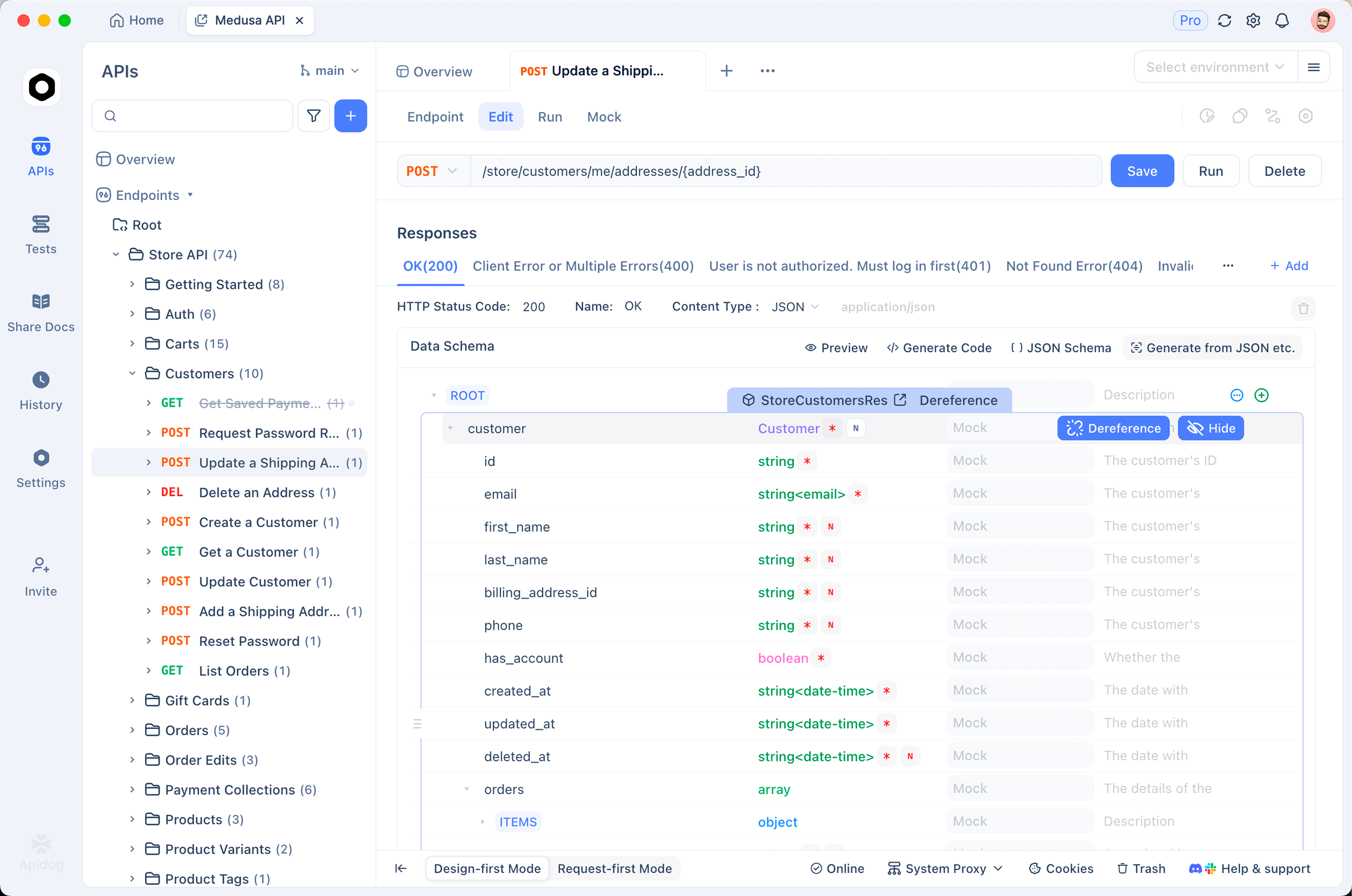
- Create a project and add the endpoint. Add
POST https://api.deepseek.com/chat/completions(or import an OpenAI-compatible spec so all endpoints arrive at once). - Store the key as an environment variable. Put
DEEPSEEK_API_KEYin an Apidog environment and reference it in the Authorization header asBearer {{DEEPSEEK_API_KEY}}. Switching between a test key and a production key becomes a dropdown click. - Send and inspect. For streaming calls, Apidog renders the SSE events as they arrive, so you can watch reasoning content and answer content come through as separate deltas instead of eyeballing a wall of raw
data:lines. - Save variants as test cases. Keep one saved request with thinking enabled and one without, then rerun both after every model update. When DeepSeek ships the next silent upgrade to
deepseek-v4-flash, you’ll know in one click whether your prompts still behave.
Download Apidog for free, the whole flow above works on the free plan.
FAQ
Do I need to change my code to get the new model? No. The model name deepseek-v4-flash now serves DeepSeek-V4-Flash-0731. Existing integrations upgrade automatically.
Is this the same model as the DeepSeek app? No. The July 31 update covers the API only. The app and web models are unchanged.
What happened to deepseek-chat and deepseek-reasoner? Those legacy model names were scheduled for discontinuation on July 24, 2026. Use deepseek-v4-flash or deepseek-v4-pro. Our guide on how to use the DeepSeek V4 API covers the migration.
Can I use it for free? DeepSeek’s API is pay-as-you-go with no permanent free tier, but the cache-hit pricing makes experimentation nearly free in practice. See how to use the DeepSeek V4 API for free for the current options.
Does V4-Flash work with Codex and the Responses API? Yes, both, and it’s the only DeepSeek model that does so far. V4-Pro support is expected in early August 2026. Full setup in our Responses API and Codex guide.
The bottom line
DeepSeek-V4-Flash-0731 is a quiet kind of release: same model name, same prices, same architecture, and a set of agent benchmark scores that now beat the bigger V4-Pro-Preview, at least on DeepSeek’s own tests. The Responses API support and Codex adaptation signal where this model is aimed: high-concurrency agent workloads at prices that undercut every Western lab.
Grab a key, point your OpenAI SDK at https://api.deepseek.com, and put the model through your own test suite before trusting the benchmark table. Apidog makes that verification loop fast: save your prompts as test cases once, rerun them on every model update, and you’ll never be surprised by a silent upgrade again.