Quick answer: The Claude Batch API processes Messages API requests asynchronously at 50% off both input and output tokens. You submit up to 100,000 requests (or 256 MB) in one call, poll until the batch ends, then read results keyed by your own custom_id. Most batches finish inside an hour, and the hard ceiling is 24 hours.
You have 40,000 support tickets to classify, or a product catalog to rewrite, or a month of transcripts to summarize. None of it is urgent. Every one of those calls still bills at full price when you fire them one at a time, and you spend the afternoon babysitting retries against your rate limit.
The Claude Batch API exists for exactly this shape of work. You hand Anthropic a list of requests, walk away, and come back to a file of results that cost half what the same calls would have cost synchronously. No queue to run, no concurrency tuning, no backoff logic.
This guide covers what the batch endpoint does, what it costs, how to submit and collect a job, and how to let your coding agent test the whole thing with Apidog CLI before you point it at real data.
What is the Claude Batch API?
The Claude Batch API is an asynchronous endpoint at /v1/messages/batches that accepts many Messages API requests in a single submission and returns their results once processing ends. It trades latency for a 50% discount. Anthropic documents it under batch processing.
The constraints you need to design around:
- Size: up to 100,000 requests or 256 MB per batch, whichever you hit first.
- Timing: most batches complete within an hour; 24 hours is the maximum before unfinished requests expire.
- Retention: results stay available for 29 days after the batch is created.
- Feature parity: vision, tool use, system prompts, and prompt caching all work inside a batch.
- Ordering: results come back in any order, so you key them by
custom_idand never by position.
That last point is the one that bites people. A batch is a bag, not a queue.
What the Claude Batch API costs
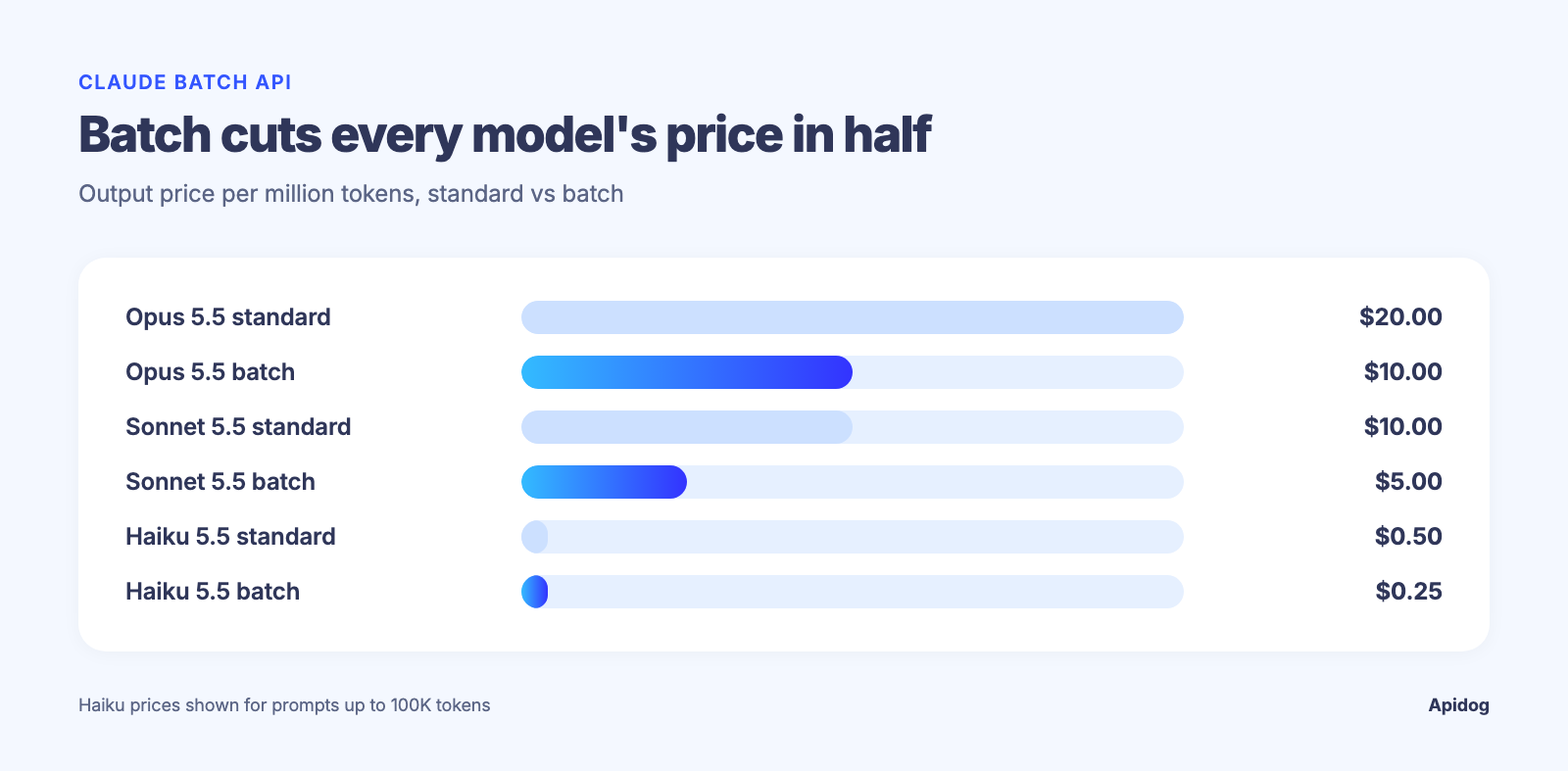
The discount is a flat 50% on both input and output tokens, applied to whatever model each request names. You can mix models inside one batch, so a cheap classifier and an expensive summarizer can ride together.
| Model | Standard input / output per MTok | Batch input / output per MTok |
|---|---|---|
| Claude Opus 5.5 | $4.00 / $20.00 | $2.00 / $10.00 |
| Claude Sonnet 5.5 | $2.00 / $10.00 | $1.00 / $5.00 |
| Claude Haiku 5.5 (prompts up to 100K) | $0.10 / $0.50 | $0.05 / $0.25 |
| Claude Haiku 5.5 (prompts over 100K) | $0.50 / $2.50 | $0.25 / $1.25 |
Read the Haiku rows carefully. Haiku 5.5 prices by prompt size, so one prompt crossing 100,000 tokens bills 5x the short-prompt rate, batch discount or not. Forecast long-context Haiku work at $0.25 / $1.25, not $0.05 / $0.25. Check Anthropic’s pricing page before you build a forecast on these numbers, and read our breakdown of where Claude API spend goes if the bill is the reason you are here.
Batch pricing also stacks with prompt caching, which is where the real savings live. More on that below.
Submit your first batch
Install the official Python SDK and build a list of requests. Each one carries a custom_id you choose and a params object that looks exactly like a normal messages.create() call.
import anthropic
from anthropic.types.message_create_params import MessageCreateParamsNonStreaming
from anthropic.types.messages.batch_create_params import Request

client = anthropic.Anthropic()

tickets = [
    "Card declined three times, support chat timed out.",
    "Love the new dashboard, the export button is hidden though.",
    "Webhook stopped firing after the 2.4 upgrade.",
]

batch = client.messages.batches.create(
    requests=[
        Request(
            custom_id=f"ticket-{i}",
            params=MessageCreateParamsNonStreaming(
                model="claude-haiku-5-5",
                max_tokens=1024,
                output_config={"effort": "low"},
                messages=[{
                    "role": "user",
                    "content": f"Label this ticket billing, bug, or praise. One word.\n\n{text}",
                }],
            ),
        )
        for i, text in enumerate(tickets)
    ]
)

print(batch.id, batch.processing_status)
Make custom_id carry meaning. A database primary key or a file path saves you a join later, and it is the only thing tying a result back to its input.
If you prefer raw HTTP, the same payload goes to POST https://api.anthropic.com/v1/messages/batches with your x-api-key and anthropic-version headers. The create a message batch reference has the full schema.
Poll the batch and collect results
Retrieve the batch until processing_status reads ended, then stream the results. Each result carries the custom_id you set and a result.type of succeeded, errored, canceled, or expired.
import time

while True:
    batch = client.messages.batches.retrieve(batch.id)
    if batch.processing_status == "ended":
        break
    print("still working:", batch.request_counts.processing)
    time.sleep(30)

labels, retry = {}, []
for result in client.messages.batches.results(batch.id):
    if result.result.type == "succeeded":
        msg = result.result.message
        labels[result.custom_id] = next(b.text for b in msg.content if b.type == "text")
    elif result.result.type == "errored":
        retry.append(result.custom_id)

print(f"{len(labels)} labeled, {len(retry)} need another pass")
Two failure modes deserve separate handling. An invalid_request error means the request body was wrong, so fix it before resubmitting. Anything else is server-side and safe to retry as-is. An expired result means the 24-hour window closed before that request ran, and you resubmit those too.
Poll on a 30 to 60 second timer. Hammering the retrieve endpoint every second buys you nothing and counts against your Claude API rate limits.
Stack batch pricing with prompt caching
The biggest win comes from combining the two discounts. If every request in your batch shares a long prefix, a style guide, a taxonomy, a 40-page contract, mark that prefix with cache_control and send the same marked prefix on all 10,000 requests.
shared_system = [
    {"type": "text", "text": "You are a support triage analyst."},
    {
        "type": "text",
        "text": taxonomy_document,          # thousands of tokens, identical every time
        "cache_control": {"type": "ephemeral"},
    },
]
Put that system block on every Request in the batch. Any request whose prefix matches a live cache entry byte for byte bills that prefix at cache-read rates, and the 50% batch discount applies to cache reads and writes alike. Do not budget for a perfect hit rate: a batch processes its requests concurrently rather than in order, so cache hits inside one batch are best-effort. Anthropic’s prompt caching guide covers the prefix rules: any byte that changes before your breakpoint invalidates everything after it, so keep timestamps and per-item text after the cached block.
Let Claude Code test the endpoint with Apidog CLI
Before you spend money on 100,000 live requests, you want a regression test on the batch lifecycle: create, retrieve, results. Writing that by hand in a GUI is slow. Let your coding agent do it with Apidog CLI instead.
npm install -g apidog-cli@latest
apidog auth login --with-token <YOUR_TOKEN>
apidog skill install   # pick Claude Code when prompted
Then one prompt to Claude Code:
In Apidog project 4820193, create a test case for POST https://api.anthropic.com/v1/messages/batches
that submits two Haiku 5.5 requests with custom_id ticket-0 and ticket-1, asserts the response
has an id and processing_status, then polls GET /v1/messages/batches/{id} until processing_status
is ended. Run it against the anthropic-staging environment and summarize failures.
The agent reads the payload schema, validates its own JSON, then creates and runs the case:
apidog cli-schema get test-case-create
apidog cli-schema validate test-case-create --file batch-case.json
apidog test-case create --project 4820193 --file batch-case.json
apidog run --test-case 77214 --project 4820193 -e 992301 -r cli,json
Your API key stays in an Apidog environment variable, so it never lands in a prompt or a repo. Swap the reporter to -r junit and the same command runs in CI on every merge, which is the setup in our Apidog CLI pipeline guide. If you have not wired the CLI into your agent yet, start with using Apidog CLI in Claude Code.
When batch is the wrong call
| Workload | Use batch? | Why |
|---|---|---|
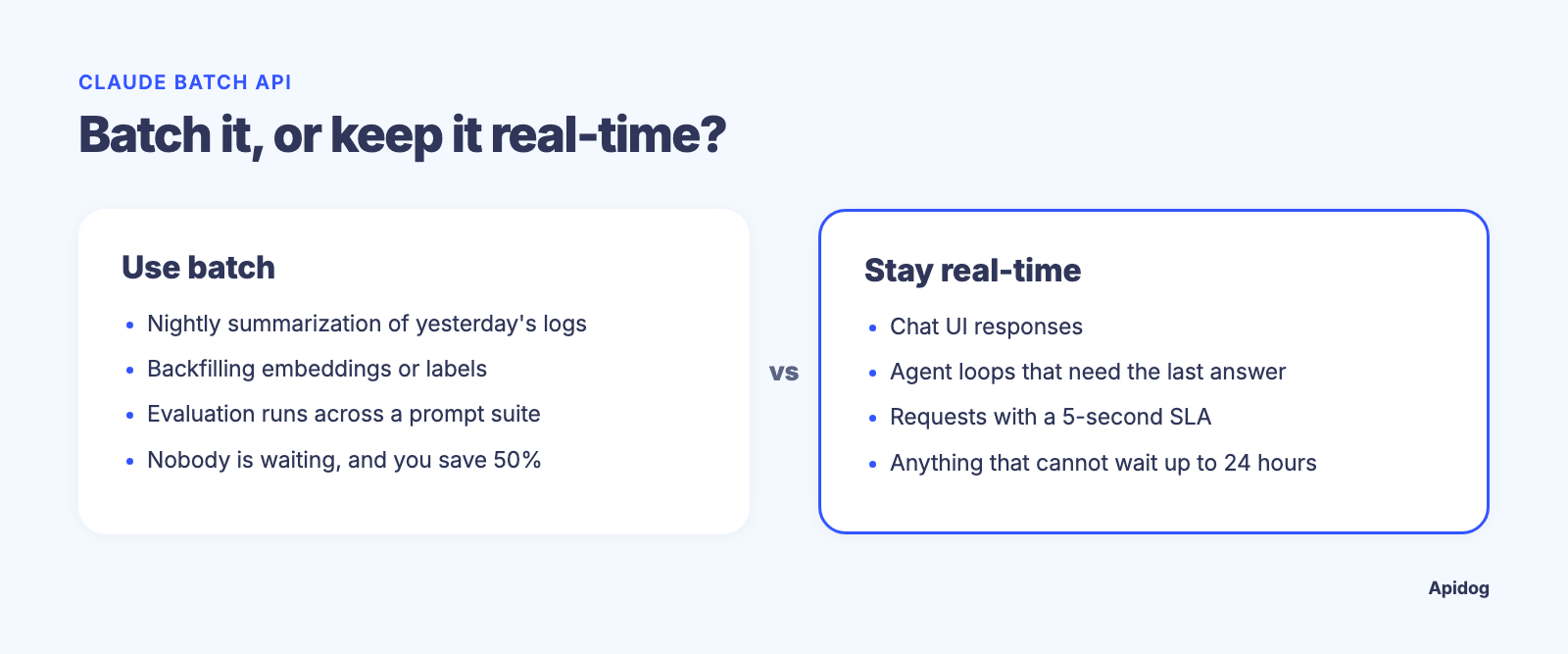
| Nightly summarization of yesterday’s logs | Yes | Nobody is waiting; 50% off |
| Backfilling embeddings or labels over a corpus | Yes | Fits the 100,000-request ceiling |
| Evaluation runs across a prompt suite | Yes | Results keyed by custom_id map to test IDs |
| Chat UI responses | No | Users will not wait an hour |
| An agent loop that needs the last answer to pick the next step | No | Batch requests cannot see each other |
| A request that must beat a 5-second SLA | No | No latency guarantee below 24 hours |
A few things also do not cross over. Fast mode is not available on the Batch API, server-side refusal fallbacks are rejected there, and on Claude Opus 5.5 and Claude Sonnet 5.5 a forced tool_choice of any or tool returns a 400 inside a batch exactly as it does on a normal call. Use tool_choice: auto with strict: true instead.
If you run multi-provider infrastructure, the same pattern exists elsewhere: see the OpenAI Batch API and Gemini API batch mode. The shapes differ, the economics do not.
FAQ
What is the Claude Batch API?
It is an asynchronous endpoint that runs standard Messages API requests in bulk at 50% of normal token prices. You submit a list of requests with your own IDs, poll until the batch ends, and read the results within 29 days.
How much does the Claude Batch API cost?
Half the standard rate on both input and output. On Claude Sonnet 5.5 that is $1.00 per million input tokens and $5.00 per million output tokens, against $2.00 and $10.00 synchronously.
How long does a Claude batch take?
Most batches finish within an hour. The maximum is 24 hours, after which any unprocessed request returns an expired result and you resubmit it.
Can I use prompt caching inside a batch?
Yes, and the discounts stack. Mark a shared prefix with cache_control, repeat that identical prefix across every request, and cached reads bill at a fraction of the input price on top of the batch discount.
What happens when one request in a batch fails?
Only that request fails. Its result carries type: "errored" with an error object; everything else still succeeds. Validation errors need a fixed payload, server errors are safe to retry unchanged.
Can I cancel a running batch?
Yes. client.messages.batches.cancel(batch_id) moves the batch to canceling. Requests already finished keep their results; the rest come back as canceled.
Does the Batch API support tools and images?
Yes. Every Messages API feature works inside a batch, including vision, tool definitions, and system prompts. The exceptions are fast mode, server-side fallbacks, and forced tool choice on the 5.5 models.
Wrapping up
Batch processing is the second-biggest free saving on the Claude API after prompt caching, and it costs you nothing in quality: same models, same features, half the price, paid for in latency you probably were not using. Key your results by custom_id, cache the shared prefix, and handle expired like a retry rather than a failure.
Test the lifecycle before you scale it. Install Apidog CLI, point your coding agent at the batch endpoints, and keep the generated test case running in CI so a schema change never surprises you at 100,000 requests. The free plan covers 4 users, and you can download Apidog and have the first case running in a few minutes.