You merged the PR. CI was green. The deploy finished without a single error in the logs. Twenty minutes later, support tickets start coming in: a payment endpoint is returning 500s for a slice of customers, and you have no idea why because nothing failed in the pipeline.
This is the gap that canary testing closes. Unit tests and integration tests check your code against what you expected. They cannot check your code against the real world: production traffic, the actual database, the third-party API that quietly changed its rate limit last Tuesday. Canary testing pushes a new release to a small fraction of real traffic first, watches how it behaves, and only widens the rollout once the signals look healthy. If something breaks, it breaks for 2% of users for two minutes instead of 100% of users for an hour.
For APIs specifically, you can do better than watching dashboards and hoping. You can run a real test suite against the canary the moment it goes live, assert on status codes, response schemas, and latency, then gate the rollout on the result. That’s the workflow this guide walks through, and we’ll wire it up end to end with Apidog and its command-line runner so the whole thing lives inside your existing CI/CD pipeline.
What canary testing actually is
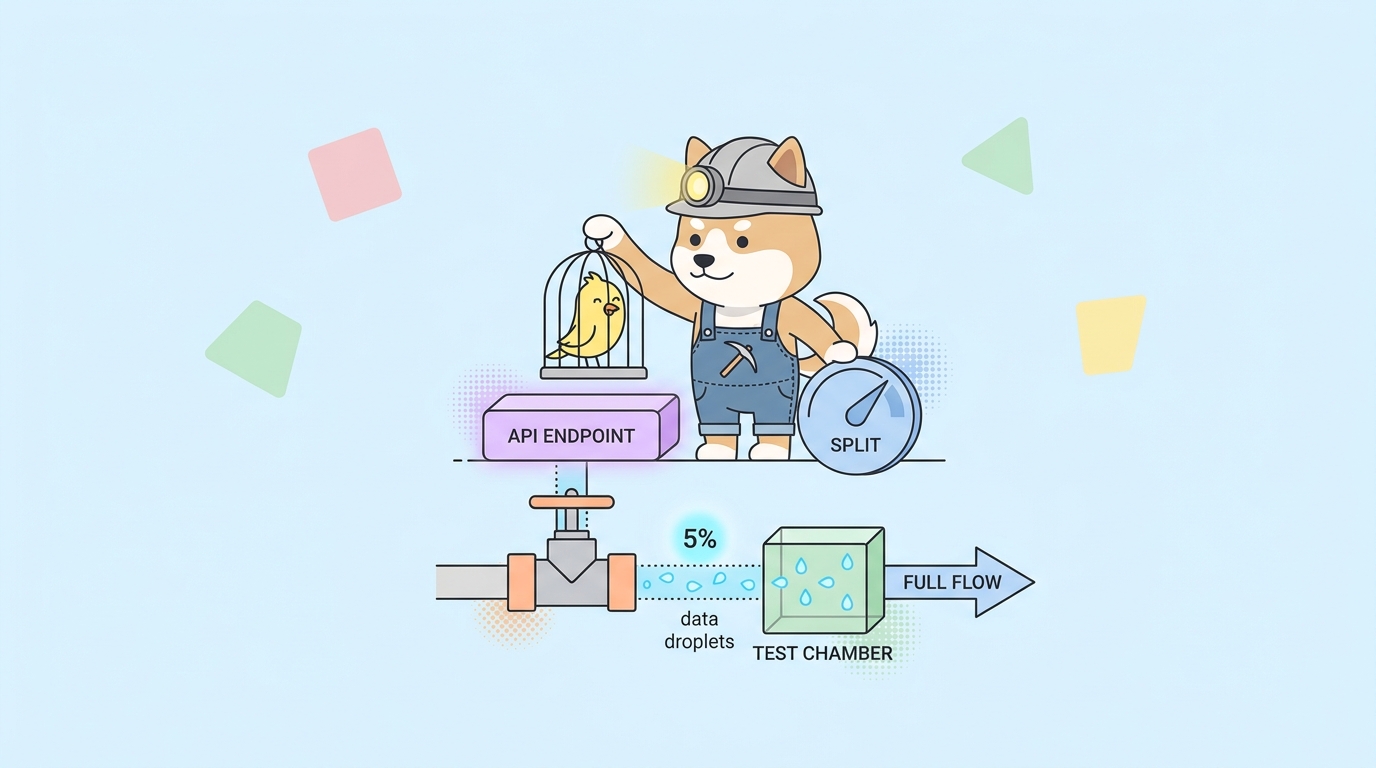
The name comes from the canary in a coal mine. Miners carried a caged bird underground because it reacted to toxic gas long before humans did. If the bird stopped singing, you got out. A canary release works the same way: a small, expendable sample takes the risk first so the rest of your users never have to.
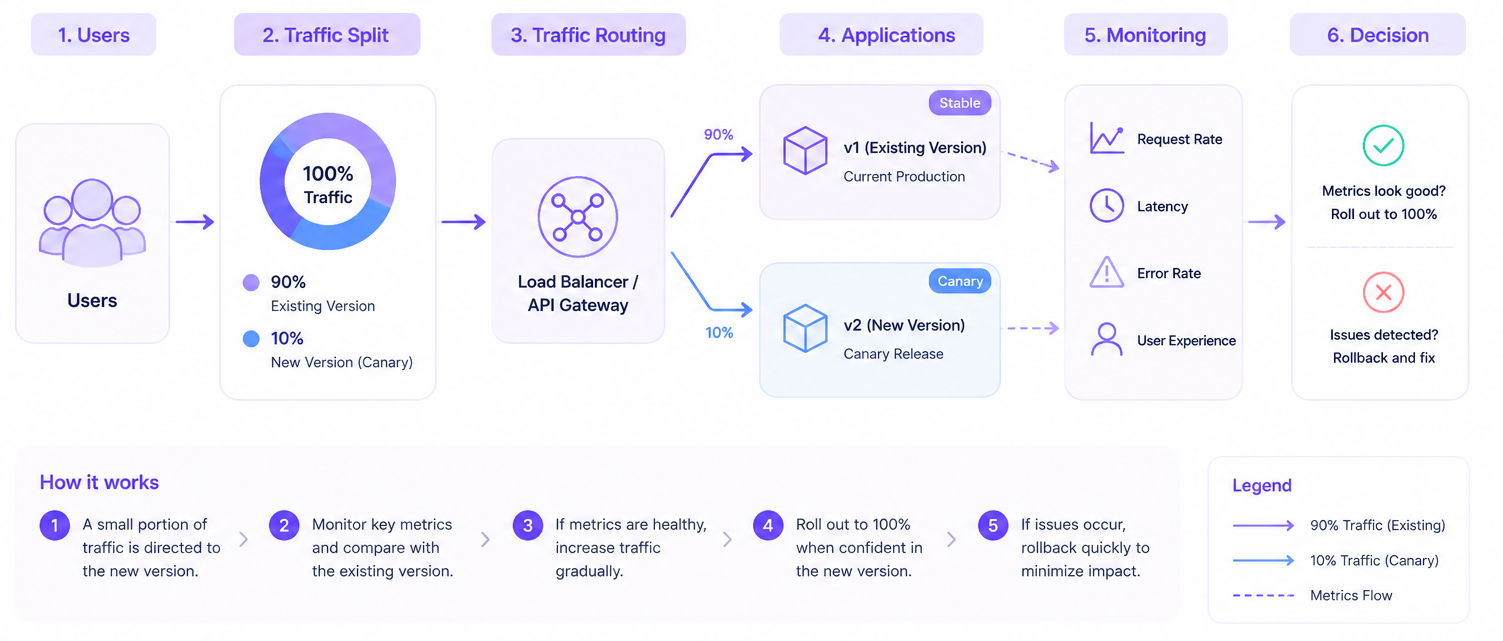
In practice, a canary deployment means running two versions of your service at once:
- Stable: the current production version, serving most traffic.
- Canary: the new version, serving a small percentage (often 1% to 5% to start).
A load balancer, service mesh, or ingress controller splits traffic between them. You watch the canary’s error rate, latency, and business metrics against the stable baseline. If the canary holds up, you shift more traffic to it in steps until it serves 100% and becomes the new stable. If it degrades, you route everything back to stable and the bad release never reaches most of your audience.
Canary testing is the active half of that loop. Instead of waiting for organic traffic to surface a bug, you fire a deliberate suite of API requests at the canary and check the responses. Passive monitoring tells you something went wrong after users hit it. Active canary testing tells you something is wrong before you widen the blast radius.
Canary testing vs. the testing you already do
Canary testing doesn’t replace your other tests. It sits at the end of the chain and catches a different class of failure.
| Test type | Runs against | Catches | Misses |
|---|---|---|---|
| Unit tests | Isolated functions | Logic bugs | Anything involving real I/O |
| Integration tests | Wired-up components | Broken contracts between services | Production config, real data shape |
| Smoke tests | A deployed build | “Is it even up?” basic failures | Subtle behavior regressions |
| Canary testing | A live release on real infra | Bad config, env drift, perf regressions, partial outages | Bugs that only show at full scale |
The reason canary testing earns its place: a huge share of production incidents come from things no pre-prod environment can fully reproduce. A missing environment variable. A stale connection-pool setting. A database index that exists in staging but not production. A downstream dependency that behaves differently under real auth. Your code is correct; the environment around it is not. Canary testing is the first time your new release meets that environment, and you want to meet it with two percent of traffic, not all of it.
If you want the broader context on where this fits, our guide on how to automate API tests in CI/CD covers the upstream stages, and smoke testing vs regression testing explains the two test types canaries lean on most.
What to measure on a canary
A canary is only useful if you know what “healthy” looks like. Pick a small set of signals and compare the canary against the stable baseline, not against an absolute number. A 1.2% error rate might be normal for your service; what matters is whether the canary is meaningfully worse than stable right now.
Four signals cover most cases:
- Error rate: the share of 5xx responses, and often 4xx that shouldn’t happen, like a sudden spike in 401s after an auth change. This is the single most important metric.
- Latency: p95 and p99, not the average. An average hides the slow tail where real users feel pain. A canary that’s 40ms slower at p99 is a warning even if the mean looks fine.
- Response correctness: does the body still match the schema? A 200 OK that returns the wrong shape is worse than a 500, because monitoring won’t flag it.
- Business signals: checkout success, login success, items added to cart. These catch logic regressions that are technically “successful” HTTP responses.
The first three you can assert directly in an API test. That’s the part we’ll automate.
The canary testing workflow, step by step
Here’s the shape of a canary rollout gated by automated API tests. Each step is something you can run from a pipeline.
- Deploy the new version as the canary alongside stable.
- Route a small slice of traffic (say 5%) to the canary.
- Run an automated API test suite against the canary endpoint.
- Watch error rate and latency for a short bake period.
- Gate: if tests pass and metrics stay within budget, shift more traffic. If not, roll back.
- Repeat the ramp (5% to 25% to 50% to 100%), re-testing at each step.
- Promote the canary to stable, retire the old version.
The two parts worth your attention are step 3 (the test suite) and step 5 (the gate). Get those right and the rest is plumbing your platform already provides.
Building the test suite in Apidog
The test suite is the heart of canary testing, and it’s where most teams cut corners. A canary “test” that only pings /health and checks for a 200 tells you the process started. It tells you nothing about whether your actual endpoints work.
A real canary suite exercises the paths that matter: authenticate, read, write, and verify the response shape on each. Apidog’s test scenarios let you chain those requests together, pass data between them, and assert on the results without writing glue code.
A solid canary scenario for an e-commerce API looks like this:
- Step 1, authenticate.
POST /auth/loginwith a test account. Assert200, extract the token from the response into a variable. - Step 2, read.
GET /products?limit=10with the token. Assert200, assert the response is an array, assert each item hasid,name, andprice. - Step 3, write.
POST /cartwith a known product. Assert201, assert the returned cart total matches the expected value. - Step 4, verify state.
GET /cart. Assert the item you just added is present.
In Apidog you build each request once, then add assertions visually. For schema checks, you can validate the response against the OpenAPI schema you already designed, so a drifted response body fails the test automatically. For the auth token handoff, you extract it from step 1’s response and reference it as a variable in later steps. No scripting required for the common cases, and you can drop into JavaScript post-processors when you need custom logic.
The payoff is that this same scenario runs three ways from one definition: manually while you’re building it, on a schedule as synthetic monitoring once it’s live, and from the command line inside your canary pipeline. You write the assertions once.
Running the suite from the command line
To gate a deployment, the suite has to run headless in CI. Apidog ships a CLI for exactly this. Install it on your build agent:
npm install -g apidog-cli
Export your test scenario data from Apidog as a CLI-formatted file, or point the runner at a scenario by ID using an access token, then run it:
apidog run \
  --access-token "$APIDOG_ACCESS_TOKEN" \
  -t "$CANARY_SCENARIO_ID" \
  -e "$CANARY_ENV_ID" \
  -r cli,html,junit
A few flags worth knowing for canary work:
-t, --test-scenarioruns a specific scenario by ID. Use-f, --test-scenario-folderto run a whole folder of scenarios.-e, --environmentselects the runtime environment. Point this at an environment whose base URL is your canary endpoint, so the same tests can hit canary, staging, or production by swapping one value.-r, --reporterscontrols output.cliprints to the console,htmlproduces a shareable report, andjunitemits XML that GitHub Actions, GitLab, Jenkins, and most CI dashboards parse natively to show pass/fail per test.-d, --iteration-dataruns the suite once per row of a CSV or JSON file. Useful for hitting the canary with several user profiles or product IDs in one pass.--upload-reportpushes the run summary back to Apidog so the team can see canary history in the app.
The CLI exits non-zero when an assertion fails. That exit code is the entire gating mechanism: your pipeline already knows how to stop on a failed step, so a failed canary test stops the rollout for free.
For a deeper walkthrough of running Apidog in pipelines, how to automate API tests in GitHub Actions and the Jenkins integration guide cover those platforms in detail.
Wiring it into CI/CD
Here’s a trimmed GitHub Actions job that deploys a canary, tests it, and only promotes on success. The structure carries over to GitLab CI, CircleCI, or Jenkins with minor syntax changes.
name: canary-release

on:
  push:
    branches: [main]

jobs:
  canary:
    runs-on: ubuntu-latest
    steps:
      - uses: actions/checkout@v4

      - name: Deploy canary (5% traffic)
        run: ./deploy.sh --canary --weight 5

      - name: Install Apidog CLI
        run: npm install -g apidog-cli

      - name: Test the canary
        run: |
          apidog run \
            --access-token "$APIDOG_ACCESS_TOKEN" \
            -t "$CANARY_SCENARIO_ID" \
            -e "$CANARY_ENV_ID" \
            -r cli,junit
        env:
          APIDOG_ACCESS_TOKEN: ${{ secrets.APIDOG_ACCESS_TOKEN }}
          CANARY_SCENARIO_ID: ${{ vars.CANARY_SCENARIO_ID }}
          CANARY_ENV_ID: ${{ vars.CANARY_ENV_ID }}

      - name: Bake and watch (2 min)
        run: sleep 120 && ./check-metrics.sh --service canary --max-error-rate 1.0

      - name: Promote canary to 100%
        run: ./deploy.sh --promote

      - name: Roll back on any failure
        if: failure()
        run: ./deploy.sh --rollback
The logic that makes this a canary rather than a plain deploy is the ordering. The canary takes a slice of traffic before the test runs, so the test exercises a release that is already serving real requests. The if: failure() step is the safety net: if the test suite exits non-zero, or the metric check trips, the job fails and the rollback runs before traffic ever ramps past 5%.
Keep CANARY_ENV_ID pointing at an Apidog environment whose base URL targets the canary. When you later want to run the same suite as a post-deploy production smoke test, you swap in the production environment ID and change nothing else. That reuse is the point: one suite, many stages.
Common mistakes that make canary testing useless
Testing the wrong endpoint. If your test hits the load-balanced public URL, the request might land on a stable instance instead of the canary. Route the test explicitly at the canary, either through a header the mesh routes on, a dedicated canary hostname, or an environment whose base URL is the canary’s address.
A bake period of zero. Some failures only appear under sustained load: memory leaks, connection-pool exhaustion, a cache that fills up. Run the test, then watch for a few minutes before promoting. A canary that passes instantly and gets promoted in ten seconds is barely a canary.
No automatic rollback. If a human has to notice the failure and click rollback, you’ve kept the slowest part of incident response in the loop. The whole value is that the pipeline rolls back on its own. Wire the rollback to the failure condition and test that the rollback works.
Absolute thresholds instead of comparisons. “Fail if error rate above 1%” breaks the day your baseline error rate is legitimately 1.5%. Compare the canary to current stable, and trip the gate when the canary is meaningfully worse, not when it crosses a number you picked months ago.
Thin assertions. A 200 response with a malformed body passes a status-code-only check and fails your users. Assert on the response schema, not just the code. This is where designing your API contract first and validating responses against the schema pays off directly: your canary test inherits the contract for free.
How wide should the canary be, and for how long?
There’s no universal answer, but a workable default for most teams:
- Start at 5% of traffic. Small enough to limit damage, large enough to get a real signal within minutes on a busy service. Low-traffic APIs may need a longer window to gather enough requests.
- Ramp in steps: 5% to 25% to 50% to 100%. Re-run the test suite at each step. A regression that hides at 5% sometimes appears at 50% when a connection pool saturates.
- Bake for at least a few minutes per step. Long enough for slow-burning failures to surface, short enough that you’re not stalling every release for an hour.
High-traffic services can move faster because they accumulate signal quickly. A payments API handling thousands of requests per second has enough data to judge a canary in a minute. An internal admin API that sees a few requests an hour needs a longer bake or a heavier synthetic test load to reach a verdict.
Where canary testing fits in your release strategy
Canary testing pairs naturally with feature flags and blue-green deployments, and it’s worth being clear on the difference. Blue-green flips all traffic from one full environment to another at once; the rollback is fast, but there’s no gradual exposure. Feature flags toggle behavior for chosen users without a redeploy. Canary releases gradually shift real traffic and gate on live signals.
Most mature teams use all three: blue-green for the infrastructure swap, canary for the gradual traffic ramp with automated gates, and feature flags for fine-grained control once the code is live. The common thread is that none of them remove the need to test the release against production. They control how much of your audience is exposed while you do.
That’s the real takeaway. Canary testing isn’t a tool you buy; it’s a discipline: deploy small, test the live release with real assertions, watch the signals, and gate the rollout on the result. The tooling exists to make each of those steps automatic. With Apidog you build the test suite once, run it from the CLI inside any pipeline, and let the exit code decide whether the release moves forward. Bad releases stop at 5% of traffic, and your users never see the 500s.
Download Apidog to build your first canary test scenario, point an environment at your canary endpoint, and add one CLI step to your pipeline. The next bad merge breaks for a handful of requests instead of all of them.
FAQ
Is canary testing the same as a canary deployment? A canary deployment is the release mechanism: serving a new version to a small slice of traffic. Canary testing is what you do during that window, actively running tests and asserting on responses instead of only watching dashboards. You need the deployment to do the testing, but the testing is what turns a risky rollout into a gated one.
Do I need a service mesh to do canary testing? No. A service mesh like Istio or Linkerd makes traffic splitting easier, but you can run canaries with a plain load balancer weight, an ingress controller’s canary annotations, or even DNS weighting. The test-and-gate part of the workflow, which is what this guide focuses on, works the same regardless of how you split traffic.
How is this different from smoke testing after deploy? A smoke test usually runs once against a fully deployed release to confirm it’s up. Canary testing runs against a release that’s serving only a fraction of real traffic, and it gates the ramp-up. The assertions can be identical; the difference is timing and consequence. A failed smoke test means rolling back something already live for everyone; a failed canary test means stopping a rollout at 5%. For the distinction between smoke and regression suites, see our comparison guide.
Can I reuse my existing API tests as canary tests? Often, yes. If you already have Apidog test scenarios with real assertions, you point them at an environment whose base URL is the canary and run them with the CLI. The work is in making sure your tests assert on response bodies and not just status codes, and in routing them at the canary rather than the load-balanced public URL.
What happens when a canary test fails in CI? The Apidog CLI exits with a non-zero code on any failed assertion. Your pipeline treats that like any failed step: the job stops, the promotion step is skipped, and your if: failure() rollback step runs. No human has to be watching for the rollback to happen.