Businesses in ChatGPT is OpenAI’s new beta that lets a company claim its profile inside ChatGPT, keep its details and products current, see how people find it, and, for eligible US ecommerce and online service businesses, launch a Business Agent that talks to customers. OpenAI announced it on November 10, 2026.
For developers, the interesting part sits underneath. Behind the profile is a product feed with a strict schema, a cloud browser that has to get through your firewall, and an optional plugin built as an MCP server that calls your backend for live prices, stock and checkout. If your API returns stale or inconsistent data, ChatGPT will repeat it to customers.
What is Businesses in ChatGPT?
Businesses in ChatGPT is a beta program, run through a dashboard called Business Hub, where a verified business manages how it appears in ChatGPT. It has three parts: a claimed business profile, aggregated engagement insights, and Business Agents, a branded conversational agent that answers questions about the business’s offerings.
OpenAI pitches it as a way to reach “the 1.2 billion people who use ChatGPT each week,” according to the launch post. The three parts work like this:
- Claim your business. Verify ownership in Business Hub, then update key details and add self-service product feeds with pricing and availability. A claimed profile gets a blue check.
- Insights. Business Hub shows mentions, website clicks and “discovery topics,” the conversation themes where your website gets cited. Data is aggregated and appears only once there are enough conversations to meet OpenAI’s thresholds. You never see individual chats.
- Business Agents. After claiming, eligible businesses can build, test and publish an agent. When your business shows up in an answer, a user can open your ChatGPT profile and start a separate, clearly labeled conversation with your agent.
Claiming does not buy ranking. OpenAI’s Businesses in ChatGPT page states that ChatGPT keeps making independent recommendations and that claiming “does not guarantee higher placement or sales.” Your profile can also show up whether or not you build an agent.
Who can use it right now
Eligibility is narrower than the headline suggests. Here’s what OpenAI’s pages say as of November 16, 2026:
| Capability | Who it’s open to |
|---|---|
| Claim a business profile | Eligible businesses where ChatGPT is offered; initially businesses with a website. You must own the business or be authorized to represent it. |
| Product feeds | Retailers, through Business Hub after identity verification |
| Insights | Claimed businesses, once traffic meets privacy thresholds |
| Business Agents | Eligible ecommerce and online service businesses in the US |
| Sponsored Business Agent | Advertisers using it as the destination for ChatGPT Ads |
Eligibility depends on industry, location, and OpenAI’s verification and integrity checks. OpenAI Enterprise customers and advertisers can claim through their OpenAI representative.
Shopify merchants can connect a store from Business Hub or the Shopify admin, and their product details, pricing and availability flow in through Shopify Catalog. Everyone else submits a feed.
What a business has to provide
OpenAI’s commerce partner playbook describes five layers. Most teams will stop at the first two or three.
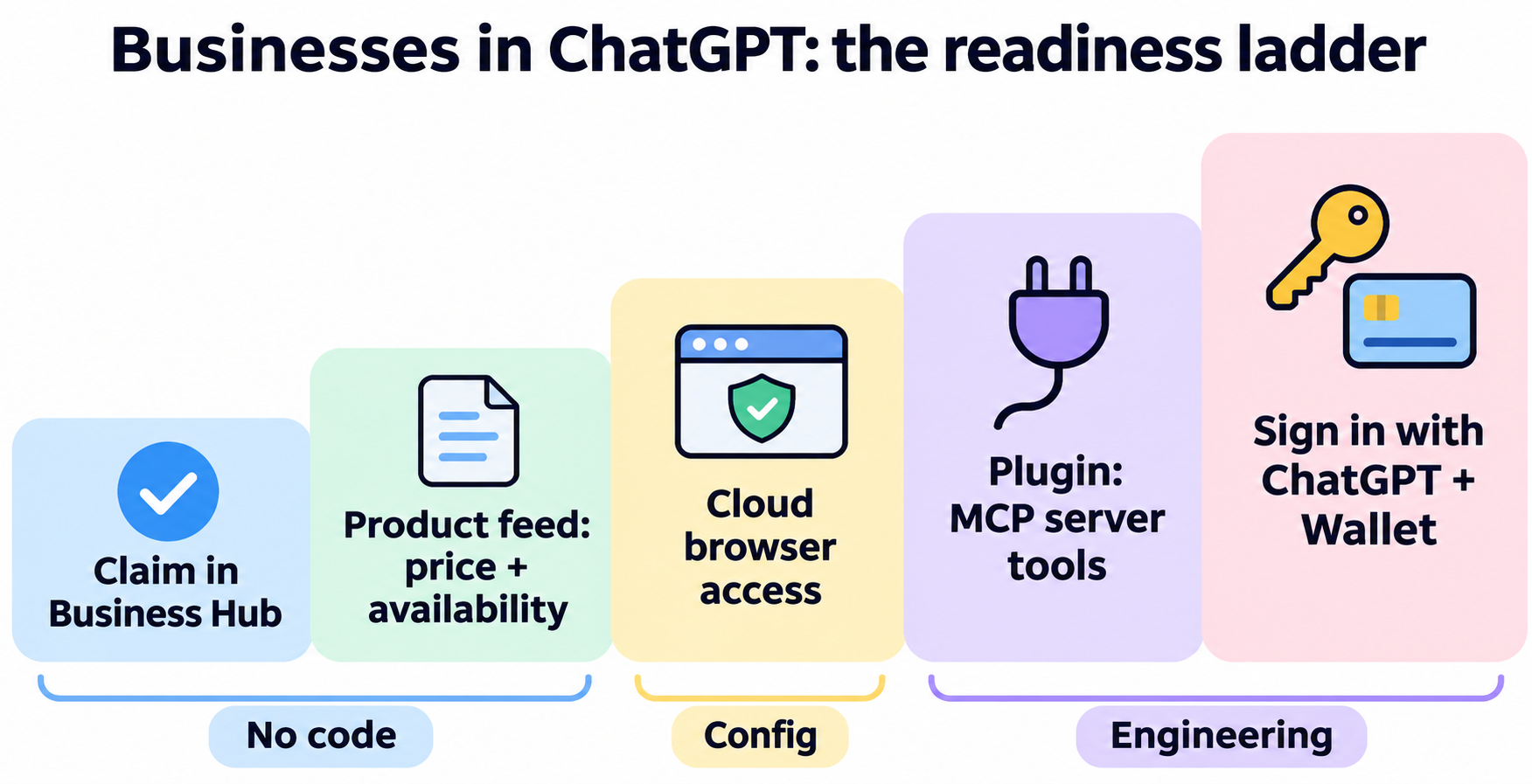
1. A verified listing
Claim and verify the business in Business Hub, then fill in the details you want ChatGPT to use. No code, but someone has to own it and keep it current.
2. A product feed
If you sell physical goods, you submit a feed. The product feed spec accepts JSONL (one JSON record per line), CSV or TSV, encoded as UTF-8, with absolute HTTP or HTTPS URLs and identifiers kept as strings. Every record needs nine basic fields:
item_id, title, description, url, brand, seller_name, image_url, availability, price
Two geo fields are also required: target_countries and store_country. Variants, ads and checkout add conditional fields such as group_id, is_ads_eligible and is_eligible_checkout.
A minimal record looks like this (placeholder values in the formats the spec requires: availability is one of five fixed values and price is an amount plus an ISO 4217 code):
{"item_id":"SKU-1042","title":"Trail Runner 3","description":"Lightweight trail shoe","url":"https://shop.example.com/p/trail-runner-3","brand":"Example","seller_name":"Example Store","image_url":"https://shop.example.com/img/tr3.jpg","availability":"in_stock","price":"129.00 USD","target_countries":["US"],"store_country":"US"}
The submit product feeds guide lists three delivery methods: manual upload, a hosted HTTPS URL, or SFTP. You pick the countries and currencies you sell in, keep item_id values stable, and fix whatever errors the upload reports.
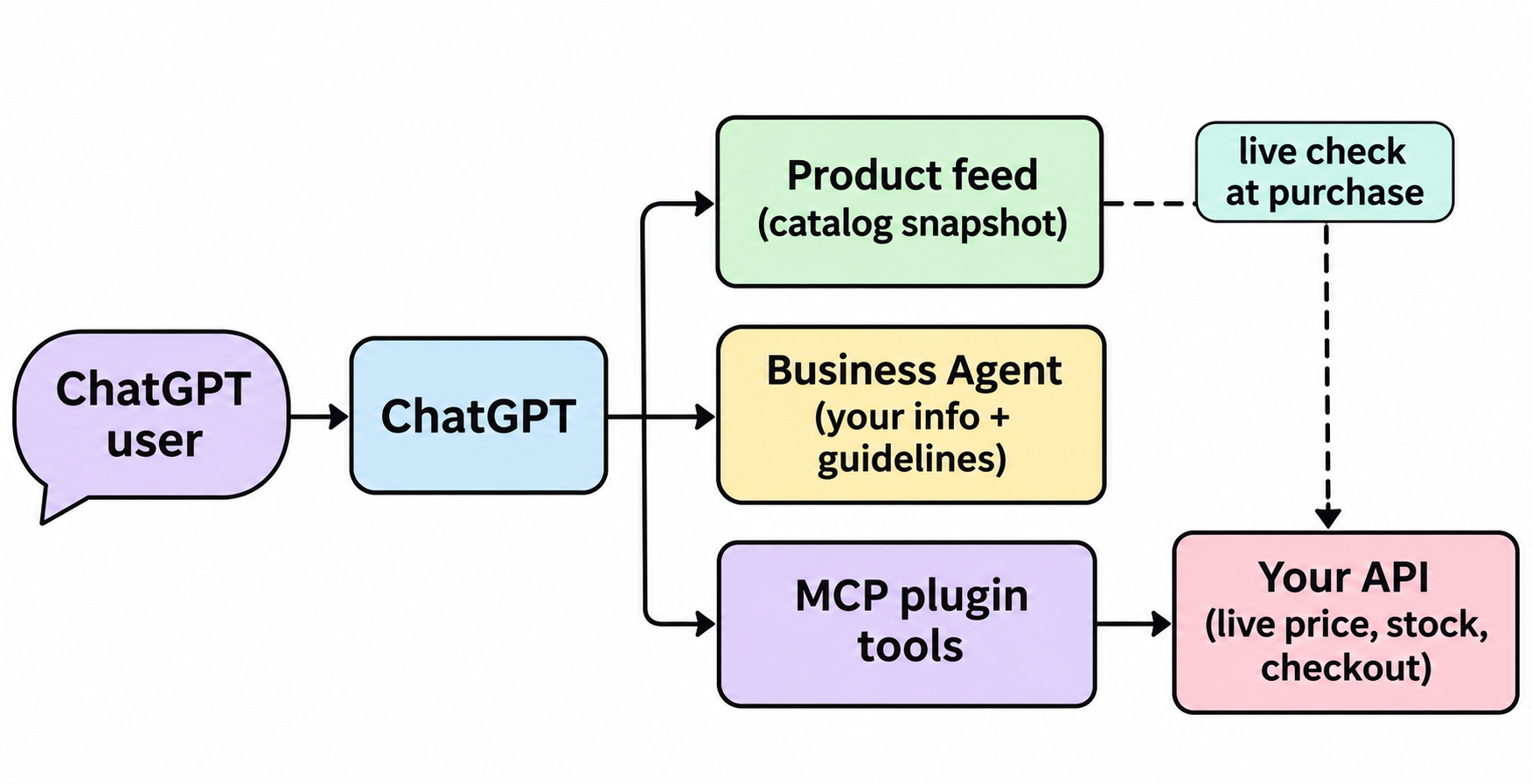
One detail matters for engineers: the feed is a catalog snapshot only. It does not update a cart or confirm a purchase. Your live website or plugin still has to check the current offer when a customer acts. The feed and your API must agree, or customers see one price in ChatGPT and another at checkout.
3. Cloud browser access
ChatGPT’s cloud browser can use your existing purchase or booking flow. OpenAI asks you to confirm that your CDN or firewall doesn’t block verified ChatGPT browser visits, and points to its agent access page for what to change. This is configuration, not new code, and it’s the lightest path to transactions.
4. A plugin, if you want structured actions
For direct calls, OpenAI’s build a plugin guide describes a headless commerce plugin: an MCP server plus skills that ChatGPT calls instead of clicking through pages. Your MCP server owns availability, pricing, transaction state and confirmation. Example tools include get_product_details, update_cart, create_checkout, get_checkout and update_checkout. The guide says names and schemas are not mandatory.
The requirements read like an API contract:
- Return stable IDs, current price, and availability for the requested location, not just catalog presence.
- Return a
continue_urlhandoff when checkout can’t finish inside the plugin. - Return explicit errors when a cart change is rejected.
- Configure authentication per the plugin auth docs; mutual TLS is optional for server-to-server calls.
If you’ve built MCP servers before, our guide to building an MCP server for AI agents covers the basics.
5. Sign in and payments
The last layer adds Sign in with ChatGPT for flows that need an account, and ChatGPT Wallet payments on your existing site, both “where available.” OpenAI says plugin and Wallet interaction patterns are still being worked out.
What the Business Agents policy means for your API
The Business Agents policy covers the instructions, information, links, forms and tools you give an agent. Three rules hit engineering directly:
- Accuracy is your job. You can’t let the agent invent offerings, prices, availability or guarantees, and you can’t hide material fees. Data your API serves has to be current.
- No silent actions. The agent must not share a user’s information with your business, or submit a form, booking or purchase for the user, without explicit authorization through an approved feature.
- No sensitive data collection. Don’t ask for health details, government IDs, or financial or authentication credentials.
OpenAI may suspend or remove an agent that breaks these rules, so treat the endpoints it touches like any public API: predictable responses, honest errors, no hidden side effects.
How to get your API ready this week
Here’s a short checklist that fits into a sprint:
- Claim and verify your business in Business Hub, or ask your OpenAI representative if you already have one.
- Map your catalog to the feed schema. List which endpoint or table provides each of the nine required fields, plus
target_countriesandstore_country. - Pin your IDs. Make sure
item_idis a stable string your API also uses, so a feed record and a live lookup point to the same product. - Write a contract for the “live check.” Price and availability from your product endpoint must match the feed at the moment of purchase. Decide what happens when they don’t.
- Audit your firewall rules for verified ChatGPT browser traffic.
- Document your API in OpenAPI if you plan a plugin. Your MCP tools will wrap these endpoints, and a spec makes the wrapping and the tests mechanical.
- Automate tests on the endpoints ChatGPT will hit, and run them on every deploy.
Let your coding agent test it with Apidog CLI
ChatGPT will read your data far more often than you will, so the checks should run without you. Apidog CLI lets an agent such as Codex, Claude Code or Cursor import your spec, write test cases and run them from the terminal.
Install it, log in, and give your agent the Apidog skill:
npm install -g apidog-cli@latest
apidog auth login --with-token <YOUR_TOKEN>
apidog skill install
Then give your agent one prompt:
Import ./openapi.yaml into Apidog project <projectId>. For GET /products/{item_id},
create a test case that asserts a 200 response, item_id returned as a string,
price and availability present, and a 404 with a JSON error for an unknown ID.
Run it against the staging environment and summarize any failures.
The agent imports the spec, reads the test case schema, validates its payload, then creates and runs the case:
apidog import --project <projectId> --format openapi --file ./openapi.yaml
apidog endpoint list --project <projectId> --method GET
apidog cli-schema get test-case-create
apidog cli-schema validate test-case-create --file case.json
apidog test-case create --project <projectId> --file case.json
apidog run --test-case <caseId> --project <projectId> -e <envId> -r cli,json
Add the same apidog run with -r junit to your pipeline so a broken price field fails the build before ChatGPT sees it. The Apidog CLI CI/CD guide shows the setup, and Apidog CLI in Codex walks through the agent side. If you’re building the MCP plugin, see how to test MCP servers too.
Apidog’s Free plan covers up to 4 users, which is enough for a small team to wire this up.
How this fits with apps and connectors
Businesses in ChatGPT is not a ChatGPT app or connector. Apps in ChatGPT put an interactive experience in the chat, and ChatGPT connectors pull a user’s own data. Businesses in ChatGPT is about how a company is represented when people compare and buy. The plumbing overlaps: the commerce plugin is an MCP server, so a team that already runs one has a head start.
FAQ
Is Businesses in ChatGPT free? OpenAI’s announcement and Business Hub page don’t list a fee for claiming a business or submitting a feed. Sponsoring a Business Agent runs through ChatGPT Ads, which is paid. [VERIFY] Check Business Hub for current terms before you budget.
Do I need an API to join? No. Claiming a profile and uploading a feed file need no code, and Shopify merchants can connect their store. You need an API only for live checks behind a plugin, and your site has to handle ChatGPT’s cloud browser.
Can businesses outside the US use it? Any eligible business where ChatGPT is offered can claim a profile. Business Agents are limited to eligible ecommerce and online service businesses in the US for now, and OpenAI says it plans to expand to more markets and categories.
Can a Business Agent place orders for customers? Not on its own. The policy bars an agent from submitting a form, booking or purchase without explicit user authorization through an approved feature. Transactions go through the cloud browser or a plugin.