
ReadMe makes genuinely good-looking developer hubs, and its pricing reflects the confidence: the jump from the free Starter plan is $250 per month billed annually for Pro, and the features enterprises usually need (SSO, audit logs, removing ReadMe branding) start at $3,000 per month, per ReadMe’s pricing page. If you’re searching for a ReadMe alternative, it’s usually one of two moments: the invoice stopped matching the value, or you realized your docs platform knows nothing about whether your API actually works.
Here’s the direct answer: Apidog is the best ReadMe alternative for API documentation, because it generates docs from the same spec your team designs, tests, and mocks against. Docs stay correct because they’re a view of the working API, not a separate project. It’s free for up to 4 users, with paid plans from $9 per user per month instead of a platform fee. This article covers where ReadMe’s model gets expensive, what Apidog replaces, and where ReadMe keeps a real edge.
The two problems with docs-only platforms
The platform fee scales like a platform, not like docs
ReadMe’s Starter plan is free and genuinely useful: one project, custom domain, interactive API reference. The next step is Pro at $250 per month billed annually. The step after that is Enterprise at $3,000+ per month, and that’s where basics like SSO, user roles, audit logs, and removing the ReadMe logo live. AI features are partly a separate meter: Ask AI is a $150 per month add-on. For a startup, $3,000 per month for documentation is a full engineer’s worth of budget for a rendering layer. Teams have been doing this math for a while; our older roundup of ReadMe.io alternatives came from the same pressure.
The docs don’t know your API
The deeper issue is architectural, and it applies at any price. ReadMe consumes your OpenAPI file; it doesn’t produce or verify it. The spec is generated somewhere else, tested somewhere else, mocked somewhere else, and synced to ReadMe as a final step. Every one of those hops is a chance for drift, and the docs are the last to find out. Bi-directional sync narrows the gap but doesn’t close it: ReadMe can’t run your test suite, so “the docs say X, the API does Y” bugs survive until a developer hits them in production and files an angry ticket.
That’s the pattern with every docs-first tool, whether it’s ReadMe, GitBook, or Document360; we’ve cataloged the category in GitBook alternatives and Document360 alternatives. The rendering is lovely. The source of truth is elsewhere.
What the flat fee costs at team scale
Flat platform pricing and per-seat pricing cross at different points than most teams guess. Here’s the annual bill for a team that needs paid features on both sides, using ReadMe Pro at $250 per month billed annually against Apidog’s free-for-4 plan and $9 per seat beyond:
| Team size | ReadMe Pro per year | Apidog per year | Difference |
|---|---|---|---|
| 3 people | $3,000 | $0 (free plan) | $3,000 |
| 5 people | $3,000 | $540 | $2,460 |
| 10 people | $3,000 | $1,080 | $1,920 |
| 25 people | $3,000 | $2,700 | $300 |
Two honest notes. ReadMe’s flat fee means very large teams eventually break even on paper: past roughly 28 seats, Pro is nominally cheaper than Apidog’s per-seat bill. But that’s also the size at which ReadMe customers usually need SSO, roles, and unbranded docs, which move the ReadMe number to $36,000 a year on Enterprise. And if the free Starter tier genuinely covers you (one project, one version), the comparison is $0 against $0, and the decision rests on the workflow argument alone.
The answer: Apidog
Apidog is an API development platform used by over 500,000 developers. Documentation is one output of it, alongside design, debugging, testing, and mocking, all driven by the same spec.
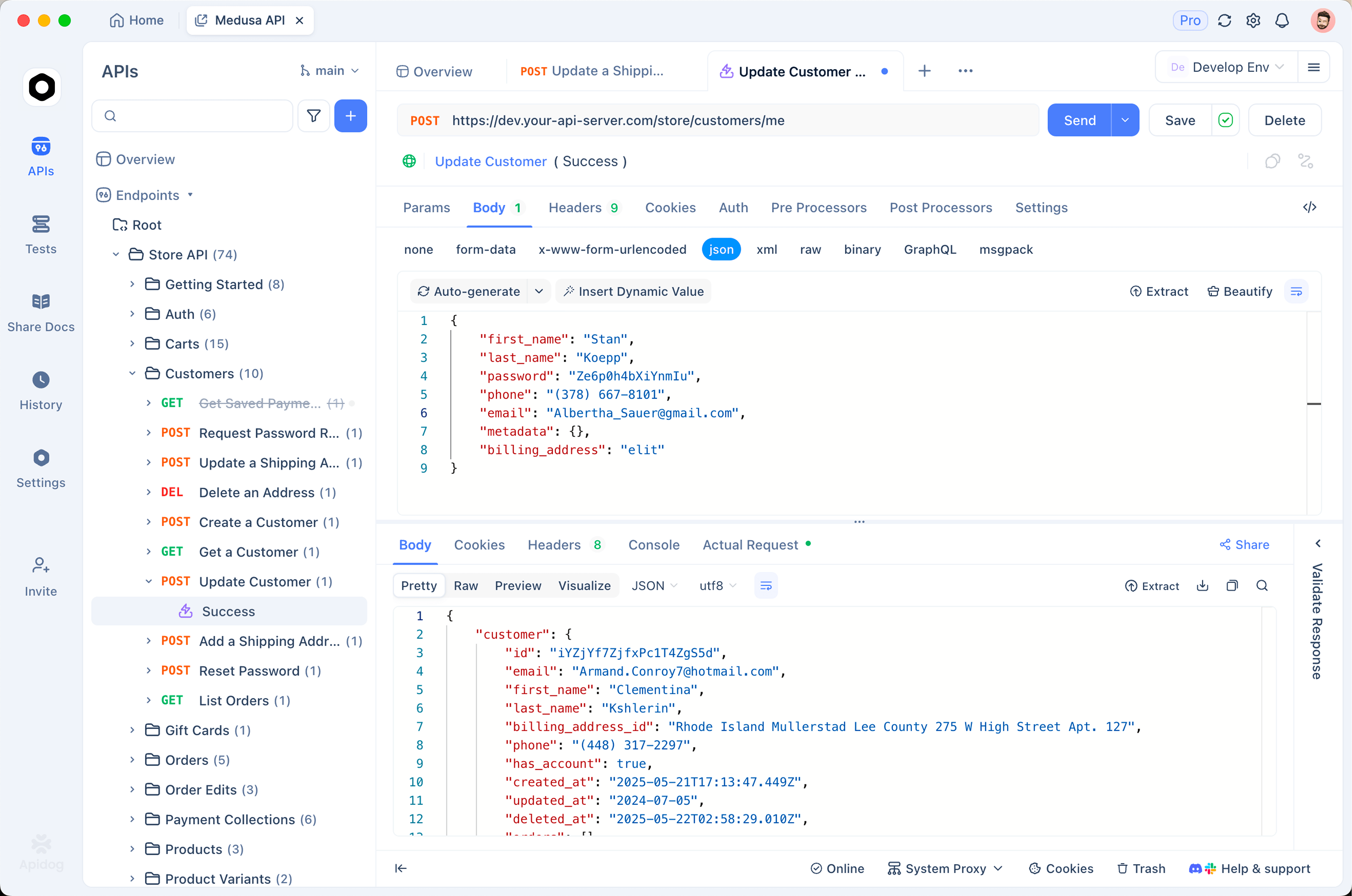
For someone comparing against ReadMe:
- Docs come from the tested spec. The endpoints your docs describe are the ones your team debugs and runs automated tests against. Change the spec and the docs, mocks, and tests update together. Drift isn’t reduced; the pipeline that produced it is gone.
- Publishing is included. Interactive reference docs, a “try it” console that sends real requests, Markdown pages for guides, versioning, and a custom domain.
- Pricing is per seat, not per platform. Free for up to 4 users; $9 per user per month beyond. There’s no $250-per-month cliff between free and paid, and no $3,000 gate.
- The consumer side is AI-ready. Docs publish alongside an MCP server, so AI agents can read your API spec directly instead of scraping HTML; details in what is Apidog MCP Server.
What the switch looks like feature by feature
Interactive API reference
Both tools render OpenAPI into a reference with a request console. The difference is what powers the console: Apidog’s “try it” runs against real environments or against the built-in smart mock server, which serves realistic schema-based fake data the moment the spec exists. Your consumers can explore an API that isn’t deployed yet.
Guides and non-reference content
ReadMe’s guides, with MDX components and reusable content blocks, are a strength, and Apidog’s answer is more utilitarian: Markdown pages alongside the reference, organized in the same doc site. You can write onboarding guides, auth walkthroughs, and changelogs. If your docs are 80% narrative content with elaborate custom components, ReadMe’s editor is nicer; if they’re 80% API reference with supporting pages, you won’t miss it.
Versioning and environments
Apidog versions docs with the API itself, and environment definitions (base URLs, auth) flow into the published docs so consumers hit the right endpoints. On ReadMe, versions are managed in the docs platform and unlimited versions require Pro.
The workflow upstream of the docs
This is the part ReadMe doesn’t have at any price: the spec editor, the request client, the automated test scenarios, the mock server, and the CI integration via Apidog CLI all live under the docs. A docs page is backed by a spec that a test suite exercised this morning. For teams currently paying for ReadMe plus Postman seats, consolidation is the quiet budget win: two subscriptions become one, and the Stoplight comparison tells the same story from the design-tool side.
ReadMe vs Apidog at a glance
| ReadMe | Apidog | |
|---|---|---|
| Free plan | 1 project, 1 version, custom domain | 4 users, unlimited projects, docs included |
| First paid tier | $250/mo billed annually (Pro) | $9 per user/mo |
| SSO, roles, audit logs | Enterprise, $3,000+/mo | Enterprise plan |
| Remove vendor branding | Enterprise only | Custom domain and layout on paid plans |
| AI assistant | Ask AI add-on, $150/mo | AI features in platform |
| Spec editing | No (imports your spec) | Yes, visual + code editors |
| API testing | No | Yes, visual scenarios, unlimited runs |
| Mock server | No | Yes, schema-aware smart mocks |
| Try-it console | Yes | Yes, against real or mock environments |
| Guides / MDX components | Strong, custom MDX on Pro | Markdown pages |
| API usage metrics in docs | Yes, developer dashboards | Request history in platform, not consumer-facing |
The last two rows are ReadMe wins, stated plainly. What you’re deciding is whether a nicer narrative editor and consumer-facing usage dashboards are worth a platform fee and a second source of truth.
Migrating from ReadMe
The export path is clean because the center of gravity is a file you already have:
- Import your OpenAPI spec into Apidog. Reference docs exist immediately, endpoints structured and grouped.
- Move guide content. ReadMe pages export as Markdown; paste them into Apidog’s doc pages. Custom MDX components need rewriting as standard Markdown, which is the one genuinely manual step.
- Point your custom domain at the Apidog-hosted docs and set up the redirect map for changed URLs.
- Then go beyond the docs: generate a mock server from the spec, build a smoke-test scenario, and put it in CI. This is the part that had no ReadMe equivalent, and it’s where the migration stops being a lateral move.
A typical reference-heavy docs site moves in a day or two. Content-heavy hubs take longer, proportional to how much MDX customization they carry.
When ReadMe still makes sense
If your developer hub is a content product (long-form guides, tutorials, community forums, a marketing-grade landing page) with a dedicated docs team, ReadMe’s authoring experience and MDX system are built for exactly that. If consumer-facing API usage dashboards matter (developers logging in to see their own request logs inside your docs), ReadMe Metrics is a differentiated feature Apidog doesn’t replicate. And if you’re on the free Starter tier with one project and it covers your needs, there’s no urgency. The switch pays off when the reference is the product, the platform fee is real money, and the drift between docs and API keeps generating support tickets.
Frequently asked questions
Is Apidog really free for API documentation?
Yes. The free plan covers 4 users and includes publishing interactive docs with the try-it console. ReadMe’s free Starter tier covers one project; its paid tiers start at $250 per month billed annually.
Can Apidog docs live on my own domain?
Yes, published docs support custom domains, custom layouts, and Markdown pages, without a vendor logo requirement tied to a $3,000 tier.
What happens to my ReadMe guides if I switch?
Export them as Markdown and add them as documentation pages in Apidog. Standard Markdown moves as-is; custom MDX components need converting to plain Markdown equivalents.
Does Apidog have something like ReadMe’s Ask AI?
Apidog publishes your spec through an MCP server, which lets AI assistants and agents consume the API definition directly. ReadMe’s Ask AI is a chat widget over your docs content, sold as a $150 per month add-on.
How do the docs stay accurate in Apidog?
Because they’re generated from the same spec your team tests against. When automated scenarios run against an endpoint and the schema changes, docs regenerate from that same source, so there’s no separate sync step to forget.
Publish docs your API can’t drift from
Import your OpenAPI spec, publish the reference on your domain, and turn on the mock server. Download Apidog or start in the browser; a team of 4 pays nothing, and the docs you publish are backed by the spec your tests just verified. The feature-level breakdown is on the Apidog vs ReadMe comparison page.