
Your build is green. Unit tests pass, the JAR is packaged, the artifact is deployed. Then the first real request hits the staging API and a downstream service returns a 500 because someone changed a response field two commits ago. The build said everything was fine. It wasn’t. It just never checked the API.
This is the gap most Bamboo CI pipelines have. Atlassian Bamboo is good at compiling code, running JUnit suites, and shipping artifacts. What it doesn’t do on its own is verify that your HTTP endpoints still behave the way your contract promises. If you want that safety net, you have to add automated API tests as a stage in the pipeline. This guide walks through exactly how to do that, using Apidog to build the tests and the Apidog CLI to run them inside a Bamboo job.
By the end you’ll have a Bamboo plan that, on every push, hits your endpoints, checks status codes, validates response bodies against your schema, and fails the build the moment a contract breaks. No Postman license per seat, no hand-written assertion scripts to maintain, and a real HTML test report attached to every build. Download Apidog if you want to follow along; the CLI piece is free and open.
Why API tests belong in Bamboo, not after it
A lot of teams test their APIs manually, or worse, in production. Someone clicks through a collection of saved requests before a release and eyeballs the responses. That works until it doesn’t. People forget. Releases happen on a Friday. The one endpoint nobody thought to re-check is the one that breaks.
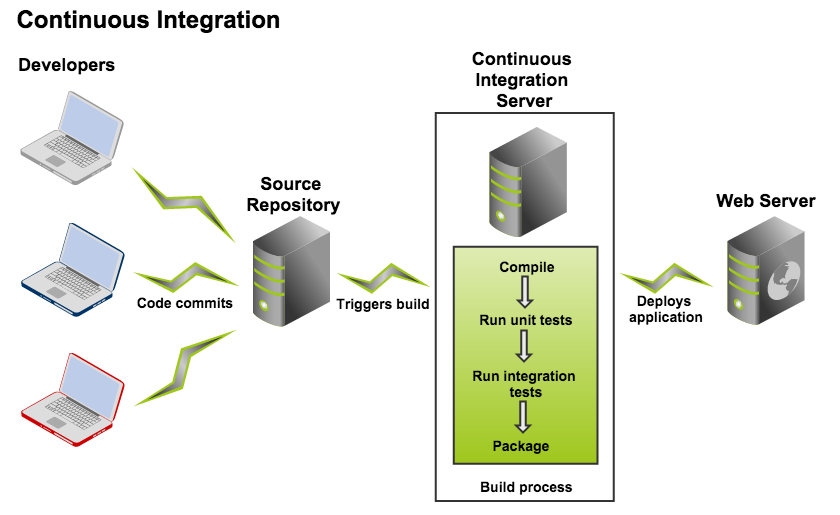
CI exists to remove that human variable. The whole point of a build server is that the same checks run the same way every single time, automatically, with no one remembering to run them. Your unit tests already live there. Your integration tests probably do too. API tests deserve the same treatment, and for a few concrete reasons:
- Contracts break silently. A backend dev renames a JSON field from
userIdtouser_id. Unit tests still pass because they test the function, not the wire format. The mobile team finds out three days later. An API test that asserts on the response body catches it in the same build that introduced it. - Status codes lie when nobody’s watching. An endpoint that should return
201 Createdstarts returning200 OKafter a refactor. Functionally close, technically wrong, and a strict client will reject it. A pipeline assertion flags this in seconds. - Auth regressions are expensive. A misconfigured token-refresh flow that returns
401on valid credentials is the kind of bug that takes down a login screen. Running an authenticated request on every build means you find it before your users do. - Environments drift. Staging gets a config change, a feature flag flips, a dependency upgrades. Running the same API suite against staging after every deploy tells you immediately whether the environment is still healthy.
The deeper context is the same reason teams adopt CI/CD in the first place: catch problems early, when they’re cheap to fix, instead of late, when they’re expensive and embarrassing. API testing is just the layer of that strategy most pipelines skip.
How API testing fits into a Bamboo plan
Before the step-by-step, it helps to understand where this lives in Bamboo’s model. Bamboo organizes work into plans, and each plan contains one or more stages that run in order. Each stage holds jobs, and each job is a sequence of tasks. Tasks are the actual commands: checkout, compile, run a script.
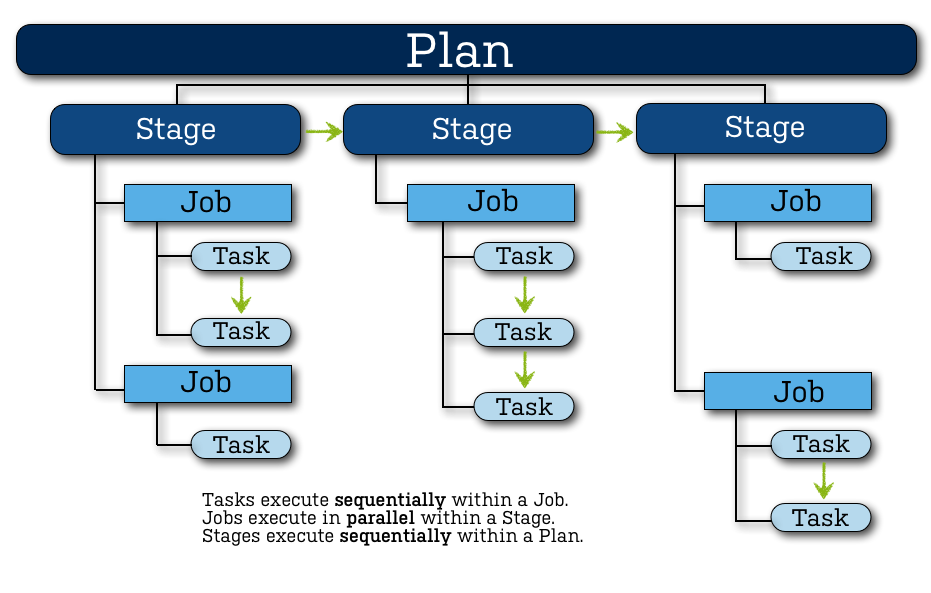
Your API tests become a task inside a job inside a stage. The natural placement is a dedicated stage that runs after your application is built and deployed to a test environment, because you need something live to send requests at. A typical plan ends up looking like this:
Plan: payments-service
├── Stage: Build
│   └── Job: Compile & Unit Test
│       ├── Task: Source Code Checkout
│       └── Task: Maven, clean package
├── Stage: Deploy to Staging
│   └── Job: Deploy
│       └── Task: Deploy artifact to staging
└── Stage: API Tests          <- this is what you're adding
    └── Job: Run API Suite
        ├── Task: Source Code Checkout
        ├── Task: Script, install & run Apidog CLI
        └── Task: Final, publish test report
If a task in the API Tests stage exits with a non-zero code, Bamboo flags the stage as failed and the whole build red. That’s exactly the behavior you want; a broken contract should stop the line, not slip through.
The tool doing the actual work in that script task is the Apidog CLI, a command-line runner that executes test scenarios you design visually in Apidog. You build the test once, in a GUI, with no code, and the same test runs unchanged in your terminal and in Bamboo. This is the same pattern teams use to automate API tests across any CI/CD system; Bamboo is one target among many.
Step 1: Build your API tests in Apidog
You can’t run tests in CI until you have tests. Apidog is where you design them, and the design is visual, so a QA engineer who doesn’t write code can build the same suite a backend developer would.
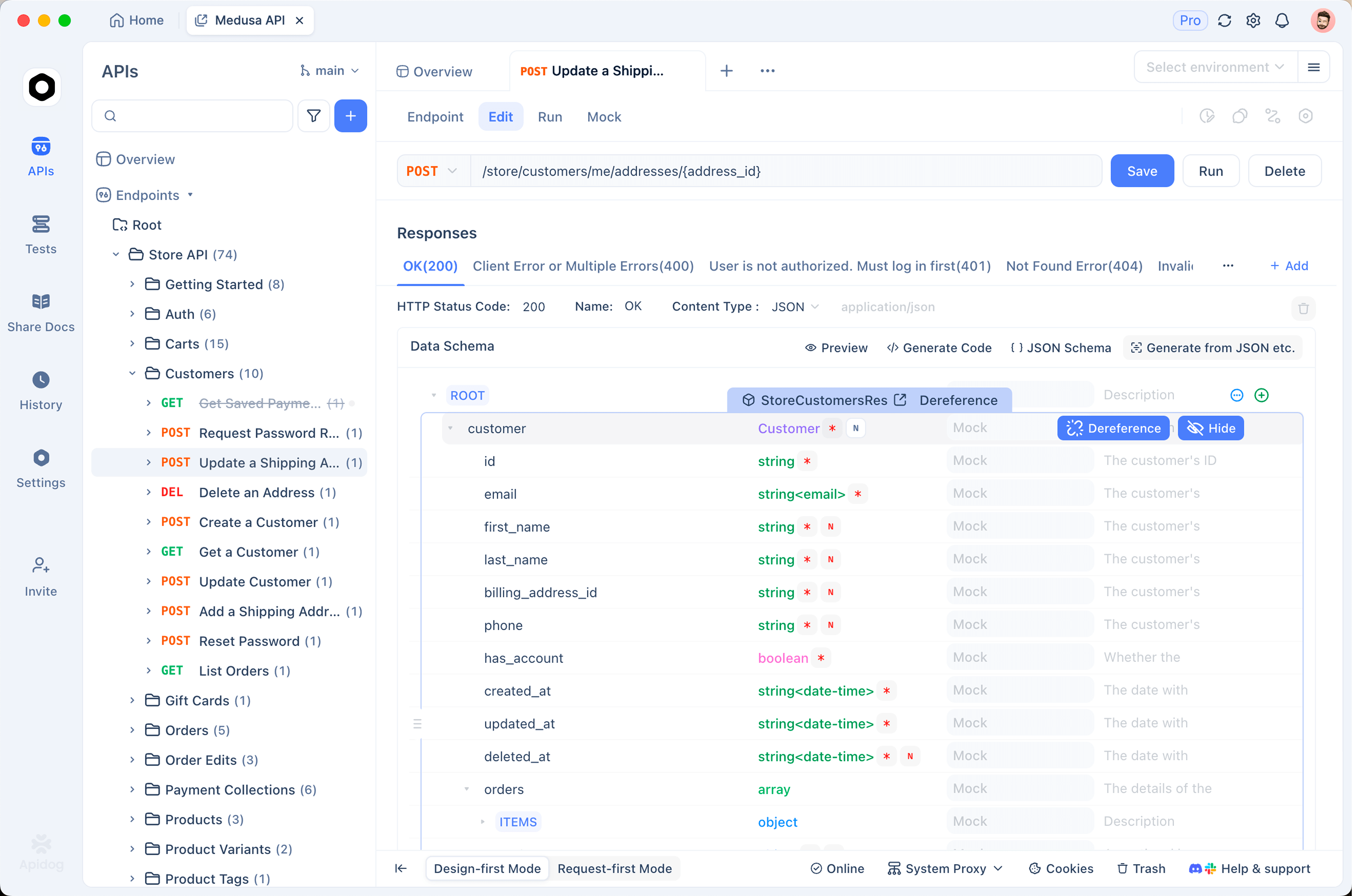
Open Apidog and create a test scenario. A scenario is an ordered sequence of API requests, run top to bottom, where each step can reuse data from the steps before it. A realistic scenario for a payments service might be:
POST /auth/loginwith valid credentials, then extract the bearer token from the response.POST /ordersusing that token, creating a new order, then save the returnedorderId.GET /orders/{orderId}and confirm the order shows up with the right status.DELETE /orders/{orderId}to clean up.
For each request, add assertions. This is the part that turns a request into a test. Apidog lets you assert visually, no scripting required:
- Status code equals
200(or201, whatever the contract says). - A JSON field exists and matches:
$.data.statusequals"pending". - The response validates against the endpoint’s OpenAPI schema, so any unexpected field type or missing required property fails the step.
- Response time stays under a threshold, say 800ms, so a slow regression shows up too.
Schema-based assertions are worth calling out. Because Apidog is schema-first, it already knows the shape your endpoint promised in its API definition. You can assert “this response matches its schema” in one click, and that single check guards against a whole category of contract drift, renamed fields, wrong types, dropped properties, without you writing a single line. If you’re coming from a script-heavy tool, this alone removes a lot of maintenance. It’s the same visual-assertion model that makes Apidog a common Postman alternative for API testing.
Group related scenarios into a test suite if you have many. A suite is just a collection of scenarios you can run together, which keeps your CI command simple; you point the runner at one suite instead of listing twenty scenarios.
Use environment variables for anything that changes between local, staging, and production: base URLs, credentials, API keys. Define a staging environment in Apidog with baseUrl set to your staging host. You’ll tell the CLI which environment to use at run time, so the exact same scenario runs against staging in Bamboo and against localhost on your laptop.
Step 2: Generate an Apidog access token and grab the IDs
Bamboo runs headless on a build agent. It can’t log into your Apidog account through a browser, so the CLI authenticates with an access token instead.
Inside your test scenario, open the CI/CD tab. Click Add access token, then Generate token. Copy the value somewhere safe for a moment; you’ll store it as a Bamboo variable shortly, not paste it into a script. The token is what lets a build agent pull and run your private project’s tests.
While you’re in that CI/CD tab, Apidog generates the full run command for you. Select Command line as the provider and it prints something you can copy directly, with your test scenario ID and project ID already filled in. That copied command is the foundation of your Bamboo task. The pieces you care about:
- Access token: authentication, passed as
--access-token. - Test scenario ID: the numeric ID after
-t, identifying which scenario to run. - Environment ID: the numeric ID after
-e, telling the CLI to run against staging.
Keep that generated command handy. The next steps adapt it for Bamboo.
Step 3: Store the token as a Bamboo plan variable
Never hard-code a token into a script task. Anyone with read access to the plan, and anyone reading build logs, would see it.
In Bamboo, go to your plan, open Plan Configuration, and find the Variables tab. Add a new variable. Name it something clear like APIDOG_ACCESS_TOKEN and paste the token as the value. Bamboo masks variables whose names contain password, secret, or token, so name it accordingly and the value gets hidden in logs and the UI.
At run time Bamboo exposes plan variables to scripts as environment variables, prefixed and upper-cased, with dots becoming underscores. A variable named APIDOG_ACCESS_TOKEN is available to your shell task as $bamboo_APIDOG_ACCESS_TOKEN. You’ll reference that, never the raw token, in the build script.
This same hygiene applies to any other secret your tests need; database passwords, third-party API keys, signing secrets. Define them as masked Bamboo variables and read them through the bamboo_ environment prefix.
Step 4: Add the API test stage and a script task
Now wire it into the plan. In Plan Configuration, add a new stage and call it API Tests. Add a job to it, then add tasks to the job in this order.
Task 1, Source Code Checkout. Even though the tests live in Apidog’s cloud, checking out your repo gives the agent a clean working directory and lets you commit any local data files (CSV iteration data, for example) alongside your code.
Task 2, Script. This is the heart of it. Choose a Script task, set the interpreter to Shell (or /bin/sh), and use an inline script body. The script installs the Apidog CLI on the agent and runs your scenario.
The Apidog CLI is an npm package, so the agent needs Node.js v16 or later. If your agents already have Node, you can skip the install line; if not, provision it through Bamboo’s capabilities or a Docker-based agent. Here’s a complete script body:
#!/bin/sh
set -e

# Install the Apidog CLI globally on the agent
npm install -g apidog-cli

# Run the test scenario against staging, output an HTML + CLI report
apidog run \
  --access-token "$bamboo_APIDOG_ACCESS_TOKEN" \
  -t 637132 \
  -e 358171 \
  -r cli,html \
  --out-dir ./apidog-reports
Swap 637132 for your real test scenario ID and 358171 for your staging environment ID, the values from the command Apidog generated in step 2. A few notes on what each flag does:
--access-tokenreads the masked Bamboo variable, so the secret never appears in the script.-t(short for--test-scenario) picks the scenario to run. To run a whole suite instead, use--test-suite <id>; to run an entire folder of scenarios, use-f <folderId>.-e(--environment) selects the staging environment you defined in Apidog, so requests go to the right host with the right variables.-r cli,html(--reporters) produces both a console report you’ll see in the Bamboo build log and an HTML report you can publish as an artifact. The CLI also supportsjsonandjunitformats here.--out-dircontrols where reports land. Default is./apidog-reports; setting it explicitly makes the artifact path predictable.
The set -e at the top matters. It makes the shell exit on the first failing command. The Apidog CLI already returns a non-zero exit code when any assertion fails, and that non-zero code is what tells Bamboo to fail the build. Together they guarantee a broken API contract turns the build red instead of being buried in the logs.
If you’ve wired API tests into GitHub Actions before, this will feel familiar; the runner and flags are identical, only the YAML-versus-Bamboo-UI wrapper differs.
Step 5: Publish the test report as a Bamboo artifact
A red build tells you something broke. The HTML report tells you what broke. Wire it up so every build keeps the report.
In the same job, go to the Artifacts tab and define a new shared artifact:
- Name:
Apidog Test Report - Location:
apidog-reports - Copy pattern:
**/*
After each build, Bamboo collects everything in the apidog-reports directory and attaches it to the build result. Open any build, go to the Artifacts tab, and you can download or view the HTML report; request-by-request results, the assertions that ran, and the exact response body for anything that failed. That last part saves real debugging time. Instead of re-running the failed request by hand, you read the captured response straight from the build.
For richer in-Bamboo display, the junit reporter is useful too. Add junit to the -r list, then add a JUnit Parser task pointed at the JUnit XML file. Bamboo then renders test counts, pass/fail breakdowns, and failure trends natively on the build summary, the same way it shows your unit test results.
Step 6: Run it and read the result
Trigger the plan manually for the first run; in Bamboo, Run plan from the plan page. Watch the build log for the API Tests stage. You’ll see npm install the CLI, then the Apidog run output stream by, scenario name, each request, each assertion, and a final summary line with totals.
Two outcomes:
All assertions pass. The CLI exits 0, the stage goes green, the build succeeds, and the HTML report is attached as an artifact anyway, so you have a record. Good. Now make it automatic; set the plan to trigger on every commit to your main branch (Plan Configuration, Triggers, Repository polling or a webhook). From here on, every push runs your API suite with zero human involvement.
An assertion fails. The CLI exits non-zero, set -e halts the script, the stage goes red, and the build fails. Open the artifact, find the failed request, and read the captured response. Maybe a field changed. Maybe staging returned a 502 because a dependency is down. Either way you know within a minute or two of the commit that introduced it, which is the entire payoff.
A realistic console summary looks like this:
┌──────────────┬──────────┬──────────┐
│              │ executed │   failed │
├──────────────┼──────────┼──────────┤
│   iterations │        1 │        0 │
├──────────────┼──────────┼──────────┤
│     requests │        4 │        0 │
├──────────────┼──────────┼──────────┤
│   assertions │       11 │        1 │
└──────────────┴──────────┴──────────┘

  1 assertion failed:
    GET /orders/{orderId}
      expected $.data.status to equal "pending" but got "failed"
That one failed assertion is the whole reason the stage exists. It caught a contract regression that compiled cleanly and passed every unit test.
Making the suite reliable in CI
A flaky API test is worse than no test, because it trains the team to ignore red builds. A few habits keep the suite trustworthy.
Isolate test data. Each run should create what it needs and clean up after itself, like the create-then-delete order flow above. Tests that depend on a record someone created last Tuesday will break the moment that record changes. Run against a dedicated staging or test environment, never production.
Use data-driven runs for coverage without duplication. If you need to test the same endpoint with twenty different inputs, don’t build twenty scenarios. Use a single scenario with --iteration-data path/to/data.csv (or -d), and the CLI runs it once per row. Commit the CSV to your repo so it’s checked out with the code. This is the same data-driven testing pattern you’d use locally, just driven from a file in CI.
Pin the CLI version. npm install -g apidog-cli grabs the latest. For reproducible builds, pin a known version, npm install -g apidog-cli@<version>, so a CLI update doesn’t silently change behavior between two builds of the same commit.
Set sensible timeouts. Add --timeout-request 10000 to fail fast on a hung endpoint instead of letting the build hang until Bamboo’s own timeout kills it. A clear “request timed out” beats a vague stalled build.
Gate deploys on the API stage. Because the API Tests stage runs before any production deploy stage, and a failed stage stops the plan, a broken contract can’t reach production. That ordering is your release gate. It’s the practical version of building a real CI/CD pipeline rather than a build that only compiles.
Keep scenarios fast and focused. A CI suite that takes twenty minutes won’t run on every commit; people will move it to nightly and lose the fast feedback. Keep the per-commit suite to your critical paths, auth, core CRUD, payment flow, and run the exhaustive edge-case suite on a schedule.
Wrapping up
Bamboo already protects you from code that doesn’t compile and unit tests that don’t pass. Adding an API test stage extends that protection to the contracts your services actually expose over the wire, the layer where most “but it worked locally” incidents actually live.
The setup is short: build visual, schema-aware tests in Apidog, generate an access token, store it as a masked Bamboo variable, and add a script task that runs apidog run with your scenario and environment IDs. Publish the report as an artifact, gate your deploy stage behind it, and trigger the plan on every commit. After that it’s automatic. Every push checks your API, and a broken contract turns the build red before it can turn into an outage.
Download Apidog and build your first test scenario, then drop the generated CLI command into a Bamboo script task. The first time it catches a regression that compiled cleanly, the stage will have paid for the ten minutes it took to set up.