OpenAI announced GPT-5.6 Sol on June 26, 2026, and the first question almost everyone asked was “how do I get it?” The honest answer, for the next few weeks, is that you can’t. Sol launched as a government-gated limited preview, available through the OpenAI API and Codex only, not in ChatGPT, and restricted to roughly 20 partners whose names were individually approved by the US government. If you aren’t one of them, there’s no waitlist link to click and no plan to upgrade to today.
That doesn’t mean you’re stuck waiting with nothing to do. OpenAI says general availability in ChatGPT, Codex, and the API is coming “in the coming weeks,” and rollouts like this tend to widen on a predictable path. This guide covers what that path usually looks like, what signals to watch, and the concrete prep you can do now so you’re testing Sol the day your access lands instead of starting from scratch.
TL;DR
- You cannot access GPT-5.6 Sol right now unless you’re one of ~20 US-government-approved preview partners. It’s API + Codex only, not in ChatGPT.
- OpenAI says GA across ChatGPT, Codex, and the API is coming “in the coming weeks.” There’s no public waitlist as of this writing.
- OpenAI rollouts historically widen from a limited preview to broader API access, then to ChatGPT. Watch the API model list and your org’s model access page.
- Prep now: get an OpenAI-compatible client, learn the
chat/completionsrequest shape (includingreasoning_effort, the newultramode, and prompt caching), and rehearse against a model you can already reach. - The exact API model identifiers for Sol, Terra, and Luna have not been published yet. Don’t hardcode a guess.
You can’t get Sol yet, and here’s why
GPT-5.6 is one generation with three durable capability tiers: Sol (the flagship, strongest), Terra (balanced, which OpenAI describes as about 2x cheaper than GPT-5.5 with similar performance), and Luna (the fastest and lowest priced, with strong capability). All three shipped at once on June 26, but all three are behind the same gate.
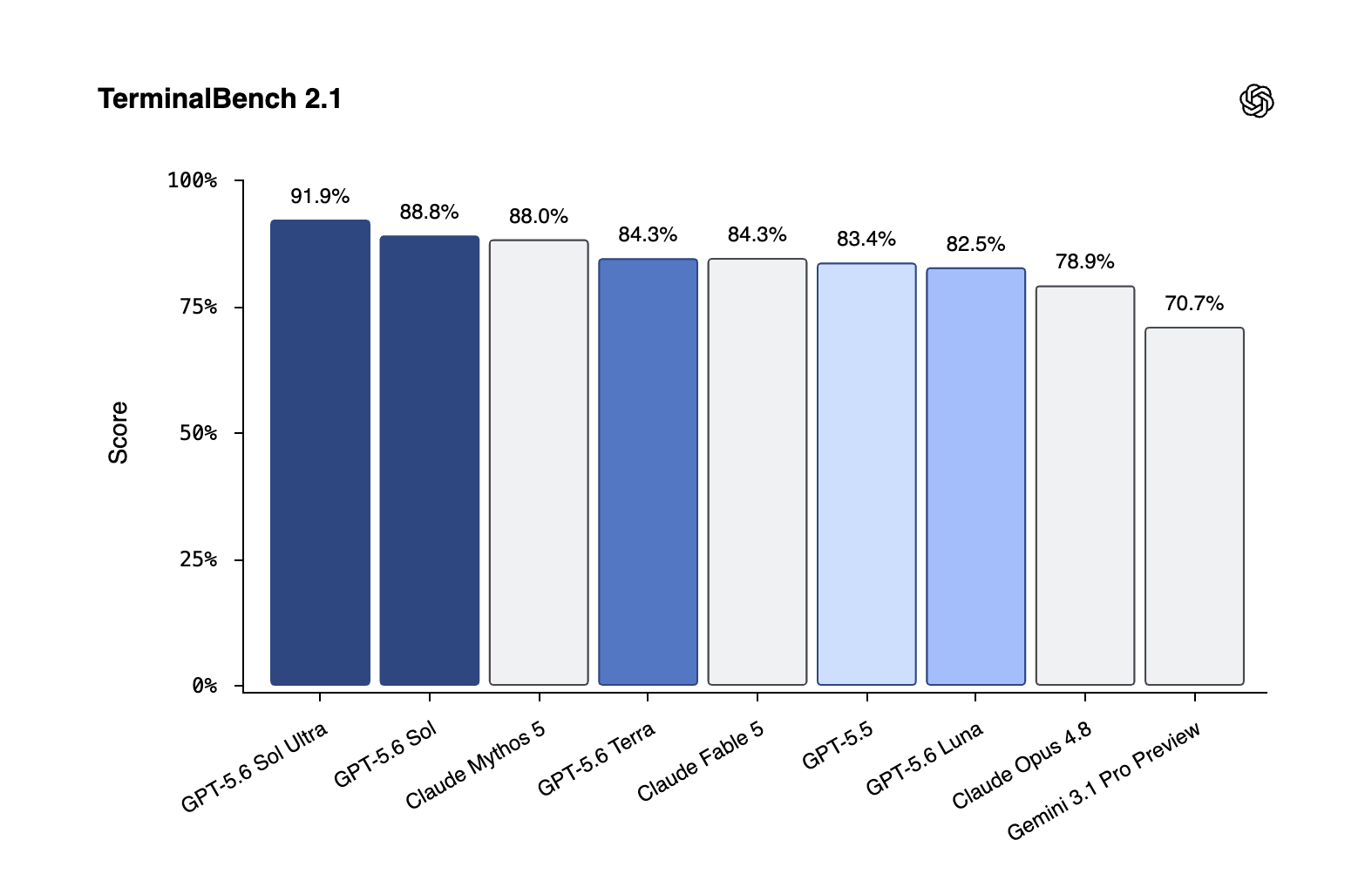
The gate is unusual. The US administration limited the launch under a June 2, 2026 executive order that set up benchmarking and assessment for new AI models. OpenAI agreed to ship to a hand-picked partner list as a temporary measure. In OpenAI’s words, via MacRumors coverage of the launch, “We are taking this short-term step because we believe it is the strongest path to broader availability in the coming weeks.” VentureBeat’s report frames the same point: the preview is partner-only, per the US government, for now.
If you want the full picture of what the model is and why it’s locked, the GPT-5.6 Sol explainer walks through the family, the naming, and the safety story. For this article, one fact matters most: there is no action you can take today to get a key. So the goal shifts from “get access” to “be ready when access arrives.”
How OpenAI rollouts usually widen
OpenAI has run this play before, and the shape is consistent enough to plan around. A new frontier model typically starts with a narrow preview, then opens to broader API access for paying developers, then reaches ChatGPT for the general public. The “coming weeks” language in the Sol announcement points at that same widening.
What’s different this time is the government sign-off step sitting in front of the usual sequence. Benchmarking and assessment under the June 2 order has to clear before the partner list expands. That adds a gate, but it doesn’t change the destination OpenAI named: ChatGPT, Codex, and the API.
If you’ve tracked earlier launches, the pattern will feel familiar. The GPT-5.4 API access guide documents how a previous rollout moved from preview to general availability, and the rhythm there is a decent mental model for what to expect with Sol, minus the new regulatory layer.
What to watch for the “it’s open” signal
You don’t need to refresh the news all day. A few concrete signals will tell you the gate has moved:
- Your org’s model access page. When the OpenAI API lists new Sol, Terra, or Luna model identifiers for your account, that’s the real green light. This is the single most reliable signal.
- The API model list endpoint. If you script against the API, a
GET /v1/modelscall will start returning the new IDs once they’re enabled for your key. - Codex availability. Sol is in Codex during the preview for approved partners. A broader Codex rollout often precedes or accompanies wider API access.
- ChatGPT model picker. Sol showing up in the ChatGPT model menu means the consumer tier has opened. For developers this usually trails API access rather than leading it.
- OpenAI’s own channels. The OpenAI GPT-5.6 Sol announcement is the canonical source. Watch it and the OpenAI help center for an update that drops the “limited preview” framing.
The order matters. API access tends to arrive before ChatGPT, so if you’re a developer, the model list and your access page beat the consumer model picker as early indicators.
The request shape you’ll use on day one
Here’s the prep that pays off most: learn the call you’ll make before you can make it. Sol speaks the standard OpenAI chat/completions shape, with a few controls worth knowing in advance.
A baseline request looks like this. The model ID is a placeholder, because the real identifiers are not public yet.
POST https://api.openai.com/v1/chat/completions
Authorization: Bearer YOUR_API_KEY
Content-Type: application/json

{
  "model": "MODEL_ID_NOT_YET_PUBLISHED",
  "messages": [
    { "role": "system", "content": "You are a careful coding assistant." },
    { "role": "user", "content": "Refactor this function and explain the change." }
  ],
  "reasoning_effort": "high"
}
A few things to understand about that body so nothing surprises you later:
reasoning_effort. GPT-5.6 adds a newmaxsetting on top of the usual effort levels.maxgives Sol the most time to reason deeply, which costs more tokens and latency but helps on hard coding and science problems. Start lower and raise it only where the task needs it.- The
ultramode. Per the OpenAI announcement,ultra“goes beyond a single agent by leveraging subagents to accelerate complex work.” It’s a different lever fromreasoning_effort: instead of one agent thinking longer, the model spins up subagents inside the call. Plan to reach for it on multi-step agentic work, not simple completions. - Prompt caching. Sol supports explicit cache breakpoints with a 30-minute minimum cache life. Cache writes are billed at 1.25x the uncached input rate, and cache reads get the 90% cached-input discount. If you send a large stable system prompt or shared context, structuring it as a cached prefix will cut cost sharply once you’re live.
Knowing the pricing helps you size the work too. Per multiple outlets, the per-1M-token rates are Sol $5 input / $30 output, Terra $2.50 input / $15 output, and Luna $1 input / $6 output. That spread tells you which tier to reach for: Sol for the hardest jobs, Luna when throughput and cost matter more than peak capability.
Rehearse against a model you can reach today
You can build and validate the entire request shape right now against a model that’s already available, then point it at Sol the moment your access lands. Because Sol uses the OpenAI-compatible chat/completions interface, the request you test today is the request you’ll send on day one, give or take the model ID.
This is where a dedicated API client earns its keep. In Apidog, you can set up the OpenAI endpoint once, save the request body with your headers and auth, run it against a model you can reach now, and write assertions on the response. When Sol opens up, you swap the model ID, drop in your new credentials, and your tests run unchanged. No scramble, no guessing at the contract under deadline.
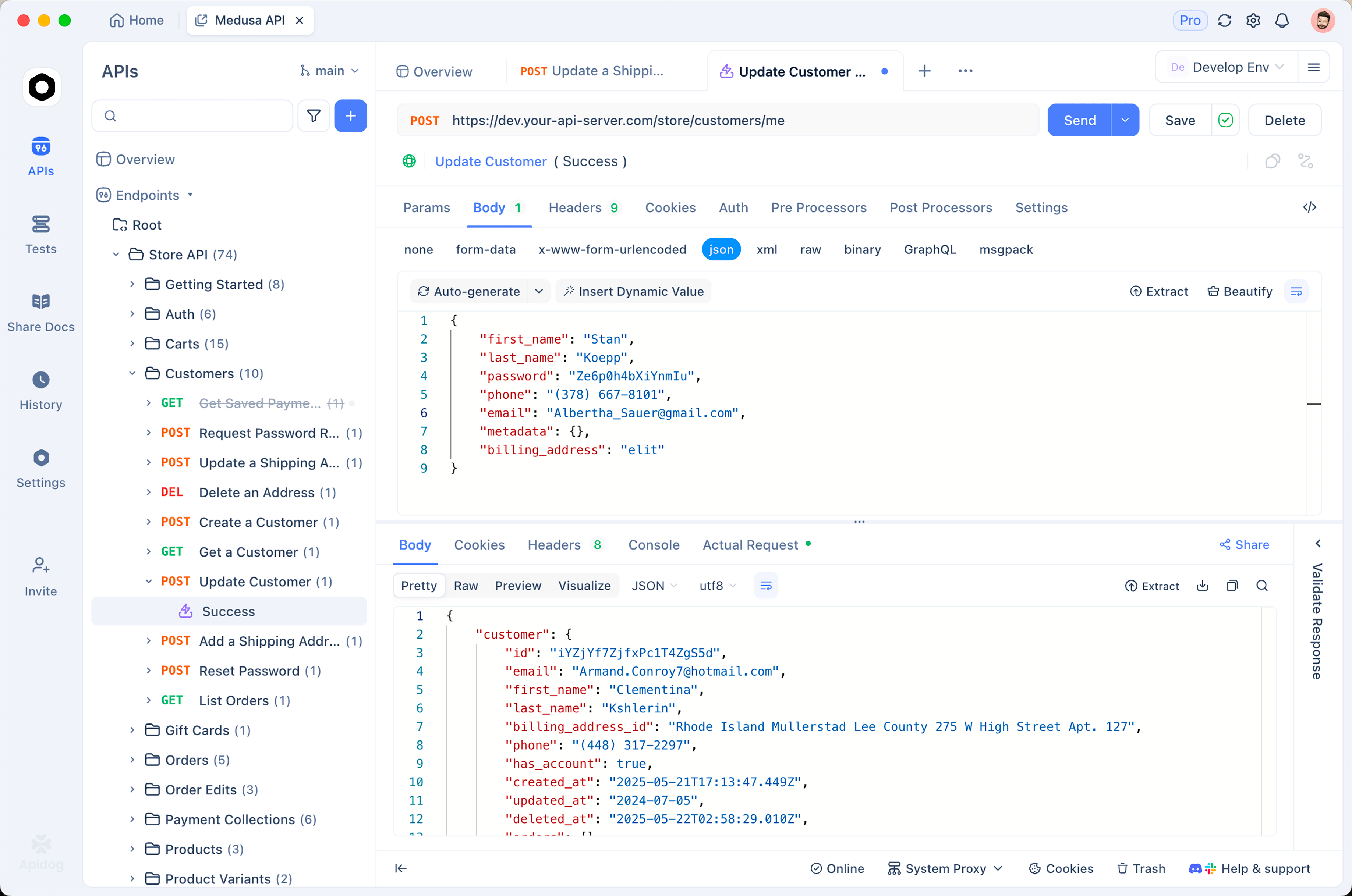
It also lets you rehearse the parts that are easy to get wrong: streaming responses, the caching headers, and how your code handles a long max-effort reasoning call versus a quick one. Getting those right against an available model means the only new variable on launch day is Sol itself.
If you’d rather not wait at all, the frontier models you can use today instead of GPT-5.6 covers the strong options that are fully available right now, including Claude Mythos 5, Claude Fable 5, GPT-5.5, Gemini 3.5 and 3.1 Pro, GLM-5.2, and Fugu Ultra. Several of them target the same coding and agentic work Sol is being hyped for, and you can wire any of them into your tests this afternoon.
A day-one readiness checklist
Run through this now so launch day is a five-minute swap instead of a half-day setup:
- Set up an OpenAI-compatible client and save a working
chat/completionsrequest against an available model. - Parameterize the model ID so switching to a Sol identifier is one variable change, not a code rewrite.
- Draft your
reasoning_effortstrategy. Decide which tasks justifymaxand which should stay lower to control cost. - Plan your
ultrausage. Identify the multi-step agentic jobs where subagents would help, so you know where to flip it on. - Structure cacheable prefixes now. Mark the stable parts of your prompts so you can add cache breakpoints the day you go live.
- Wire up assertions and a smoke test so you can confirm Sol behaves correctly in minutes, not by eyeballing output.
- Watch the right signal (your API model access page) and keep a fallback model in place until Sol is confirmed available to you.
Conclusion
Getting GPT-5.6 Sol comes down to patience plus preparation. You can’t sign up today, and pretending otherwise just wastes the wait. What you can do is build the request you’ll send, learn the max effort, ultra mode, and caching controls, and rehearse the whole flow against a model you can already reach, so the day your access lands you’re testing in minutes.
Ready to get a head start? Download Apidog to build and save your OpenAI-compatible request now, then swap in the Sol model ID the moment your preview access opens.