An Anthropic API key is the credential you send with every request to the Claude API. It starts with sk-ant-, you create it in the Claude Console, and it bills usage against your organization’s prepaid credits. If you’ve never handled one, our primer on what an API key is covers the general idea. This guide covers the specific one: creating a Console account, loading credits, generating a key with the right scope, sending the first Messages request with curl and the Python SDK, and keeping the key out of trouble afterward.
Anthropic’s official get your API key page tells you where the button is. It doesn’t tell you why the first request returns 401, which model id is current, or how to test the key without pasting it into your shell history. That’s what the rest of this covers.
What you need before you start
- An email for the Claude Console at platform.claude.com (console.anthropic.com now redirects there).
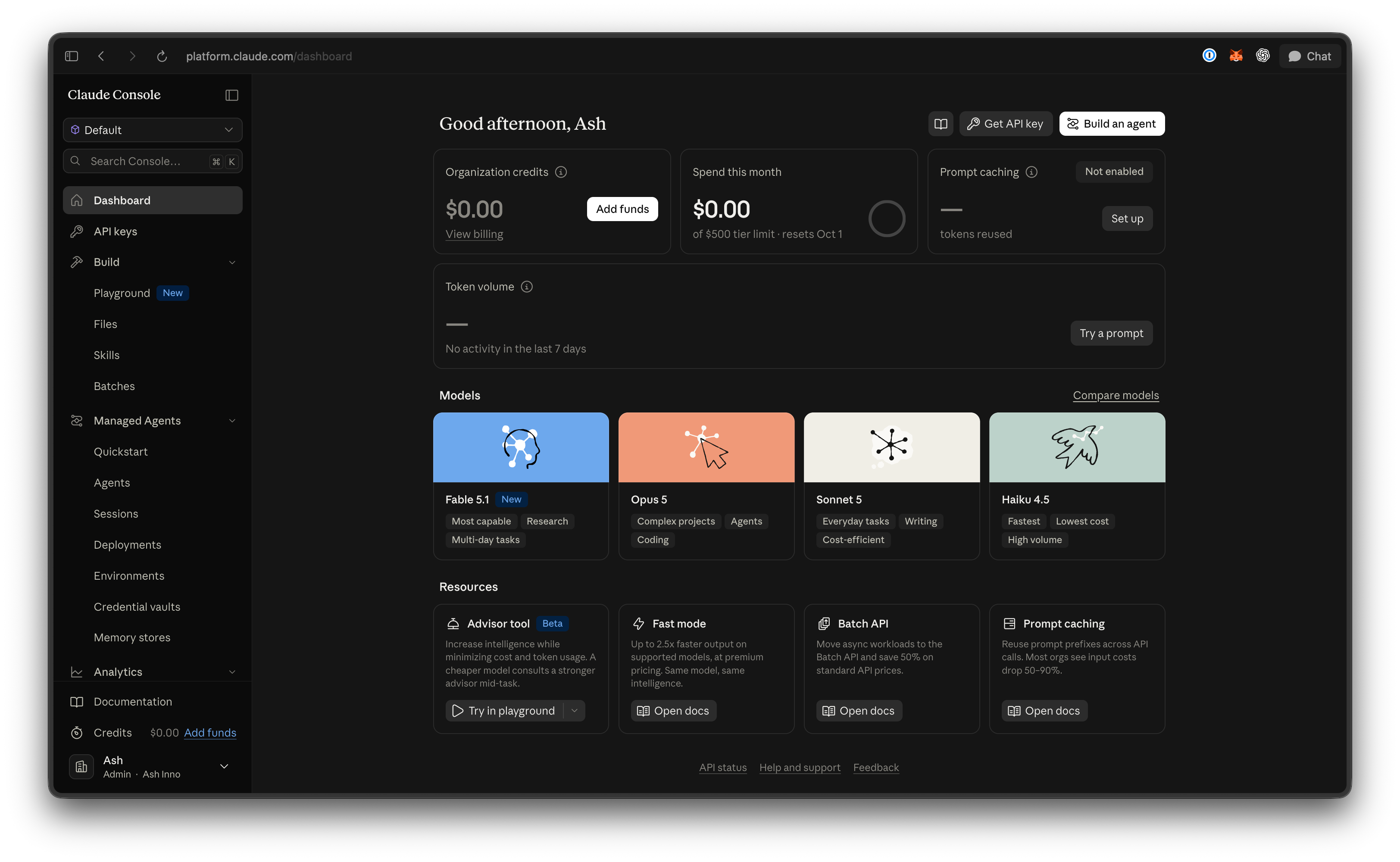
- A payment card. The API is prepaid, and only an Admin or Billing role can buy credits.
- curl, or Python 3.10+ for the SDK example.
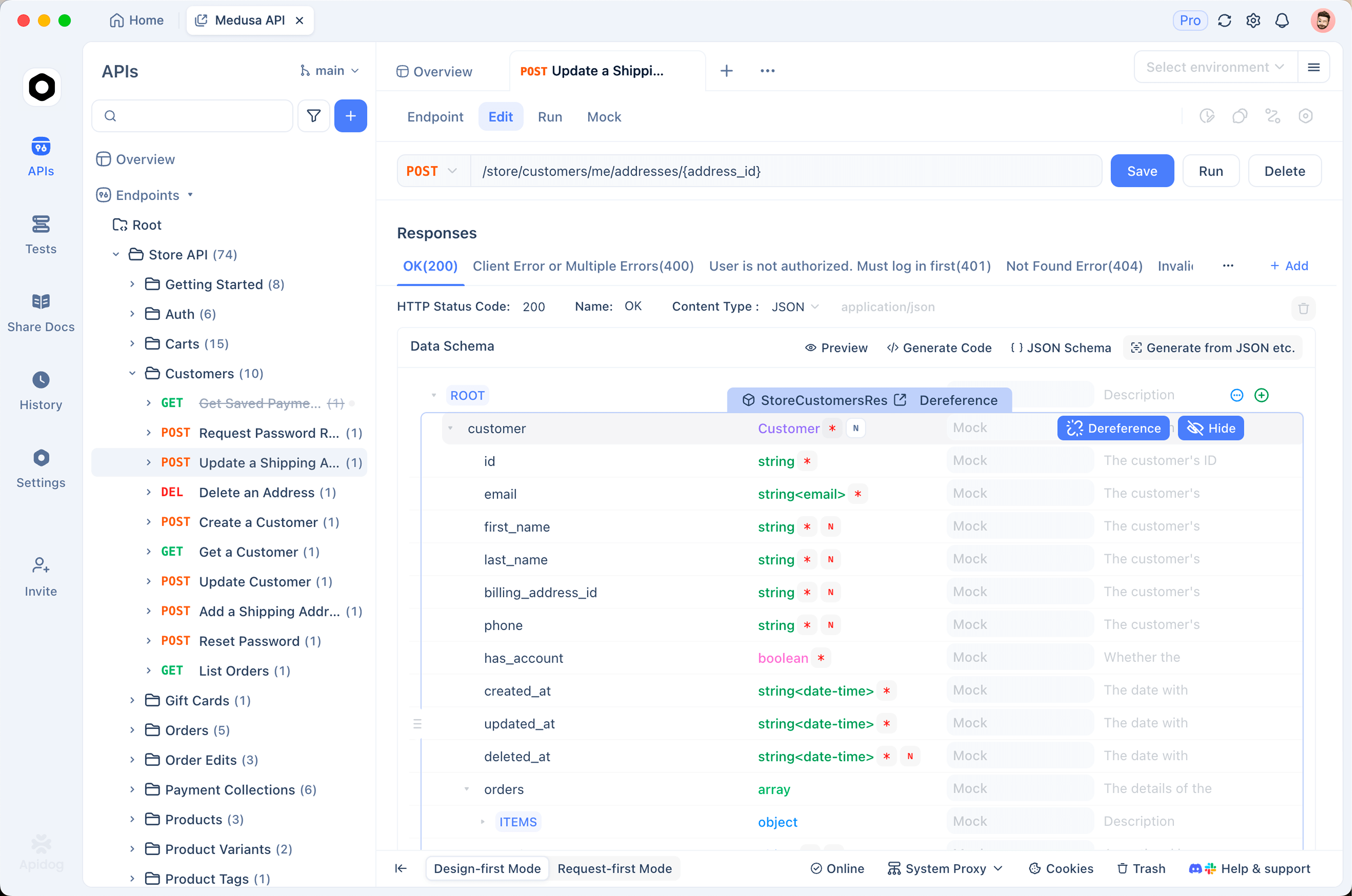
- Apidog to store the key as a local variable and save the request as a repeatable test. The free plan covers teams of up to four.
Step 1: create a Claude Console account
Sign up at platform.claude.com. That creates an organization with a Default Workspace, and your keys, credits, and rate limits all hang off it. If a teammate already made one, ask for an invite rather than creating a second org: credits and usage tiers don’t transfer.
Step 2: add credits before your first call
Yes, credits come first. Anthropic’s billing docs are direct: buy credits before you use the API, and at a zero balance neither the API nor the playground works. New users get a small amount of free credits to test with, so check your balance before buying, but treat that as a bonus rather than a plan.
Open Settings > Billing and click Buy credits. Turn on auto-reload if you’re running anything unattended. See how to purchase credits for current steps. Your organization also lands on a usage tier with a monthly spend cap, covered in the rate-limits section.
Step 3: create the API key
Go to Settings > API keys and click Create key. Four choices matter:
- Name: name it after the app, not the person.
orders-service-stagingbeatsmy key. - Expiration: 3 hours to 30 days, custom, or Never. Pick a short life for testing; it can’t be changed later.
- Linked account: yourself for a personal key, a service account for anything shared. A personal key dies when you leave the org.
- Workspace: scope it to one workspace and you can skip the
anthropic-workspace-idheader. A multi-workspace key must send it on every request or you get a 400.
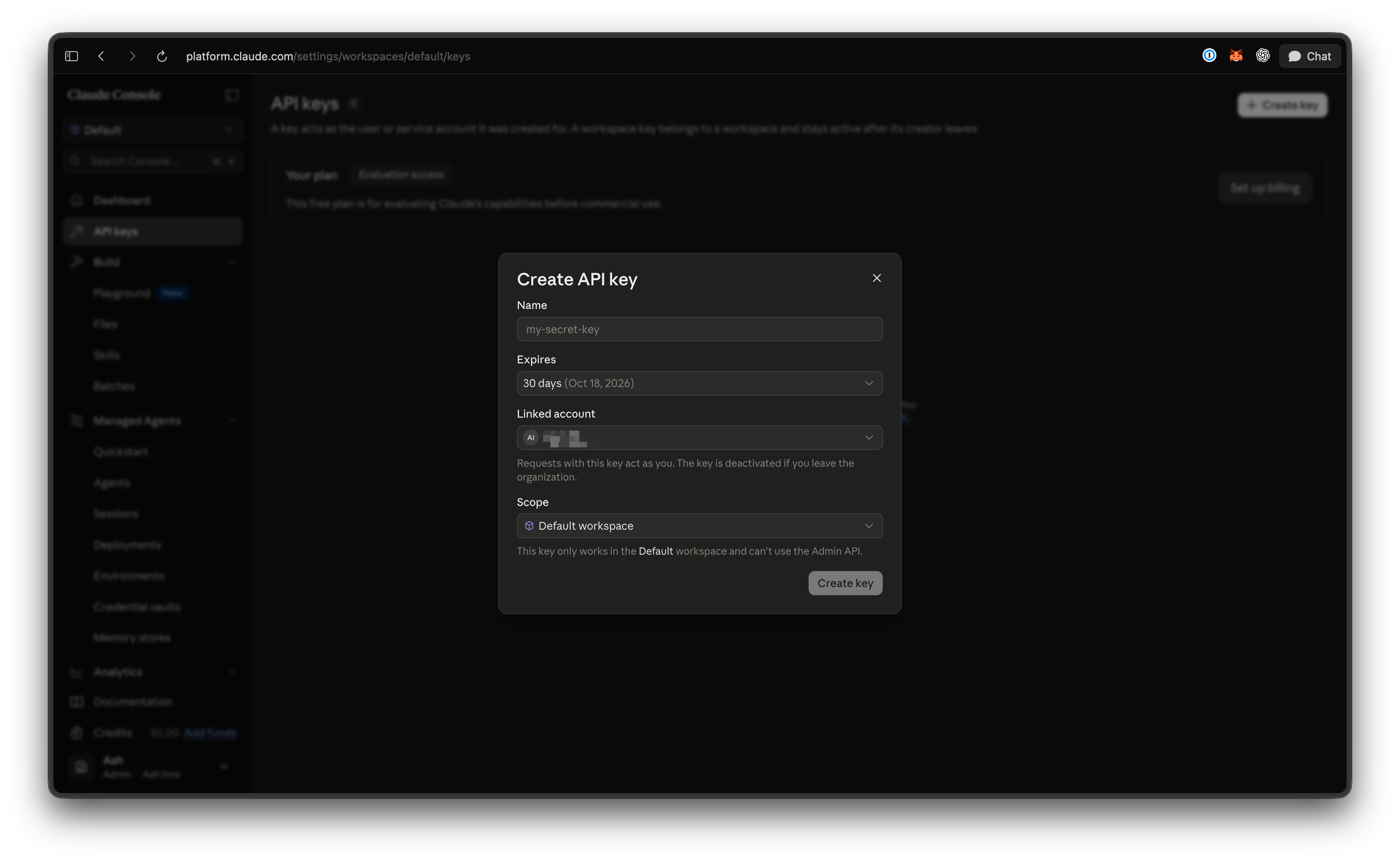
The Console shows the full key exactly once, so copy it straight into your secrets manager. There’s no reveal button. If Create key is greyed out, your role can’t create keys; ask an admin.
Step 4: the three headers every request needs
Every call to POST https://api.anthropic.com/v1/messages carries three headers.
| Header | Value | Notes |
|---|---|---|
x-api-key |
your sk-ant-... key |
Authorization: Bearer <key> also works and is now the documented primary form; x-api-key is the legacy fallback and still supported |
anthropic-version |
2023-06-01 |
Required. Pins the response format. The date is stable and is not tied to model releases |
content-type |
application/json |
Required for the JSON body |
The official SDKs send all three for you. Raw HTTP and API clients need them spelled out, which is where most first-request failures come from. Full reference: Claude API overview.
Step 5: send your first Messages request
The body needs model, max_tokens, and messages. Use a current model id: as of September 2026 that’s claude-opus-5 (the recommended default), claude-fable-5-1 (most capable), claude-sonnet-5, and claude-haiku-4-5. Older 3.x and 4.x ids return 404 or point at retired models, and current ids carry no date suffix. The Claude Opus 5 API walkthrough goes deeper on thinking, effort, and streaming.
curl
export ANTHROPIC_API_KEY="sk-ant-api03-..."

curl https://api.anthropic.com/v1/messages \
  -H "x-api-key: $ANTHROPIC_API_KEY" \
  -H "anthropic-version: 2023-06-01" \
  -H "content-type: application/json" \
  -d '{
    "model": "claude-opus-5",
    "max_tokens": 1024,
    "messages": [
      {"role": "user", "content": "Write a one-sentence OpenAPI description for POST /orders, which creates an order and returns 201."}
    ]
  }'
A successful response, trimmed:
{
  "id": "msg_01...",
  "role": "assistant",
  "model": "claude-opus-5",
  "content": [{"type": "text", "text": "Creates a new order and returns it with a 201 status."}],
  "stop_reason": "end_turn",
  "usage": {"input_tokens": 31, "output_tokens": 24}
}
Read the text from content[].text, check stop_reason is end_turn, and keep usage for cost tracking. The request-id response header is what support asks for when something fails.
Python SDK
pip install anthropic
import anthropic

client = anthropic.Anthropic()  # reads ANTHROPIC_API_KEY from the environment

message = client.messages.create(
    model="claude-opus-5",
    max_tokens=1024,
    messages=[{
        "role": "user",
        "content": "Write a one-sentence OpenAPI description for POST /orders, which creates an order and returns 201.",
    }],
)

for block in message.content:
    if block.type == "text":
        print(block.text)
The SDK reads ANTHROPIC_API_KEY, adds the version and content-type headers, and retries 429 and 5xx twice with backoff. Never pass the key as a string literal; the environment variable is the whole point.
Step 6: store and test the key in Apidog
A key pasted into a shell lives in your history file. A key stored in a shared request syncs to teammates. Apidog separates the two: the request structure is shared, the secret stays on your machine.
Store the key as a local variable. Open Environment Management, create an environment called Anthropic, and add a variable ANTHROPIC_API_KEY. Leave the shared value as SET_LOCALLY and paste the real key into the local value, which stays in your client’s cache and never syncs. Our guide to Apidog environments and secret variables covers the scope rules.
Set the headers once. In the same panel, add two global parameters under Headers: x-api-key set to {{ANTHROPIC_API_KEY}}, and anthropic-version set to 2023-06-01. They apply to every request in the project, and Apidog adds content-type automatically for a JSON body.
Send the first request. New request, POST to https://api.anthropic.com/v1/messages, paste the JSON body from the curl example, send. Open the Actual Request tab to confirm both headers went out with the variable resolved. That tab is the fastest way to prove a 401 is a header problem, not a key problem.
Save it as a test. Save the request as an endpoint case, then add three assertions: status equals 200, stop_reason equals end_turn, and usage.output_tokens is above 0. Run it from the Apidog CLI and inject the key from your CI secret store at runtime. That’s a one-click smoke test for the key, the headers, and the model id. Download Apidog to follow along; the free plan includes four seats.
Rate limits and what a request costs
Limits are per organization and per model: requests per minute (RPM), input tokens per minute (ITPM), and output tokens per minute (OTPM). Only uncached input counts toward ITPM, so prompt caching raises throughput without a tier change. From the rate limits documentation:
| Tier | Monthly spend cap | Claude Opus 5 (RPM / ITPM / OTPM) | Claude Fable 5.x (RPM / ITPM / OTPM) |
|---|---|---|---|
| Start | $500 | 1,000 / 2M / 400K | 1,000 / 500K / 100K |
| Build | $1,000 | 5,000 / 5M / 1M | 2,000 / 1.5M / 300K |
| Scale | $200,000 | 10,000 / 10M / 2M | 4,000 / 4M / 800K |
| Custom | none | negotiated | negotiated |
Sonnet 5 and Haiku 4.5 share the Opus 5 numbers at each tier. Every response carries anthropic-ratelimit-*-remaining and -reset headers, so you can watch headroom without polling the Console.
Per million tokens, from the pricing page: Opus 5 is $5 in / $25 out, Sonnet 5 $2 / $10, Fable 5.1 $10 / $50, Haiku 4.5 $1 / $5. Cache reads cost 10% of input (2.5% on Fable 5.1) and the Batch API halves both sides. That first curl request costs a fraction of a cent.
Common errors and how to fix them
Errors come back as JSON with an error.type and a request_id. The errors reference lists every code; these are the ones you’ll hit first.
| Status and type | Usual cause | Fix |
|---|---|---|
401 authentication_error |
Key malformed, revoked, expired, or the env var is empty | echo $ANTHROPIC_API_KEY and check for trailing whitespace; create a new key if it expired |
400 invalid_request_error |
Missing max_tokens, malformed JSON, a multi-workspace key without anthropic-workspace-id, thinking.type: enabled on a 4.7+ model, or a spend limit you set was reached |
Read error.message; it names the field or limit |
404 not_found_error |
Model id typo, a date-suffixed guess, a retired model, or a wrong path | Use an id from the current models table, and confirm the path is /v1/messages |
402 billing_error |
Payment or credit problem | Check Settings > Billing |
429 rate_limit_error |
You exceeded RPM, ITPM, or OTPM | Wait the seconds in retry-after, then retry. No retry-after header means you hit the tier’s monthly spend cap (error_code: enforced_spend_limit_reached) |
500 api_error / 529 overloaded_error |
Anthropic-side error or high traffic | Retry with backoff; keep the request_id |
Key hygiene: rotation, scoping, and never in client code
Never ship the key to a browser or mobile app. Anything in a JavaScript bundle or an APK is public within minutes. Put the call behind your own backend. For Apple apps that must call Claude directly, App Attest issues short-lived tokens to verified builds instead of a static key.
One key per app and environment. Separate staging and production keys in separate workspaces let you cap staging spend and revoke one without touching the other.
Rotate on a schedule. Create the new key, deploy, confirm it works, then delete the old one. Disable is reversible; Delete is permanent. Suspect a leak, disable first and investigate second. A secret scanner in your repo catches keys committed before anyone noticed.
Prefer short-lived credentials in production. Workload Identity Federation swaps your cloud provider’s identity token for a short-lived Claude token, so there’s no sk-ant- string to leak at all.
FAQ
Is an Anthropic API key the same as a Claude API key?
Yes. The Console, SDKs, and docs now say “Claude API”, and the key format and headers are identical. Older tutorials saying “Anthropic API key” mean the same credential.
Can I get an Anthropic API key for free?
Creating the key is free. Using it draws from prepaid credits, and Anthropic’s pricing page says new users get a small amount of free credits to test with. If you’re trying to run real workloads without paying, read our honest breakdown of free Claude API access before you build around any of it.
Does a Claude Pro or Max subscription include API access?
No. Claude.ai subscriptions and Console API credits bill separately. You need a Console organization with credits, even if you already pay for Claude.ai.
What happens when my key expires?
Requests return 401 authentication_error. Expired keys can’t be reactivated, so create a new one and update the environment variable. Anthropic emails the key’s creator seven days and one day before expiry on keys with a long enough lifetime.
Next step
Create the key with a 7-day expiration, put it in an Apidog local variable, run the smoke test, and only then wire it into code. If that passes, the credential, headers, and model id are all correct, and every 401 after that is a real problem rather than a typo.