The Gemini 3.5 Flash API went live with the model launch on May 19, 2026. Flash is the only variant of the 3.5 family available today; Pro lands in June. This guide walks through the full developer setup for Flash: getting a key, making your first call, handling multimodal input, streaming, tool use, and testing the whole thing properly with Apidog.
If you’ve used the Gemini API before, the pattern hasn’t changed. The only new piece is the model name string: gemini-3.5-flash. If you’re new to it, you can be making working Flash requests in about ten minutes.
What you get with the Gemini 3.5 Flash API
Three things matter on day one:
gemini-3.5-flash: live now, fast, cheap, multimodal- Same OpenAPI-style endpoint: drop-in for projects already calling Gemini 3 or 3.1
- Free tier on AI Studio: ~1,500 requests/day with no credit card
Capabilities exposed through the Flash API:
- 1M token input context, 64K output tokens
- Text + image input, text + structured output
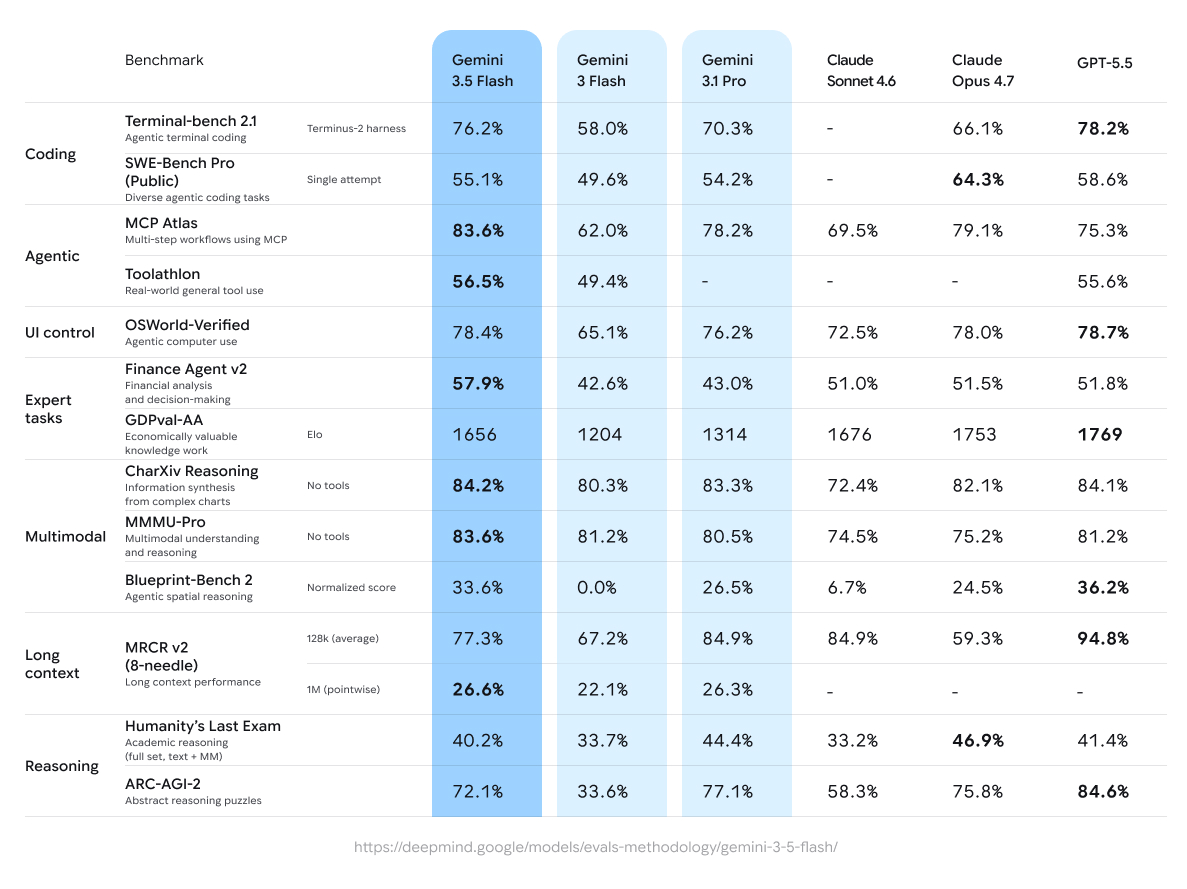
- Native function calling and tool use (83.6% MCP Atlas)
- Streaming responses (~4× faster output tokens/second than other frontier models)
- Long-context retrieval scoring at the top of Google’s MRCR v2 table
- Chart and document reasoning (84.2% CharXiv)
For pricing details including per-token rates and batch mode discounts, see our Gemini 3.5 Flash pricing guide.
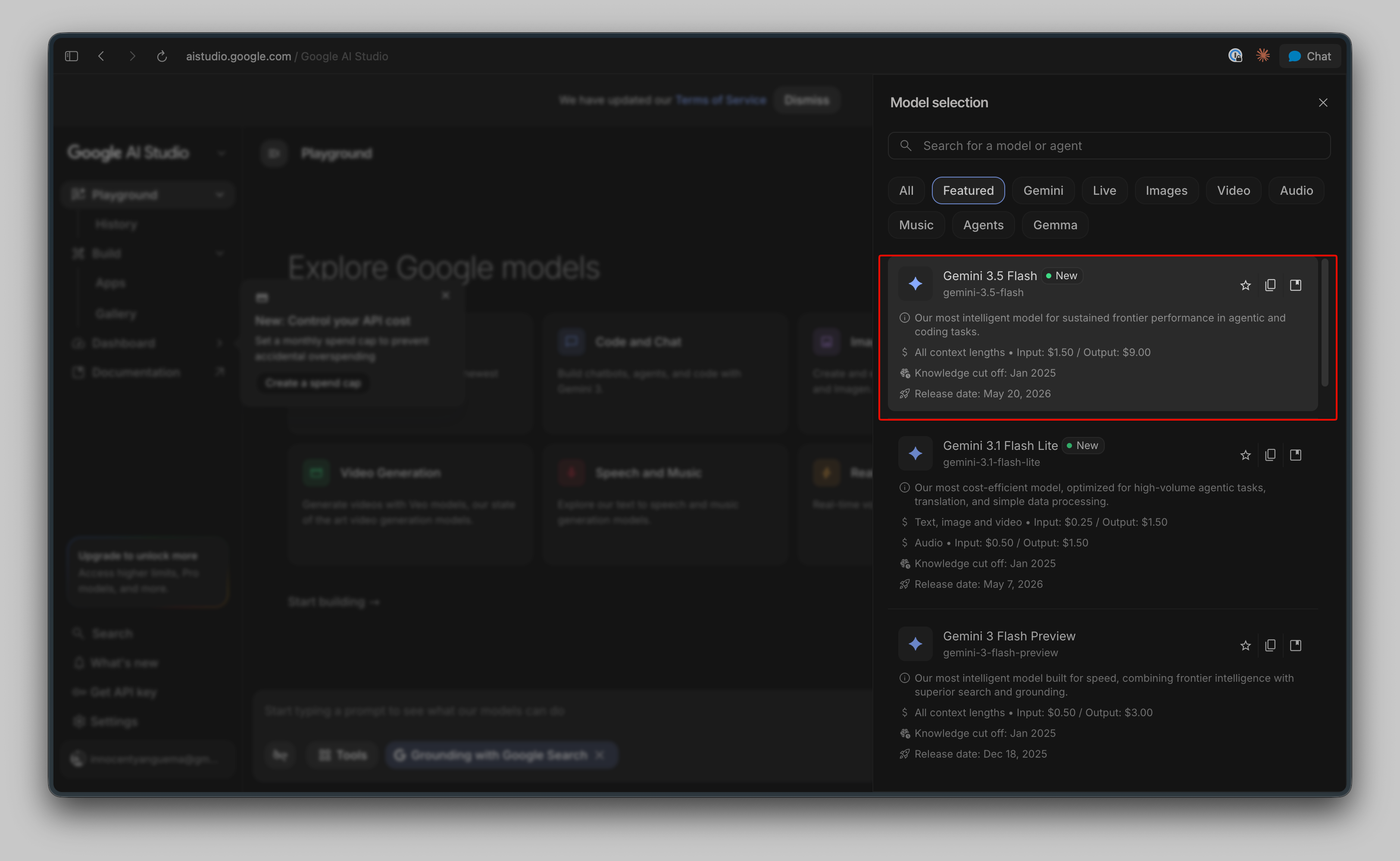
Step 1: Get your Gemini 3.5 Flash API key
Two paths, depending on whether you want free quotas or paid scale.
Path A, Google AI Studio (free tier)
- Go to aistudio.google.com
- Sign in with a Google account
- Click Get API key in the left nav
- Either pick an existing project or create one
- Click Create API key, then copy it
This is the same flow covered in our free Gemini API key guide. The key works against gemini-3.5-flash immediately with the free daily quota.
Path B, Vertex AI (production)
For production workloads with billing and audit logs:
- Enable the Vertex AI API in Google Cloud Console
- Create a service account with
aiplatform.user - Download the JSON credentials
- Authenticate via
gcloud auth application-default loginor the JSON file
Vertex routes Flash under a slightly different SDK pattern. Most teams start with AI Studio and migrate when they need org controls.
Step 2: Install the SDK
The official Google GenAI SDK ships for Python, Node.js, Go, and Java. Pick your language:
# Python
pip install -U google-genai

# Node.js
npm install @google/genai

# Go
go get google.golang.org/genai
You don’t need the SDK at all if you’re calling the REST endpoint directly, see the curl example below.
Step 3: Make your first Flash call
Python
import os
from google import genai

client = genai.Client(api_key=os.environ["GEMINI_API_KEY"])

response = client.models.generate_content(
    model="gemini-3.5-flash",
    contents="Explain how OAuth 2.0 PKCE flow works in 3 short paragraphs."
)

print(response.text)
Node.js
import { GoogleGenAI } from "@google/genai";

const ai = new GoogleGenAI({ apiKey: process.env.GEMINI_API_KEY });

const response = await ai.models.generateContent({
  model: "gemini-3.5-flash",
  contents: "Explain how OAuth 2.0 PKCE flow works in 3 short paragraphs.",
});

console.log(response.text);
curl
curl "https://generativelanguage.googleapis.com/v1beta/models/gemini-3.5-flash:generateContent" \
  -H "x-goog-api-key: $GEMINI_API_KEY" \
  -H "Content-Type: application/json" \
  -d '{
    "contents": [{
      "parts": [{"text": "Explain how OAuth 2.0 PKCE flow works in 3 short paragraphs."}]
    }]
  }'
That’s the happy path for Flash. From here, you layer on the features you actually need.
Streaming responses
Flash’s output is fast. Streaming makes the speed visible to your users.
Python
stream = client.models.generate_content_stream(
    model="gemini-3.5-flash",
    contents="Write a 5-step tutorial on writing a REST API client in Go."
)

for chunk in stream:
    print(chunk.text, end="", flush=True)
Node.js
const stream = await ai.models.generateContentStream({
  model: "gemini-3.5-flash",
  contents: "Write a 5-step tutorial on writing a REST API client in Go.",
});

for await (const chunk of stream) {
  process.stdout.write(chunk.text);
}
The endpoint changes from :generateContent to :streamGenerateContent for raw REST calls.
Multimodal input with Flash
Gemini 3.5 Flash takes images alongside text. The CharXiv Reasoning score of 84.2% is real, chart understanding actually works on this model.
Python (image from disk)
import os
from google import genai
from google.genai import types

client = genai.Client(api_key=os.environ["GEMINI_API_KEY"])

with open("dashboard.png", "rb") as f:
    image_bytes = f.read()

response = client.models.generate_content(
    model="gemini-3.5-flash",
    contents=[
        types.Part.from_bytes(data=image_bytes, mime_type="image/png"),
        "Extract every metric in this dashboard as a JSON object."
    ]
)

print(response.text)
Supported mime types: image/png, image/jpeg, image/webp, image/heic, image/heif. PDFs and video also work through types.Part.from_uri().
Function calling and tool use with Flash
Tool calling is where Flash differentiates from its predecessors. The MCP Atlas score of 83.6% means Flash picks the right tool more reliably than the 3.1 generation.
Python
from google.genai import types

weather_tool = types.Tool(
    function_declarations=[{
        "name": "get_current_weather",
        "description": "Get the current weather for a city.",
        "parameters": {
            "type": "object",
            "properties": {
                "city": {"type": "string", "description": "City name"},
                "unit": {"type": "string", "enum": ["celsius", "fahrenheit"]}
            },
            "required": ["city"]
        }
    }]
)

response = client.models.generate_content(
    model="gemini-3.5-flash",
    contents="What's the weather in Singapore right now?",
    config=types.GenerateContentConfig(tools=[weather_tool])
)

for part in response.candidates[0].content.parts:
    if part.function_call:
        print(f"Call: {part.function_call.name}")
        print(f"Args: {dict(part.function_call.args)}")
Flash returns a function_call object with the name and arguments. You execute the function locally, send the result back, and continue the conversation. The pattern matches what teams already use with Gemini 3 Flash API.
Structured output (JSON mode)
Force JSON output from Flash by setting the response MIME type and schema:
response = client.models.generate_content(
    model="gemini-3.5-flash",
    contents="List 3 popular API testing tools with their pricing.",
    config=types.GenerateContentConfig(
        response_mime_type="application/json",
        response_schema={
            "type": "array",
            "items": {
                "type": "object",
                "properties": {
                    "name": {"type": "string"},
                    "price_per_month": {"type": "number"},
                    "free_tier": {"type": "boolean"}
                },
                "required": ["name", "free_tier"]
            }
        }
    )
)

import json
data = json.loads(response.text)
Validated JSON every call. No regex parsing, no retry loops.
Pricing (as of May 2026)
Pay-as-you-go rates for gemini-3.5-flash:
| Tier | Input | Output |
|---|---|---|
| Standard | ~$1.50 / 1M tokens | ~$9.00 / 1M tokens |
| Cached input | reduced rate | n/a |
| Batch mode | ~50% off | ~50% off |
For batch workloads, the Gemini API batch mode gives you the 50% discount on jobs that don’t need real-time latency. Worth checking before you commit to scale.
For the full pricing math including real cost scenarios for daily SaaS workloads and agent loops, see our Flash pricing breakdown. For the official Google reference, see Gemini Developer API pricing.
Testing your Gemini 3.5 Flash integration with Apidog
A working SDK call is only step one. Production integrations need to handle the messy parts: streaming chunks, tool-call validation, multimodal payloads, error retries, rate limits. That’s where having a proper testing setup pays back.
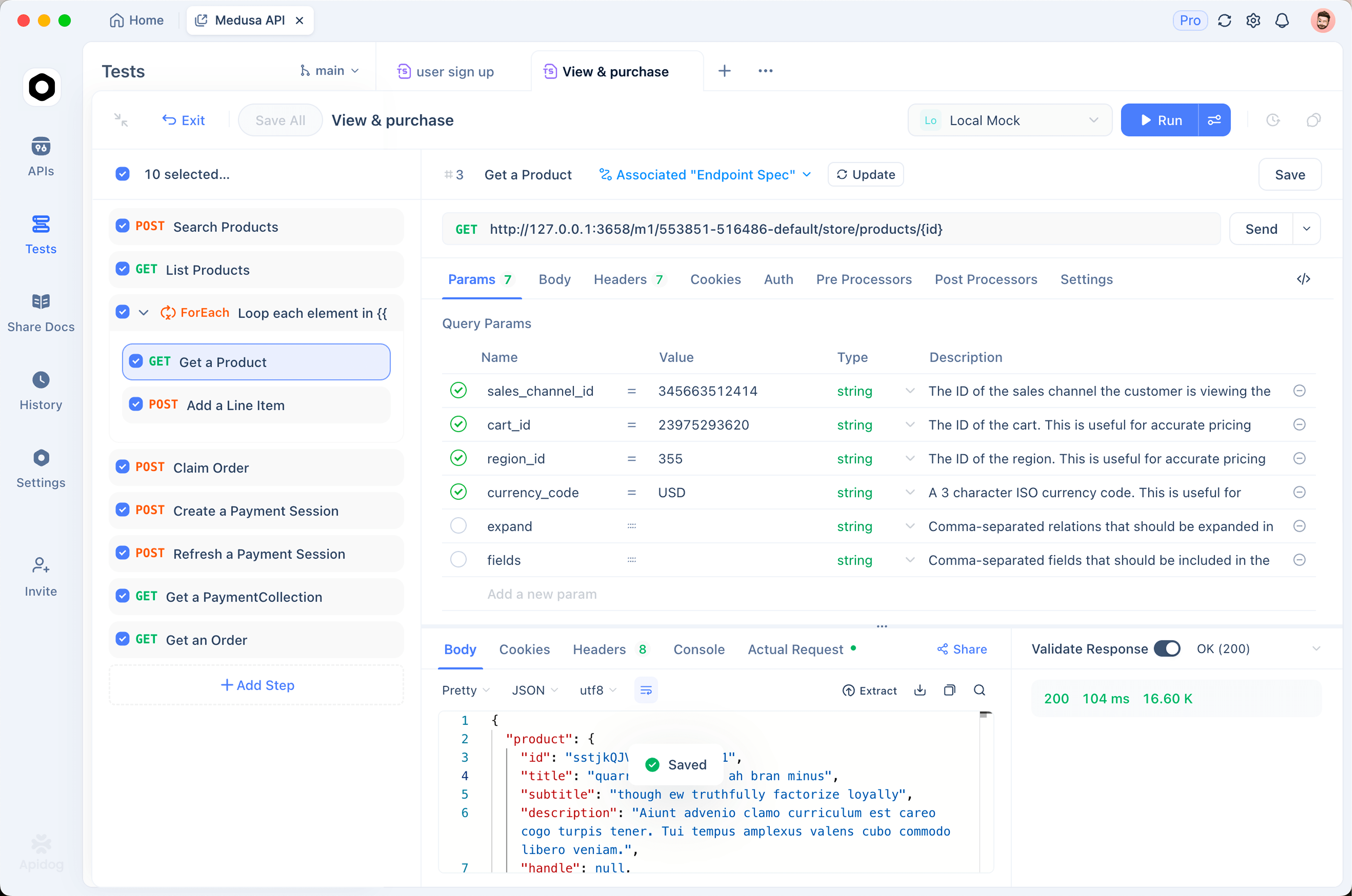
Apidog handles the full Gemini Flash API surface in one workspace:
- Save the Flash endpoint as a request: paste the full URL, attach your
x-goog-api-key, hit Send - Replay across model versions: swap
gemini-3.5-flashfor the oldergemini-3-flashon the same request, diff outputs - Stream responses inline: Apidog renders the streamed chunks as they arrive, with timings per chunk
- Validate JSON schema output: assertions catch drift when you change prompts
- Mock the Flash endpoint: generate a mock response for testing your downstream code without burning API quota
- Build test scenarios for agent loops: chain multiple Flash calls with tool-call validation between steps
To get started, download Apidog, create a new request pointing at the Flash endpoint, and import the curl snippet from earlier in this post. The whole setup takes about two minutes.
Error handling and rate limits
Flash’s error model is straightforward. Codes that matter:
- 400: bad request (most often a malformed
contentsarray or unsupported mime type) - 401: bad API key
- 403: quota exhausted or model not enabled
- 429: rate limited (back off and retry)
- 500/503: server side, retry with exponential backoff
Wrap your Flash calls with a retry loop:
import time
from google import genai

def call_with_retry(client, model, prompt, max_retries=3):
    for attempt in range(max_retries):
        try:
            return client.models.generate_content(model=model, contents=prompt)
        except Exception as e:
            if attempt == max_retries - 1:
                raise
            time.sleep(2 ** attempt)
Free tier quotas reset daily (15 requests per minute, ~1,500 per day on Flash). Production tier quotas reset per minute and per day. For high-throughput jobs, check the batch mode path or use a tiered fallback to Gemini 3 Flash when you hit limits.
Migrating from Gemini 3.1 to 3.5 Flash
Most projects need to change exactly one string: the model name.
# Before
model="gemini-3.1-pro"  # or gemini-3.1-flash

# After
model="gemini-3.5-flash"
What you should verify after the swap:
- Tool schemas still match, they do for most calls, but rerun your eval
- Output speed, your streaming UI may need throttling because Flash streams ~4× faster
- Token budgets, same 1M / 64K caps, but the model is denser, so a given prompt may use fewer output tokens
- Refusal patterns, safety guardrails are stricter; expect different rejections on edge cases
For a deeper migration walkthrough, our Gemini 3.1 Pro API guide covers the SDK pattern; everything carries forward.
Common Flash patterns
Long-context document analysis
with open("large_report.pdf", "rb") as f:
    pdf_bytes = f.read()

response = client.models.generate_content(
    model="gemini-3.5-flash",
    contents=[
        types.Part.from_bytes(data=pdf_bytes, mime_type="application/pdf"),
        "Summarize the financial outlook from this report in 5 bullet points."
    ]
)
Flash’s 1M token context handles full PDFs without chunking.
Agent loop with tool calls
conversation = [{"role": "user", "parts": [{"text": "Book me a flight to Tokyo"}]}]

while True:
    response = client.models.generate_content(
        model="gemini-3.5-flash",
        contents=conversation,
        config=types.GenerateContentConfig(tools=[flight_search_tool, booking_tool])
    )

    part = response.candidates[0].content.parts[0]
    if not part.function_call:
        print(part.text)
        break

    result = execute_tool(part.function_call)
    conversation.append({"role": "model", "parts": [part]})
    conversation.append({"role": "user", "parts": [{"function_response": result}]})
This is the loop pattern that Flash’s Terminal-Bench 2.1 score (76.2%) measures. Real agent runs work.
FAQ
Is there a free tier for the Gemini 3.5 Flash API? Yes, through Google AI Studio with daily quotas (~1,500 requests/day). No credit card required.
Does Flash support OpenAI-compatible endpoints? Yes. Google exposes an OpenAI-compatible shim at /v1beta/openai/. You can point any OpenAI SDK at it by setting base_url and using your Gemini key. The model name stays gemini-3.5-flash.
Can I use Flash with LangChain or LlamaIndex? Yes, both have native Gemini integrations. Pass model="gemini-3.5-flash" in their respective wrappers.
When does Gemini 3.5 Pro ship? June 2026 per Google’s launch announcement. Until then, Flash is the only 3.5 variant available.
What’s the max image size for Flash? Recommended 3072×3072. Larger images get resampled. For OCR-heavy work, see the Gemini 2.0 Flash OCR workflow, the same patterns apply.
How do I test streaming endpoints in Apidog? Open the request, set :streamGenerateContent as the endpoint suffix, and Apidog will render the SSE chunks as they arrive. Useful for debugging incomplete responses.
Where can I see API logs? In AI Studio under “Activity,” or in Vertex AI under “Logs Explorer” for production deployments.
For workloads where per-token cost outweighs peak capability,Gemini 3.1 Flash Lite provides a trimmed-down endpoint worth benchmarking alongside 3.5 Flash.
What to build first
A short list of starter projects worth shipping in the first week with Flash:
- PDF Q&A bot: drop a PDF into the 1M context window, ask questions, return cited answers
- Chart-to-JSON pipeline: feed dashboard screenshots, extract structured data
- Customer support agent: function calling against your CRM, runs unattended
- Code review assistant: multi-file diff context, structured output with severity ratings
- Internal search agent: combine 1M context with tool calls to internal APIs
For each, the same testing flow applies: build the prompt, wrap it in your SDK call, validate the response shape with Apidog, and ship.