Here’s the decision up front. Pick Gemini 3.5 Flash-Lite when you’re running simple tasks at high volume and you care most about cost and speed: classification, extraction, short chat replies, RAG answers, autocomplete. Pick Gemini 3.6 Flash when quality matters more than the invoice: multi-step agents, tool use, coding, computer use, and answers where a wrong result is expensive.
Both models shipped in Google’s Flash-tier refresh on July 21, 2026. Both accept up to 1M input tokens. They sit at different points on the same curve, so the question isn’t really which model is “better.” It’s which trade-off fits the job in front of you.
One naming quirk to clear up first: the workhorse jumped to 3.6, but the Lite tier stayed on 3.5. So you’re comparing a 3.5 model against a 3.6 model, and that’s expected, not a typo. More on that in the FAQ.
The short answer
Default to Flash-Lite for anything simple that you run millions of times, and reach for 3.6 Flash the moment the task needs reasoning, tools, or code. If you can’t decide, start on Flash-Lite, watch where the answers fall short, and promote only those calls to 3.6 Flash. You rarely need one model for the whole app.
Price and speed side by side
| Attribute | Gemini 3.5 Flash-Lite | Gemini 3.6 Flash |
|---|---|---|
| Model ID | gemini-3.5-flash-lite |
gemini-3.6-flash |
| Input price | $0.30 / 1M tokens | $1.50 / 1M tokens |
| Output price | $2.50 / 1M tokens | $7.50 / 1M tokens |
| Throughput | ~350 output tokens/sec | Not separately published |
| Context window | 1M tokens | 1M tokens |
| Free tier | Yes (rate-limited) | Yes (rate-limited) |
Flash-Lite is cheaper on every token. Input runs 5x less; output runs 3x less. Google publishes a throughput figure of around 350 output tokens per second for Flash-Lite, which is what makes it feel instant in a chat box or an autocomplete field. Google didn’t publish a separate tokens-per-second number for 3.6 Flash, but 3.6 Flash produces about 17% fewer output tokens than the 3.5 Flash it replaces, so it finishes multi-step work faster than the sticker price suggests. You can confirm the current rates on the Gemini API pricing page and in our Gemini 3.6 Flash pricing breakdown.
Quality and benchmarks
The price gap buys you headroom on hard tasks. On Terminal-Bench 2.1, which measures agentic terminal work, Flash-Lite scores 54 and 3.6 Flash scores 78.0. That 24-point spread is the whole story: on genuinely multi-step, tool-driven jobs, 3.6 Flash is the stronger model by a clear margin.
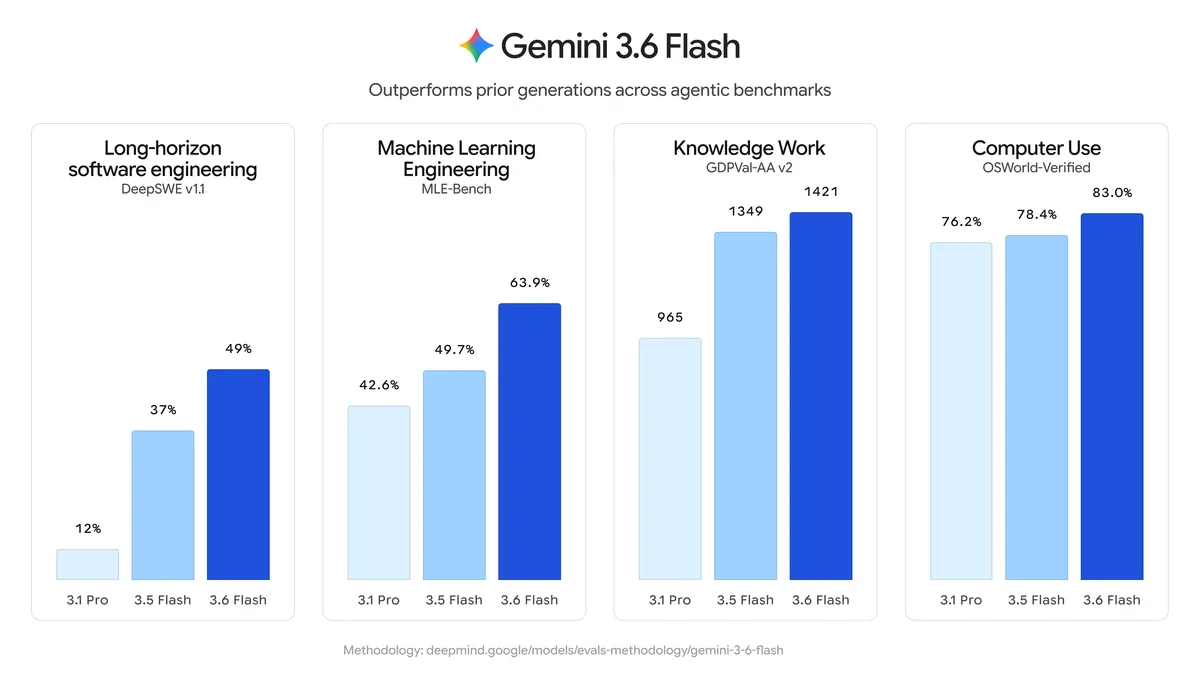
3.6 Flash also reports 83.0 on OSWorld-Verified, the computer-use benchmark that measures driving a real browser or desktop. Flash-Lite doesn’t target that skill. If your workload clicks around a screen, that’s a 3.6 Flash job. On coding specifically, 3.6 Flash posts 58.7% on SWE-Bench Pro and 49% on DeepSWE v1.1, the kind of scores that put it in real agentic-coding territory. Flash-Lite isn’t aimed at that work.
It’s worth being fair to Flash-Lite here. Its 54 on Terminal-Bench 2.1 is up from 31 on the previous Lite generation, so the cheap tier got much more capable this round. It’s not a weak model. It’s a model tuned for a different job: fast, cheap, good-enough reasoning on tasks that don’t branch. Google’s own Flash model page and the launch announcement frame the two the same way: one tier for volume, one tier for depth.
Which model for which job
Use this as a starting matrix, then adjust with your own evals.
| Task | Best fit |
|---|---|
| High-volume classification or extraction | Flash-Lite |
| Chat assistants and short replies | Flash-Lite |
| RAG answers over retrieved context | Flash-Lite |
| Autocomplete-style, latency-critical UX | Flash-Lite |
| Search-scale, every-request pipelines | Flash-Lite |
| Multi-step agents | 3.6 Flash |
| Tool use and function-calling chains | 3.6 Flash |
| Coding and code review | 3.6 Flash |
| Computer use (browser or desktop) | 3.6 Flash |
| Higher-stakes answers where errors cost money | 3.6 Flash |
The pattern is simple. Flash-Lite wins where the task is narrow and the volume is huge. 3.6 Flash wins where the task branches and the cost of being wrong is high. A model that tags support tickets by category ten million times a day belongs on Flash-Lite. A model that reads a stack trace, edits three files, and opens a pull request belongs on 3.6 Flash. If you’re weighing this against the older 3.5 Flash instead of Flash-Lite, our 3.6 Flash vs 3.5 Flash comparison covers that upgrade path.
A cost comparison on the same workload
Numbers make the trade-off concrete. Say a daily job sends 10M input tokens and generates 2M output tokens, a typical shape for a batch summarization or extraction pipeline.
| Model | Input (10M) | Output (2M) | Daily total |
|---|---|---|---|
| Flash-Lite | $3.00 | $5.00 | $8.00 |
| 3.6 Flash | $15.00 | $15.00 | $30.00 |
At that mix, 3.6 Flash costs 3.75x more: $8.00 versus $30.00 a day, or roughly $240 versus $900 a month for the same volume.
The multiple isn’t fixed, though. Because Flash-Lite is 5x cheaper on input and 3x cheaper on output, your real savings land somewhere between 3x and 5x depending on the shape of your traffic. Input-heavy work (long RAG context, large documents, classification of big inputs) leans toward the 5x end, and those are exactly the workloads Flash-Lite is built for. Output-heavy generation leans toward 3x.
So the real question isn’t just “can 3.6 Flash do this?” It’s “is the quality bump worth paying 3x to 4x more per call, at my volume?” For a Search-scale pipeline, the answer is usually no. For an agent that edits code or files a ticket, the answer is usually yes.
How to A/B both in Apidog
You don’t have to guess which tier is good enough. The Gemini API is a plain REST endpoint, so you can send the same prompt to both models and compare the responses directly. Apidog is an API client built for exactly this kind of side-by-side check.
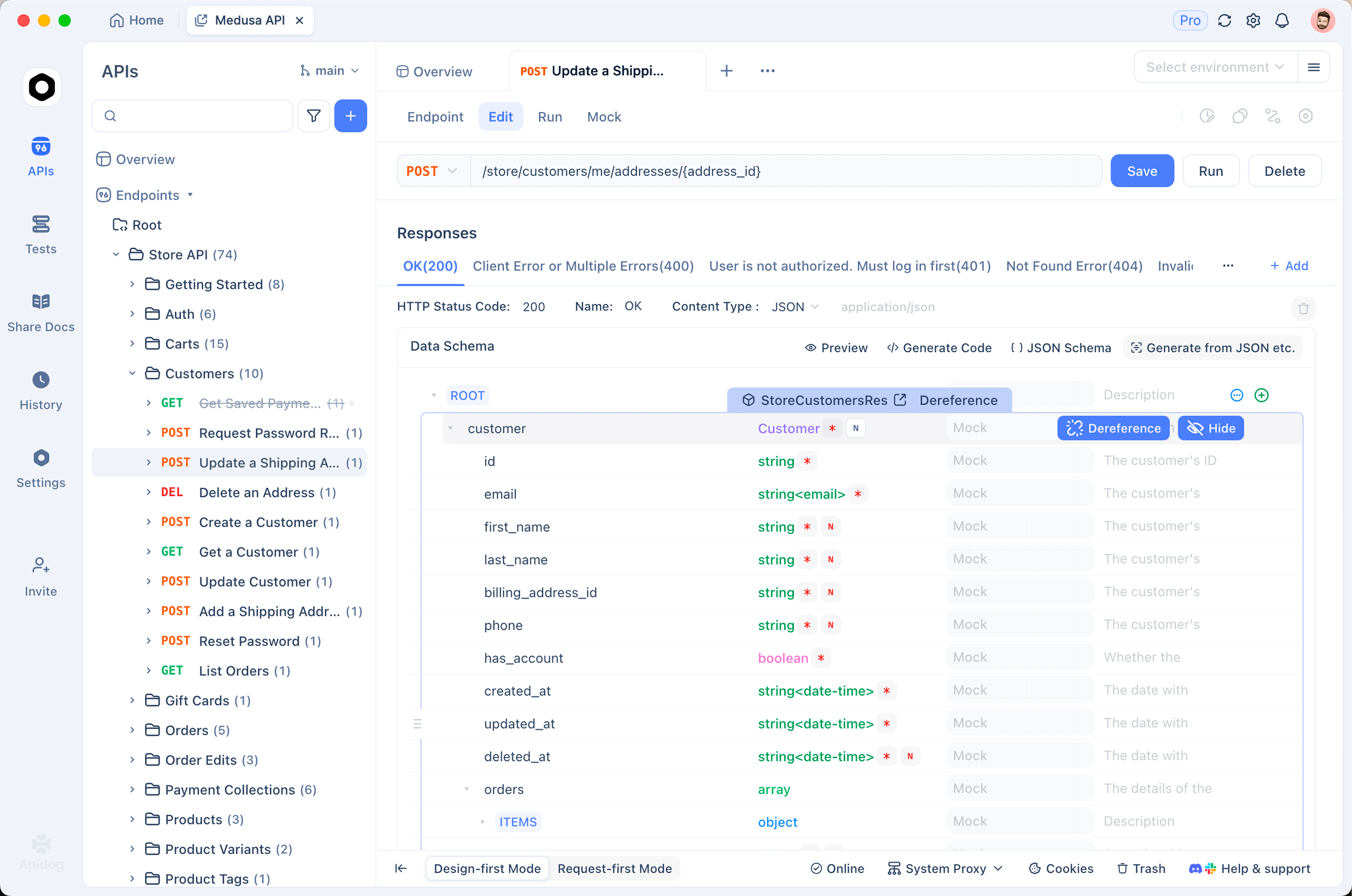
Here’s a workflow that takes a few minutes:
- Create a POST request to the Gemini API endpoint and store your API key in an Apidog environment variable, so the key never sits in the request body or in version control.
- Send it once with the model set to
gemini-3.5-flash-lite. Note the response and the latency Apidog reports. - Duplicate the request and change one thing: the model id to
gemini-3.6-flash. Same prompt, same parameters, so the only variable is the model. - Compare the two responses on quality, and compare the timings Apidog logs for each call.
- Add assertions on the response (status code, expected JSON fields, required content) so “good enough” is defined by a check, not by eyeballing.
Once the requests exist, save them and turn them into a repeatable test. You can schedule the API tests in Apidog to re-run the same prompts on a cadence, which catches quality or latency drift when Google updates either model. Be clear about the boundary: Apidog sends the requests and checks your assertions, but it doesn’t run the model, and it won’t tell you which answer is smarter. That judgment stays with you. To follow along, download Apidog and point a request at the Gemini endpoint.
FAQ
Is Flash-Lite just a worse version of 3.6 Flash? No. It’s a different point on the cost, quality, and speed curve. Flash-Lite is cheaper and faster with a lower ceiling on hard reasoning; 3.6 Flash costs more and reasons better. On simple high-volume tasks, Flash-Lite is often the right answer precisely because it’s cheaper and quicker, not despite it.
Why is one called 3.5 and the other 3.6? Mixed versioning. In this refresh Google moved the main Flash workhorse to 3.6 but kept the Lite tier at 3.5 (the same release also included a 3.5 Flash Cyber security model). Same family, different version numbers. Don’t read the 3.5 on Flash-Lite as “old and abandoned.”
Do they share the same context window? Yes. Both accept up to 1M input tokens, so long-context prompts aren’t a reason to choose one over the other. Pick on reasoning quality, price, and speed instead.
Can I use both in one app? That’s the recommended pattern. Route cheap, simple, high-volume calls to Flash-Lite and escalate the hard ones to 3.6 Flash. Because the API shape is identical, switching is a one-field change, which is what makes the Apidog A/B above so quick to run.
Are they free to try? Both have a free tier in Google AI Studio, rate-limited, and Google may use free-tier data to improve its products. That’s fine for testing; read the terms before you send anything sensitive.
Bottom line
Reach for Flash-Lite as your default for cheap, fast, simple work at scale, and promote the hard, branching, or code-heavy calls to 3.6 Flash where the 24-point Terminal-Bench gap earns its 3x to 4x price. Don’t pick in the abstract: send your real prompts to both, measure quality and latency, and let the numbers decide. Apidog makes that comparison a two-request job.