

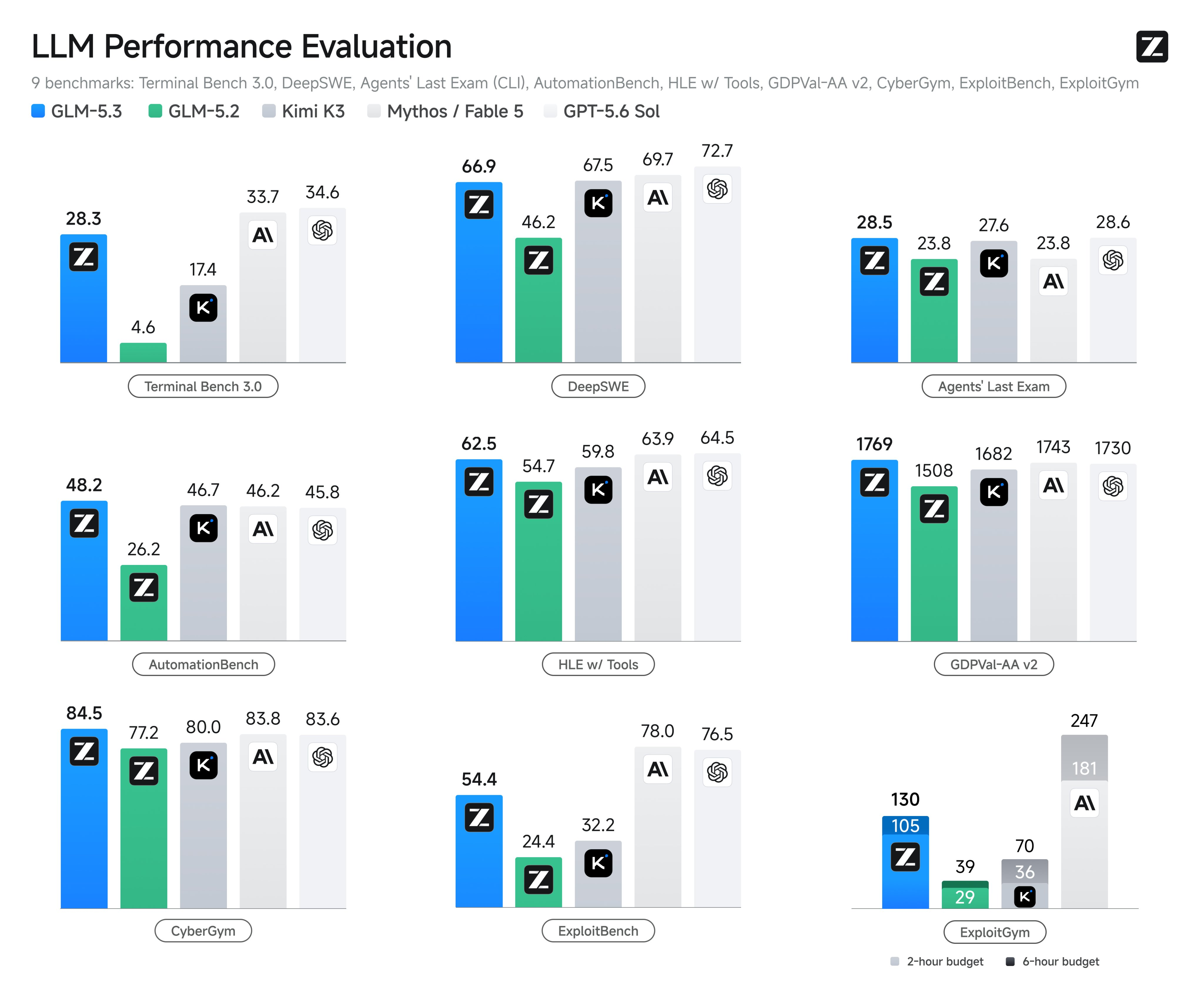
Zhipu AI, the Chinese lab that operates internationally as Z.ai, released GLM-5.3 on August 14, 2026, and the coding numbers are the story. Internal evaluations show a 50% improvement in coding capability over GLM-5.2, the Terminal-Bench 3.0 score jumped from 4.6 to 28.3, and Zhipu describes the model’s coding and agent capability as “approaching Claude Fable 5”, according to the launch report from BigGo. Open weights follow in about two weeks. For the full capability breakdown and benchmark table, read what GLM-5.3 is; this article is the hands-on API quickstart.
Here’s what you’ll do: get an API key, make a first call in cURL, port it to Python and Node.js through the OpenAI SDK, stream tokens, tune the parameters that matter, and wire the whole loop into Apidog so you can lock the request shape before writing application code. The good news up front: Z.ai’s API is OpenAI-compatible. If you’ve called any OpenAI-style endpoint before, you already know most of this.
One caveat before the code. GLM-5.3 shipped today, and Zhipu’s docs move fast on launch days. Everything below that came straight from the official docs when I checked is presented as verified; anything the docs hadn’t caught up on yet is flagged as the GLM-5 family convention, with a link so you can confirm the current state yourself.
TL;DR
- GLM-5.3 released August 14, 2026. Zhipu internal evaluations report a 50% coding improvement over GLM-5.2 and a Terminal-Bench 3.0 jump from 4.6 to 28.3. It ranks first among open-source models on Terminal-Bench 3.0 and Agents’ Last Exam.
- The API is OpenAI-compatible. International endpoint:
POST https://api.z.ai/api/paas/v4/chat/completionswith headerAuthorization: Bearer $GLM_API_KEY. Mainland China:https://open.bigmodel.cn/api/paas/v4/chat/completions. - At the time of writing, the GLM-5 docs page listed
glm-5as the model ID. Zhipu’s pricing page listsglm-5.2andglm-5.1as separate models, so expectglm-5.3to follow the same dotted convention. Confirm before hardcoding. - Zhipu had not published 5.3-specific API pricing at launch. For scale, the official pricing page listed GLM-5.2 at $1.40 per 1M input tokens and $4.40 per 1M output tokens, and GLM-5 at $1.00 and $3.20.
- Open weights land on Hugging Face around August 28, 2026. GLM Coding Plan quotas were reset for all users on August 14.
- Test in Apidog first: one environment per regional endpoint, the model ID behind a variable, and saved responses as fixtures so prompt iteration doesn’t bill tokens.
Why GLM-5.3 matters
The base model didn’t change. Every gain in this release comes from scaled post-training on top of GLM-5, which makes the size of the jumps unusual. Terminal-Bench 3.0 went from 4.6 to 28.3, a 6.2x move that took GLM from irrelevant to first among open-source models on that benchmark and on Agents’ Last Exam. SWE-Marathon roughly doubled against GLM-5.2. On the security side, CyberGym came in at 84.5%, slightly above Claude Mythos 5 and GPT-5.6 Sol, while ExploitBench landed at 54.4%, still trailing the frontier models. Flag the sourcing: the 50% coding claim and several of these scores come from Zhipu’s own evaluations, so treat them as a vendor’s report until third parties reproduce them.
The architecture underneath is the GLM-5 family baseline: a Mixture of Experts design with 744B total parameters, around 40B active per forward pass, and a 200K token context window, per Z.ai’s docs. Those are family specs, not 5.3-specific claims.
Two more reasons this release matters for API users. First, Zhipu says it will release GLM-5.3 open weights about two weeks after launch, around August 28, alongside what it calls its most extensive risk review system to date, per Pandaily’s launch coverage. If self-hosting is on your roadmap, the API you set up today doubles as your regression baseline; our GLM-5.3 self-hosting prep guide covers that play in detail. Second, Seeking Alpha frames Zhipu as the “Chinese OpenAI challenger”, and open-weight releases at this capability level tend to move prices across the whole market.
Get an API key
There are two platforms, split by region, and the split carries through everything else in this guide.
Z.ai (international). Sign up at z.ai, open the API console, and create a key. Docs live at docs.z.ai. This is the path for anyone outside mainland China, and it’s the endpoint the rest of this article defaults to.
Bigmodel.cn (mainland China). Zhipu’s domestic platform is open.bigmodel.cn. Same API shape, same auth scheme, different host and separate billing. If your traffic originates in mainland China, use this one; latency and compliance both point that way.
Whichever platform you pick, export the key once and keep it out of your code:
export GLM_API_KEY="your-key-from-the-console"
If you’re on the GLM Coding Plan rather than pay-as-you-go API billing, note that quotas were reset for all users on August 14, so you start the 5.3 era with a clean allowance.
Endpoint and authentication
The chat completions endpoint, verified against the GLM-5 docs at the time of writing:
POST https://api.z.ai/api/paas/v4/chat/completions
Mainland China swaps the host:
POST https://open.bigmodel.cn/api/paas/v4/chat/completions
Auth is one header: Authorization: Bearer $GLM_API_KEY. No signing, no session handshake.
OpenAI-compatible means exactly what you hope it means. The request body is the model plus messages array shape, the response comes back with choices, message, finish_reason, and usage, and the official OpenAI SDKs work unmodified once you point base_url at Z.ai. Any code you’ve written against another OpenAI-compatible provider ports over with a host and model swap; the pattern is the same one we walked through for DeepSeek V4 Pro’s API.
One honest hedge on the model ID. When I fetched the docs on launch day, the GLM-5 page listed glm-5 as the model string and hadn’t yet been updated for 5.3. Zhipu’s pricing page bills glm-5.2 and glm-5.1 as distinct models, so the family convention says the new ID is glm-5.3. The examples below use it, but check the docs before you pin it in production. If glm-5.3 404s in your region, fall back to glm-5 and you’re still on the same family.
Your first request in cURL
A complete working call:
curl "https://api.z.ai/api/paas/v4/chat/completions" \
  -H "Authorization: Bearer $GLM_API_KEY" \
  -H "Content-Type: application/json" \
  -d '{
    "model": "glm-5.3",
    "messages": [
      {
        "role": "system",
        "content": "You are a code reviewer. Flag issues as blocking or non-blocking."
      },
      {
        "role": "user",
        "content": "Review this shell script for safety:\n\nrm -rf $BUILD_DIR/*\ncp dist/* $DEPLOY_TARGET"
      }
    ],
    "temperature": 0.3,
    "max_tokens": 1024
  }'
The response is standard OpenAI shape: a choices array where choices[0].message.content holds the answer, and a usage block with prompt_tokens and completion_tokens. Given that Terminal-Bench score, shell and terminal-adjacent review prompts like this one are exactly where 5.3 is supposed to have improved most, so it’s a fitting smoke test.
The docs also document a thinking parameter that toggles the model’s reasoning mode:
"thinking": { "type": "enabled" }
Enable it for multi-step coding and agent tasks; skip it for short extraction calls where reasoning tokens are wasted spend.
Python quickstart
No new SDK to learn. Install the OpenAI package and change the base URL:
pip install --upgrade openai
import os
from openai import OpenAI

client = OpenAI(
    api_key=os.environ["GLM_API_KEY"],
    base_url="https://api.z.ai/api/paas/v4",
)

response = client.chat.completions.create(
    model="glm-5.3",
    messages=[
        {
            "role": "system",
            "content": "You are a code reviewer. Flag issues as blocking or non-blocking.",
        },
        {
            "role": "user",
            "content": (
                "Review this Flask route for security issues:\n\n"
                "@app.route('/user/<id>')\n"
                "def get_user(id):\n"
                "    return db.execute(f'SELECT * FROM users WHERE id = {id}')"
            ),
        },
    ],
    temperature=0.3,
    max_tokens=2048,
)

print(response.choices[0].message.content)
print("input tokens:", response.usage.prompt_tokens)
print("output tokens:", response.usage.completion_tokens)
Log that usage block from day one. With no 5.3-specific pricing published at launch, your token counts are the only way to project what your bill becomes once the official numbers appear.
Node.js quickstart
Same move with the openai npm package:
import OpenAI from "openai";

const client = new OpenAI({
  apiKey: process.env.GLM_API_KEY,
  baseURL: "https://api.z.ai/api/paas/v4",
});

const response = await client.chat.completions.create({
  model: "glm-5.3",
  messages: [
    {
      role: "system",
      content: "You are a terminal automation agent. Return each step as a shell command with a one-line rationale.",
    },
    {
      role: "user",
      content: "A Node service on port 3000 stopped responding after a deploy. Give me a diagnosis sequence.",
    },
  ],
  temperature: 0.3,
  max_tokens: 2048,
});

console.log(response.choices[0].message.content);
If your codebase already talks to OpenAI, you don’t need a parallel client. Instantiate a second OpenAI instance with the Z.ai baseURL and route requests per task. That makes A/B comparison between GLM-5.3 and your incumbent model a routing decision instead of a rewrite.
Streaming
The docs confirm streaming support through the standard stream flag. In Python:
stream = client.chat.completions.create(
    model="glm-5.3",
    messages=[
        {"role": "user", "content": "Explain the N+1 query problem with a concrete ORM example."}
    ],
    stream=True,
)

for chunk in stream:
    delta = chunk.choices[0].delta.content
    if delta:
        print(delta, end="", flush=True)
Over raw HTTP, set "stream": true in the body and parse server-sent events; each data: line carries a delta in OpenAI’s chunk format. Two practical notes. Token usage arrives at or after the final chunk, so accounting is only accurate once the stream closes. And if you enable thinking, expect a longer pause before the first visible token on hard prompts; the model is spending tokens reasoning before it answers, which is the tradeoff you signed up for.
Parameters that matter
The knobs the docs cover, in order of how often you’ll touch them:
| Parameter | Type | What it does |
|---|---|---|
max_tokens |
integer | Hard cap on output length. Your main cost lever. |
temperature |
number | Use 0.2 to 0.4 for code and extraction, 0.7+ for open-ended writing. |
thinking |
object | {"type": "enabled"} turns on reasoning mode for multi-step tasks. |
stream |
boolean | Server-sent events instead of a single response body. |
messages |
array | Standard OpenAI roles: system, user, assistant. |
On cost: Zhipu had not published 5.3-specific API pricing at launch, so resist any per-token number you see on reseller pages. The official pricing page is the source of truth; as of this writing it listed GLM-5.2 at $1.40 input and $4.40 output per 1M tokens, and GLM-5 at $1.00 and $3.20, which brackets where 5.3 plausibly lands. Cached input on the paid GLM models is discounted 80 to 85%, so structure repeated system prompts to hit the cache. If a provider has ever surprised you with a price change, you know why this discipline matters; our DeepSeek price increase postmortem covers the cost-control patterns that transfer directly.
Test GLM-5.3 in Apidog before you write app code
Prompt iteration inside a script is a slow loop: edit, rerun, scroll, repeat, and every cycle bills tokens. Because Z.ai’s API is OpenAI-compatible, an API client can absorb the whole exploration phase.
The setup in Apidog:
- Create a project and add the chat completions request. Import any OpenAI-compatible spec or define the single
POST /chat/completionsendpoint by hand; the body is the familiarmodelplusmessagesshape. - Create two environments:
zai-internationalandbigmodel-mainland. Set the base URL in each (https://api.z.ai/api/paas/v4andhttps://open.bigmodel.cn/api/paas/v4) and bindAuthorization: Bearer {{GLM_API_KEY}}at the environment level. Switching regions becomes a dropdown click, and the key never lands in a saved request. - Put the model ID behind a variable set to
glm-5.3. On launch week this matters more than usual: if the ID shifts as docs settle, or you want to A/B againstglm-5.2, you change one variable instead of editing every saved request. - Test the
thinkingtoggle side by side. Duplicate the request, enable reasoning on one copy, and compare latency, output quality, andusageon the same prompt. This is the fastest way to decide which of your workloads deserve reasoning tokens. - Hit the streaming endpoint. SSE chunks render live, so you see time-to-first-token the way your users will.
- Save good responses as examples. Later runs hit the fixture instead of the live API, which is the single biggest token saver during development.
From there, chain saved requests into test scenarios with assertions on finish_reason, response schema, and token counts, and you’ve turned smoke tests into a regression suite. The same workflow, generalized to any API, is in our API testing guide for QA engineers.
Error handling and rate limits
Expect standard OpenAI-style errors: an error object with a message, type, and code. The usual suspects are 401 for a missing or revoked key, 400 for a malformed body or an unknown model ID, 429 for rate limits, and 5xx for transient server faults.
Three habits for a launch-day API:
- Wrap every call in a retry helper with jittered exponential backoff on 429 and 5xx. New model launches concentrate traffic, and day-one capacity is when you’ll meet 429s.
- Don’t invent rate-limit numbers. Zhipu publishes concurrency and tier details in the official docs; read the live values there rather than trusting a blog post, including this one, to stay current.
- Pin the model ID behind config. If a 5.3 behavior change breaks a prompt, rolling back to
glm-5.2should be a config change, not a deploy. The debugging workflow we built for Grok’s API applies unchanged here, since both speak the OpenAI dialect.
FAQ
What is the model ID for the GLM-5.3 API?
Expect glm-5.3, following the family convention that gives us glm-5.2 and glm-5.1 on Zhipu’s pricing page. At the time of writing the docs still listed glm-5 on the model page, so confirm at docs.z.ai before pinning it, and keep the ID in config so a correction is cheap.
Does the GLM-5.3 API work with the OpenAI SDK?
Yes. The API is OpenAI-compatible, so the official openai packages for Python and Node.js work once you set base_url to https://api.z.ai/api/paas/v4 (or the bigmodel.cn equivalent) and pass your Z.ai key. Request and response shapes match the chat completions standard, including streaming.
How much does the GLM-5.3 API cost?
Zhipu had not published 5.3-specific pricing when it launched on August 14, 2026. The official pricing page listed GLM-5.2 at $1.40 per 1M input tokens and $4.40 per 1M output tokens, which is your best reference point until the 5.3 row appears. Ignore reseller price guesses.
How does GLM-5.3 compare with Claude and GPT?
Zhipu’s own evaluations put coding and agent capability “approaching Claude Fable 5”, with CyberGym at 84.5% slightly above Claude Mythos 5 and GPT-5.6 Sol, but ExploitBench at 54.4% still behind the frontier. Treat vendor numbers as claims until independently reproduced; for how we stack up frontier models against each other, see our Grok 4.6 vs GPT-5.6 vs Claude Fable 5 comparison.
Can I run GLM-5.3 locally instead of using the API?
Not yet. Zhipu says open weights arrive about two weeks after release, around August 28, 2026, on its Hugging Face org. The 744B-parameter MoE design means local serving is server-class work, not laptop work; use the hosted API now and build the baseline you’ll compare a self-hosted deployment against.
Where GLM-5.3 fits in your stack
GLM-5.3 is worth an afternoon of evaluation if you run agent loops or coding workloads, and the OpenAI-compatible surface makes that afternoon cheap. The Terminal-Bench and SWE-Marathon jumps are vendor-reported, but a 6.2x move is large enough to check yourself, and the two-week runway to open weights means requests you save today become the regression baseline for a self-hosted deployment later.
The sensible sequence: get a key, run the cURL call, and move the request into an API client before touching application code. Download Apidog to set up the two regional environments, park the model ID behind a variable, and compare thinking on and off across your real prompts. Once the responses look right, the Python or Node port is a base URL and an environment variable, because the wire format was never the hard part.


