
Every API test needs data to run against. A login test needs users. A checkout test needs orders, addresses, and payment records. A search test needs a few thousand rows so pagination actually does something. Typing that data by hand is slow, and the hand-typed version is always too clean to catch real bugs.
A test data generator solves this. It produces realistic, varied records on demand so your tests exercise the edge cases your production data will eventually throw at them. This guide explains what a test data generator is, the main types you can choose from, and how to generate test data directly inside Apidog without bolting on a separate tool.
If you’re new to faking API responses entirely, start with what a mock API is and come back here for the data side of the problem.
What is a test data generator?
A test data generator is a tool or library that creates synthetic records that look like real production data. Instead of writing {"name": "test", "email": "test@test.com"} a hundred times, you describe the shape you want (a name, a valid email, a price between 10 and 500) and the generator fills in believable values.
Good test data has three properties:
- Realistic. Names look like names, emails pass validation, dates fall in sensible ranges.
- Varied. No two records are identical, so your assertions catch off-by-one and boundary errors.
- Safe. It’s synthetic, so you never copy real customer records (and their PII) into a test suite.
The goal isn’t pretty data. It’s coverage. A generator lets you produce the long tail of inputs (empty strings, unicode names, huge numbers, expired dates) that break code in ways your tidy manual fixtures never will.
Why realistic test data matters for API testing
APIs validate input. They reject malformed emails, clamp out-of-range numbers, and branch on optional fields. If every test record is John Doe / john@example.com / quantity 1, you only ever test the happy path.
Realistic, generated data lets you do three things you can’t do by hand:
- Test at volume. Generate 5,000 products and your pagination, sorting, and filtering get a real workout.
- Hit boundaries on purpose. Ask for prices of exactly 0, negative quantities, or 256-character names to confirm validation holds.
- Run data-driven tests. Feed a table of inputs through one test and assert the right outcome for each row.
That last point is where a generator pays off most, and it’s where Apidog ties data generation straight into test execution. More on that below.
The main types of test data generators
Test data generators fall into four buckets. Most teams end up using more than one.
1. Code libraries
Libraries like Faker.js (JavaScript) and Faker (Python) give you a programmatic API: faker.person.fullName(), faker.internet.email(), faker.commerce.price(). They’re the most flexible option because you generate data in code, seed it for reproducibility, and wire it into scripts.
The trade-off is that you’re writing and maintaining code. If you live in JavaScript, our deep dive on Faker.js and how to use it in Apidog walks through the library in detail and shows how those same Faker rules plug into Apidog’s mock engine.
2. Standalone and online generators
Tools like Mockaroo let you define columns in a web UI and download CSV, JSON, or SQL. They’re handy for a one-time seed file or a quick dataset, with no code to write. The downside: the data is a static export. Regenerating it or keeping it in sync with a changing schema means going back to the UI each time.
3. Schema-based generators
If you already have an OpenAPI spec or a JSON Schema, a schema-based generator reads the field types and constraints and produces matching data automatically. This keeps your test data aligned with the contract. We cover the OpenAPI flow in how to generate mock data from OpenAPI schemas. The JSON Schema standard is what makes this possible: types, formats, and ranges are all machine-readable.
4. AI-based generators
The newest option asks a model to invent context-aware records: a realistic support ticket, a plausible product description, a coherent user profile. This shines when you need data that “makes sense” together rather than random field values. See generating mock data using Claude Code for a hands-on example.
How to generate test data in Apidog
Here’s the part most “test data generator” roundups miss: if you test APIs in Apidog, you don’t need a separate generator at all. Data generation is built into three places in the workflow.
Smart mock with field rules. When Apidog mocks an endpoint, it reads each field name and type and generates believable values automatically. An email field returns a valid email, a createdAt field returns a date, a price field returns a number. You can attach Faker-style rules per field to control the output, so the mock returns the same shape your real API will. Download Apidog and any endpoint you define starts returning realistic data immediately, no db.json to maintain.
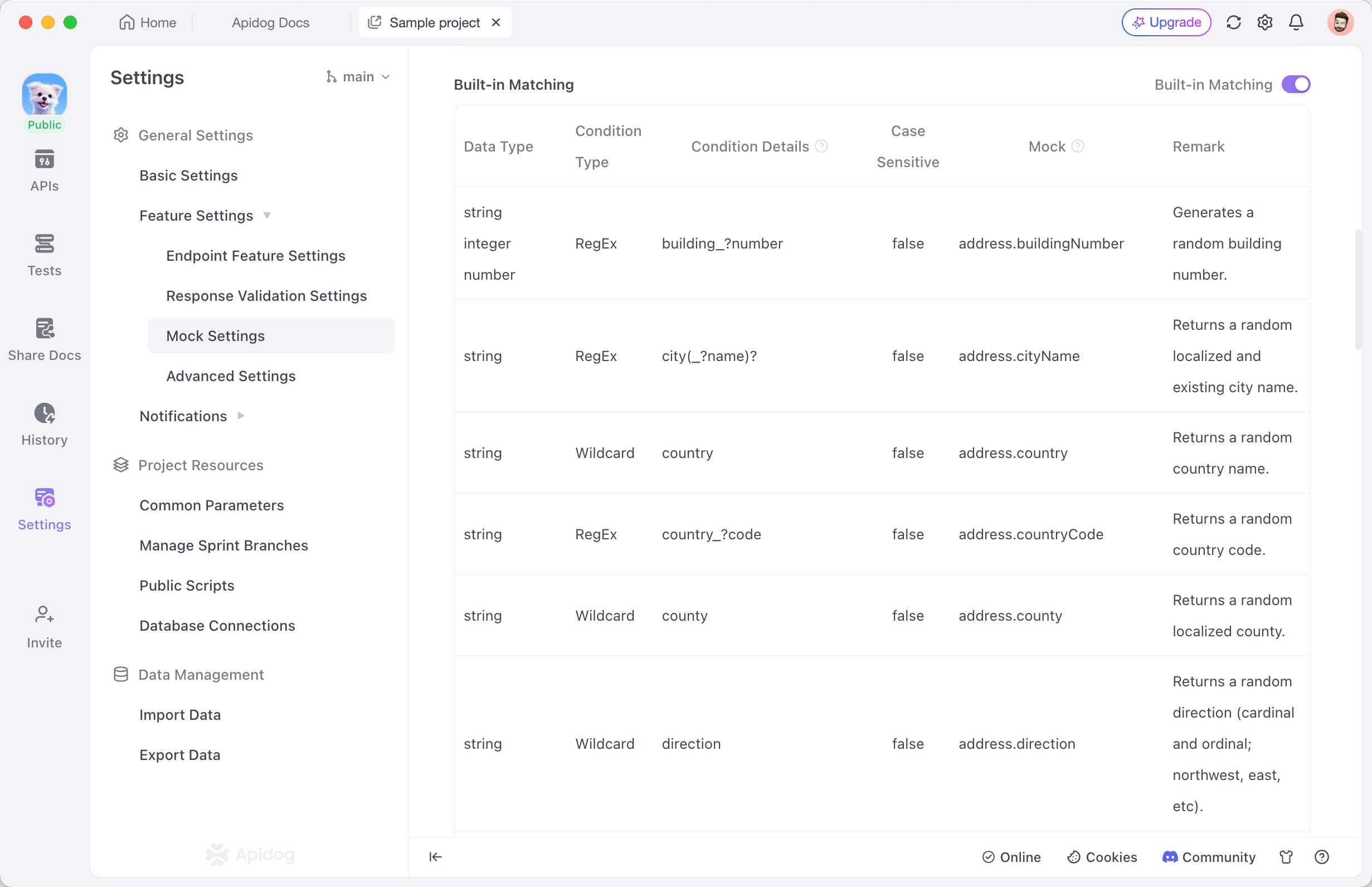
AI-generated test data. Apidog can generate a batch of test records for an endpoint from its schema, so you get a varied dataset without hand-writing rules for every field.

Data-driven testing. This is the one that closes the loop. You attach a CSV or JSON dataset to a test step, and Apidog runs the step once per row, substituting the values in as variables. One test, many inputs, one assertion pattern. The mechanics are covered in how to run parameterized API tests from CSV and JSON, and if you’re weighing tools for this specific job, which tool to use for data-driven API testing compares the options. Running in CI? The same datasets work from the terminal with data-driven testing in the Apidog CLI.
Step by step: generate test data for an endpoint
- Open your project in Apidog and select the endpoint you want test data for.
- Define the response schema (or import it from your OpenAPI file). Field names and types drive the generation.
- Turn on the mock. Apidog returns generated values for every field right away.
- To control specific fields, add a mock rule (for example, set
statusto one ofactive,pending,closed). - For test runs, create a dataset (CSV or JSON), attach it to the test step, and the step iterates over every row.
You now have realistic responses for development and a repeatable input table for testing, both from the same place you write and run the tests.
How to pick a test data generator
| If you need… | Use | Why |
|---|---|---|
| Full programmatic control in JS/Python | Faker library | Flexible, scriptable, reproducible with seeds |
| A quick static seed file | Mockaroo or similar | No code, export and go |
| Data that matches your API contract | Schema-based (OpenAPI/JSON Schema) | Stays in sync with the spec |
| Context-aware, “sensible” records | AI generator | Coherent multi-field data |
| Generated data wired into mocks and tests | Apidog | One tool for mock, generate, and run |
There’s no single winner. A scripting-heavy team leans on Faker; a team that already designs APIs in Apidog gets generation, mocking, and data-driven runs without leaving the workspace.
Best practices for API test data
- Seed for reproducibility. A failing test is only useful if you can regenerate the exact data that broke it. Use a fixed seed for runs you need to repeat.
- Generate the bad data too. Empty fields, wrong types, oversized payloads, and expired tokens belong in your dataset, not just valid rows.
- Keep data and schema in sync. When the contract changes, regenerate. Schema-based generation makes this automatic.
- Never use real PII. Synthetic data sidesteps privacy rules and the risk of leaking customer records into a repo.
- Match volume to the test. Pagination and performance tests need thousands of rows; a single validation check needs a handful.
FAQ
What’s the difference between a test data generator and a mock server? A generator produces the data; a mock server serves it over HTTP as fake API responses. You often want both, which is why Apidog combines them: the mock returns data the generator created. A standalone generator just hands you a file.
Can I generate test data from my OpenAPI spec? Yes. Schema-based tools read the spec’s types and constraints to produce matching records. See generating mock data from OpenAPI schemas.
Is generated test data safe to commit to a repo? Synthetic data is, since it contains no real personal information. Never commit exports of production data.
How do I run one test against many generated inputs? Use data-driven testing: attach a CSV or JSON dataset and the test iterates per row. The parameterized testing guide shows the setup.
Do I need to spin up a fake server to use test data? Not necessarily. If you want a throwaway REST API backed by a flat file, see our guide to json-server and JSONPlaceholder. For schema-aware, team-shareable mocks, use Apidog’s built-in mock.
The short version
A test data generator turns the slow, error-prone job of inventing records into a one-line description of the shape you want. Pick a code library for scripting control, a schema-based tool to stay aligned with your contract, or an AI generator for coherent records. If you already test APIs in Apidog, you get generation, smart mocks, and data-driven runs in one place, so the data you generate flows straight into the tests that use it. Download Apidog and point it at an endpoint to see realistic test data on the first request.