
Apidog’s APIs module gives you two ways to build the same thing: an API contract. One uses visual forms. The other uses a raw code editor wired into Git. Both produce valid OpenAPI. The difference is how your team works day to day, and which one fits depends less on the tool and more on your habits.
This guide walks through the design-first vs spec-first decision in Apidog: what each mode is, how they handle Git, and which teams tend to pick which. You switch between them from a single toggle in the bottom-left of the APIs module, so the choice isn’t permanent. But picking the right default saves friction.
The two philosophies
Before the modes, the mindset. Both approaches share one rule: you define the API contract before you write the implementation. The contract is the source of truth. Code, tests, mocks, and docs all flow from it.
Design-first means you shape that contract through a structured interface. You add endpoints, parameters, and schemas through forms and dropdowns. The tool guarantees the output is valid because you can only enter valid values.
Spec-first (often called contract-first) means you write the contract directly as a specification file: OpenAPI in YAML or JSON. The spec is your working surface. You edit it like source code.
These terms overlap in practice. “Contract-first” and “spec-first” are near-synonyms, and many teams use “design-first” loosely to mean any approach where the contract precedes the code. The useful distinction here is concrete: in Apidog, one mode hands you forms, the other hands you a text editor. That’s the line that matters when you’re choosing.
It’s worth separating both from design-first vs code-first API development. Code-first generates the spec from annotations in your implementation, so the code leads. Both Apidog modes keep the contract in front of the code. They just disagree on how you author it. For the broader picture of treating your spec as a versioned artifact, see our overview of the Git-native API workflow.
Apidog Design-First Mode
Design-First Mode is the visual designer. You build endpoints through a guided interface: pick a method, name the path, add query and path parameters, define request and response schemas through a tree editor, and attach examples. Apidog renders the underlying OpenAPI for you in the background.
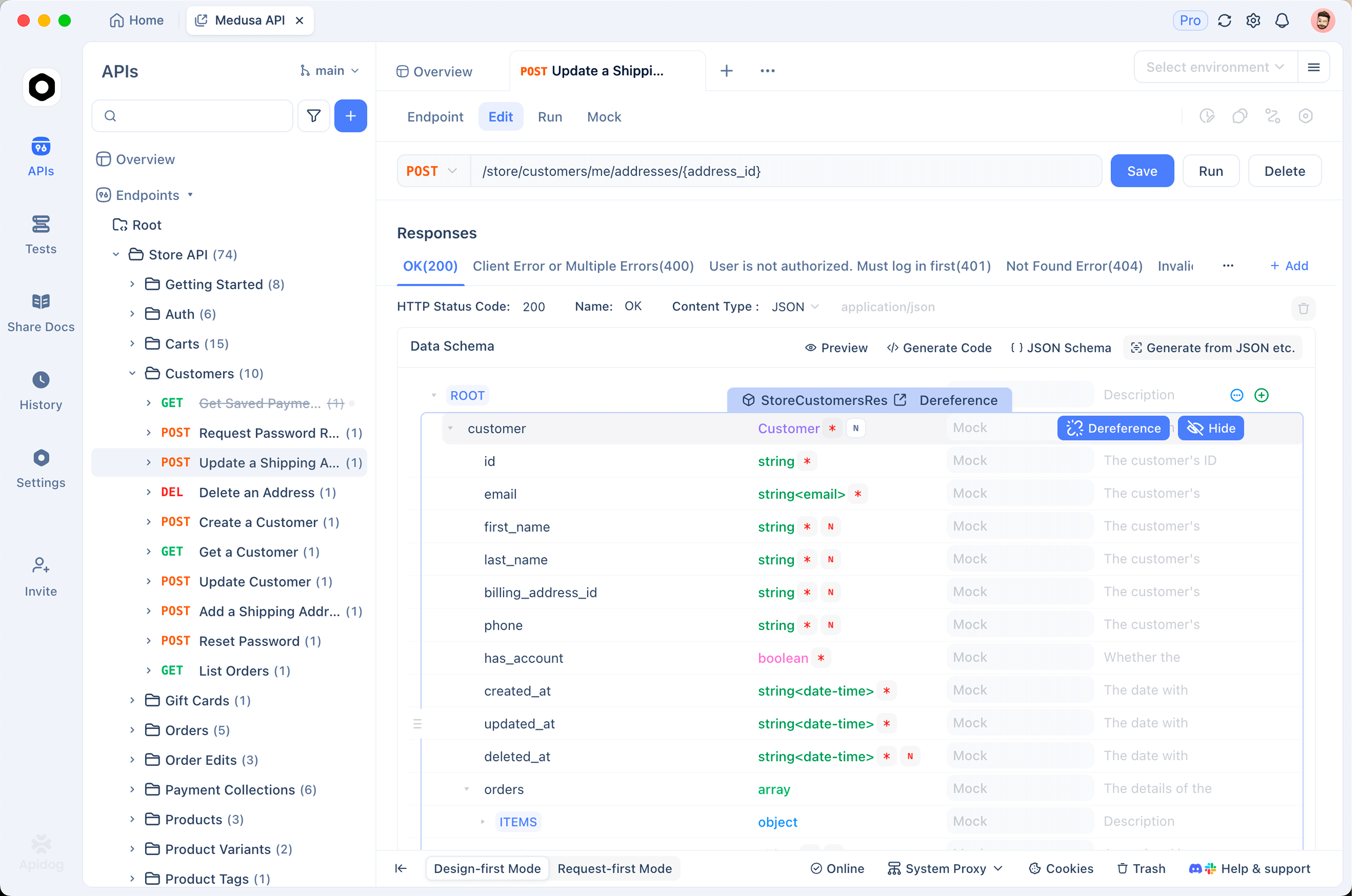
This mode is the default for most teams, and for good reason. You don’t need to remember OpenAPI syntax. The schema editor enforces structure, so you can’t ship a spec with a misplaced bracket or an invalid type. Reusable components, like a shared Error schema or a common header, are a few clicks away.
Design-First Mode also supports branches, so teams can work on separate versions of the API design in parallel and reconcile them later. Reviewers see a structured diff rather than raw text, which makes contract changes easier to read for people who don’t live in YAML.
The trade-off: you’re working through an abstraction. If you already think in OpenAPI, the forms can feel like extra clicks between you and the spec you have in your head.
Apidog Spec-First Mode
Spec-First Mode flips that. Instead of forms, you get an IDE-style code editor and you write the OpenAPI or Swagger spec directly in YAML or JSON. It’s built for teams that want their API definition to live in Git like any other source file.
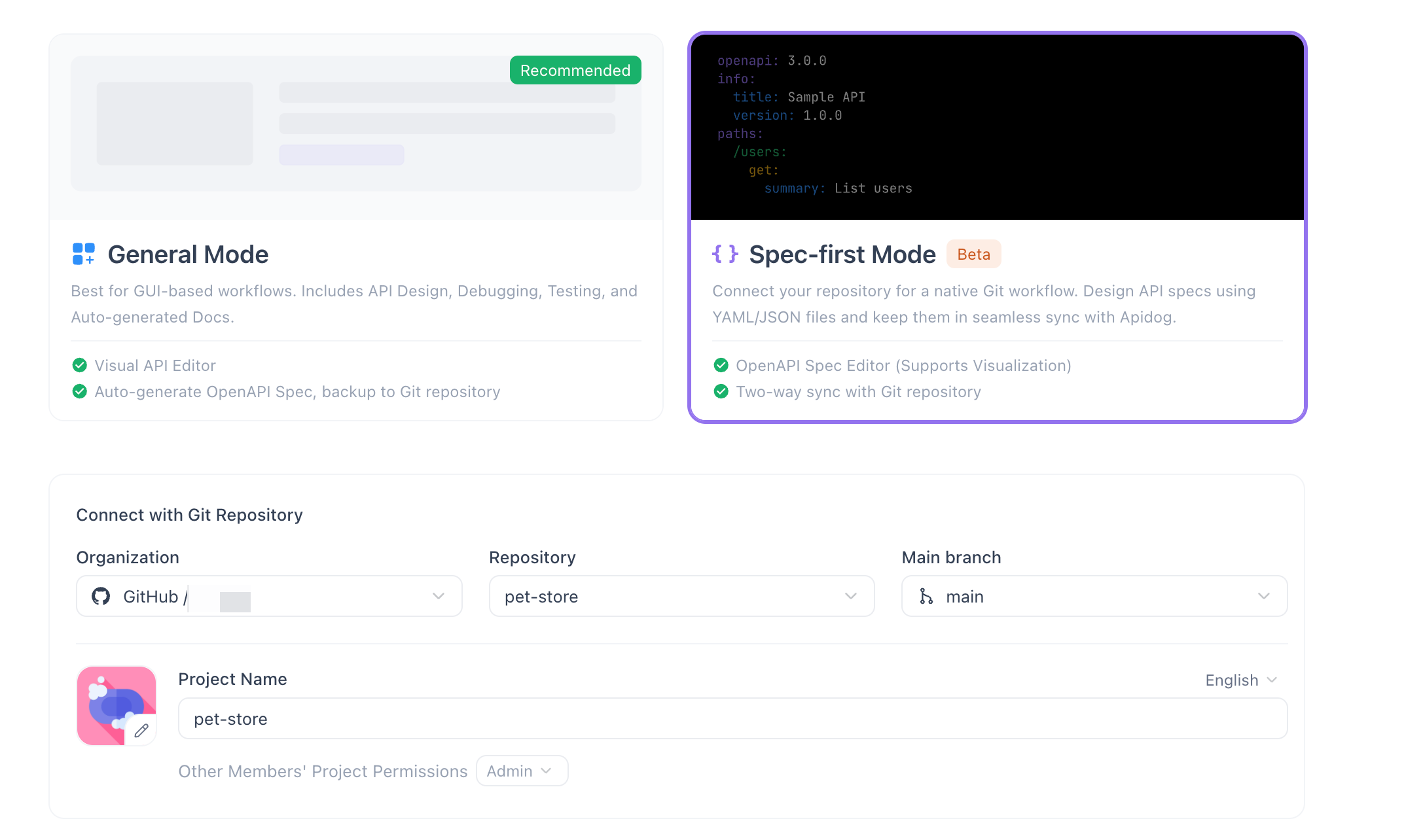
The editor behaves like the one in your code editor: syntax highlighting, inline validation, and auto-completion tuned for the OpenAPI and Swagger schemas. As you type, a left sidebar auto-parses your spec into an outline of paths and components, so you can navigate a large file without scrolling. A sync indicator shows whether your local edits are in step with the connected repository.
The headline has is two-way Git sync. You connect a repository on GitHub or GitLab (Azure DevOps works through a generic Git Connection), and Apidog syncs your spec file in both directions. Edit in Apidog, then commit and push straight from the app. Or edit the spec in your code editor, push from there, and pull the changes back into Apidog. The spec file is the shared truth, and both surfaces stay aligned. You can read the full setup in the Spec-First Mode docs.
This mode treats your API contract the way you’d treat any other code artifact: reviewed in pull requests, versioned alongside the services that implement it, and diffed line by line. If that’s how your team already manages infrastructure and config, see our deeper take on API spec as code for the reasoning behind it.
Side-by-side comparison
Both modes produce the same OpenAPI and support mocking, testing, and docs downstream. They differ in how you author and version the spec.
| Design-First Mode | Spec-First Mode (beta) | |
|---|---|---|
| Editor | Visual forms and schema tree | IDE-style YAML/JSON code editor |
| Spec format | OpenAPI (generated for you) | OpenAPI / Swagger, written by hand |
| Git workflow | Branch support inside Apidog | Two-way sync with GitHub, GitLab, Azure DevOps (Git Connection); commit and push from the app |
| Validation | Enforced by the form inputs | Inline syntax validation and auto-completion |
| Navigation | Endpoint list and folders | Auto-parsed outline in the left sidebar |
| Learning curve | Low; no OpenAPI knowledge needed | Higher; assumes OpenAPI fluency |
| Best for | Mixed-skill teams, fast onboarding | Engineers who treat the spec as code |
Which team should pick which
Use Design-First Mode if your contributors aren’t all OpenAPI experts. Product managers, QA, and junior engineers can all add or review endpoints without learning spec syntax. It’s also the faster path when you’re starting a new API from scratch and want to move quickly through structure without worrying about formatting.
Use Spec-First Mode if your spec already lives, or should live, in a Git repository next to your service code. Backend teams that review API changes in pull requests, run spec linting in CI, or want a single canonical YAML file across tools will feel at home. The two-way sync means Apidog stops being a separate copy of the truth and becomes a window onto the same file your repo holds.
A practical middle path: many teams design new endpoints in Design-First Mode for speed, then move to Spec-First once the API matures and Git review becomes the priority. The modes aren’t rival products. They’re two views of one contract.
How to switch modes
Switching is a single toggle. Open the APIs module in your Apidog project and look at the bottom-left corner, where the mode switcher sits. Flip it, and the same contract renders in the other mode.
A few things to keep in mind when you switch:
- The underlying spec is shared, so your endpoints, schemas, and examples carry across. You’re changing the editing surface, not rebuilding the API.
- To use Spec-First Mode’s Git sync, connect your GitHub, GitLab, or Azure DevOps repository first. Once connected, the sync indicator tells you whether your edits are committed and pushed.
- Because Spec-First Mode is in beta, try it on a project where you can confirm the sync behavior before relying on it for a production contract.
You can move back and forth as your needs change, so treat the choice as a default rather than a commitment.
FAQ
Is spec-first the same as contract-first?
In practice, yes. “Spec-first” and “contract-first” both mean you author the API specification before the implementation, and both treat that spec as the source of truth. Apidog’s Spec-First Mode is a contract-first workflow where the contract is a hand-written OpenAPI or Swagger file synced to Git.
Does Spec-First Mode work with GitLab and Azure DevOps?
Yes. Spec-First Mode supports two-way Git sync with GitHub and GitLab directly. Azure DevOps works through a generic Git Connection, so you can sync your spec file to an Azure-hosted repository as well.
Can I switch from design-first to spec-first without losing my work?
Yes. Both modes read and write the same underlying contract, so your endpoints, schemas, and examples stay intact when you flip the toggle in the bottom-left of the APIs module. You’re swapping the editor, not the data.
Not sure which fits your team? Open the APIs module, try the mode toggle in the bottom-left, and design your next endpoint both ways. The contract is the same either way; pick the surface that matches how your team already works.