

You want access to one of the most capable open models of 2026—GLM-5 from Z.ai—without paying a single cent for API calls or cloud compute. Engineers and developers achieve this today by running GLM-5 locally on consumer and prosumer hardware. Unsloth's aggressive quantization shrinks the 744B-parameter (40B active) Mixture-of-Experts model from 1.65TB to just 241GB, and you can deploy it via llama.cpp, Ollama, or vLLM.
You run GLM-5 locally! The process demands attention to hardware, precise build steps, and smart offloading strategies. This guide walks you through every method, explains why each command matters, and shows you how to squeeze maximum performance from your setup. You gain full data sovereignty, zero latency for agentic workflows, and unlimited inference.
What Makes GLM-5 a Game-Changer for Local Deployment?
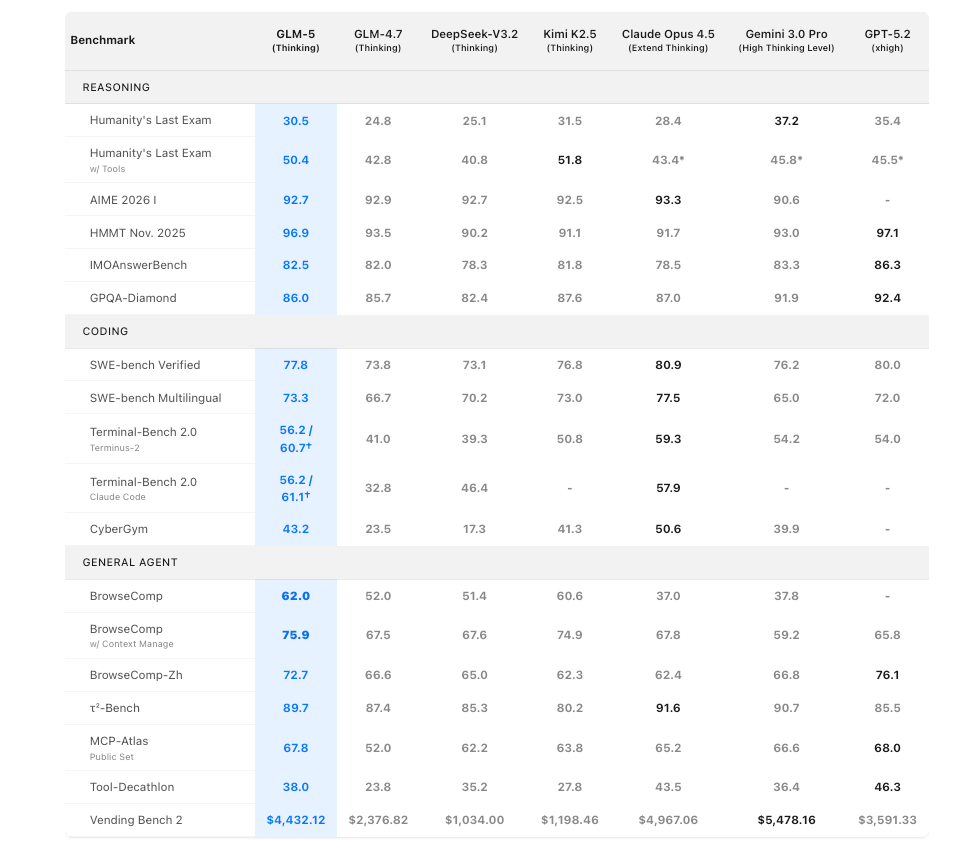
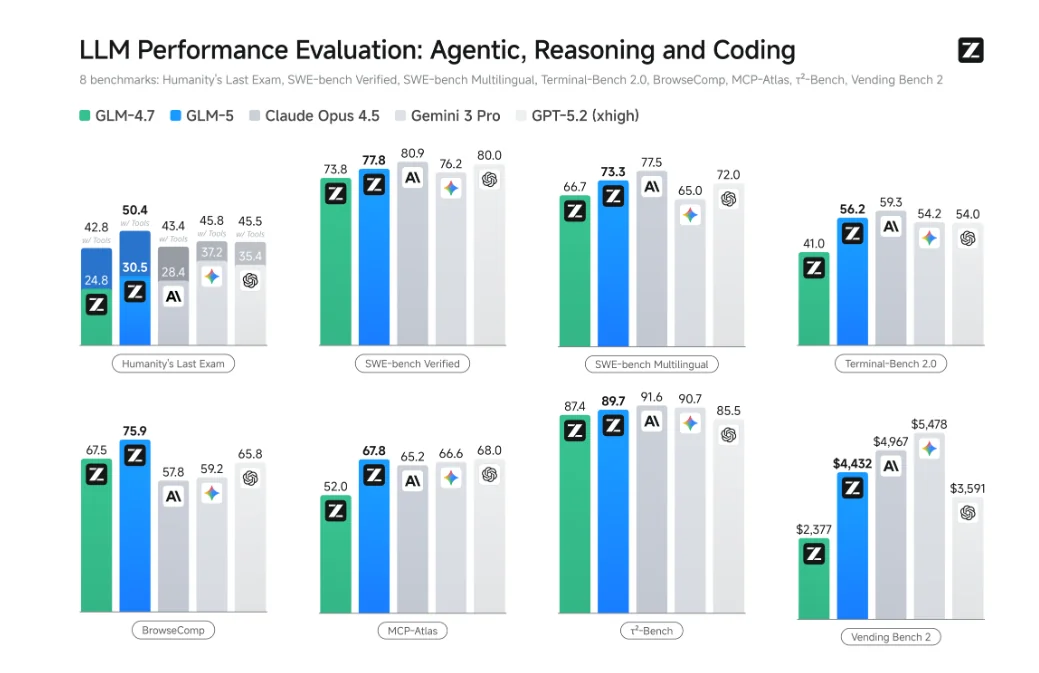
Z.ai released GLM-5 as the successor to GLM-4.7. The model scales to 744B total parameters with 40B active per token, trained on 28.5T tokens. It delivers state-of-the-art results on agentic benchmarks: 77.8% on SWE-bench Verified, 89.7% on τ²-Bench, and 61.1% on Terminal-Bench 2.0 with tools.
You benefit from a 200K context window thanks to DeepSeek Sparse Attention. The model excels at long-horizon reasoning, multi-turn tool calling, and complex code generation. Moreover, the open MIT license lets you run, modify, and even commercialize it without restrictions.
However, the raw model requires 1.65TB of storage and massive VRAM. Unsloth changed the game by releasing Dynamic 2.0 GGUF quantizations—UD-IQ2_XXS at 241GB (-85%) and 1-bit at 176GB (-89%). These versions preserve reasoning quality through intelligent layer upcasting while fitting on a 256GB unified-memory Mac or a single 24GB GPU paired with 256GB system RAM.
You run GLM-5 locally with these quantizations because they balance size, speed, and capability. Benchmarks show minimal degradation on coding and agent tasks compared to full precision.
Why Run GLM-5 Locally Instead of Using Cloud APIs?
You eliminate recurring costs. Cloud providers charge per token, and GLM-5's capabilities make heavy usage expensive fast. Local inference costs nothing beyond electricity.
You protect sensitive data. Enterprises and researchers keep proprietary code, medical records, or customer queries entirely offline.
You achieve lower latency. Local models respond in milliseconds for chat and tool-calling loops. You chain agents without network hops.
You customize freely. You fine-tune with Unsloth, create Modelfiles in Ollama, or build custom tools in vLLM.
Furthermore, you experiment without rate limits. You test 200K contexts, run 1000-turn conversations, or benchmark tool-calling accuracy overnight.
Hardware Requirements: What You Actually Need
You match your setup to the quantization level.
- 2-bit UD-IQ2_XXS (241GB): Runs on Apple M-series with 256GB unified memory or NVIDIA 24GB GPU + 256GB RAM with MoE offloading.
- 1-bit (176GB): Fits in 180GB RAM.
- FP8 (vLLM): Demands 8×H200 or equivalent—over 800GB VRAM total.
- Minimum viable: 64GB RAM + modern CPU for very small contexts; 128GB+ recommended for practical work.
You monitor usage with nvidia-smi on Linux or Activity Monitor on macOS. SSD storage accelerates offloading. You allocate at least 50GB free for the model files and cache.
Method 1: Run GLM-5 Locally with Unsloth GGUF in llama.cpp (Most Accessible)
You choose this path for maximum flexibility and efficiency on mixed hardware.
Step 1: Build llama.cpp with GLM-5 Support
You need the latest llama.cpp with PR 19460 merged.
apt-get update && apt-get install -y build-essential cmake curl libcurl4-openssl-dev pciutils
git clone https://github.com/ggml-org/llama.cpp
cd llama.cpp
git fetch origin pull/19460/head:MASTER
git checkout MASTER
mkdir build && cd build
cmake .. -DGGML_CUDA=ON  # Use -DGGML_CUDA=OFF for CPU-only
cmake --build . --config Release -j
cd ..
cp build/bin/llama-* .
You run this once. The build takes 10–20 minutes depending on your machine.
Step 2: Download the Quantized Model
You use huggingface_hub for fast transfers.
pip install -U huggingface_hub hf_transfer
export HF_HUB_ENABLE_HF_TRANSFER=1
hf download unsloth/GLM-5-GGUF --local-dir GLM-5-GGUF --include "*UD-IQ2_XXS*"
You now have the 241GB model split across shards.
Step 3: Launch Inference
You start the CLI for interactive use.
export LLAMA_CACHE="GLM-5-GGUF"
./llama-cli \
  -hf unsloth/GLM-5-GGUF:UD-IQ2_XXS \
  --jinja \
  --ctx-size 32768 \
  --flash-attn on \
  --temp 0.7 \
  --top-p 1.0 \
  --fit on
You add --threads 32 for CPU-heavy setups or -ot ".ffn_.*_exps.=CPU" to offload MoE experts.
Step 4: Serve as OpenAI API
You expose the model for applications.
./llama-server \
  --model GLM-5-GGUF/UD-IQ2_XXS/GLM-5-UD-IQ2_XXS-00001-of-00006.gguf \
  --alias "glm-5" \
  --fit on \
  --ctx-size 32768 \
  --port 8000 \
  --jinja
You now point any OpenAI client to http://localhost:8000/v1.
You achieve 3–8 tokens/second on a 24GB GPU with this setup. You scale context to 128K without crashing when you use --fit on.
Method 2: Run GLM-5 Locally with Ollama (Easiest for Beginners)
You prefer simplicity. Ollama handles downloads, quantization, and serving automatically.
Installation
You download from ollama.com and run the installer. On Linux:
curl -fsSL https://ollama.com/install.sh | sh
ollama serve
Pull and Run GLM-5
You use the community-optimized tag.
ollama pull glm-5:cloud
ollama run glm-5:cloud
You interact directly in the terminal or through the API at http://localhost:11434/v1.
Create a Custom Modelfile
You tailor the system prompt and parameters.
FROM glm-5:cloud
SYSTEM You are an expert software architect with deep knowledge of distributed systems.
PARAMETER temperature 0.6
PARAMETER num_ctx 131072
You build and run:
ollama create my-glm5 -f Modelfile
ollama run my-glm5
You integrate with Claude Code, Cursor, or Continue.dev by setting the Ollama endpoint. You gain a polished local alternative to cloud coding agents.
Method 3: Advanced Deployment with vLLM (Maximum Performance)
You need the highest throughput for production agents.
You install the nightly build:
uv pip install --upgrade vllm --extra-index-url https://wheels.vllm.ai/nightly/cu130
You launch the server (FP8 version requires 8×H200):
vllm serve unsloth/GLM-5-FP8 \
  --served-model-name glm-5 \
  --tensor-parallel-size 8 \
  --kv-cache-dtype fp8 \
  --tool-call-parser glm47 \
  --reasoning-parser glm45 \
  --max-model-len 200000 \
  --gpu-memory-utilization 0.93
You enable speculative decoding and tool calling. You serve thousands of requests per minute on a multi-GPU cluster.
Test and Debug Your Local GLM-5 with Apidog
You connect Apidog to your endpoint and verify everything works.
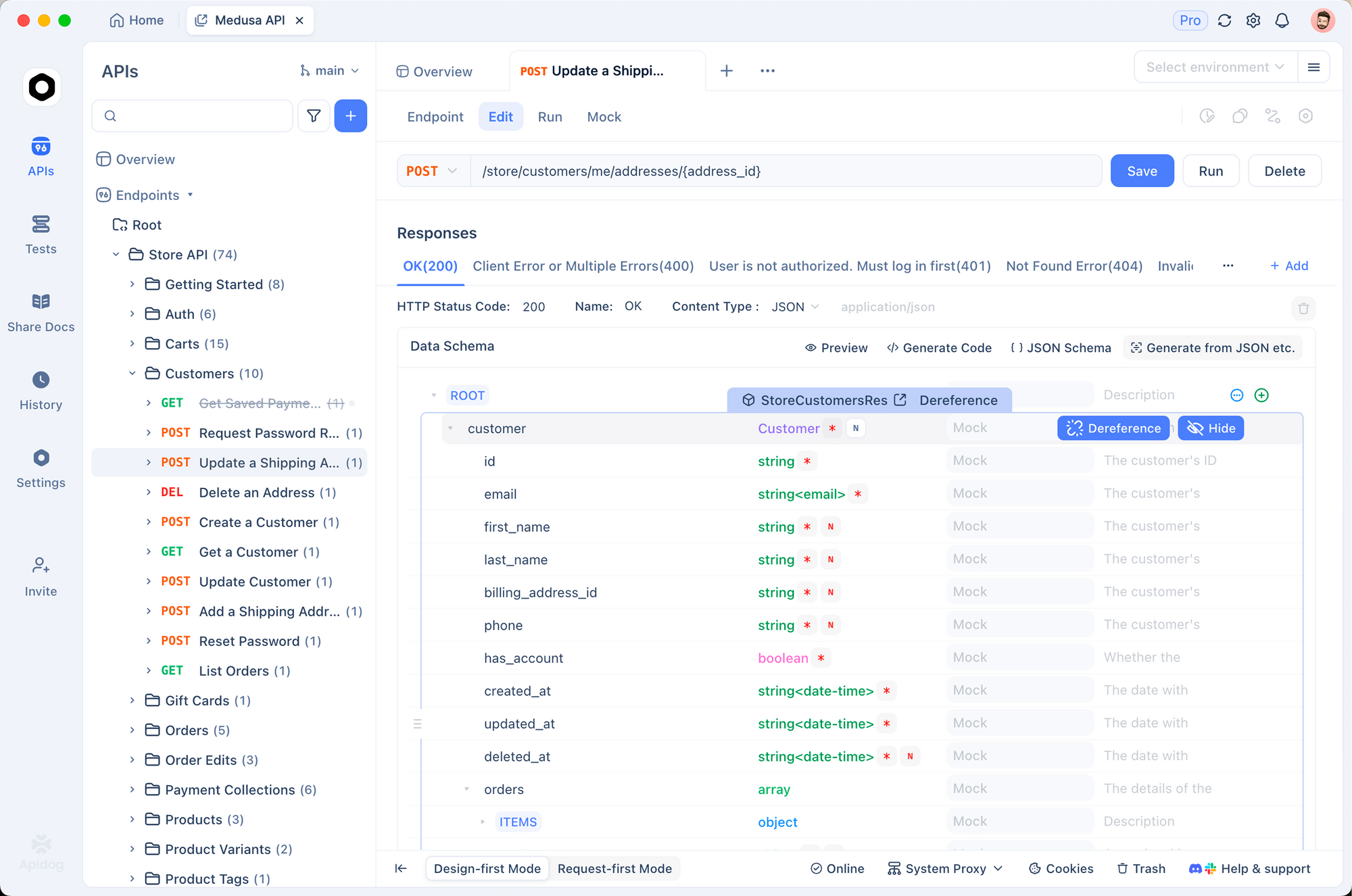
You create a new project, set base URL to http://localhost:8000/v1 (or 11434 for Ollama), and define the /chat/completions endpoint.
You build requests visually:
- Model:
glm-5 - Messages: system + user
- Temperature: 0.7
- Tools: define JSON schemas for function calling
You send requests, inspect streaming responses, and save collections for regression tests. You generate Python or JavaScript SDKs instantly. You mock responses for frontend teams.
Apidog turns your local GLM-5 into a first-class development platform. You iterate on agents, validate tool outputs, and measure latency—all without leaving the interface.
Performance Optimization Techniques
You squeeze more speed from your hardware.
- You enable flash attention and
--fit onin llama.cpp. - You offload only MoE experts to CPU when VRAM is tight.
- You use 4-bit for chat and 2-bit for agentic coding.
- You set
--prio 3in the server for higher process priority. - You monitor with
nvtoporhtopand adjust--n-gpu-layers.
You achieve 15–25 tokens/second on a dual RTX 4090 setup with these tweaks.
Common Issues and How You Fix Them
You encounter memory errors. You reduce context to 16K or offload more layers.
You see poor tool calling. You set temperature to 1.0 and top-p to 0.95, then use the --tool-call-parser glm47 flag.
You experience slow downloads. You enable hf_transfer and use a fast mirror.
You hit CUDA out of memory. You add --gpu-memory-utilization 0.85 and close background processes.
You always check the Unsloth docs and the GLM-5 GGUF repo for the latest shards.
If your hardware budget is tighter than GLM-5 demands, running GLM-4.7-Flash locally follows a nearly identical setup while requiring significantly fewer resources.
The Road Ahead: Local GLM-5 and Beyond
You witness the shift to sovereign AI. Models like GLM-5 prove that frontier capability runs on hardware you already own. You combine it with local vector databases, tool servers, and agent frameworks to build private, high-performance systems.
You join the community on Hugging Face, Reddit’s r/LocalLLaMA, and Unsloth’s Discord. You share Modelfiles, benchmark results, and custom quantizations.
You run GLM-5 locally today. You control the compute, the data, and the future of your AI stack.
Start with the 2-bit GGUF in llama.cpp. Download Apidog. Spin up the server. You will be amazed at what you can build when the model lives on your machine.
The era of truly local frontier models has arrived. You make the most of it.


