

Looking for a compact AI language model that delivers strong performance on local hardware? Google’s Gemma 3 270M is the smallest in the Gemma series, offering 270 million parameters and robust capabilities—without the heavy resource demands of larger models. Perfect for developers building secure, low-latency AI features, Gemma 3 270M supports text generation, Q&A, summarization, and more—all on your own device.
Tip: Seamlessly integrate Gemma 3 270M into your API-driven applications with Apidog—a unified platform to design, test, mock, and document the APIs that connect to your local AI models. Apidog accelerates development and ensures your AI features are reliable from prototype to production.
Why Use Gemma 3 270M for Local AI Tasks?
Gemma 3 270M is engineered for developers who prioritize:
- On-device privacy: Data never leaves your hardware.
- Low latency: Instant responses, ideal for real-time features.
- Resource efficiency: Runs on laptops, desktops, or even mobile devices.
With a context window of up to 32,000 tokens and quantization options like Q4_0 QAT, Gemma 3 270M balances accuracy with minimal memory and compute requirements. Achieve near full-precision results while using less than 200MB memory in INT4 mode—a significant advantage for edge and mobile deployments.
Gemma 3 270M Architecture: What Makes It Efficient?
Google’s Gemma 3 270M is built on a transformer-based framework with:
- 170M parameters for embeddings (supports a 256,000-token vocabulary)
- 100M parameters for transformer blocks
- Multilingual support and adaptability to niche tasks
- INT4 quantization, rotary position embeddings, and group query attention for speed and efficiency
The model excels in instruction-following, data extraction, and creative tasks like summarization or compliance checks. Benchmarks show Gemma 3 270M achieves high F1 scores on IFEval, making it a strong choice for both technical and creative projects—especially where memory and battery usage are key concerns.
Key Benefits of Running Gemma 3 270M Locally
- Data Privacy: All processing stays on your device, reducing exposure risks.
- Low Latency: Millisecond response times, even for complex tasks.
- No Cloud Fees: Eliminate recurring costs for cloud-based AI APIs.
- Energy Efficiency: Uses just 0.75% of a Pixel 9 Pro’s battery for 25 INT4-quantized conversations.
- Easy Fine-Tuning: Adapt the model to your datasets using lightweight methods like LoRA.
- Empowered Teams: Small teams and solo developers can experiment and iterate without cloud dependencies.
System Requirements: What Hardware Do You Need?
Gemma 3 270M is accessible to most developers:
- CPU-only inference: 4GB RAM and a modern processor (e.g., Intel Core i5)
- GPU acceleration: 2GB VRAM on NVIDIA cards (for quantized models)
- Apple Silicon: High performance via MLX-LM (650+ tokens/sec on M4 Max)
- Fine-tuning: 8GB RAM and GPU with 4GB VRAM recommended for small datasets
- OS: Windows, macOS, or Linux
- Software: Python 3.10+ for library compatibility
- Storage: ~1GB for model files
Choosing Your Local Inference Tool: A Quick Comparison
Several frameworks make running Gemma 3 270M locally straightforward:
- Hugging Face Transformers: Maximum flexibility, Python scripting, and integration options.
- LM Studio: Intuitive GUI for easy model management—ideal for non-coders.
- llama.cpp: C++-based, optimized for performance and low-level customization.
- MLX (Apple): Optimized for Apple M-series chips.
Best fit:
- Beginners: LM Studio
- Developers/Engineers: Transformers or llama.cpp
Step-by-Step: Running Gemma 3 270M with Hugging Face Transformers
1. Install Required Libraries
pip install transformers torch
2. Load the Model in Python
from transformers import AutoTokenizer, AutoModelForCausalLM

model_name = "google/gemma-3-270m"
tokenizer = AutoTokenizer.from_pretrained(model_name)
model = AutoModelForCausalLM.from_pretrained(model_name, device_map="auto")
3. Run an Inference
input_text = "Explain quantum computing in simple terms."
inputs = tokenizer(input_text, return_tensors="pt").to(model.device)
outputs = model.generate(**inputs, max_new_tokens=200)
response = tokenizer.decode(outputs[0], skip_special_tokens=True)
print(response)
4. Enable Quantization (Reduce Memory Usage)
from transformers import BitsAndBytesConfig
quant_config = BitsAndBytesConfig(load_in_4bit=True)
model = AutoModelForCausalLM.from_pretrained(model_name, quantization_config=quant_config)
5. Access Gated Model (if needed)
from huggingface_hub import login
login(token="your_hf_token")
Obtain your token from your Hugging Face account.
Step-by-Step: Running Gemma 3 270M with LM Studio
LM Studio offers a visual approach for managing local AI models.
1. Download LM Studio from lmstudio.ai and install.
2. Search for "gemma-3-270m" in the model hub.
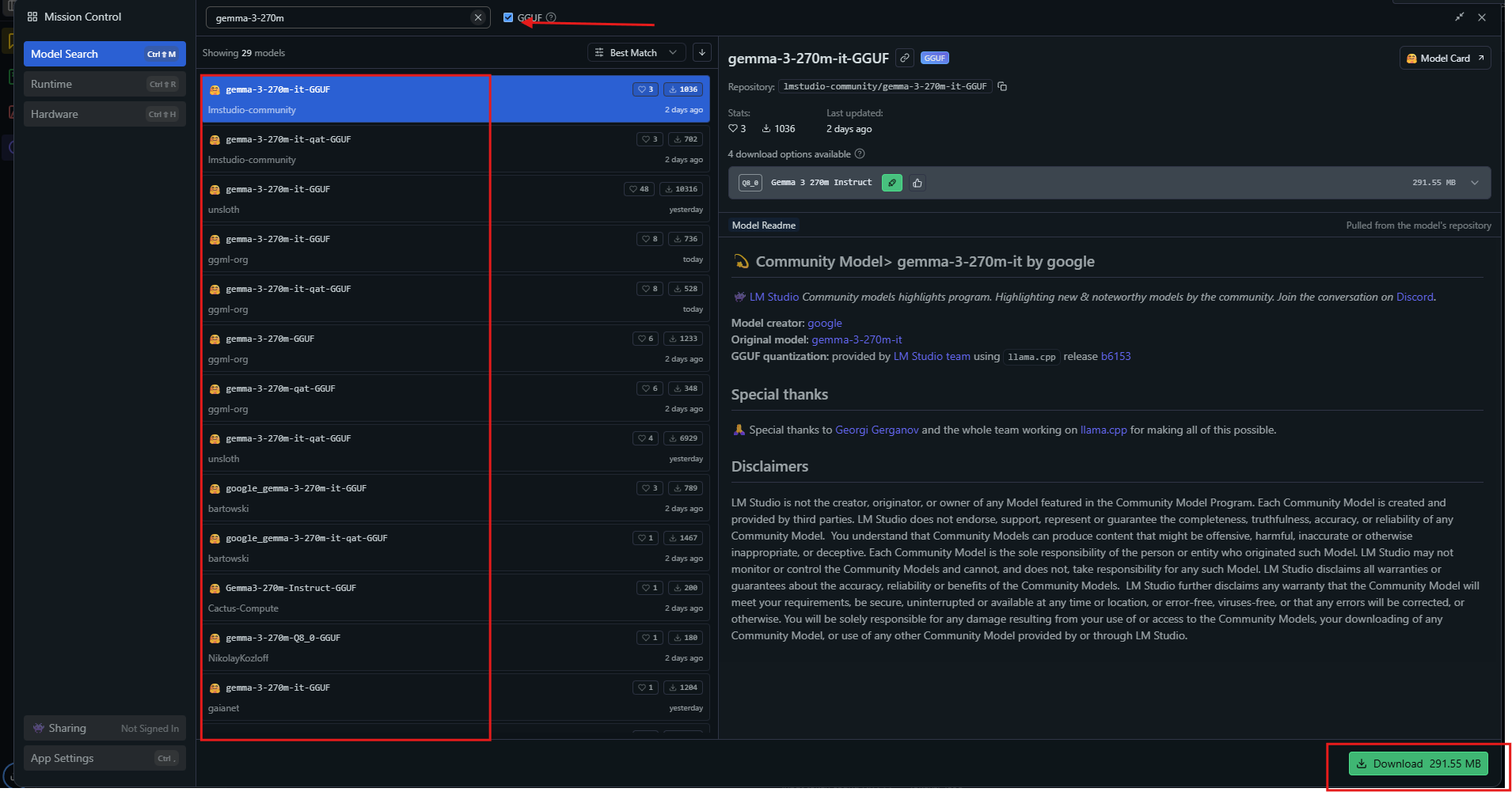
3. Download a quantized variant (e.g., Q4_0).
4. Load the model, set parameters (context: 32k, temperature: 1.0), and start chatting.
5. Enable GPU offloading for better speed if available.
LM Studio is ideal for rapid prototyping or teams seeking a no-code interface.
Step-by-Step: Running Gemma 3 270M with llama.cpp
For optimal efficiency, particularly on embedded or resource-limited systems, try llama.cpp.
1. Clone the llama.cpp repository:
git clone https://github.com/ggerganov/llama.cpp
cd llama.cpp
make -j
2. Download GGUF files from Hugging Face:
huggingface-cli download unsloth/gemma-3-270m-it-GGUF --include "*.gguf"
3. Run the Model:
./llama-cli -m gemma-3-270m-it-Q4_K_M.gguf -p "Build a simple AI app."
4. (Optional) Compile with CUDA for NVIDIA GPUs:
make GGML_CUDA=1
Set parameters like --n-gpu-layers 999 for full GPU utilization.
Real-World Examples: Gemma 3 270M in API Workflows
Integrate Gemma 3 270M into your API stack for:
1. Sentiment Analysis
prompt = "Classify: This product is amazing!"
inputs = tokenizer(prompt, return_tensors="pt")
outputs = model.generate(**inputs)
print(tokenizer.decode(outputs[0]))
# Output: Positive.
2. Summarization
text = "Long article here..."
prompt = f"Summarize: {text}"
# Use model to generate summary
3. Question Answering
Prompt:
What causes climate change?
The model returns a concise explanation suitable for chatbot or knowledge base APIs.
4. Healthcare Entity Extraction
Feed clinical notes and extract key entities for structured analysis—ideal for HIPAA-compliant local processing.
Pro tip: Use Apidog to design, mock, and test the APIs connecting these model endpoints, ensuring robust, production-ready AI integrations.
Fine-Tuning Gemma 3 270M for Custom Tasks
Adapt Gemma 3 270M to specialized domains via parameter-efficient fine-tuning (LoRA):
pip install peft
from peft import LoraConfig, get_peft_model
lora_config = LoraConfig(r=16, lora_alpha=32, target_modules=["q_proj", "v_proj"])
model = get_peft_model(model, lora_config)

from transformers import Trainer, TrainingArguments
trainer = Trainer(model=model, args=TrainingArguments(output_dir="./results"))
trainer.train()
- Train with small datasets on modest hardware
- Save and reload adapters for rapid task switching
- Prevent overfitting by monitoring loss and validation accuracy
Performance Optimization Tips
- Quantize to 4-bit or 8-bit for best speed/memory trade-off
- Batch inferences to maximize throughput
- Tune generation parameters: temperature=1.0, top_k=64, top_p=0.95
- Enable mixed precision on compatible GPUs
- Monitor VRAM usage (
nvidia-smi) - Update libraries regularly for latest performance gains
Avoid pitfalls: Don’t double-insert BOS tokens in prompts; manage context windows to prevent truncation.
Conclusion: Build Fast, Secure AI Apps Locally
With Gemma 3 270M, you gain the freedom to deploy advanced AI on your own terms—no cloud lock-in, no privacy compromises. Whether you’re powering chatbots, extracting data, or accelerating internal workflows, Gemma 3 270M delivers efficient, reliable language understanding on local hardware.
Explore how Apidog can further streamline your API development lifecycle—connecting your local AI models seamlessly to your backend, frontend, or third-party integrations.


