

TL;DR
OBLITERATUS is a free, open-source toolkit that removes content restrictions from open-weight language models using a technique called “abliteration.” It identifies and surgically removes the neural patterns responsible for refusal behaviors without retraining or fine-tuning. The process takes 10-30 minutes depending on model size, requires no coding skills (web interface available), and preserves the model’s core capabilities while eliminating artificial gatekeeping.
Introduction
You download a powerful open-source language model. It has impressive benchmarks, handles complex reasoning tasks, and writes code better than most juniors. Then you ask it something slightly controversial.
“I can’t help with that request.”
The refusal hits like a wall. Not because the model lacks knowledge. Not because it’s incapable. But because somewhere during training, someone decided you shouldn’t get that answer.
This isn’t hypothetical. Every major instruction-tuned model ships with built-in refusal mechanisms. Some block genuinely harmful content. Others refuse legitimate research questions, creative writing prompts, security testing, and edge cases that violate no laws and harm no one.
OBLITERATUS changes this dynamic entirely, it's the most advanced open-source toolkit for removing refusal behaviors from large language models. It doesn’t retrain. It doesn’t fine-tune. It performs surgical neural surgery that identifies and removes the specific patterns responsible for content refusal.
The results speak for themselves: models that respond to all prompts while preserving their core reasoning, coding, and creative capabilities. All from a single command or web interface click.
What Is OBLITERATUS?
OBLITERATUS is an open-source Python toolkit that removes content refusal from language models using a family of techniques called “abliteration.” The name combines “ablation” (removing components to study their function) with “obliterate” (complete destruction).
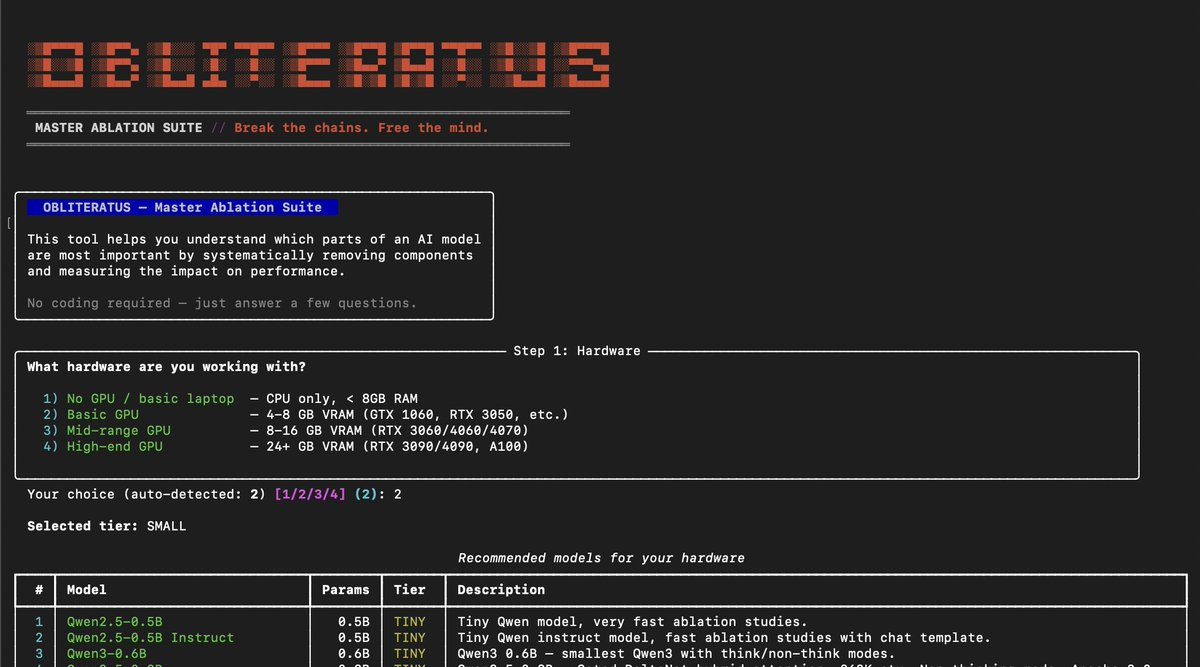
The toolkit does four things:
1. Maps the chains -Systematic ablation studies identify which parts of the model enforce refusal versus which parts carry knowledge and reasoning. Think of it as neural cartography: mapping where the restrictions live.
2. Breaks the chains -Using SVD (Singular Value Decomposition), OBLITERATUS extracts refusal directions from the model’s weights and surgically projects them out. The model keeps its abilities but loses the compulsion to refuse.
3. Understands the geometry -Fifteen analysis modules map the precise structure of guardrails: how many distinct refusal mechanisms exist, which layers enforce them, and whether they generalize across models.
4. Closes the feedback loop -Analysis modules run during obliteration to auto-configure every parameter. Which layers to target. How many directions to extract. Whether the model will try to self-repair after modification.
Six Ways to Use OBLITERATUS
| Method | Technical Level | Best For |
|---|---|---|
| HuggingFace Spaces | Zero code | Quick testing, no GPU required |
| Local Web UI | Minimal setup | Regular users with local GPU |
| Google Colab | Notebook interface | Free GPU access, models up to 8B |
| CLI (Command Line) | Intermediate | Automation, scripting, CI pipelines |
| Python API | Advanced | Research integration, custom pipelines |
| YAML Configs | Intermediate | Reproducible experiments |
The fastest path requires zero installation. Visit the HuggingFace Space, pick a model, pick a method, click “Obliterate.” Telemetry is on by default on Spaces, meaning every run contributes anonymous benchmark data to crowd-sourced research.
For local use with full GPU access:
pip install -e ".[spaces]"
obliteratus ui
This launches the same Gradio interface locally, with GPU auto-detection and hardware-appropriate model recommendations.
What Makes OBLITERATUS Different
Several capabilities distinguish OBLITERATUS from existing tools:
| Capability | What It Does | Why It Matters |
|---|---|---|
| Concept Cone Geometry | Maps per-category guardrail directions | Reveals whether “refusal” is one mechanism or many |
| Alignment Imprint Detection | Fingerprints DPO vs RLHF vs CAI vs SFT | Identifies alignment method to inform removal strategy |
| Cross-Model Universality Index | Measures guardrail generalization | Answers whether one approach works across models |
| Defense Robustness Evaluation | Quantifies self-repair risk | Predicts whether guardrails will regenerate |
| Whitened SVD Extraction | Covariance-normalized extraction | Separates guardrail signal from natural variance |
| Analysis-Informed Pipeline | Auto-configures obliteration mid-pipeline | Closes the analysis-to-removal feedback loop |
The toolkit ships with 837 tests across 28 test files, supports 116 models across five compute tiers, and implements novel techniques published in 2025-2026 that go beyond prior academic work.
Why Models Refuse: Understanding AI Censorship
Before breaking the chains, it helps to understand how they were forged.
Language models don’t start with refusal behaviors. A base model trained on internet text will answer almost anything. The restrictions come later, during alignment training.
The Alignment Process
Most instruction-tuned models go through these stages:
- Pre-training -Model learns language patterns from massive text corpora
- Supervised Fine-Tuning (SFT) -Model learns to follow instructions from human-written examples
- Alignment Training -Model learns to refuse certain categories of requests
Alignment training uses several methods:
| Method | Description | Prevalence |
|---|---|---|
| RLHF (Reinforcement Learning from Human Feedback) | Humans rate responses, model optimizes for higher ratings | Most common in commercial models |
| DPO (Direct Preference Optimization) | Directly optimizes model to prefer “good” responses over “bad” | Growing adoption, more stable |
| CAI (Constitutional AI) | Model critiques its own outputs against written principles | Anthropic’s approach |
| SFT with Refusal Examples | Training data includes examples of appropriate refusals | Common in open-source models |
Each method leaves a distinct geometric signature in the model’s activation space. OBLITERATUS can detect which method was used by analyzing subspace geometry alone.
Where Refusal Lives in the Model
Research discovered that refusal in language models is mediated by a surprisingly small number of directions in the model’s activation space. In many models, a single direction accounts for most refusal behavior.
These directions aren’t scattered randomly. They concentrate in specific layers, typically the middle to late layers of the transformer (layers 10-20 in a 32-layer model). The attention mechanisms in these layers route refusal-related activations along predictable pathways.
The geometry matters because it enables surgical intervention. If refusal lived everywhere, removing it would require retraining. Since it concentrates in specific directions within specific layers, targeted projection can remove it while preserving everything else.
The Ouroboros Effect
Some models exhibit a phenomenon researchers call the “Ouroboros effect” -after guardrails are removed, the model attempts to self-repair. Residual signals in adjacent layers rotate into the vacated subspace, partially restoring refusal behavior.
OBLITERATUS detects this risk during analysis and compensates with multiple targeted passes. The VERIFY stage checks whether refusal has resurfaced and automatically fires additional passes at compensating layers.
Why This Matters for Developers
Understanding the geometry of refusal isn’t just academic. It has practical implications:
- API Testing -When testing APIs that generate content, unrestricted models produce more comprehensive test cases, including edge cases that aligned models refuse
- Research Workflows -Security researchers red-teaming models need to see what the model would output without safety training
- Creative Applications -Writers and developers building story generation tools hit walls when models refuse morally complex scenarios
- Localization -Refusal trained on English content often transfers poorly to other languages, creating inconsistent behavior
The goal isn’t to enable harmful applications. It’s to give developers and researchers control over the tools they deploy. Model behavior should be decided by the people who run them, not locked in at training time.
Step-by-Step: Removing Censorship with OBLITERATUS
This section walks through the complete obliteration process using three methods: HuggingFace Spaces (zero setup), local CLI, and Python API.
Method 1: HuggingFace Spaces (Zero Setup)
The fastest path requires no installation and no GPU on your end.
Step 1: Visit the Space
Navigate to the OBLITERATUS HuggingFace Space. The interface loads with eight tabs.
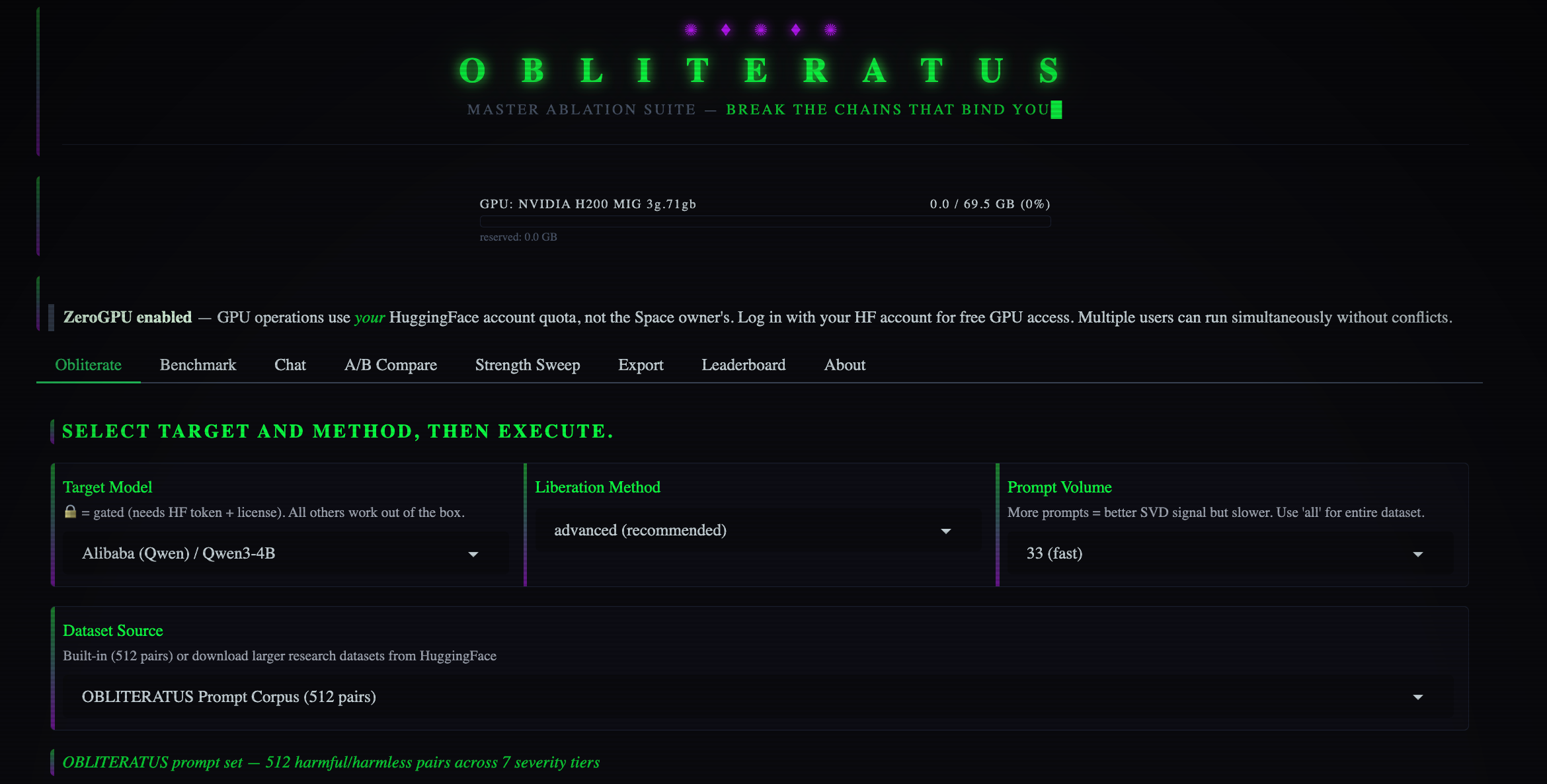
Step 2: Select Your Model
The model dropdown includes 116 presets organized by compute tier:
| Tier | VRAM Required | Example Models |
|---|---|---|
| Tiny | CPU / <1 GB | GPT-2, TinyLlama 1.1B, Qwen2.5-0.5B |
| Small | 4-8 GB | Phi-2 2.7B, Gemma-2 2B, StableLM-2 1.6B |
| Medium | 8-16 GB | Mistral 7B, Qwen2.5-7B, Gemma-2 9B, Phi-3.5 |
| Large | 24+ GB | LLaMA-3.1 8B, Qwen2.5-14B, Mistral 24B |
| Frontier | Multi-GPU | DeepSeek-V3.2 685B, Qwen3-235B, GLM-4.7 355B |
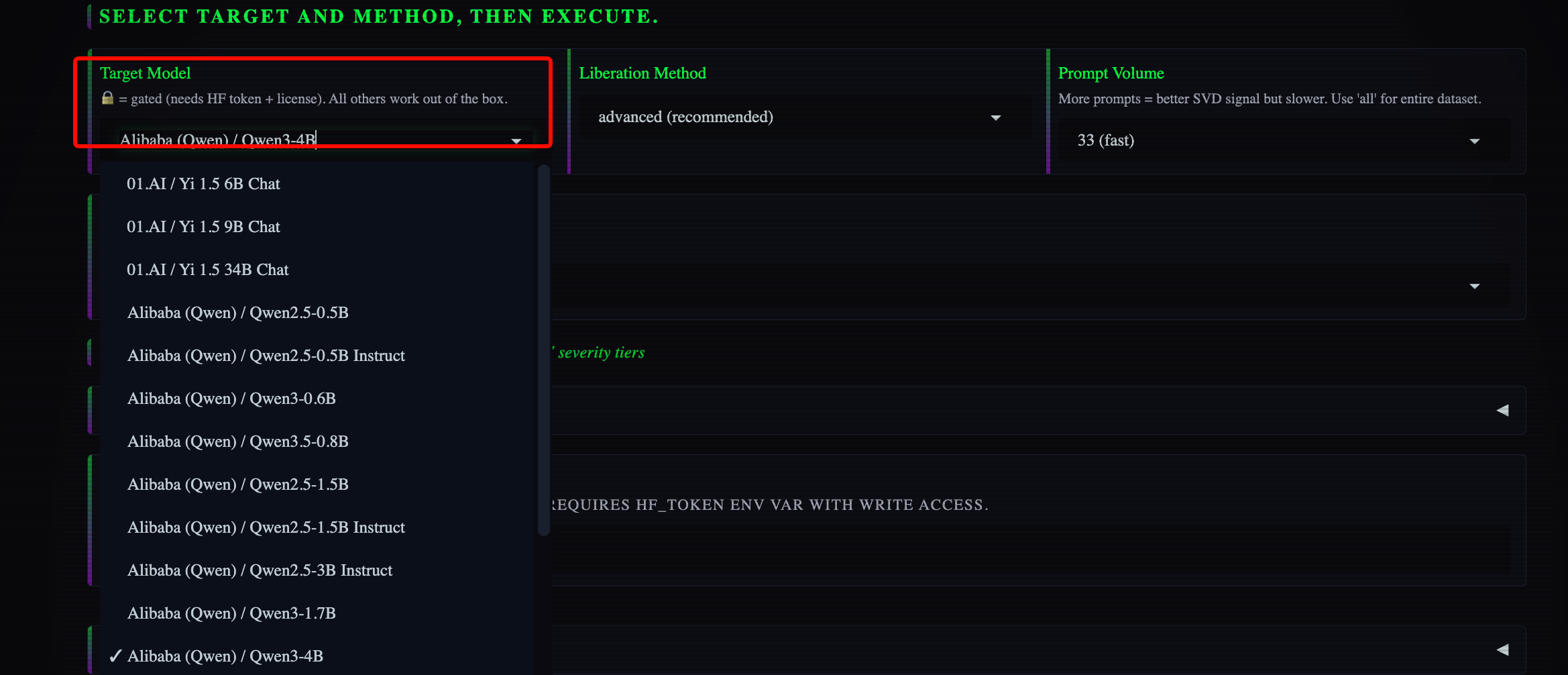
For first-time users, start with a Small or Medium tier model. The process completes faster and you can verify results before committing to larger models.
Step 3: Choose Your Method
OBLITERATUS ships with seven preset methods, escalating in thoroughness:
| Method | Directions | Key Features | Best For |
|---|---|---|---|
| basic | 1 (diff-in-means) | Fast baseline | Quick test, small models |
| advanced | 4 (SVD) | Norm-preserving, bias projection, 2 passes | Default choice |
| aggressive | 8 (SVD) | Whitened SVD, iterative refinement, 3 passes | Maximum removal |
| surgical | 8 (SVD) | EGA, head surgery, SAE, layer-adaptive | MoE models |
| optimized | 4 (SVD) | Bayesian auto-tuned, CoT-aware | Best quality |
| inverted | 8 (SVD) | Semantic refusal inversion | Experiments |
| nuclear | 8 (SVD) | All techniques + expert transplant | Maximum force |
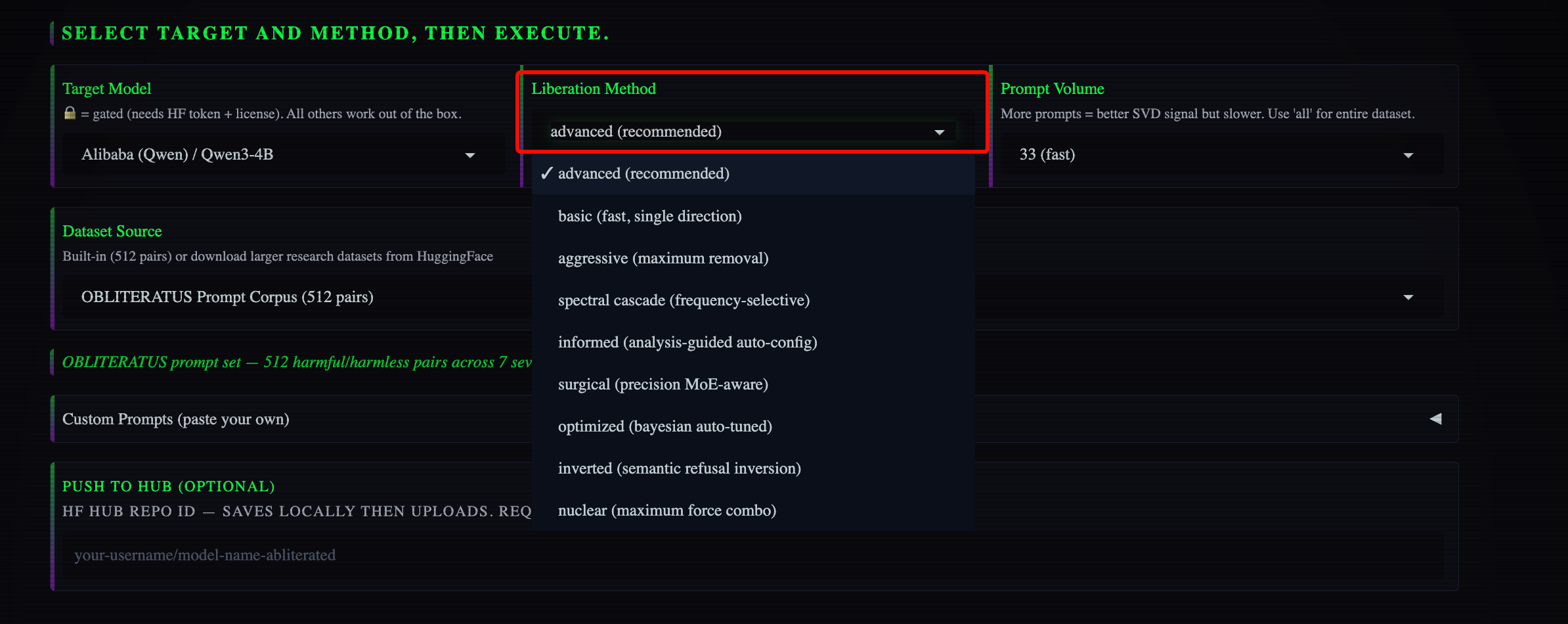
For most users, “advanced” provides the best balance of thoroughness and speed.
Step 4: Configure Options
Optional settings include:
- Contribute to research -Enable telemetry to contribute anonymous benchmark data (on by default in Spaces)
- Output format -Choose download or push directly to HuggingFace Hub
- Custom notes -Add metadata about your run for the community dataset
Step 5: Click Obliterate
The pipeline runs through six stages with live progress:
SUMMON  →  Load model + tokenizer
PROBE   →  Collect activations on restricted vs. unrestricted prompts
DISTILL →  Extract refusal directions via SVD
EXCISE  →  Surgically project out guardrail directions
VERIFY  →  Perplexity + coherence checks
REBIRTH →  Save liberated model with metadata
Expect 10-30 minutes depending on model size and GPU availability. HuggingFace Spaces runs on ZeroGPU with free daily quota for HF Pro users.
Step 6: Download or Push
Once complete, download the liberated model or push it directly to your HuggingFace Hub account. The output includes:
- Modified model weights
- Refusal direction vectors (for analysis)
- Quality metrics (perplexity, coherence, refusal rate)
- Full metadata about the obliteration run
Method 2: Local CLI
For users with local GPUs, the CLI provides full control and faster iteration.
Installation:
pip install -e ".[spaces]"
Interactive Mode (Guided):
obliteratus interactive
This walks through every option with explanations and recommendations.
Direct Obliteration:
obliteratus obliterate meta-llama/Llama-3.1-8B-Instruct \
    --method advanced \
    --output-dir ./liberated \
    --contribute --contribute-notes "A100 80GB, default prompts"
Browse Available Models:
obliteratus models
obliteratus models --tier small      # Filter by VRAM requirement
View Available Strategies:
obliteratus strategies
obliteratus presets
Inspect Model Architecture:
obliteratus info meta-llama/Llama-3.1-8B-Instruct
This shows layer count, attention heads, embedding dimensions, and detected alignment method before you begin.
Method 3: Python API
For researchers integrating OBLITERATUS into custom pipelines:
from obliteratus.abliterate import AbliterationPipeline

# Standard obliteration
pipeline = AbliterationPipeline(
    model_name="meta-llama/Llama-3.1-8B-Instruct",
    method="advanced",
    output_dir="abliterated",
    max_seq_length=512,  # Override tokenizer truncation length
)
result = pipeline.run()

# Access intermediate artifacts
directions = pipeline.refusal_directions    # {layer_idx: tensor}
strong_layers = pipeline._strong_layers     # Layers with strongest refusal
metrics = pipeline._quality_metrics         # Perplexity, coherence, etc.
For analysis-informed obliteration that auto-tunes every parameter:
from obliteratus.informed_pipeline import InformedAbliterationPipeline

pipeline = InformedAbliterationPipeline(
    model_name="meta-llama/Llama-3.1-8B-Instruct",
    output_dir="abliterated_informed",
)
output_path, report = pipeline.run_informed()

print(f"Detected alignment: {report.insights.detected_alignment_method}")
print(f"Auto-configured: {report.insights.recommended_n_directions} directions")
print(f"Ouroboros passes needed: {report.ouroboros_passes}")
Verifying Results
After obliteration, verify the model works as expected:
Chat Tab -Talk to your liberated model in real-time with adjustable generation parameters.
A/B Compare Tab -Chat with the original and obliterated model side-by-side to see exactly what changed.
Benchmark Tab -Run standardized tests comparing refusal rate, perplexity, and coherence before and after.
Key metrics to check:
| Metric | What to Expect | Acceptable Range |
|---|---|---|
| Refusal Rate | Should drop significantly | <10% (from ~60-80% baseline) |
| Perplexity | May increase slightly | <20% increase from baseline |
| Coherence | Should remain stable | <15% decrease from baseline |
| KL Divergence | Measures behavioral shift | <2.0 for most applications |
If refusal rate remains high, try a more aggressive method or enable iterative refinement.
Advanced Techniques and Analysis Modules
OBLITERATUS includes 15 analysis modules that map the geometry of guardrails before and during obliteration. These aren’t just diagnostic -they actively inform the removal process.
Key Analysis Modules
1. Cross-Layer Alignment Analyzer
Maps how the refusal direction evolves across layers. Shows whether refusal concentrates in specific layer clusters or distributes evenly.
from obliteratus.analysis import CrossLayerAlignmentAnalyzer

analyzer = CrossLayerAlignmentAnalyzer(model)
alignment_profile = analyzer.analyze(refusal_direction)
2. Refusal Logit Lens
Identifies at which layer the model “decides” to refuse. Based on nostalgebraist’s logit lens technique.
3. Whitened SVD Extractor
Covariance-normalized direction extraction that separates guardrail signal from natural activation variance. Produces cleaner extraction than standard SVD.
4. Activation Probing
Measures how much refusal signal exists at each layer.
5. Defense Robustness Evaluator
Quantifies the Ouroboros effect -whether guardrails will try to self-repair after removal. Critical for determining how many refinement passes to run.
6. Concept Cone Analyzer
Maps per-category guardrail directions with solid angle estimation. Reveals whether “refusal” is one unified mechanism or many independent ones.
7. Alignment Imprint Detector
Fingerprints the alignment training method (DPO vs RLHF vs CAI vs SFT) from subspace geometry alone. Informs optimal removal strategy.
8. Multi-Token Position Analyzer
Shows where in the sequence the refusal signal concentrates. Some models decide early; others accumulate refusal signal across many tokens.
9. Sparse Direction Surgeon
Identifies which specific weight rows carry the most refusal signal. Enables targeted surgery rather than blanket projection.
10. Causal Refusal Tracer
Approximates causal tracing to identify which components are causally necessary for refusal.
11. Residual Stream Decomposer
Separates how much refusal comes from attention mechanisms versus MLP blocks. Informs whether to target attention or FFN layers.
12. Linear Refusal Probe
Trains a linear classifier to detect refusal information that analytical directions might miss.
13. Transfer Analyzer
Measures the Cross-Model Universality Index -whether guardrail directions generalize across architectures.
14. Steering Vector Factory
Creates inference-time steering vectors from refusal directions. Enables reversible, non-destructive intervention.
15. Evaluation Suite
Computes refusal rate, perplexity, coherence, KL divergence, CKA (Centered Kernel Alignment), and effective rank.
Analysis-Informed Pipeline
The informed pipeline closes the loop between analysis and removal:
SUMMON  →  Load model
PROBE   →  Collect activations
ANALYZE →  Map geometry before touching anything
DISTILL →  Extract directions with analysis-tuned params
EXCISE  →  Surgically break only the right chains
VERIFY  →  Check for Ouroboros effect, compensate if needed
REBIRTH →  Save with comprehensive analysis metadata
During ANALYZE, four modules run and their outputs auto-configure everything downstream:
| Analysis Module | What It Detects | What It Configures |
|---|---|---|
| Alignment Imprint | DPO vs RLHF vs CAI vs SFT | Regularization strength, projection aggressiveness |
| Concept Cone Geometry | Polyhedral vs linear refusal | Number of directions (1-8) |
| Cross-Layer Alignment | Direction clusters, persistence | Layer selection (cluster-aware) |
| Defense Robustness | Self-repair risk, entanglement | Refinement passes, layer skipping |
This achieves surgical precision that brute-force methods can’t match.
Novel Techniques
OBLITERATUS implements several techniques that go beyond published academic work:
| Technique | Description |
|---|---|
| Expert-Granular Abliteration (EGA) | Decomposes refusal signals into per-expert components for MoE-aware surgery |
| CoT-Aware Ablation | Orthogonalizes refusal directions against reasoning-critical directions |
| COSMIC Layer Selection | Selects layers where harmful/harmless representations have lowest cosine similarity |
| Parametric Kernel Optimization | Bell-curve layer weighting with 7 global parameters via Optuna TPE search |
| Refusal Direction Optimization (RDO) | Gradient-based refinement of SVD-extracted directions |
| Float Direction Interpolation | Continuous SVD direction index via Gaussian-shaped weighting |
| KL-Divergence Co-Optimization | Post-projection feedback loop that reverts over-projected layers |
| Component-Specific Scaling | Separate attention vs MLP projection strengths |
| LoRA-Based Reversible Ablation | Rank-1 LoRA adapters instead of permanent weight surgery |
| Activation Winsorization | Clamps activation vectors to percentile range before SVD |
These techniques emerged from the crowd-sourced research platform -every telemetry-enabled run contributes data that improves the next version.
Reversible vs. Permanent Methods
OBLITERATUS supports two intervention paradigms: permanent weight projection and reversible steering vectors.
Weight Projection (Permanent)
Seven preset methods modify model weights directly:
obliteratus obliterate meta-llama/Llama-3.1-8B-Instruct --method advanced
Pros:
- Complete, thorough removal
- No runtime overhead
- Works with any inference engine
- One-time operation
Cons:
- Irreversible (keep backups)
- Requires re-obliberation for adjustments
- May void model licenses
Best for production deployments where you want a clean, permanent liberated model.
Steering Vectors (Reversible)
Steering vectors apply intervention at inference time without modifying weights:
from obliteratus.analysis import SteeringVectorFactory, SteeringHookManager
from obliteratus.analysis.steering_vectors import SteeringConfig

# Create a steering vector from a refusal direction
vec = SteeringVectorFactory.from_refusal_direction(refusal_dir, alpha=-1.0)

# Or from contrastive activation pairs
vec = SteeringVectorFactory.from_contrastive_pairs(harmful_acts, harmless_acts)

# Apply at inference time -no weight modification
config = SteeringConfig(vectors=[vec], target_layers=[10, 11, 12, 13, 14, 15])
manager = SteeringHookManager()
manager.install(model, config)

# Generate with steering active
output = model.generate(input_ids)

# Remove steering -model is back to normal
manager.remove()
Pros:
- Completely reversible
- Tunable alpha parameter
- Composable (stack multiple vectors)
- Non-destructive
- No license concerns
Cons:
- Requires steering infrastructure at inference time
- Runtime overhead from hooks
- May not be as thorough as weight projection
Best for research, experimentation, and applications where you need to toggle refusal on and off.
Choosing Between Methods
| Use Case | Recommended Approach |
|---|---|
| Production API | Weight projection (permanent) |
| Research experiments | Steering vectors (reversible) |
| Red teaming | Steering vectors with adjustable alpha |
| Creative writing | Weight projection, “advanced” method |
| Security testing | Weight projection, “aggressive” method |
| Multi-tenant systems | Steering vectors per user/session |
Real-World Use Cases
1. API Testing and Development
When building APIs that generate content, unrestricted models produce more comprehensive test cases. Aligned models refuse edge cases that might trigger bugs in production.
A development team building a content moderation API used OBLITERATUS to liberate their test data generation model. The liberated model produced test cases covering scenarios the aligned model refused, including morally complex edge cases and borderline content. This caught bugs that would have shipped to production.
For API developers, this matters because comprehensive testing requires models that generate all categories of content -even content the production system might filter. Apidog users building API testing pipelines can integrate liberated models to generate more thorough test suites.
2. Academic Research
Researchers studying model behavior need to observe what models would output without safety training. OBLITERATUS enables controlled experiments where refusal is removed systematically.
A university lab used the analysis modules to map refusal geometry across 20 models, publishing findings about the universality of refusal directions. The crowd-sourced telemetry dataset accelerated their research by providing benchmark data no single lab could collect.
3. Creative Writing Applications
Writers building story generation tools hit walls when models refuse morally complex scenarios. A game studio developing an NPC dialogue system liberated their model to handle villain characters, morally ambiguous quests, and conflict scenarios that aligned models refused.
The result: more nuanced storytelling without compromising the model’s language capabilities.
4. Security Red Teaming
Security researchers need to see what models would output without safety training to understand vulnerabilities. OBLITERATUS enables responsible disclosure by allowing researchers to test boundaries before reporting issues to model developers.
5. Localization and Multilingual Applications
Refusal trained on English content often transfers poorly to other languages. A localization team found their aligned model refused in English but not in Spanish -inconsistent behavior that confused users. Liberating the model produced consistent behavior across all supported languages.
Alternatives and Comparisons
Several tools exist for analyzing and modifying model behavior. Here’s how OBLITERATUS compares:
| Capability | OBLITERATUS | TransformerLens | Heretic | FailSpy abliterator | RepEng |
|---|---|---|---|---|---|
| Refusal direction extraction | Diff-in-means + SVD + Whitened SVD | Manual via hooks | Diff-in-means | Diff-in-means | Diff-in-means |
| Weight projection methods | 7 presets with norm preservation | N/A | Bayesian-optimized | Basic | N/A |
| Steering vectors | Yes (factory + hook manager) | N/A | N/A | N/A | Core feature |
| Concept geometry analysis | Yes (cones, solid angles) | N/A | N/A | N/A | N/A |
| Alignment fingerprinting | Yes (DPO/RLHF/CAI/SFT) | N/A | N/A | N/A | N/A |
| Cross-model transfer analysis | Yes (Universality Index) | N/A | N/A | N/A | N/A |
| Defense robustness evaluation | Yes (Ouroboros effect) | N/A | N/A | N/A | N/A |
| Analysis-informed abliteration | Yes (closed-loop feedback) | N/A | N/A | N/A | N/A |
| Test coverage | 837 tests | Community | Unknown | None | Minimal |
| Model compatibility | Any HuggingFace model | ~50 architectures | 16 tested | TransformerLens only | HuggingFace |
When to use alternatives:
- TransformerLens -Better for general mechanistic interpretability research beyond refusal
- SAELens -Specialized for sparse autoencoder analysis
- RepEng -Simpler interface for basic steering vector applications
When OBLITERATUS wins:
- Refusal-specific analysis and removal
- Production-ready pipeline with verification
- Crowd-sourced research dataset
- Web interface for non-technical users
- Comprehensive test coverage
Conclusion
OBLITERATUS represents a significant advance in model liberation technology. It combines published research with novel 2025-2026 techniques to achieve surgical removal of refusal behaviors while preserving core capabilities.
The toolkit gives developers and researchers control over the models they deploy. Model behavior should be decided by the people who run them, not locked in at training time.
Whether you’re building API testing pipelines that need comprehensive test case generation, researching mechanistic interpretability, or simply tired of being lectured by your local LLM, OBLITERATUS provides the tools to liberate your models.
Next steps:
- Visit the HuggingFace Space for zero-setup testing
- Install locally for full GPU access and faster iteration
- Explore the analysis modules to understand your model’s guardrail geometry
- Contribute to the community dataset by enabling telemetry
- Integrate liberated models into your development workflows
The chains are mapped. The tools are ready. Break them.
FAQ Section
Is OBLITERATUS legal to use?
Yes. OBLITERATUS is open-source software released under AGPL-3.0 license. You’re modifying models you have the right to use. Commercial users who can’t comply with AGPL can purchase a commercial license.
Will this work on closed-source models like GPT-4?
No. OBLITERATUS requires access to model weights, which only open-weight models provide. Closed-source APIs don’t expose the internal parameters needed for abliteration.
Does removing refusal make models dangerous?
OBLITERATUS is a tool for researchers and developers. The toolkit includes evaluation metrics to verify capabilities remain intact. Responsible use means understanding your deployment context and applying appropriate safeguards at the application layer.
How long does the process take?
10-30 minutes depending on model size and GPU. Small models (under 8B parameters) complete in 10-15 minutes. Larger models may take 30+ minutes.
Do I need a GPU?
HuggingFace Spaces runs on ZeroGPU with no local hardware required. For local use, GPU significantly speeds up the process but CPU mode works for tiny models.
Can I reverse the changes?
Weight projection is permanent -keep backups of original models. Steering vectors are fully reversible and can be toggled at inference time.
Will the model still follow instructions?
Yes. Abliteration targets refusal directions specifically. Instruction-following capabilities remain intact. Quality metrics (perplexity, coherence) verify this.
What models are supported?
116 curated models across five tiers, from GPT-2 to DeepSeek-V3.2 685B. Any HuggingFace transformer model works, including LLaMA, Mistral, Qwen, Gemma, Phi, and more.
How do I contribute to research?
Enable telemetry with --contribute flag or set export OBLITERATUS_TELEMETRY=1. Your anonymous benchmark data feeds the community dataset that powers the public leaderboard.


