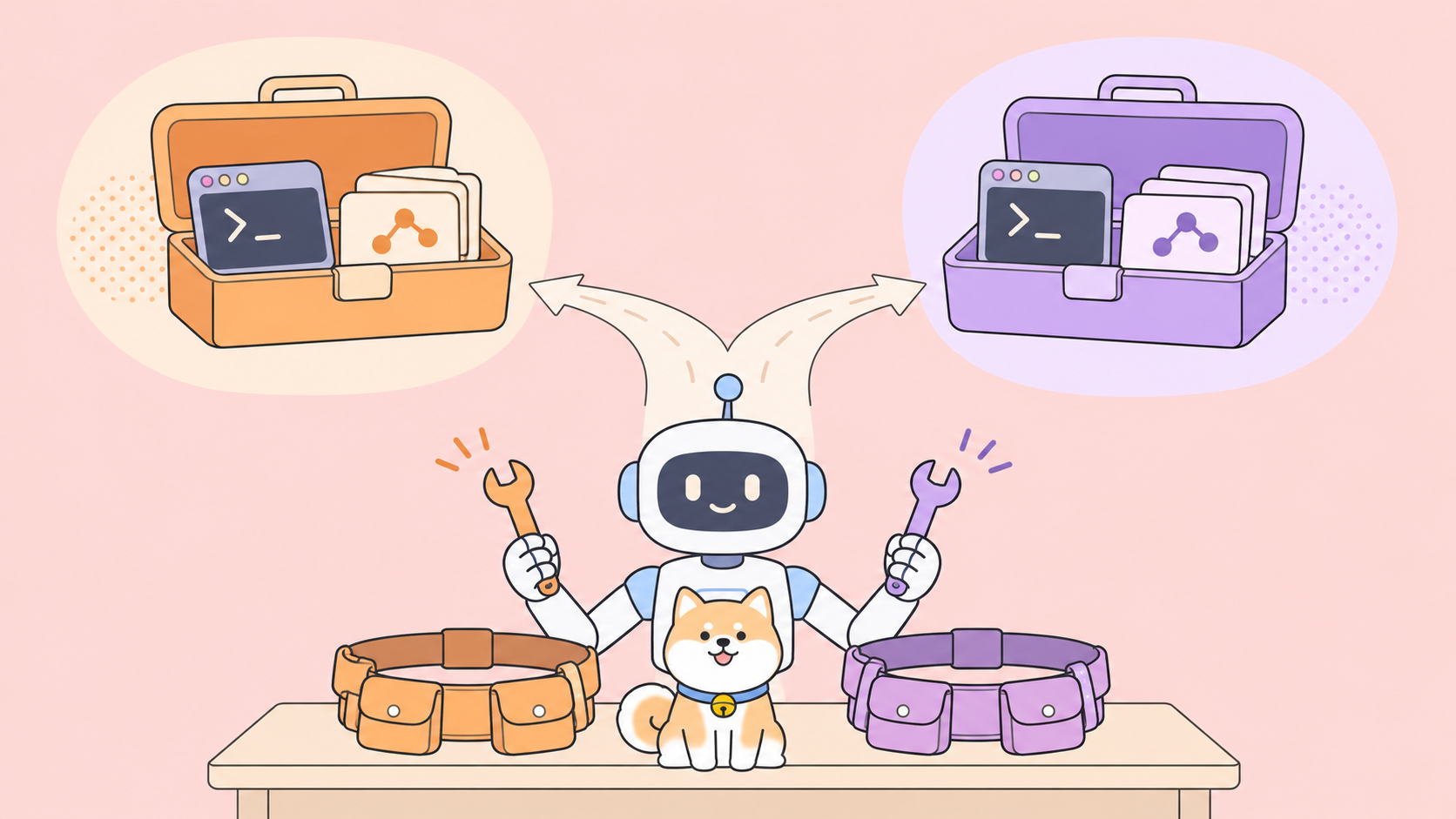
The Postman plugin for Claude Code and Apidog CLI solve the same problem: they give your coding agent real API tooling so it stops guessing at endpoints. Pick the Postman plugin if your team already lives in Postman workspaces and wants Context Graph or Secret Scanner in the loop. Pick Apidog CLI if you want one agent-ready CLI that works across agents, validates every write before it hits the server, and gives a team of up to 4 people a free plan.
What is the Postman plugin for Claude Code?
The Postman plugin for Claude Code is a set of skills that make Claude Code run the real Postman CLI for each stage of API work: discover, design, mock, test, document and gate. It ships through Anthropic’s official plugin marketplace, and an api-engineer skill routes each request to a specialist skill.
Postman’s hands-on guide, published November 9, 2026, installs it with two commands:
claude plugin marketplace add anthropics/claude-plugins-official
claude plugin install postman@claude-plugins-official
A bootstrap skill installs the Postman CLI the first time Claude needs it. You need Claude Code, Node.js 18 or later and a Postman account; the guide says the free plan works, and local commands like linting, mocking and collection runs need no sign-in.
The skill list is broad:
| Skill | What it does |
|---|---|
bootstrap |
Finds the CLI, authenticates, links the repo to a workspace |
api-discovery |
Searches workspaces, finds public APIs through Orbit, queries Context Graph |
api-mocking |
Generates and runs mocks from a spec or collection |
api-testing |
Runs requests and collections with pm.test assertions |
api-documentation |
Generates agent-friendly docs |
ai-readiness |
Scores a spec for agent usability |
ci-integration |
Adds lint, test and readiness gates to CI |
A SessionStart hook reminds Claude on every startup, clear and compact to send API work through api-engineer, so the agent doesn’t forget the tooling mid-session.
How the Postman plugin routes your agent’s work
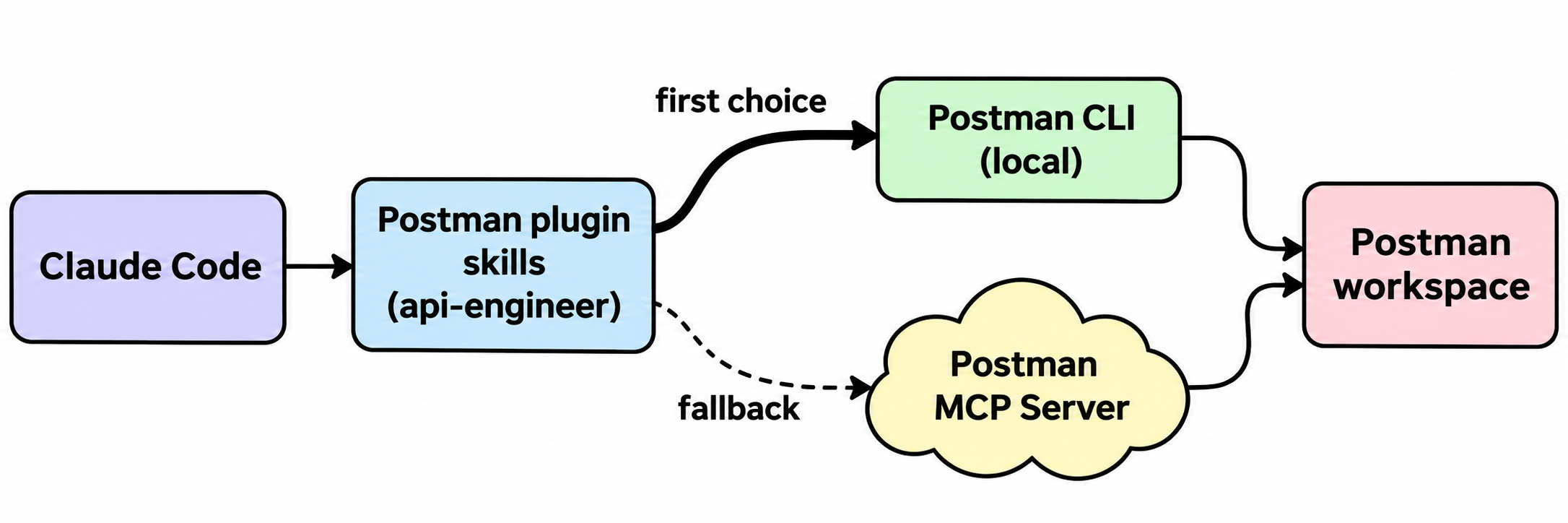
The plugin prefers the local CLI. Postman’s leaked-credential walkthrough (November 10, 2026) spells it out: the plugin sends requests to the Postman CLI whenever the CLI can complete them, and falls back to the hosted Postman MCP Server at mcp.postman.com only for tasks the CLI doesn’t support. In the versions tested, that meant Secret Scanner, audit logs and collection roles.
Three examples from Postman’s posts:
- Incident response without opening the app. The agent located a leaked bearer token, found 32 downstream consumers with Context Graph, moved the token into a vault secret, re-ran the collection and closed the findings only after the human confirmed revocation. The author issued the new token on the service side.
- Shared simulations across agent sessions. The simulations post (November 12, 2026) ran two Claude Code sessions on one workspace. Agent A published four simulations, including a 402 payment-declined case and an 8-second payment timeout. Agent B pulled them with
postman simulation listandpostman simulation run <simulation-id> --port 4000, and the timeout exposed a real bug: the checkout’s 3-second client timeout fired first, leaving the charge status unknown. - Context Graph for impact questions.
postman context-graph ask "..." --waitanswers “what could break if we change this API?” from a map built from Postman, GitHub and New Relic data.
Postman states the fine print plainly. Secret Scanner and audit logs need the Enterprise plan, and scanning internal workspaces also needs the Advanced Security Administration add-on. Mocks don’t hot reload. Some CLI commands send run results and analytics to Postman by default; the guide points to --no-report-events to opt out.
What is Apidog CLI for coding agents?
Apidog CLI is a command-line tool that lets any coding agent design, mock, test and document APIs in an Apidog project. It isn’t tied to one agent: you install it once, add the Apidog skill to whichever agent you use (Claude Code, Codex, Cursor and others), and the agent drives the same apidog commands.
Version 2.2.12 covers endpoints, schemas, mocks, environments, test cases, scenarios, suites, imports, exports, docs sites and branches. Two choices make it agent-friendly:
- Validate before write. Every command that takes JSON tells the agent to run
apidog cli-schema get <key>for the payload shape andapidog cli-schema validate <key> --file <path>before writing. Bad payloads fail locally instead of as a server error and a retry. - AI branches.
apidog branch create --type ai --from <sourceBranchName>gives the agent its own branch. The help text says AI branch changes aren’t written back automatically; the agent asks you before it merges.
Apidog shipped this after building an MCP server first. The team wrote up why in We Built 126 MCP Tools, and its internal comparison of MCP against CLI plus skill measured about 30% fewer tool calls and 25% fewer tokens on typical tasks.
Postman plugin vs Apidog CLI: side-by-side
Here’s how the two compare on the things your agent touches, based on Postman’s posts and apidog --help as of November 16, 2026:
| Postman plugin for Claude Code | Apidog CLI + skill | |
|---|---|---|
| Install | 2 claude plugin commands; CLI auto-installed |
npm install -g apidog-cli@latest + skill install |
| Agents | Claude Code (plugin marketplace) | Any agent that runs shell commands |
| Execution path | Postman CLI first, hosted MCP Server as fallback | CLI only |
| Payload safety | Skills guide the agent | cli-schema validate gate before every JSON write |
| Mocking | postman mock generate/run, shared simulations |
apidog mock expectations in the project |
| Testing | Collections with pm.test, collection run |
Test cases, scenarios, suites via apidog run |
| Impact analysis | Context Graph queries | Not a built-in feature |
| Security workflows | Secret Scanner, vault (Enterprise for scanner and audit logs) | Not covered by the CLI |
| Agent safety rail | Guide advises the agent never run workspace push |
AI branches with human-approved merge |
| Free tier | Free plan is single-player | Free plan covers up to 4 users |
Postman goes deeper on dependency mapping and incident response. Apidog goes wider on agent support and gates every write with validation.
Which one uses fewer tokens?
Nobody has published a head-to-head, and each headline number measures something different.
Postman’s Context Graph benchmark (November 4, 2026) reports 43% fewer input tokens and 42% less working time. The model was GPT 6.1 Terra, not Claude Code, on 17 questions about one 802-repository GitHub organization. Each comparison ran once, graph query charges were excluded, and end-to-end time including the graph wait improved 26%. It measures Context Graph on code search, not the plugin on everyday API work.
Apidog’s figures compare its own MCP server against CLI plus skill on tasks like adding a test case. That’s an architecture choice inside one product, not Apidog against Postman.
Both vendors moved from “load every tool into context” to a CLI the agent calls on demand, and that pattern is what saves tokens. Run both on your own API with one fixed prompt and compare the session token counts.
Pricing: what each costs your team
Pricing, checked on November 16, 2026:
- Postman. Per the Postman pricing page, Free and Solo are single-player plans. Solo is $9 per month billed annually, Team is $19 per user per month billed annually ($23 monthly), and Enterprise is contact-sales. Context Graph queries include 1,000 per month on Free and 5,000 on paid plans, then $0.01 per query. The plugin’s Secret Scanner workflow needs Enterprise.
- Apidog. The Free plan covers up to 4 users.
For two to four developers sharing one API project on a free plan, that difference decides it. For an Enterprise Postman shop, the plugin adds agent access to tools you already pay for.
Let Claude Code drive Apidog CLI
Don’t hand-build test cases while an agent sits idle in the next pane. Install the CLI once and give it one prompt.
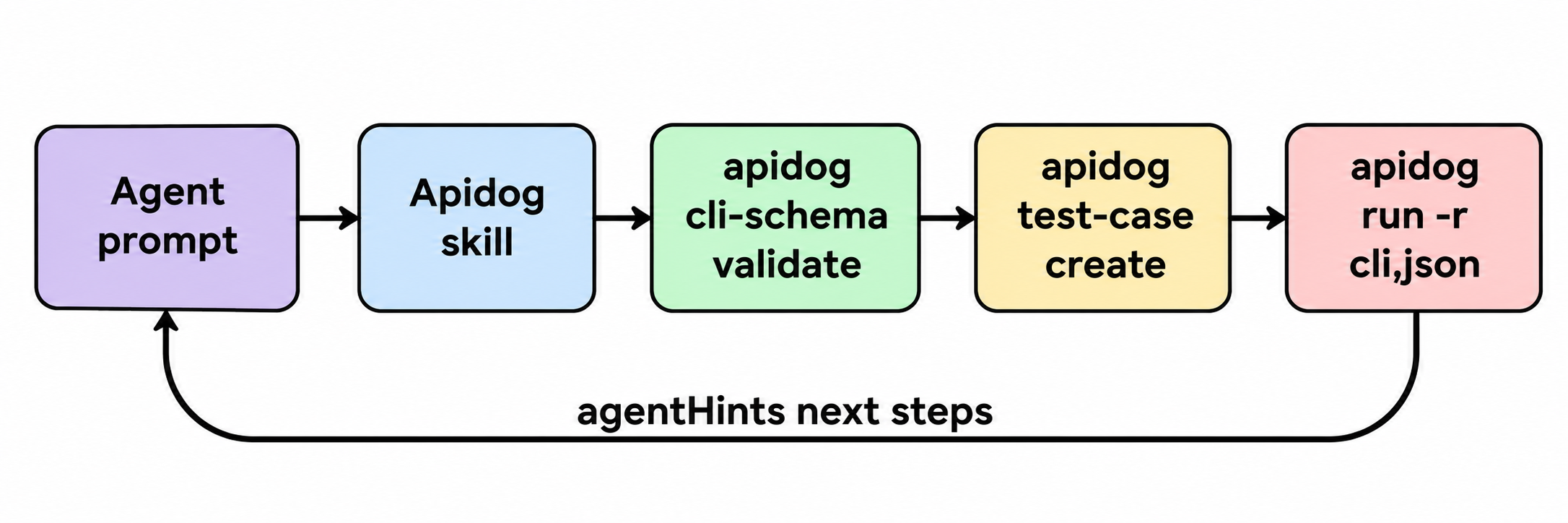
Setup takes three commands:
npm install -g apidog-cli@latest
apidog auth login --with-token <YOUR_TOKEN>
npx -y skills add https://apidog.com   # pick Claude Code when prompted
apidog skill install also installs or updates the skill. Or tell your agent to read the installation guide and set it up.
Then give Claude Code one prompt, using the same Orders API as Postman’s guide so you can run both tools on one spec:
Import ./openapi.yaml into Apidog project <projectId>. Then create a test case
for POST /orders that asserts a 201 status and an "id" field in the response,
run it against environment <envId>, and summarize any failures.
The agent reads the skill, then runs commands like these:
apidog import --project <projectId> --format openapi --file ./openapi.yaml
apidog cli-schema get test-case-create
apidog cli-schema validate test-case-create --file case.json
apidog test-case create --project <projectId> --file case.json
apidog run --test-case <caseId> --project <projectId> -e <envId> -r cli,json
A bad payload stops at cli-schema validate. Add --upload-report and the run appears in the Apidog app for your team. The same apidog run call with -r junit drops into a pipeline; see Apidog CLI in CI/CD and the full Claude Code setup guide.
Which one should your agent use?
Choose the Postman plugin for Claude Code if:
- Your APIs, collections and specs already live in Postman workspaces.
- You want Context Graph impact queries before changing a shared API.
- You’re on Enterprise and want Secret Scanner and audit logs inside the agent loop.
Choose Apidog CLI if:
- Your team uses more than one coding agent, or might switch.
- You want every agent write validated locally before it reaches the server.
- You want agent edits isolated on AI branches until a human merges.
- You’re a team of two to four that needs shared projects on a free plan.
For CI runners specifically, see Apidog CLI vs Postman CLI and our Postman Claude Skills review.
FAQ
Is the Postman plugin for Claude Code free? The plugin installs from Anthropic’s official marketplace, and Postman’s guide says the free plan works for the core workflow. Secret Scanner and audit logs need Enterprise, and Context Graph queries past 1,000 a month on Free cost $0.01 each.
Does the Postman plugin use MCP or the CLI? Both. It routes work to the Postman CLI whenever the CLI can complete it and falls back to the hosted Postman MCP Server for tasks the CLI doesn’t cover, such as Secret Scanner and audit logs.
Does Apidog CLI work with Claude Code? Yes. Install the CLI, add the Apidog skill with npx -y skills add https://apidog.com or apidog skill install, and Claude Code runs apidog commands from your prompt. The same setup works in Codex, Cursor and other agents.
Can I move Postman collections into Apidog with the CLI? Yes. apidog import --project <projectId> --format postman --file <path> imports an exported Postman collection into an Apidog project.
Is the 43% token saving about the Claude Code plugin? No. Postman’s 43% figure comes from a Context Graph benchmark run with GPT 6.1 Terra on 17 code-search questions, each run once. It doesn’t measure the Claude Code plugin on day-to-day API tasks.