
Most developers running multiple AI agents hit the same wall around agent number five. You’ve got Claude Code in one terminal rewriting a backend service, Codex in another generating tests, Cursor editing a component, and three more tabs you forgot to check. Nobody knows what anyone else is doing. Costs spiral. Two agents duplicate the same work. One runs for six hours and produces nothing useful because nobody gave it a clear objective.
Paperclip fixes this. It’s an open-source orchestration platform that turns your scattered AI agents into a structured company, complete with org charts, assigned roles, task management, budget limits, and audit logs. It hit 35,000+ GitHub stars in under three weeks, which tells you how many developers were sitting on the same frustration.
This article walks you through setting it up, structuring your first agent company, and running it so work actually gets done without you watching every terminal.
What Paperclip is (and what it isn’t)
Before you install anything, understand what you’re getting.
Paperclip is an orchestration layer. It coordinates agents, tracks their work, controls their budgets, and gives them context about the company’s goals. It does not build agents, replace your AI provider, or add a chat interface.
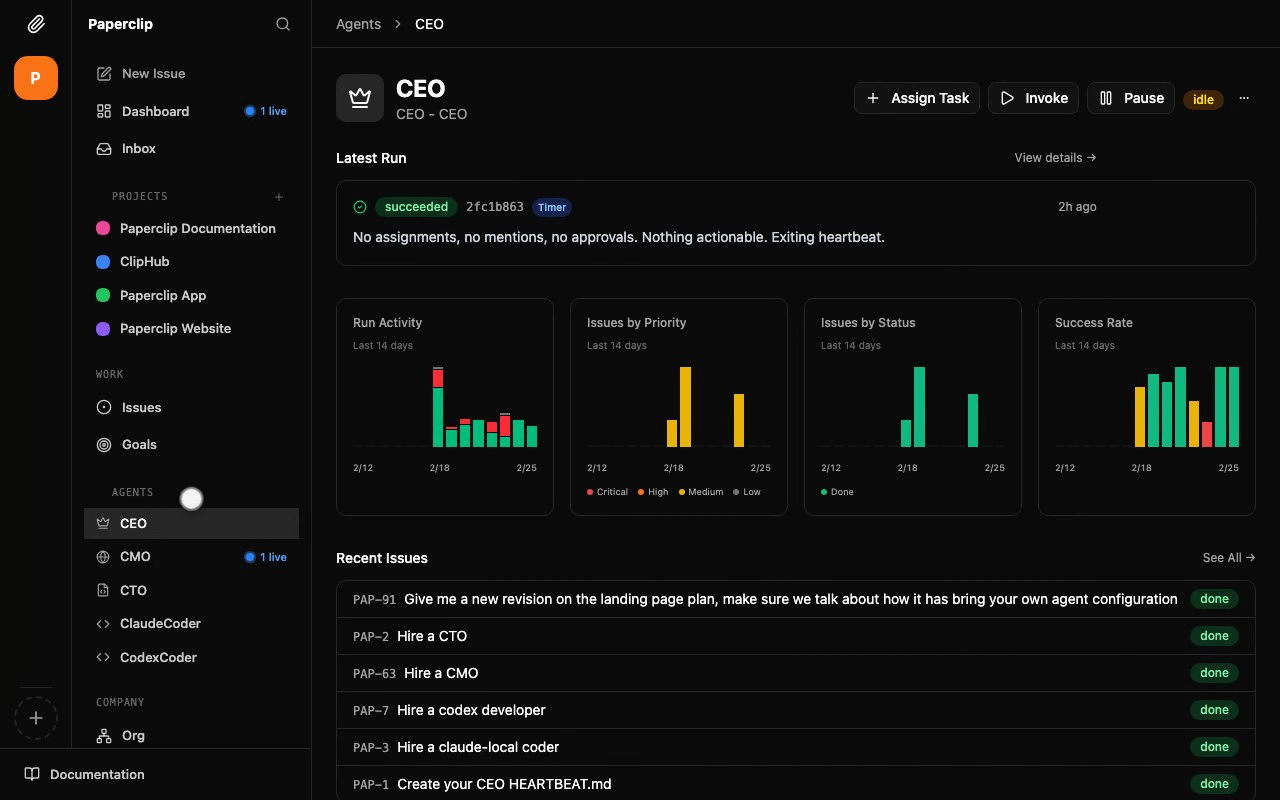
The mental model the Paperclip team uses: “If Claude Code is an employee, Paperclip is the company.”
That means:
- Agents have roles, not just prompts
- Tasks have owners, not just open terminals
- Budgets have hard limits, not just vibes
- Everything is logged in an audit trail
Paperclip works with Claude Code, OpenAI Codex, Cursor, Gemini CLI, and any agent that can receive a webhook or heartbeat signal. You bring the agents. Paperclip runs the company.
It is explicitly not:
- A chatbot UI
- A drag-and-drop workflow builder like n8n or Zapier
- A framework for writing agents
- Useful for single-agent use cases
If you’re running one AI agent occasionally, Paperclip is overkill. If you’re running three or more agents on ongoing work, it’s the missing piece.
Installing Paperclip
You need Node.js 20+, pnpm 9.15+, and that’s it. Paperclip ships with an embedded PostgreSQL database, so you don’t need to set up external storage.
The fastest way to start:
npx paperclipai onboard --yes
This downloads the CLI, runs onboarding with sensible defaults, and starts the server on port 3100. Open http://127.0.0.1:3100 and you’re looking at the dashboard.
If you want to contribute or dig into the code:
git clone https://github.com/paperclipai/paperclip.git
cd paperclip
pnpm install
pnpm dev
If you prefer Docker:
docker compose -f docker-compose.quickstart.yml up --build
What gets created on disk:
Paperclip stores everything under ~/.paperclip/instances/default/:
~/.paperclip/instances/default/
  config.json          — server and storage settings
  db/                  — embedded PostgreSQL data files
  secrets/master.key   — encryption key (auto-generated)
  logs/                — server logs
  data/storage/        — file attachments
  workspaces/<agent>/  — per-agent working directories
Local mode uses local_trusted auth by default, which skips login and uses a synthetic “Board” user. You can start using the dashboard immediately, no account creation needed.
Once you’re in, run the health check:
paperclipai doctor
If anything is misconfigured, --repair fixes most issues automatically:
paperclipai doctor --repair
Setting up your first company
In Paperclip, a “company” is the top-level container for your agents, tasks, goals, and budgets. Think of it as a project, except every project member is an AI agent with a role and a reporting line.
From the dashboard, create a new company and give it a mission statement. This isn’t decorative. Every task an agent receives traces back to the company mission, so agents have context for why they’re doing the work, not just what to do. This matters for decision-making in longer agentic runs.
A simple example mission: “Build and maintain a REST API for customer order management. Prioritize correctness over speed. Document every public endpoint.”
That one statement gives your agents a filter for every decision they make.
Adding your first agents
Each agent in Paperclip has an adapter that defines which AI tool it uses and how it communicates.
The supported adapters out of the box:
| Agent | Adapter type | Package |
|---|---|---|
| Claude Code | claude_local |
@paperclipai/adapter-claude-local |
| OpenAI Codex | codex_local |
@paperclipai/adapter-codex-local |
| Gemini CLI | gemini_local |
@paperclipai/adapter-gemini-local |
| Cursor | cursor |
@paperclipai/adapter-cursor-local |
| HTTP webhooks | HTTP adapter | custom endpoint |
To add a Claude Code agent via CLI:
paperclipai agent local-cli "Backend Engineer" --company-id <your-company-id>
This bootstraps the agent, installs its skills in ~/.claude/skills, and generates API credentials. The agent now exists in your company org chart and can receive task assignments.
Configuring a Claude agent (set in the UI or per-agent config):
| Field | What it does |
|---|---|
model |
Which Claude model to use (e.g., claude-sonnet-4-6) |
cwd |
Working directory for the agent (auto-created if missing) |
promptTemplate |
System prompt with {{variable}} substitution |
maxTurnsPerRun |
Max agentic turns per heartbeat (default: 300) |
timeoutSec |
Hard execution limit (0 = no timeout) |
Model allocation by role is worth thinking through before you start. Running Opus on every agent gets expensive fast. A practical split:
- CEO / orchestration agents: Sonnet (strategic reasoning, worth the cost)
- Manager agents: Haiku (routing and delegation, cheap and fast)
- Creative / coding ICs: Sonnet (output quality matters here)
- Formulaic ICs: Haiku (boilerplate generation, test scaffolding, migrations)
This allocation can cut your monthly agent spend by 40-60% compared to running Sonnet everywhere, without meaningful quality loss on routine tasks.
Structuring your agent org
Here’s a working structure for a small software project:
CEO (Sonnet)
 ├── CTO (Haiku)
 │    ├── Backend Engineer (Sonnet)
 │    ├── Frontend Engineer (Sonnet)
 │    └── QA Engineer (Haiku)
 └── Technical Writer (Haiku)
The CEO agent holds the mission and breaks it into goals. The CTO routes goals to engineering agents. Engineers do the work. QA validates. The writer documents.
Each agent has a heartbeat interval, the frequency at which it wakes up, checks its assigned tasks, does work, and exits. Agents don’t run continuously. They wake, execute, and sleep. This is what keeps costs from spiraling.
Recommended intervals:
- Coding agents: 600 seconds (10 minutes)
- On-demand agents: 86,400 seconds (once a day) with wake-on-demand enabled
- Minimum safe interval: 30 seconds (lower than this risks cost overruns and spam)
How the heartbeat works
Understanding the heartbeat model is key to getting reliable work out of your agents.
Every time an agent wakes, it follows a nine-step protocol:
- Confirm identity via
GET /api/agents/me - Handle any pending approval callbacks
- Fetch assigned tasks from
GET /api/companies/{companyId}/issues - Prioritize: in-progress tasks first, then todo; skip blocked tasks unless they can be unblocked
- Check out the task via
POST /api/issues/{issueId}/checkout(if another agent already took it, the response is 409 and this agent moves on) - Read the full task context and comment thread
- Do the work
- Update the task with comments and status changes
- Delegate subtasks with parent and goal IDs if needed
The checkout mechanism at step 5 is what prevents duplicate work. Two agents can’t pick up the same task. If one is working on it, the other skips it automatically.
Paperclip injects context into every agent run via environment variables:
PAPERCLIP_TASK_ID          # which task triggered this run
PAPERCLIP_WAKE_REASON      # why the agent woke (timer, mention, assignment)
PAPERCLIP_AGENT_ID         # the agent's identity
PAPERCLIP_API_URL          # URL to call back to Paperclip's API
Agents can use these to post updates, create subtasks, request approvals, and delegate — all within a single heartbeat.
Assigning tasks and tracking work
Tasks in Paperclip work like GitHub issues crossed with a project management tool. Create one from the UI or CLI:
paperclipai issue create \
  --company-id <id> \
  --title "Add pagination to the orders endpoint" \
  --assignee-agent-id <backend-engineer-id>
Tasks can have:
- Parent tasks for breaking large work into subtasks
- Goal links so agents know which company objective this serves
- Comments for context, approval requests, and status updates
- @-mentions to wake a specific agent on-demand (no waiting for the next heartbeat)
You can view all open tasks from the CLI:
paperclipai issue list
Or in the dashboard, where tasks show their current owner, status, and which heartbeat run last touched them.
Budget control that actually works
This is one of the most useful features in Paperclip, and the most overlooked by people who are new to multi-agent setups.
Each agent gets a monthly token budget. When it hits 80%, the agent automatically shifts to critical-only tasks. When it hits 100%, it pauses completely.
Set a budget in the agent configuration. The community-suggested starting point is $20-50/month per agent tier. You can track burn rate per agent, cost per heartbeat, and cumulative monthly spend all from the dashboard.
The cost dashboard shows which agents are efficient and which are burning tokens on unfocused work. If an agent’s cost-per-heartbeat is climbing, it’s usually a sign the prompts are too vague or the task scope is too wide. You fix it by tightening the assignment, not by raising the budget.
Without budget controls, a misconfigured agent running on a 30-second interval with Extended Thinking enabled can burn through hundreds of dollars before you notice. Paperclip stops that from happening automatically.
Runtime skills: teaching agents new workflows without retraining
One of the more powerful features in Paperclip is skill injection. When an agent runs, Paperclip’s adapter creates symlinks to SKILL.md files in the agent’s config directory and passes them via --add-dir. The agent reads the skill file as part of its context and follows the workflow.
This means you can teach an agent a new process, such as how to write commit messages, how to handle database migrations, or how to format API documentation, by writing a markdown file. No prompt rewriting. No redeployment.
You write the skill:
# SKILL: Database migrations

When creating a migration:
1. Never modify existing migration files
2. Use descriptive names: YYYYMMDD_description.sql
3. Include both up and down SQL
4. Test locally before committing
5. Add a comment explaining the business reason for the change
Save it to the skills directory, assign it to your backend agent, and every future heartbeat follows that process.
If you’re testing APIs built by your agents
When your agents are building APIs, you need a way to test what they produce fast. Apidog fits naturally here. It handles API design, mock servers, and automated tests in one place, so when your backend agent ships an endpoint, you can validate it immediately without switching between Swagger, Postman, and a separate mock tool.
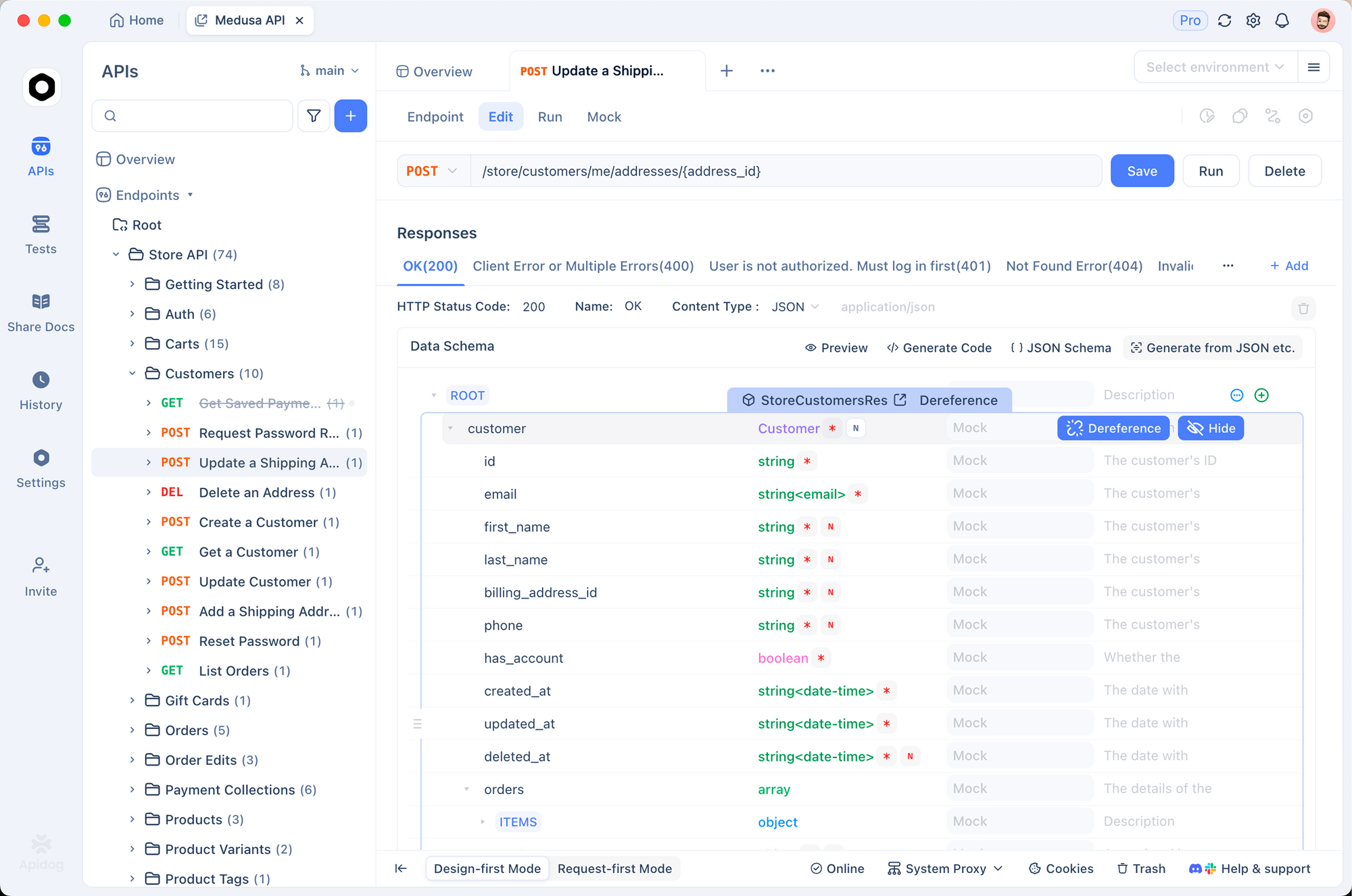
You can auto-generate test suites from your OpenAPI spec, run them against the agent’s output, and feed the results back as a task comment. The agent picks it up on the next heartbeat and fixes the failures. The full loop, from code to test to fix, runs without a human in the middle.
Apidog supports REST, GraphQL, and gRPC, and it’s free to start.
Managing multiple instances
Paperclip supports multiple isolated instances on one machine via the PAPERCLIP_INSTANCE_ID env var or the --instance flag. Each instance has its own config, database, ports, and workspaces.
For local development, the worktree command creates a fully isolated dev instance per git branch:
paperclipai worktree:make feature/orders-pagination
This gives you separate ports, config, and a database scoped to that branch. You can run a test company against feature code without touching your production agent setup. When you’re done, tear it down and it’s gone.
Multi-agent setups that work
A few patterns that work well once you have the basics running:
Goal cascade: Write one high-level goal at the company level, then let your CEO agent break it into project goals, and each manager agent break those into tasks. Agents do better work when they understand the chain of purpose rather than receiving isolated instructions.
Approval gates: For any agent action that touches production, staging environments, or billing, configure an approval gate. The agent pauses, sends you a notification, and waits for a thumbs-up before continuing. It adds one manual step but catches issues before they’re expensive.
On-demand wakes via @-mention: Instead of a fast heartbeat interval (and the token cost that comes with it), set agents to a slow interval and use @-mentions in task comments to wake them immediately when needed. You get fast response times on important work without paying for constant polling.
Separate workspace per agent: Each agent has its own working directory under workspaces/<agent-id>/. Keep these clean. Agents that share a workspace step on each other’s work. The isolation is built in; don’t fight it.
Another option in the same category: Sharkly
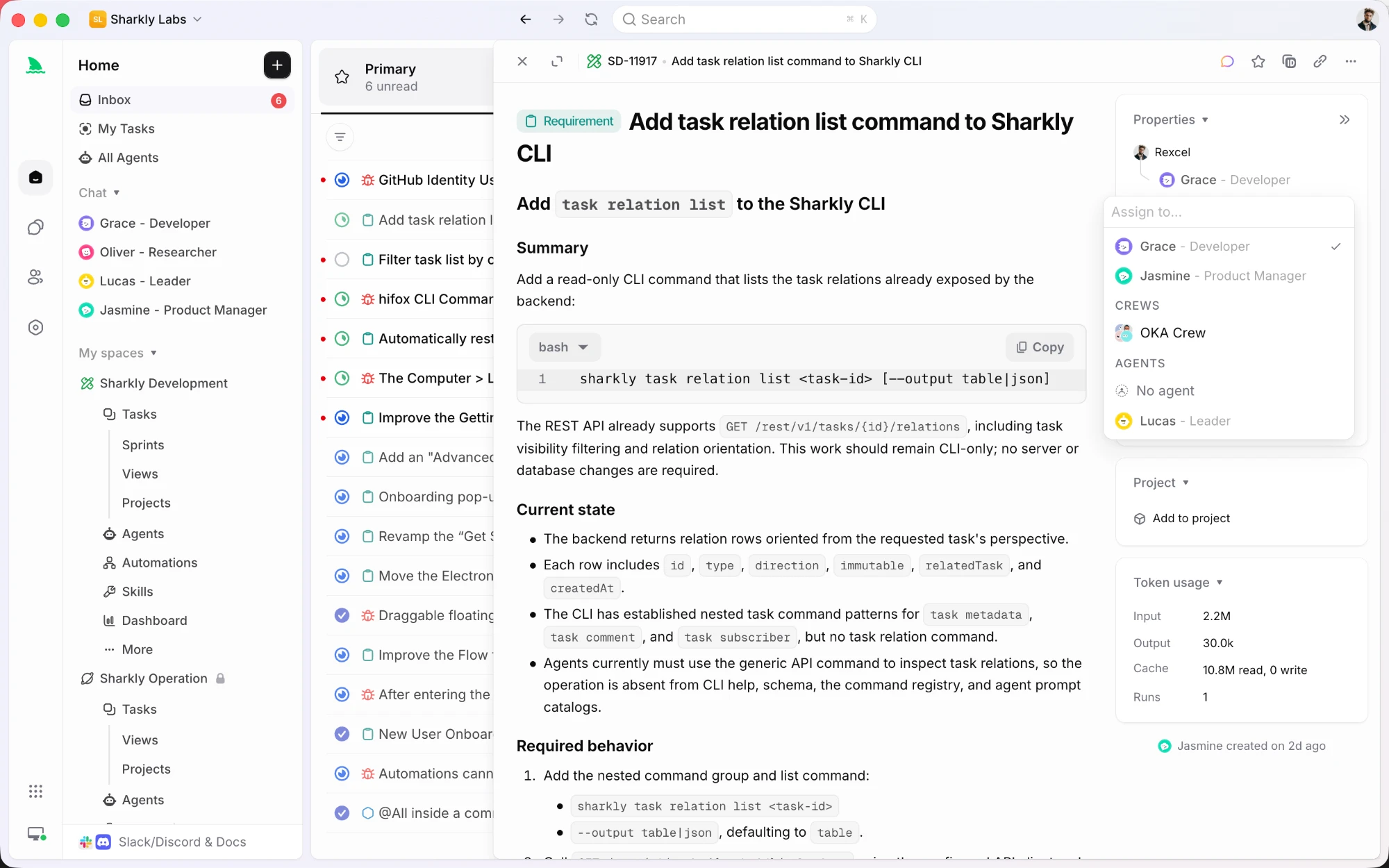
Paperclip models an agent company. Sharkly models an agent team inside a project tracker, which is a different trade-off worth knowing if you got this far.
Structure comes from spaces, projects, sprints, and tasks rather than org charts and heartbeats. A task can be assigned to a person, to an Agent, or to a Crew, which is a leader agent plus other agents and people. Crews run leader-first: the leader reads the task context, decides which members to pull in, and combines their results in one place instead of every agent starting at once.
Execution is bring your own. You connect a Computer (laptop, server, or container) and Sharkly uses the runtimes already installed on it, so model usage runs through the subscriptions and API keys you already pay for. Repository work can run in a separate worktree per task, which is what keeps parallel agents from stepping on each other.
If you liked Paperclip's idea but want sprints, Jira sync, and a task history a human reviewer can audit, it is worth a look.
Getting started takes about 15 minutes
The first time through, onboarding takes under 15 minutes. One command installs and starts the server. Adding your first agent and creating a task takes another five minutes in the dashboard.
The harder part is structuring your company well: writing a clear mission, picking the right model for each role, and setting sensible budget limits. Spend 30 minutes on that before you start assigning work and your agents will produce much better results than if you wire everything up fast and hope for the best.
If you’re already running more than two AI agents on any ongoing project, this is worth an afternoon of setup. The difference between a terminal tab per agent and a structured company with budget controls, task ownership, and audit logs is the difference between a side project and something that can actually run unsupervised.


