OpenAPI team collaboration breaks down the moment your spec moves into Git. Not because Git is wrong for specs, it is the right place for them, but because Git’s review tools were built for engineers reviewing code, not for QA, frontend, or product managers who also need to participate in API design.
If your team has already adopted a file-based approach (storing OpenAPI specs as YAML or JSON in a repository), you have likely hit this wall: the spec is versioned and reviewable, but non-engineers still review a Stoplight preview in a browser, ask questions over Slack DMs, and wait for developers to update the file before they can test anything. The api-spec-as-code post covers why Git is the right source of truth. This post covers the collaboration gap that remains once you get there, and how tools like Apidog bridge that gap without pulling your spec out of Git.
The gap Git alone does not close
Git handles change history, branching, and pull request diffs. Those are powerful primitives for engineers. They do not address several collaboration needs that appear once your whole team starts working from a shared spec.
Design-time comments from non-engineers. A QA engineer who spots an inconsistent error schema in a PR diff cannot easily annotate openapi.yaml line 247 with a threaded question. GitHub’s PR interface works for code reviewers; it is less natural for stakeholders who are reading the spec as documentation, not as source code.
Live mocks tied to the current branch. Frontend developers often need a running mock server before backend implementation is done. With a raw YAML file in Git, generating that mock requires a separate tool or a manual step. The file is not automatically a runnable artifact.
Notification routing by role. When a backend team merges a breaking change to a shared spec, downstream teams (frontend, mobile, QA) need to know. Git webhooks can notify a Slack channel, but they deliver generic “file changed” signals. Role-aware notifications that say “the /payments endpoint response changed; here are the affected consumers” require a layer on top.
Access control for documentation. A spec in a public GitHub repo is readable by anyone. Private repos solve that, but access control at the audience level, where an external partner can read endpoint docs but not the internal admin API, is not something Git provides natively.
These four gaps are not arguments against Git. They are arguments for connecting Git to a collaboration layer.
What a collaboration layer does (and does not do)
The framing that helps here: Git stays the source of truth; the collaboration layer is what connects that file to docs, mocks, reviews, notifications, and CI/CD reports.
Tools in this space fall into roughly two categories:
| Category | Examples | Strengths | What they add on top of Git |
|---|---|---|---|
| Hosted spec platforms | Stoplight, SwaggerHub | Polished UI, comments, access control | Maintain their own copy of the spec; Git is optional |
| File-native collaboration layers | Apidog (Spec-First Mode, beta), Redocly | Work from your committed file; Git stays authoritative | Layer collaboration, mocks, and CI on top of the file |
| Git-native API clients | Bruno, Insomnia | Excellent file sync, collections-as-code | Stop at the request layer; docs/mocks/reports are not auto-connected |
Understanding this table prevents a common mistake: choosing a tool based on one feature and then discovering it is weak in another dimension.
Bruno’s Git handling is strong, and it stops at the request layer
Bruno deserves an honest description before you design your workflow around it. Bruno Ultimate, in particular, has file-native collection storage, strong Git integration, SSO, SCIM, secret manager hooks, and audit logging. If your primary need is executing requests against a spec that you manage separately, Bruno’s Git story is genuinely solid.
Where Bruno stops is at the request layer. It does not auto-generate API documentation from a committed OpenAPI file, it does not produce branch-aware mock servers from that file, and it does not route role-specific notifications when a spec path changes. Those things require either a separate hosted tool or a platform that bridges file-native storage with collaboration features.
The integration overhead is real. If you are evaluating Bruno for a team that already uses Stoplight for docs and mock servers, you are not replacing Stoplight; you are adding Bruno alongside it. That may be the right call, but it is worth being explicit about the architecture.
How Apidog Spec-First Mode bridges the gap
Apidog’s Spec-First Mode (currently in beta) is designed for exactly this architecture. You commit a openapi.yaml file to Git; Apidog reads that file as the authoritative source and layers collaboration features on top without forking the spec into its own database.
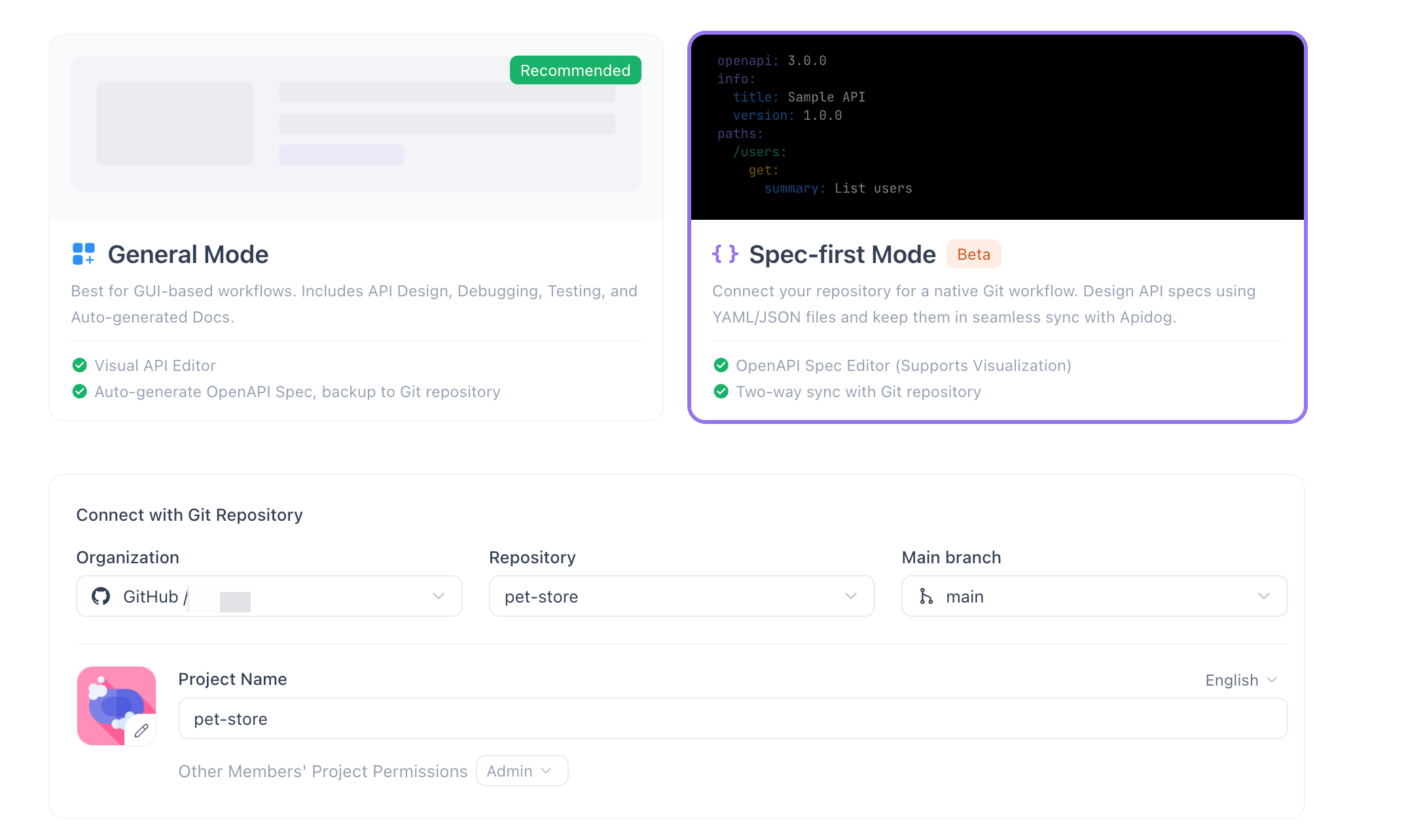
Here is what the workflow looks like in practice.
Step 1: Link your Git repo
In Apidog, you connect a project to a GitHub, GitLab, or Bitbucket repository and point it at the OpenAPI file path. The apidog-git-integration-sync guide covers the connection steps in detail.
# openapi.yaml (committed in your repo at api/openapi.yaml)
openapi: "3.1.0"
info:
  title: Payments API
  version: "2.4.0"
paths:
  /payments:
    post:
      summary: Create a payment
      operationId: createPayment
      requestBody:
        required: true
        content:
          application/json:
            schema:
              $ref: "#/components/schemas/PaymentRequest"
      responses:
        "201":
          description: Payment created
          content:
            application/json:
              schema:
                $ref: "#/components/schemas/PaymentResponse"
        "422":
          description: Validation error
          content:
            application/json:
              schema:
                $ref: "#/components/schemas/ValidationError"
components:
  schemas:
    PaymentRequest:
      type: object
      required: [amount, currency, source]
      properties:
        amount:
          type: integer
          description: Amount in smallest currency unit (e.g., cents)
        currency:
          type: string
          enum: [usd, eur, gbp]
        source:
          type: string
          description: Payment method token
    PaymentResponse:
      type: object
      properties:
        id:
          type: string
        status:
          type: string
          enum: [pending, completed, failed]
    ValidationError:
      type: object
      properties:
        code:
          type: string
        message:
          type: string
Step 2: Review and comment from the spec, not the diff
Once linked, Apidog renders the spec as interactive documentation. Team members can add comments directly to endpoints, schemas, and response examples. A QA engineer reviewing the POST /payments path can flag the missing idempotency-key header without touching the YAML file or needing a GitHub account with commit access.
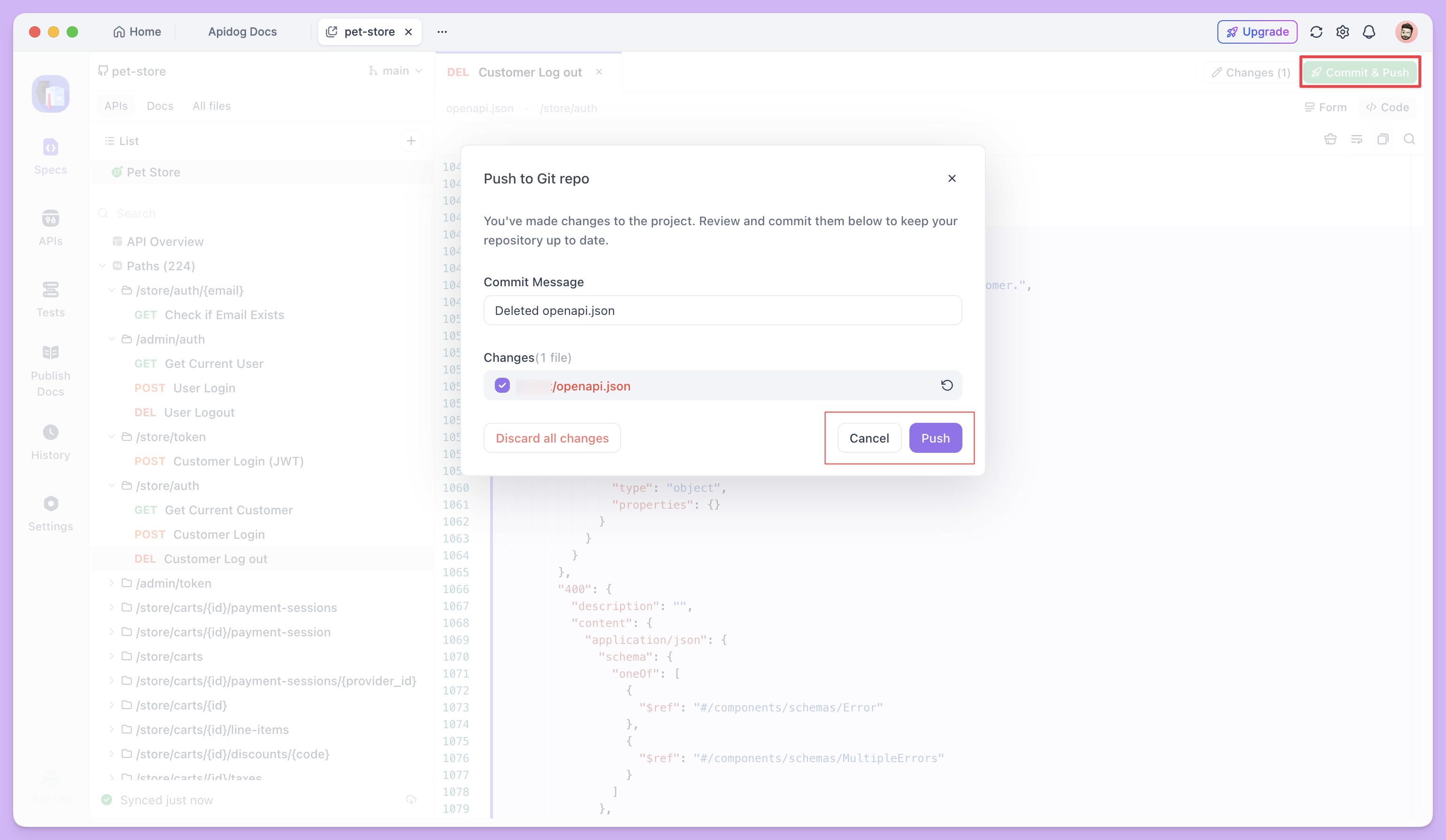
Comments are threaded and resolved. When the engineer updates openapi.yaml and pushes a new commit, the linked Apidog project reflects the change. The conversation stays attached to the spec element, not the line number.
Step 3: Generate branch-specific mocks automatically
With Spec-First Mode, each branch of your spec can produce a separate mock server. A frontend developer working against a feature/payment-v2 branch gets a mock URL that reflects the new schema on that branch. The production mock URL stays stable.
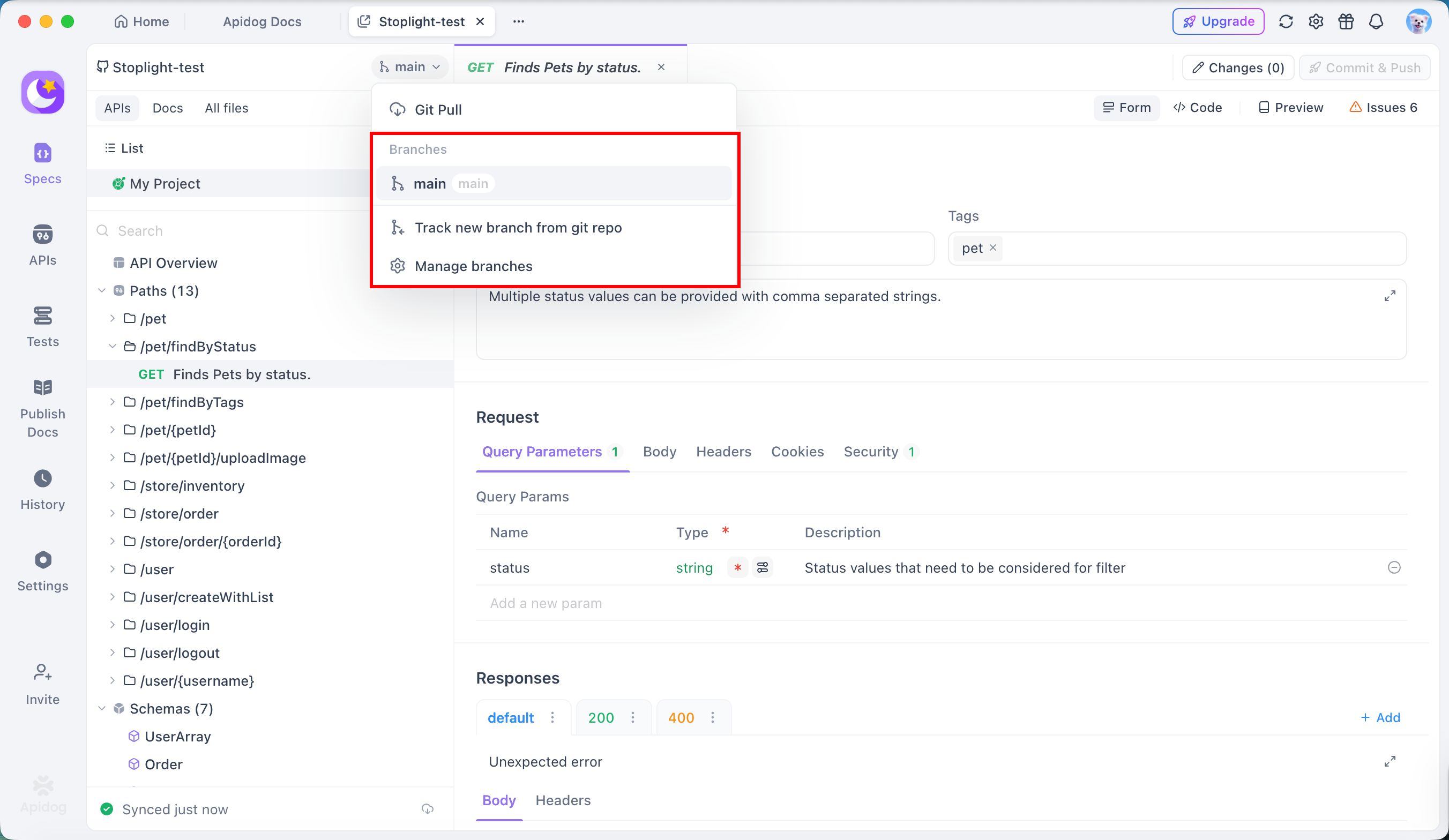
This eliminates the “waiting for backend” problem without anyone manually running npx @stoplight/prism-cli mock openapi.yaml.
Step 4: Route notifications to the right teams
When a path or schema in the spec changes (on merge), Apidog can send notifications to configured channels. You route /payments change events to a Slack channel where the frontend and mobile teams subscribe. You route /admin change events to a separate internal channel.
For Slack and Teams setup, see Slack incoming webhooks and Microsoft Teams incoming webhooks for the webhook configuration on those platforms. Apidog’s notification settings let you bind these channels per endpoint tag or path prefix.
Worth verifying in a trial: the granularity of notification routing (per-tag vs per-path) and how access control for documentation audiences maps to your org’s role structure. These are capabilities to evaluate against your specific requirements.
Connecting the collaboration layer to CI/CD
The collaboration layer is most useful when it connects to your pipeline, not only your team’s chat tools. Apidog’s CLI lets you run contract tests against the committed spec as a CI step. Combined with a linter like Spectral or Redocly CLI for spec validation, you get a pipeline that enforces spec quality and surfaces collaboration context together.
A typical GitHub Actions step might look like this:
# .github/workflows/api-spec.yml
name: API spec validation and test

on: [push, pull_request]

jobs:
  validate-and-test:
    runs-on: ubuntu-latest
    steps:
      - uses: actions/checkout@v4

      - name: Validate OpenAPI spec (Spectral)
        run: |
          npm install -g @stoplight/spectral-cli
          spectral lint api/openapi.yaml --ruleset .spectral.yaml

      - name: Run Apidog contract tests
        env:
          APIDOG_TOKEN: ${{ secrets.APIDOG_TOKEN }}
        run: |
          npx apidog-cli run \
            --project-id ${{ vars.APIDOG_PROJECT_ID }} \
            --test-suite "Payments API smoke" \
            --environment staging
The OpenAPI spec is the canonical reference for what your API promises. Running contract tests against the committed file means your CI pipeline fails if the running service drifts from the spec, not only when unit tests pass.
For a deeper look at the Git-native workflow pattern this fits into, git-native-api-workflow walks through how to build that pipeline end-to-end.
Comparing the main options for file-based teams
If you are evaluating tools after reading this, here is a direct comparison across the dimensions that matter for file-based collaboration. Capabilities marked with a question mark are worth verifying in your own trial; they vary by plan tier and configuration.
| Capability | Stoplight | SwaggerHub | Apidog (Spec-First, beta) |
|---|---|---|---|
| Git as authoritative source | Optional (own copy by default) | Optional | Yes (Spec-First Mode) |
| Design-time comments | Yes | Yes | Yes |
| Branch-specific mocks | Yes | Partial | Yes |
| Role-based doc access | Yes | Yes | Check in trial |
| Cross-project schema reuse | Yes | Yes | Check in trial |
| CI/CD contract testing | Via Prism | Limited | Yes (Apidog CLI) |
| Custom lint rules | Via Spectral | Limited | Check in trial |
| SSO/SCIM | Paid tiers | Enterprise | Check in trial |
| Notification routing | Via webhooks | Limited | Yes |
| File-native (no double copy) | No | No | Yes (Spec-First) |
For a broader comparison that includes SwaggerHub, see swaggerhub-vs-apidog-collaboration.
FAQ
Can we keep using Git PR reviews alongside Apidog comments?
Yes. The two flows serve different audiences. Git PR reviews are for engineers reviewing the YAML change; Apidog comments are for product, QA, and frontend stakeholders reviewing the spec as documentation. Both can run in parallel without conflicting. The committed file stays the single source of truth for both.
What happens if someone edits the spec in Apidog instead of the file?
In Spec-First Mode, edits made through the Apidog interface can be pushed back to Git as commits. The flow is: edit in UI, commit to branch, PR review in Git, merge. This is worth confirming in your trial because the exact sync direction (Apidog-to-Git vs Git-to-Apidog) affects how your team decides where edits originate. For a step-by-step walkthrough of Spec-First Mode itself, see spec-first-mode-apidog-beta-walkthrough.
Does Spec-First Mode work with monorepos that have multiple OpenAPI files?
Multiple spec files per project are a common monorepo pattern. Apidog supports multiple projects, each linked to a different file path. Whether a single Apidog project can map to several spec files, or whether custom lint rules can be shared across those projects, is worth testing in a trial against your specific repo layout.
How does this compare to Redocly for file-based teams?
Redocly CLI is strong for spec linting, bundling, and docs generation from files. Redocly’s hosted platform adds review and team features. The distinction is similar to the Stoplight comparison: Redocly’s collaboration layer is available on paid plans. Apidog’s differentiation is the combined coverage of mocks, contract testing, notifications, and docs in one platform that reads from your committed file.
What about the OpenAPI Initiative’s own tooling?
The OpenAPI Initiative publishes the spec itself; it does not publish a collaboration platform. The ecosystem of tools that implement the spec is what you are choosing between. Any tool in this post that claims to “support OpenAPI” should be tested against OpenAPI 3.1 if that is your spec version, since 3.1 support varies.
Conclusion
If your team already stores OpenAPI specs in Git, the file-management problem is solved. The collaboration problem is not. Design-time comments from non-engineers, branch-specific mocks for frontend, role-targeted notifications on breaking changes, and access-controlled documentation all require a layer that connects your committed file to the rest of the team’s workflow.
That layer does not have to replace Git. It should read from Git, build on top of it, and stay out of the way when engineers are doing code review in PRs.
If your current setup has Stoplight or a shared document handling collaboration while Git handles versioning, that is exactly the architecture Apidog Spec-First Mode is designed to consolidate. Because it is still in beta, run a focused trial against the capabilities your team needs most (document access control, cross-project schema reuse, notification granularity) before committing. Download Apidog and connect it to a branch of your existing spec repo to see how the collaboration layer fits into the workflow your team already has.