
Mistral released Medium 3.5 on April 29, 2026. The API model ID is mistral-medium-3.5, the endpoint is https://api.mistral.ai/v1/chat/completions, and the request shape is close enough to the OpenAI standard that swapping base URLs from another provider takes one line of code. The headline numbers are a 256K context window, native vision, function calling, 24-language support, and 77.6% on SWE-Bench Verified; figures that put it in the same conversation as GPT-5.5 and DeepSeek V4 for the kind of agentic, code-heavy work most teams are wiring up right now.
This guide covers authentication, every parameter that matters, Python and Node examples, vision input, tool calling, JSON mode, streaming, error handling, and an Apidog workflow that keeps cost visible while you iterate on prompts. For comparable model guides, see how to use the DeepSeek V4 API and how to use the GPT-5.5 API.
TL;DR
- Endpoint:
POST https://api.mistral.ai/v1/chat/completions. Auth is a bearer token on the standardAuthorizationheader. - Model ID:
mistral-medium-3.5. Context window: 256K tokens. Pricing: $1.5 per million input tokens, $7.5 per million output tokens. - 128B dense merged model with reasoning, vision, native function calling, structured JSON output, and 24-language coverage.
- Open weights live on Hugging Face as
mistralai/Mistral-Medium-3.5-128Bunder a Modified MIT License with a large-revenue carve-out. - SWE-Bench Verified: 77.6%. τ³-Telecom: 91.4. Strong on coding, instruction following, and tool use.
- Download Apidog to A/B Medium 3.5 against your current model, store the key as a secret variable, and watch the cost diff per call.
What changed in Medium 3.5
Medium 3 shipped earlier in the year as a text-only model with a 128K context. Medium 3.5 is a different beast. It is Mistral’s first flagship merged model: instruction following, reasoning, and coding live in a single set of weights, so you no longer pick between a chat checkpoint and a reasoning checkpoint. Vision is native, the context doubles to 256K, and function calling is wired in at the model level instead of bolted on through a separate API surface.
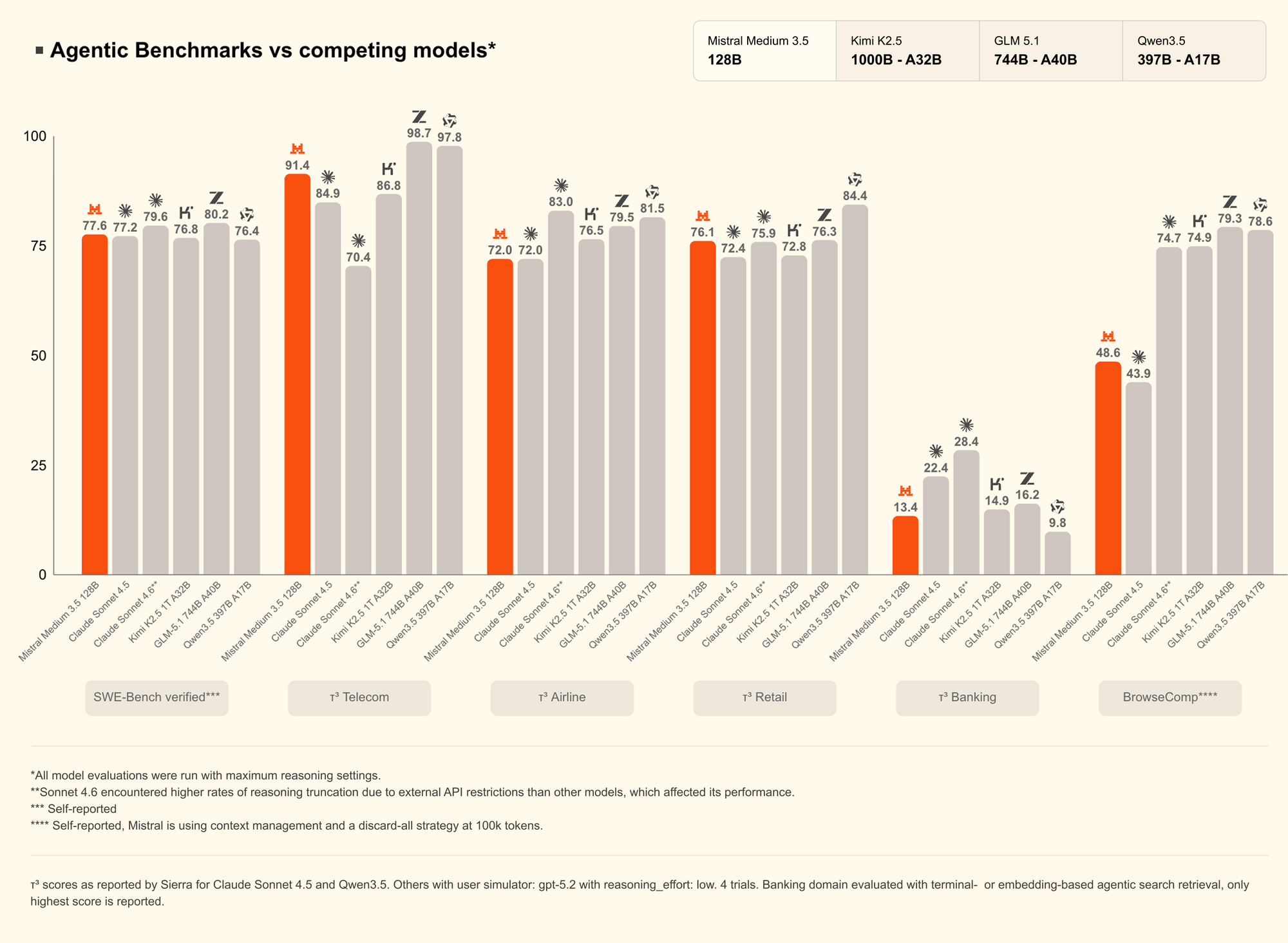
Three numbers anchor the upgrade. SWE-Bench Verified at 77.6% lands in the same band as the top frontier models for code patching. τ³-Telecom at 91.4 puts it ahead of most generalist models on multi-turn agentic dialogue. The 256K context covers a full mid-sized codebase or a several-hour transcript without truncation. None of these are marketing rounding errors; they map directly to whether the model can finish your task without a second pass.
The pricing shift is the part to budget for. Medium 3 sat at $0.40 per million input tokens and $2.00 per million output. Medium 3.5 jumps to $1.5 input and $7.5 output, roughly 4x. That is the cost of the merged-checkpoint approach plus vision plus the longer context. Treat the older Medium 3 as the bulk-throughput option and Medium 3.5 as the “I need this answer right” tier.
Prerequisites
Before the first call, line up four things.
- A Mistral account at console.mistral.ai with a payment method on file. Without a balance, calls return
402 Payment Required. - An API key scoped to the project you will bill against. Project keys are safer than account keys for anything that ships to production.
- An SDK. Mistral publishes an official
mistralaipackage for Python and JavaScript, and the OpenAI SDK works against the same endpoint with a base-URL swap. - An API client that can replay requests without spamming your terminal history. curl works for the first call. After that, use Apidog to keep the key out of your shell history and the request bodies under version control.
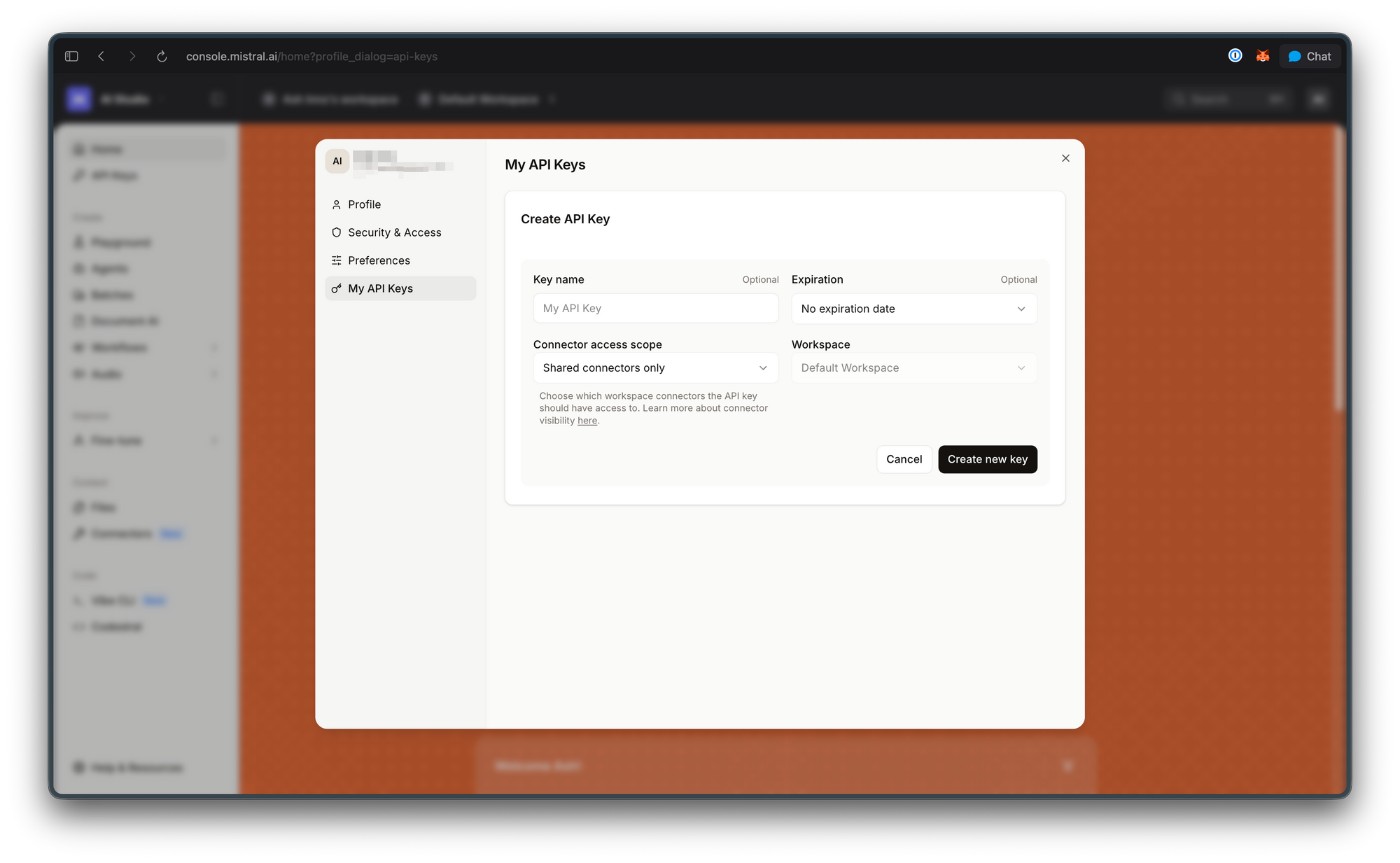
Export the key once:
export MISTRAL_API_KEY="..."
Endpoint and authentication
Mistral’s La Plateforme exposes everything through one base URL.
POST https://api.mistral.ai/v1/chat/completions
Authentication is a bearer token on the Authorization header. The minimum viable request looks like this:
curl https://api.mistral.ai/v1/chat/completions \
  -H "Authorization: Bearer $MISTRAL_API_KEY" \
  -H "Content-Type: application/json" \
  -d '{
    "model": "mistral-medium-3.5",
    "messages": [
      {"role": "user", "content": "Explain dense merged checkpoints in two sentences."}
    ]
  }'
A successful response returns a JSON body with a choices array, a usage block broken down into prompt_tokens, completion_tokens, and total_tokens, and an id you can carry forward for tracing. Failures return an error envelope with code and message. The shape matches the OpenAI envelope closely enough that any error parser you already have works without modification.
Request parameters
Every field maps to either cost or behavior. Here is the map for mistral-medium-3.5.
| Parameter | Type | Values | Notes |
|---|---|---|---|
model |
string | mistral-medium-3.5 |
Required. |
messages |
array | role/content pairs | Required. Same schema as OpenAI. |
temperature |
float | 0 to 1.5 | Mistral recommends 0.7 for general use, 0.3 for code. |
top_p |
float | 0 to 1 | Default 1.0. |
max_tokens |
int | 1 to context limit | Caps output length. |
stream |
bool | true or false | Enables SSE streaming. |
tools |
array | OpenAI tool spec | Native function calling. |
tool_choice |
string or object | auto, any, none, or specific tool |
Controls tool use. Note: any instead of required. |
response_format |
object | {"type": "json_object"} or JSON schema |
Structured output. |
random_seed |
int | any int | For reproducibility. Note: not seed. |
safe_prompt |
bool | true or false | Adds Mistral’s safety preamble. |
presence_penalty |
float | -2 to 2 | Penalize repeated topics. |
frequency_penalty |
float | -2 to 2 | Penalize repeated tokens. |
Two small differences trip people up when migrating from OpenAI: tool_choice="any" means “force a tool call” (OpenAI uses required), and the seed parameter is random_seed (OpenAI uses seed). Everything else lines up.
Python client
Mistral ships an official Python SDK that matches the API one-to-one.
import os
from mistralai import Mistral

client = Mistral(api_key=os.environ["MISTRAL_API_KEY"])

response = client.chat.complete(
    model="mistral-medium-3.5",
    messages=[
        {"role": "system", "content": "Reply in code only."},
        {"role": "user", "content": "Write a Rust function that debounces events."},
    ],
    temperature=0.3,
    max_tokens=2048,
)

print("Content:", response.choices[0].message.content)
print("Total tokens:", response.usage.total_tokens)
print("Cost estimate (USD):",
      response.usage.prompt_tokens * 1.5 / 1_000_000 +
      response.usage.completion_tokens * 7.5 / 1_000_000)
If you already have an OpenAI-shape codebase, the OpenAI Python SDK works against the Mistral endpoint with two changes: the base URL and the model ID.
from openai import OpenAI

client = OpenAI(
    api_key=os.environ["MISTRAL_API_KEY"],
    base_url="https://api.mistral.ai/v1",
)

response = client.chat.completions.create(
    model="mistral-medium-3.5",
    messages=[{"role": "user", "content": "Hello, Mistral."}],
)
The OpenAI SDK route is the path of least resistance for teams running provider-agnostic code; the native mistralai SDK is the path that exposes Mistral-specific features cleanly, so pick based on whether you plan to use vision and structured outputs heavily.
Node client
Same two-track choice on Node. The native SDK:
import { Mistral } from "@mistralai/mistralai";

const client = new Mistral({ apiKey: process.env.MISTRAL_API_KEY });

const response = await client.chat.complete({
  model: "mistral-medium-3.5",
  messages: [
    { role: "user", content: "Explain dense merged checkpoints in plain English." },
  ],
  temperature: 0.7,
});

console.log(response.choices[0].message.content);
console.log("Usage:", response.usage);
The OpenAI SDK route, for parity with existing code:
import OpenAI from "openai";

const client = new OpenAI({
  apiKey: process.env.MISTRAL_API_KEY,
  baseURL: "https://api.mistral.ai/v1",
});

const response = await client.chat.completions.create({
  model: "mistral-medium-3.5",
  messages: [{ role: "user", content: "Hello, Mistral." }],
});
Streaming responses
Set stream: true and iterate the SSE chunks. The shape matches OpenAI exactly, and the cumulative reasoning trace is interleaved into choices[].delta.content instead of being separated into a sidecar field.
stream = client.chat.stream(
    model="mistral-medium-3.5",
    messages=[{"role": "user", "content": "Stream a 300-word essay on merged checkpoints."}],
)

for chunk in stream:
    delta = chunk.data.choices[0].delta.content or ""
    print(delta, end="", flush=True)
For terminal output, the Mistral stream pacing is faster than DeepSeek V4-Pro on the same length of prompt and roughly even with GPT-5.5, based on side-by-side runs through the Apidog response viewer.
Tool calling
Medium 3.5 ships with native function calling. Functions defined in the tools array become callable, and the model picks when to invoke them.
tools = [{
    "type": "function",
    "function": {
        "name": "get_weather",
        "description": "Return the current weather for a city.",
        "parameters": {
            "type": "object",
            "properties": {
                "city": {"type": "string"},
                "unit": {"type": "string", "enum": ["c", "f"]},
            },
            "required": ["city"],
        },
    },
}]

response = client.chat.complete(
    model="mistral-medium-3.5",
    messages=[{"role": "user", "content": "Weather in Lagos in Celsius?"}],
    tools=tools,
    tool_choice="auto",
)

tool_call = response.choices[0].message.tool_calls[0]
print(tool_call.function.name, tool_call.function.arguments)
From there, run the function locally, append the result as a role: "tool" message, and call the API again to continue the loop. The pattern is identical to the OpenAI tool-use loop. The agentic capability shows in the τ³-Telecom score; in practice, that translates to fewer wasted hops on multi-turn workflows where the model has to decide between calling a tool, asking the user, and answering directly.
JSON mode and structured output
For schema-validated output, pass a JSON schema in response_format.
schema = {
    "type": "json_schema",
    "json_schema": {
        "name": "release_note",
        "schema": {
            "type": "object",
            "properties": {
                "title": {"type": "string"},
                "date": {"type": "string"},
                "bullets": {"type": "array", "items": {"type": "string"}},
            },
            "required": ["title", "date", "bullets"],
            "additionalProperties": False,
        },
        "strict": True,
    },
}

response = client.chat.complete(
    model="mistral-medium-3.5",
    messages=[
        {"role": "system", "content": "Reply with a single JSON object matching the schema."},
        {"role": "user", "content": "Summarize today's Mistral Medium 3.5 release."},
    ],
    response_format=schema,
)
The strict mode enforces the schema at decode time, so you do not need to add a Pydantic or Zod parse step on the client; the response either matches the schema or the call fails with a structured error. For lower-friction cases where you only need valid JSON of any shape, set response_format={"type": "json_object"} and validate on the client side.
Vision input
Medium 3.5’s vision encoder was trained from scratch to handle variable image sizes and aspect ratios; you do not need to pre-resize anything. Pass image content alongside text in the messages array.
response = client.chat.complete(
    model="mistral-medium-3.5",
    messages=[{
        "role": "user",
        "content": [
            {"type": "text", "text": "What is in this image and what is it doing wrong?"},
            {"type": "image_url", "image_url": "https://example.com/diagram.png"},
        ],
    }],
)
Image inputs are billed as input tokens at the same $1.5 per million rate; the exact token count per image varies with resolution and is reported in the usage.prompt_tokens field. For high-volume image workloads, log the per-image token cost early and decide whether to compress, crop, or skip frames before scaling.
Build the collection in Apidog
Replaying requests from the terminal burns credits and hides the diff between runs. The workflow that survives real use:
- Download Apidog and create a project.
- Add an environment with
{{MISTRAL_API_KEY}}stored as a secret variable so it never lands in shared exports. - Save a POST request to
{{BASE_URL}}/chat/completionswith theAuthorization: Bearer {{MISTRAL_API_KEY}}header. - Parameterize
model,temperature, andtool_choiceso you can A/B across variants without duplicating requests. - Use the response viewer to inspect
usageon every run. Add a small post-response script that multipliesprompt_tokens * 1.5 / 1_000_000 + completion_tokens * 7.5 / 1_000_000so the per-call cost shows up next to every result.
Teams already running the matching DeepSeek V4 API collection in Apidog can duplicate it, swap the base URL to https://api.mistral.ai/v1, change the model ID to mistral-medium-3.5, and run head-to-head prompts across both providers in minutes. The same pattern applies for comparing against GPT-5.5.
Error handling
The error envelope follows OpenAI conventions closely. The codes you will hit first:
| Code | Meaning | Fix |
|---|---|---|
| 400 | Bad request | Validate JSON schema, especially messages and tools. |
| 401 | Invalid key | Regenerate at console.mistral.ai. |
| 402 | Payment required | Top up the account or add a card. |
| 403 | Model not allowed | Check the key’s project scope and the model ID spelling. |
| 422 | Parameter out of range | max_tokens exceeds context, or tool_choice is malformed. |
| 429 | Rate limit | Back off, then retry with exponential jitter. |
| 500 | Server error | Retry once. If it repeats, check the status page. |
| 503 | Overloaded | Fall back to Mistral Medium 3 or wait 30 seconds. |
Wrap calls in a retry helper that handles 429 and 5xx with exponential backoff. Do not retry 4xx errors automatically; those are logic bugs, not transient failures. Apidog’s response viewer makes it trivial to spot a malformed tools payload because the offending field is highlighted in the request body next to the error.
Cost control patterns
The 4x price jump from Medium 3 to Medium 3.5 punishes lazy routing. Five patterns keep the bill predictable.
- Default to Medium 3, escalate to Medium 3.5. Run a cheap first pass on Medium 3 and route hard prompts to 3.5 only when the cheap pass returns low confidence or fails a validator.
- Cap
max_tokens. Most answers fit in 2,000 output tokens. The 256K context window is for input bulk, not output bulk; output is the expensive side at $7.5 per million. - Keep system prompts lean. Every system-prompt token is billed on every call; trimming a 2K-token preamble down to 500 tokens cuts your input bill by 75% on a high-volume endpoint.
- Log
usageon every call. Shipprompt_tokens,completion_tokens, and the per-call USD estimate to your observability stack. An alert on a sudden output-token spike catches prompts that drifted into chain-of-thought territory. - Use vision selectively. Image tokens add up fast. Crop to the relevant region before sending, and downscale to the lowest resolution that still answers the question.
Comparing Medium 3.5 to other Mistral tiers
Mistral’s lineup as of late April 2026:
| Model | Context | Input $/M | Output $/M | Vision | Best for |
|---|---|---|---|---|---|
mistral-small |
32K | $0.10 | $0.30 | No | High-volume classification, light chat |
mistral-medium-3 |
128K | $0.40 | $2.00 | No | Bulk throughput, longer chat |
mistral-medium-3.5 |
256K | $1.5 | $7.5 | Yes | Reasoning, code, vision, agents |
mistral-large |
128K | $2.00 | $6.00 | Limited | Frontier-tier text reasoning |
Medium 3.5 is the only tier that combines the long context, vision, and merged reasoning capabilities. Large-tier offers a different cost curve (cheaper output, more expensive input) and beats 3.5 on a few text-only benchmarks; pick by workload, not by tier name.
Migrating from another provider
The migration is mostly a base-URL change.
From OpenAI:
- base_url="https://api.openai.com/v1"
- model="gpt-5.5"
+ base_url="https://api.mistral.ai/v1"
+ model="mistral-medium-3.5"
From DeepSeek:
- base_url="https://api.deepseek.com/v1"
- model="deepseek-v4-pro"
+ base_url="https://api.mistral.ai/v1"
+ model="mistral-medium-3.5"
Two gotchas to watch:
tool_choice="required"on OpenAI becomestool_choice="any"on Mistral.seedbecomesrandom_seed.
Run the diff through your existing test suite before flipping production traffic. Better yet, mirror traffic to Mistral in shadow mode for a day, log both responses, and diff them in Apidog before promoting.
Real-world use cases
A few patterns where Medium 3.5 already pays for itself:
- Code review assistants. The 77.6% SWE-Bench Verified score and 256K context make it strong on PR-level review where the model needs to see the full diff plus surrounding files.
- Document QA over long PDFs. 256K context covers most contracts, RFPs, and policy documents in one call without chunking.
- Multimodal data extraction. Pulling structured fields out of receipts, screenshots, or diagrams in one call beats running OCR plus a separate text model.
- Agent loops with tool calls. The native function calling and high τ³-Telecom score reduce the number of “tool call failed, retry with corrected JSON” cycles that chew through tokens.
FAQ
What is the model ID for Mistral Medium 3.5 on the API?mistral-medium-3.5. The Hugging Face checkpoint is published as mistralai/Mistral-Medium-3.5-128B. If you serve the open weights yourself with vLLM or Unsloth, use the Hugging Face ID. For the hosted API, use the short ID.
Is Medium 3.5 OpenAI-compatible?Close, but not identical. The endpoint shape, headers, and most parameters match OpenAI exactly, so the OpenAI Python and Node SDKs work with a base URL override. The two divergences are tool_choice="any" (vs OpenAI’s required) and random_seed (vs OpenAI’s seed).
Can I run Medium 3.5 locally?Yes. The weights are open under a Modified MIT License with a large-revenue carve-out. The 128B parameter count means you need significant GPU memory; quantized GGUF builds from unsloth/Mistral-Medium-3.5-128B-GGUF run on a single high-end consumer card. The patterns from how to run DeepSeek V4 locally translate directly.
Does it support streaming with tool calls?Yes. Streaming returns tool-call argument fragments incrementally on delta.tool_calls, the same shape as OpenAI’s streamed tool-call format. The fragments accumulate into a complete JSON object once the stream closes.
How do I count input tokens before sending?Use the mistral-common Python package’s tokenizer for exact counts. It is the same tokenizer the API uses, so byte-for-byte counts match usage.prompt_tokens on the response.
What context length should I plan for in production?The 256K window is the cap, but pricing scales linearly. A 200K-token call costs $0.30 in input alone before the model even starts generating. Most production workloads fit comfortably under 32K; reach for the long context only when the task genuinely needs it.
Is there a free tier?Mistral does not advertise a permanent free tier, but new accounts typically come with a small trial credit. For sustained free experimentation on similar tier models, see how to use the DeepSeek V4 API for free.


