If you run your developer portal on Redocly, you already work the way most API teams want to: openapi.yaml lives in Git, guides are Markdown, and a push updates the docs. The fear when switching tools is losing that loop and ending up editing docs by hand in a web UI.
You don’t have to. Apidog Spec-first Mode keeps your spec and your Markdown in the same repository, syncs on every push through a webhook, and publishes a portal with guides and an API reference in one sidebar. This guide walks through the migration, including the one part that doesn’t carry over automatically: the long-form content many Redocly users keep inside info.description and tags[].description.
If you’re still comparing tools, start with Apidog vs. Redocly or the wider list of Redocly alternatives. This post assumes you’ve picked Apidog and want to move without breaking your workflow.
What carries over and what doesn’t
We tested this migration with a real production spec: OpenAPI 3.0.3, 62 operations across 13 tags, with getting-started, authentication and integration content written into the spec’s description fields. Here’s what happened on import.
| Item | Result in Apidog Spec-first Mode |
|---|---|
| Operations, paths, parameters | Imported intact (62 of 62) |
Schemas and components |
Imported intact |
| Security schemes (API key, bearer, OAuth2) | Imported intact |
| Tags | Became endpoint folders (13 of 13) |
| Git sync | Push to the repo, webhook updates the project |
info.description |
Imported, but not rendered as separate guide pages |
tags[].description |
Imported, but not shown as category intro pages by default |
| Markdown files in the repo | Synced and published as doc pages |
The API reference moves over with no edits. The gap is narrative content.
Why your description fields don’t render the same way
Redoc, the renderer behind Redocly’s reference docs, treats info.description as a mini-document. Every Markdown heading inside it becomes a sidebar entry, so teams often write their whole “Getting started” and “Authentication” guides there. Tag descriptions render as intro text at the top of each tag group.
That’s a Redoc convention, not part of the OpenAPI Specification. The spec only defines description as a CommonMark string. Apidog, like most portals, keeps guides as standalone Markdown documents and keeps the spec for the reference. A default publish after import shows the API reference only, without the guides you wrote in the description fields.
The fix is a one-time move: lift that content out of the YAML into Markdown files next to it. After that, everything stays Git-driven.
The target repository layout
This is the structure we validated:
your-repo/
├── openapi.yaml              # source of truth for the API reference
└── docs/
    ├── getting-started.md
    ├── authentication.md
    └── embed-integration-guide.md
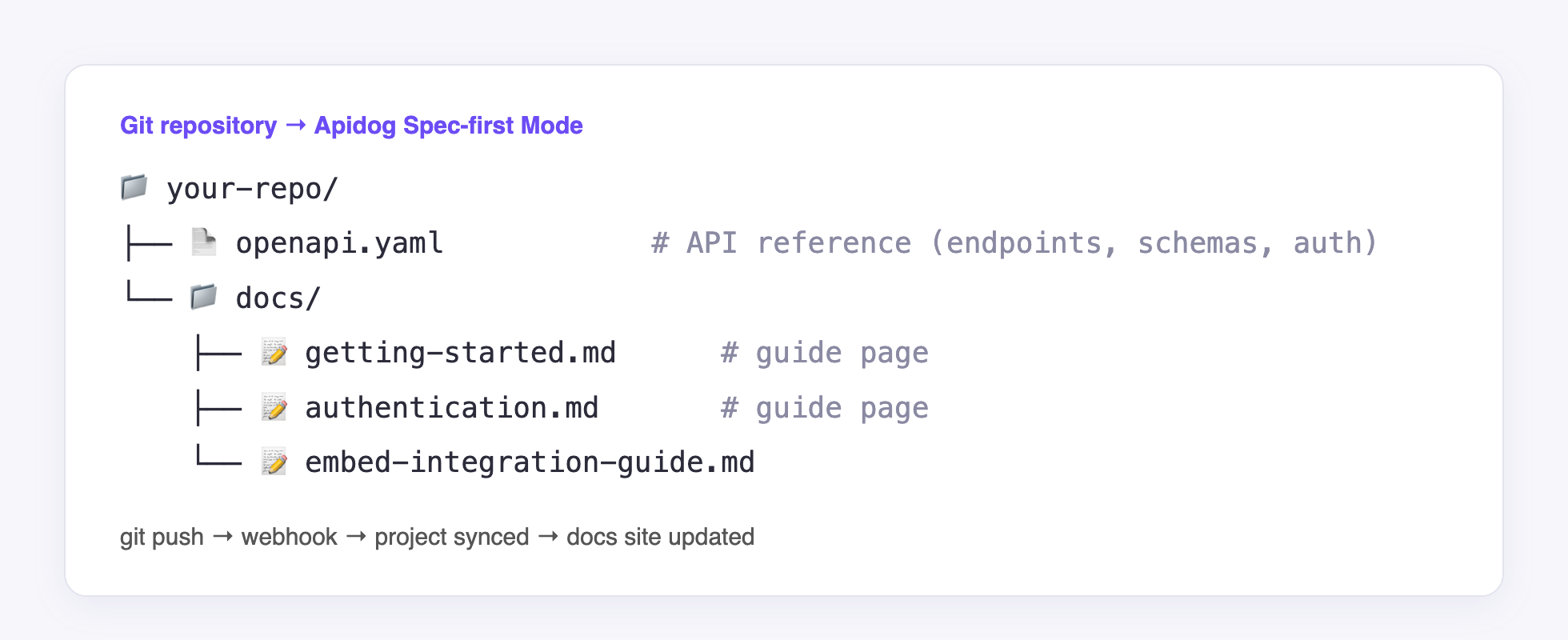
openapi.yaml drives the API reference. Each file in docs/ becomes a page in the portal sidebar. Images referenced by those Markdown files can live in the same repo and sync with them.
If you used Redocly’s sidebars.yaml to order your navigation, keep it as a reference. You’ll set the same order once in Apidog’s docs site settings.
Step-by-step migration
1. Audit what’s inside your description fields
Before moving anything, see how much content sits in the spec. With yq:
# How long is the top-level description?
yq '.info.description' openapi.yaml | wc -w

# Which headings does it contain? Each one is a Redoc sidebar entry today.
yq '.info.description' openapi.yaml | grep -E '^#{1,3} '

# Which tags carry a description?
yq '.tags[] | select(.description != null) | .name' openapi.yaml
The heading list is your future docs/ file list. In our test, info.description split into two Markdown files, and the tag descriptions became per-folder intro pages plus one extra Markdown file.
2. Split info.description into Markdown files
Copy each top-level section into its own file under docs/. Keep the headings, code samples and links. Then shrink info.description in the spec to a one-paragraph summary, so the content lives in one place only.
Watch for two Redoc-specific features while you copy:
<SecurityDefinitions />and similar Redoc tags don’t render outside Redoc. Replace them with a short written section that links to the security schemes in the reference.- Links like
#tag/Paymentspoint to Redoc anchors. Update them to the matching Apidog doc or folder URLs after the first publish.
3. Connect the repository in Spec-first Mode
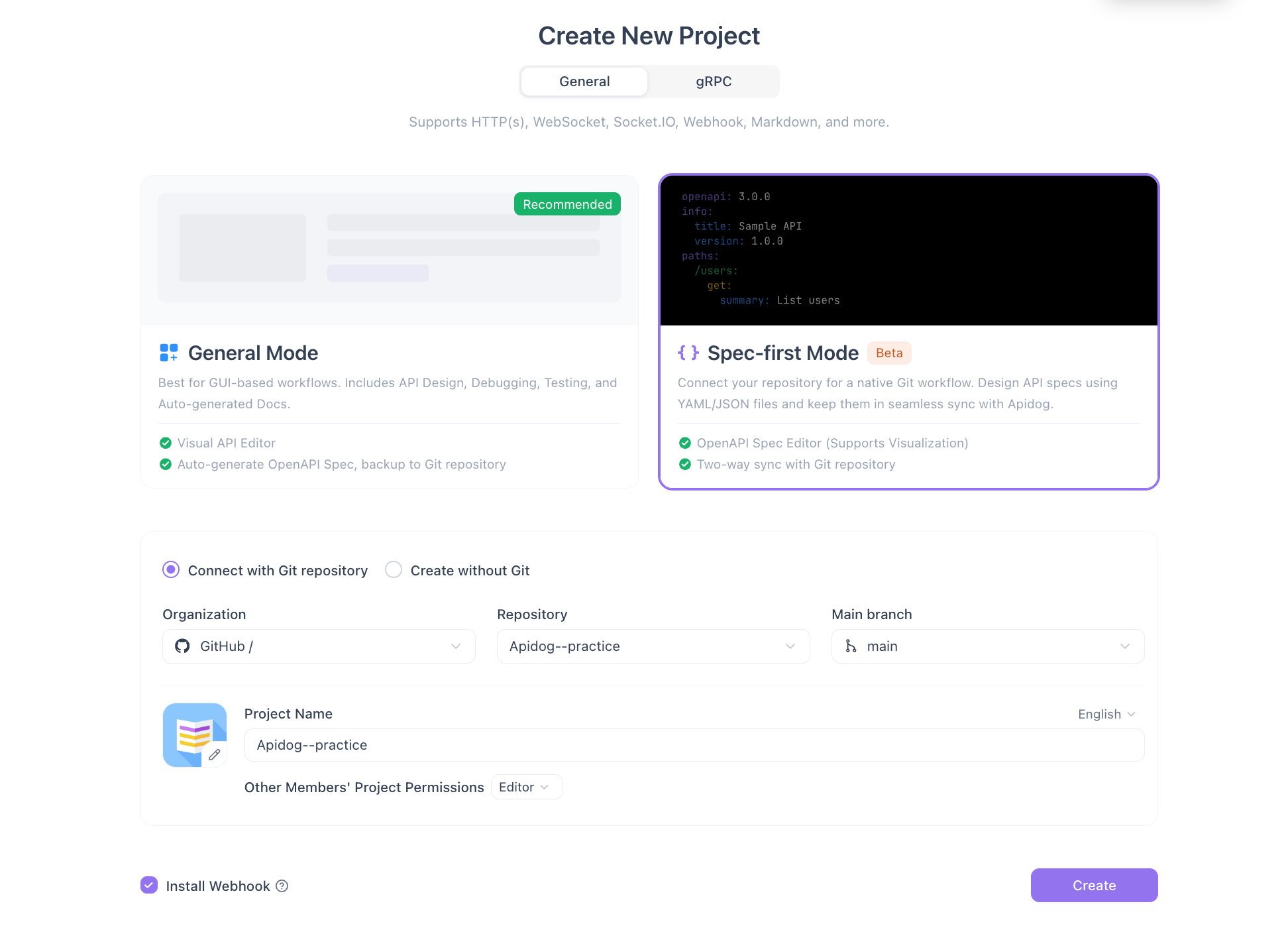
Create a project in Spec-first Mode, connect your repository (GitHub, GitLab, Azure DevOps or Bitbucket), point it at openapi.yaml and the docs/ folder, and install the webhook. From then on, a push to the tracked branch updates the project.
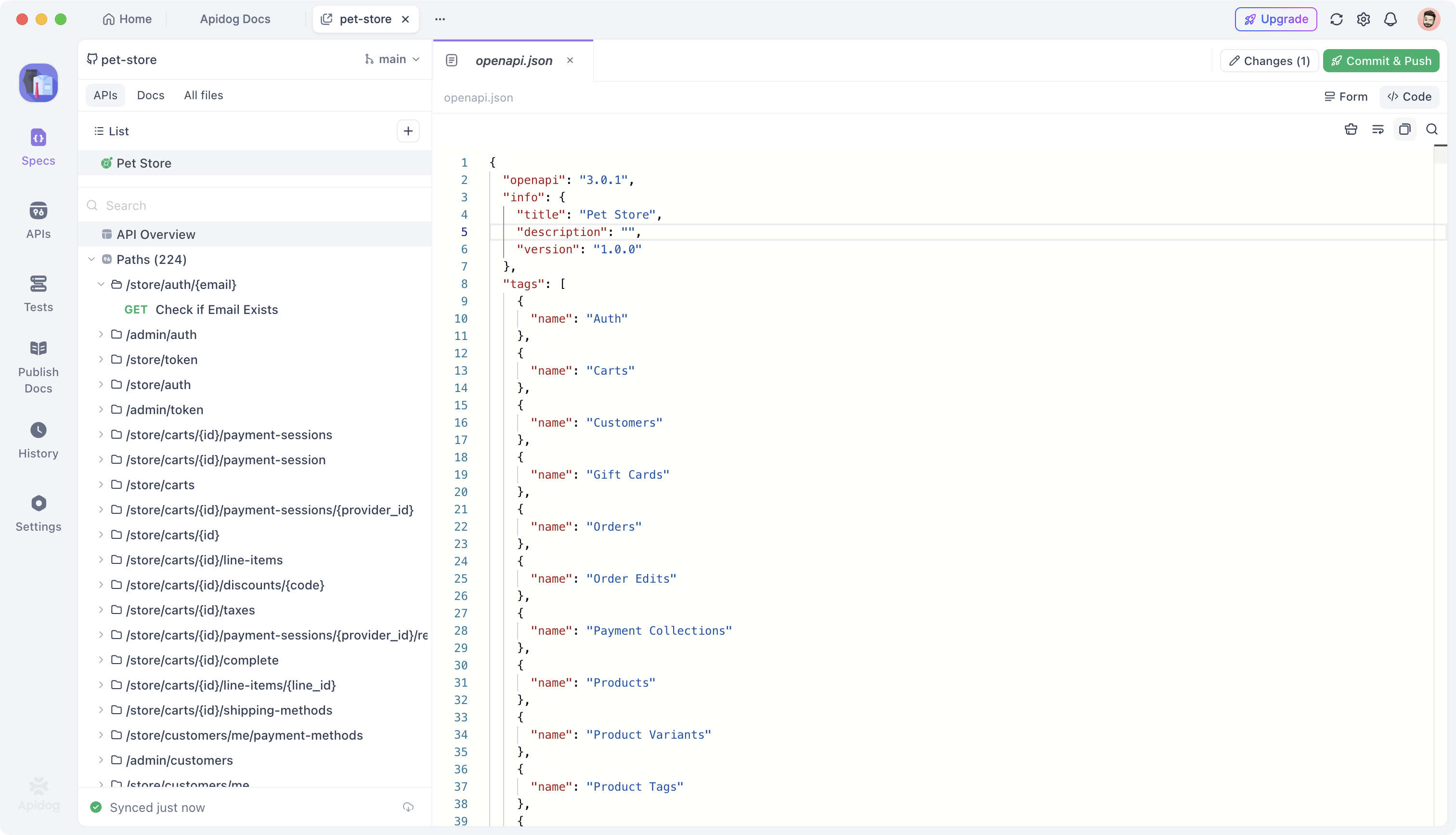
After the first sync, the Specs workspace shows your spec and the rest of the repository. The APIs tab lists the operations parsed from openapi.yaml, Docs holds your Markdown pages, and All files mirrors the repo.
The webhook is what keeps this a docs-as-code workflow. Without it, you’d have to trigger syncs by hand. For a refresher on why this matters, see our guide to docs as code.
4. Publish the docs site and set navigation
Publish a docs site from the project and arrange the sidebar. The order most Redocly users want, and the one we reproduced, is:
- Getting Started
- Authentication
- Integration guides
- API Reference (the endpoint folders from your tags)
Markdown pages and API folders mix freely in one tree, so you can match your current Redocly sidebar closely.
5. Add your custom domain
Point a CNAME such as developers.example.com at the docs site. Custom domains are available on the Free plan.
Let your coding agent migrate tag descriptions with Apidog CLI
Tag descriptions are the most tedious part. Thirteen tags means thirteen copy-paste jobs, and you’ll redo them every time a tag description changes during the transition. Hand it to your coding agent instead.
Apidog CLI gives Claude Code, Codex, Cursor or any terminal agent structured JSON access to your project, including endpoint folders. Set it up once:
npm install -g apidog-cli@latest
apidog auth login --with-token <YOUR_ACCESS_TOKEN>
npx -y skills add https://apidog.com
The last line installs the Apidog skill so your agent knows the commands without guessing. The installation guide covers tokens and private deployments.
Then give your agent one prompt:
Readopenapi.yaml. For every tag with a description, find the matching endpoint folder in Apidog project<PROJECT_ID>and set that folder’s description to the tag’s description. Validate each payload withapidog cli-schema validate folder-updatebefore writing. Show me the list of folders you changed.
Here’s what the agent runs:
# Find the folder IDs that correspond to your tags
apidog folder list --project <PROJECT_ID> --type endpoint

# Check the payload shape instead of guessing it
apidog cli-schema get folder-update

# For each tag: write {"description": "..."} to a file, validate, then update
apidog cli-schema validate folder-update --file ./payments-folder.json
apidog folder update <FOLDER_ID> --project <PROJECT_ID> --type endpoint \
  --file ./payments-folder.json
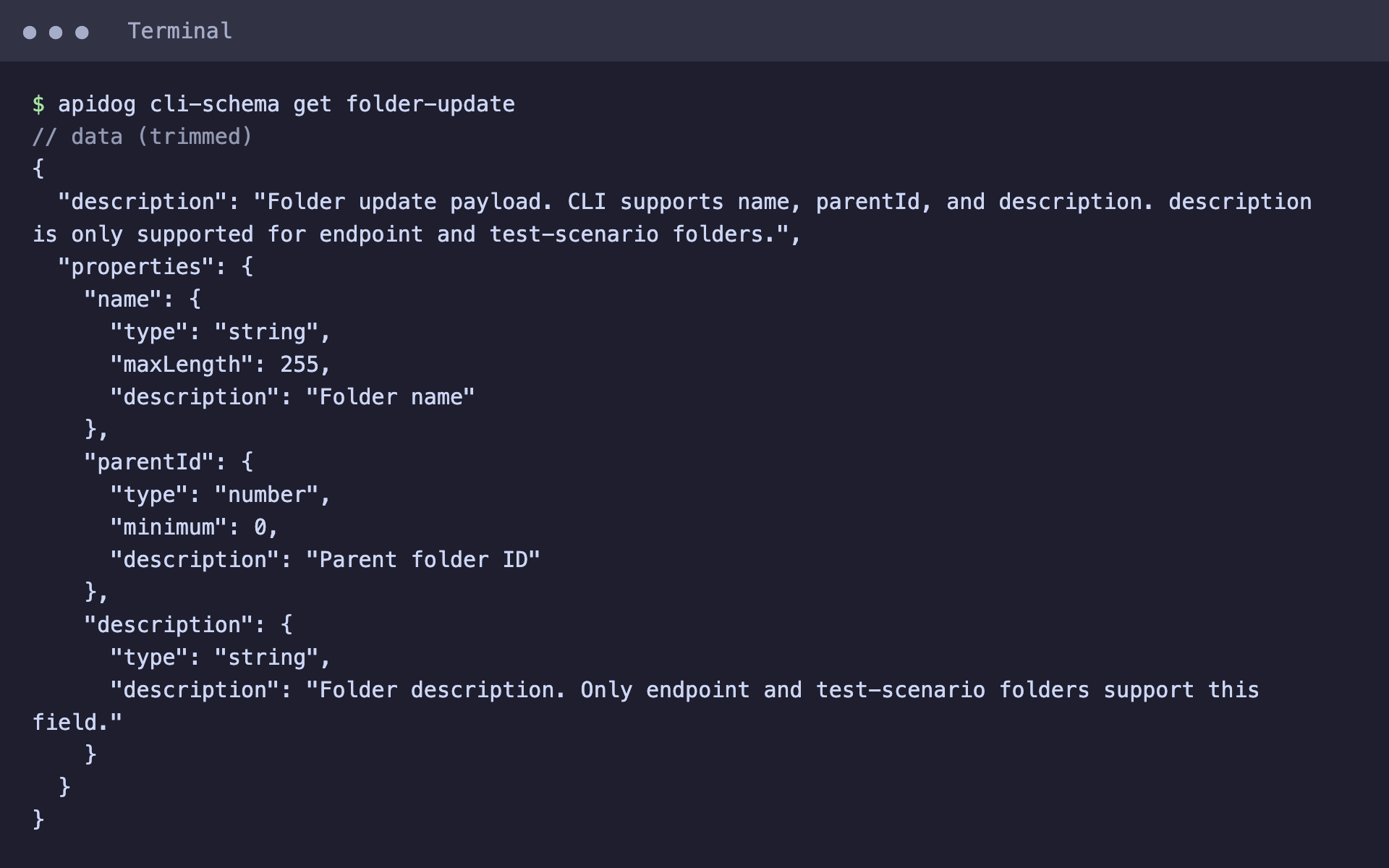
The folder-update schema accepts name, parentId and description, and description is supported on endpoint and test-scenario folders. For guides that don’t belong to a single tag, the agent can use apidog doc list and apidog doc create the same way, after reading apidog cli-schema get doc-create.
To show a folder’s intro on the published site, set Folder Contents Displaying Setting in the folder’s settings under Documentation Settings after Publication.
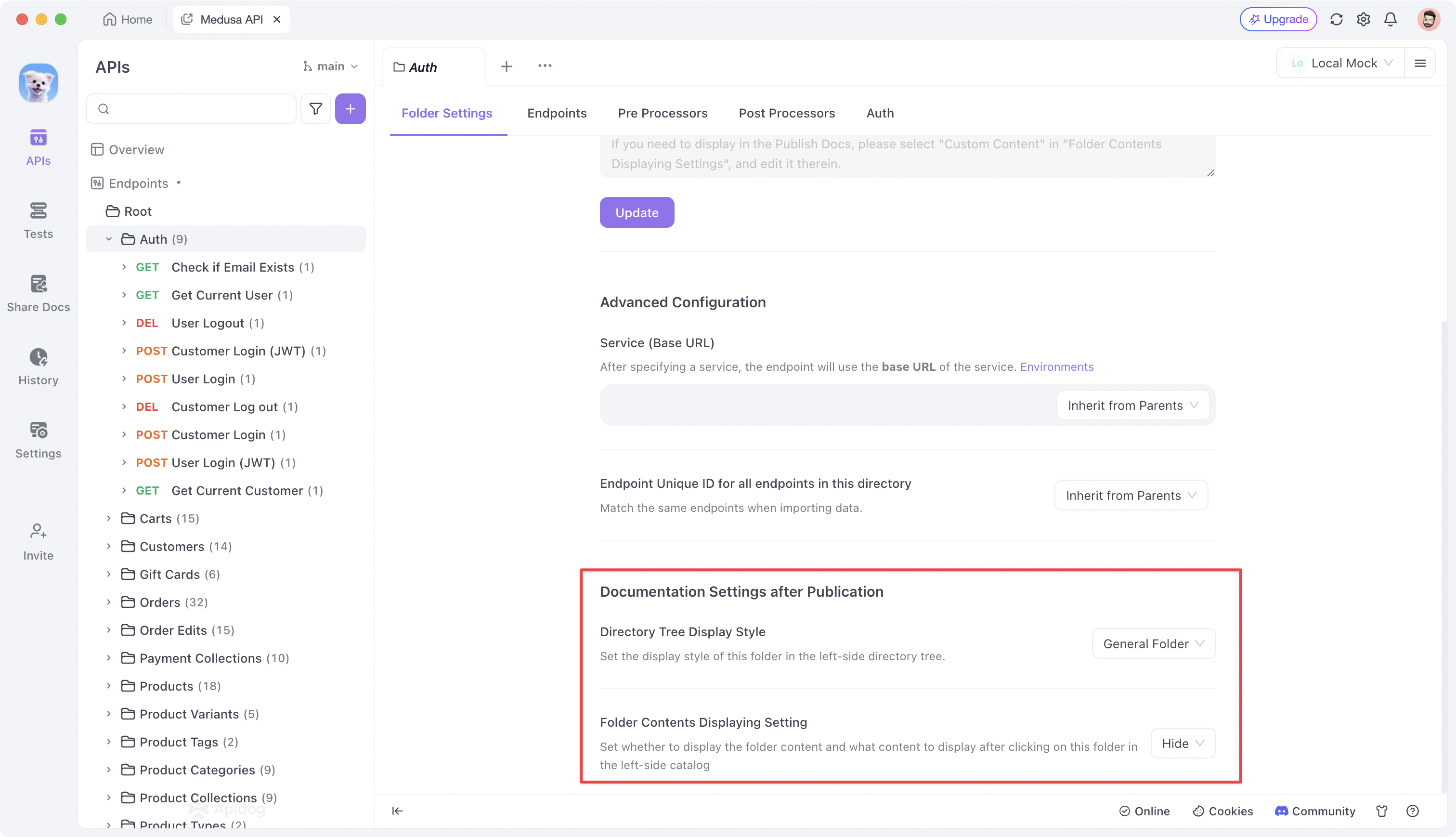
One honest caveat: surfacing tag descriptions as per-category intro pages works, but it relies on a less-documented path. Test it on two or three folders in your own workspace before you depend on it for all of them. For more agent-driven spec work, see using Apidog CLI in Claude Code and letting an agent update your API spec.
What stays outside Git
A Spec-first project keeps your API and your Markdown in Git. A few portal settings live in the Apidog interface and aren’t version-controlled:
| Setting | Where it lives |
|---|---|
openapi.yaml (endpoints, schemas, security) |
Git |
Guide pages in docs/ |
Git |
| Docs site publication | Apidog interface |
| Sidebar order and navigation | Apidog interface |
| Folder intro display settings | Apidog interface |
| Custom domain | Apidog interface and your DNS |
These are set-once items. You touch them when you add a new top-level section, not on every content change. Redocly keeps more of this in redocly.yaml and sidebars.yaml, so if you review navigation changes in pull requests today, plan for that to move into the UI.
Plan and pricing
The setup described here fits the Free plan, custom domain included. Free covers up to 4 team members. Paid plans add things like multiple documentation sites per project and custom visibility controls. Check Apidog pricing for the current limits.
Redocly vs. Apidog after the migration
| Redocly | Apidog Spec-first Mode | |
|---|---|---|
| Spec in Git | Yes | Yes |
| Guides as Markdown in Git | Yes | Yes |
| Auto-sync on push | Yes | Yes, via webhook |
Guides inside info.description |
Rendered as sidebar sections | Move to Markdown files |
| Navigation config | sidebars.yaml in Git |
Apidog interface |
| API testing, mocking, debugging | Separate tools | Same project |
| Agent access via CLI | Redocly CLI (lint, bundle, build) | Apidog CLI (read and write project resources) |
The trade is simple. You lose YAML-defined navigation. You gain testing, mocking and an agent-friendly CLI on the same spec your docs come from. For a CLI-by-CLI breakdown, read Apidog CLI vs Redocly CLI.
FAQ
Will my Redocly-hosted URLs keep working? Not automatically. Page paths change. If your old portal had high-traffic guide URLs, add redirects at your DNS or proxy layer for the main pages after you switch the domain.
Do I have to rewrite my OpenAPI spec? No. The spec imports as is. You only move narrative content out of info.description and tags[].description into Markdown files.
Can I keep x-tagGroups? Use folders for grouping instead. Each tag becomes a folder, and you can nest folders to reproduce your tag groups.
How does this compare to migrating from Stoplight? The shape is similar: spec in Git, Markdown next to it, webhook sync. See how to migrate from Stoplight to Apidog if you run both tools.
What if a step behaves differently in my workspace? Our results came from a test environment. Re-run the import on a branch first and compare the published portal with your current one before you switch DNS.
Make the move in an afternoon
A Redocly-to-Apidog migration is mostly a content move. Your spec imports as is. Your guides move out of description fields into a docs/ folder once. A webhook keeps everything in sync after that. Let your agent handle the repetitive tag-description work with Apidog CLI, and spend your own time checking the published portal page by page.
Download Apidog and connect your repo to Spec-first Mode to start the migration.