

Tencent open-sourced Hy3 Preview on April 22, 2026, and within a day OpenRouter listed it as a fully free endpoint. No credit card, no token metering, no trial window. You can call the same 295B-parameter Mixture-of-Experts model that powers Tencent’s Yuanbao app and CodeBuddy assistant from your own code, today, for zero dollars.
This guide shows how to use the Hy3 Preview API for free through OpenRouter, the Hugging Face Space, and the raw Hy3 repo. It also covers the reasoning modes that make Hy3 different from most 2026 open models, and how to test the API inside Apidog without writing throwaway scripts.
If you want the fastest route to your first response, jump to “Step-by-step: call Hy3 Preview free on OpenRouter.”
TL;DR
- Hy3 Preview is free on OpenRouter under the model ID
tencent/hy3-preview:freewith $0 input and $0 output pricing. - It’s a Mixture-of-Experts model: 295B total parameters, 21B active, 192 experts with top-8 routing, and a 256K-token context window.
- Three reasoning modes ship built in:
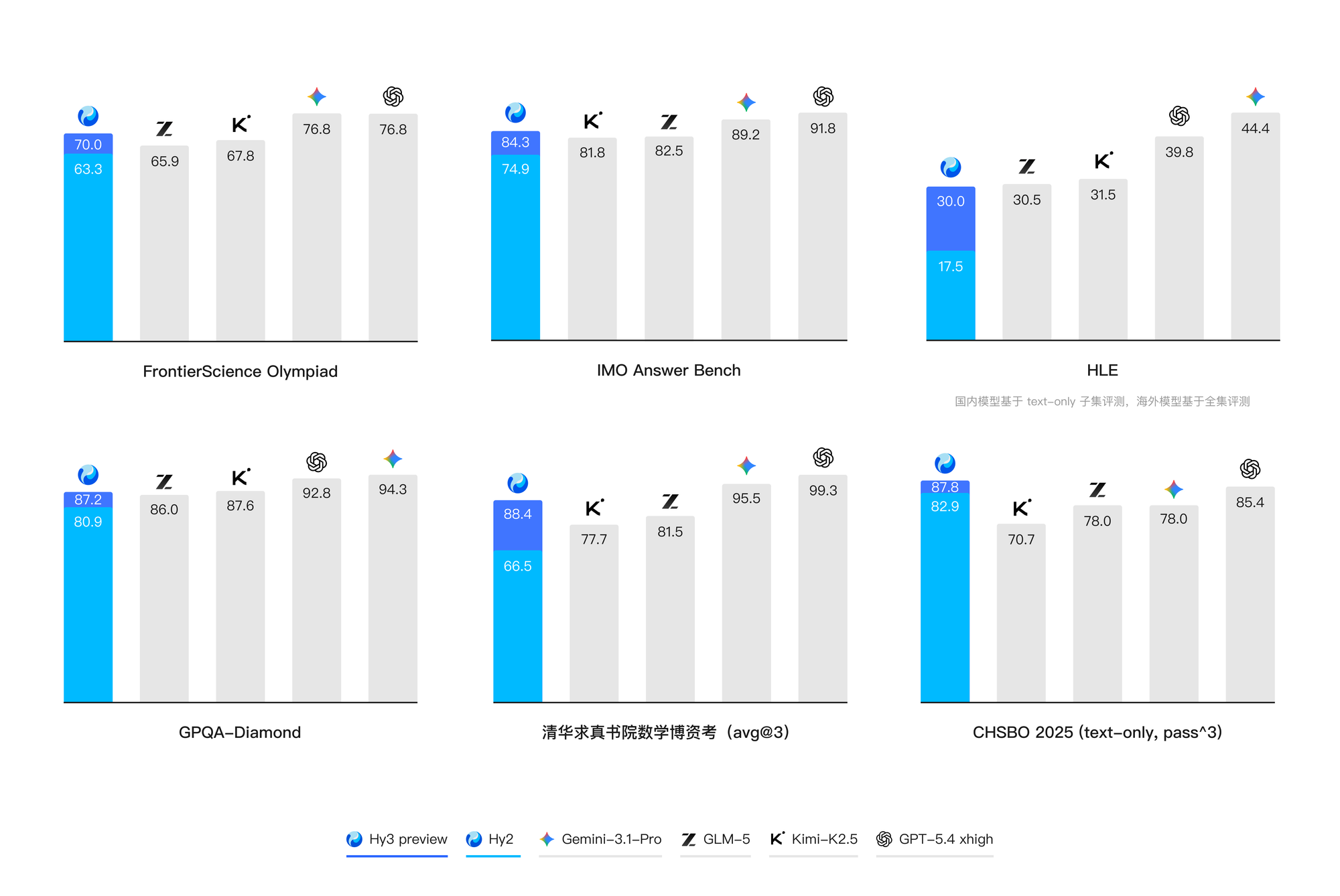
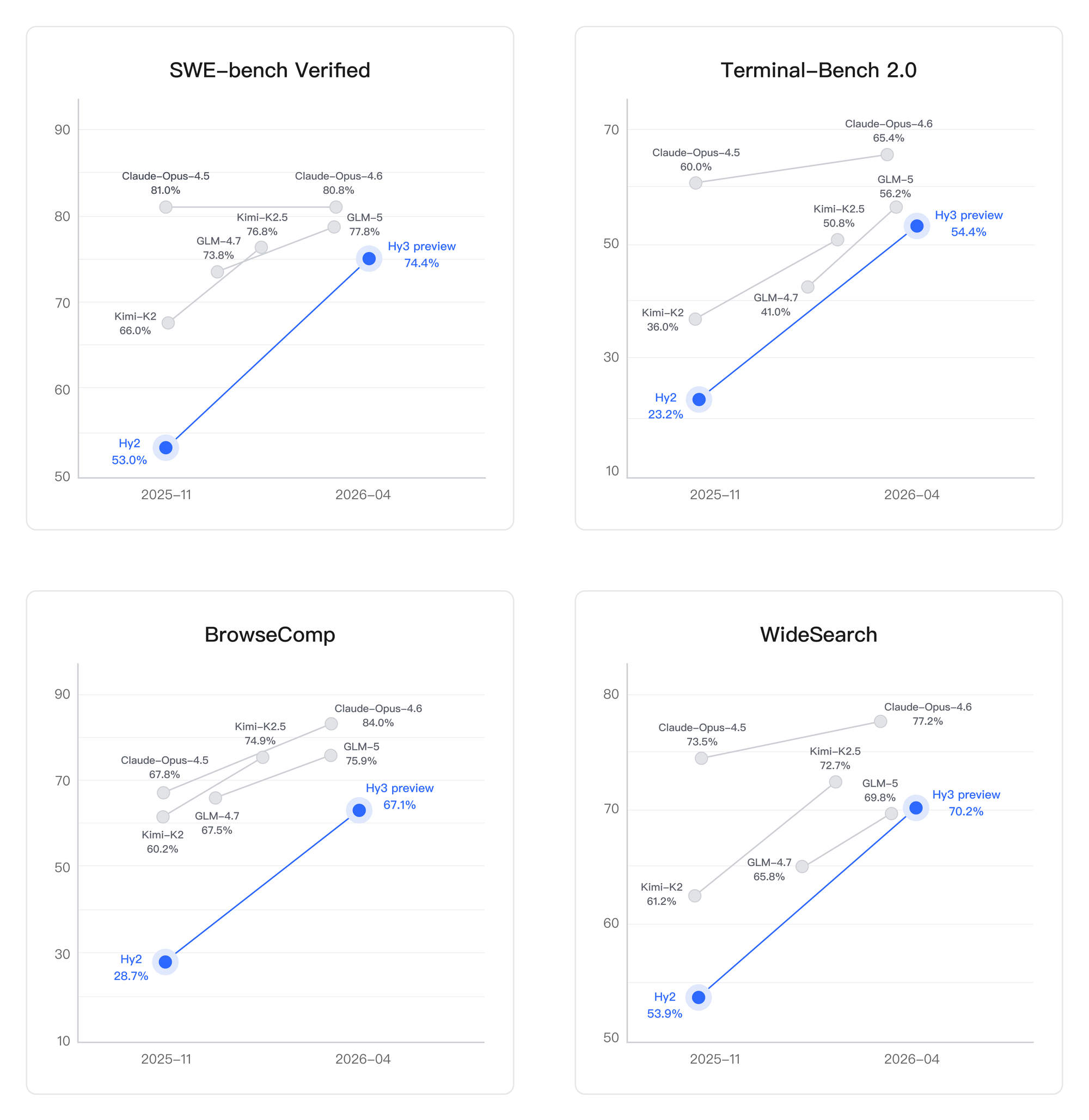
no_thinkfor fast answers,low, andhighfor deep chain-of-thought on agent and coding tasks. - Benchmarks are strong for an open-weights model: SWE-bench Verified 74.4, Terminal-Bench 2.0 54.4, GPQA Diamond 87.2, MMLU 87.42.
- You can run it three free ways: the OpenRouter free tier, the Hugging Face Hy3-preview Space, or local inference with vLLM and the open weights.
- Apidog pairs well with the OpenRouter endpoint because Hy3 uses the OpenAI Chat Completions schema; point a request at OpenRouter and go.
What is Hy3 Preview?
Hy3 Preview is the first flagship release from Tencent’s restructured Hunyuan foundation-model team, now led by Yao Shunyu, a former OpenAI researcher the company hired to push its reasoning stack. Let's frame it as Tencent’s most capable model yet and a direct answer to the top Chinese open-weights releases from DeepSeek, Alibaba, and Zhipu.
The technical profile from the official model card is agent-first:
- Architecture: Mixture-of-Experts, 80 layers plus one MTP layer, 64 attention heads with grouped-query attention.
- Parameters: 295B total, 21B active per forward pass.
- Experts: 192 specialists with top-8 routing per token.
- Context: 256K tokens (262,144 on OpenRouter’s listing).
- Tokenizer: 120,832-entry vocabulary with BF16 precision.
- License: Tencent Hy Community License, commercial use allowed within the license terms.
What sets it apart from a generic 200B-range MoE is the agentic training. Tencent rebuilt its RL infrastructure for multi-turn tool use, and the published scores on SWE-bench Verified, Terminal-Bench 2.0, and the internal WildClawBench suite land it close to the top closed models on code and shell tasks.
Three free ways to use Hy3 Preview
You have three paths depending on whether you want a chat UI, an API, or local weights.
| Path | What it is | Free? | Good for |
|---|---|---|---|
OpenRouter tencent/hy3-preview:free |
Hosted OpenAI-compatible API | Yes, $0 in/out | Building agents, scripts, and backend features |
| Hugging Face Space | Browser chat demo | Yes | Quick prompts, kicking the tires, smoke tests |
| Self-hosted weights (vLLM / SGLang) | Run the open weights on your own GPUs | Free software, hardware cost applies | Privacy-sensitive workloads, high volume |
Most developers will want the OpenRouter route. It is the shortest path from signup to a working API call, and the rate limits on the free tier are generous enough for prototyping.
Step-by-step: call Hy3 Preview free on OpenRouter
Here is the minimal path from zero to a working tencent/hy3-preview:free response.
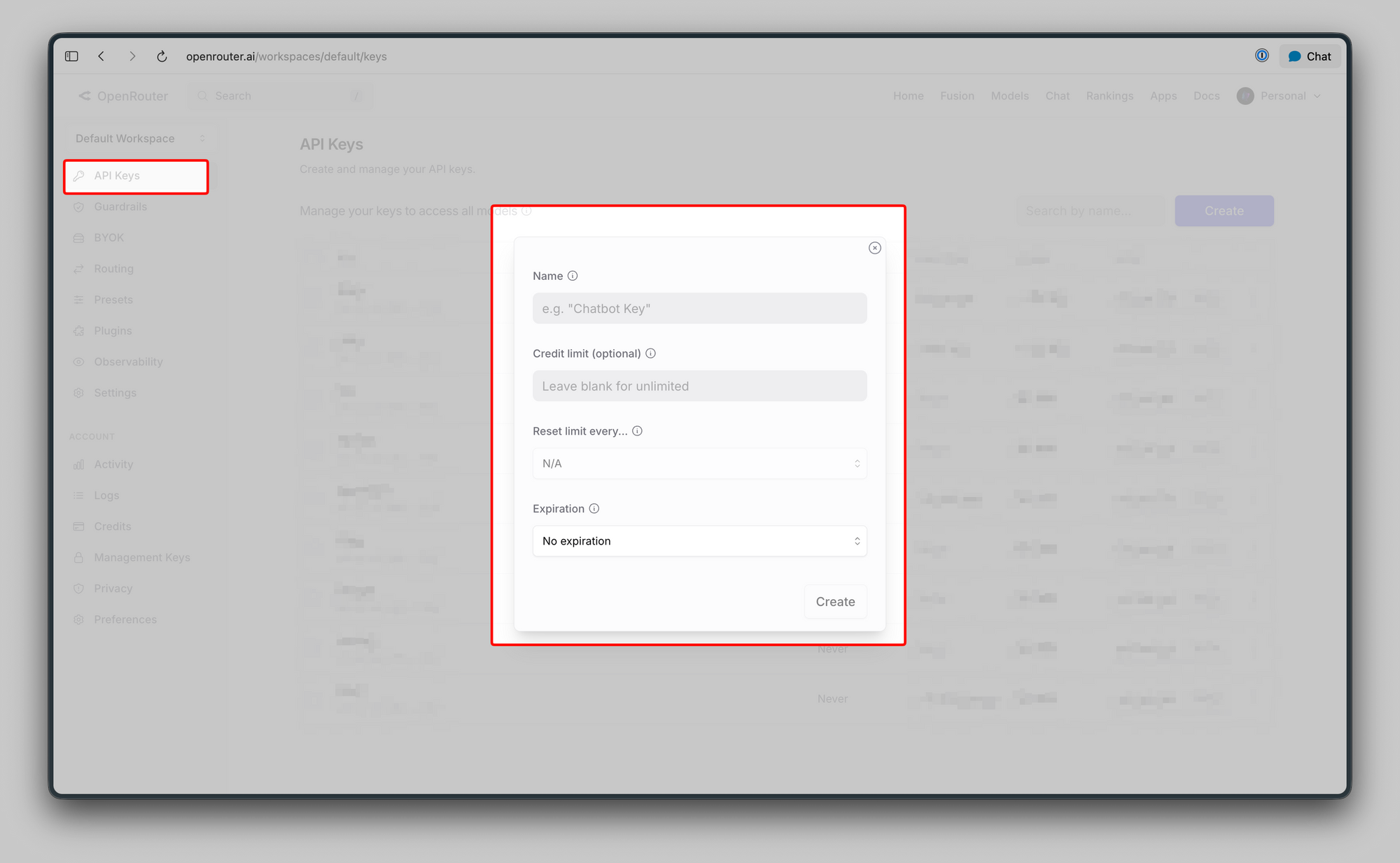
- Create an OpenRouter account. Sign up at openrouter.ai. Email is enough; no payment method required for free-tier models.
- Generate an API key. In the OpenRouter dashboard, open “Keys” and create a new key. Copy it into an environment variable, for example
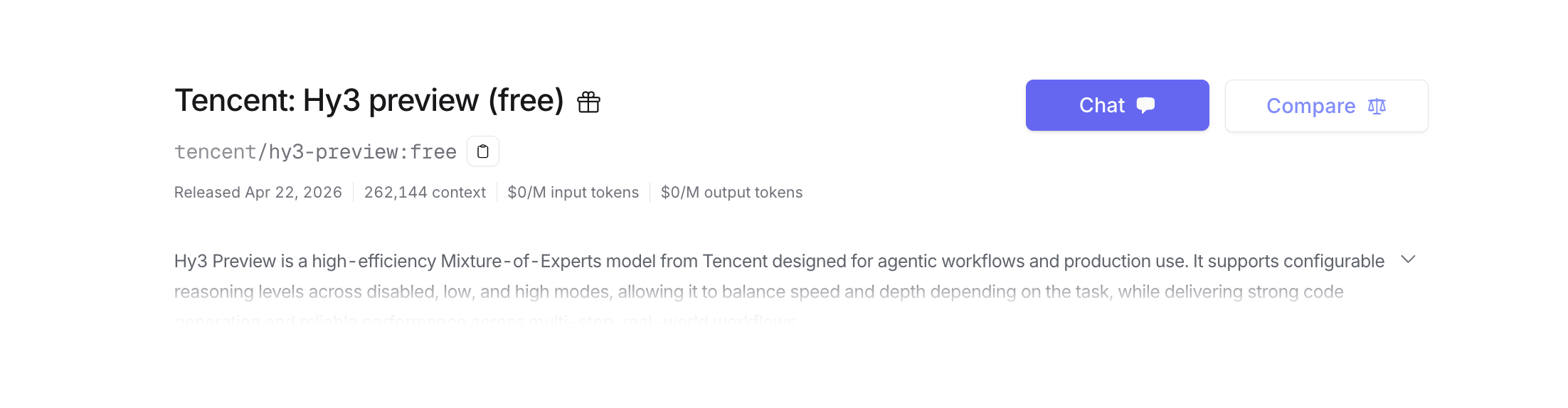
export OPENROUTER_API_KEY=sk-or-.... - Open the model page. Go to the Hy3 Preview free listing and confirm the status banner reads “Free.” You will also see usage stats there; at launch the endpoint was handling 6.81B prompt tokens per day across all users.
Send your first request. OpenRouter exposes the OpenAI Chat Completions schema, so any OpenAI SDK works:
curl https://openrouter.ai/api/v1/chat/completions \
  -H "Authorization: Bearer $OPENROUTER_API_KEY" \
  -H "Content-Type: application/json" \
  -d '{
    "model": "tencent/hy3-preview:free",
    "messages": [
      {"role": "user", "content": "Explain the MoE routing decision inside a top-8 of 192 setup in 3 sentences."}
    ],
    "temperature": 0.9,
    "top_p": 1.0
  }'
- Turn on reasoning when you need it. Hy3 accepts a
reasoningparameter witheffortset toloworhigh. OpenRouter returns the thinking trace in a separatereasoning_detailsarray, billed as its own token bucket:
{
  "model": "tencent/hy3-preview:free",
  "messages": [
    {"role": "user", "content": "Plan, then write a Bash script that rotates daily log files older than 30 days into a dated archive folder."}
  ],
  "reasoning": {"effort": "high"}
}
- Iterate. Keep the session in the same thread if you want the model to build on earlier context; Hy3’s 256K window handles most full codebases end to end.
That is the whole flow. The model you are calling is the same one published on Hugging Face; quality on the OpenRouter free tier is identical to the paid routes on other providers.
Free, Plus, and self-host: where they differ
Free is not the only path, and it helps to see the real diff before you commit to one.
| Capability | OpenRouter Free | OpenRouter Paid (non-free endpoints) | Self-hosted (vLLM / SGLang) |
|---|---|---|---|
| Per-token cost | $0 | Per provider | Electricity plus GPU amortization |
| Reasoning modes | no_think, low, high |
Same | Same |
| Context length | 256K | 256K | 256K (memory permitting) |
| Throughput under load | Shared pool, deprioritized under demand | Dedicated | Whatever your cluster serves |
| Rate limits | OpenRouter free-tier cap (flexes) | Provider-specific | None |
| Data retention | OpenRouter logging policy | Provider-specific | Stays on your hardware |
| Reasoning token visibility | Yes, via reasoning_details |
Yes | Yes |
Free is the right choice for prototypes, side projects, evaluation benchmarks, and low-traffic agents. Paid or self-hosted makes sense the moment latency matters or you exceed the rate cap.
Prompt and parameter tips that get more out of Hy3
Hy3 rewards explicit setup more than smaller models. A few habits help.
- Match temperature to the mode. The model card recommends
temperature=0.9andtop_p=1.0as the default. Drop to0.3for structured output, stay at0.9for creative work. - Use
no_thinkfor everyday chat. The default reasoning mode is off for a reason; you only needloworhighfor planning, multi-step code, or math. Runninghighon a one-line question wastes reasoning tokens. - Name the tools in the system prompt. Hy3 was trained for tool use with a specific parser (
hy_v3). Even on OpenRouter you get better calls when the system prompt describes each tool’s job instead of relying on schema alone. - Quote code, do not summarize it. The 256K window lets you paste whole files. Paste the file, then ask the question; do not ask the model to imagine the code.
- Batch multi-file edits. Hy3’s SWE-bench Verified score of 74.4 comes from editing several files coherently. Give it the full set in one message rather than dripping them in one at a time.
- Ask for a plan first. For agentic tasks, a two-step pattern (“draft a plan, wait for my confirmation, then execute”) consistently produces cleaner results than one-shot prompts.
Limits worth knowing before you ship
A few gotchas will trip you up if you skip them.
- Rate limits flex with load. OpenRouter’s free tier shares capacity across all free users. At launch, daily prompt volume was already 6.81B tokens; peak-hour calls can see 429s. Build retries with exponential backoff.
- Reasoning tokens count as output.
reasoning_detailsare free on the OpenRouter free tier, but on paid routes they bill as output. Do not shipeffort: "high"defaults to a revenue-sensitive product without measuring. - The license is not Apache 2.0. The Tencent Hy Community License allows commercial use but carries usage-policy and attribution clauses; read the full license on the GitHub repo before you embed Hy3 in a product.
- Tool calling requires the right parser. If you self-host, run vLLM or SGLang with
--tool-call-parser hy_v3(orhunyuanfor SGLang). Without it, tool calls come back as plain text. - English and Chinese are first class; other languages are second. The C-Eval 89.80 and CMMLU 89.61 scores show strong Chinese. Other languages are supported via MMMLU but drop off in quality.
- It lags the top US flagships on some reasoning benchmarks. HLE sits at 30, and the SCMP coverage notes Hy3 is on par with top Chinese models but still behind OpenAI and Google DeepMind’s current flagships on the hardest reasoning suites.
The developer fast path: Hy3 Preview plus Apidog
Command-line curl is fine for a demo. For real iteration, a visual API client saves hours.
- Open Apidog and create a new project. Import the OpenAI Chat Completions OpenAPI spec; OpenRouter uses the same schema.
- Set the base URL to
https://openrouter.ai/api/v1and add an environment variable forOPENROUTER_API_KEY. - Create a request that hits
/chat/completionswith the model set totencent/hy3-preview:free. - Fork the request to compare reasoning modes. Apidog lets you duplicate a request and tweak one parameter, so you can run the same prompt with
no_think,low, andhighside by side and inspect the latency and output diff. - Save prompt templates. Agentic prompts get long. Apidog’s environment and variable system keeps system prompts, tool schemas, and user turns separated so you can reuse them across tests.
If you are coming off Postman, the shift is quick; our API testing without Postman in 2026 guide covers the migration. Teams that live in their editor can run the same workflow inside VS Code with Apidog inside VS Code, which keeps prompt tuning next to the code that consumes the output.
Free alternatives when you hit the cap
If the OpenRouter free pool throttles you during peak hours, two paths worth trying first.
- Hugging Face Space. The Hy3-preview Space hosts a browser chat demo. It is not scriptable, but it is free and useful for quick comparisons.
- Other free Chinese open-weights models. Alibaba’s Qwen 3.5 Omni ships a free tier with strong multimodal output; see our Qwen 3.5 Omni announcement and how-to companion for setup. Zhipu GLM 5V Turbo is another option with a generous free tier; the GLM 5V Turbo API guide has the full walk-through.
None of these match Hy3’s SWE-bench and Terminal-Bench numbers for agentic coding, but they cover chat, multilingual, and multimodal use cases the free Hy3 tier does not prioritize. For a production build, Download Apidog and set up one collection per model; side-by-side benchmarks on your actual prompts beat reading any leaderboard.
Self-hosting Hy3 Preview with vLLM
If you have the hardware, local inference is the fourth free path. The model card recommends vLLM with tensor parallelism of 8 and multi-token prediction enabled for speculative decoding:
vllm serve tencent/Hy3-preview \
  --tensor-parallel-size 8 \
  --speculative-config.method mtp \
  --speculative-config.num_speculative_tokens 1 \
  --tool-call-parser hy_v3 \
  --reasoning-parser hy_v3 \
  --enable-auto-tool-choice \
  --served-model-name hy3-preview
The equivalent SGLang command uses --tool-call-parser hunyuan and --reasoning-parser hunyuan. Once the server is up at http://localhost:8000/v1, any OpenAI SDK points at it the same way it would point at OpenRouter; only the base URL and key change.
Expect eight H100-class GPUs at BF16 for the full model. Quantized community builds will appear, but at launch the official path is full precision.
FAQ
Is Hy3 Preview free?Yes. OpenRouter lists tencent/hy3-preview:free with $0 per million input tokens and $0 per million output tokens. Reasoning tokens on the free tier are also free, though they count against rate limits. Confirm the current status on the OpenRouter model page before depending on it for production.
How does Hy3 Preview compare to DeepSeek V3 and Qwen 3?Hy3 Preview’s SWE-bench Verified score of 74.4 and Terminal-Bench 2.0 of 54.4 put it in the same tier as the top Chinese open models, with a clear agent and tool-use tilt. For pure chat, Qwen 3 and DeepSeek V3 are competitive; for agent and coding workflows, Hy3’s RL-trained tool use is the differentiator.
What are Hy3’s reasoning modes?Three: no_think (default, direct answer), low, and high. Switch them through the reasoning parameter on OpenRouter or via chat_template_kwargs={"reasoning_effort": "high"} when calling the model directly. Use high for planning, multi-step code, and math; leave it off for chat.
Can I use Hy3 Preview commercially?Yes, under the Tencent Hy Community License. The license permits commercial use with attribution and usage-policy compliance. Read the full terms on the Hy3 GitHub repo before deploying it in a revenue-generating product.
What context length does the free tier support?256K tokens end to end. OpenRouter’s listing shows 262,144 tokens, matching the model card. You can paste an entire mid-size codebase and still have room for tool schemas and conversation history.
How do I test Hy3 Preview without writing code?Use the Hugging Face Space for a browser chat demo, or point Apidog at the OpenRouter endpoint. Apidog imports the OpenAI OpenAPI spec, so configuring the request is three fields: base URL, API key, and model name.


