

If you have read about Zuplo and want to ship something real with it, this is the post for you. The platform is fast to learn, but the documentation is spread across portal flows, CLI commands, and learning-center articles. This guide stitches the pieces together into one tutorial: create a project, expose a route, add API key auth and rate limiting, write a custom TypeScript policy, deploy to the edge, and test the whole thing with Apidog.
By the end you will have a working API gateway running in front of your origin, with authentication, rate limiting, an auto-generated developer portal, and a CI-friendly Git workflow. The whole walkthrough takes about thirty minutes.
If you are still deciding whether Zuplo is the right tool, start with our companion post: What is the Zuplo API gateway. For everything else, the Zuplo documentation covers edge cases this guide skips.
TL;DR
- Sign up at portal.zuplo.com or scaffold a local project with
npm create zuplo. - Define routes in
config/routes.oas.jsonand forward them to your origin with the URL Forward Handler. - Add inbound policies (API key auth, rate limit, schema validation) by editing the route file or clicking through the Route Designer.
- Write custom logic as TypeScript modules in
modules/; the runtime gives you typed access to request, context, and environment. - Push to your linked Git branch to deploy a preview environment; merge to ship to production across 300+ edge locations.
- Test every route with Apidog before promoting to production.
- Pricing starts free with 100K requests per month; the Builder plan is $25 per month.
Prerequisites
You need three things before you start:
- A Zuplo account
- An origin API to put the gateway in front of. If you do not have one, use
https://echo.zuplo.io, which echoes whatever you send it. - Node.js 18 or higher if you plan to use the CLI.
For local development you also need a code editor. VS Code with the TypeScript extension is the path of least resistance, and you can pair it with the Apidog VS Code extension to fire requests without leaving your editor.
Step 1: Create your Zuplo project
You have two ways to start: the web portal or the CLI. Most teams begin in the portal because it is faster to demo, then migrate to the CLI once they want CI/CD.
Option A: Portal-first
- Sign in at portal.zuplo.com.
- Click “New Project” and pick a name like
acme-gateway. - Choose “Empty Project” so nothing is auto-created.
- The Code tab opens to a starter file tree.
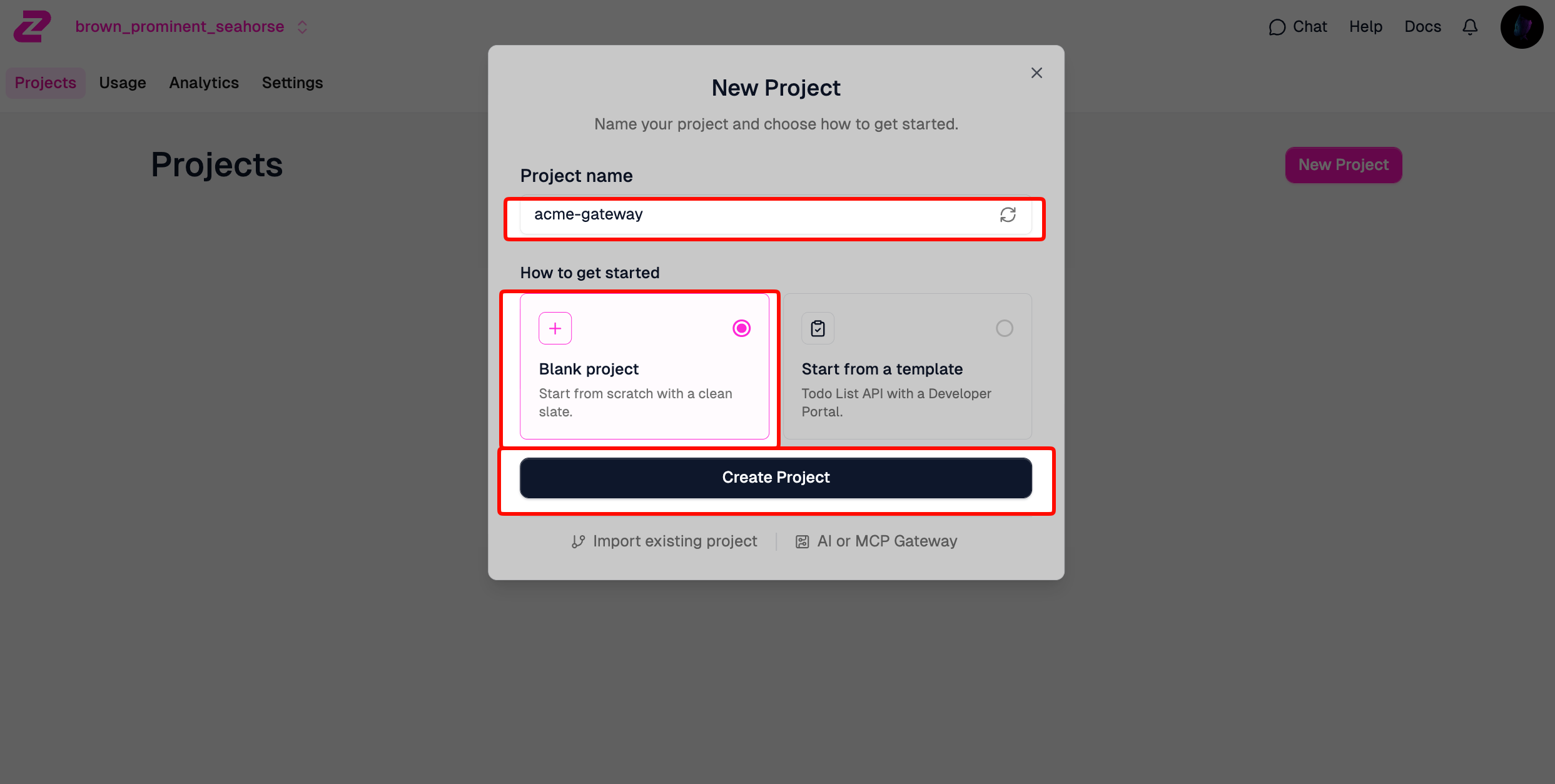
The portal links the project to a managed Git repo by default. You can connect your own GitHub, GitLab, Bitbucket, or Azure DevOps repo from Settings later.
Option B: CLI-first
The CLI scaffolds the same project layout locally so you can edit in your IDE and use Git from day one.
npm create zuplo@latest -- --name acme-gateway
cd acme-gateway
npm install
npm run dev
The dev server starts on port 9000 and prints a link to the local Route Designer at http://localhost:9100. Any change you make in the editor or in the designer hot-reloads immediately.
To link the local project to your Zuplo account once you are ready to deploy:
npx zuplo link
Pick the account and environment when prompted. From here, npx zuplo deploy ships the current Git branch.
Step 2: Define your first route
Open config/routes.oas.json. This is an OpenAPI 3 document with Zuplo extensions for handlers and policies. Add a route that forwards GET /v1/products to your origin:
{
  "openapi": "3.1.0",
  "info": { "title": "Acme Gateway", "version": "1.0.0" },
  "paths": {
    "/v1/products": {
      "get": {
        "summary": "List products",
        "operationId": "list-products",
        "x-zuplo-route": {
          "corsPolicy": "anything-goes",
          "handler": {
            "export": "urlForwardHandler",
            "module": "$import(@zuplo/runtime)",
            "options": {
              "baseUrl": "${env.ORIGIN_URL}"
            }
          },
          "policies": { "inbound": [] }
        },
        "responses": {
          "200": { "description": "Success" }
        }
      }
    }
  }
}
A few details worth noticing. The x-zuplo-route extension is where Zuplo lives inside an otherwise-vanilla OpenAPI file. The handler describes what happens when the route matches; urlForwardHandler is the built-in proxy. The ${env.ORIGIN_URL} reference pulls from environment variables so you can target different backends per environment.
Set ORIGIN_URL from Settings > Environment Variables in the portal, or by editing config/.env locally. Use https://echo.zuplo.io if you do not have a real origin yet.
Save and the local dev server reloads. Hit http://localhost:9000/v1/products and you should see the echoed request. Deployed gateways will respond from the closest edge data center instead.
Step 3: Add API key authentication
Public APIs need credentials. Zuplo ships a managed API key service so you do not have to build a key store yourself.
Edit the route to add the inbound policy:
"policies": {
  "inbound": ["api-key-auth"]
}
Then add the policy definition to config/policies.json (Zuplo creates this file the first time you add a policy):
{
  "name": "api-key-auth",
  "policyType": "api-key-inbound",
  "handler": {
    "export": "ApiKeyInboundPolicy",
    "module": "$import(@zuplo/runtime)",
    "options": {
      "allowUnauthenticatedRequests": false
    }
  }
}
Now create a consumer (the entity that owns one or more API keys):
- Go to Services > API Key Service in the portal.
- Click “Create Consumer”.
- Set the subject to a stable identifier like
acme-customer-1. - Add the email of whoever should manage the key.
- Copy the generated API key.
Test with curl. Without the header, you should see a 401:
curl -i https://YOUR-PROJECT.zuplo.app/v1/products
# HTTP/2 401
With the header, you should see the original 200 response:
curl -i https://YOUR-PROJECT.zuplo.app/v1/products \
  -H "Authorization: Bearer YOUR_API_KEY"
# HTTP/2 200
If you prefer driving this from a real client, import the gateway’s OpenAPI spec into Apidog, set a global header for Authorization: Bearer {{api_key}}, and bind api_key to an environment variable. You get a clean test surface for every route in seconds.
Step 4: Rate limit the route
Never ship a public API without rate limits. The default Zuplo rate limit policy gives you per-IP, per-key, or per-custom-attribute throttling.
Add it to the inbound list, after auth:
"policies": {
  "inbound": ["api-key-auth", "rate-limit-by-key"]
}
Define it in config/policies.json:
{
  "name": "rate-limit-by-key",
  "policyType": "rate-limit-inbound",
  "handler": {
    "export": "RateLimitInboundPolicy",
    "module": "$import(@zuplo/runtime)",
    "options": {
      "rateLimitBy": "sub",
      "requestsAllowed": 60,
      "timeWindowMinutes": 1
    }
  }
}
rateLimitBy: "sub" keys the bucket on the authenticated subject from the API key policy, so each customer gets their own 60-per-minute budget. Replace with "ip" if you want to throttle anonymous traffic.
The 61st request inside any sixty-second window returns 429 with retry headers attached. Test it by firing 70 requests in a loop and watching the response codes flip.
for i in {1..70}; do
  curl -s -o /dev/null -w "%{http_code}\n" \
    https://YOUR-PROJECT.zuplo.app/v1/products \
    -H "Authorization: Bearer YOUR_API_KEY"
done | sort | uniq -c
You should see 60 lines reading 200 and 10 reading 429.
Step 5: Validate request payloads
If you have a POST route that takes a JSON body, the request validation policy catches malformed payloads at the gateway instead of at your origin. It uses the JSON Schema embedded in your OpenAPI operation, so you get this for free if your spec is accurate.
Add a route with a request body:
"/v1/products": {
  "post": {
    "summary": "Create product",
    "operationId": "create-product",
    "requestBody": {
      "required": true,
      "content": {
        "application/json": {
          "schema": {
            "type": "object",
            "required": ["name", "priceCents"],
            "properties": {
              "name": { "type": "string", "minLength": 1 },
              "priceCents": { "type": "integer", "minimum": 1 },
              "category": { "type": "string", "enum": ["food", "drink"] }
            }
          }
        }
      }
    },
    "x-zuplo-route": {
      "handler": { /* same as above */ },
      "policies": {
        "inbound": [
          "api-key-auth",
          "rate-limit-by-key",
          "validate-request"
        ]
      }
    }
  }
}
Add the policy:
{
  "name": "validate-request",
  "policyType": "open-api-request-validation-inbound",
  "handler": {
    "export": "OpenApiRequestValidationInboundPolicy",
    "module": "$import(@zuplo/runtime)",
    "options": {
      "validateBody": "reject"
    }
  }
}
Now a POST with a missing field is rejected with a 400 before it reaches your origin. Test it with Apidog by saving a “happy path” request, a “missing required field” request, and a “wrong enum value” request as separate examples in the same request group. You can run all three with one click.
Step 6: Write a custom TypeScript policy
Pre-built policies cover most of what teams need. The point of Zuplo, though, is the moment you need something custom. Here is an outbound policy that adds a Cache-Control header for paid customers and no-store for free ones.
Create modules/tiered-cache.ts:
import { ZuploRequest, ZuploContext, HttpProblems } from "@zuplo/runtime";

interface PolicyOptions {
  paidPlanHeader: string;
  paidMaxAge: number;
}

export default async function (
  response: Response,
  request: ZuploRequest,
  context: ZuploContext,
  options: PolicyOptions,
): Promise<Response> {
  const plan = request.user?.data?.plan ?? "free";

  if (plan === "free") {
    response.headers.set("Cache-Control", "no-store");
  } else {
    response.headers.set(
      "Cache-Control",
      `public, max-age=${options.paidMaxAge}`,
    );
  }

  context.log.info(`Cache header set for plan=${plan}`);
  return response;
}
Wire it into config/policies.json:
{
  "name": "tiered-cache",
  "policyType": "custom-code-outbound",
  "handler": {
    "export": "default",
    "module": "$import(./modules/tiered-cache)",
    "options": {
      "paidPlanHeader": "x-plan",
      "paidMaxAge": 300
    }
  }
}
And reference it from the route:
"policies": {
  "inbound": ["api-key-auth", "rate-limit-by-key"],
  "outbound": ["tiered-cache"]
}
The custom policy is just a function. You can unit test it with Vitest or Jest by passing in a synthetic Response and ZuploRequest and asserting on the headers, no integration harness required.
Step 7: Deploy to the edge
Deployment is a Git push.
git add .
git commit -m "Add products gateway with auth, rate limit, and tiered cache"
git push origin feature/products-gateway
Zuplo builds a preview environment for every branch and prints the URL in the build log. The preview gets its own subdomain like https://acme-gateway-feature-products-gateway-abc123.zuplo.app, with all your policies active and pointing to whatever ORIGIN_URL is set for that environment.
Test the preview URL with Apidog by setting it as a new environment in your project. Run your full test suite against it. If everything passes, merge the branch.
git checkout main
git merge feature/products-gateway
git push origin main
The merge triggers the production deploy. Within sixty seconds the new version is live in 300+ edge locations. Promote and rollback are both git push operations; there is no separate UI.
Step 8: Generate the developer portal
The portal is hosted at https://YOUR-PROJECT.developers.zuplo.com and rebuilds on every deploy. It includes:
- One page per route, with the schema, description, and a try-it console.
- Code samples in cURL, JavaScript, Python, Go, and a few others.
- Self-serve API key issuance for any visitor who signs up.
- Branding controls in the portal under Developer Portal > Settings.
If your OpenAPI spec has good descriptions and examples, the portal looks finished without further work. If your spec is thin, this is the moment you find out.
To customize, the portal source ships as a separate Next.js app you can fork from the Zuplo developer portal repo on GitHub. Most teams stay on the hosted version.
Step 9: Test everything with Apidog
Once your gateway is live, the discipline that prevents production incidents is testing every route, every policy, and every error path. Apidog makes this fast.
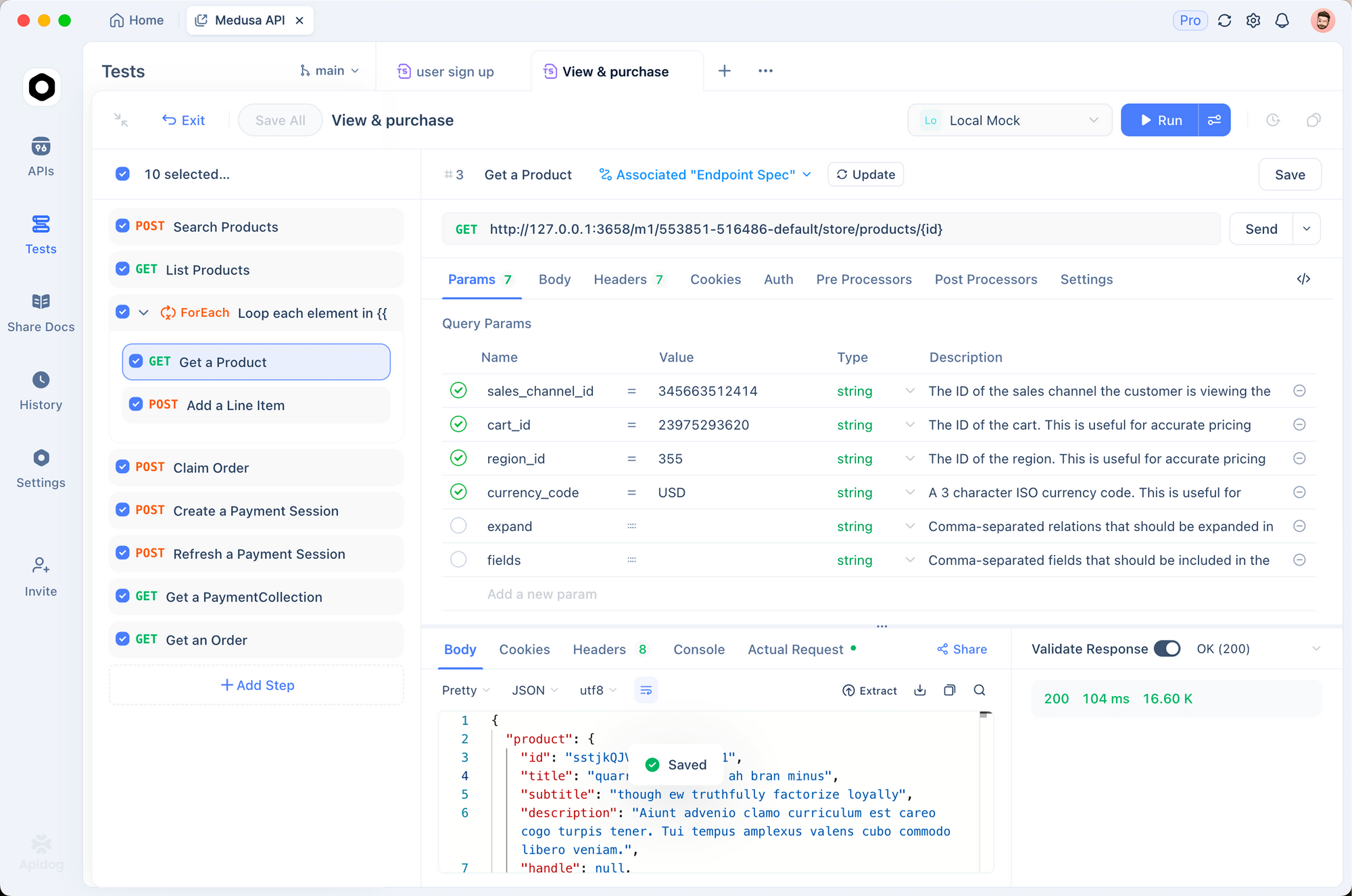
The workflow that works well:
- Import the gateway’s OpenAPI spec from
https://YOUR-PROJECT.zuplo.app/openapi. Apidog turns each operation into a request you can fire. - Create environments for
local,preview, andproduction, each with its ownbase_urlandapi_key. - Save at minimum three requests per route: happy path, auth failure, and rate-limit trigger. Run them as a group before every deploy.
- Use Apidog’s automated test scenarios to chain calls together (create a product, list it, delete it) and assert on response shapes.
- Generate code samples in your team’s primary language and paste them into your runbooks.
If you are migrating from Postman, the API testing without Postman guide walks through the import. Download Apidog if you have not already.
Common questions about using Zuplo
How do I switch a route between environments without changing the spec?
Use environment variables. Define ORIGIN_URL per environment in the portal Settings or in config/.env locally, and reference it as ${env.ORIGIN_URL} inside the handler options. The route stays identical; only the variable changes.
Can I run Zuplo offline?
Yes. npm run dev starts a local gateway on port 9000 with the local Route Designer on 9100. Custom policies, validation, and rate limiting all work locally; the only thing that requires an internet connection is the managed API key service, and you can run npx zuplo link to use the cloud service from your local instance.
How do I roll back a bad deploy?
git revert the merge commit and push. Zuplo redeploys the previous state. There is no separate “rollback” button because the Git history is the source of truth.
What happens to in-flight requests during a deploy?
Deployments are atomic at the edge; in-flight requests finish on the old version and new requests hit the new version. There is no downtime window.
Can I use Zuplo with gRPC or WebSockets?
Yes. The urlForwardHandler proxies WebSocket upgrades transparently, and gRPC is supported through the gRPC handler. REST and GraphQL are first-class and the most common case.
How do I expose my Zuplo API to AI agents?
Add the MCP Server Handler to a route, point it at your OpenAPI spec, and pick the operations to expose. The same auth and rate-limit policies apply to MCP requests. The Zuplo MCP Server documentation covers the setup.
How much does the gateway cost in production?
The free tier covers 100K requests per month. The Builder plan adds 1M requests for $25 per month, and additional requests cost $100 per 100K. Enterprise pricing starts at $1,000 per month on an annual contract. Full breakdown on the Zuplo pricing page.
Conclusion
You now have a working Zuplo gateway with API key auth, per-key rate limiting, request validation, a custom TypeScript outbound policy, and a developer portal, all deploying through Git to the global edge. The same project handles preview environments, production rollouts, and AI agent access through MCP.
The piece that keeps it stable is the test loop. Use Apidog against every preview before it merges, and you will catch the broken auth headers, the missing schema fields, and the rate limits that were accidentally too generous before they ship. Download Apidog and wire it into your gateway today.


